













Interconnecting containers at
scale with NGINX
@sarahnovotny
#dockercon
Building a great application
is only half the battle,
delivering the application
is the other half.
MORE INFORMATION AT NGINX.COM
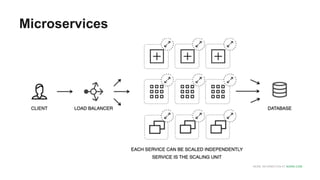
Microservices
1)
The good
things
MORE INFORMATION AT NGINX.COM
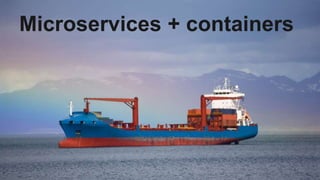
Microservices + containers
The Microservices Architecture:
Enables continuous delivery,
rapid deployment and elasticity
MORE INFORMATION AT NGINX.COM
The Microservices Architecture:
To scale, you can scale each
service independently
MORE INFORMATION AT NGINX.COM
The Microservices Architecture:
Services can be written in
different languages using
different frameworks
MORE INFORMATION AT NGINX.COM
Making Changes:
Each service can be changed,
tested and built independently
MORE INFORMATION AT NGINX.COM
Making Changes:
Release cycles can be
dramatically shortened
MORE INFORMATION AT NGINX.COM
Deploying Microservices:
To unlock the potential of
microservices you must
embrace containers, cloud and
DevOps
2)
The bad things
The Microservices Architecture:
Services can be written in
different languages using
different frameworks
Making Changes:
Release cycles can be
dramatically shortened
Complexity:
To unlock the potential of
microservices you must
embrace containers, cloud and
DevOps
MORE INFORMATION AT NGINX.COM
Here be dragons
3)
How can
NGINX help?
Performance
is user experience.
Our users are our
community of developers,
devops, sysadmins, cloud
engineers & network
admins
NGINX as your stevedores:
Acts as a HTTP router
inspecting requests and
deciding how each one should
be satisfied
ste·ve·dore
ˈstēvəˌdôr/
noun
noun: stevedore; plural noun: stevedores
a person employed, or a contractor engaged,
at a dock to load and unload cargo from ships.
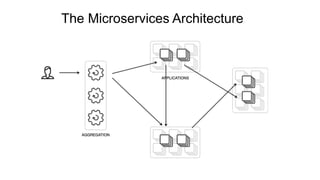
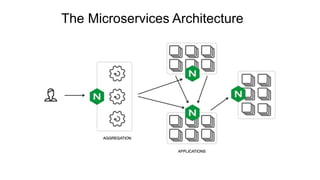
The Microservices Architecture
Docker orchestration
many options vying
(and then there’s service
discovery)
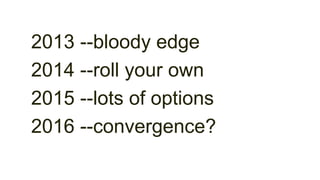
2013 --bloody edge
2014 --roll your own
2015 --lots of options
2016 --convergence?
MORE INFORMATION AT NGINX.COM
docker-compose
MORE INFORMATION AT NGINX.COM
This .yml file builds –
Consul for service
discovery
Registrator
tutum/hello-world
Google/golang-hello
& NGINX Plus
MORE INFORMATION AT NGINX.COM
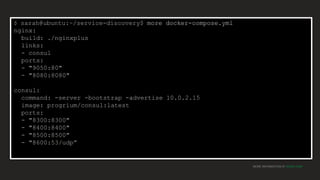
$ sarah@ubuntu:~/service-discovery$ more docker-compose.yml
nginx:
build: ./nginxplus
links:
- consul
ports:
- "9050:80"
- "8080:8080"
consul:
command: -server -bootstrap -advertise 10.0.2.15
image: progrium/consul:latest
ports:
- "8300:8300"
- "8400:8400"
- "8500:8500"
- "8600:53/udp”
MORE INFORMATION AT NGINX.COM
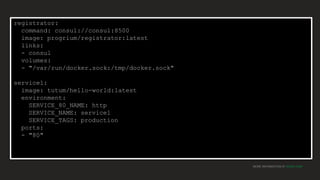
registrator:
command: consul://consul:8500
image: progrium/registrator:latest
links:
- consul
volumes:
- "/var/run/docker.sock:/tmp/docker.sock"
service1:
image: tutum/hello-world:latest
environment:
SERVICE_80_NAME: http
SERVICE_NAME: service1
SERVICE_TAGS: production
ports:
- "80"
MORE INFORMATION AT NGINX.COM
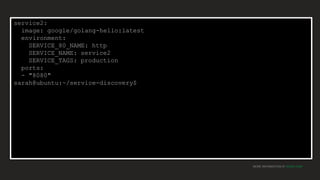
service2:
image: google/golang-hello:latest
environment:
SERVICE_80_NAME: http
SERVICE_NAME: service2
SERVICE_TAGS: production
ports:
- "8080"
sarah@ubuntu:~/service-discovery$
MORE INFORMATION AT NGINX.COM
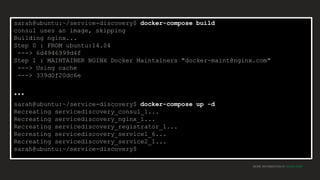
sarah@ubuntu:~/service-discovery$ docker-compose build
consul uses an image, skipping
Building nginx...
Step 0 : FROM ubuntu:14.04
---> 6d4946999d4f
Step 1 : MAINTAINER NGINX Docker Maintainers "docker-maint@nginx.com"
---> Using cache
---> 339d0f20dc6e
…
sarah@ubuntu:~/service-discovery$ docker-compose up -d
Recreating servicediscovery_consul_1...
Recreating servicediscovery_nginx_1...
Recreating servicediscovery_registrator_1...
Recreating servicediscovery_service1_6...
Recreating servicediscovery_service2_1...
sarah@ubuntu:~/service-discovery$
MORE INFORMATION AT NGINX.COM
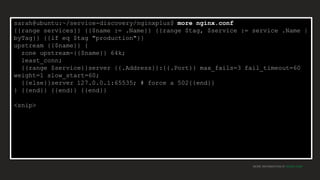
sarah@ubuntu:~/service-discovery/nginxplus$ more nginx.conf
{{range services}} {{$name := .Name}} {{range $tag, $service := service .Name |
byTag}} {{if eq $tag "production"}}
upstream {{$name}} {
zone upstream-{{$name}} 64k;
least_conn;
{{range $service}}server {{.Address}}:{{.Port}} max_fails=3 fail_timeout=60
weight=1 slow_start=60;
{{else}}server 127.0.0.1:65535; # force a 502{{end}}
} {{end}} {{end}} {{end}}
<snip>
MORE INFORMATION AT NGINX.COM
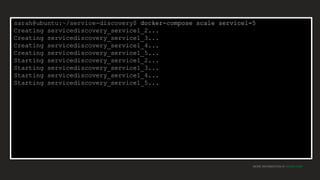
sarah@ubuntu:~/service-discovery$ docker-compose scale service1=5
Creating servicediscovery_service1_2...
Creating servicediscovery_service1_3...
Creating servicediscovery_service1_4...
Creating servicediscovery_service1_5...
Starting servicediscovery_service1_2...
Starting servicediscovery_service1_3...
Starting servicediscovery_service1_4...
Starting servicediscovery_service1_5...
MORE INFORMATION AT NGINX.COM
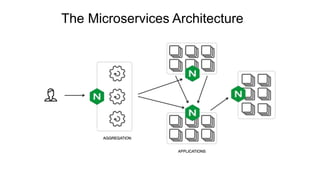
The Microservices Architecture
MORE INFORMATION AT NGINX.COM
Visit our kiosk
tomorrow to go
through this
demo
It was based on a blog post for
bellycard by @shanesveller
And built by @fymemon
Thank you
@sarahnovotny
#dockercon

Interconnecting containers at scale #Dockercon

  • 1.
  • 2.
  • 3.
    Building a greatapplication is only half the battle, delivering the application is the other half.
  • 4.
    MORE INFORMATION ATNGINX.COM Microservices
  • 5.
  • 6.
    MORE INFORMATION ATNGINX.COM Microservices + containers
  • 7.
    The Microservices Architecture: Enablescontinuous delivery, rapid deployment and elasticity
  • 8.
    MORE INFORMATION ATNGINX.COM The Microservices Architecture: To scale, you can scale each service independently
  • 9.
    MORE INFORMATION ATNGINX.COM The Microservices Architecture: Services can be written in different languages using different frameworks
  • 10.
    MORE INFORMATION ATNGINX.COM Making Changes: Each service can be changed, tested and built independently
  • 11.
    MORE INFORMATION ATNGINX.COM Making Changes: Release cycles can be dramatically shortened
  • 12.
    MORE INFORMATION ATNGINX.COM Deploying Microservices: To unlock the potential of microservices you must embrace containers, cloud and DevOps
  • 13.
  • 14.
    The Microservices Architecture: Servicescan be written in different languages using different frameworks
  • 15.
    Making Changes: Release cyclescan be dramatically shortened
  • 16.
    Complexity: To unlock thepotential of microservices you must embrace containers, cloud and DevOps
  • 17.
    MORE INFORMATION ATNGINX.COM Here be dragons
  • 18.
  • 19.
  • 20.
    Our users areour community of developers, devops, sysadmins, cloud engineers & network admins
  • 21.
    NGINX as yourstevedores: Acts as a HTTP router inspecting requests and deciding how each one should be satisfied
  • 22.
    ste·ve·dore ˈstēvəˌdôr/ noun noun: stevedore; pluralnoun: stevedores a person employed, or a contractor engaged, at a dock to load and unload cargo from ships.
  • 23.
  • 24.
  • 25.
    Docker orchestration many optionsvying (and then there’s service discovery)
  • 26.
    2013 --bloody edge 2014--roll your own 2015 --lots of options 2016 --convergence?
  • 27.
    MORE INFORMATION ATNGINX.COM docker-compose
  • 28.
    MORE INFORMATION ATNGINX.COM This .yml file builds – Consul for service discovery Registrator tutum/hello-world Google/golang-hello & NGINX Plus
  • 29.
    MORE INFORMATION ATNGINX.COM $ sarah@ubuntu:~/service-discovery$ more docker-compose.yml nginx: build: ./nginxplus links: - consul ports: - "9050:80" - "8080:8080" consul: command: -server -bootstrap -advertise 10.0.2.15 image: progrium/consul:latest ports: - "8300:8300" - "8400:8400" - "8500:8500" - "8600:53/udp”
  • 30.
    MORE INFORMATION ATNGINX.COM registrator: command: consul://consul:8500 image: progrium/registrator:latest links: - consul volumes: - "/var/run/docker.sock:/tmp/docker.sock" service1: image: tutum/hello-world:latest environment: SERVICE_80_NAME: http SERVICE_NAME: service1 SERVICE_TAGS: production ports: - "80"
  • 31.
    MORE INFORMATION ATNGINX.COM service2: image: google/golang-hello:latest environment: SERVICE_80_NAME: http SERVICE_NAME: service2 SERVICE_TAGS: production ports: - "8080" sarah@ubuntu:~/service-discovery$
  • 32.
    MORE INFORMATION ATNGINX.COM sarah@ubuntu:~/service-discovery$ docker-compose build consul uses an image, skipping Building nginx... Step 0 : FROM ubuntu:14.04 ---> 6d4946999d4f Step 1 : MAINTAINER NGINX Docker Maintainers "docker-maint@nginx.com" ---> Using cache ---> 339d0f20dc6e … sarah@ubuntu:~/service-discovery$ docker-compose up -d Recreating servicediscovery_consul_1... Recreating servicediscovery_nginx_1... Recreating servicediscovery_registrator_1... Recreating servicediscovery_service1_6... Recreating servicediscovery_service2_1... sarah@ubuntu:~/service-discovery$
  • 33.
  • 34.
  • 35.
    MORE INFORMATION ATNGINX.COM sarah@ubuntu:~/service-discovery/nginxplus$ more nginx.conf {{range services}} {{$name := .Name}} {{range $tag, $service := service .Name | byTag}} {{if eq $tag "production"}} upstream {{$name}} { zone upstream-{{$name}} 64k; least_conn; {{range $service}}server {{.Address}}:{{.Port}} max_fails=3 fail_timeout=60 weight=1 slow_start=60; {{else}}server 127.0.0.1:65535; # force a 502{{end}} } {{end}} {{end}} {{end}} <snip>
  • 36.
    MORE INFORMATION ATNGINX.COM sarah@ubuntu:~/service-discovery$ docker-compose scale service1=5 Creating servicediscovery_service1_2... Creating servicediscovery_service1_3... Creating servicediscovery_service1_4... Creating servicediscovery_service1_5... Starting servicediscovery_service1_2... Starting servicediscovery_service1_3... Starting servicediscovery_service1_4... Starting servicediscovery_service1_5...
  • 37.
  • 38.
  • 39.
  • 40.
    MORE INFORMATION ATNGINX.COM Visit our kiosk tomorrow to go through this demo It was based on a blog post for bellycard by @shanesveller And built by @fymemon
  • 41.

Editor's Notes

  • #5 We’ve all heard the hype about microservices and how they make the world a better place for developers
  • #10 And now, since the services are independent, they can be written in different languages using different frameworks. So you gain the flexibility to choose the right tools for each service.
  • #11 And another big advantage is that changes can also be made independently. As long as the interfaces don’t change you are free to roll out new versions of a service without having to worry about impacting other services.
  • #12 The ease of making changes and deploying microservices allows you to dramatically reduce your release cycles and achieve rapid deployment or continuous delivery.
  • #13 Once you have decided to take advantage of the benefits of a microservices architecture you need to decide how you will deploy the services. It should come as no surprise that with microservices being a very new way of doing things, you will want to look to new tools to deploy them. To take full advantage you will want to embrace containers, cloud and DevOps. The rise of containerization has provided an ideal platform for hosting microservices. Containers are much lighter weight then full virtualization allowing you to achieve a far higher density with the same amount of resources and they are much more DevOps friendly, allowing services to be more easily created and scaled.
  • #14 But, with these positives come some of the very same facts reframed as negatives.
  • #15 And now, since the services are independent, they can be written in different languages using different frameworks. So you gain the flexibility to choose the right tools for each service.
  • #16 The ease of making changes and deploying microservices allows you to dramatically reduce your release cycles and achieve rapid deployment or continuous delivery.
  • #17 Once you have decided to take advantage of the benefits of a microservices architecture you need to decide how you will deploy the services. It should come as no surprise that with microservices being a very new way of doing things, you will want to look to new tools to deploy them. To take full advantage you will want to embrace containers, cloud and DevOps. The rise of containerization has provided an ideal platform for hosting microservices. Containers are much lighter weight then full virtualization allowing you to achieve a far higher density with the same amount of resources and they are much more DevOps friendly, allowing services to be more easily created and scaled.
  • #19 But, with these positives come some of the very same facts reframed as negatives.
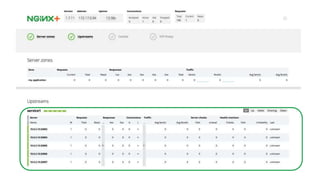
  • #22 NGINX Plus can act as an HTTP router. It can handle a large number of incoming requests, inspecting each one and making sure they get to the correct service. And it supports scaling service instances up and down and making sure to only send requests to healthy instances by actively checking the health of each service instance.
  • #24 In reality, microservices architectures look more like this. Here we show an aggregation layer at the front. This layer takes single service requests and makes multiple service requests, aggregating the responses before returning to the client. This is especially useful for mobile apps. Because of the lower bandwidth and higher latency of mobile device,s bundling multiple requests can have a large impact on performance, but aggregation can also be used for non-mobile applications. Then once the aggregation layer makes its service requests, each service can make requests to other services.
  • #25 Since the aggregation layer and the services layer can scale independently, you need something to distribute the traffic. And this is where NGINX comes in. It can handle the client requests to the aggregation layer, load balancing them across the available aggregation servers, and then handling the request from the aggregation layer to the services and also the requests from one service to another. In all cases making sure to route traffic to healthy services, using the NGINX Plus health checks. Allowing services to be easily scaled using tools like docker-compose, kubernetes, swarm, NGINX Plus dynamic configuration API,and other automation infrastructures allowing for intelligent routing based on factors such as URL’s, headers, and letting you do A/B testing, etc.
  • #26 There are many tools vying for a place in the container orchestration ecosystem. Kubernetes, mesos, docker compose, swarm …
  • #27 There are many tools vying for a place in the container orchestration ecosystem. Kubernetes, mesos, docker compose, swarm …
  • #35 The big trick in all of the managing complexity is going from one to many