Tích hợp trao đổi dữ liệu với
        Facebook


      By: Nguyễn Mạnh Tiến
            Tầm tay
Agenda

•   FB connection
•   FB graph API
•   How work?
•   Technical steps
•   FB and Open Social
Facebook overview
More than 800 million active users
More than 60 million Connect users
 monthly
About 83% people trust their friends over
  any other source.
Facebook users engaged with
facebook on 2.5M websites every
month
About 36 TB/day
Facebook connection?

λ   The next evolution of Facebook Platform

λ   It enables the integration of the Facebook Platform into your own site,
   allowing your users to:
– Seamlessly "connect" their Facebook account and
information with your site
– Connect and find their friends who also use your site
– Share information and actions on your site with their
friends on Facebook through their profile pages &
newsfeeds
Facebook to my site?


• Identity: Seamlessly connect the user's Facebook account and
information with your site.
• Friends: Bring a user's Facebook friends into your site. You can
even link friends that have existing accounts.
• Discovery: Publish information back into their friends' News
Feeds on Facebook.
• Privacy: Bring dynamic privacy to your site.
• Reliability: The full power and flexibility of Facebook
Platform.
Should Use Facebook Connect?

• One-click Login: Allow users to log in with their Facebook identity and
allow your site to access their Facebook profile information.

• Increased engagement: Leverage users' personal interests to show more
relevant information and surface personalized content from friends such
as reviews or comments.

• New forms of distribution: Users can share content and actions taken on
your site with friends back on Facebook through feed, invites, and other
social communication channels on Facebook.
Facebook core
Facebook Graph API?

–   Facebook's core
–   Presents a simple, consistent view of the Facebook
    social graph
–   Every object in the social graph has a unique ID. You
    can access the properties of an object by requesting
    https://graph.facebook.com/ID
–   People and pages with usernames can be accessed
    using their username as an ID
–   All responses are JSON objects
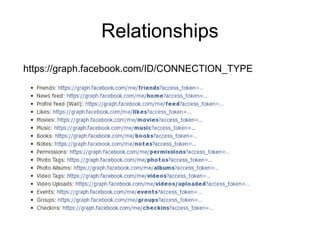
–   Relationships
–   Reading, Searching, Publishing, Deleting, Analytics
Object
https://graph.facebook.com/platform
Relationships
https://graph.facebook.com/ID/CONNECTION_TYPE
How does it work?
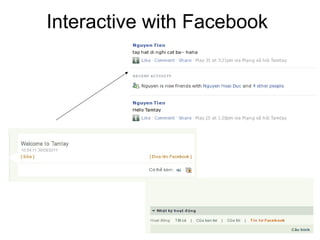
Connect
Interactive with Facebook
Technical steps
First step


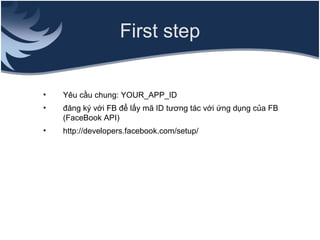
•   Yêu cầu chung: YOUR_APP_ID
•   đăng ký với FB để lấy mã ID tương tác với ứng dụng của FB
    (FaceBook API)
•   http://developers.facebook.com/setup/
Next step : Authentication

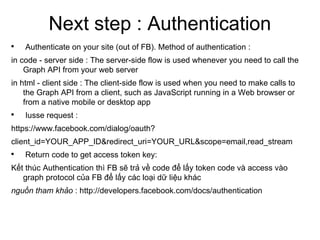
    Authenticate on your site (out of FB). Method of authentication :
in code - server side : The server-side flow is used whenever you need to call the
    Graph API from your web server
in html - client side : The client-side flow is used when you need to make calls to
    the Graph API from a client, such as JavaScript running in a Web browser or
    from a native mobile or desktop app

    Iusse request :
https://www.facebook.com/dialog/oauth?
client_id=YOUR_APP_ID&redirect_uri=YOUR_URL&scope=email,read_stream

    Return code to get access token key:
Kết thúc Authentication thì FB sẽ trả về code để lấy token code và access vào
   graph protocol của FB để lấy các loại dữ liệu khác
nguồn tham khảo : http://developers.facebook.com/docs/authentication
Reading
Using access token key, issuing HTTP GET requests , return data in json
ví dụ truy cập feed :
https://graph.facebook.com/id/feed?access_token=2227470867|2.AQA_W4-
fDdlG-erj.3600.1306126800.0-1090002606|Ktp_XdsULJo0j-CAaUratCxJKqM


Php code:
<?php
$readfeed_url = sprintf('https://graph.facebook.com/%d/feed?access_token=%s',
$fbdata['fbid'], $fbdata['access_token'] ) ;
$feed = json_decode(file_get_contents($readfeed_url));
?>
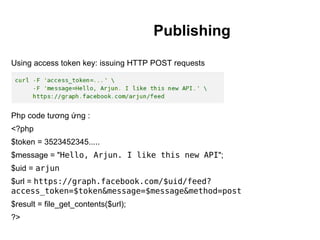
Publishing
Using access token key: issuing HTTP POST requests


Php code tương ứng :
<?php
$token = 3523452345.....
$message = "Hello, Arjun. I like this new API";
$uid = arjun
$url = https://graph.facebook.com/$uid/feed?
access_token=$token&message=$message&method=post
$result = file_get_contents($url);
?>
Alternatively, OpenSocial
Market Size and Competition
•   Ideally speaking, OpenSocial has
    a market potential for 250 million
    users as opposed to 64 million
    active users on Facebook

•   15,000 Applications on Facebook.
    Difficult to rapidly grow user base
    due to a saturated market

•   Most existing Google Widgets can
    run on OpenSocial. Results?
    Difficult to rapidly grow user base
    due to existing competition
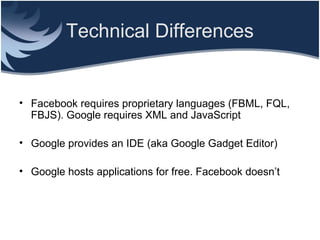
Technical Differences


• Facebook requires proprietary languages (FBML, FQL,
  FBJS). Google requires XML and JavaScript

• Google provides an IDE (aka Google Gadget Editor)

• Google hosts applications for free. Facebook doesn’t
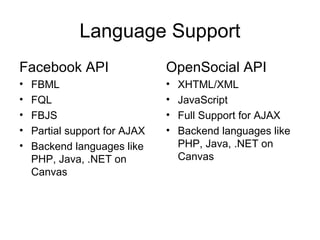
Language Support
Facebook API                   OpenSocial API
•   FBML                       •   XHTML/XML
•   FQL                        •   JavaScript
•   FBJS                       •   Full Support for AJAX
•   Partial support for AJAX   •   Backend languages like
•   Backend languages like         PHP, Java, .NET on
    PHP, Java, .NET on             Canvas
    Canvas
FB and Open social

• The choice of your platform should depend on
  demographic
• OpenSocial is modeled after Facebook. So if you’ve built
  a Facebook application before, it is relatively easy to
  learn OpenSocial
• “Write Once, Run Anywhere” is not exactly true. An
  Orkut specific OpenSocial app. Might not necessairly run
  on Hi5
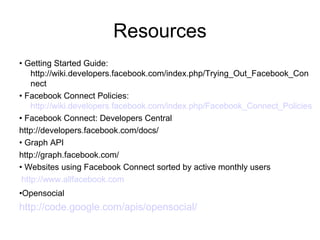
Resources
• Getting Started Guide:
    http://wiki.developers.facebook.com/index.php/Trying_Out_Facebook_Con
    nect
• Facebook Connect Policies:
    http://wiki.developers.facebook.com/index.php/Facebook_Connect_Policies
• Facebook Connect: Developers Central
http://developers.facebook.com/docs/
• Graph API
http://graph.facebook.com/
• Websites using Facebook Connect sorted by active monthly users
 http://www.allfacebook.com
•Opensocial
http://code.google.com/apis/opensocial/
Thank you


Nguyễn Mạnh Tiến
tien.nguyen@tamtay.vn
www.tamtay.vn

Interactive with-facebook

  • 1.
    Tích hợp traođổi dữ liệu với Facebook By: Nguyễn Mạnh Tiến Tầm tay
  • 2.
    Agenda • FB connection • FB graph API • How work? • Technical steps • FB and Open Social
  • 3.
    Facebook overview More than800 million active users More than 60 million Connect users monthly About 83% people trust their friends over any other source. Facebook users engaged with facebook on 2.5M websites every month About 36 TB/day
  • 4.
    Facebook connection? λ The next evolution of Facebook Platform λ It enables the integration of the Facebook Platform into your own site, allowing your users to: – Seamlessly "connect" their Facebook account and information with your site – Connect and find their friends who also use your site – Share information and actions on your site with their friends on Facebook through their profile pages & newsfeeds
  • 5.
    Facebook to mysite? • Identity: Seamlessly connect the user's Facebook account and information with your site. • Friends: Bring a user's Facebook friends into your site. You can even link friends that have existing accounts. • Discovery: Publish information back into their friends' News Feeds on Facebook. • Privacy: Bring dynamic privacy to your site. • Reliability: The full power and flexibility of Facebook Platform.
  • 6.
    Should Use FacebookConnect? • One-click Login: Allow users to log in with their Facebook identity and allow your site to access their Facebook profile information. • Increased engagement: Leverage users' personal interests to show more relevant information and surface personalized content from friends such as reviews or comments. • New forms of distribution: Users can share content and actions taken on your site with friends back on Facebook through feed, invites, and other social communication channels on Facebook.
  • 7.
  • 8.
    Facebook Graph API? – Facebook's core – Presents a simple, consistent view of the Facebook social graph – Every object in the social graph has a unique ID. You can access the properties of an object by requesting https://graph.facebook.com/ID – People and pages with usernames can be accessed using their username as an ID – All responses are JSON objects – Relationships – Reading, Searching, Publishing, Deleting, Analytics
  • 9.
  • 10.
  • 11.
  • 12.
  • 13.
  • 14.
  • 15.
    First step • Yêu cầu chung: YOUR_APP_ID • đăng ký với FB để lấy mã ID tương tác với ứng dụng của FB (FaceBook API) • http://developers.facebook.com/setup/
  • 16.
    Next step :Authentication  Authenticate on your site (out of FB). Method of authentication : in code - server side : The server-side flow is used whenever you need to call the Graph API from your web server in html - client side : The client-side flow is used when you need to make calls to the Graph API from a client, such as JavaScript running in a Web browser or from a native mobile or desktop app  Iusse request : https://www.facebook.com/dialog/oauth? client_id=YOUR_APP_ID&redirect_uri=YOUR_URL&scope=email,read_stream  Return code to get access token key: Kết thúc Authentication thì FB sẽ trả về code để lấy token code và access vào graph protocol của FB để lấy các loại dữ liệu khác nguồn tham khảo : http://developers.facebook.com/docs/authentication
  • 17.
    Reading Using access tokenkey, issuing HTTP GET requests , return data in json ví dụ truy cập feed : https://graph.facebook.com/id/feed?access_token=2227470867|2.AQA_W4- fDdlG-erj.3600.1306126800.0-1090002606|Ktp_XdsULJo0j-CAaUratCxJKqM Php code: <?php $readfeed_url = sprintf('https://graph.facebook.com/%d/feed?access_token=%s', $fbdata['fbid'], $fbdata['access_token'] ) ; $feed = json_decode(file_get_contents($readfeed_url)); ?>
  • 18.
    Publishing Using access tokenkey: issuing HTTP POST requests Php code tương ứng : <?php $token = 3523452345..... $message = "Hello, Arjun. I like this new API"; $uid = arjun $url = https://graph.facebook.com/$uid/feed? access_token=$token&message=$message&method=post $result = file_get_contents($url); ?>
  • 19.
  • 20.
    Market Size andCompetition • Ideally speaking, OpenSocial has a market potential for 250 million users as opposed to 64 million active users on Facebook • 15,000 Applications on Facebook. Difficult to rapidly grow user base due to a saturated market • Most existing Google Widgets can run on OpenSocial. Results? Difficult to rapidly grow user base due to existing competition
  • 21.
    Technical Differences • Facebookrequires proprietary languages (FBML, FQL, FBJS). Google requires XML and JavaScript • Google provides an IDE (aka Google Gadget Editor) • Google hosts applications for free. Facebook doesn’t
  • 22.
    Language Support Facebook API OpenSocial API • FBML • XHTML/XML • FQL • JavaScript • FBJS • Full Support for AJAX • Partial support for AJAX • Backend languages like • Backend languages like PHP, Java, .NET on PHP, Java, .NET on Canvas Canvas
  • 23.
    FB and Opensocial • The choice of your platform should depend on demographic • OpenSocial is modeled after Facebook. So if you’ve built a Facebook application before, it is relatively easy to learn OpenSocial • “Write Once, Run Anywhere” is not exactly true. An Orkut specific OpenSocial app. Might not necessairly run on Hi5
  • 24.
    Resources • Getting StartedGuide: http://wiki.developers.facebook.com/index.php/Trying_Out_Facebook_Con nect • Facebook Connect Policies: http://wiki.developers.facebook.com/index.php/Facebook_Connect_Policies • Facebook Connect: Developers Central http://developers.facebook.com/docs/ • Graph API http://graph.facebook.com/ • Websites using Facebook Connect sorted by active monthly users http://www.allfacebook.com •Opensocial http://code.google.com/apis/opensocial/
  • 25.
    Thank you Nguyễn MạnhTiến tien.nguyen@tamtay.vn www.tamtay.vn