www.codeandpeddle.com
communications@codeandpeddle.com
Integrations with
Marketing Automation
Tools
Table of
Contents
01
02
Introduction
The Landscape of Marketing Automation
Tools
03
04
05
Integrating Marketing Automation with
CRM Systems
Maximizing: Marketo, HubSpot, Pardot
API Integration
Conclusion
www.codeandpeddle.com
In today's fast-evolving business landscape, marketing professionals rely on advanced tools
like Marketing Automation to streamline their efforts. This strategic approach utilizes
technology to automate repetitive tasks and complex campaigns efficiently. Understanding
the importance of integrations is key to unlocking the full potential of these tools.
Marketing Automation involves using software platforms to automate marketing tasks and
workflows, going beyond scheduling to orchestrate personalized campaigns across
channels. This saves time and resources while enhancing precision in reaching the target
audience.
Introduction
Definition of Marketing Automation
Integrating marketing automation tools into a broader technological ecosystem allows for
seamless communication, data sharing, and synchronized efforts with other essential
components. This synergy ensures a holistic approach to marketing endeavors, aligning tools
to achieve overarching business goals.
From industry leaders like HubSpot to AI-driven newcomers, a variety of automation tools
cater to different needs such as lead generation and social media campaigns. These tools'
nuances is crucial for effective marketing strategies. In the following sections, we'll explore
why integrations matter, challenges they pose, and key features for seamless compatibility
within the marketing automation ecosystem. Join us to unlock the full potential of
integrations with marketing automation tools.
Importance of Integrations
Overview of Marketing Automation Tools
In the dynamic realm of marketing automation, several industry leaders have carved their
niche, offering diverse solutions tailored to the evolving needs of businesses.
HubSpot: A Leader in Inbound Marketing: HubSpot is renowned for its user-friendly
platform and focus on inbound marketing. Marketers benefit from its intuitive interface,
facilitating seamless execution of strategies like content creation and lead nurturing. Its
comprehensive suite of tools, covering areas from email marketing to social media
management, makes it a top choice for businesses of all sizes.
Marketo: Streamlining Automation and Lead Management: Marketo stands out for its
emphasis on automation and lead management, particularly geared towards enterprises.
Its robust platform enables efficient creation, management, and nurturing of leads. With
advanced analytics and reporting features, businesses gain actionable insights, driving
data-driven decisions in marketing.
Pardot: Enhancing B2B Marketing through Salesforce Integration: Pardot, part of
Salesforce, specializes in B2B marketing. Its seamless integration with Salesforce CRM
fosters collaboration between marketing and sales teams. Pardot excels in automating
complex B2B marketing processes, from lead generation to nurturing, ensuring a cohesive
approach to customer engagement.
The Landscape of Marketing Automation Tools
Elevating Operations with HubSpot-SFDC Sync: In today's business landscape, the
alignment of sales and marketing is crucial for success, akin to a finely orchestrated
symphony. The HubSpot-SFDC Sync facilitates this collaboration, refining leads,
synchronizing data, and fostering teamwork.
Harmony in Data: The HubSpot-SFDC Sync Symphony: With HubSpot-SFDC Sync, data
synchronization becomes a seamless process, ensuring smooth information flow between
systems. This harmonious integration empowers teams with accurate insights, driving
strategic decisions effectively.
Leads Refined: Elevating Qualification with HubSpot-SFDC Sync: The HubSpot-SFDC Sync
elevates lead qualification, transforming prospects into valuable assets poised for
conversion. By leveraging the strengths of HubSpot and Salesforce, businesses can
implement sophisticated qualification processes, identifying high-potential leads and
nurturing them strategically.
Collaborate to Captivate: HubSpot-SFDC Sync Unites Marketing and Sales: Acting as a
bridge between marketing and sales, the HubSpot-SFDC Sync encourages collaboration
towards a common goal of engaging audiences and boosting revenue. Through
seamless communication and shared insights, teams can align their efforts, delivering
cohesive and compelling experiences to customers.
In the intricate choreography of modern business operations, the fusion of Marketing
Automation with Customer Relationship Management (CRM) systems emerges as a
strategic ballet, seamlessly intertwining sales and marketing efforts. Let's delve into the
transformative impact of this integration, uncovering how it enhances not only efficiency
but also the overall effectiveness of business strategies.
Integrating Marketing Automation with CRM Systems
HubSpot Integrations
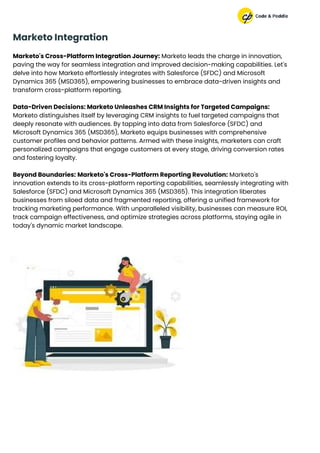
Marketo's Cross-Platform Integration Journey: Marketo leads the charge in innovation,
paving the way for seamless integration and improved decision-making capabilities. Let's
delve into how Marketo effortlessly integrates with Salesforce (SFDC) and Microsoft
Dynamics 365 (MSD365), empowering businesses to embrace data-driven insights and
transform cross-platform reporting.
Data-Driven Decisions: Marketo Unleashes CRM Insights for Targeted Campaigns:
Marketo distinguishes itself by leveraging CRM insights to fuel targeted campaigns that
deeply resonate with audiences. By tapping into data from Salesforce (SFDC) and
Microsoft Dynamics 365 (MSD365), Marketo equips businesses with comprehensive
customer profiles and behavior patterns. Armed with these insights, marketers can craft
personalized campaigns that engage customers at every stage, driving conversion rates
and fostering loyalty.
Beyond Boundaries: Marketo's Cross-Platform Reporting Revolution: Marketo's
innovation extends to its cross-platform reporting capabilities, seamlessly integrating with
Salesforce (SFDC) and Microsoft Dynamics 365 (MSD365). This integration liberates
businesses from siloed data and fragmented reporting, offering a unified framework for
tracking marketing performance. With unparalleled visibility, businesses can measure ROI,
track campaign effectiveness, and optimize strategies across platforms, staying agile in
today's dynamic market landscape.
Marketo Integration
Maximizing Impact: Pardot's Lead Management Excellence with SFDC Integration:
Pardot, integrated with Salesforce (SFDC), serves as a catalyst for optimizing lead
management workflows and enhancing customer engagement. Let's delve into how
Pardot, in sync with SFDC, elevates lead management efficiency and streamlines
communication channels for a more immersive customer experience.
Optimizing Lead Management Workflows: Pardot and Salesforce (SFDC) redefine lead
management by seamlessly integrating marketing and sales teams. This integration
ensures leads are nurtured, qualified, and smoothly transitioned to sales representatives.
Automation plays a key role as Pardot streamlines workflows, assigning scores, and
prioritizing leads based on engagement and behavior. This optimization accelerates the
lead-to-customer journey, equipping sales teams with the most relevant and qualified
leads for conversion.
Streamlining Communication Channels for Enhanced Customer Engagement: Pardot
leverages SFDC data to craft personalized messages tailored to individual preferences
and behaviors. Whether through email campaigns, social media interactions, or
personalized content, businesses create seamless and engaging experiences that foster
lasting relationships. By optimizing workflows and communication channels, Pardot
ensures efficient lead management and meaningful interactions that drive customer
satisfaction and loyalty.
Pardot Integrations
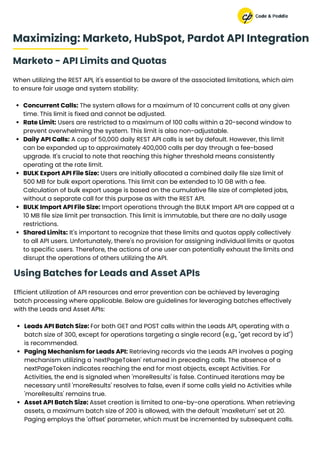
Marketo - API Limits and Quotas
When utilizing the REST API, it's essential to be aware of the associated limitations, which aim
to ensure fair usage and system stability:
Concurrent Calls: The system allows for a maximum of 10 concurrent calls at any given
time. This limit is fixed and cannot be adjusted.
Rate Limit: Users are restricted to a maximum of 100 calls within a 20-second window to
prevent overwhelming the system. This limit is also non-adjustable.
Daily API Calls: A cap of 50,000 daily REST API calls is set by default. However, this limit
can be expanded up to approximately 400,000 calls per day through a fee-based
upgrade. It's crucial to note that reaching this higher threshold means consistently
operating at the rate limit.
BULK Export API File Size: Users are initially allocated a combined daily file size limit of
500 MB for bulk export operations. This limit can be extended to 10 GB with a fee.
Calculation of bulk export usage is based on the cumulative file size of completed jobs,
without a separate call for this purpose as with the REST API.
BULK Import API File Size: Import operations through the BULK Import API are capped at a
10 MB file size limit per transaction. This limit is immutable, but there are no daily usage
restrictions.
Shared Limits: It's important to recognize that these limits and quotas apply collectively
to all API users. Unfortunately, there's no provision for assigning individual limits or quotas
to specific users. Therefore, the actions of one user can potentially exhaust the limits and
disrupt the operations of others utilizing the API.
Maximizing: Marketo, HubSpot, Pardot API Integration
Using Batches for Leads and Asset APIs
Efficient utilization of API resources and error prevention can be achieved by leveraging
batch processing where applicable. Below are guidelines for leveraging batches effectively
with the Leads and Asset APIs:
Leads API Batch Size: For both GET and POST calls within the Leads API, operating with a
batch size of 300, except for operations targeting a single record (e.g., "get record by id")
is recommended.
Paging Mechanism for Leads API: Retrieving records via the Leads API involves a paging
mechanism utilizing a 'nextPageToken' returned in preceding calls. The absence of a
nextPageToken indicates reaching the end for most objects, except Activities. For
Activities, the end is signaled when 'moreResults' is false. Continued iterations may be
necessary until 'moreResults' resolves to false, even if some calls yield no Activities while
'moreResults' remains true.
Asset API Batch Size: Asset creation is limited to one-by-one operations. When retrieving
assets, a maximum batch size of 200 is allowed, with the default 'maxReturn' set at 20.
Paging employs the 'offset' parameter, which must be incremented by subsequent calls.
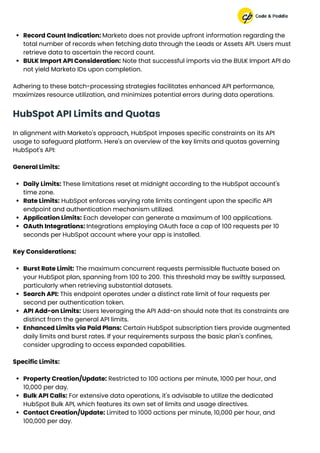
Record Count Indication: Marketo does not provide upfront information regarding the
total number of records when fetching data through the Leads or Assets API. Users must
retrieve data to ascertain the record count.
BULK Import API Consideration: Note that successful imports via the BULK Import API do
not yield Marketo IDs upon completion.
Adhering to these batch-processing strategies facilitates enhanced API performance,
maximizes resource utilization, and minimizes potential errors during data operations.
HubSpot API Limits and Quotas
In alignment with Marketo's approach, HubSpot imposes specific constraints on its API
usage to safeguard platform. Here's an overview of the key limits and quotas governing
HubSpot's API:
General Limits:
Daily Limits: These limitations reset at midnight according to the HubSpot account's
time zone.
Rate Limits: HubSpot enforces varying rate limits contingent upon the specific API
endpoint and authentication mechanism utilized.
Application Limits: Each developer can generate a maximum of 100 applications.
OAuth Integrations: Integrations employing OAuth face a cap of 100 requests per 10
seconds per HubSpot account where your app is installed.
Key Considerations:
Burst Rate Limit: The maximum concurrent requests permissible fluctuate based on
your HubSpot plan, spanning from 100 to 200. This threshold may be swiftly surpassed,
particularly when retrieving substantial datasets.
Search API: This endpoint operates under a distinct rate limit of four requests per
second per authentication token.
API Add-on Limits: Users leveraging the API Add-on should note that its constraints are
distinct from the general API limits.
Enhanced Limits via Paid Plans: Certain HubSpot subscription tiers provide augmented
daily limits and burst rates. If your requirements surpass the basic plan's confines,
consider upgrading to access expanded capabilities.
Specific Limits:
Property Creation/Update: Restricted to 100 actions per minute, 1000 per hour, and
10,000 per day.
Bulk API Calls: For extensive data operations, it's advisable to utilize the dedicated
HubSpot Bulk API, which features its own set of limits and usage directives.
Contact Creation/Update: Limited to 1000 actions per minute, 10,000 per hour, and
100,000 per day.
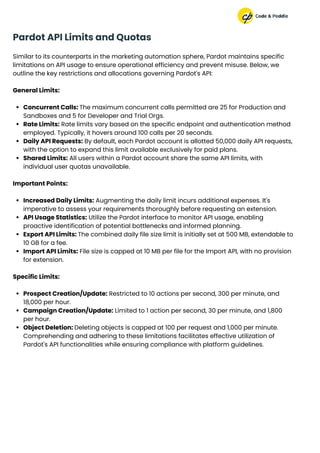
Pardot API Limits and Quotas
Similar to its counterparts in the marketing automation sphere, Pardot maintains specific
limitations on API usage to ensure operational efficiency and prevent misuse. Below, we
outline the key restrictions and allocations governing Pardot's API:
General Limits:
Concurrent Calls: The maximum concurrent calls permitted are 25 for Production and
Sandboxes and 5 for Developer and Trial Orgs.
Rate Limits: Rate limits vary based on the specific endpoint and authentication method
employed. Typically, it hovers around 100 calls per 20 seconds.
Daily API Requests: By default, each Pardot account is allotted 50,000 daily API requests,
with the option to expand this limit available exclusively for paid plans.
Shared Limits: All users within a Pardot account share the same API limits, with
individual user quotas unavailable.
Important Points:
Increased Daily Limits: Augmenting the daily limit incurs additional expenses. It's
imperative to assess your requirements thoroughly before requesting an extension.
API Usage Statistics: Utilize the Pardot interface to monitor API usage, enabling
proactive identification of potential bottlenecks and informed planning.
Export API Limits: The combined daily file size limit is initially set at 500 MB, extendable to
10 GB for a fee.
Import API Limits: File size is capped at 10 MB per file for the Import API, with no provision
for extension.
Specific Limits:
Prospect Creation/Update: Restricted to 10 actions per second, 300 per minute, and
18,000 per hour.
Campaign Creation/Update: Limited to 1 action per second, 30 per minute, and 1,800
per hour.
Object Deletion: Deleting objects is capped at 100 per request and 1,000 per minute.
Comprehending and adhering to these limitations facilitates effective utilization of
Pardot's API functionalities while ensuring compliance with platform guidelines.
As we conclude our exploration into Integrations with Marketing Automation Tools, it's vital
to recap the key points highlighting the significance of this synergy. From streamlining
marketing processes to seamlessly integrating with CRM systems, targeted email
campaigns, and coordinated social media endeavors, integration has emerged as a
strategic imperative for businesses in the digital age.
Recap of Key Points
Our journey began with an overview of the Marketing Automation landscape, emphasizing
the definition and importance of these tools. We examined major players such as HubSpot,
Marketo, and Pardot noting emerging trends driven by AI and cross-channel automation.
Addressing common implementation challenges, we discussed data security, compatibility
issues, and training hurdles. Exploring key features emphasized the importance of real-time
data sync, customization options, and scalability for a robust integration ecosystem.
Integration with CRM systems emerged as pivotal, showcasing the seamless alignment of
sales and marketing efforts, precision in lead nurturing, and insights derived from advanced
analytics. Our exploration of email marketing integration unveiled the art of targeted
campaigns, behavioral triggers, and the critical role of analytics in performance monitoring.
communications@codeandpeddle.com
Conclusion
www.codeandpeddle.com
For more information

Integrations with Marketing Automation Tools | Code & Peddle

  • 1.
  • 2.
    Table of Contents 01 02 Introduction The Landscapeof Marketing Automation Tools 03 04 05 Integrating Marketing Automation with CRM Systems Maximizing: Marketo, HubSpot, Pardot API Integration Conclusion www.codeandpeddle.com
  • 3.
    In today's fast-evolvingbusiness landscape, marketing professionals rely on advanced tools like Marketing Automation to streamline their efforts. This strategic approach utilizes technology to automate repetitive tasks and complex campaigns efficiently. Understanding the importance of integrations is key to unlocking the full potential of these tools. Marketing Automation involves using software platforms to automate marketing tasks and workflows, going beyond scheduling to orchestrate personalized campaigns across channels. This saves time and resources while enhancing precision in reaching the target audience. Introduction Definition of Marketing Automation Integrating marketing automation tools into a broader technological ecosystem allows for seamless communication, data sharing, and synchronized efforts with other essential components. This synergy ensures a holistic approach to marketing endeavors, aligning tools to achieve overarching business goals. From industry leaders like HubSpot to AI-driven newcomers, a variety of automation tools cater to different needs such as lead generation and social media campaigns. These tools' nuances is crucial for effective marketing strategies. In the following sections, we'll explore why integrations matter, challenges they pose, and key features for seamless compatibility within the marketing automation ecosystem. Join us to unlock the full potential of integrations with marketing automation tools. Importance of Integrations Overview of Marketing Automation Tools
  • 4.
    In the dynamicrealm of marketing automation, several industry leaders have carved their niche, offering diverse solutions tailored to the evolving needs of businesses. HubSpot: A Leader in Inbound Marketing: HubSpot is renowned for its user-friendly platform and focus on inbound marketing. Marketers benefit from its intuitive interface, facilitating seamless execution of strategies like content creation and lead nurturing. Its comprehensive suite of tools, covering areas from email marketing to social media management, makes it a top choice for businesses of all sizes. Marketo: Streamlining Automation and Lead Management: Marketo stands out for its emphasis on automation and lead management, particularly geared towards enterprises. Its robust platform enables efficient creation, management, and nurturing of leads. With advanced analytics and reporting features, businesses gain actionable insights, driving data-driven decisions in marketing. Pardot: Enhancing B2B Marketing through Salesforce Integration: Pardot, part of Salesforce, specializes in B2B marketing. Its seamless integration with Salesforce CRM fosters collaboration between marketing and sales teams. Pardot excels in automating complex B2B marketing processes, from lead generation to nurturing, ensuring a cohesive approach to customer engagement. The Landscape of Marketing Automation Tools
  • 5.
    Elevating Operations withHubSpot-SFDC Sync: In today's business landscape, the alignment of sales and marketing is crucial for success, akin to a finely orchestrated symphony. The HubSpot-SFDC Sync facilitates this collaboration, refining leads, synchronizing data, and fostering teamwork. Harmony in Data: The HubSpot-SFDC Sync Symphony: With HubSpot-SFDC Sync, data synchronization becomes a seamless process, ensuring smooth information flow between systems. This harmonious integration empowers teams with accurate insights, driving strategic decisions effectively. Leads Refined: Elevating Qualification with HubSpot-SFDC Sync: The HubSpot-SFDC Sync elevates lead qualification, transforming prospects into valuable assets poised for conversion. By leveraging the strengths of HubSpot and Salesforce, businesses can implement sophisticated qualification processes, identifying high-potential leads and nurturing them strategically. Collaborate to Captivate: HubSpot-SFDC Sync Unites Marketing and Sales: Acting as a bridge between marketing and sales, the HubSpot-SFDC Sync encourages collaboration towards a common goal of engaging audiences and boosting revenue. Through seamless communication and shared insights, teams can align their efforts, delivering cohesive and compelling experiences to customers. In the intricate choreography of modern business operations, the fusion of Marketing Automation with Customer Relationship Management (CRM) systems emerges as a strategic ballet, seamlessly intertwining sales and marketing efforts. Let's delve into the transformative impact of this integration, uncovering how it enhances not only efficiency but also the overall effectiveness of business strategies. Integrating Marketing Automation with CRM Systems HubSpot Integrations
  • 6.
    Marketo's Cross-Platform IntegrationJourney: Marketo leads the charge in innovation, paving the way for seamless integration and improved decision-making capabilities. Let's delve into how Marketo effortlessly integrates with Salesforce (SFDC) and Microsoft Dynamics 365 (MSD365), empowering businesses to embrace data-driven insights and transform cross-platform reporting. Data-Driven Decisions: Marketo Unleashes CRM Insights for Targeted Campaigns: Marketo distinguishes itself by leveraging CRM insights to fuel targeted campaigns that deeply resonate with audiences. By tapping into data from Salesforce (SFDC) and Microsoft Dynamics 365 (MSD365), Marketo equips businesses with comprehensive customer profiles and behavior patterns. Armed with these insights, marketers can craft personalized campaigns that engage customers at every stage, driving conversion rates and fostering loyalty. Beyond Boundaries: Marketo's Cross-Platform Reporting Revolution: Marketo's innovation extends to its cross-platform reporting capabilities, seamlessly integrating with Salesforce (SFDC) and Microsoft Dynamics 365 (MSD365). This integration liberates businesses from siloed data and fragmented reporting, offering a unified framework for tracking marketing performance. With unparalleled visibility, businesses can measure ROI, track campaign effectiveness, and optimize strategies across platforms, staying agile in today's dynamic market landscape. Marketo Integration
  • 7.
    Maximizing Impact: Pardot'sLead Management Excellence with SFDC Integration: Pardot, integrated with Salesforce (SFDC), serves as a catalyst for optimizing lead management workflows and enhancing customer engagement. Let's delve into how Pardot, in sync with SFDC, elevates lead management efficiency and streamlines communication channels for a more immersive customer experience. Optimizing Lead Management Workflows: Pardot and Salesforce (SFDC) redefine lead management by seamlessly integrating marketing and sales teams. This integration ensures leads are nurtured, qualified, and smoothly transitioned to sales representatives. Automation plays a key role as Pardot streamlines workflows, assigning scores, and prioritizing leads based on engagement and behavior. This optimization accelerates the lead-to-customer journey, equipping sales teams with the most relevant and qualified leads for conversion. Streamlining Communication Channels for Enhanced Customer Engagement: Pardot leverages SFDC data to craft personalized messages tailored to individual preferences and behaviors. Whether through email campaigns, social media interactions, or personalized content, businesses create seamless and engaging experiences that foster lasting relationships. By optimizing workflows and communication channels, Pardot ensures efficient lead management and meaningful interactions that drive customer satisfaction and loyalty. Pardot Integrations
  • 8.
    Marketo - APILimits and Quotas When utilizing the REST API, it's essential to be aware of the associated limitations, which aim to ensure fair usage and system stability: Concurrent Calls: The system allows for a maximum of 10 concurrent calls at any given time. This limit is fixed and cannot be adjusted. Rate Limit: Users are restricted to a maximum of 100 calls within a 20-second window to prevent overwhelming the system. This limit is also non-adjustable. Daily API Calls: A cap of 50,000 daily REST API calls is set by default. However, this limit can be expanded up to approximately 400,000 calls per day through a fee-based upgrade. It's crucial to note that reaching this higher threshold means consistently operating at the rate limit. BULK Export API File Size: Users are initially allocated a combined daily file size limit of 500 MB for bulk export operations. This limit can be extended to 10 GB with a fee. Calculation of bulk export usage is based on the cumulative file size of completed jobs, without a separate call for this purpose as with the REST API. BULK Import API File Size: Import operations through the BULK Import API are capped at a 10 MB file size limit per transaction. This limit is immutable, but there are no daily usage restrictions. Shared Limits: It's important to recognize that these limits and quotas apply collectively to all API users. Unfortunately, there's no provision for assigning individual limits or quotas to specific users. Therefore, the actions of one user can potentially exhaust the limits and disrupt the operations of others utilizing the API. Maximizing: Marketo, HubSpot, Pardot API Integration Using Batches for Leads and Asset APIs Efficient utilization of API resources and error prevention can be achieved by leveraging batch processing where applicable. Below are guidelines for leveraging batches effectively with the Leads and Asset APIs: Leads API Batch Size: For both GET and POST calls within the Leads API, operating with a batch size of 300, except for operations targeting a single record (e.g., "get record by id") is recommended. Paging Mechanism for Leads API: Retrieving records via the Leads API involves a paging mechanism utilizing a 'nextPageToken' returned in preceding calls. The absence of a nextPageToken indicates reaching the end for most objects, except Activities. For Activities, the end is signaled when 'moreResults' is false. Continued iterations may be necessary until 'moreResults' resolves to false, even if some calls yield no Activities while 'moreResults' remains true. Asset API Batch Size: Asset creation is limited to one-by-one operations. When retrieving assets, a maximum batch size of 200 is allowed, with the default 'maxReturn' set at 20. Paging employs the 'offset' parameter, which must be incremented by subsequent calls.
  • 9.
    Record Count Indication:Marketo does not provide upfront information regarding the total number of records when fetching data through the Leads or Assets API. Users must retrieve data to ascertain the record count. BULK Import API Consideration: Note that successful imports via the BULK Import API do not yield Marketo IDs upon completion. Adhering to these batch-processing strategies facilitates enhanced API performance, maximizes resource utilization, and minimizes potential errors during data operations. HubSpot API Limits and Quotas In alignment with Marketo's approach, HubSpot imposes specific constraints on its API usage to safeguard platform. Here's an overview of the key limits and quotas governing HubSpot's API: General Limits: Daily Limits: These limitations reset at midnight according to the HubSpot account's time zone. Rate Limits: HubSpot enforces varying rate limits contingent upon the specific API endpoint and authentication mechanism utilized. Application Limits: Each developer can generate a maximum of 100 applications. OAuth Integrations: Integrations employing OAuth face a cap of 100 requests per 10 seconds per HubSpot account where your app is installed. Key Considerations: Burst Rate Limit: The maximum concurrent requests permissible fluctuate based on your HubSpot plan, spanning from 100 to 200. This threshold may be swiftly surpassed, particularly when retrieving substantial datasets. Search API: This endpoint operates under a distinct rate limit of four requests per second per authentication token. API Add-on Limits: Users leveraging the API Add-on should note that its constraints are distinct from the general API limits. Enhanced Limits via Paid Plans: Certain HubSpot subscription tiers provide augmented daily limits and burst rates. If your requirements surpass the basic plan's confines, consider upgrading to access expanded capabilities. Specific Limits: Property Creation/Update: Restricted to 100 actions per minute, 1000 per hour, and 10,000 per day. Bulk API Calls: For extensive data operations, it's advisable to utilize the dedicated HubSpot Bulk API, which features its own set of limits and usage directives. Contact Creation/Update: Limited to 1000 actions per minute, 10,000 per hour, and 100,000 per day.
  • 10.
    Pardot API Limitsand Quotas Similar to its counterparts in the marketing automation sphere, Pardot maintains specific limitations on API usage to ensure operational efficiency and prevent misuse. Below, we outline the key restrictions and allocations governing Pardot's API: General Limits: Concurrent Calls: The maximum concurrent calls permitted are 25 for Production and Sandboxes and 5 for Developer and Trial Orgs. Rate Limits: Rate limits vary based on the specific endpoint and authentication method employed. Typically, it hovers around 100 calls per 20 seconds. Daily API Requests: By default, each Pardot account is allotted 50,000 daily API requests, with the option to expand this limit available exclusively for paid plans. Shared Limits: All users within a Pardot account share the same API limits, with individual user quotas unavailable. Important Points: Increased Daily Limits: Augmenting the daily limit incurs additional expenses. It's imperative to assess your requirements thoroughly before requesting an extension. API Usage Statistics: Utilize the Pardot interface to monitor API usage, enabling proactive identification of potential bottlenecks and informed planning. Export API Limits: The combined daily file size limit is initially set at 500 MB, extendable to 10 GB for a fee. Import API Limits: File size is capped at 10 MB per file for the Import API, with no provision for extension. Specific Limits: Prospect Creation/Update: Restricted to 10 actions per second, 300 per minute, and 18,000 per hour. Campaign Creation/Update: Limited to 1 action per second, 30 per minute, and 1,800 per hour. Object Deletion: Deleting objects is capped at 100 per request and 1,000 per minute. Comprehending and adhering to these limitations facilitates effective utilization of Pardot's API functionalities while ensuring compliance with platform guidelines.
  • 11.
    As we concludeour exploration into Integrations with Marketing Automation Tools, it's vital to recap the key points highlighting the significance of this synergy. From streamlining marketing processes to seamlessly integrating with CRM systems, targeted email campaigns, and coordinated social media endeavors, integration has emerged as a strategic imperative for businesses in the digital age. Recap of Key Points Our journey began with an overview of the Marketing Automation landscape, emphasizing the definition and importance of these tools. We examined major players such as HubSpot, Marketo, and Pardot noting emerging trends driven by AI and cross-channel automation. Addressing common implementation challenges, we discussed data security, compatibility issues, and training hurdles. Exploring key features emphasized the importance of real-time data sync, customization options, and scalability for a robust integration ecosystem. Integration with CRM systems emerged as pivotal, showcasing the seamless alignment of sales and marketing efforts, precision in lead nurturing, and insights derived from advanced analytics. Our exploration of email marketing integration unveiled the art of targeted campaigns, behavioral triggers, and the critical role of analytics in performance monitoring. communications@codeandpeddle.com Conclusion www.codeandpeddle.com For more information