WORLD BOOK ONLINE
A subscription-based encyclopedia that
is available for free for patrons of the
Mahomet Public Library
A Ready Reference instructional presentation
THE ENTIRE WORLD BOOK ENCYCLOPEDIA
AT THE TIP OF YOUR FINGERS.
 The World Book Encyclopedia has been in print every year
since 1917.
 In the last few years, in addition to their print service,
they’ve gone digital!
 Like many other encyclopedias, World Book has gathered
information on almost any topic imaginable.
 The 2019 edition contains over 17,000 articles.
HOW TO ACCESS WORLD BOOK ONLINE
 World Book Online can be accessed through any computer
or online-ready device. All you need is your library card!
 If you don’t have access to a computer, the computers at
the library can be used during regular library hours.
 In your web browser, type in worldbookonline.com or copy
and paste the web address into the search bar.
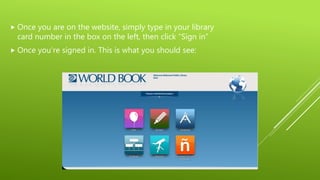
 Once you are on the website, simply type in your library
card number in the box on the left, then click “Sign in”
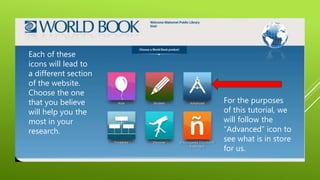
 Once you’re signed in. This is what you should see:
Each of these
icons will lead to
a different section
of the website.
Choose the one
that you believe
will help you the
most in your
research.
For the purposes
of this tutorial, we
will follow the
“Advanced” icon to
see what is in store
for us.
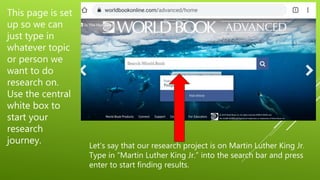
This page is set
up so we can
just type in
whatever topic
or person we
want to do
research on.
Use the central
white box to
start your
research
journey. Let’s say that our research project is on Martin Luther King Jr.
Type in “Martin Luther King Jr.” into the search bar and press
enter to start finding results.
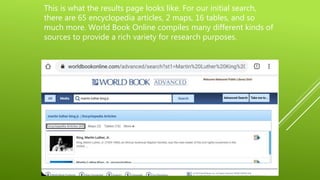
This is what the results page looks like. For our initial search,
there are 65 encyclopedia articles, 2 maps, 16 tables, and so
much more. World Book Online compiles many different kinds of
sources to provide a rich variety for research purposes.
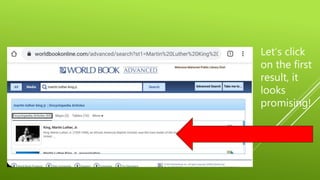
Let’s click
on the first
result, it
looks
promising!
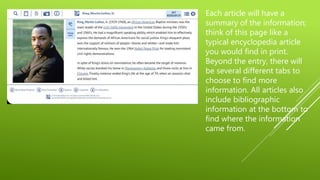
Each article will have a
summary of the information;
think of this page like a
typical encyclopedia article
you would find in print.
Beyond the entry, there will
be several different tabs to
choose to find more
information. All articles also
include bibliographic
information at the bottom to
find where the information
came from.
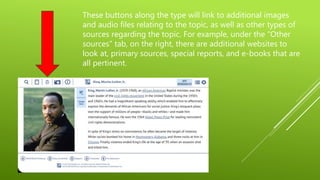
These buttons along the type will link to additional images
and audio files relating to the topic, as well as other types of
sources regarding the topic. For example, under the “Other
sources” tab, on the right, there are additional websites to
look at, primary sources, special reports, and e-books that are
all pertinent.
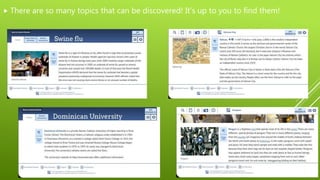
 There are so many topics that can be discovered! It’s up to you to find them!
But of course, if you need any help, the
Mahomet Public reference librarian is always
around to help. Any questions regarding
World Book Online can be answered in your
local library.
CITATION
World Book Online. (2019) Retrieved December 7th, 2019.
Worldbookonline.com

Instructional presentation

  • 1.
    WORLD BOOK ONLINE Asubscription-based encyclopedia that is available for free for patrons of the Mahomet Public Library A Ready Reference instructional presentation
  • 2.
    THE ENTIRE WORLDBOOK ENCYCLOPEDIA AT THE TIP OF YOUR FINGERS.  The World Book Encyclopedia has been in print every year since 1917.  In the last few years, in addition to their print service, they’ve gone digital!  Like many other encyclopedias, World Book has gathered information on almost any topic imaginable.  The 2019 edition contains over 17,000 articles.
  • 3.
    HOW TO ACCESSWORLD BOOK ONLINE  World Book Online can be accessed through any computer or online-ready device. All you need is your library card!  If you don’t have access to a computer, the computers at the library can be used during regular library hours.  In your web browser, type in worldbookonline.com or copy and paste the web address into the search bar.
  • 4.
     Once youare on the website, simply type in your library card number in the box on the left, then click “Sign in”  Once you’re signed in. This is what you should see:
  • 5.
    Each of these iconswill lead to a different section of the website. Choose the one that you believe will help you the most in your research. For the purposes of this tutorial, we will follow the “Advanced” icon to see what is in store for us.
  • 6.
    This page isset up so we can just type in whatever topic or person we want to do research on. Use the central white box to start your research journey. Let’s say that our research project is on Martin Luther King Jr. Type in “Martin Luther King Jr.” into the search bar and press enter to start finding results.
  • 7.
    This is whatthe results page looks like. For our initial search, there are 65 encyclopedia articles, 2 maps, 16 tables, and so much more. World Book Online compiles many different kinds of sources to provide a rich variety for research purposes.
  • 8.
    Let’s click on thefirst result, it looks promising!
  • 9.
    Each article willhave a summary of the information; think of this page like a typical encyclopedia article you would find in print. Beyond the entry, there will be several different tabs to choose to find more information. All articles also include bibliographic information at the bottom to find where the information came from.
  • 10.
    These buttons alongthe type will link to additional images and audio files relating to the topic, as well as other types of sources regarding the topic. For example, under the “Other sources” tab, on the right, there are additional websites to look at, primary sources, special reports, and e-books that are all pertinent.
  • 11.
     There areso many topics that can be discovered! It’s up to you to find them!
  • 12.
    But of course,if you need any help, the Mahomet Public reference librarian is always around to help. Any questions regarding World Book Online can be answered in your local library.
  • 13.
    CITATION World Book Online.(2019) Retrieved December 7th, 2019. Worldbookonline.com