InfoPath Forms and
Workflows in SP 2010
Wylde Solutions
Sydney SharePoint User Group
18 September 2011
Sydney, Australia
Agenda
 InfoPath Forms
 InfoPath 2010
 Forms & Form Templates
 Usage in SharePoint 2010
 Demo
 Workflows
 Workflows and SharePoint 2010
 Standard vs. Custom
 Authoring tools
 Demo
 Q & A
© 2011 Wylde Solutions. All rights reserved. It is forbidden to reproduce
any part of this presentation, in any form, without prior written
permission from the author.
InfoPath 2010
 InfoPath Designer 2010
 InfoPath Filler 2010
 InfoPath Forms Services
© 2011 Wylde Solutions. All rights reserved. It is forbidden to reproduce any part of this
presentation, in any form, without prior written permission from the author.
Forms & Form Templates
 Form Templates are form designs
 Created using InfoPath Designer
 Hosted or standalone
 Forms are XML documents
 Filled using InfoPath Filler or browser
 Can be submitted anywhere
 Contain link to Form Template
© 2011 Wylde Solutions. All rights reserved. It is forbidden to reproduce
any part of this presentation, in any form, without prior written
permission from the author.
Usage in SharePoint
 Custom List Forms
 Form Libraries
 External List Forms
 Workflow: Association, Initiation, Tasks etc.
© 2011 Wylde Solutions. All rights reserved. It is forbidden to reproduce
any part of this presentation, in any form, without prior written
permission from the author.
Demo
 Three repositories: Custom List, Form Library, External
List
 Also related lists: Incident Source Types, Incident Types
 Database contains three tables to replicate the data
structure
 Creating and/or modifying InfoPath forms for SharePoint
lists
© 2011 Wylde Solutions. All rights reserved. It is forbidden to reproduce
any part of this presentation, in any form, without prior written
permission from the author.
InfoPath in SP2010 - Advantages
 Easy and quick way to generate forms for Custom and
External Lists
 Great WYSIWYG form designer
 Extensibility
© 2011 Wylde Solutions. All rights reserved. It is forbidden to reproduce
any part of this presentation, in any form, without prior written
permission from the author.
Limitations of Custom List Forms
• No support for document libraries
• No support for managed metadata columns
• No way to publish somewhere else and/or reuse
• No way to generate form for content type
• No support for custom code
© 2011 Wylde Solutions. All rights reserved. It is forbidden to reproduce
any part of this presentation, in any form, without prior written
permission from the author.
Limitations of Form Libraries
• Need to create a form library though it’s not always a
business requirement
• For columns of type Person there is not standard way of
passing the values
© 2011 Wylde Solutions. All rights reserved. It is forbidden to reproduce
any part of this presentation, in any form, without prior written
permission from the author.
Limitations of External List Forms
 No custom code if use with External Item Pickers
 No support for additional Data Sources
© 2011 Wylde Solutions. All rights reserved. It is forbidden to reproduce
any part of this presentation, in any form, without prior written
permission from the author.
Common InfoPath Limitations
 Browser-enabled forms lack true Web experience
 More or less complex scenarios require strong technical
knowledge
 Printing capabilities
© 2011 Wylde Solutions. All rights reserved. It is forbidden to reproduce
any part of this presentation, in any form, without prior written
permission from the author.
Workflows in SharePoint 2010
 Business process automation
 Workflow management system
© 2011 Wylde Solutions. All rights reserved. It is forbidden to reproduce
any part of this presentation, in any form, without prior written
permission from the author.
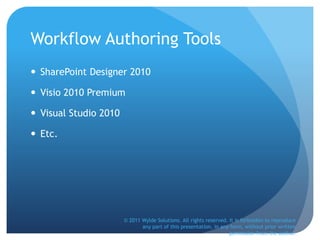
Standard vs. Custom
From http://blogs.msdn.com/b/sharepointdesigner/archive/2010/02/22/overview-of-human-workflow-in-sharepoint-2010.aspx© 2011 Wylde Solutions. All rights reserved. It is forbidden to reproduce
any part of this presentation, in any form, without prior written
permission from the author.
Workflow Authoring Tools
 SharePoint Designer 2010
 Visio 2010 Premium
 Visual Studio 2010
 Etc.
© 2011 Wylde Solutions. All rights reserved. It is forbidden to reproduce
any part of this presentation, in any form, without prior written
permission from the author.
Demo
 Scenario
 Incident submitted -> BU Manager is notified
 BU Manager investigates and if severity is high then notifies
Operations Manager
 Operations Manager provide outcomes and if required
notifies external people
© 2011 Wylde Solutions. All rights reserved. It is forbidden to reproduce
any part of this presentation, in any form, without prior written
permission from the author.
Workflow Management in SP 2010
 Advantages
 Easy to create, modify and publish sequential workflows
 New features for visual authoring and tracking and new steps
and functional improvements
 Flexible and extensible platform built on WWF
 Form customization is pretty easy
 Disadvantages
 Lack of interoperability between standard tools
 SharePoint Designer workflows can be only sequential and UI
is not user-friendly
 Need strong technical knowledge to create complex workflows
© 2011 Wylde Solutions. All rights reserved. It is forbidden to reproduce
any part of this presentation, in any form, without prior written
permission from the author.
Q & A
 Your questions and suggestions
 http://wyldesolutions.com/SharePointQuestions.aspx
© 2011 Wylde Solutions. All rights reserved. It is forbidden to reproduce
any part of this presentation, in any form, without prior written
permission from the author.
Resources
 http://claytoncobb.wordpress.com/
 http://blogs.msdn.com/b/infopath/
 http://wyldesharepoint.blogspot.com
© 2011 Wylde Solutions. All rights reserved. It is forbidden to reproduce
any part of this presentation, in any form, without prior written
permission from the author.
Reference
 Slava Gorbunov – slava@wyldesolutions.com
 Web site: http://wyldesolutions.com
 Blog: http://wyldesharepoint.blogspot.com
 Twitter: @SlavaGorbunov
© 2011 Wylde Solutions. All rights reserved. It is forbidden to reproduce
any part of this presentation, in any form, without prior written
permission from the author.

InfoPathFormsandWorkflowsinSharePoint2010

  • 1.
    InfoPath Forms and Workflowsin SP 2010 Wylde Solutions Sydney SharePoint User Group 18 September 2011 Sydney, Australia
  • 2.
    Agenda  InfoPath Forms InfoPath 2010  Forms & Form Templates  Usage in SharePoint 2010  Demo  Workflows  Workflows and SharePoint 2010  Standard vs. Custom  Authoring tools  Demo  Q & A © 2011 Wylde Solutions. All rights reserved. It is forbidden to reproduce any part of this presentation, in any form, without prior written permission from the author.
  • 3.
    InfoPath 2010  InfoPathDesigner 2010  InfoPath Filler 2010  InfoPath Forms Services © 2011 Wylde Solutions. All rights reserved. It is forbidden to reproduce any part of this presentation, in any form, without prior written permission from the author.
  • 4.
    Forms & FormTemplates  Form Templates are form designs  Created using InfoPath Designer  Hosted or standalone  Forms are XML documents  Filled using InfoPath Filler or browser  Can be submitted anywhere  Contain link to Form Template © 2011 Wylde Solutions. All rights reserved. It is forbidden to reproduce any part of this presentation, in any form, without prior written permission from the author.
  • 5.
    Usage in SharePoint Custom List Forms  Form Libraries  External List Forms  Workflow: Association, Initiation, Tasks etc. © 2011 Wylde Solutions. All rights reserved. It is forbidden to reproduce any part of this presentation, in any form, without prior written permission from the author.
  • 6.
    Demo  Three repositories:Custom List, Form Library, External List  Also related lists: Incident Source Types, Incident Types  Database contains three tables to replicate the data structure  Creating and/or modifying InfoPath forms for SharePoint lists © 2011 Wylde Solutions. All rights reserved. It is forbidden to reproduce any part of this presentation, in any form, without prior written permission from the author.
  • 7.
    InfoPath in SP2010- Advantages  Easy and quick way to generate forms for Custom and External Lists  Great WYSIWYG form designer  Extensibility © 2011 Wylde Solutions. All rights reserved. It is forbidden to reproduce any part of this presentation, in any form, without prior written permission from the author.
  • 8.
    Limitations of CustomList Forms • No support for document libraries • No support for managed metadata columns • No way to publish somewhere else and/or reuse • No way to generate form for content type • No support for custom code © 2011 Wylde Solutions. All rights reserved. It is forbidden to reproduce any part of this presentation, in any form, without prior written permission from the author.
  • 9.
    Limitations of FormLibraries • Need to create a form library though it’s not always a business requirement • For columns of type Person there is not standard way of passing the values © 2011 Wylde Solutions. All rights reserved. It is forbidden to reproduce any part of this presentation, in any form, without prior written permission from the author.
  • 10.
    Limitations of ExternalList Forms  No custom code if use with External Item Pickers  No support for additional Data Sources © 2011 Wylde Solutions. All rights reserved. It is forbidden to reproduce any part of this presentation, in any form, without prior written permission from the author.
  • 11.
    Common InfoPath Limitations Browser-enabled forms lack true Web experience  More or less complex scenarios require strong technical knowledge  Printing capabilities © 2011 Wylde Solutions. All rights reserved. It is forbidden to reproduce any part of this presentation, in any form, without prior written permission from the author.
  • 12.
    Workflows in SharePoint2010  Business process automation  Workflow management system © 2011 Wylde Solutions. All rights reserved. It is forbidden to reproduce any part of this presentation, in any form, without prior written permission from the author.
  • 13.
    Standard vs. Custom Fromhttp://blogs.msdn.com/b/sharepointdesigner/archive/2010/02/22/overview-of-human-workflow-in-sharepoint-2010.aspx© 2011 Wylde Solutions. All rights reserved. It is forbidden to reproduce any part of this presentation, in any form, without prior written permission from the author.
  • 14.
    Workflow Authoring Tools SharePoint Designer 2010  Visio 2010 Premium  Visual Studio 2010  Etc. © 2011 Wylde Solutions. All rights reserved. It is forbidden to reproduce any part of this presentation, in any form, without prior written permission from the author.
  • 15.
    Demo  Scenario  Incidentsubmitted -> BU Manager is notified  BU Manager investigates and if severity is high then notifies Operations Manager  Operations Manager provide outcomes and if required notifies external people © 2011 Wylde Solutions. All rights reserved. It is forbidden to reproduce any part of this presentation, in any form, without prior written permission from the author.
  • 16.
    Workflow Management inSP 2010  Advantages  Easy to create, modify and publish sequential workflows  New features for visual authoring and tracking and new steps and functional improvements  Flexible and extensible platform built on WWF  Form customization is pretty easy  Disadvantages  Lack of interoperability between standard tools  SharePoint Designer workflows can be only sequential and UI is not user-friendly  Need strong technical knowledge to create complex workflows © 2011 Wylde Solutions. All rights reserved. It is forbidden to reproduce any part of this presentation, in any form, without prior written permission from the author.
  • 17.
    Q & A Your questions and suggestions  http://wyldesolutions.com/SharePointQuestions.aspx © 2011 Wylde Solutions. All rights reserved. It is forbidden to reproduce any part of this presentation, in any form, without prior written permission from the author.
  • 18.
    Resources  http://claytoncobb.wordpress.com/  http://blogs.msdn.com/b/infopath/ http://wyldesharepoint.blogspot.com © 2011 Wylde Solutions. All rights reserved. It is forbidden to reproduce any part of this presentation, in any form, without prior written permission from the author.
  • 19.
    Reference  Slava Gorbunov– slava@wyldesolutions.com  Web site: http://wyldesolutions.com  Blog: http://wyldesharepoint.blogspot.com  Twitter: @SlavaGorbunov © 2011 Wylde Solutions. All rights reserved. It is forbidden to reproduce any part of this presentation, in any form, without prior written permission from the author.

Editor's Notes

  • #2 Hi everyone. My name is Slava and I work at Wylde Solutions. Tonight am going to talk about using InfoPath forms and workflows in SharePoint 2010. This topic is a very important, because Workflows and electronic forms are an important part of any business collaboration. I am going to show you how to use InfoPath to build and implement forms and how to build workflows using SharePoint tools and other Microsoft tools. Who have used InfoPath 2007? InfoPath 2010? Workflows, I suppose everyone has got at least some involvement in workflows either as a business process owner or business analyst or implementer. I hope we will have a good conversation and you will get some useful information. Feel free to ask any questions as we go.
  • #3 First we will talk about InfoPath forms. What is that and how to use it properly. Because a lot of people say InfoPath meaning something, but it’s a set of products. Then I will explain from my point of view what is form and what is form template, because it’s important when you work with InfoPath to understand the difference Next will go information about using InfoPath forms in SharePoint 2010, different options that are available and limitations that you might face This section will be finalized with the demo where we will try to build a couple of forms from scratch using different scenarios and see the InfoPath + SharePoint in action. First we will talk about workflows and how they fit into SharePoint. Standard workflows that exist at SharePoint 2010 and what custom workflows could be. Then we will discuss authoring tools. There is a couple of famous third party tools that simplify workflows authoring and also standard SharePoint workflow authoring tools and some new authoring functionality that was not available in SharePoint 2007. We will see the capabilities and advantages and disadvantages of standard tools today. We will end this section with another demo where we will try to create a workflow in SharePoint using Microsoft tools that we have and the forms we built previously. After that we will have questions and answers section.
  • #4 First of all – InfoPath 2010 is a set of tools that is very powerful in regard to designing and implementing business forms. Design. InfoPath Designer is a former InfoPath and is needed to design form templates. Fill. Filler is a new product in Office 2010 and is just a client application to fill InfoPath forms Host. InfoPath Forms Services are the part of SharePoint 2010 Server Enterprise. Form templates can be hosted anywhere, but InfoPath Forms Services give us browser-enabled forms.
  • #5 Very often people say InfoPath form when they mean form design. It’s not technically correct and I would like to explain the difference. Basically, form template is what we design in InfoPath Designer (former InfoPath). It contains all the files necessary to display form for filling or other actions. So when we design the form, InfoPath creates a set of files for us and package it as a template Forms – are XML documents. So whatever you type in when filling the form produces an XML document with the form data that has a reference to form template. I will show the contents of submitted InfoPath form when we have a demo Show download a copy and the open in VS 2010. Also mention the ability to edit and then save back to form library
  • #6 InfoPath was not originally created for SharePoint. It’s was just an application to author and filling business forms. From SharePoint 2007 InfoPath forms started getting more involved in SharePoint and in 2010 they are almost everywhere.  Though InfoPath is not specifically a SharePoint application (apart from Forms Services) we will focus on using forms in SharePoint. Custom List forms – InfoPath form templates that are generated by SharePoint for a selected custom list. This is an alternative to standard list form. Form Libraries – are document libraries where content type template or a document template for library is InfoPath form template External List forms – are InfoPath form templates created for External Lists (it’s in regard to BCS). In SP 2010 we can generate an external list and an InfoPath form template for this list Workflow forms – different types of forms related to standard and custom workflows use InfoPath
  • #7 Now the demo. From my own experience the best learning is by doing some practical tasks. This way you really understand the subject. Also in the demo we will see exactly what are the advantages and disadvantages of InfoPath forms when integrated with SharePoint 2010. We will try and create three types of forms: Custom List, Regular InfoPath Form (for Form Library) and External List form. All our forms will be browser-enabled. For demo I have chosen the real-life sample: Incident Management process. Many organizations implement incident management solutions in different ways. This is requirement, and sometimes legal requirement to process incidents, investigate them and report to police or medical service depending on incident severity. So we have three libraries in SharePoint to store incidents data. We have three to illustrate the InfoPath, not because we are mad.  We also have a SQL Server database that stores same information. (Show)
  • #9 (Demo: each point) 0. Document Libraries. That means we can’t create InfoPath form for a document library and have consistent UX easily. 1. Managed metadata 1.1. Generate form for custom list 1.2. Add managed metadata column 1.3. Refresh the form in InfoPath 1.4. Witness the error 2. Show the publish options. Say that scenario could be having site and subsites to consolidate data, but you have to edit the InfoPath form for each site then 3. Show content type in SharePoint Designer or content type properties, try to generate the form for ct 4. Open the form designer. Try to generate some code stuff and then publish.
  • #10 (Demo: each point) We have to store XML files even if we don’t need them necessarily. This is good in terms of having the forms stored somewhere, but if we just need information to be consolidated and then processed we can’t do this in current version of the technology There is a lot of cases when we need information about who does what with the form and/or specifying the next step responsible people. Since InfoPath 2007 we have to do some coding to accomplish this or passing through the text column rather than user column. This is improved for Custom List forms, but not for Form Library Forms
  • #12 Dropdowns with thousands of record. Need autocomplete or other dynamic style controls Required when: 2.1. Dynamically pre-filter datasets 2.2. HTML or JavaScript hacks 2.3. Printing capabilities are limited
  • #13 Let’s start with a definition of workflow. It is a depiction of a sequence of operations, declared as work of a person, a group of persons, an organization of staff, or one or more simple or complex mechanisms. Workflow is serving as a virtual representation of actual work. Often there is a document that goes through the workflow. So with workflows we can model some activities that are repeated and then execute them when necessary if we implement them in some workflow management system. SharePoint 2010 is a good workflow management system, because it’s reliable and flexible and extensible. We can create, store, execute and track workflows by means of SharePoint. It also provide tools for workflow authoring (SPD 2010) and allows to create workflows using third-party software and Visual Studio 2010 and/or Visio 2010.
  • #14 There is a set of workflows that are available out-of-the-box: Approval Three-State Workflow Collect Signatures Collect Feedback Disposition Approval Etc. Standard workflows can easily suit a small organization. Though I have never seen a small business that needed formal approval i.e. Example, at one of my previous works a marketing department required a workflow to approve their policies documentation to be inline with some standards. First requirement was to select who is going to be an approver and when approved (if approved) store who approved and when within the document being approved.  Just a quick note – it was SharePoint 2007.  So we normally wouldn’t use ootb workflows, but would require some customization. That’s where we will need some authoring tools
  • #15 Ok, at our hands we have SPD, Visio and Visual Studio. Normally, you wouldn’t require anything else, but there is still a couple of workflow solutions that offer this functionality. The interesting fact is that when you purchase a third party tool you don’t necessarily get what you want straight away. Just a short example: I worked on one project that required an InfoPath form and some mighty Workflow Management tool to function together. Even taking to account all the advantages that this product might give you, business users still can’t use it if they require complex workflows. So I always question the need to have third party workflow management software if you have SharePoint 2010. It’s my own opinion backed up with 10 years of experience in IT and 6 years experience with SharePoint in particular.
  • #16 Now the demo. We will see what it is to create a custom workflow in SharePoint 2010. We will try and create Incident Management process using the forms we have created so far. Scenario: Incident is submitted. BU Manager has to be notified. BU Manager has to investigate the incident and then provide more details We have incident severity If severity is 1 or 2 then we have to notify Operations Manager and then Operations Manager has to provide outcomes and decide whether to notify external entities Operations Manager can also return the incidents back to BU Manager for extra information We have to log data into the database and we have to store all changes of the severity Some insights first. This scenario initially has been developed using Visual Studio from form to workflow and all the other logic. It has it’s advantage, but because company outsourced all their IT services it’s not easy to maintain this system and even if minor changes required they have to ask for help. But the functionality is very useful and powerful so they are alright with that.
  • #17 Resolution: If you have simple workflows – use SPD with some light customizations like custom forms etc. If you have complex workflows – your IT staff might already have some experience using Visual Studio and there was already some investments in that product. Because 99% of cases I know about using third party workflow mgmt solutions involve highly-skilled technical people which will be exactly the same amount of resources and in majority even less if you just use Microsoft products available and your internal IT resources.