SIEMENS Spring Training – Dallas 2006
page 1 of 10
Siemens Energy & Automation, Inc.
SINAMICS LAB HMI (ProTool) Interface
Exercise: Configuration of the drive unit with Servo control
with an HMI (ProTool) Interface
Using the training-case SINAMICS S120
Task 1: Online / Offline configuration of a SIMOTION SCOUT / STARTER – project
and download to the target system
NOTE:
This HMI lab can be started from the SERVO lab #1 as a starting point.
Open your completed Lab #1 and Save As HMI
Offline configuration of SERVO_02
Double Click [ Configuration ]
Click [ Configure DDS ]
This lab requires the use of Extended Setpoint Channel to address the speed
setpoints via the HMI.
CU320
RAM
Scout or
Starter
Load into target system ROMSave to ROM
SIEMENS Spring Training – Dallas 2006
page 2 of 10
Siemens Energy & Automation, Inc.
Configure DDS sequence:
Select [ Continue ] Select [ Continue ]
Accept all the remaining configurations as set up from Lab #1 exercise.
Repeat this same configuration [ Extended setpoint channel ] for SERVO_03
Save and compile
SIEMENS Spring Training – Dallas 2006
page 3 of 10
Siemens Energy & Automation, Inc.
Go back Online
Open the [ Control Logic ] configuration for SERVO_02 and select p840[0] BI: ON/OFF
as R2094: Bit 0, BO: PROFIBUS PZD receive.
This was selected based on the Function Diagram:
Figure 2-54 2460 - Receive telegram, free interconnection via BICO (p0922 = 999)
The next page shows the connection between the parameter written to by the HMI and the
r2094 parameter selected by p840[0] BI: ON/OFF1
Select [  Download ]
SIEMENS Spring Training – Dallas 2006
page 4 of 10
Siemens Energy & Automation, Inc.
This is an excerpt from the Function Diagrams of the S120 Manual:
The above function diagram can be viewed on page 2-777 of the Parameter List & Functions
Sinamics manual: SINAMICS_S_Listenhandbuch_0605_eng.pdf
The HMI application is configured to write
a 1 or 0 to p2098[0].0 which in turn will
gate a 0 or 1 to r2094.0 which will activate
or deactivate the ON/OFF1 bit for the
SERVO
SIEMENS Spring Training – Dallas 2006
page 5 of 10
Siemens Energy & Automation, Inc.
Open the >> Setpoint Channel – Speed Setpoint configuration for SERVO_02
Select p1001[0], CO; Fixed speed setpoint
Open the >> Setpoint Channel – Speed Setpoint configuration for SERVO_03
Select p1001[0], CO; Fixed speed setpoint
NOTE:
The p1001[0] parameter selected for SERVO_02 and p1001[0] are unique for PROFIBUS
mapping. The next section details how the HMI will send data to the p1001[0] (REAL)
registers using the PROTOOL interface.
SIEMENS Spring Training – Dallas 2006
page 6 of 10
Siemens Energy & Automation, Inc.
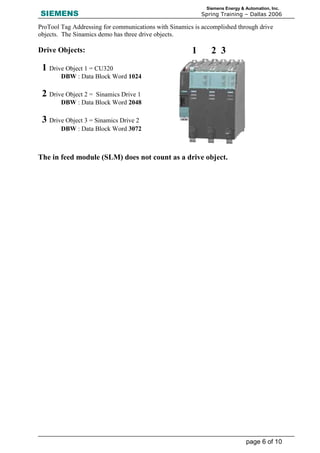
ProTool Tag Addressing for communications with Sinamics is accomplished through drive
objects. The Sinamics demo has three drive objects.
Drive Objects:
The in feed module (SLM) does not count as a drive object.
1 Drive Object 1 = CU320
DBW : Data Block Word 1024
2 Drive Object 2 = Sinamics Drive 1
DBW : Data Block Word 2048
3 Drive Object 3 = Sinamics Drive 2
DBW : Data Block Word 3072
1 2 3
SIEMENS Spring Training – Dallas 2006
page 7 of 10
Siemens Energy & Automation, Inc.
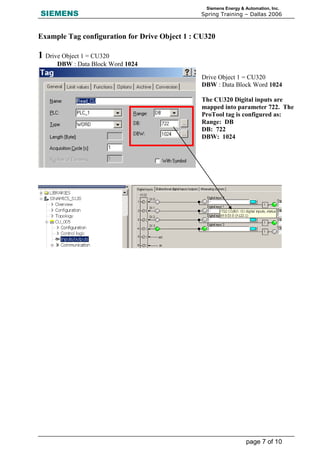
Example Tag configuration for Drive Object 1 : CU320
1 Drive Object 1 = CU320
DBW : Data Block Word 1024
Drive Object 1 = CU320
DBW : Data Block Word 1024
The CU320 Digital inputs are
mapped into parameter 722. The
ProTool tag is configured as:
Range: DB
DB: 722
DBW: 1024
SIEMENS Spring Training – Dallas 2006
page 8 of 10
Siemens Energy & Automation, Inc.
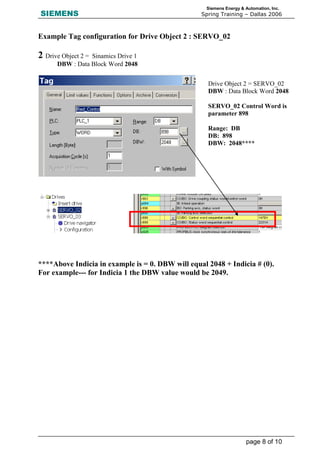
Example Tag configuration for Drive Object 2 : SERVO_02
2 Drive Object 2 = Sinamics Drive 1
DBW : Data Block Word 2048
****Above Indicia in example is = 0. DBW will equal 2048 + Indicia # (0).
For example--- for Indicia 1 the DBW value would be 2049.
Drive Object 2 = SERVO_02
DBW : Data Block Word 2048
SERVO_02 Control Word is
parameter 898
Range: DB
DB: 898
DBW: 2048****
SIEMENS Spring Training – Dallas 2006
page 9 of 10
Siemens Energy & Automation, Inc.
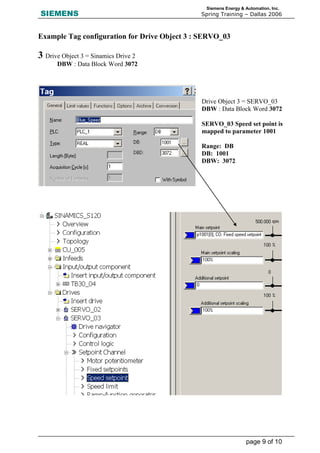
Example Tag configuration for Drive Object 3 : SERVO_03
3 Drive Object 3 = Sinamics Drive 2
DBW : Data Block Word 3072
Drive Object 3 = SERVO_03
DBW : Data Block Word 3072
SERVO_03 Speed set point is
mapped to parameter 1001
Range: DB
DB: 1001
DBW: 3072
SIEMENS Spring Training – Dallas 2006
page 10 of 10
Siemens Energy & Automation, Inc.
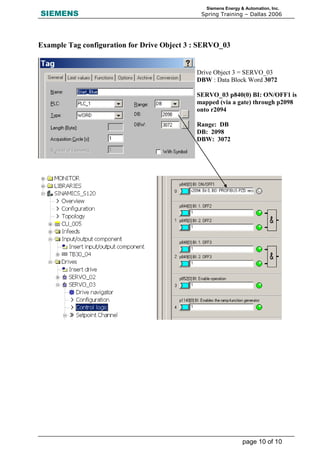
Example Tag configuration for Drive Object 3 : SERVO_03
Drive Object 3 = SERVO_03
DBW : Data Block Word 3072
SERVO_03 p840(0) BI: ON/OFF1 is
mapped (via a gate) through p2098
onto r2094
Range: DB
DB: 2098
DBW: 3072

Info plc net_sinamics hmi lab (1)

  • 1.
    SIEMENS Spring Training– Dallas 2006 page 1 of 10 Siemens Energy & Automation, Inc. SINAMICS LAB HMI (ProTool) Interface Exercise: Configuration of the drive unit with Servo control with an HMI (ProTool) Interface Using the training-case SINAMICS S120 Task 1: Online / Offline configuration of a SIMOTION SCOUT / STARTER – project and download to the target system NOTE: This HMI lab can be started from the SERVO lab #1 as a starting point. Open your completed Lab #1 and Save As HMI Offline configuration of SERVO_02 Double Click [ Configuration ] Click [ Configure DDS ] This lab requires the use of Extended Setpoint Channel to address the speed setpoints via the HMI. CU320 RAM Scout or Starter Load into target system ROMSave to ROM
  • 2.
    SIEMENS Spring Training– Dallas 2006 page 2 of 10 Siemens Energy & Automation, Inc. Configure DDS sequence: Select [ Continue ] Select [ Continue ] Accept all the remaining configurations as set up from Lab #1 exercise. Repeat this same configuration [ Extended setpoint channel ] for SERVO_03 Save and compile
  • 3.
    SIEMENS Spring Training– Dallas 2006 page 3 of 10 Siemens Energy & Automation, Inc. Go back Online Open the [ Control Logic ] configuration for SERVO_02 and select p840[0] BI: ON/OFF as R2094: Bit 0, BO: PROFIBUS PZD receive. This was selected based on the Function Diagram: Figure 2-54 2460 - Receive telegram, free interconnection via BICO (p0922 = 999) The next page shows the connection between the parameter written to by the HMI and the r2094 parameter selected by p840[0] BI: ON/OFF1 Select [  Download ]
  • 4.
    SIEMENS Spring Training– Dallas 2006 page 4 of 10 Siemens Energy & Automation, Inc. This is an excerpt from the Function Diagrams of the S120 Manual: The above function diagram can be viewed on page 2-777 of the Parameter List & Functions Sinamics manual: SINAMICS_S_Listenhandbuch_0605_eng.pdf The HMI application is configured to write a 1 or 0 to p2098[0].0 which in turn will gate a 0 or 1 to r2094.0 which will activate or deactivate the ON/OFF1 bit for the SERVO
  • 5.
    SIEMENS Spring Training– Dallas 2006 page 5 of 10 Siemens Energy & Automation, Inc. Open the >> Setpoint Channel – Speed Setpoint configuration for SERVO_02 Select p1001[0], CO; Fixed speed setpoint Open the >> Setpoint Channel – Speed Setpoint configuration for SERVO_03 Select p1001[0], CO; Fixed speed setpoint NOTE: The p1001[0] parameter selected for SERVO_02 and p1001[0] are unique for PROFIBUS mapping. The next section details how the HMI will send data to the p1001[0] (REAL) registers using the PROTOOL interface.
  • 6.
    SIEMENS Spring Training– Dallas 2006 page 6 of 10 Siemens Energy & Automation, Inc. ProTool Tag Addressing for communications with Sinamics is accomplished through drive objects. The Sinamics demo has three drive objects. Drive Objects: The in feed module (SLM) does not count as a drive object. 1 Drive Object 1 = CU320 DBW : Data Block Word 1024 2 Drive Object 2 = Sinamics Drive 1 DBW : Data Block Word 2048 3 Drive Object 3 = Sinamics Drive 2 DBW : Data Block Word 3072 1 2 3
  • 7.
    SIEMENS Spring Training– Dallas 2006 page 7 of 10 Siemens Energy & Automation, Inc. Example Tag configuration for Drive Object 1 : CU320 1 Drive Object 1 = CU320 DBW : Data Block Word 1024 Drive Object 1 = CU320 DBW : Data Block Word 1024 The CU320 Digital inputs are mapped into parameter 722. The ProTool tag is configured as: Range: DB DB: 722 DBW: 1024
  • 8.
    SIEMENS Spring Training– Dallas 2006 page 8 of 10 Siemens Energy & Automation, Inc. Example Tag configuration for Drive Object 2 : SERVO_02 2 Drive Object 2 = Sinamics Drive 1 DBW : Data Block Word 2048 ****Above Indicia in example is = 0. DBW will equal 2048 + Indicia # (0). For example--- for Indicia 1 the DBW value would be 2049. Drive Object 2 = SERVO_02 DBW : Data Block Word 2048 SERVO_02 Control Word is parameter 898 Range: DB DB: 898 DBW: 2048****
  • 9.
    SIEMENS Spring Training– Dallas 2006 page 9 of 10 Siemens Energy & Automation, Inc. Example Tag configuration for Drive Object 3 : SERVO_03 3 Drive Object 3 = Sinamics Drive 2 DBW : Data Block Word 3072 Drive Object 3 = SERVO_03 DBW : Data Block Word 3072 SERVO_03 Speed set point is mapped to parameter 1001 Range: DB DB: 1001 DBW: 3072
  • 10.
    SIEMENS Spring Training– Dallas 2006 page 10 of 10 Siemens Energy & Automation, Inc. Example Tag configuration for Drive Object 3 : SERVO_03 Drive Object 3 = SERVO_03 DBW : Data Block Word 3072 SERVO_03 p840(0) BI: ON/OFF1 is mapped (via a gate) through p2098 onto r2094 Range: DB DB: 2098 DBW: 3072