Introducing
In The Zone
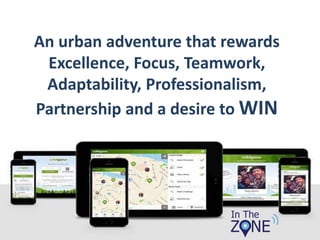
An urban adventure that rewards
Excellence, Focus, Teamwork,
Adaptability, Professionalism,
Partnership and a desire to WIN
The Aim:
To earn as many
points as possible
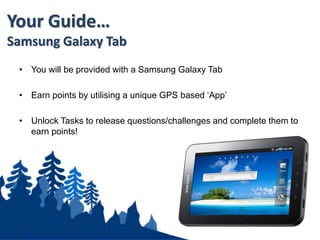
• You will be provided with a Samsung Galaxy Tab
• Earn points by utilising a unique GPS based ‘App’
• Unlock Tasks to release questions/challenges and complete them to
earn points!
Your Guide…
Samsung Galaxy Tab
Overview:
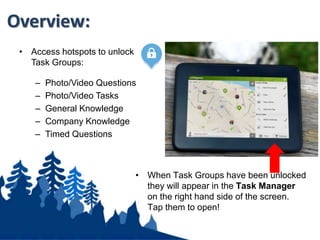
• Access hotspots to unlock
Task Groups:
– Photo/Video Questions
– Photo/Video Tasks
– General Knowledge
– Company Knowledge
– Timed Questions
• When Task Groups have been unlocked
they will appear in the Task Manager
on the right hand side of the screen.
Tap them to open!
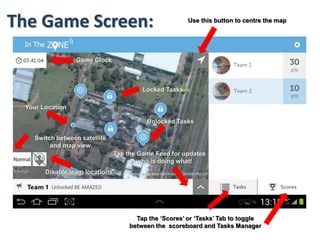
The Game Screen:
Tap the ‘Scores’ or ‘Tasks’ Tab to toggle
between the scoreboard and Tasks Manager
Use this button to centre the map
Tap the Game Feed for updates
on who is doing what!
Game Clock
Switch between satellite
and map view
Disable team locations
Your Location
Locked Tasks
Unlocked Tasks
• Smile please. First take a Team Photo (by tapping the screen), add a
Team Name and then tap the JOIN GAME button.
• Once your team has been registered you are off.
Starting the Game:

In The Zone High Tech Teambuilding

  • 1.
  • 2.
    An urban adventurethat rewards Excellence, Focus, Teamwork, Adaptability, Professionalism, Partnership and a desire to WIN
  • 3.
    The Aim: To earnas many points as possible
  • 4.
    • You willbe provided with a Samsung Galaxy Tab • Earn points by utilising a unique GPS based ‘App’ • Unlock Tasks to release questions/challenges and complete them to earn points! Your Guide… Samsung Galaxy Tab
  • 5.
    Overview: • Access hotspotsto unlock Task Groups: – Photo/Video Questions – Photo/Video Tasks – General Knowledge – Company Knowledge – Timed Questions • When Task Groups have been unlocked they will appear in the Task Manager on the right hand side of the screen. Tap them to open!
  • 6.
    The Game Screen: Tapthe ‘Scores’ or ‘Tasks’ Tab to toggle between the scoreboard and Tasks Manager Use this button to centre the map Tap the Game Feed for updates on who is doing what! Game Clock Switch between satellite and map view Disable team locations Your Location Locked Tasks Unlocked Tasks
  • 7.
    • Smile please.First take a Team Photo (by tapping the screen), add a Team Name and then tap the JOIN GAME button. • Once your team has been registered you are off. Starting the Game: