CONTENT
1. Introduction
2. Classification of Computer
3. Hardware
4. Software
5. Input Devices
6. Output Devices
7. Usage of Computer
INTRODUCTION
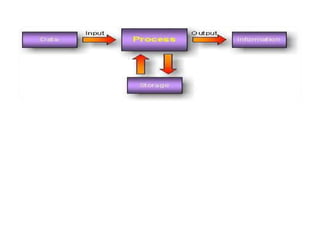
The term computer is derived from the word compute. A
computer is an electronic device that takes data and
instruction as an input from the user, processes data, and
provide useful information known as output. This cycle of
operation of a computer is known as the input process-
output cycle and as in shown in figure.
CLASSIFICATION OF COMPUTER
Computer is classified into several
categories depending on their computing
ability and processing speed. These include
Microcomputer
Minicomputer
Mainframe Computer
Supercomputer
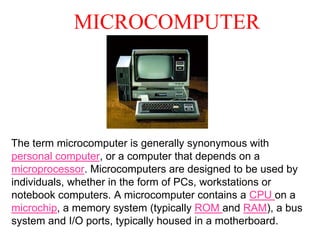
MICROCOMPUTER
The term microcomputer is generally synonymous with
personal computer, or a computer that depends on a
microprocessor. Microcomputers are designed to be used by
individuals, whether in the form of PCs, workstations or
notebook computers. A microcomputer contains a CPU on a
microchip, a memory system (typically ROM and RAM), a bus
system and I/O ports, typically housed in a motherboard.
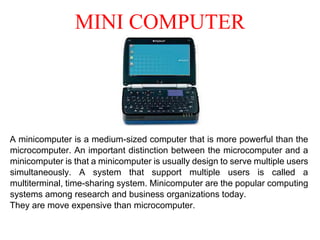
MINI COMPUTER
A minicomputer is a medium-sized computer that is more powerful than the
microcomputer. An important distinction between the microcomputer and a
minicomputer is that a minicomputer is usually design to serve multiple users
simultaneously. A system that support multiple users is called a
multiterminal, time-sharing system. Minicomputer are the popular computing
systems among research and business organizations today.
They are move expensive than microcomputer.
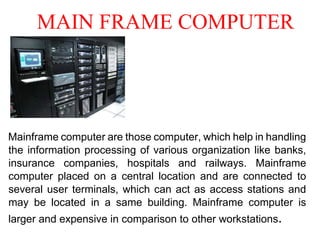
MAIN FRAME COMPUTER
Mainframe computer are those computer, which help in handling
the information processing of various organization like banks,
insurance companies, hospitals and railways. Mainframe
computer placed on a central location and are connected to
several user terminals, which can act as access stations and
may be located in a same building. Mainframe computer is
larger and expensive in comparison to other workstations.
SUPER COMPUTER
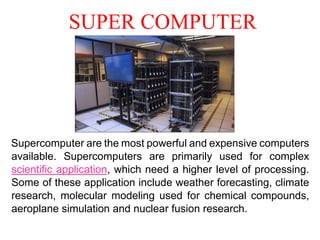
Supercomputer are the most powerful and expensive computers
available. Supercomputers are primarily used for complex
scientific application, which need a higher level of processing.
Some of these application include weather forecasting, climate
research, molecular modeling used for chemical compounds,
aeroplane simulation and nuclear fusion research.
HARDWARE
The electronic device is known as hardware.
Computer Hardware is the physical part of the computer
system, the machinery and equipment.
Parts of the computer “you can feel”
Internal hardware devices include motherboards, hard drives,
and RAM. External hardware devices include monitors,
keyboards, mice, printers, and scanners.
The internal hardware parts of a computer are often referred
to as components, while external hardware devices are
usually called peripherals. Together, they all fall under the
category of computer hardware.
SOFTWARE
Software is a collection of computer programs and
related data that provide the instructions for telling
a computer what to do and how to do it. In other
words, software is a conceptual entity which is a set
of computer programs, procedures, and associated
documentation concerned with the operation of a
data processing system. We can also say software
refers to one or more computer programs and data
held in the storage of the computer for some
purposes
INPUT DEVICES
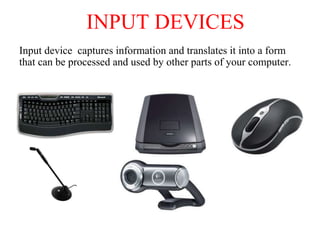
Input device captures information and translates it into a form
that can be processed and used by other parts of your computer.
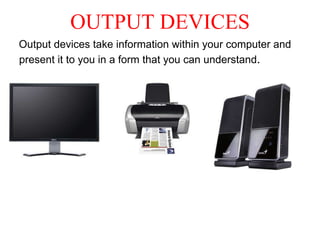
OUTPUT DEVICES
Output devices take information within your computer and
present it to you in a form that you can understand.
USAGE OF COMPUTER
Computer is the best companion of our
daily life
• Network attached storage
• Media Server
• Graphics design
• On-line banking
• Gaming
• Social Networking
• Knowledge sharing
• Science
IMR PPT.docx

IMR PPT.docx

  • 2.
    CONTENT 1. Introduction 2. Classificationof Computer 3. Hardware 4. Software 5. Input Devices 6. Output Devices 7. Usage of Computer
  • 3.
    INTRODUCTION The term computeris derived from the word compute. A computer is an electronic device that takes data and instruction as an input from the user, processes data, and provide useful information known as output. This cycle of operation of a computer is known as the input process- output cycle and as in shown in figure.
  • 5.
    CLASSIFICATION OF COMPUTER Computeris classified into several categories depending on their computing ability and processing speed. These include Microcomputer Minicomputer Mainframe Computer Supercomputer
  • 6.
    MICROCOMPUTER The term microcomputeris generally synonymous with personal computer, or a computer that depends on a microprocessor. Microcomputers are designed to be used by individuals, whether in the form of PCs, workstations or notebook computers. A microcomputer contains a CPU on a microchip, a memory system (typically ROM and RAM), a bus system and I/O ports, typically housed in a motherboard.
  • 7.
    MINI COMPUTER A minicomputeris a medium-sized computer that is more powerful than the microcomputer. An important distinction between the microcomputer and a minicomputer is that a minicomputer is usually design to serve multiple users simultaneously. A system that support multiple users is called a multiterminal, time-sharing system. Minicomputer are the popular computing systems among research and business organizations today. They are move expensive than microcomputer.
  • 8.
    MAIN FRAME COMPUTER Mainframecomputer are those computer, which help in handling the information processing of various organization like banks, insurance companies, hospitals and railways. Mainframe computer placed on a central location and are connected to several user terminals, which can act as access stations and may be located in a same building. Mainframe computer is larger and expensive in comparison to other workstations.
  • 9.
    SUPER COMPUTER Supercomputer arethe most powerful and expensive computers available. Supercomputers are primarily used for complex scientific application, which need a higher level of processing. Some of these application include weather forecasting, climate research, molecular modeling used for chemical compounds, aeroplane simulation and nuclear fusion research.
  • 10.
    HARDWARE The electronic deviceis known as hardware. Computer Hardware is the physical part of the computer system, the machinery and equipment. Parts of the computer “you can feel” Internal hardware devices include motherboards, hard drives, and RAM. External hardware devices include monitors, keyboards, mice, printers, and scanners. The internal hardware parts of a computer are often referred to as components, while external hardware devices are usually called peripherals. Together, they all fall under the category of computer hardware.
  • 11.
    SOFTWARE Software is acollection of computer programs and related data that provide the instructions for telling a computer what to do and how to do it. In other words, software is a conceptual entity which is a set of computer programs, procedures, and associated documentation concerned with the operation of a data processing system. We can also say software refers to one or more computer programs and data held in the storage of the computer for some purposes
  • 12.
    INPUT DEVICES Input devicecaptures information and translates it into a form that can be processed and used by other parts of your computer.
  • 13.
    OUTPUT DEVICES Output devicestake information within your computer and present it to you in a form that you can understand.
  • 14.
    USAGE OF COMPUTER Computeris the best companion of our daily life • Network attached storage • Media Server • Graphics design • On-line banking • Gaming • Social Networking • Knowledge sharing • Science