





SmugMug can upload some images at the
same time, and categorize them with albums.
Also, you can customize the background and
style of seeing the pictures, allowing a very
beautiful and easily interface, even for
begginers. You can even win some money
uploading photos or sending an invitation to
SmugMug to your friends (or that’s what
make me think that).
It has a smiley as the official logo


Flickr is based in a giant community, when
everyody can upload his photos and
somebody can see it. Like in minus, you can
add your friends for see his photos more
faster and easily. Altrough, and in my
opinion, isn’t as user-friendly as minus.
Imageshack, made in 2003, is a webpage when
everybody can upload images, without needed of
registration, until 2014, when the webpage has been
changed. It has a beautiful friendly interface, which
can manage all your images uploaded.
You can add, also, some labels to your photos, or
even an infinite number of albums.
It has a yellow frog as the official logo
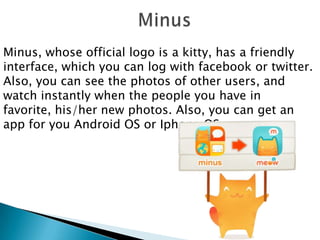
Minus, whose official logo is a kitty, has a friendly
interface, which you can log with facebook or twitter.
Also, you can see the photos of other users, and
watch instantly when the people you have in
favorite, his/her new photos. Also, you can get an
app for you Android OS or Iphone OS.


Photobucker has a beautiful (and grey)
interface, which you can manage your photos
and galleries very well. Also, is the best of the
5 options to edit photos. You can share
libraries (AKA galleries) via
Facebook, Twitter, Google Plus, Gmail, and so
much more.
Smugmug Flickr
Max
galleries?

Imageshack Minus

Photobucket

infinite

Infinite

Infinite

Infinite

1TB

5/10Mb per
image

Maximum
capacity

Infinite

2GB

Customize?

Yes

Yes

No

Yes

Yes

Title
picture?

No

Yes

No

Yes

Yes

Labels

No

Yes

Yes

Yes

No

Private
Galleries

Yes

Yes

Yes

Yes

Yes

Download?

Yes

Yes

Yes

No

No

Spanish

No

Yes

No

No

No

Catalan

No

No

No

No

No

Userfriendly

7

8

6

9

6

Speed

7

7

8

9

9

Design

10

10

8

7

7

Global

8

8

7

9

7


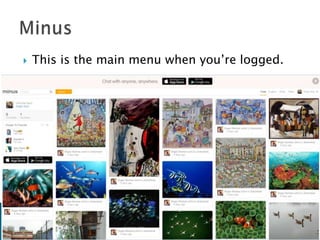
This is the main menu when you’re logged.


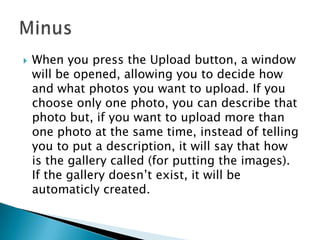
When you press the Upload button, a window
will be opened, allowing you to decide how
and what photos you want to upload. If you
choose only one photo, you can describe that
photo but, if you want to upload more than
one photo at the same time, instead of telling
you to put a description, it will say that how
is the gallery called (for putting the images).
If the gallery doesn’t exist, it will be
automaticly created.


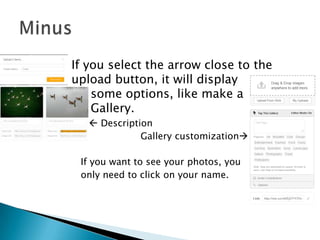
If you select the arrow close to the
upload button, it will display
some options, like make a
Gallery.
  Description
Gallery customization
If you want to see your photos, you
only need to click on your name.


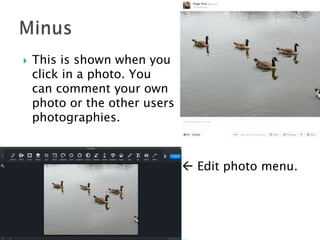
This is shown when you
click in a photo. You
can comment your own
photo or the other users
photographies.

 Edit photo menu.

Image servers

  • 1.
       SmugMug can uploadsome images at the same time, and categorize them with albums. Also, you can customize the background and style of seeing the pictures, allowing a very beautiful and easily interface, even for begginers. You can even win some money uploading photos or sending an invitation to SmugMug to your friends (or that’s what make me think that). It has a smiley as the official logo
  • 2.
     Flickr is basedin a giant community, when everyody can upload his photos and somebody can see it. Like in minus, you can add your friends for see his photos more faster and easily. Altrough, and in my opinion, isn’t as user-friendly as minus.
  • 3.
    Imageshack, made in2003, is a webpage when everybody can upload images, without needed of registration, until 2014, when the webpage has been changed. It has a beautiful friendly interface, which can manage all your images uploaded. You can add, also, some labels to your photos, or even an infinite number of albums. It has a yellow frog as the official logo
  • 4.
    Minus, whose officiallogo is a kitty, has a friendly interface, which you can log with facebook or twitter. Also, you can see the photos of other users, and watch instantly when the people you have in favorite, his/her new photos. Also, you can get an app for you Android OS or Iphone OS.
  • 5.
     Photobucker has abeautiful (and grey) interface, which you can manage your photos and galleries very well. Also, is the best of the 5 options to edit photos. You can share libraries (AKA galleries) via Facebook, Twitter, Google Plus, Gmail, and so much more.
  • 6.
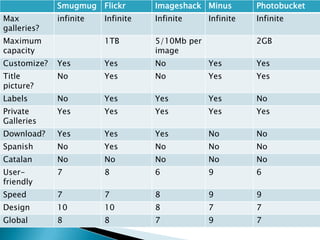
    Smugmug Flickr Max galleries? Imageshack Minus Photobucket infinite Infinite Infinite Infinite 1TB 5/10Mbper image Maximum capacity Infinite 2GB Customize? Yes Yes No Yes Yes Title picture? No Yes No Yes Yes Labels No Yes Yes Yes No Private Galleries Yes Yes Yes Yes Yes Download? Yes Yes Yes No No Spanish No Yes No No No Catalan No No No No No Userfriendly 7 8 6 9 6 Speed 7 7 8 9 9 Design 10 10 8 7 7 Global 8 8 7 9 7
  • 7.
     This is themain menu when you’re logged.
  • 8.
     When you pressthe Upload button, a window will be opened, allowing you to decide how and what photos you want to upload. If you choose only one photo, you can describe that photo but, if you want to upload more than one photo at the same time, instead of telling you to put a description, it will say that how is the gallery called (for putting the images). If the gallery doesn’t exist, it will be automaticly created.
  • 9.
     If you selectthe arrow close to the upload button, it will display some options, like make a Gallery.   Description Gallery customization If you want to see your photos, you only need to click on your name.
  • 10.
     This is shownwhen you click in a photo. You can comment your own photo or the other users photographies.  Edit photo menu.