iGoogle Gadgets More Access to Your Library Katie Lynn, Electronic Services Librarian Wyoming State Law Library Wyoming Library Association, Annual Conference, October 1, 2009
What is iGoogle? iGoogle is a customizable homepage http://www.google.com/ig?hl=en&t=0 iGoogle lets you create a personalized homepage that contains a Google search box at the top, and your choice of any number of gadgets below October 1, 2009 iGoogle Gadgets: More Access to Your Library
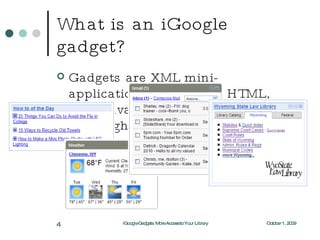
What is an iGoogle gadget? Gadgets are XML mini-applications built using HTML, with JavaScript, Flash or Silverlight for dynamic behaviors. October 1, 2009 iGoogle Gadgets: More Access to Your Library
What’s in a gadget? XML  is the language you use to write gadget specifications. A gadget is simply an XML file, placed somewhere on the internet where Google can find it (it can be hosted by Google, as well). The content of a gadget is typically written in  HTML . JavaScript  is a scripting language you can use to add dynamic behavior to your gadgets. October 1, 2009 iGoogle Gadgets: More Access to Your Library
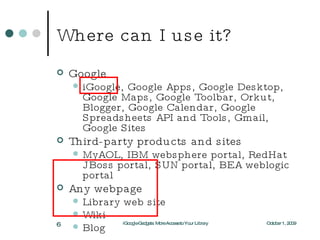
Where can I use it? Google iGoogle, Google Apps, Google Desktop, Google Maps, Google Toolbar, Orkut, Blogger, Google Calendar, Google Spreadsheets API and Tools, Gmail, Google Sites Third-party products and sites MyAOL, IBM websphere portal, RedHat JBoss portal, SUN portal, BEA weblogic portal  Any webpage  Library web site Wiki Blog October 1, 2009 iGoogle Gadgets: More Access to Your Library
Why? Reach more users Users can add your gadget to their iGoogle page or web site = more traffic! Maintenance is easy Write your gadget once, and with minor changes it can run in multiple places October 1, 2009 iGoogle Gadgets: More Access to Your Library
How? iGoogle Gadgets @ Your Library  -  http://www.slideshare.net/edmetz1/igoogle-gadgets-your-library gadgets.* API Developer's Guide  -  http://code.google.com/intl/en/apis/gadgets/docs/dev_guide.html October 1, 2009 iGoogle Gadgets: More Access to Your Library
My method To find gadgets, go to your iGoogle homepage -  http://www.google.com/ig . If you don't have one, it's a lot easier to get one and work through it. Click the "Add Stuff" link on the top right. Search for "library" and you'll see many RSS feeds as well as library gadgets. I added several to my iGoogle so I could see how other libraries have used the technology. I chose a couple of designs that I liked, and noted the URL(s) for the gadget(s) themselves. October 1, 2009 iGoogle Gadgets: More Access to Your Library
My method I added the Google Gadget Editor to iGoogle, used the "open from URL" command and saved the gadgets I liked in the GGE. Google hosts this online, so remember that you will want to eventually copy your finished gadget code and save it in a local file for a backup. Open the gadget you want to modify and save it under a different name. Then play to your heart's content (easier said than done, but fun all the same). October 1, 2009 iGoogle Gadgets: More Access to Your Library
My method I followed the gadget created by Duke University libraries for the tabbed structure. I used the tabs for popular legal research content, but I really liked their idea of using the tabs for searching different resources – catalog, databases, ejournals. The code I used for creating the WYLDCAT search form is in Technote 97 -  http://will.state.wy.us/wyld/technotes/note097.html . Of course, save and preview as you go. October 1, 2009 iGoogle Gadgets: More Access to Your Library
My method You can publish your finished gadget to the Google content directory or save it on your library server and add the URL to the gadget to the Google content directory separately. By the time I had pretty much finished the law library gadget, I was fairly familiar with Google's instructions (Developer's Guide). I suggest you return to it often with questions. It will eventually cease to be super scary. October 1, 2009 iGoogle Gadgets: More Access to Your Library
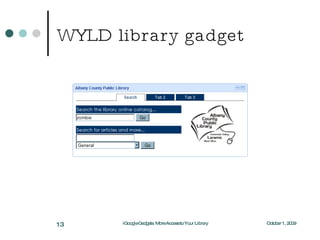
WYLD library gadget October 1, 2009 iGoogle Gadgets: More Access to Your Library
Questions? Want help? Katie Lynn [email_address] 307.777.6487 Thank you! October 1, 2009 iGoogle Gadgets: More Access to Your Library

iGoogle Gadgets

  • 1.
    iGoogle Gadgets MoreAccess to Your Library Katie Lynn, Electronic Services Librarian Wyoming State Law Library Wyoming Library Association, Annual Conference, October 1, 2009
  • 2.
    What is iGoogle?iGoogle is a customizable homepage http://www.google.com/ig?hl=en&t=0 iGoogle lets you create a personalized homepage that contains a Google search box at the top, and your choice of any number of gadgets below October 1, 2009 iGoogle Gadgets: More Access to Your Library
  • 3.
    What is aniGoogle gadget? Gadgets are XML mini-applications built using HTML, with JavaScript, Flash or Silverlight for dynamic behaviors. October 1, 2009 iGoogle Gadgets: More Access to Your Library
  • 4.
    What is aniGoogle gadget? Gadgets are XML mini-applications built using HTML, with JavaScript, Flash or Silverlight for dynamic behaviors. October 1, 2009 iGoogle Gadgets: More Access to Your Library
  • 5.
    What’s in agadget? XML is the language you use to write gadget specifications. A gadget is simply an XML file, placed somewhere on the internet where Google can find it (it can be hosted by Google, as well). The content of a gadget is typically written in HTML . JavaScript is a scripting language you can use to add dynamic behavior to your gadgets. October 1, 2009 iGoogle Gadgets: More Access to Your Library
  • 6.
    Where can Iuse it? Google iGoogle, Google Apps, Google Desktop, Google Maps, Google Toolbar, Orkut, Blogger, Google Calendar, Google Spreadsheets API and Tools, Gmail, Google Sites Third-party products and sites MyAOL, IBM websphere portal, RedHat JBoss portal, SUN portal, BEA weblogic portal Any webpage Library web site Wiki Blog October 1, 2009 iGoogle Gadgets: More Access to Your Library
  • 7.
    Why? Reach moreusers Users can add your gadget to their iGoogle page or web site = more traffic! Maintenance is easy Write your gadget once, and with minor changes it can run in multiple places October 1, 2009 iGoogle Gadgets: More Access to Your Library
  • 8.
    How? iGoogle Gadgets@ Your Library - http://www.slideshare.net/edmetz1/igoogle-gadgets-your-library gadgets.* API Developer's Guide - http://code.google.com/intl/en/apis/gadgets/docs/dev_guide.html October 1, 2009 iGoogle Gadgets: More Access to Your Library
  • 9.
    My method Tofind gadgets, go to your iGoogle homepage - http://www.google.com/ig . If you don't have one, it's a lot easier to get one and work through it. Click the "Add Stuff" link on the top right. Search for "library" and you'll see many RSS feeds as well as library gadgets. I added several to my iGoogle so I could see how other libraries have used the technology. I chose a couple of designs that I liked, and noted the URL(s) for the gadget(s) themselves. October 1, 2009 iGoogle Gadgets: More Access to Your Library
  • 10.
    My method Iadded the Google Gadget Editor to iGoogle, used the "open from URL" command and saved the gadgets I liked in the GGE. Google hosts this online, so remember that you will want to eventually copy your finished gadget code and save it in a local file for a backup. Open the gadget you want to modify and save it under a different name. Then play to your heart's content (easier said than done, but fun all the same). October 1, 2009 iGoogle Gadgets: More Access to Your Library
  • 11.
    My method Ifollowed the gadget created by Duke University libraries for the tabbed structure. I used the tabs for popular legal research content, but I really liked their idea of using the tabs for searching different resources – catalog, databases, ejournals. The code I used for creating the WYLDCAT search form is in Technote 97 - http://will.state.wy.us/wyld/technotes/note097.html . Of course, save and preview as you go. October 1, 2009 iGoogle Gadgets: More Access to Your Library
  • 12.
    My method Youcan publish your finished gadget to the Google content directory or save it on your library server and add the URL to the gadget to the Google content directory separately. By the time I had pretty much finished the law library gadget, I was fairly familiar with Google's instructions (Developer's Guide). I suggest you return to it often with questions. It will eventually cease to be super scary. October 1, 2009 iGoogle Gadgets: More Access to Your Library
  • 13.
    WYLD library gadgetOctober 1, 2009 iGoogle Gadgets: More Access to Your Library
  • 14.
    Questions? Want help?Katie Lynn [email_address] 307.777.6487 Thank you! October 1, 2009 iGoogle Gadgets: More Access to Your Library

Editor's Notes

  • #2 October 1, 2009 iGoogle Gadgets: More Access to Your Library