Inman Case Status Portal Training
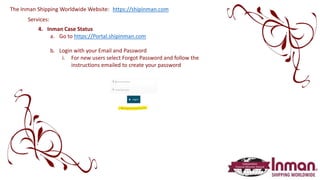
The Inman Shipping Worldwide Website:
Services:
https://shipinman.com
4. Inman Case Status
a. Go to https://Portal.shipinman.com
b. Login with your Email and Password
i. For new users select Forgot Password and follow the
instructions emailed to create your password
Services:
Inman Case Status:
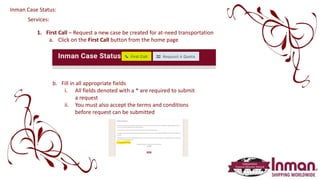
1. First Call – Request a new case be created for at-need transportation
a. Click on the First Call button from the home page
b. Fill in all appropriate fields
i. All fields denoted with a * are required to submit
a request
ii. You must also accept the terms and conditions
before request can be submitted
Services:
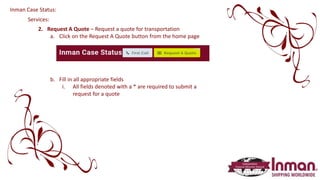
2. Request A Quote – Request a quote for transportation
a. Click on the Request A Quote button from the home page
b. Fill in all appropriate fields
i. All fields denoted with a * are required to submit a
request for a quote
Inman Case Status:
Services:
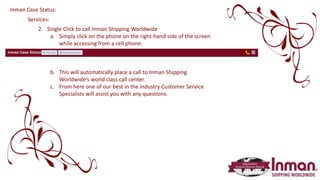
2. Single Click to call Inman Shipping Worldwide
a. Simply click on the phone on the right-hand side of the screen
while accessing from a cell phone.
b. This will automatically place a call to Inman Shipping
Worldwide’s world class call center.
c. From here one of our best in the industry Customer Service
Specialists will assist you with any questions.
Inman Case Status:
Services:
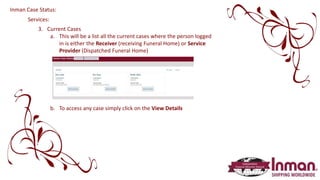
3. Current Cases
a. This will be a list all the current cases where the person logged
in is either the Receiver (receiving Funeral Home) or Service
Provider (Dispatched Funeral Home)
b. To access any case simply click on the View Details
Inman Case Status:
Services:
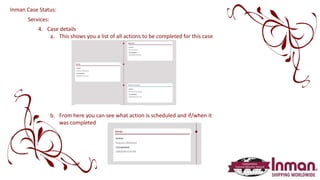
4. Case details
a. This shows you a list of all actions to be completed for this case
b. From here you can see what action is scheduled and if/when it
was completed
Inman Case Status:
Services:
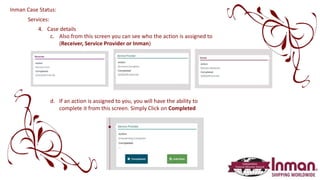
4. Case details
c. Also from this screen you can see who the action is assigned to
(Receiver, Service Provider or Inman)
d. If an action is assigned to you, you will have the ability to
complete it from this screen. Simply Click on Completed
Inman Case Status:
Services:
4. Case details
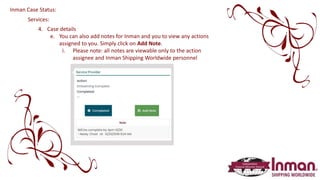
e. You can also add notes for Inman and you to view any actions
assigned to you. Simply click on Add Note.
i. Please note: all notes are viewable only to the action
assignee and Inman Shipping Worldwide personnel
Inman Case Status:
Services:
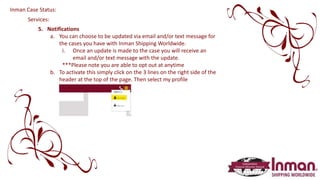
5. Notifications
a. You can choose to be updated via email and/or text message for
the cases you have with Inman Shipping Worldwide.
i. Once an update is made to the case you will receive an
email and/or text message with the update.
***Please note you are able to opt out at anytime
b. To activate this simply click on the 3 lines on the right side of the
header at the top of the page. Then select my profile
Inman Case Status:
Services:
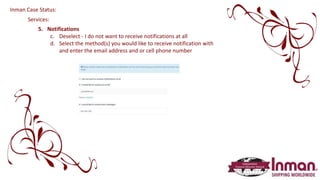
5. Notifications
c. Deselect - I do not want to receive notifications at all
d. Select the method(s) you would like to receive notification with
and enter the email address and or cell phone number
Inman Case Status:
At Inman Shipping Worldwide we are
everywhere you need us to be!
Please contact us 24 hours a day 7 days a week 365 days a year
Call us at (800) 321-0566
Email us at customer.service@shipinman.com
or utilize our online service at www.shipinman.com
Inman Shipping Worldwide

Ics portal training

  • 1.
    Inman Case StatusPortal Training
  • 2.
    The Inman ShippingWorldwide Website: Services: https://shipinman.com 4. Inman Case Status a. Go to https://Portal.shipinman.com b. Login with your Email and Password i. For new users select Forgot Password and follow the instructions emailed to create your password
  • 3.
    Services: Inman Case Status: 1.First Call – Request a new case be created for at-need transportation a. Click on the First Call button from the home page b. Fill in all appropriate fields i. All fields denoted with a * are required to submit a request ii. You must also accept the terms and conditions before request can be submitted
  • 4.
    Services: 2. Request AQuote – Request a quote for transportation a. Click on the Request A Quote button from the home page b. Fill in all appropriate fields i. All fields denoted with a * are required to submit a request for a quote Inman Case Status:
  • 5.
    Services: 2. Single Clickto call Inman Shipping Worldwide a. Simply click on the phone on the right-hand side of the screen while accessing from a cell phone. b. This will automatically place a call to Inman Shipping Worldwide’s world class call center. c. From here one of our best in the industry Customer Service Specialists will assist you with any questions. Inman Case Status:
  • 6.
    Services: 3. Current Cases a.This will be a list all the current cases where the person logged in is either the Receiver (receiving Funeral Home) or Service Provider (Dispatched Funeral Home) b. To access any case simply click on the View Details Inman Case Status:
  • 7.
    Services: 4. Case details a.This shows you a list of all actions to be completed for this case b. From here you can see what action is scheduled and if/when it was completed Inman Case Status:
  • 8.
    Services: 4. Case details c.Also from this screen you can see who the action is assigned to (Receiver, Service Provider or Inman) d. If an action is assigned to you, you will have the ability to complete it from this screen. Simply Click on Completed Inman Case Status:
  • 9.
    Services: 4. Case details e.You can also add notes for Inman and you to view any actions assigned to you. Simply click on Add Note. i. Please note: all notes are viewable only to the action assignee and Inman Shipping Worldwide personnel Inman Case Status:
  • 10.
    Services: 5. Notifications a. Youcan choose to be updated via email and/or text message for the cases you have with Inman Shipping Worldwide. i. Once an update is made to the case you will receive an email and/or text message with the update. ***Please note you are able to opt out at anytime b. To activate this simply click on the 3 lines on the right side of the header at the top of the page. Then select my profile Inman Case Status:
  • 11.
    Services: 5. Notifications c. Deselect- I do not want to receive notifications at all d. Select the method(s) you would like to receive notification with and enter the email address and or cell phone number Inman Case Status:
  • 12.
    At Inman ShippingWorldwide we are everywhere you need us to be! Please contact us 24 hours a day 7 days a week 365 days a year Call us at (800) 321-0566 Email us at customer.service@shipinman.com or utilize our online service at www.shipinman.com Inman Shipping Worldwide