



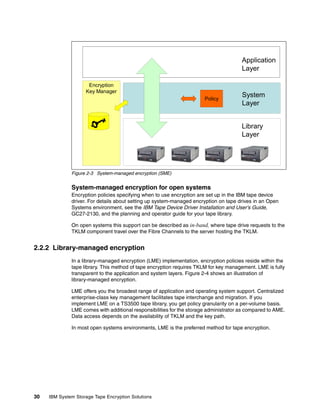
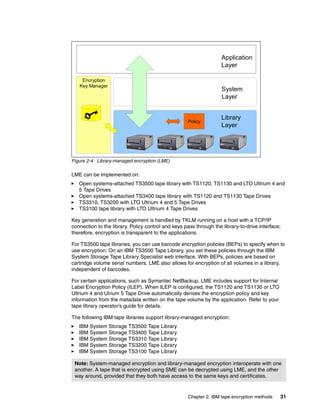
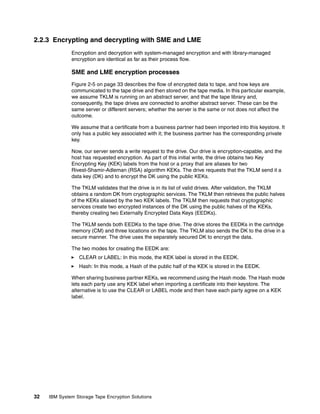
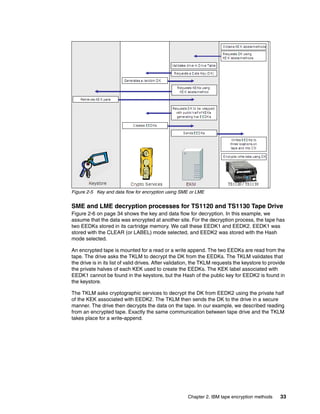

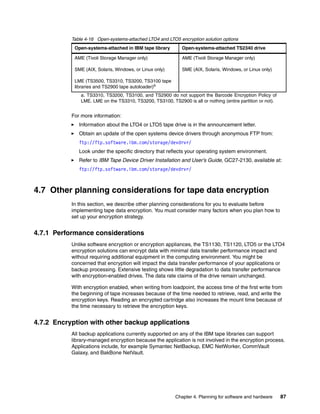
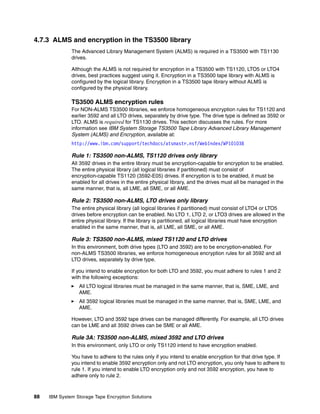
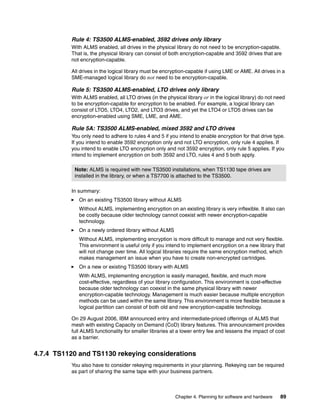
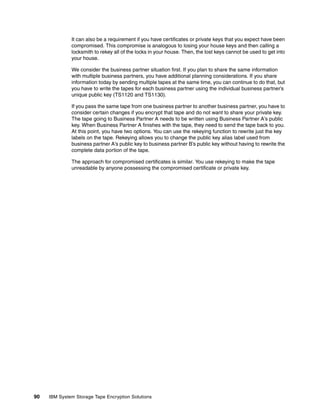



Front cover


IBM System Storage
Open Systems Tape
Encryption Solutions
Understanding tape encryption and
Tivoli Key Lifecycle Manager Version 2

Planning for and installing
hardware and software

Configuring and managing
the tape encryption solution


                                                             Alex Osuna
                                                       Luciano Cecchetti
                                                           Edgar Vinson


ibm.com/redbooks
International Technical Support Organization

IBM System Storage Open Systems Tape Encryption
Solutions

December 2010


                                               SG24-7907-00
Note: Before using this information and the product it supports, read the information in “Notices” on
 page vii.


First Edition (December 2010)
This edition applies to Tivoli Key Lifecycle Manager (TKLM) Version 2.


© Copyright International Business Machines Corporation 2010. All rights reserved.
Note to U.S. Government Users Restricted Rights -- Use, duplication or disclosure restricted by GSA ADP Schedule
Contract with IBM Corp.
Contents

                 Notices . . . . . . . . . . . . . . . . . . . . . . . . . . . . . . . . . . . . . . . . . . . . . . . . . . . . . . . . . . . . . . . . . vii
                 Trademarks . . . . . . . . . . . . . . . . . . . . . . . . . . . . . . . . . . . . . . . . . . . . . . . . . . . . . . . . . . . . . viii

                 Preface . . . . . . . . . . . . . . . . . . . . . . . . . . . . . . . . . . . . . . . . . . . . . . . . . . . . . . . . . . . . . . . . . ix
                 The team who wrote this book . . . . . . . . . . . . . . . . . . . . . . . . . . . . . . . . . . . . . . . . . . . . . . . . .x
                 Become a published author . . . . . . . . . . . . . . . . . . . . . . . . . . . . . . . . . . . . . . . . . . . . . . . . . . xi
                 Comments welcome. . . . . . . . . . . . . . . . . . . . . . . . . . . . . . . . . . . . . . . . . . . . . . . . . . . . . . . . xi
                 Stay connected to IBM Redbooks . . . . . . . . . . . . . . . . . . . . . . . . . . . . . . . . . . . . . . . . . . . . . xii

                 Chapter 1. Introduction to tape encryption. . . . . . . . . . . . . . . . . . . . . . . . . . . . . . . . . . . . 1
                 1.1 IBM System Storage tape drives. . . . . . . . . . . . . . . . . . . . . . . . . . . . . . . . . . . . . . . . . . . 2
                 1.2 How tape data encryption works . . . . . . . . . . . . . . . . . . . . . . . . . . . . . . . . . . . . . . . . . . . 4
                 1.3 What to encrypt . . . . . . . . . . . . . . . . . . . . . . . . . . . . . . . . . . . . . . . . . . . . . . . . . . . . . . . . 6
                 1.4 Why use tape data encryption. . . . . . . . . . . . . . . . . . . . . . . . . . . . . . . . . . . . . . . . . . . . . 7
                    1.4.1 Why encrypt data in the drive . . . . . . . . . . . . . . . . . . . . . . . . . . . . . . . . . . . . . . . . . 7
                    1.4.2 Fundamental to encryption: Policy and key management . . . . . . . . . . . . . . . . . . . 7
                    1.4.3 Summary. . . . . . . . . . . . . . . . . . . . . . . . . . . . . . . . . . . . . . . . . . . . . . . . . . . . . . . . . 8
                 1.5 Concepts of tape data encryption . . . . . . . . . . . . . . . . . . . . . . . . . . . . . . . . . . . . . . . . . . 8
                    1.5.1 Symmetric key encryption . . . . . . . . . . . . . . . . . . . . . . . . . . . . . . . . . . . . . . . . . . . . 9
                    1.5.2 Asymmetric key encryption . . . . . . . . . . . . . . . . . . . . . . . . . . . . . . . . . . . . . . . . . . 11
                    1.5.3 Hybrid encryption . . . . . . . . . . . . . . . . . . . . . . . . . . . . . . . . . . . . . . . . . . . . . . . . . 14
                    1.5.4 Digital certificates . . . . . . . . . . . . . . . . . . . . . . . . . . . . . . . . . . . . . . . . . . . . . . . . . 15
                 1.6 Simplifying key management with TKLM . . . . . . . . . . . . . . . . . . . . . . . . . . . . . . . . . . . 20
                    1.6.1 Encryption as a critical business process . . . . . . . . . . . . . . . . . . . . . . . . . . . . . . . 20
                    1.6.2 Encryption and key management for compliance, availability, retention and security
                          21
                    1.6.3 Securing data automatically on self-encrypting drives . . . . . . . . . . . . . . . . . . . . . 21
                    1.6.4 Addressing objections to encryption of data at rest . . . . . . . . . . . . . . . . . . . . . . . 21

                 Chapter 2. IBM tape encryption methods . . . . . . . . . . . . . . . . . . . . . . . . . . . . . . . . . . . .                           23
                 2.1 Tivoli Key Lifecycle Manager . . . . . . . . . . . . . . . . . . . . . . . . . . . . . . . . . . . . . . . . . . . .                 24
                    2.1.1 What is new in version 2 . . . . . . . . . . . . . . . . . . . . . . . . . . . . . . . . . . . . . . . . . . . .                24
                    2.1.2 Tivoli Lifecycle Key Manager components and resources . . . . . . . . . . . . . . . . . .                                       25
                    2.1.3 Key exchange . . . . . . . . . . . . . . . . . . . . . . . . . . . . . . . . . . . . . . . . . . . . . . . . . . . .            27
                 2.2 Methods of managing IBM tape encryption. . . . . . . . . . . . . . . . . . . . . . . . . . . . . . . . . .                           29
                    2.2.1 System-managed encryption . . . . . . . . . . . . . . . . . . . . . . . . . . . . . . . . . . . . . . . .                       29
                    2.2.2 Library-managed encryption . . . . . . . . . . . . . . . . . . . . . . . . . . . . . . . . . . . . . . . . .                    30
                    2.2.3 Encrypting and decrypting with SME and LME . . . . . . . . . . . . . . . . . . . . . . . . . . .                                32
                    2.2.4 Application-managed encryption. . . . . . . . . . . . . . . . . . . . . . . . . . . . . . . . . . . . . .                       34
                    2.2.5 Mixed mode example . . . . . . . . . . . . . . . . . . . . . . . . . . . . . . . . . . . . . . . . . . . . . .                  37

                 Chapter 3. IBM System Storage tape and tape automation for encryption . . . . . . . . .                                                  39
                 3.1 IBM System Storage TS1130 and TS1120 Tape Drive . . . . . . . . . . . . . . . . . . . . . . . .                                      40
                    3.1.1 Tape data encryption support . . . . . . . . . . . . . . . . . . . . . . . . . . . . . . . . . . . . . . . .                    40
                    3.1.2 IBM TotalStorage 3592 Model J70 Tape Controller . . . . . . . . . . . . . . . . . . . . . . .                                   41
                 3.2 IBM LTO Ultrium tape drives and libraries . . . . . . . . . . . . . . . . . . . . . . . . . . . . . . . . . .                        42
                    3.2.1 LTO overview . . . . . . . . . . . . . . . . . . . . . . . . . . . . . . . . . . . . . . . . . . . . . . . . . . . .            42
                    3.2.2 LTO media . . . . . . . . . . . . . . . . . . . . . . . . . . . . . . . . . . . . . . . . . . . . . . . . . . . . . .           43
                    3.2.3 IBM System Storage TS2240 Tape Drive Express Model . . . . . . . . . . . . . . . . . .                                          46


© Copyright IBM Corp. 2010. All rights reserved.                                                                                                           iii
3.2.4 IBM System Storage TS2250 Tape Drive Express model . . . . . . . . . . . . . . . . . .                                  47
                  3.2.5 IBM System Storage TS2350 Tape Drive . . . . . . . . . . . . . . . . . . . . . . . . . . . . . . .                      48
                  3.2.6 IBM System Storage TS2900 Tape Autoloader . . . . . . . . . . . . . . . . . . . . . . . . . .                           48
                  3.2.7 IBM System Storage TS3100 Tape Library . . . . . . . . . . . . . . . . . . . . . . . . . . . . .                        50
                  3.2.8 IBM System Storage TS3200 Tape Library . . . . . . . . . . . . . . . . . . . . . . . . . . . . .                        51
                  3.2.9 IBM System Storage TS3310 Tape Library . . . . . . . . . . . . . . . . . . . . . . . . . . . . .                        53
               3.3 IBM System Storage TS3400 Tape Library . . . . . . . . . . . . . . . . . . . . . . . . . . . . . . . . .                     56
               3.4 IBM System Storage TS3500 Tape Library . . . . . . . . . . . . . . . . . . . . . . . . . . . . . . . . .                     57
                  3.4.1 Tape encryption overview . . . . . . . . . . . . . . . . . . . . . . . . . . . . . . . . . . . . . . . . . . .          58
                  3.4.2 Tape drives, libraries, and media relationship. . . . . . . . . . . . . . . . . . . . . . . . . . . .                   63

               Chapter 4. Planning for software and hardware. . . . . . . . . . . . . . . . . . . . . . . . . . . . . . .                       65
               4.1 Encryption planning. . . . . . . . . . . . . . . . . . . . . . . . . . . . . . . . . . . . . . . . . . . . . . . . . . . .   66
               4.2 Planning assumptions . . . . . . . . . . . . . . . . . . . . . . . . . . . . . . . . . . . . . . . . . . . . . . . . . .     66
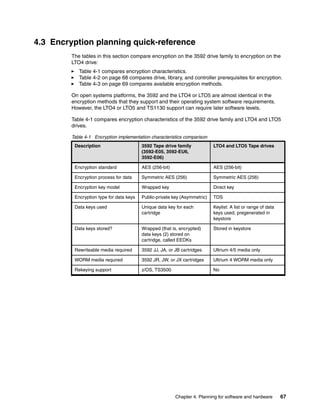
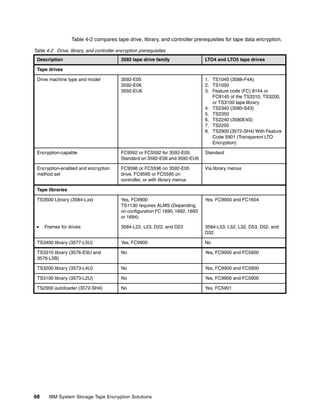
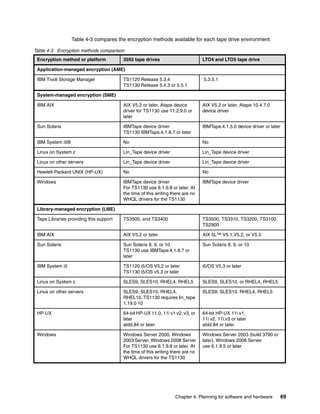
               4.3 Encryption planning quick-reference . . . . . . . . . . . . . . . . . . . . . . . . . . . . . . . . . . . . . . .            67
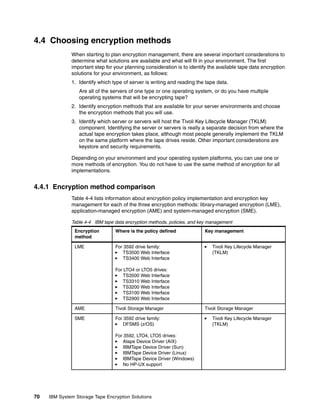
               4.4 Choosing encryption methods. . . . . . . . . . . . . . . . . . . . . . . . . . . . . . . . . . . . . . . . . . . .           70
                  4.4.1 Encryption method comparison. . . . . . . . . . . . . . . . . . . . . . . . . . . . . . . . . . . . . . .               70
                  4.4.2 Open systems encryption methods. . . . . . . . . . . . . . . . . . . . . . . . . . . . . . . . . . . .                  71
                  4.4.3 Decision time . . . . . . . . . . . . . . . . . . . . . . . . . . . . . . . . . . . . . . . . . . . . . . . . . . . .   72
               4.5 Solutions available by operating system . . . . . . . . . . . . . . . . . . . . . . . . . . . . . . . . . . . .              72
                  4.5.1 AIX solution components . . . . . . . . . . . . . . . . . . . . . . . . . . . . . . . . . . . . . . . . . . .           72
                  4.5.2 Linux on System p, System x, and other Intel or AMD Opteron servers. . . . . . . .                                      74
                  4.5.3 HP-UX, Sun, and Windows components . . . . . . . . . . . . . . . . . . . . . . . . . . . . . . .                        76
                  4.5.4 IBM Tivoli Storage Manager . . . . . . . . . . . . . . . . . . . . . . . . . . . . . . . . . . . . . . . . .            79
               4.6 Ordering information . . . . . . . . . . . . . . . . . . . . . . . . . . . . . . . . . . . . . . . . . . . . . . . . . . .   79
                  4.6.1 TS1120 tape drive prerequisites . . . . . . . . . . . . . . . . . . . . . . . . . . . . . . . . . . . . . .             80
                  4.6.2 Tape controller prerequisites. . . . . . . . . . . . . . . . . . . . . . . . . . . . . . . . . . . . . . . . .          81
                  4.6.3 LTO4 or LTO5 tape drive prerequisites. . . . . . . . . . . . . . . . . . . . . . . . . . . . . . . . .                  82
                  4.6.4 Tape library prerequisites . . . . . . . . . . . . . . . . . . . . . . . . . . . . . . . . . . . . . . . . . . .        83
                  4.6.5 Other library and rack open systems installations. . . . . . . . . . . . . . . . . . . . . . . . .                      84
                  4.6.6 General software prerequisites for encryption . . . . . . . . . . . . . . . . . . . . . . . . . . .                     85
                  4.6.7 TS1120 and TS1130 supported platforms . . . . . . . . . . . . . . . . . . . . . . . . . . . . . .                       85
                  4.6.8 IBM LTO4 and LTO5 tape drive supported platforms . . . . . . . . . . . . . . . . . . . . . .                            86
               4.7 Other planning considerations for tape data encryption . . . . . . . . . . . . . . . . . . . . . . . .                       87
                  4.7.1 Performance considerations . . . . . . . . . . . . . . . . . . . . . . . . . . . . . . . . . . . . . . . . .            87
                  4.7.2 Encryption with other backup applications . . . . . . . . . . . . . . . . . . . . . . . . . . . . . .                   87
                  4.7.3 ALMS and encryption in the TS3500 library . . . . . . . . . . . . . . . . . . . . . . . . . . . . .                     88
                  4.7.4 TS1120 and TS1130 rekeying considerations . . . . . . . . . . . . . . . . . . . . . . . . . . .                         89

               Chapter 5. Planning for Tivoli Key Lifecycle Manager V2 . . . . . . . . . . . . . . . . . . . . . . . 91
               5.1 Planning the TKLM v2 installation . . . . . . . . . . . . . . . . . . . . . . . . . . . . . . . . . . . . . . . . . 92
                  5.1.1 Hardware requirements for open systems . . . . . . . . . . . . . . . . . . . . . . . . . . . . . . 92
                  5.1.2 Software requirements . . . . . . . . . . . . . . . . . . . . . . . . . . . . . . . . . . . . . . . . . . . . . 93
                  5.1.3 Keystore type and key size requirements . . . . . . . . . . . . . . . . . . . . . . . . . . . . . . . 96
               5.2 Before you migrate . . . . . . . . . . . . . . . . . . . . . . . . . . . . . . . . . . . . . . . . . . . . . . . . . . . . 98
                  5.2.1 Migration requirements for Encryption Key Manager . . . . . . . . . . . . . . . . . . . . . 100
                  5.2.2 Migration restrictions for Encryption Key Manager . . . . . . . . . . . . . . . . . . . . . . . 100
                  5.2.3 Migration methods . . . . . . . . . . . . . . . . . . . . . . . . . . . . . . . . . . . . . . . . . . . . . . . 101
               5.3 Suggested best practices . . . . . . . . . . . . . . . . . . . . . . . . . . . . . . . . . . . . . . . . . . . . . . 102

               Chapter 6. TKLM Windows installation . . . . . . . . . . . . . . . . . . . . . . . . . . . . . . . . . . . . . 105
               6.1 TKLM Windows installation . . . . . . . . . . . . . . . . . . . . . . . . . . . . . . . . . . . . . . . . . . . . . 106

               Chapter 7. TKLM Linux installation . . . . . . . . . . . . . . . . . . . . . . . . . . . . . . . . . . . . . . . . 123


iv   IBM System Storage Open Systems Tape Encryption Solutions
7.1 TKLM Linux installation . . . . . . . . . . . . . . . . . . . . . . . . . . . . . . . . . . . . . . . . . . . . . . . . 124

Chapter 8. TKLM operational considerations. . . . . . . . . . . . . . . . . . . . . . . . . . . . . . . .                            147
8.1 Scripting with TKLM . . . . . . . . . . . . . . . . . . . . . . . . . . . . . . . . . . . . . . . . . . . . . . . . . .          148
   8.1.1 Simple Linux backup script example. . . . . . . . . . . . . . . . . . . . . . . . . . . . . . . . . .                       148
8.2 Synchronizing primary TKLM configuration data . . . . . . . . . . . . . . . . . . . . . . . . . . . .                            149
   8.2.1 Setting up primary and secondary TKLM servers . . . . . . . . . . . . . . . . . . . . . . . .                               149
8.3 TKLM backup and restore procedures . . . . . . . . . . . . . . . . . . . . . . . . . . . . . . . . . . . .                       150
   8.3.1 Backup using the GUI . . . . . . . . . . . . . . . . . . . . . . . . . . . . . . . . . . . . . . . . . . . . .              150
   8.3.2 Restore using the GUI . . . . . . . . . . . . . . . . . . . . . . . . . . . . . . . . . . . . . . . . . . . .               151
   8.3.3 Backup using the command line . . . . . . . . . . . . . . . . . . . . . . . . . . . . . . . . . . . . .                     153
   8.3.4 Restore using the command line. . . . . . . . . . . . . . . . . . . . . . . . . . . . . . . . . . . . .                     154
8.4 Data sharing with business partners . . . . . . . . . . . . . . . . . . . . . . . . . . . . . . . . . . . . . .                  155
   8.4.1 Sharing TS1100 certificate data with a business partner . . . . . . . . . . . . . . . . . .                                 155
   8.4.2 Sharing LTO key data with a business partner . . . . . . . . . . . . . . . . . . . . . . . . . .                            157
8.5 Fixing the security warnings in your web browser. . . . . . . . . . . . . . . . . . . . . . . . . . . .                          160
   8.5.1 Fixing the security warning in Internet Explorer browser . . . . . . . . . . . . . . . . . .                                160

Chapter 9. Administration . . . . . . . . . . . . . . . . . . . . . . . . . . . . . . . . . . . . . . . . . . . . . . .              161
9.1 Role Based Access Control (RBAC) . . . . . . . . . . . . . . . . . . . . . . . . . . . . . . . . . . . . . .                     162
   9.1.1 Permissions . . . . . . . . . . . . . . . . . . . . . . . . . . . . . . . . . . . . . . . . . . . . . . . . . . . .         162
   9.1.2 Installation defaults . . . . . . . . . . . . . . . . . . . . . . . . . . . . . . . . . . . . . . . . . . . . . . .         162
   9.1.3 Adding new TKLM users . . . . . . . . . . . . . . . . . . . . . . . . . . . . . . . . . . . . . . . . . . .                 162
   9.1.4 Assigning roles to new users . . . . . . . . . . . . . . . . . . . . . . . . . . . . . . . . . . . . . . .                  166
   9.1.5 RBAC impacts to the CLI and GUI . . . . . . . . . . . . . . . . . . . . . . . . . . . . . . . . . . .                       168
9.2 Device groups . . . . . . . . . . . . . . . . . . . . . . . . . . . . . . . . . . . . . . . . . . . . . . . . . . . . . . .      168
   9.2.1 Creating a new device group . . . . . . . . . . . . . . . . . . . . . . . . . . . . . . . . . . . . . . .                   169
   9.2.2 Adding a tape drive to a device group . . . . . . . . . . . . . . . . . . . . . . . . . . . . . . . .                       172
   9.2.3 Deleting a tape drive from a device group . . . . . . . . . . . . . . . . . . . . . . . . . . . . .                         175
   9.2.4 Deleting a device group . . . . . . . . . . . . . . . . . . . . . . . . . . . . . . . . . . . . . . . . . . .               177
   9.2.5 Creating a corresponding role for a new device group . . . . . . . . . . . . . . . . . . . .                                179
   9.2.6 Moving a tape drive to a different device group . . . . . . . . . . . . . . . . . . . . . . . . .                           182
   9.2.7 Tips for working with device groups . . . . . . . . . . . . . . . . . . . . . . . . . . . . . . . . . .                     183
9.3 LTO key groups. . . . . . . . . . . . . . . . . . . . . . . . . . . . . . . . . . . . . . . . . . . . . . . . . . . . . .        183
   9.3.1 Creating an LTO key group. . . . . . . . . . . . . . . . . . . . . . . . . . . . . . . . . . . . . . . . .                  184
   9.3.2 Modifying an LTO key group . . . . . . . . . . . . . . . . . . . . . . . . . . . . . . . . . . . . . . . .                  186
   9.3.3 Deleting an LTO key group . . . . . . . . . . . . . . . . . . . . . . . . . . . . . . . . . . . . . . . . .                 189
9.4 3592 Certificates . . . . . . . . . . . . . . . . . . . . . . . . . . . . . . . . . . . . . . . . . . . . . . . . . . . . .      191
   9.4.1 Creating a 3592 certificate . . . . . . . . . . . . . . . . . . . . . . . . . . . . . . . . . . . . . . . . .               192
   9.4.2 Modifying a 3592 certificate . . . . . . . . . . . . . . . . . . . . . . . . . . . . . . . . . . . . . . . .                194
   9.4.3 Deleting a 3592 certificate . . . . . . . . . . . . . . . . . . . . . . . . . . . . . . . . . . . . . . . . .               195
9.5 Scheduling rollovers . . . . . . . . . . . . . . . . . . . . . . . . . . . . . . . . . . . . . . . . . . . . . . . . . .         197
   9.5.1 Scheduling LTO key group rollover. . . . . . . . . . . . . . . . . . . . . . . . . . . . . . . . . . .                      198
   9.5.2 Scheduling 3592 certificate rollover . . . . . . . . . . . . . . . . . . . . . . . . . . . . . . . . . .                    200

Related publications . . . . . . . . . . . . . . . . . . . . . . . . . . . . . . . . . . . . . . . . . . . . . . . . . . . .         203
IBM Redbooks . . . . . . . . . . . . . . . . . . . . . . . . . . . . . . . . . . . . . . . . . . . . . . . . . . . . . . . . . .     203
Other publications . . . . . . . . . . . . . . . . . . . . . . . . . . . . . . . . . . . . . . . . . . . . . . . . . . . . . . .     204
Online resources . . . . . . . . . . . . . . . . . . . . . . . . . . . . . . . . . . . . . . . . . . . . . . . . . . . . . . . .     205
How to get Redbooks . . . . . . . . . . . . . . . . . . . . . . . . . . . . . . . . . . . . . . . . . . . . . . . . . . . . .        206
Help from IBM . . . . . . . . . . . . . . . . . . . . . . . . . . . . . . . . . . . . . . . . . . . . . . . . . . . . . . . . . .    207

Index . . . . . . . . . . . . . . . . . . . . . . . . . . . . . . . . . . . . . . . . . . . . . . . . . . . . . . . . . . . . . . . . . 209


                                                                                                                       Contents          v
vi   IBM System Storage Open Systems Tape Encryption Solutions
Notices

This information was developed for products and services offered in the U.S.A.

IBM may not offer the products, services, or features discussed in this document in other countries. Consult
your local IBM representative for information on the products and services currently available in your area. Any
reference to an IBM product, program, or service is not intended to state or imply that only that IBM product,
program, or service may be used. Any functionally equivalent product, program, or service that does not
infringe any IBM intellectual property right may be used instead. However, it is the user's responsibility to
evaluate and verify the operation of any non-IBM product, program, or service.

IBM may have patents or pending patent applications covering subject matter described in this document. The
furnishing of this document does not give you any license to these patents. You can send license inquiries, in
writing, to:
IBM Director of Licensing, IBM Corporation, North Castle Drive, Armonk, NY 10504-1785 U.S.A.

The following paragraph does not apply to the United Kingdom or any other country where such
provisions are inconsistent with local law: INTERNATIONAL BUSINESS MACHINES CORPORATION
PROVIDES THIS PUBLICATION "AS IS" WITHOUT WARRANTY OF ANY KIND, EITHER EXPRESS OR
IMPLIED, INCLUDING, BUT NOT LIMITED TO, THE IMPLIED WARRANTIES OF NON-INFRINGEMENT,
MERCHANTABILITY OR FITNESS FOR A PARTICULAR PURPOSE. Some states do not allow disclaimer of
express or implied warranties in certain transactions, therefore, this statement may not apply to you.

This information could include technical inaccuracies or typographical errors. Changes are periodically made
to the information herein; these changes will be incorporated in new editions of the publication. IBM may make
improvements and/or changes in the product(s) and/or the program(s) described in this publication at any time
without notice.

Any references in this information to non-IBM Web sites are provided for convenience only and do not in any
manner serve as an endorsement of those Web sites. The materials at those Web sites are not part of the
materials for this IBM product and use of those Web sites is at your own risk.

IBM may use or distribute any of the information you supply in any way it believes appropriate without incurring
any obligation to you.

Information concerning non-IBM products was obtained from the suppliers of those products, their published
announcements or other publicly available sources. IBM has not tested those products and cannot confirm the
accuracy of performance, compatibility or any other claims related to non-IBM products. Questions on the
capabilities of non-IBM products should be addressed to the suppliers of those products.

This information contains examples of data and reports used in daily business operations. To illustrate them
as completely as possible, the examples include the names of individuals, companies, brands, and products.
All of these names are fictitious and any similarity to the names and addresses used by an actual business
enterprise is entirely coincidental.

COPYRIGHT LICENSE:

This information contains sample application programs in source language, which illustrate programming
techniques on various operating platforms. You may copy, modify, and distribute these sample programs in
any form without payment to IBM, for the purposes of developing, using, marketing or distributing application
programs conforming to the application programming interface for the operating platform for which the sample
programs are written. These examples have not been thoroughly tested under all conditions. IBM, therefore,
cannot guarantee or imply reliability, serviceability, or function of these programs.


© Copyright IBM Corp. 2010. All rights reserved.                                                             vii
Trademarks
IBM, the IBM logo, and ibm.com are trademarks or registered trademarks of International Business Machines
Corporation in the United States, other countries, or both. These and other IBM trademarked terms are
marked on their first occurrence in this information with the appropriate symbol (® or ™), indicating US
registered or common law trademarks owned by IBM at the time this information was published. Such
trademarks may also be registered or common law trademarks in other countries. A current list of IBM
trademarks is available on the Web at http://www.ibm.com/legal/copytrade.shtml

The following terms are trademarks of the International Business Machines Corporation in the United States,
other countries, or both:
   AIX 5L™                              POWER7™                                System z9®
   AIX®                                 pSeries®                               System z®
   AS/400®                              RACF®                                  Tivoli®
   DB2®                                 Redbooks®                              TotalStorage®
   DS8000®                              Redbooks (logo)     ®                  WebSphere®
   ESCON®                               RS/6000®                               xSeries®
   FICON®                               System i5®                             z/OS®
   i5/OS®                               System i®                              z/VM®
   IBM®                                 System p®                              z/VSE™
   iSeries®                             System Storage®                        z9®
   Netfinity®                           System x®

The following terms are trademarks of other companies:

Java, and all Java-based trademarks are trademarks of Sun Microsystems, Inc. in the United States, other
countries, or both.

Microsoft, Windows, and the Windows logo are trademarks of Microsoft Corporation in the United States,
other countries, or both.

Intel, Intel logo, Intel Inside logo, and Intel Centrino logo are trademarks or registered trademarks of Intel
Corporation or its subsidiaries in the United States and other countries.

UNIX is a registered trademark of The Open Group in the United States and other countries.

Linux is a trademark of Linus Torvalds in the United States, other countries, or both.

Other company, product, or service names may be trademarks or service marks of others.


viii    IBM System Storage Open Systems Tape Encryption Solutions
Preface

                 This IBM® Redbooks® publication discusses IBM System Storage® Open
                 Systems Tape Encryption solutions. It specifically describes Tivoli® Key Lifecycle
                 Manager (TKLM) Version 2, which is a Java™ software program that manages
                 keys enterprise-wide and provides encryption-enabled tape drives with keys for
                 encryption and decryption. The book explains various methods of managing IBM
                 tape encryption. These methods differ in where the encryption policies reside,
                 where key management is performed, whether a key manager is required, and if
                 required, how the tape drives communicate with it.
                 Essentially, the security and accessibility characteristics of encrypted data create
                 considerations for clients which do not exist with storage devices that do not
                 encrypt data. Encryption key material must be kept secure from disclosure or use
                 by any agent that does not have authority to it; at the same time it must be acces-
                 sible to any agent that has both the authority and need to use it at the time of
                 need.

                 IBM supports three methods of encrypting data on tape:
                     System-Managed Encryption (SME)
                     Library-Managed Encryption (LME)
                     Application-Managed Encryption (AME)

                 Only SME and LME require the implementation of an external component, the
                 Tivoli Key Lifecycle Manager, to provide and manage keys. With AME, key
                 provisioning and key management are handled by the application. The following
                 tape drives are capable of encrypting the data that is written on the tape
                 cartridge with TKLM Version 2:
                     IBM System Storage TS1130 Model E06 and Model EU6 Tape Drive
                     IBM System Storage TS1120 Model E05 Tape Drive
                     IBM System Storage Linear Tape-Open (LTO) Ultrium Generation 4 and 5
                     Tape Drive.

                 Because of the nature of encryption, the security of and accessibility to
                 encrypted data depends on the security of and accessibility to the key needed to
                 decrypt the data. The disclosure of a decryption key to an unauthorized agent (a
                 person or a system component) creates a security exposure if that agent also
                 has access to the ciphertext generated with the associated encryption key. If all
                 copies of the decryption key are lost (whether intentionally or accidentally), then
                 there is no feasible way to decrypt the associated ciphertext, and the data
                 contained in the ciphertext is said to have been cryptographically erased. If the
                 only copies of some data that exist are cryptographically-erased ciphertext, then


© Copyright IBM Corp. 2010. All rights reserved.                                                  ix
access to that data has been permanently lost for all practical purposes. This
               book is written for readers who need to understand and use the various methods
               of managing IBM tape encryption.


The team who wrote this book
               This book was produced by a team of specialists from around the world working
               at the International Technical Support Organization, San Jose Center.

                               Alex Osuna is a Project Leader at the International Technical
                               Support Organization, Tucson Center. He writes extensively
                               about IBM System Storage N series and Tape. Before joining
                               the ITSO five years ago, he worked in the Tivoli Western Region
                               as a Systems Engineer. Alex has worked in the IT industry for
                               more than 32 years, focusing mainly on storage. He joined IBM
                               29 years ago, and holds certifications from IBM, Red Hat,
               Microsoft® and the Open Group.

                                Luciano Cecchetti is an IBM Senior Accredited Product
                                Service Representative who has more than 31 years of
                                experience in hardware support activities. Since 1985, he has
                                provided technical support in Rome, Italy. He provided second
                                level support for ES/9000 during an international assignment in
                                1988 at the IBM European Product Support Group in
                                Montpelier, France. As a specialist member of the RMSS SWAT
               Team, he supported and coordinated the first 3494 VTS/Library installations in
               Portugal and Greece. In 2002, he earned a Specialist (CS) degree in High End
               Tape Solutions from the IBM Professional Certification Program. He has held a
               nomination for Senior membership of World-Wide Product Services Profession
               since 2007. He joined the RMSS Mainz VET/PFE (Virtual EMEA Team) in 2010,
               working as Back Office Specialist for EMEA Tape Support. Luciano’s areas of
               expertise include CPUs, disks, and tapes in complex open system and
               mainframe environments.

                                Edgar Vinson is a Senior Mainframe Technical Solution
                                Architect in the United States who has 32 years of experience in
                                the mainframe field. Prior to becoming an architect, he was a
                                mainframe systems programmer for more than 27 years. His
                                areas of expertise include mainframe DASD and tape for
                                configurations, consulting, and creating education for Solution
                                Architect teams. Edgar has worked for IBM for 11 years.
               Previously, he was in the US Air Force for seven years and worked for Boeing for
               14 years.


x   IBM System Storage Open Systems Tape Encryption Solutions
Thanks to the following people for their contributions to this project:

        Carla J. Ruhl
        IBM Systems & Technology Group, Systems Hardware Development San Jose

        Jeff Ziehm
        IBM LTO/3592, Tape Performance - ATS Americas

        James Ebert
        Information Developer: ID Technical Writing

        Matthew Boult
        Tivoli Product Introduction Specialist - BetaWorks


Become a published author
        Here's an opportunity to spotlight your skills, grow your career, and become a
        published author - all at the same time! Join an ITSO residency project and help
        write a book in your area of expertise, while honing your experience using
        leading-edge technologies. Your efforts will help to increase product acceptance
        and customer satisfaction, as you expand your network of technical contacts and
        relationships. Residencies run from two to six weeks in length, and you can
        participate either in person or as a remote resident working from your home
        base.

        Find out more about the residency program, browse the residency index, and
        apply online at:
        ibm.com/redbooks/residencies.html


Comments welcome
        Your comments are important to us!

        We want our books to be as helpful as possible. Send us your comments about
        this book or other IBM Redbooks publications in one of the following ways:
           Use the online Contact us review Redbooks form found at:
           ibm.com/redbooks
           Send your comments in an e-mail to:
           redbooks@us.ibm.com


                                                                                  Preface   xi
Mail your comments to:
                   IBM Corporation, International Technical Support Organization
                   Dept. HYTD Mail Station P099
                   2455 South Road
                   Poughkeepsie, NY 12601-5400


Stay connected to IBM Redbooks
                   Find us on Facebook:
                   http://www.facebook.com/IBMRedbooks
                   Follow us on Twitter:
                   http://twitter.com/ibmredbooks
                   Look for us on LinkedIn:
                   http://www.linkedin.com/groups?home=&gid=2130806
                   Explore new Redbooks publications, residencies, and workshops with the
                   IBM Redbooks weekly newsletter:
                   https://www.redbooks.ibm.com/Redbooks.nsf/subscribe?OpenForm
                   Stay current on recent Redbooks publications with RSS Feeds:
                   http://www.redbooks.ibm.com/rss.html


xii   IBM System Storage Open Systems Tape Encryption Solutions
1


    Chapter 1.   Introduction to tape encryption
                 This chapter presents an overview of the concepts involved in encrypting data on tape. It
                 introduces the members of the IBM System Storage tape drive family that incorporate this
                 capability and explains how tape data encryption works. Encryption keys and key
                 management issues are covered, as are digital signatures and digital certificates. Finally, the
                 advantages of the IBM tape encryption solution and IBM Tivoli Key Lifecycle Manager are
                 explored.


© Copyright IBM Corp. 2010. All rights reserved.                                                               1
1.1 IBM System Storage tape drives
              IBM has three tape drives that are capable of encrypting the data that is written on the tape
              cartridge:
                  IBM System Storage TS1130 Model E06 and Model EU6 Tape Drive
                  IBM System Storage TS1120 Model E05 Tape Drive
                  IBM System Storage Linear Tape-Open (LTO) Ultrium Generation 4 and 5 Tape Drive

              In this document, we use abbreviations to refer to the drives, designating them TS1130 Tape
              Drive, TS1120 Tape Drive, and LTO4 and LTO5 Tape Drive.

              The IBM System Storage TS1130 Tape Drive Model E06 and Model EU6 have the capability
              to encrypt data on tape cartridges. This encryption capability is standard on all TS1130 Tape
              Drives. The encryption capability includes drive hardware, and microcode additions and
              changes.

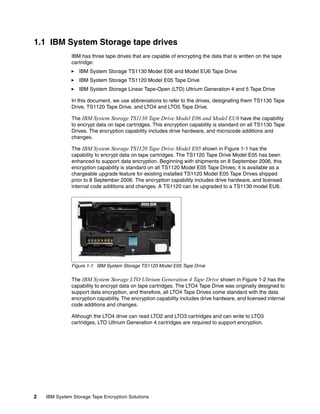
              The IBM System Storage TS1120 Tape Drive Model E05 shown in Figure 1-1 has the
              capability to encrypt data on tape cartridges. The TS1120 Tape Drive Model E05 has been
              enhanced to support data encryption. Beginning with shipments on 8 September 2006, this
              encryption capability is standard on all TS1120 Model E05 Tape Drives; it is available as a
              chargeable upgrade feature for existing installed TS1120 Model E05 Tape Drives shipped
              prior to 8 September 2006. The encryption capability includes drive hardware, and licensed
              internal code additions and changes. A TS1120 can be upgraded to a TS1130 model EU6.


              Figure 1-1 IBM System Storage TS1120 Model E05 Tape Drive

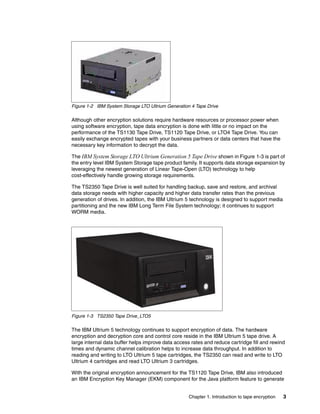
              The IBM System Storage LTO Ultrium Generation 4 Tape Drive shown in Figure 1-2 has the
              capability to encrypt data on tape cartridges. The LTO4 Tape Drive was originally designed to
              support data encryption, and therefore, all LTO4 Tape Drives come standard with the data
              encryption capability. The encryption capability includes drive hardware, and licensed internal
              code additions and changes.

              Although the LTO4 drive can read LTO2 and LTO3 cartridges and can write to LTO3
              cartridges, LTO Ultrium Generation 4 cartridges are required to support encryption.


2   IBM System Storage Tape Encryption Solutions
Figure 1-2 IBM System Storage LTO Ultrium Generation 4 Tape Drive

Although other encryption solutions require hardware resources or processor power when
using software encryption, tape data encryption is done with little or no impact on the
performance of the TS1130 Tape Drive, TS1120 Tape Drive, or LTO4 Tape Drive. You can
easily exchange encrypted tapes with your business partners or data centers that have the
necessary key information to decrypt the data.

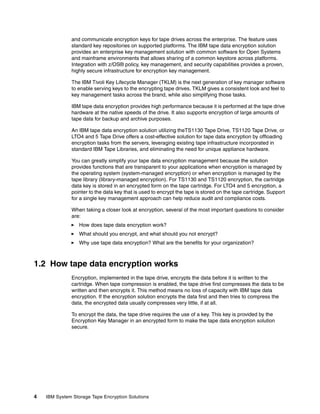
The IBM System Storage LTO Ultrium Generation 5 Tape Drive shown in Figure 1-3 is part of
the entry level IBM System Storage tape product family. It supports data storage expansion by
leveraging the newest generation of Linear Tape-Open (LTO) technology to help
cost-effectively handle growing storage requirements.

The TS2350 Tape Drive is well suited for handling backup, save and restore, and archival
data storage needs with higher capacity and higher data transfer rates than the previous
generation of drives. In addition, the IBM Ultrium 5 technology is designed to support media
partitioning and the new IBM Long Term File System technology; it continues to support
WORM media.


Figure 1-3 TS2350 Tape Drive_LTO5

The IBM Ultrium 5 technology continues to support encryption of data. The hardware
encryption and decryption core and control core reside in the IBM Ultrium 5 tape drive. A
large internal data buffer helps improve data access rates and reduce cartridge fill and rewind
times and dynamic channel calibration helps to increase data throughput. In addition to
reading and writing to LTO Ultrium 5 tape cartridges, the TS2350 can read and write to LTO
Ultrium 4 cartridges and read LTO Ultrium 3 cartridges.

With the original encryption announcement for the TS1120 Tape Drive, IBM also introduced
an IBM Encryption Key Manager (EKM) component for the Java platform feature to generate


                                                    Chapter 1. Introduction to tape encryption   3
and communicate encryption keys for tape drives across the enterprise. The feature uses
              standard key repositories on supported platforms. The IBM tape data encryption solution
              provides an enterprise key management solution with common software for Open Systems
              and mainframe environments that allows sharing of a common keystore across platforms.
              Integration with z/OS® policy, key management, and security capabilities provides a proven,
              highly secure infrastructure for encryption key management.

              The IBM Tivoli Key Lifecycle Manager (TKLM) is the next generation of key manager software
              to enable serving keys to the encrypting tape drives. TKLM gives a consistent look and feel to
              key management tasks across the brand, while also simplifying those tasks.

              IBM tape data encryption provides high performance because it is performed at the tape drive
              hardware at the native speeds of the drive. It also supports encryption of large amounts of
              tape data for backup and archive purposes.

              An IBM tape data encryption solution utilizing theTS1130 Tape Drive, TS1120 Tape Drive, or
              LTO4 and 5 Tape Drive offers a cost-effective solution for tape data encryption by offloading
              encryption tasks from the servers, leveraging existing tape infrastructure incorporated in
              standard IBM Tape Libraries, and eliminating the need for unique appliance hardware.

              You can greatly simplify your tape data encryption management because the solution
              provides functions that are transparent to your applications when encryption is managed by
              the operating system (system-managed encryption) or when encryption is managed by the
              tape library (library-managed encryption). For TS1130 and TS1120 encryption, the cartridge
              data key is stored in an encrypted form on the tape cartridge. For LTO4 and 5 encryption, a
              pointer to the data key that is used to encrypt the tape is stored on the tape cartridge. Support
              for a single key management approach can help reduce audit and compliance costs.

              When taking a closer look at encryption, several of the most important questions to consider
              are:
                  How does tape data encryption work?
                  What should you encrypt, and what should you not encrypt?
                  Why use tape data encryption? What are the benefits for your organization?


1.2 How tape data encryption works
              Encryption, implemented in the tape drive, encrypts the data before it is written to the
              cartridge. When tape compression is enabled, the tape drive first compresses the data to be
              written and then encrypts it. This method means no loss of capacity with IBM tape data
              encryption. If the encryption solution encrypts the data first and then tries to compress the
              data, the encrypted data usually compresses very little, if at all.

              To encrypt the data, the tape drive requires the use of a key. This key is provided by the
              Encryption Key Manager in an encrypted form to make the tape data encryption solution
              secure.


4   IBM System Storage Tape Encryption Solutions
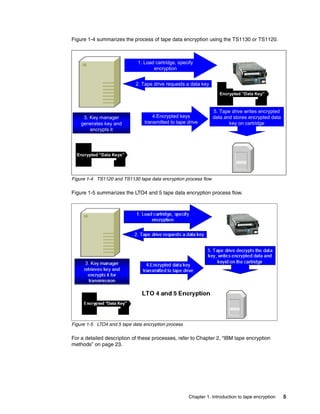
Figure 1-4 summarizes the process of tape data encryption using the TS1130 or TS1120.


                             1. Load cartridge, specify
                                    encryption

      Encryption            2. Tape drive requests a data key
         Key
       Manager                                                      Encrypted “Data Key”


                                                                 5. Tape drive writes encrypted
     3. Key manager                 4.Encrypted keys             data and stores encrypted data
    generates key and           transmitted to tape drive               key on cartridge
        encrypts it


  Encrypted “Data Keys”


Figure 1-4 TS1120 and TS1130 tape data encryption process flow

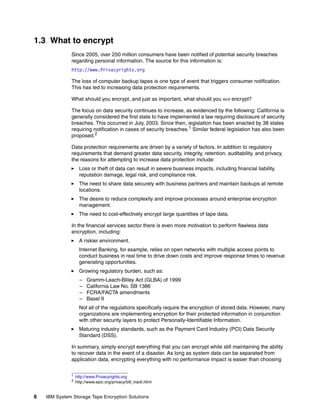
Figure 1-5 summarizes the LTO4 and 5 tape data encryption process flow.


Figure 1-5 LTO4 and 5 tape data encryption process

For a detailed description of these processes, refer to Chapter 2, “IBM tape encryption
methods” on page 23.


                                                     Chapter 1. Introduction to tape encryption   5
1.3 What to encrypt
              Since 2005, over 250 million consumers have been notified of potential security breaches
              regarding personal information. The source for this information is:
              http://www.Privacyrights.org

              The loss of computer backup tapes is one type of event that triggers consumer notification.
              This has led to increasing data protection requirements.

              What should you encrypt, and just as important, what should you not encrypt?

              The focus on data security continues to increase, as evidenced by the following: California is
              generally considered the first state to have implemented a law requiring disclosure of security
              breaches. This occurred in July, 2003. Since then, legislation has been enacted by 38 states
              requiring notification in cases of security breaches.1 Similar federal legislation has also been
              proposed.2

              Data protection requirements are driven by a variety of factors. In addition to regulatory
              requirements that demand greater data security, integrity, retention, auditability, and privacy,
              the reasons for attempting to increase data protection include:
                    Loss or theft of data can result in severe business impacts, including financial liability,
                    reputation damage, legal risk, and compliance risk.
                    The need to share data securely with business partners and maintain backups at remote
                    locations.
                    The desire to reduce complexity and improve processes around enterprise encryption
                    management.
                    The need to cost-effectively encrypt large quantities of tape data.

              In the financial services sector there is even more motivation to perform flawless data
              encryption, including:
                    A riskier environment.
                    Internet Banking, for example, relies on open networks with multiple access points to
                    conduct business in real time to drive down costs and improve response times to revenue
                    generating opportunities.
                    Growing regulatory burden, such as:
                    –   Gramm-Leach-Bliley Act (GLBA) of 1999
                    –   California Law No. SB 1386
                    –   FCRA/FACTA amendments
                    –   Basel II
                    Not all of the regulations specifically require the encryption of stored data. However, many
                    organizations are implementing encryption for their protected information in conjunction
                    with other security layers to protect Personally-Identifiable Information.
                    Maturing industry standards, such as the Payment Card Industry (PCI) Data Security
                    Standard (DSS).

              In summary, simply encrypt everything that you can encrypt while still maintaining the ability
              to recover data in the event of a disaster. As long as system data can be separated from
              application data, encrypting everything with no performance impact is easier than choosing

              1
                  http://www.Privacyrights.org
              2   http://www.epic.org/privacy/bill_track.html


6   IBM System Storage Tape Encryption Solutions
which data falls into which legislation for encryption, and trying to keep current on the
           dynamic privacy rights rules and regulations.


1.4 Why use tape data encryption
           Tape data encryption is used to hide and protect sensitive data. If tape cartridges leave data
           centers, the data is no longer protected through Resource Access Control Facility (RACF®)
           or similar access protection mechanisms. Tape data encryption is an easy and economical
           way to protect data from unauthorized view, thereby fulfilling a large and increasing number of
           public and private security requirements.l

           Important and sensitive data can be protected in many ways. Data can be encrypted by
           means of special software programs or hardware adapters, or outside of the device where the
           data is stored. Encrypting data with software programs takes away processor power, and
           encrypting data with hardware requires additional investment in hardware for the computers.

           One advantage of IBM tape data encryption is that the data is encrypted after compression,
           and there are no additional software program costs. IBM tape data encryption saves space on
           tape cartridges and avoids additional hardware investments. In addition, outboard encryption
           in the tape drives can help you protect large volumes of tape data in a cost-effective way. Data
           on cartridges does not have to be degaussed or overwritten with patterns of x’FF’ at the end
           of life of the cartridge. This approach is valid for Write Once Read Many (WORM) cartridges
           and for normal cartridges.

           The encryption key management capability is designed to manage keys across mainframes
           and Open Systems environments. There is only one component to be managed across
           multiple platforms.


1.4.1 Why encrypt data in the drive
           The IBM tape drive encryption solution encrypts data within the drive using the 256-bit
           Advanced Encryption Standard (AES) algorithm, rather than receiving previously encrypted
           data. This system offers several advantages. Encrypting data in the drive produces the most
           efficient data compression, because the drive first compresses the data, then encrypts it,
           providing more efficient data storage and media usage.

           Encrypting in the drive also eliminates having to use additional machines or appliances in the
           environment by offloading the encryption processing overhead onto the drive. Because the
           drive can also process unencrypted workloads, the IT environment is further simplified by
           eliminating the need for separate drives to process data that does not have to be encrypted.


1.4.2 Fundamental to encryption: Policy and key management
           Tape-drive-based encryption using keys is only part of the solution. A complete solution must
           also address encryption policy and key management. Because policy and key management
           can vary depending on the environment, IBM has developed a flexible solution that allows you
           to tailor the implementation to your unique environment.

           The IBM solution provides policy options at three levels:
              Library layer
              Application layer
              System layer


                                                                Chapter 1. Introduction to tape encryption   7
IBM supports two methods for managing the encryption keys: through the application (in
              Open Systems) or through a new key manager program called the Tivoli Lifecycle Key
              Manager. Additionally, the previous generation key manager called the Encryption Key
              Manager (EKM) is still available. The policy implementation also depends on the
              environment. For example, in a z/OS environment, the encryption policies can be managed
              by Data Facility Storage Management Subsystem (DFSMS) structures; however, in Open
              Systems environments, the policy granularity is based on other methods, such as by drive or
              by a range of volume serial numbers on cartridges in a library.


1.4.3 Summary
              Encryption capability, which is provided as a standard feature in the IBM TS1130, TS1120,
              LTO5, and LTO4 tape drives, makes encrypting data stored on tape cartridges much easier.
              This capability is increasingly important as legislation regulating protection of data becomes
              more wide-spread. The tape-drive-based encryption solutions developed by IBM and
              described here, coupled with the Encryption Key Manager component, enable key
              management and encryption in a wide variety of environments.

              IBM provides tape drive encryption support in a broad range of operating systems
              environments:
                  z/OS
                  z/VM®
                  z/VSE™
                  z/TPF
                  i5/OS®
                  AIX®
                  Linux® on System z®
                  Linux on other platforms
                  HP-UX
                  Sun Solaris
                  Windows® Server 2000, Windows 2003 Server, or Windows 2008 Server

              Support is described in detail in the following chapters.


1.5 Concepts of tape data encryption
              In this section, we discuss basic encryption concepts and cryptographic terms. Encryption
              has been used to exchange information in a secure and confidential way for many centuries.
              Encryption transforms data that is unprotected, or plain text, into encrypted data, or
              ciphertext, by using a key. It is very difficult to “break” ciphertext and change it back to clear
              text without the associated encryption key.

              Computer technology has enabled increasingly sophisticated encryption algorithms. Working
              with the United States Government National Institute of Standards and Technology (NIST),
              IBM invented one of the first computer-based algorithms, Data Encryption Standard (DES), in
              1974. With the advances in computer technology, DES is now considered obsolete. Today,
              there are several widely used encryption algorithms, including Triple DES (TDES) and
              Advanced Encryption Standard (AES).

              Early encryption methods used the same key to encrypt clear text to generate cipher text and
              to decrypt the cipher text to regenerate the clear text. Because the same key is used for both
              encryption and decryption, this method is called symmetric encryption. All of the encryption
              algorithms previously mentioned use symmetric encryption.


8   IBM System Storage Tape Encryption Solutions
It was only in the 1970s that cryptographers invented asymmetric key algorithms for
          encryption and decryption. These algorithms use different keys for encryption and decryption.
          The keys are mathematically related, but deriving one key from the other key is practically
          impossible. Encryption methods using different keys for encryption and decryption are called
          asymmetric encryption.

          The IBM tape data encryption solution uses a combination of symmetric and asymmetric
          encryption methods.This combination of symmetric and asymmetric encryption algorithms is
          prevalent in many security solutions, including TLS, IPSEC, and Kerberos.


1.5.1 Symmetric key encryption
          Symmetric key encryption uses identical keys, or keys that can be related through a simple
          transformation, for encryption and decryption. Everyone who has knowledge of the key can
          transform the ciphertext back to plain text. If you want to preserve confidentiality, you must
          protect your key and keep it a secret. Therefore, symmetric encryption is also called private
          or secret key encryption, which is not to be confused with the private key in an asymmetric
          key system.

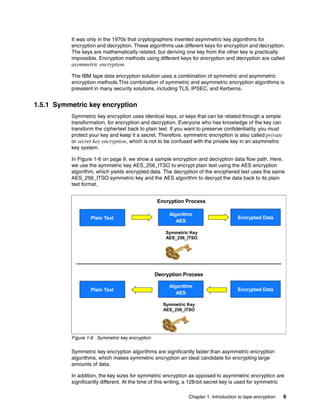
          In Figure 1-6 on page 9, we show a sample encryption and decryption data flow path. Here,
          we use the symmetric key AES_256_ITSO to encrypt plain text using the AES encryption
          algorithm, which yields encrypted data. The decryption of the enciphered text uses the same
          AES_256_ITSO symmetric key and the AES algorithm to decrypt the data back to its plain
          text format.


                                                Encryption Process

                                                      Algorithm
                  Plain Text                                                         Encrypted Data
                                                         AES

                                                    Symmetric Key
                                                    AES_256_ITSO


                                                Decryption Process

                                                      Algorithm
                  Plain Text                                                         Encrypted Data
                                                         AES

                                                   Symmetric Key
                                                   AES_256_ITSO


          Figure 1-6 Symmetric key encryption

          Symmetric key encryption algorithms are significantly faster than asymmetric encryption
          algorithms, which makes symmetric encryption an ideal candidate for encrypting large
          amounts of data.

          In addition, the key sizes for symmetric encryption as opposed to asymmetric encryption are
          significantly different. At the time of this writing, a 128-bit secret key is used for symmetric

                                                              Chapter 1. Introduction to tape encryption   9
AES encryption and the Rivest-Shamir-Adleman (RSA) encryption algorithm suggests a
              1024-bit key length.

              Secret key algorithms can be architected to support encryption one bit at a time or by
              specified blocks of bits. The AES standard supports 128-bit block sizes and key sizes of 128,
              192, and 256 bits. The IBM tape data encryption solution uses an AES-256 bit key.

              Other well-known symmetric key examples include Twofish, Blowfish, Serpent, Cast5, DES,
              TDES, and IDEA.

              Speed and short key length are advantages of symmetric encryption, but there are two
              drawbacks: the way that keys are exchanged and the number of keys required.

              Secure exchange of keys has always been a problem with symmetric encryption. The sender
              and the recipient have to share a common, secret key. The sender of a confidential message
              must make sure that no one other than the intended recipient gets knowledge of the key. So,
              the sender has to transfer the key to the recipient in a secure way, for example, in a
              face-to-face meeting, through a trusted courier, or via a secure electronic channel. This
              method of transferring keys might work as long as only a few people are involved in the
              exchange of confidential information. When a larger number of people have to exchange
              keys, the distribution of secret keys becomes difficult and inefficient with this method.

              The second drawback of symmetric encryption is the large number of required keys. When a
              group of people are to exchange symmetrically encrypted information, each possible pair of
              two people in this group has to share a secret key. The number of required keys grows very
              fast with the number of people in the group. The number of keys required in relation to the
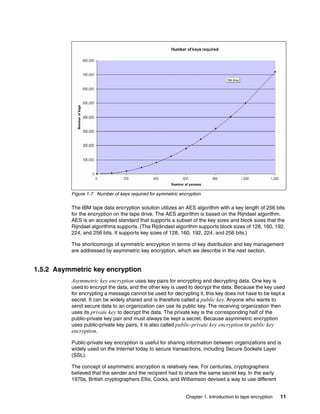
              number of people can be calculated with the following formula, where k is the number of keys,
              and n is the number of people:
                 kn =n(n-1)/2

              As Figure 1-7 illustrates, the number of required keys grows rapidly. For a group of 100
              people, 4,950 different keys are required. A group of 1,000 people requires 499,500 keys.
              This helps to explain why key distribution and key management are such big challenges.


10   IBM System Storage Tape Encryption Solutions
Figure 1-7 Number of keys required for symmetric encryption

          The IBM tape data encryption solution utilizes an AES algorithm with a key length of 256 bits
          for the encryption on the tape drive. The AES algorithm is based on the Rijndael algorithm.
          AES is an accepted standard that supports a subset of the key sizes and block sizes that the
          Rijndael algorithms supports. (The Rijdindael algorithm supports block sizes of 128, 160, 192,
          224, and 256 bits. It supports key sizes of 128, 160, 192, 224, and 256 bits.)

          The shortcomings of symmetric encryption in terms of key distribution and key management
          are addressed by asymmetric key encryption, which we describe in the next section.


1.5.2 Asymmetric key encryption
          Asymmetric key encryption uses key pairs for encrypting and decrypting data. One key is
          used to encrypt the data, and the other key is used to decrypt the data. Because the key used
          for encrypting a message cannot be used for decrypting it, this key does not have to be kept a
          secret. It can be widely shared and is therefore called a public key. Anyone who wants to
          send secure data to an organization can use its public key. The receiving organization then
          uses its private key to decrypt the data. The private key is the corresponding half of the
          public-private key pair and must always be kept a secret. Because asymmetric encryption
          uses public-private key pairs, it is also called public-private key encryption or public key
          encryption.

          Public-private key encryption is useful for sharing information between organizations and is
          widely used on the Internet today to secure transactions, including Secure Sockets Layer
          (SSL).

          The concept of asymmetric encryption is relatively new. For centuries, cryptographers
          believed that the sender and the recipient had to share the same secret key. In the early
          1970s, British cryptographers Ellis, Cocks, and Williamson devised a way to use different


                                                              Chapter 1. Introduction to tape encryption   11
keys for encrypting and decrypting data. Because they were working for GCHQ, a British
              intelligence agency, their findings were kept secret until 1997. In 1976, Whitfield Diffie and
              Martin Hellman invented a solution to the problem, which has since become known as
              Diffie-Hellman key exchange. In 1977 Ron Rivest, Adi Shamir, and Leonard Adleman
              published an algorithm for public key encryption.

              Well-known examples of asymmetric key algorithms are:
                  Rivest-Shamir-Adleman (RSA)
                  Diffie-Hellman
                  Elliptic curve cryptography (ECC)
                  ElGamal

              Today, the RSA algorithm is the most widely used public key technique.

                Note: RSA uses trapdoor functions. Trapdoor functions are mathematical functions that
                are easy to compute in one direction, but difficult to compute in the reverse direction
                without additional information. This additional information is called the trapdoor. In the case
                of RSA, the private key is the trapdoor.

              The advantage of asymmetric key encryption is the ability to share secret data without
              sharing the same encryption key. But there are disadvantages, too. Asymmetric key
              encryption is computationally more intensive and therefore significantly slower than
              symmetric key encryption. In practice, you will often use a combination of symmetric and
              asymmetric encryption. We describe this method in 1.5.3, “Hybrid encryption” on page 14.

              The IBM tape data encryption solution utilizes the asymmetric RSA algorithm to encrypt
              symmetric AES keys.

              Digital signature
              You can use public-private key pairs to protect the content of a message, and also to digitally
              sign a message. For example, if Tony wants to send JoHann a digitally signed message, Tony
              will not use JoHann’s public key to encrypt the message, but Tony’s own private key. The
              content of the encrypted message is not protected, because anyone can decrypt the
              message by using Tony’s public key. But, if JoHann is able to decrypt Tony’s message with
              Tony’s public key, JoHann can be sure that Tony sent the message. JoHann has proof that the
              message was encrypted with Tony’s private key and JoHann knows that only Tony has access
              to this key.

              In practice, predominantly for efficiency reasons, a hash value of the message is signed
              rather than the whole message, but the overall procedure is the same.

              In the previous example, JoHann has to make sure that Tony’s public key really belongs to
              Tony, and not to someone pretending to be Tony. If JoHann cannot confirm this himself,
              JoHann will need a trusted third party to verify Tony’s identity. A certificate issued and signed
              by a Certification Authority (CA) can confirm that the public key belongs to Tony. A certificate
              binds together the identity of a person or organization and its public key. If JoHann trusts the
              CA, JoHann can be sure that it really was Tony who sent the message.

              We discuss certificates in detail in 1.5.4, “Digital certificates” on page 15.

              Of course, you can combine public key encryption and a digital signature to produce a
              message that is both encryption-protected and digitally signed.


12   IBM System Storage Tape Encryption Solutions
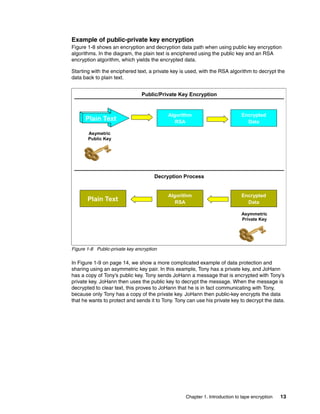
Example of public-private key encryption
Figure 1-8 shows an encryption and decryption data path when using public key encryption
algorithms. In the diagram, the plain text is enciphered using the public key and an RSA
encryption algorithm, which yields the encrypted data.

Starting with the enciphered text, a private key is used, with the RSA algorithm to decrypt the
data back to plain text.


                                Public/Private Key Encryption


                                           Algorithm                          Encrypted
      Plain Text                              RSA                               Data

       Asymetric
       Public Key


                                      Decryption Process


                                           Algorithm                          Encrypted
       Plain Text                             RSA
                                              AES                               Data

                                                                             Asymmetric
                                                                             Private Key


Figure 1-8 Public-private key encryption

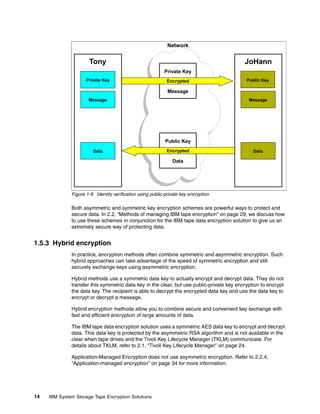
In Figure 1-9 on page 14, we show a more complicated example of data protection and
sharing using an asymmetric key pair. In this example, Tony has a private key, and JoHann
has a copy of Tony’s public key. Tony sends JoHann a message that is encrypted with Tony’s
private key. JoHann then uses the public key to decrypt the message. When the message is
decrypted to clear text, this proves to JoHann that he is in fact communicating with Tony,
because only Tony has a copy of the private key. JoHann then public-key encrypts the data
that he wants to protect and sends it to Tony. Tony can use his private key to decrypt the data.


                                                   Chapter 1. Introduction to tape encryption   13
Network


                      Tony                                                                 JoHann
                                                           Private Key
                     Private Key                             Encrypted                      Public Key

                                                             Message
                      Message                                                                Message


                                                            Public Key
                        Data                                 Encrypted                         Data

                                                               Data


              Figure 1-9 Identity verification using public-private key encryption

              Both asymmetric and symmetric key encryption schemes are powerful ways to protect and
              secure data. In 2.2, “Methods of managing IBM tape encryption” on page 29, we discuss how
              to use these schemes in conjunction for the IBM tape data encryption solution to give us an
              extremely secure way of protecting data.


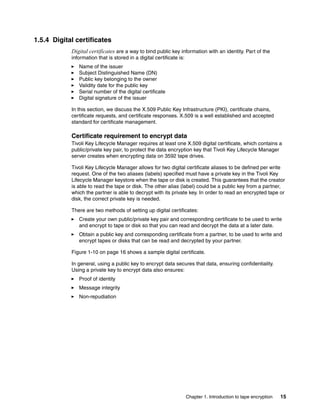
1.5.3 Hybrid encryption
              In practice, encryption methods often combine symmetric and asymmetric encryption. Such
              hybrid approaches can take advantage of the speed of symmetric encryption and still
              securely exchange keys using asymmetric encryption.

              Hybrid methods use a symmetric data key to actually encrypt and decrypt data. They do not
              transfer this symmetric data key in the clear, but use public-private key encryption to encrypt
              the data key. The recipient is able to decrypt the encrypted data key and use the data key to
              encrypt or decrypt a message.

              Hybrid encryption methods allow you to combine secure and convenient key exchange with
              fast and efficient encryption of large amounts of data.

              The IBM tape data encryption solution uses a symmetric AES data key to encrypt and decrypt
              data. This data key is protected by the asymmetric RSA algorithm and is not available in the
              clear when tape drives and the Tivoli Key Lifecycle Manager (TKLM) communicate. For
              details about TKLM, refer to 2.1, “Tivoli Key Lifecycle Manager” on page 24.

              Application-Managed Encryption does not use asymmetric encryption. Refer to 2.2.4,
              “Application-managed encryption” on page 34 for more information.


14   IBM System Storage Tape Encryption Solutions
1.5.4 Digital certificates
            Digital certificates are a way to bind public key information with an identity. Part of the
            information that is stored in a digital certificate is:
               Name of the issuer
               Subject Distinguished Name (DN)
               Public key belonging to the owner
               Validity date for the public key
               Serial number of the digital certificate
               Digital signature of the issuer

            In this section, we discuss the X.509 Public Key Infrastructure (PKI), certificate chains,
            certificate requests, and certificate responses. X.509 is a well established and accepted
            standard for certificate management.

            Certificate requirement to encrypt data
            Tivoli Key Lifecycle Manager requires at least one X.509 digital certificate, which contains a
            public/private key pair, to protect the data encryption key that Tivoli Key Lifecycle Manager
            server creates when encrypting data on 3592 tape drives.

            Tivoli Key Lifecycle Manager allows for two digital certificate aliases to be defined per write
            request. One of the two aliases (labels) specified must have a private key in the Tivoli Key
            Lifecycle Manager keystore when the tape or disk is created. This guarantees that the creator
            is able to read the tape or disk. The other alias (label) could be a public key from a partner,
            which the partner is able to decrypt with its private key. In order to read an encrypted tape or
            disk, the correct private key is needed.

            There are two methods of setting up digital certificates:
               Create your own public/private key pair and corresponding certificate to be used to write
               and encrypt to tape or disk so that you can read and decrypt the data at a later date.
               Obtain a public key and corresponding certificate from a partner, to be used to write and
               encrypt tapes or disks that can be read and decrypted by your partner.

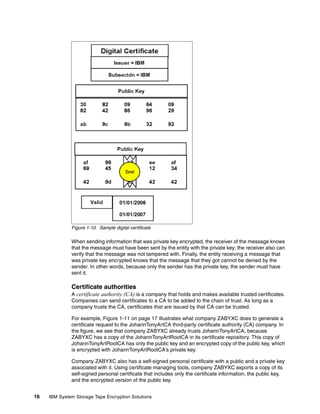
            Figure 1-10 on page 16 shows a sample digital certificate.

            In general, using a public key to encrypt data secures that data, ensuring confidentiality.
            Using a private key to encrypt data also ensures:
               Proof of identity
               Message integrity
               Non-repudiation


                                                                      Chapter 1. Introduction to tape encryption   15
Figure 1-10 Sample digital certificate

              When sending information that was private key encrypted, the receiver of the message knows
              that the message must have been sent by the entity with the private key; the receiver also can
              verify that the message was not tampered with. Finally, the entity receiving a message that
              was private key encrypted knows that the message that they got cannot be denied by the
              sender. In other words, because only the sender has the private key, the sender must have
              sent it.

              Certificate authorities
              A certificate authority (CA) is a company that holds and makes available trusted certificates.
              Companies can send certificates to a CA to be added to the chain of trust. As long as a
              company trusts the CA, certificates that are issued by that CA can be trusted.

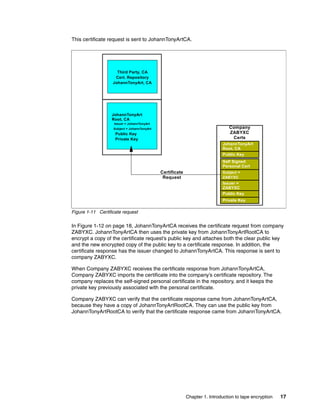
              For example, Figure 1-11 on page 17 illustrates what company ZABYXC does to generate a
              certificate request to the JohannTonyArtCA third-party certificate authority (CA) company. In
              the figure, we see that company ZABYXC already trusts JohannTonyArtCA, because
              ZABYXC has a copy of the JohannTonyArtRootCA in its certificate repository. This copy of
              JohannTonyArtRootCA has only the public key and an encrypted copy of the public key, which
              is encrypted with JohannTonyArtRootCA’s private key.

              Company ZABYXC also has a self-signed personal certificate with a public and a private key
              associated with it. Using certificate managing tools, company ZABYXC exports a copy of its
              self-signed personal certificate that includes only the certificate information, the public key,
              and the encrypted version of the public key.


16   IBM System Storage Tape Encryption Solutions
This certificate request is sent to JohannTonyArtCA.


                     Third Party, CA
                    Cert. Repository
                   JohannTonyArt, CA


                  JohannTonyArt
                  Root, CA
                   Issuer = JohannTonyArt
                   Subject = JohannTonyArt                                     Company
                    Public Key                                                 ZABYXC
                    Private Key                                                 Certs
                                                                            JohannTonyArt
                                                                            Root, CA
                                                                            Public Key
                                                                            Self Signed
                                                                            Personal Cert
                                             Certificate                    Subject =
                                              Request                       ZABYXC
                                                                            Issuer =
                                                                            ZABYXC
                                                                            Public Key
                                                                            Private Key

Figure 1-11 Certificate request

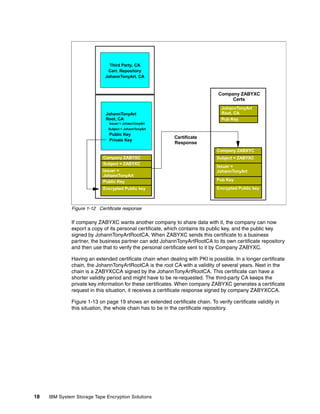
In Figure 1-12 on page 18, JohannTonyArtCA receives the certificate request from company
ZABYXC. JohannTonyArtCA then uses the private key from JohannTonyArtRootCA to
encrypt a copy of the certificate request’s public key and attaches both the clear public key
and the new encrypted copy of the public key to a certificate response. In addition, the
certificate response has the issuer changed to JohannTonyArtCA. This response is sent to
company ZABYXC.

When Company ZABYXC receives the certificate response from JohannTonyArtCA,
Company ZABYXC imports the certificate into the company’s certificate repository. The
company replaces the self-signed personal certificate in the repository, and it keeps the
private key previously associated with the personal certificate.

Company ZABYXC can verify that the certificate response came from JohannTonyArtCA,
because they have a copy of JohannTonyArtRootCA. They can use the public key from
JohannTonyArtRootCA to verify that the certificate response came from JohannTonyArtCA.


                                                           Chapter 1. Introduction to tape encryption   17
Third Party, CA
                              Cert. Repository
                             JohannTonyArt, CA


                                                                               Company ZABYXC
                                                                                    Certs
                                                                                 JohannTonyArt
                             JohannTonyArt                                       Root, CA
                             Root, CA                                            Pub Key
                               Issuer = JohannTonyArt
                              Subject = JohannTonyArt
                               Public Key
                                                            Certificate
                               Private Key
                                                            Response
                                                                               Company ZABXYC
                            Company ZABYXC                                     Subject = ZABYXC
                            Subject = ZABYXC
                                                                               Issuer =
                            Issuer =                                           JohannTonyArt
                            JohannTonyArt
                            Public Key                                         Pub Key

                            Encrypted Public key                               Encrypted Public key


              Figure 1-12 Certificate response

              If company ZABYXC wants another company to share data with it, the company can now
              export a copy of its personal certificate, which contains its public key, and the public key
              signed by JohannTonyArtRootCA. When ZABYXC sends this certificate to a business
              partner, the business partner can add JohannTonyArtRootCA to its own certificate repository
              and then use that to verify the personal certificate sent to it by Company ZABYXC.

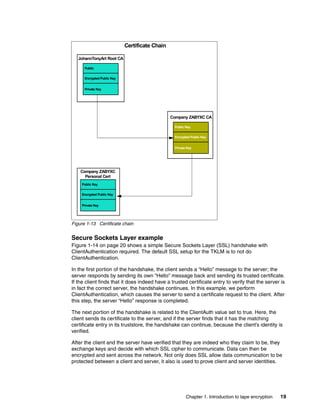
              Having an extended certificate chain when dealing with PKI is possible. In a longer certificate
              chain, the JohannTonyArtRootCA is the root CA with a validity of several years. Next in the
              chain is a ZABYXCCA signed by the JohannTonyArtRootCA. This certificate can have a
              shorter validity period and might have to be re-requested. The third-party CA keeps the
              private key information for these certificates. When company ZABYXC generates a certificate
              request in this situation, it receives a certificate response signed by company ZABYXCCA.

              Figure 1-13 on page 19 shows an extended certificate chain. To verify certificate validity in
              this situation, the whole chain has to be in the certificate repository.


18   IBM System Storage Tape Encryption Solutions
Certificate Chain

   JohannTonyArt Root CA

      Public


      Encrypted Public Key


      Private Key


                                                 Company ZABYXC CA

                                                  Public Key


                                                  Encrypted Public Key


                                                  Private Key


    Company ZABYXC
      Personal Cert
    Public Key


    Encrypted Public Key


    Private Key


Figure 1-13 Certificate chain


Secure Sockets Layer example
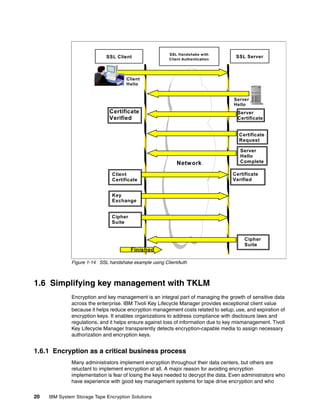
Figure 1-14 on page 20 shows a simple Secure Sockets Layer (SSL) handshake with
ClientAuthentication required. The default SSL setup for the TKLM is to not do
ClientAuthentication.

In the first portion of the handshake, the client sends a “Hello” message to the server; the
server responds by sending its own “Hello” message back and sending its trusted certificate.
If the client finds that it does indeed have a trusted certificate entry to verify that the server is
in fact the correct server, the handshake continues. In this example, we perform
ClientAuthentication, which causes the server to send a certificate request to the client. After
this step, the server “Hello” response is completed.

The next portion of the handshake is related to the ClientAuth value set to true. Here, the
client sends its certificate to the server, and if the server finds that it has the matching
certificate entry in its truststore, the handshake can continue, because the client’s identity is
verified.

After the client and the server have verified that they are indeed who they claim to be, they
exchange keys and decide with which SSL cipher to communicate. Data can then be
encrypted and sent across the network. Not only does SSL allow data communication to be
protected between a client and server, it also is used to prove client and server identities.


                                                         Chapter 1. Introduction to tape encryption   19
SSL Handshake with
                             SSL Client                 Client Authentication
                                                                                     SSL Server


                                      Client
                                      Hello


                                                                                    Server
                                                                                    Hello
                              Certificate                                             Server
                              Verified                                                Certificate


                                                                                       Certificate
                                                                                       Request

                                                                                       Server
                                                                                       Hello
                                                           Network                     Complete

                                Client                                              Certificate
                                Certificate                                         Verified


                                Key
                                Exchange


                               Cipher
                               Suite


                                                                                         Cipher
                                                                                         Suite
                                        Finished

              Figure 1-14 SSL handshake example using ClientAuth


1.6 Simplifying key management with TKLM
              Encryption and key management is an integral part of managing the growth of sensitive data
              across the enterprise. IBM Tivoli Key Lifecycle Manager provides exceptional client value
              because it helps reduce encryption management costs related to setup, use, and expiration of
              encryption keys. It enables organizations to address compliance with disclosure laws and
              regulations, and it helps ensure against loss of information due to key mismanagement. Tivoli
              Key Lifecycle Manager transparently detects encryption-capable media to assign necessary
              authorization and encryption keys.


1.6.1 Encryption as a critical business process
              Many administrators implement encryption throughout their data centers, but others are
              reluctant to implement encryption at all. A major reason for avoiding encryption
              implementation is fear of losing the keys needed to decrypt the data. Even administrators who
              have experience with good key management systems for tape drive encryption and who

20   IBM System Storage Tape Encryption Solutions
believe that key loss can be prevented often have concerns about complexity, interoperability,
           performance, and cost. In addition, administrators must decide whether to encrypt data at
           rest, data in flight, or both. Encrypting tape cartridges inside a physically protected data
           center might appear unnecessary; however, as tape cartridges are retired and physically
           moved outside the data center, data on these devices is exposed to risk.


1.6.2 Encryption and key management for compliance, availability, retention
      and security
           Implementing encryption and key management can help organizations reduce risks, address
           audit deficiencies, and maintain continuous, reliable access to information. Because expired
           or inactive data accounts for a large percentage of total data storage, encryption and key
           management solutions need to support data that an organization might use in the future as
           well as securely dispose of data that is no longer needed. Furthermore, organizations might
           have data retention policies, which, if implemented using encryption and key lifecycle
           management, can simplify and make more predictable the erasure of data.

           Effective encryption and key management eradicates inhibitors to innovation by providing
           effective control over sensitive business assets and efficient automation of processes for
           managing access to critical data. Encryption and key management as implemented by IBM
           can help secure data for new business models, such as the use of service providers, and
           helps enable data sharing without secret key distribution by leveraging public/private key
           cryptography.


1.6.3 Securing data automatically on self-encrypting drives
           Corporations, seeking to avoid data breaches and customer notifications required by privacy
           laws, are attempting to erase data on retired drives before sending them off premises. Risks
           are abundant. Insider threats are growing. Managers of branch offices and small-to-midsize
           businesses without strong physical security also worry about external theft. Now, securing
           data automatically against theft or loss can be achieved with the simplest, most secure
           encryption and key management.

           Data in flight across a fibre channel storage area network (SAN) is not a significant security
           risk because the SAN is an internal, protected network. In order to attack in-flight data, a
           hacker has to tap into a switch (or fibre), decode thousands of SAN packets from different
           sources, and reassemble them to read the data. Malicious attackers typically target data at
           rest on tape cartridges. Greater vulnerabilities reside on databases and file systems stored
           on network-attached storage (NAS), SAN, and file servers where digital assets such as
           intellectual property, credit cards, social security numbers and financial information reside.
           But it can be a complex task to secure each database and file system individually. Building
           encryption into the storage infrastructure makes encryption deployment and management
           dramatically simpler.


1.6.4 Addressing objections to encryption of data at rest
           Tivoli Key Lifecycle Manager and self-encrypting storage provide advantages to encrypting
           data at rest that far exceed implementation costs. In the past, encryption methods decreased
           computing performance, but IBM self-encrypting storage represents the next generation of
           encryption, with less than one percent impact on performance. Organizations that were
           reluctant to adopt encryption due to performance drains can now encrypt at native drive
           speed.


                                                              Chapter 1. Introduction to tape encryption   21
Tivoli Key Lifecycle Manager is simple to install and configure and requires no application or
              server changes, so there is minimal impact to a customer’s environment. Although other
              storage encryption solutions can significantly add to the storage solution cost, IBM’s
              self-encrypting storage solution adds only a small, incremental cost to the storage solution.


22   IBM System Storage Tape Encryption Solutions
2


    Chapter 2.   IBM tape encryption methods
                 In this chapter, we discuss Tivoli Key Lifecycle Manager (TKLM), which is a Java software
                 program that manages keys enterprise-wide and provides encryption-enabled tape drives
                 with keys for encryption and decryption.

                 We describe various methods of managing IBM tape encryption. These methods differ in
                 where the encryption policies reside, where key management is performed, whether a key
                 manager is required, and, if a key manager is required, how the tape drives communicate with
                 it.

                 IBM supports three methods of encrypting data on tape:
                     Library-managed encryption (LME)
                     Application-managed encryption (AME)
                     System-managed encryption (SME)

                 Only two of these methods, SME and LME, require the implementation of an external
                 component, the TKLM, to provide and manage keys. With AME, key provisioning and key
                 management are handled by the application.

                 When describing the encryption methods, we trace the flow of data and keys. We explain how
                 the tape drive communicates with the application and how symmetric keys and asymmetric
                 keys are transferred to the drive. For AME, we describe how the application communicates
                 with the tape drives.

                 In each section, we briefly discuss the criteria that can influence your decision for or against a
                 specific encryption method. For more information, refer to Chapter 4, “Planning for software
                 and hardware” on page 65.


© Copyright IBM Corp. 2010. All rights reserved.                                                                23
2.1 Tivoli Key Lifecycle Manager
              It is common for an enterprise to have a large number of symmetric keys, asymmetric keys,
              and certificates. All of these keys and certificates have to be managed. Key management can
              be handled either internally by an application, such as Tivoli Storage Manager, or by the
              hardware itself using internal licensed code. In this section, we discuss the Tivoli Key
              Lifecycle Manager (TKLM).

              TKLM is an application that performs key management tasks for IBM hardware that is
              encryption-enabled, like the TS1120 and TS1130 Tape Drives and Linear Tape-Open (LTO)
              Ultrium 4 and 5 Tape Drives. The tasks provide, protect, store, and maintain encryption keys
              that are used to encrypt information being written to, and decrypt information being read from
              tape media. TKLM operates on a variety of systems.

              TKLM can be a shared resource deployed in several locations within an enterprise. It is
              capable of serving numerous IBM encrypting tape drives regardless of where those drives
              reside (for example, in tape library subsystems, connected to mainframe systems through
              various types of channel connections, or installed in other computing systems).


2.1.1 What is new in version 2
              Tivoli Key Lifecycle Manager enables you to locally create, distribute, back up, archive, and
              manage the life cycle of keys and certificates in your enterprise.

              New functions in version 2 of Tivoli Key Lifecycle Manager include:
                 Role-based access control that provides permissions to do tasks such as create, modify,
                 and delete for specific device groups. Most permissions are associated with specific
                 device groups.
                 Extension of support to devices using industry-standard Key Management Interoperability
                 Protocol (KMIP) for encryption of stored data and the corresponding cryptographic key
                 management. This reduces dependency on specific vendors and enhances the product’s
                 standing with peer-reviewed protocols.
                 Extension of support to devices using Internet Key Exchange (IKEv2-SCSI) Version 1 for
                 secure interchange of keys between cryptographic units.

                   Note: Tivoli Key Lifecycle Manager does not support IKEv2-SCSI if you use the Federal
                   Information Processing Standard (FIPS). If your system uses IKEv2-SCSI, do not
                   specify a value for the fips property that Tivoli Key Lifecycle Manager provides.

                 Serving of symmetric keys to DS5000 storage servers.
                 Version 2 can provide administration and ongoing maintenance of keys served to DS5000
                 storage servers and restrict the set of machines with which a device such as a disk drive
                 can be associated by associating a device to an existing machine in the Tivoli Key
                 Lifecycle Manager database.
                 Additional usability changes.
                 Supported platforms:
                 Red Hat Enterprise Linux RHEL 5 - x86-32
                 SuSE Linux (SLES) 10.0 - x86-32
                 SuSE Linux (SLES) 11.0 Enterprise Server x86-32 - x86-32


24   IBM System Storage Tape Encryption Solutions
Windows Server 2003 Enterprise Edition (32 bit mode)
              Windows Server 2003 Standard Edition (32 bit mode)
              Windows Server 2008 Enterprise Edition (32 bit mode)
              Windows Server 2008 Standard Edition (32 bit mode)
              AIX 5.3 System i/p
              AIX 6.1 System i/p

            Note: Refer to Chapter 9, “Administration” on page 161 for a detailed discussion about the
            new functions.


2.1.2 Tivoli Lifecycle Key Manager components and resources
           The sole task of the Tivoli Lifecycle Key Manager is to handle the serving of keys to the
           encrypting tape drives. The TKLM does not perform any cryptographic operations, such as
           generating encryption keys, and it does not provide storage for keys and certificates. Instead,
           TKLM relies on external components to perform these tasks. In the following sections, we
           describe the components of TKLM and the resources that are used by TKLM.
              Lifecycle functions
              – Notification of certificate expiration through the Tivoli Integrated Portal (TIP)
              – Automated rotation of certificates
              – Automated rotation of groups of keys
              Usability enhancements
              –   Provides a graphical user interface (GUI)
              –   Initial configuration wizards
              –   Migration wizards
              –   User defined device groups
              –   RBAC
              –   adding devices to TKLM new method
              Integrated backup and restore of TKLM file
              – One button to create and restore a single backup packaged as a JAR file
              TIP installation manager
              – Simple to use installation for Windows, Linux, AIX, Solaris
              – Can be a silent installation
              Machine affinity
              LTO variable length serial number


                                                               Chapter 2. IBM tape encryption methods   25
Figure 2-1 shows the TKLM components and external resources.


              Figure 2-1 TKLM components and resources


              DB2
              TKLM stores the drive table in DB2®, giving the user a more robust interface for managing
              drives, and the keys and certificates that are associated with those drives. This enables the
              user to more easily search and query that information.

              Enterprise WebSphere Application Server (eWAS)
              The Enterprise WebSphere® Application Server, identified in the figure as eWAS, is a
              software application server that is built using open standards such as Java EE, XML, and
              Web Services. It is supported on the following platforms: Windows, AIX, Linux, Solaris, i/OS
              and z/OS. Beginning with Version 6.1 and now into Version 7, the open standard
              specifications are aligned and common across all the platforms. Platform exploitation, to the
              extent it takes place, is done below the open standard specification line.

              Enterprise WebSphere Application Server works with a number of web servers, including
              Apache HTTP Server, Netscape Enterprise Server, Microsoft Internet Information Services
              (IIS), IBM HTTP Server for i5/OS, IBM HTTP Server for z/OS, and IBM HTTP Server for
              AIX/Linux/Microsoft Windows/Solaris. WebSphere Application Server uses port 9060 for
              connection.

              IBM Tivoli Integrated Portal
              IBM Tivoli Integrated Portal (TIP) is a standards-based architecture for web administration.
              Tivoli Integrated Portal enables administrative interfaces as individual plug-ins to a common
              console network. It enables single sign-on, an authentication process that enables you to
              enter one user ID and password to access multiple applications.

                Tip: The option to automatically accept unknown tape drives can facilitate the task of
                populating the tape drive table with your drives. For security reasons, you might want to
                turn off this option as soon as all of your tape drives have been added to the table.
                However, in a business continuity and recovery site, like Sunguard or IBM BCRS,
                accepting unknown tape drives is required.


              Configuration file
              TKLM has an editable configuration file with additional configuration parameters that are not
              offered in the GUI. The file can be text-edited, but the preferred method is to modify the file
              through the TKLM command-line interface (CLI).


26   IBM System Storage Tape Encryption Solutions
We discuss the configuration of TKLM extensively in Chapter 9, “Administration” on page 161,
          where we describe the full set of configuration options.

          Java security keystore
          The keystore is defined as part of the Java Cryptography Extension (JCE) and is an element
          of the Java Security components, which are, in turn, part of the Java Runtime Environment
          (JRE). A keystore holds the certificates and keys (or pointers to the certificates and keys)
          used by TKLM to perform cryptographic operations. A keystore can be either hardware-based
          or software-based.

          TKLM supports several types of Java keystores, offering a variety of operational
          characteristics to meet your requirements.

          TKLM Open systems
          TKLM on open systems supports the JCE keystore (JCEKS). This keystore supports both
          CLEAR key symmetric keys, and CLEAR key asymmetric keys. Symmetric keys are used for
          LTO4 and LTO5 encryption drives and asymmetric keys are used for TS1120 and TS1130
          Tape Drives.

          Cryptographic services
          IBM Java Security components provide cryptographic capabilities; TKLM itself does not
          provide cryptographic capabilities and therefore does not require, nor is it allowed to obtain,
          FIPS 140-2 certification. However, TKLM takes advantage of the cryptographic capabilities of
          the IBM Java Virtual Machine (JVM) in the IBM Java Cryptographic Extension component and
          enables the selection and use of the IBMJCEFIPS cryptographic provider, which has a FIPS
          140-2 Level 1 certification. By setting the FIPS configuration parameter to ON in the
          Configuration Properties file, either through text editing or by using the TKLM CLI, you can
          make TKLM use the IBMJCEFIPS provider for all cryptographic functions.

          For more information about the IBMJCEFIPS provider, its selection, and its use, see:
          http://www.ibm.com/developerworks/java/jdk/security/50/FIPShowto.html


2.1.3 Key exchange
          TKLM acts as a process awaiting key generation or key retrieval requests sent to it through a
          TCP/IP communication path between TKLM and the tape library, tape controller, tape
          subsystem, device driver, or tape drive. When a tape drive writes encrypted data, it first
          requests an encryption key from TKLM. The tasks that TKLM performs upon receipt of the
          request are different for TS1120 and TS1130 Tape Drives than for LTO Ultrium Tape Drives.

          TS1120 and TS1130 Tape Drives
          TKLM requests an Advanced Encryption Standard (AES) key from the cryptographic services
          and serves it to the tape drives in either of two protected forms:
             Encrypted or wrapped, using Rivest-Shamir-Adleman (RSA) key pairs. TS1120 and
             TS1130 Tape Drives write this copy of the key to the cartridge memory and three
             additional places on the tape media in the cartridge for redundancy.
             Separately wrapped for secure transfer to the tape drive, where it is unwrapped upon
             arrival and the key inside is used to encrypt the data being written to tape.

          Additionally, the libraries now support SSL-encrypted connections between the TKLM and
          library for key exchanges. However, note that when not using SSL for key exchange the key


                                                             Chapter 2. IBM tape encryption methods   27
material will be encrypted in another fashion. The transport of keys is always secure across
              the TCP/IP connection.

              When an encrypted tape cartridge is read by a TS1120 or TS1130 Tape Drive, the protected
              AES key on the tape is sent to TKLM, where the wrapped AES key is unwrapped. The AES
              key is then wrapped with a different key for secure transfer back to the tape drive, where it is
              unwrapped and used to decrypt the data stored on the tape. TKLM also allows protected AES
              keys to be rewrapped, or rekeyed, using different RSA keys from the original keys that were
              used when the tape was written. Rekeying is useful when an unexpected need arises to
              export volumes to business partners whose public keys were not included; it eliminates
              having to rewrite the entire tape and enables a tape cartridge’s data key to be reencrypted
              with a business partner’s public key. For a more detailed description, refer to 2.2.3,
              “Encrypting and decrypting with SME and LME” on page 32.

              LTO Ultrium 4 and Ultrium 5 Tape Drives
              The TKLM fetches an existing AES key from a keystore and wraps it for secure transfer to the
              tape drive, where it is unwrapped upon arrival and used to encrypt the data being written to
              tape.

              When an encrypted tape is read by a Tape Drive, the TKLM fetches the required key from the
              keystore, based on the information in the Key ID on the tape, and serves it to the tape drive
              wrapped for secure transfer.

              See Figure 2-2 on page 28 for a quick view of LTO media cartridge compatibility.


              Figure 2-2 LTO5, 4 and 3 compatibility


28   IBM System Storage Tape Encryption Solutions
2.2 Methods of managing IBM tape encryption
          There are three methods of tape encryption management supported by the IBM tape data
          encryption solution. These methods differ in where the encryption policy engine resides,
          where key management is performed, and how the TKLM is connected to the drive.
          Encryption policies control which volumes need to be encrypted.

          Key management and the encryption policies can be located in any one of the following three
          environmental layers:
             Library layer
             Application layer
             System layer

          In accordance with the layers, we call these methods:
             Library-managed encryption (LME)
             Application-managed encryption (AME)
             System-managed encryption (SME)

          Not all operating systems, applications, and tape libraries support all of these methods, and
          where they are supported, not all of the methods are equally suitable. When you plan for tape
          encryption, select the encryption method based on your operating environment. In the
          following sections, we explain the characteristics of AME, SME, and LME.


2.2.1 System-managed encryption
          In a system-managed encryption (SME) implementation, encryption policies reside within the
          system layer. This method of tape encryption requires TKLM for key management. SME is
          fully transparent to the application and library layers. Figure 2-3 shows a schematic illustration
          of SME.

          SME is supported on the following open systems platforms:
             AIX
             Windows
             Linux
             Solaris

          On open systems platforms, the IBM tape device driver is used for specifying encryption
          policies on a per-drive basis.

          SME offers you centralized enterprise-class key management, which facilitates tape
          interchange and migration. Another advantage is its support for stand-alone drives.
          Drawbacks are its policy granularity on open systems, additional responsibilities for the
          storage administrator, and the dependency of data access on the availability of the TKLM and
          the key path.

          SME shares most of its advantages and disadvantages with LME, but with two major
          differences. Naturally, LME does not support stand-alone tape drives. However, in an open
          systems environment, LME gives you better policy granularity than SME because you can
          control encryption on a per-volume basis with TS3500 tape libraries.

          In an open systems environment with stand-alone drives and an application that does not
          support encryption, SME is the only choice. In all other environments, consider LME as an
          alternative.


                                                               Chapter 2. IBM tape encryption methods    29
Application
                                                                                       Layer

                     Encryption
                    Key Manager
                                                                       Policy
                                                                                       System
                                                                                       Layer


                                                                                       Library
                                                                                       Layer


              Figure 2-3 System-managed encryption (SME)


              System-managed encryption for open systems
              Encryption policies specifying when to use encryption are set up in the IBM tape device
              driver. For details about setting up system-managed encryption on tape drives in an Open
              Systems environment, see the IBM Tape Device Driver Installation and User’s Guide,
              GC27-2130, and the planning and operator guide for your tape library.

              On open systems this support can be described as in-band, where tape drive requests to the
              TKLM component travel over the Fibre Channels to the server hosting the TKLM.


2.2.2 Library-managed encryption
              In a library-managed encryption (LME) implementation, encryption policies reside within the
              tape library. This method of tape encryption requires TKLM for key management. LME is fully
              transparent to the application and system layers. Figure 2-4 shows an illustration of
              library-managed encryption.

              LME offers you the broadest range of application and operating system support. Centralized
              enterprise-class key management facilitates tape interchange and migration. If you
              implement LME on a TS3500 tape library, you get policy granularity on a per-volume basis.
              LME comes with additional responsibilities for the storage administrator as compared to AME.
              Data access depends on the availability of TKLM and the key path.

              In most open systems environments, LME is the preferred method for tape encryption.


30   IBM System Storage Tape Encryption Solutions
Application
                                                                    Layer

    Encryption
   Key Manager
                                                                    System
                                                                    Layer


                                                                    Library
                                                    Policy
                                                                    Layer


Figure 2-4 Library-managed encryption (LME)

LME can be implemented on:
   Open systems-attached TS3500 tape library with TS1120, TS1130 and LTO Ultrium 4 and
   5 Tape Drives
   Open systems-attached TS3400 tape library with TS1120 and TS1130 Tape Drives
   TS3310, TS3200 with LTO Ultrium 4 and 5 Tape Drives
   TS3100 tape library with LTO Ultrium 4 Tape Drives

Key generation and management is handled by TKLM running on a host with a TCP/IP
connection to the library. Policy control and keys pass through the library-to-drive interface;
therefore, encryption is transparent to the applications.

For TS3500 tape libraries, you can use barcode encryption policies (BEPs) to specify when to
use encryption. On an IBM TS3500 Tape Library, you set these policies through the IBM
System Storage Tape Library Specialist web interface. With BEPs, policies are based on
cartridge volume serial numbers. LME also allows for encryption of all volumes in a library,
independent of barcodes.

For certain applications, such as Symantec NetBackup, LME includes support for Internal
Label Encryption Policy (ILEP). When ILEP is configured, the TS1120 and TS1130 or LTO
Ultrium 4 and Ulrium 5 Tape Drive automatically derives the encryption policy and key
information from the metadata written on the tape volume by the application. Refer to your
tape library operator’s guide for details.

The following IBM tape libraries support library-managed encryption:
   IBM System Storage TS3500 Tape Library
   IBM System Storage TS3400 Tape Library
   IBM System Storage TS3310 Tape Library
   IBM System Storage TS3200 Tape Library
   IBM System Storage TS3100 Tape Library

 Note: System-managed encryption and library-managed encryption interoperate with one
 another. A tape that is encrypted using SME can be decrypted using LME, and the other
 way around, provided that they both have access to the same keys and certificates.


                                                    Chapter 2. IBM tape encryption methods    31
2.2.3 Encrypting and decrypting with SME and LME
              Encryption and decryption with system-managed encryption and with library-managed
              encryption are identical as far as their process flow.

              SME and LME encryption processes
              Figure 2-5 on page 33 describes the flow of encrypted data to tape, and how keys are
              communicated to the tape drive and then stored on the tape media. In this particular example,
              we assume TKLM is running on an abstract server, and that the tape library and,
              consequently, the tape drives are connected to another abstract server. These can be the
              same server or different servers; whether the server is the same or not does not affect the
              outcome.

              We assume that a certificate from a business partner had been imported into this keystore. It
              only has a public key associated with it; the business partner has the corresponding private
              key.

              Now, our server sends a write request to the drive. Our drive is encryption-capable, and the
              host has requested encryption. As part of this initial write, the drive obtains two Key
              Encrypting Key (KEK) labels from the host or a proxy that are aliases for two
              Rivest-Shamir-Adleman (RSA) algorithm KEKs. The drive requests that the TKLM send it a
              data key (DK) and to encrypt the DK using the public KEKs.

              The TKLM validates that the drive is in its list of valid drives. After validation, the TKLM
              obtains a random DK from cryptographic services. The TKLM then retrieves the public halves
              of the KEKs aliased by the two KEK labels. The TKLM then requests that cryptographic
              services create two encrypted instances of the DK using the public halves of the KEKs,
              thereby creating two Externally Encrypted Data Keys (EEDKs).

              The TKLM sends both EEDKs to the tape drive. The drive stores the EEDKs in the cartridge
              memory (CM) and three locations on the tape. The TKLM also sends the DK to the drive in a
              secure manner. The drive uses the separately secured DK to encrypt the data.

              The two modes for creating the EEDK are:
                 CLEAR or LABEL: In this mode, the KEK label is stored in the EEDK.
                 Hash: In this mode, a Hash of the public half of the KEK is stored in the EEDK.

              When sharing business partner KEKs, we recommend using the Hash mode. The Hash mode
              lets each party use any KEK label when importing a certificate into their keystore. The
              alternative is to use the CLEAR or LABEL mode and then have each party agree on a KEK
              label.


32   IBM System Storage Tape Encryption Solutions
Figure 2-5 Key and data flow for encryption using SME or LME


SME and LME decryption processes for TS1120 and TS1130 Tape Drive
Figure 2-6 on page 34 shows the key and data flow for decryption. In this example, we
assume that the data was encrypted at another site. For the decryption process, the tape has
two EEDKs stored in its cartridge memory. We call these EEDK1 and EEDK2. EEDK1 was
stored with the CLEAR (or LABEL) mode selected, and EEDK2 was stored with the Hash
mode selected.

An encrypted tape is mounted for a read or a write append. The two EEDKs are read from the
tape. The drive asks the TKLM to decrypt the DK from the EEDKs. The TKLM validates that
the drive is in its list of valid drives. After validation, the TKLM requests the keystore to provide
the private halves of each KEK used to create the EEDKs. The KEK label associated with
EEDK1 cannot be found in the keystore, but the Hash of the public key for EEDK2 is found in
the keystore.

The TKLM asks cryptographic services to decrypt the DK from EEDK2 using the private half
of the KEK associated with EEDK2. The TKLM then sends the DK to the drive in a secure
manner. The drive then decrypts the data on the tape. In our example, we described reading
from an encrypted tape. Exactly the same communication between tape drive and the TKLM
takes place for a write-append.


                                                       Chapter 2. IBM tape encryption methods     33
Figure 2-6 Key and data flow for decryption using SME or LME


2.2.4 Application-managed encryption
              For application-managed encryption (AME), the application has to be capable of generating
              and managing encryption keys and of managing encryption policies. IBM Tivoli Storage
              Manager includes these capabilities. Policies specifying when encryption is to be used are
              defined through the application interface. The policies and keys pass through the data path
              between the application layer and the encrypting tape drives. Encryption is the result of
              interaction between the application and the encryption-enabled tape drive and does not
              require any changes to the system and library layers. This is illustrated in Figure 2-7 on
              page 35.

              AME is the easiest encryption method to implement and adds the fewest responsibilities for
              the storage administrator. Because the data path and the key path are the same, there is no
              additional risk to data and drive availability. Policy granularity depends on the application.
              With Tivoli Storage Manager, you control encryption on a storage pool basis. There is no
              centralized key management with AME because the application generates, stores, and
              manages the encryption keys. The lack of centralized key management makes tape
              interchange and migration more difficult.

              AME can be the most convenient solution when IBM Tivoli Storage Manager is the only
              application that utilizes tape encryption.

              IBM Tivoli Storage Manager does not restrict you to using AME. You can also choose SME or
              LME to encrypt Tivoli Storage Manager data.

                Note: Tape volumes written and encrypted using the AME method can only be decrypted
                with an AME solution. In addition, because the data keys reside only in the IBM Tivoli
                Storage Manager database, the same database must be used.


34   IBM System Storage Tape Encryption Solutions
Policy
                                                                    Application
                                                                    Layer


                                                                    System
                                                                    Layer


                                                                    Library
                                                                    Layer


Figure 2-7 Application-managed encryption (AME)

AME on IBM TS1120, TS1130 and LTO Ultrium 4 and 5 Tape Drives can use either of two
encryption command sets, the IBM encryption command set developed for TKLM or the T10
command set defined by the International Committee for Information Technology Standards
(INCITS).

AME using the TS1120 and TS1130 Tape Drives is supported in the following IBM libraries:
   IBM System Storage TS3400 Tape Library
   IBM System Storage TS3500 Tape Library

Application-managed tape encryption using LTO Ultrium 4 and Ultrium 5 Tape Drives is
supported in the following IBM tape drives and libraries:
   IBM System Storage TS2340 Tape Drive Express Model S43 and Xcc/HVEC 3580S4X
   IBM System Storage TS3100 Tape Library
   IBM System Storage TS3200 Tape Library
   IBM System Storage TS3310 Tape Library
   IBM System Storage TS3500 Tape Library

For details about setting up AME, refer to your Tivoli Storage Manager documentation or the
following website:
http://publib.boulder.ibm.com/infocenter/tivihelp/v1r1/index.jsp

Example of application-managed encryption
In this section, we describe how data is encrypted to tape using Tivoli Storage Manager as
the key manager. Figure 2-8 on page 36 shows a high-level diagram depicting how data and
keys travel to and from the tape when writing from the beginning of the tape (BOT).

In the figure, a tape drive mounts a tape for encryption. The tape drive then sends its tape ID
or VOLSER to IBM Tivoli Storage Manager.IBM Tivoli Storage Manager then generates a
256-bit AES data key, encrypts the data key, and stores the encrypted data key and the tape
identifier in the Tivoli Storage Manager database. IBM Tivoli Storage Manager then sends the
data key to the tape drive. Using the AES algorithms and the data key that was sent to it, the
tape drive encrypts data to the tape.


                                                   Chapter 2. IBM tape encryption methods   35
TSM
                             Server
                                                                   Tape
                                                                   Drive
                                                Tape ID
                       Generate Data Key
                       Store Data Key in DB                  Encrypt Data
                                                Data Key      with Data Key


                             Database                Encrypted         Tape ID
                     Tape ID   Data Key                     Data

                     Tape1     AES Data Key1
                     Tape2     AES Data Key2
                                                                   Tape
                     Tape3     AES Data Key3
                                                                AES 256
                     ...       ...                            Encrypted Data


              Figure 2-8 Application-managed encryption data flow for encryption

              Figure 2-9 on page 37 shows the flow of data and keys when using AME to read or
              write-append an encrypted cartridge. In this diagram, Tivoli Storage Manager is the
              application that controls encryption.

              In our example, an encrypted tape is mounted for decryption. The tape drive reads the tape
              ID or VOLSER and sends that information to IBM Tivoli Storage Manager. IBM Tivoli Storage
              Manager looks up that tape ID in its internal database and finds the entry associated with it.
              IBM Tivoli Storage Manager then decrypts the data key from the entry. IBM Tivoli Storage
              Manager then sends the data key to the tape drive.

              Now, the tape drive can read data from the tape, decrypting the data as it reads using the
              256-bit AES data key and the AES algorithms to yield clear data.


36   IBM System Storage Tape Encryption Solutions
TSM
                           Server
                                              Tape ID        Tape
                       Search Table for      Data Key
                                                              Drive
                        Tape ID
                       Retrieve DataKey      Decrypted    Decrypt Data
                                                             with Data Key
                        from Database          Data


                           Database                Encrypted         Tape ID
                Tape ID      Data Key                      Data

                Tape1        AES Data Key1
                Tape2        AES Data Key2
                                                                  Tape
                Tape3        AES Data Key3
                                                              AES 256
                ...          ...                            Encrypted Data


          Figure 2-9 Application-managed encryption data flow for decryption


2.2.5 Mixed mode example
          In the previous sections, we described how encryption works with different tape encryption
          methods. This section describes a mixed environment, using different types of tape
          encryption methods. In reality, an enterprise is likely to have several types of systems. The
          tape solutions can commingle and allow all of those disparate setups to take advantage of
          tape data encryption.

          Figure 2-10 on page 38 shows an enterprise taking advantage of both in-band and
          out-of-band encryption. In addition, this picture shows both a system-managed encryption
          solution and a library-managed encryption solution implemented concurrently in the same
          enterprise.

          In our example, a TKLM is running on a z/OS system, taking advantage of hardware
          cryptography for its keystore. There is also a miscellaneous IBM server system with a TKLM
          running and an open systems server attached to a TS3500 tape library. The z/OS system and
          the open systems server are attached to two separate libraries. The IBM server, which is
          running a backup TKLM, is not attached to any libraries, but it is attached to the shared
          LAN/WAN.

          We can see that the open systems server is running LME on its library. All data is sent across
          Fibre Channel to the library to be encrypted to tape. The keys that this library uses for
          encryption, however, come across the network from either the z/OS TKLM or the IBM server
          TKLM.

          The library that is attached to the z/OS system shows both in-band and out-of-band
          encryption. The z/OS system attached to the library is using in-band encryption. TKLM
          communication to the library is across the Fibre Channel, and data is also sent across the
          Fibre Channel. In addition, this library is pointing to the backup TKLM on the IBM server
          system. The keys that are served to the library from the IBM server flow across the network,
          which requires the library’s control unit to have network access.


                                                                    Chapter 2. IBM tape encryption methods   37
Figure 2-10 Encryption in a mixed environment


                Tape drives, libraries and media relationship
                A quick view of the relationships among the components is shown in Table 2-1

Table 2-1 Encryption hardware components relationship
 Tape Library     Tape Drive         Tape Media            Encryption Method

 TS2900           3572-S4H           LTO4                  LME, AME, SME

 TS3100           LTO4               LTO4                  LME, AME, SME
                                                           Using T10, for SAS and Fibre Channel drives only.

 TS3200           LTO4, LTO5         LTO4, LTO5            LME, AME, SME
                                                           Using T10, for SAS and Fibre Channel drives only.

 TS3310           LTO4 SAS and       LTO4                  LME, AME, SME
                  Fibre Channel

 TS3400           TS1120             3592-JA, JB           LME, AME, SME

 TS3500           LTO4, LTO5,        LTO4, LTO5,           LME,AME, SME
                  TS1120, TS1130     3592-JA, JB, JJ,
                                     WORM-JR, JW, JX


38    IBM System Storage Tape Encryption Solutions
3


    Chapter 3.   IBM System Storage tape and
                 tape automation for encryption
                 A wide variety of IBM tape products support encryption. In this chapter, we introduce and
                 describe the IBM tape drives, the IBM tape libraries, and the IBM Tape Virtualization solution
                 that support tape encryption in Open Systems. We discuss the characteristics of each
                 product and how it supports tape encryption.

                 The following products are covered:
                     IBM System Storage TS1120 and TS1130 Tape Drives
                     IBM Linear Tape-Open (LTO) Ultrium 4 and 5 Tape Drives
                     IBM LTO Tape Libraries:
                     –   IBM TS2900 Tape Autoloader
                     –   IBM TS3100 Tape Library Express Model
                     –   IBM TS3200 Tape Library Express Model
                     –   IBM TS3310 Tape Library
                     –   IBM TS3400 Tape Library
                     IBM System Storage TS3500 Tape Library

                 For more information about tape drives and libraries, see:
                     IBM System Storage Tape Library Guide for Open Systems, SG24-5946
                     IBM TS3500 Tape Library with System z Attachment: A Practical Guide to TS1120 Tape
                     Drives and TS3500 Tape Automation, SG24-6789
                     IBM System Storage TS1120 and TS1130 Tape Drives and TS1120 Controller (3592
                     Models J1A, E05, E06, EU6, J70 and C06) Introduction and Planning Guide, GA32-0555.


© Copyright IBM Corp. 2010. All rights reserved.                                                             39
3.1 IBM System Storage TS1130 and TS1120 Tape Drive
              The IBM System Storage TS1130 Tape Drive (machine type 3592, Model E06) represents the
              third generation of IBM 3592 Tape Drives. The TS1130 is designed for applications that
              require high capacity and fast access to data across a wide range of environments.


3.1.1 Tape data encryption support
              The IBM TS1130 Tape Drive and IBM TS1120 Tape Drive support encryption of data on a
              tape cartridge. All IBM TS1130 Tape Drives and IBM T1120 Tape Drives with a serial number
              of 13-65000 or higher are encryption-capable. For currently installed TS1120 drives with a
              serial number lower than 13-6500, a chargeable upgrade is available.

              The encryption capability is implemented through tape drive hardware, and microcode
              additions and changes. All 3592 media, including WORM cartridges, can be encrypted. In
              addition, two applications are designed to support encryption: Tivoli Key Lifecycle Manager
              (TKLM) and Encryption Key Manager (EKM). TKLM uses standard key repositories on
              supported platforms. TKLM is required on a supported server to interface with the tape drive
              for encryption in a system-managed encryption or library-managed encryption
              implementation.

              With encryption enabled, the access time to data on the tape drive increases, with the bulk of
              the time spent in OPEN processing when from the load point. Also, the tape drive unload time
              increases. This is because of the time necessary to retrieve, read, and write the encryption
              key.

                Note: When attaching to a System z server, the IBM 3592 Tape Controller Model C06 or
                the IBM 3592 Tape Controller Model J70 is required to support tape data encryption.


              Host attachment
              In an open systems environment, you can connect different systems to the two Fibre Channel
              ports and use the drive from each system, but you cannot share a drive between an open
              systems and a System z environment. A better approach is to connect each port to an
              independent fabric for redundancy and zone the fabric so both open systems hosts can
              access both ports. When combined with an IBM device driver, on most platforms this will
              provide both load balancing and path failover. For more information, see the IBM
              TotalStorage® Tape Device Drivers Installation and User’s Guide, GC35-0154, available at
              the following ftp site:
              ftp://ftp.software.ibm.com/storage/devdrvr/
                 Open systems attachment
                 A TS1130 can attach to IBM System i®, i5, iSeries®, AS/400®, System p®, p5, pSeries®,
                 RS/6000®, RS/6000 SP systems, System z9® and System z servers, System x® and
                 xSeries®, Netfinity®, and non IBM servers, workstations, and personal computers that
                 support Fibre Channel interfaces.

              For the latest details about specific hardware, software, and Fibre Channel support for the
              IBM TS1120 Tape Drive, refer to the following website:
              http://www.ibm.com/systems/storage/tape/ts1130/index.html

              For the latest information about applications and the levels that support TS1130 Tape Drives,
              refer to the Independent Software Vendor (ISV) matrixes at:
              http://www.ibm.com/systems/storage/tape/pdf/compatibility/ts1120_isv_matrix.pdf

40   IBM System Storage Tape Encryption Solutions
For supported host bus adapters, refer to:
           http://www.ibm.com/systems/support/storage/config/hba/index.wss

           For additional information about TS1130, refer to IBM System Storage TS1120 and TS1130
           Tape Drives and TS1120 Controller Introduction and Planning Guide 3592 Models J1A, E05,
           E06, EU6, J70 and C06, GA32-0555.


3.1.2 IBM TotalStorage 3592 Model J70 Tape Controller
           The Model J70 controller is the predecessor of the TS1120 Model C06. It has been withdrawn
           from marketing, but existing installations can upgrade the microcode level of the J70 to
           support tape data encryption when encryption-enabled TS1120 Tape Drives are attached.
           See Figure 3-1.

           The 3592 Model J70 controller supports TS1130, TS1120, and 3592-J1A drives in a TS3500
           library.

           To use tape encryption, all tape drives behind the J70 must be TS1130 Model E06, TS1130
           Model EU6, or TS1120 Model E05 drives; in the system-managed (SMStape) environment,
           intermixing encryption-enabled and non-encryption-enabled TS1120 Model E05 drives is not
           supported behind the same tape controller.


           Figure 3-1 IBM 3592 Model J70 Tape Controller


                                 Chapter 3. IBM System Storage tape and tape automation for encryption   41
3.2 IBM LTO Ultrium tape drives and libraries
              In this section, we provide an overview of LTO Ultrium tape drive and media technology and
              describe IBM LTO Ultrium tape drives and automated tape libraries. We describe the following
              products:
                 IBM System Storage TS2240 and TS2250 Tape Drive Express Model
                 IBM System Storage TS2340 and TS2350 Tape Drive Express Model
                 IBM System Storage TS1040 and TS1050 Tape Drive
                 IBM System Storage TS2900 Tape Autoloader
                 IBM System Storage TS3100 Tape Library
                 IBM System Storage TS3200 Tape Library
                 IBM System Storage TS3310 Tape Library

              The System Storage TS3500 Tape Library also supports IBM LTO Ultrium tape drives, but it is
              not exclusively an LTO tape library. It supports the installation of IBM LTO Ultrium, IBM
              System Storage TS1120 Tape Drives, and IBM System Storage TS1130 Tape Drives. Using
              IBM TS1120 or IBM TS1130 Tape Drives, the TS3500 attaches not only to open systems, but
              also to System z hosts. We discuss the TS3500 Tape Library in a separate section (3.4, “IBM
              System Storage TS3500 Tape Library” on page 57).


3.2.1 LTO overview
              The LTO Program was formed in 1997 by IBM, Hewlett-Packard (HP), and Seagate. The three
              companies, HP, IBM, and Quantum (the successor to Seagate), jointly oversee the
              development and road map of Linear Tape-Open (LTO) technology.

              The LTO technology objective was to establish new open-format specifications for high
              capacity, high performance tape storage products for use in the midrange and network server
              computing environments and to enable superior tape product options.

              LTO program cooperation goes beyond the initial three companies. LTO format specifications
              have been made available to all who want to participate through standard licensing
              provisions. LTO program technology has attracted a number of other industry leaders, so that
              LTO-specified products (tape drives and tape storage cartridges) will reach the market from
              multiple manufacturers, not just the technology provider companies. This is critical to meeting
              an open market objective and is accomplished through open licensing of the technology.

              Cooperation is also evident in the LTO program requirement that all products produced by
              licensees are technically certified annually. The primary objective of this certification is to help
              determine whether LTO format cartridges will be interchangeable across drives produced by
              different LTO Ultrium manufacturers. In other words, LTO-compliant media from any vendor
              can be read and written in LTO-compliant drives from any vendor.

              All three consortium members (IBM, HP, and Quantum) are shipping LTO Ultrium products,
              and numerous other licensees are shipping hardware and media.

              The Linear Tape-Open organization website is:
              http://www.lto.org

              For more information about LTO technology, refer to the IBM System Storage Tape Libraries
              Guide for Open Systems, SG24-5946.

              The IBM LTO website is:
              http://www.ibm.com/storage/lto


42   IBM System Storage Tape Encryption Solutions
The LTO Ultrium road map (Figure 3-2 on page 43) shows the evolution of LTO technology. At
          the time of writing, IBM Ultrium generation 4 and 5 products are offered. The information in
          the road map is given as an indication of future developments by the three consortium
          members and is subject to change.


                         Generation    Generation    Generation     Generation     Generation   Generation
                             1             2             3              4              5            6


           Capacity
                           100 GB          200 GB      400 GB         800 GB         1.6 TB       3.2 TB
           (Native)


           Transfer
                            Up to        Up to          Up to         Up to         Up to        Up to
           Rate
                           20 MB/s      40 MB/s        80 MB/s       120 MB/s      180 MB/s     270 MB/s
           (Native)


           WORM              No             No           Yes            Yes           Yes          Yes


           Encryption        No             No           No             Yes           Yes          Yes


          Figure 3-2 LTO Ultrium road map


           Important: Hewlett-Packard, IBM, and Quantum reserve the right to change the
           information in this migration path without notice.


3.2.2 LTO media
          Each generation of LTO Ultrium tape drives uses its own cartridge. LTO drives generally
          provide backward read compatibility for the previous generations and read/write compatibility
          for the previous generation. For example, LTO4 drives can read and write in LTO3 format on
          LTO3 media. They can also read the LTO2 format from LTO2 media, but cannot write in LTO2
          format. See Table 3-1 for a quick reference.

          Table 3-1 Ultrium data cartridge compatibility with Ultrium tape drive
                             IBM LTO Ultrium Data Cartridges
           IBM Ultrium
           Tape Drive        1500 GB           800 GB            400 GB          200GB           100GB
                             (Ultrium 5)       (Ultrium 4)       (Ultrium 3)     (Ultrium 2)     (Ultrium 1)

           Ultrium 5         Read/Write        Read/Write        Read only

           Ultrium 4                           Read/Write        Read/Write      Read only

           Ultrium 3                                             Read/Write      Read/Write      Read only

           Ultrium 2                                                             Read/Write      Read/Write

           Ultrium 1                                                                             Read/Write


                                  Chapter 3. IBM System Storage tape and tape automation for encryption        43
The generations include:
                 LTO1 was the first generation of the LTO technology, with an uncompressed tape capacity
                 of 100 GB per cartridge.
                 LTO2 is the second generation of the LTO technology, with an uncompressed tape
                 capacity of 200 GB per cartridge.
                 LTO3 is the third generation of the LTO technology, with an uncompressed tape capacity of
                 400 GB per cartridge. A WORM (write-once, read-many) version of the LTO3 cartridge is
                 also available.
                 LTO4 is the fourth generation of the LTO technology, with an uncompressed tape capacity
                 of 800 GB per cartridge. A WORM (write-once, read-many) version of the LTO4 cartridge
                 is also available. LTO4 is the first LTO generation that supports encryption. Encryption on
                 LTO drives requires the use of LTO4 media.
                 LTO5 is the fifth generation of the LTO technology, with an uncompressed tape capacity of
                 1500 GB per cartridge. A WORM (write-once, read-many) version of the LTO5 cartridge is
                 also available. LTO5 is the second LTO generation that supports encryption. Encryption on
                 LTO drives requires the use of LTO5 media.

              LTO cartridges are color-coded. The LTO Ultrium 1 data cartridge is black, the LTO Ultrium 2
              data cartridge is purple, the LTO Ultrium 3 data cartridge is steel blue, the LTO Ultrium 4 data
              cartridge is green, and the LTO Ultrium 5 data cartridge is burgundy. The third generation IBM
              WORM cartridge is a two-tone cartridge with a steel-blue top and a platinum (silver) bottom,
              the fourth generation WORM is a two-tone cartridge with a steel-green top and a platinum
              (silver) bottom and the fifth generation WORM is a two-tone cartridge with a steel-burgundy
              top and a platinum (silver) bottom.

              See Figure 3-3 for a quick view of LTO cartridge compatibility.


              Figure 3-3 IBM Ultrium 3, 4, and 5 cartridge compatibility


44   IBM System Storage Tape Encryption Solutions
WORM tape format
Beginning with LTO3, Write Once Read Many (WORM) functionality provides for
non-erasable, non-rewritable operation with tape media and is designed for long-term tamper
resistant record retention.

The IBM LTO3 specification for WORM includes the use of low-level encoding in the Cartridge
Memory (CM), which is also mastered into the servo pattern as part of the manufacturing
process. This encoding is designed to prevent tampering.

Data can be appended at the end of a WORM cartridge to which data was previously written,
allowing the full use of the high capacity tape media.

LTO3 WORM cartridges can be used with any LTO3 tape drive with the appropriate
microcode and firmware. LTO3 non-WORM and WORM cartridges can coexist in the same
library.

The same description holds for the LTO4 and LTO5 WORM cartridges. They can be used by
any LTO4 and LTO5 Tape Drive and can coexist with non-WORM cartridges. Additionally, the
LTO4 drive can read and write WORM and non-WORM LTO3 cartridges, and the LTO5 drive
can read and write WORM and non-WORM LTO4 cartridges.

Figure 3-4 shows IBM LTO3 and LTO4 media. The two-tone cartridges in the picture are LTO3
WORM media.


Figure 3-4 IBM LTO Ultrium 3 and IBM LTO Ultrium 4 media


Labels
The LTO cartridge label uses the barcode symbology of USS-39. A description and definition
is available from the Automatic Identification Manufacturers (AIM) specification Uniform
Symbol Specification (USS-39) and the ANSI MH10.8M-1993 ANSI Barcode specification.

The barcode string consists of a start character, eight alphanumeric characters, and the stop
character. Quiet zones precede and follow the start and stop characters. The first six
characters can be any combination of uppercase A-Z or 0-9 (for example, ABC123) to identify
the cartridge volume. The last two characters are determined by the LTO cartridge media type
(that is, “L” for LTO and “1” for tape cartridge generation or drive manufacturer unique
identifier).

 Note: No characters other than uppercase alpha A-Z or numeric 0-9 are allowed.


                      Chapter 3. IBM System Storage tape and tape automation for encryption   45
Human-readable characters are allowed provided that there is no conflict or interference with
              the automation code. Users can specify the format, colors, and location of the
              human-readable characters.

              For optimal library performance make sure your labels adhere to the guidelines found in Label
              Specification for IBM 3592 Cartridges when used in IBM Libraries, located at:
              http://www.storage.ibm.com/media/tapecartridges/index.html

              Under Enterprise storage media, select 3592 tape cartridges. Under Related information,
              select Barcode Label Specification for use with 3592 Tape Media. Under Content, select the
              .pdf file to access the document. You can also contact your IBM Marketing Representative for
              this specification.

              Figure 3-5 shows a barcode label for an LTO1 data cartridge.


              Figure 3-5 LTO Ultrium 1 barcode label


3.2.3 IBM System Storage TS2240 Tape Drive Express Model
              The IBM TS2240 Tape Drive is an external stand-alone or rack-mountable half high LTO4
              drive. It is the entry point for the family of IBM LTO tape products and incorporates the latest
              generation of LTO technology. The TS2240 is suited to handle the backup, save and restore,
              and archival data storage needs of a wide range of small systems. See Figure 3-6 on
              page 47.

              IBM TS2240 increases the native data rate to up to 120 MBps. With the use of the LTO4 data
              cartridge, it doubles the tape cartridge capacity to 800 GB uncompressed capacity (1600 GB
              with 2:1 compression).

              The IBM TS2240 Tape Drive uses a 3 Gbps Serial-Attached SCSI (SAS) interface for
              connections to a wide spectrum of Open Systems servers. The TS2240 models attach to IBM
              System p, IBM System i, IBM System x, Microsoft Windows, HP-UX, Sun Solaris, UNIX®,
              and Linux servers.

              The TS2240 is encryption capable and supports application-managed encryption on AIX,
              Windows Server 2003, Linux, and Solaris. Encryption requires the latest device drivers, which
              are available on the FTP download site:
              ftp://ftp.software.ibm.com/storage/devdrvr/


46   IBM System Storage Tape Encryption Solutions
Figure 3-6 IBM System Storage TS2240 Tape Drive Express Model

          For more information about the IBM TS2240 Tape Drive, see IBM System Storage Tape
          Library Guide for Open Systems, SG24-5946.


3.2.4 IBM System Storage TS2250 Tape Drive Express model
          The IBM System Storage TS2250 Tape Drive Express model, the entry level of the IBM
          System Storage tape product family, is the answer to growing storage requirements.
          Incorporating the latest generation of the industry-leading Linear Tape-Open (LTO)
          technology, the TS2250 Tape Drive is suited for handling backup, save and restore, and
          archival data storage needs with higher capacity and higher data transfer rate than previous
          generation. In addition, the IBM Ultrium 5 technology is designed to support media
          partitioning, and the new IBM Long Term File System technology. It also continues to support
          encryption of data and WORM media.


          Figure 3-7 IBM System Storage TS2250 Tape Drive Express model

          The TS2250 provides a physical storage capacity of up to 3.0TB (with 2:1 compression) in
          conjunction with the new IBM Ultrium 1.5TB data cartridge, nearly double the capacity of
          previous Ultrium 4 cartridges. The data transfer performance of the TS2250 Tape Drive has
          increased over the previous LTO half height generation with a transfer rate of up to 140MBps
          with 6 Gbps SAS interface connectivity. It also now offers two SAS and one Ethernet port per
          drive to improve availability.

          The IBM Ultrium 5 technology is also designed to support encryption of data. The hardware
          encryption and decryption core and control core resides in the IBM Ultrium 5 tape drive. In
          addition to reading and writing to Ultrium 5 tape cartridges, the TS2250 can read and write to
          Ultrium 4 cartridges and read Ultrium 3 cartridges.

          For more details, see:
          ftp://public.dhe.ibm.com/common/ssi/pm/sp/n/tsd03092usen/TSD03092USEN.PDF


                                Chapter 3. IBM System Storage tape and tape automation for encryption   47
3.2.5 IBM System Storage TS2350 Tape Drive
              The IBM System Storage TS2350 Tape Drive Express (3580 Model S53, Figure 3-8) is an
              external stand alone or rack mountable shelf unit that provides high capacity and
              performance for the midrange systems environment. The TS2350 incorporates the Linear
              Tape-Open (LTO) IBM System Storage Ultrium 5 Full-High Tape Drive, which provides
              maximum tape drive throughput native data rate performance of up to 140 MBps compared to
              the IBM TS2240 LTO Full-High Tape Drive (Ultrium 4) at up to 120 MBps native data transfer
              rate. In addition, with the use of the new IBM LTO Ultrium 5 1.5 TB Data Cartridge, the IBM
              TS2350 Ultrium 5 Tape Drive provides double tape cartridge capacity with up to 1.5 TB native
              physical capacity (3.0 TB with 2:1 compression) compared to previous Ultrium 4 800 GB (1.6
              TB with 2:1 compression) Tape Cartridges. IBM Ultrium 5 Tape Drives can read and write LTO
              Ultrium 4 data cartridges, and can read LTO Ultrium 3 data cartridges. The TS2350 Tape
              Drive supports WORM (Write Once Read Many) on WORM cartridge types.

              The TS2350 Tape Drive Model S53 uses 6 Gbps Serial Attached SCSI (SAS) interfaces for
              connecting to open systems servers. The TS2350 Model S53 has dual-port SFF-8088
              interfaces for connecting to open systems servers.

              The TS2350 Tape Drive Model S53 is encryption-capable and supports application-managed
              encryption (AME). The TS2350 Tape Drive can use the T10 encryption method. Encryption is
              only supported on LTO Ultrium 4 and Ultrium 5 Data Cartridge.

              The TS2350 is a client-replaceable unit (CRU). If a TS2350 fails, IBM provides you a
              replacement part.

              For error codes and messages, there is a Single Character Display (SCD) at the front of the
              TS2350 Tape Drive.


              Figure 3-8 IBM System Storage TS2350 Tape Drive


3.2.6 IBM System Storage TS2900 Tape Autoloader
              The IBM System Storage TS2900 Tape Autoloader (Machine Type 3572, Figure 3-9 on
              page 49) provides compact, high capacity, low-cost solutions for simple unattended data
              backup. The library has a compact 1U form factor with easy access to tape cartridges via a
              removable magazine. The IBM System Storage TS2900 Tape Autoloader is an external
              stand-alone or rack-mountable unit that incorporates an IBM Ultrium 3 or Ultrium 4 Half-High
              Tape Drive. It is equipped with a Serial Attached SCSI (SAS) host adapter attachment that
              has a data transfer rate of up to 3 Gbps.

              The IBM System Storage TS2900 Tape Autoloader has a removable cartridge magazine with
              nine data cartridge slots, including a configurable two slot I/O station. IBM System Storage
              TS2900 Tape Autoloader is an entry point for IBM Linear Tape-Open (LTO) tape automation.
              This autoloader uses the IBM patented high density (HD) slot technology.


48   IBM System Storage Tape Encryption Solutions
Standard features include:
   Application-managed encryption (AME) with LTO4
   Barcode reader
   LCD display for local management
   Web-guided user interface for remote management
   Configurable I/O station
   Removable magazine with IBM patented HD Slot technology

Optional features include:
   Transparent system-managed encryption (SME) and library-managed encryption (LME)
   Choice of rack mount or desktop packaging

For the remainder of this chapter, we use the terms TS2900 or TS2900 Tape Autoloader as
abbreviations for the IBM System Storage TS2900 Tape Autoloader.


Figure 3-9 IBM System Storage TS2900 Tape Autoloader


Encryption settings
The TS2900 supports application-managed encryption by default when an LTO4 or LTO5
drive is installed. An additional feature, Transparent LTO Encryption, is required for
system-managed encryption or library-managed encryption. The encryption settings are
shown in Figure 3-10.


Figure 3-10 IBM TS2900 Tape Autoloader encryption settings


                      Chapter 3. IBM System Storage tape and tape automation for encryption   49
3.2.7 IBM System Storage TS3100 Tape Library
              The TS3100 Tape Library (Machine Type 3573, Model L2U) is a single or dual drive, entry
              level desktop or rack-mounted unit (requiring two rack units of an industry standard 19-inch
              rack) that can operate in random or sequential mode. The robotics inside the library move the
              cartridges to and from the tape drive, which permits unattended backup. Two removable
              magazines can store a total of 24 cartridges. A single dedicated mail slot (I/O station) is
              available for importing and exporting cartridges.

              The TS3100 now incorporates the new IBM Linear Tape-Open (LTO) Ultrium 5 Half-High and
              Full High 6-Gb SAS and 8-Gb Fibre Channel Drives, enhancing tape performance over the
              previous generation IBM LTO Ultrium 4 Tape Drives, with a native data transfer rate of up to
              140 MBps. Mixed Ultrium generations and attachment Tape Drive types are supported where
              drive space is available.

              The following IBM Ultrium Tape Drives are available for the TS3100 Tape Library:
                 Ultrium 5 Full-High 6 Gbps Serial Attached SCSI (SAS)
                 Ultrium 5 Full-High 8 Gbps Fibre Channel (FC)
                 Ultrium 5 Half-High 6 Gbps Serial Attached SCSI (SAS)
                 Ultrium 5 Half-High 8 Gbps Fibre Channel
                 Ultrium 4 Full-High Low Voltage Differential (LVD) SCSI
                 Ultrium 4 Full-High Fibre Channel (FC)
                 Ultrium 4 Full-High 3 Gbps SAS
                 Ultrium 4 Half-High 3 Gbps SAS
                 The IBM Ultrium 3 Half-High 3 Gbps SAS

              Up to two IBM Ultrium 3, Ultrium 4, and Ultrium 5 Half-High Tape Drives or one IBM Ultrium 3,
              Ultrium 4, and Ultrium 5 Full-High Tape Drive can be installed in the TS3100 Tape Library.

              Tape encryption is supported on the IBM Ultrium LTO4 and LTO5 Tape Drive with the SAS
              and Fibre Channel interface. The TS3100 supports application-managed encryption,
              system-managed encryption, and library-managed encryption. Refer to Feature code 5900,
              Transparent LTO Encryption.

              The LTO Ultrium 5 and Ultrium 4 Tape Drives support host application-managed encryption
              and system-managed encryption, using T10 encryption methods, for SAS and Fibre Channel
              drives only. Data encryption is supported with LTO Ultrium 4 and LTO Ultrium 5 Data
              Cartridges only. Encryption is also supported for library firmware Version 4.0 and later and
              drive firmware level 74H4 or later.

                Note: For LTO Ultrium 5, the IBM Tivoli Key Lifecycle Manager v1.0 or later is required to
                enable system-managed and library-managed encryption.

              The encryption-enabled drive contains the necessary hardware and firmware to encrypt and
              decrypt host tape application data. The encryption policy and encryption keys are provided by
              the host application or host server. A drive digital certificate is installed at manufacturing time.
              Each drive receives a unique serial number and certificate. The T10 application can validate
              each drive instance by checking the drive’s digital certificate. AME is supported on AIX,
              Windows 2000 Server, Linux, and Solaris. Encryption requires the latest device drivers
              available on the ftp download site:
              ftp://ftp.software.ibm.com/storage/devdrvr/

              The LTO Ultrium 5 and Ultrium 4 encryption environment can be complex and requires
              knowledge beyond that of a product-trained IBM service support representative (SSR). In the
              Tape Storage environment, the encryption function on tape drives (desktop, stand-alone, and

50   IBM System Storage Tape Encryption Solutions
within libraries) is configured and managed by the client. In certain instances, SSRs will be
          required to enable encryption at a hardware level when service access or service
          password-controlled access is necessary.

          The installation of an IBM Ultrium 5 Tape Drive with encryption might require code updates for
          System p and supported open systems device drivers or storage management software. For
          details on supported software versions and release levels for the Ultrium 5 Tape Drive, as well
          as hardware support information, refer to the following website:

          http://www.ibm.com/storage/tape

          Tape Encryption is available at no charge for AME. Feature Code (FC) 1604 (for the TS3500
          Tape Library) or FC5900 (for all other tape libraries) and FC9900 must be ordered when you
          are planning to work with SME.

           Note: The optional Transparent Encryption Key feature enabling SME and LME is not
           available on a TS3100 model purchased through High Volume channels.


          Figure 3-11 IBM System Storage TS3100 Tape Library Express model

          For more information about the IBM TS3100 Tape Library, refer to IBM System Storage Tape
          Libraries Guide for Open Systems, SG24-5946.


3.2.8 IBM System Storage TS3200 Tape Library
          The IBM System Storage TS3200 Tape Library (Machine Type 3573 Model L4U) is a
          midrange level desktop or rack-mounted unit (requiring four rack units of an industry standard
          19-inch rack). The IBM TS3200 Tape Library operates in random or sequential mode. You can
          partition the IBM TS3200 Tape Library into a maximum of four logical libraries when four
          drives are installed. A mixture of a SCSI drive, a Fibre Channel drive (Full-High only) and a
          Serial Attached SCSI (SAS) drive is supported when the IBM TS3200 Tape Library is
          partitioned (but not within the same logical library).

          The TS3200 incorporates the new IBM Linear Tape-Open (LTO) Ultrium 5 Half-High and Full
          High 6-Gbps SAS and 8-Gbps Fibre Channel Drives, enhancing tape performance over the
          previous generation IBM LTO Ultrium 4 Tape Drives, with a native data transfer rate of up to
          140 MBps Mixed Ultrium generations and attachment Tape Drive types are supported where
          drive space is available.

          The IBM TS3200 Tape Library supports both data path and control path failover when you
          install Feature Code 1682. The robotics inside the library move the cartridges to and from the
          drives so unattended backups can take place. The four standard removable magazines can
          store a total of 48 cartridges. The IBM TS3200 Tape Library comes with three I/O slots for
          importing and exporting cartridges.

          The following IBM Ultrium Tape Drives are available for the TS3200 Tape Library:
             Ultrium 5 Full-High 6 Gbps Serial Attached SCSI (SAS)
             Ultrium 5 Full-High 8 Gbps Fibre Channel (FC)


                                Chapter 3. IBM System Storage tape and tape automation for encryption   51
Ultrium 5 Half-High 6 Gbps Serial Attached SCSI (SAS)
                 Ultrium 5 Half-High 8 Gbps Fibre Channel
                 Ultrium 4 Full-High Low Voltage Differential (LVD) SCSI
                 Ultrium 4 Full-High Fibre Channel (FC)
                 Ultrium 4 Full-High 3 Gbps SAS
                 Ultrium 4 Half-High 3 Gbps SAS
                 The IBM Ultrium 3 Half-High 3 Gbps SAS

              Up to four IBM Ultrium 3, Ultrium 4, and Ultrium 5 Half-High Tape Drives or two IBM Ultrium 4
              or Ultrium 5 Full-High Tape Drives can be installed in the TS3200 Tape Library. Refer to
              Feature Code 5900, Transparent LTO Encryption, for SME and LME support.

              Application-managed encryption, library-managed encryption, and system-managed
              encryption are supported on the IBM Ultrium LTO4 and LTO5 Tape Drives with the SAS and
              Fibre Channel interface.

                Note: IBM Tivoli Key Lifecycle Manager (TKLM) V1 or later is required for encryption key
                management with an LTO Ultrium 5 Tape Drive.


              Standard features are a barcode reader and a remote management unit (RMU).


              Figure 3-12 IBM System Storage TS3200 Tape Library Express model

              The LTO Ultrium 5 and Ultrium 4 Tape Drive supports host application-managed encryption
              using the T10 encryption method, and system-managed encryption for SAS and Fibre
              Channel drives only. Tape Encryption is supported with LTO Ultrium 4 and Ultrium 5 Data
              Cartridges only. Encryption is also supported for library firmware Version 1.95 and later.

                Note: For LTO Ultrium 5, the IBM Tivoli Key Lifecycle Manager v1.0 or later is required to
                enable SME and LME.

              The encryption-enabled drive contains the necessary hardware and firmware to encrypt and
              decrypt host tape application data. Encryption policy and encryption keys are provided by the
              host application or host server. A drive digital certificate is installed at manufacturing time.
              Encryption requires the latest device drivers, which are available on the ftp download site:
              ftp://ftp.software.ibm.com/storage/devdrvr/

              The LTO Ultrium 5 and Ultrium 4 encryption environment can be complex and requires
              knowledge beyond that of a product-trained IBM service support representative (SSR). In the
              Tape Storage environment, the encryption function on tape drives (desktop, stand-alone, and
              within libraries) is configured and managed by the client. In certain instances, IBM SSRs will
              be required to enable encryption at a hardware level when service access or service
              password-controlled access is required.


52   IBM System Storage Tape Encryption Solutions
The installation of an IBM Ultrium 5 Tape Drive with encryption might require code updates for
          System p and supported open systems device drivers or storage management software. For
          details on supported software versions and release levels for the Ultrium 5 Tape Drive, as well
          as hardware support information, refer to the following website:

          http://www.ibm.com/storage/tape

          Tape encryption is available at no charge for AME. Feature Codes 5900 and 9900 must be
          ordered when you are planning to work with SME.

           Note: The optional Transparent Encryption Key feature enabling system-managed and
           library-managed encryption is not available on a TS3200 model purchased through High
           Volume channels.

          For more information about the IBM TS3200 Tape Library, refer to the IBM System Storage
          Tape Libraries Guide for Open Systems, SG24-5946.


3.2.9 IBM System Storage TS3310 Tape Library
          The TS3310 Tape Library is a highly expandable Ultrium LTO library that allows you to start
          small with a 5U base unit (Model L5B), available in desktop or rack-mounted configurations,
          which contains the library control module, fixed tape cartridge storage of 35 slots, a
          configurable I/O station of 6 slots, a touchscreen display, cartridge-handling robotics, and up
          to two LTO Ultrium 5, Ultrium 4, or Ultrium 3 Tape Drives.

          Over time, as your need for tape backup increases, you can add additional 9U Model E9U
          expansion modules. Each E9U expansion module can accommodate up to four LTO Ultrium
          5, Ultrium 4, or Ultrium 3 Tape Drives, additional storage slots, a configurable I/O station of 12
          slots, and a redundant power supply. The entire system grows vertically. Currently available
          configurations include the 5U base library module, alone or with up to four 9U modules.

          The TS3310 Tape Library offers a broad range of configuration possibilities. The smallest
          configuration includes a base unit with one to two LTO3, LTO4, or LTO5 tape drives, 52.5 TB
          of native tape storage (35 slots), and 6 I/O slots. This configuration will be upgradeable to a
          fully configured rack-mounted library 41U high with up to 18 LTO3, LTO4, or LTO5 tape drives
          with over 603 TB of native tape storage and up to 54 I/O slots.

          The new Serial Attached SCSI (SAS) IBM Ultrium Tape Drive is also supported in the
          TS3310.

          The IBM Ultrium LTO5 and LTO4 Fibre Channel and the LTO4 Serial Attached SCSI (SAS)
          tape drives available in the TS3310 configuration are encryption-capable and support
          application-managed, system-managed, and library-managed encryption.

          The TS3310 library supports host application-managed, system-managed, and
          library-managed encryption for SAS and Fibre Channel drives only. Data encryption is
          supported with LTO Ultrium 5 and Ultrium 4 Data Cartridges only.

          The installation of an IBM Ultrium 5 Tape Drive with encryption might require code updates for
          System p and supported open systems device drivers or storage management software. For
          details about supported software versions and release levels for the Ultrium 5 Tape Drive, as
          well as hardware support information, refer to the following website:

          http://www.ibm.com/storage/tape


                                 Chapter 3. IBM System Storage tape and tape automation for encryption   53
Application-managed encryption is available at no charge, and at the time of this writing,
              Tivoli Storage Manager was the only application that supports AME.

                Note: For LTO Ultrium 5, the IBM Tivoli Key Lifecycle Manager v1.0 or later is required to
                enable system-managed and library-managed encryption.

              System-managed encryption and library-managed encryption both need FC5900 and
              FC9900. FC5900 is a Transparent LTO Encryption feature, which provides a license key to
              enable SME and LME. FC9900 is a feature that must be ordered when encryption will be
              used in the TS3310. It includes publication updates with information about enabling and
              configuring the TS3310 to support Encryption. This feature also provides the Encryption Key
              Manager (EKM) publications.

              Before setting up Tape Encryption on the TS3310, you must already have installed your EKM
              on a server in your network. An EKM is needed when SME or LME will be configured.

              Encryption can be set up for each logical library. To configure encryption, log into the TS3310
              using the web user interface. Select Manage Library  Logical Library, select the logical
              library that you want to modify, and click Go. After selecting the logical library in the pull-down
              menu, select Modify Encryption Method, select your preferred method, and click OK.
              Figure 3-13 and Figure 3-14 show the types of encryption methods that you can select.


              Figure 3-13 TS3310 Logical Library Encryption


54   IBM System Storage Tape Encryption Solutions
Figure 3-14 Modify Encryption Method

Valid methods for the TS3310 Encryption are Application Managed Encryption (AME),
System Managed Encryption (SME), and Library Managed Encryption (LME); SME and LME
require an additional license key.

 Note: If you do not have an installed encryption license key, you will not be able to choose
 SME or LME methods. If you attempt to choose either of these methods without an
 installed encryption key, an error message displays and the encryption method defaults to
 None.

The Logical Library library Encryption Settings field includes two settings:
   Encryption method:
   – None: No encryption is used.
   – Application-managed encryption: Encryption in operating environments that run an
     application capable of generating and managing encryption policies and keys. If you
     select application-managed encryption, no further configuration steps are necessary.
     AME is standard for all Ultrium 4 and Ultrium 5 drives in this library. At the time of this
     writing, only Tivoli Storage Manager is capable of application-managed encryption.
   – System-managed encryption: Encryption in operating environments where no
     application is capable of key management runs, and encryption is set up implicitly
     through each instance of the IBM device driver.
   – Library-managed encryption: Transparent encryption by the TS3310 Tape Library tape
     drive.
   The Encryption Policy pull-down menu is only visible when Library Managed
   Encryption is selected. The available options are:
   – Encrypt All
   – Internal Label - Selective Encryption
   – Internal Label - Encrypt All


                      Chapter 3. IBM System Storage tape and tape automation for encryption   55
The Advanced Encryption Settings fields are for Engineering Support use only. These
              settings are for use only by IBM support personnel, and only under the direction of the drive
              development team. Their use is limited to solving unforeseen problem or to support a unique
              configuration. These options are not intended for use by the client without the guidance of
              IBM support.

              The Encryption Key Management Server Settings field includes the following options:
                 Primary IP address (IPv4): The primary internet protocol address of the encryption server
                 Primary TCP port number: The primary port for the encryption server
                 Secondary IP address (IPv4): The secondary internet protocol address of the encryption
                 server
                 Secondary TCP port number: The secondary port for the encryption server
                 Enable SSL for Encryption: Select this check box if you want to allow the security feature
                 SSL when using the web user interface.

              For more detailed information about how to set up encryption on the TS3310, refer to IBM
              System Storage TS3310 Tape Library Setup and Operator Guide, GA32-0477.

              Encryption requires the latest device drivers, which are available on the ftp download website:
              ftp://ftp.software.ibm.com/storage/devdrvr/


3.3 IBM System Storage TS3400 Tape Library
              The IBM System Storage TS3400 Tape Library (Machine type 3577, Model 5LU, shown in
              Figure 3-15 on page 57) is designed to offer high performance drive technology and
              automation for the open systems environment. The IBM System Storage TS3400 Tape
              Library is a five unit (5U) external desktop or rack-mountable tape library that incorporates up
              to two IBM System Storage TS1120 Tape Drives or the new Generation 3 TS1130 (3592-E06)
              Tape Drives. To support the TS1130 Tape Drives, the new library firmware Release 3 or later
              is required.

              The IBM System Storage TS1120 Tape Drive has a native capacity of 700 GB when using the
              IBM Extended Data Cartridge (JB), or 500 GB when using the IBM Data Cartridge (JA). The
              IBM System Storage TS1120 Tape Drive has a native rate of up to 100 MBps. The IBM
              System Storage TS1120 Tape Drive has a dual-ported switched fabric 4 Gbps Fibre Channel
              attachment. The tape drives must be ordered separately with the final order.

              The IBM System Storage TS1130 Tape Drive has a native capacity of 1000 GB (1.0 TB) when
              using the IBM 3592 Extended Data Cartridge (JB), or 640 GB when using the IBM 3592
              Enterprise Cartridge (JA). The TS1130 Tape Drive has a native data rate of up to 160 MBps.
              The IBM TS1130 Tape Drive has a dual-ported switched fabric 4 Gbps Fibre Channel
              attachment.

              The IBM System Storage TS3400 Tape Library supports the IBM TS1120 and the TS1130
              built-in encryption capabilities. The supported encryption methods are application-managed,
              system-managed, and library-managed encryption.

              The IBM System Storage 3592-J1A Tape Drive is not supported in the IBM System Storage
              TS3400 Tape Library.


56   IBM System Storage Tape Encryption Solutions
Figure 3-15 IBM System Storage TS3400 Tape Library


        Data encryption
        The 3592 Model E tape drives include data encryption capabilities within the drive itself. This
        capability provides clients with a greater ability to protect information if tape cartridges are lost
        or stolen by supporting the storage of the data in an encrypted form. The IBM Encryption Key
        Manager (EKM) or Tivoli Key Lifecycle Manager (TKLM) components for the Java platform
        can help generate and manage encryption keys for 3592 Model E tape drives. This feature
        uses standard key repositories on supported platforms and supports three encryption
        management methods: application-managed, system-managed, and library-managed
        encryption.


3.4 IBM System Storage TS3500 Tape Library
        The IBM System Storage TS3500 Tape Library leverages the LTO and Enterprise 3592 drive
        technologies within the same library. The TS3500 was previously known as the IBM
        TotalStorage 3584 Tape Library and still has the machine type 3584.

        The TS3500 Tape Library provides tape storage solutions to meet the need for large,
        unattended storage capabilities in midrange to enterprise environments (z/OS and Open
        Systems). This chapter only covers information relating to the TS3500 Tape Library
        attachment in an open systems environment. For information about TS3500 Tape Library
        attachment to a System z environment, refer to IBM System Storage TS3500 Tape Library
        with System z Attachment: A Practical Guide to Enterprise Tape Drives and TS3500 Tape
        Automation, SG24-6789.

        Combining reliable, automated tape handling and storage with reliable, high-performance IBM
        LTO Ultrium tape and 3592 drives, the TS3500 Tape Library offers outstanding retrieval
        performance with typical cartridge move times of less than three seconds.

        The TS3500 Tape Library can be partitioned into multiple logical libraries. This makes it an
        excellent choice for consolidating tape workloads from multiple heterogeneous open systems
        servers and enables the support for System z attachment in the same library.

        In addition, the TS3500 Tape Library provides outstanding reliability and redundancy, through
        the provision of redundant power supplies in each frame, an optional second cartridge
        accessor, control and data path failover, and dual grippers within each cartridge accessor.
        Both library and drive firmware can now be upgraded non-disruptively, that is, without
        interrupting the normal operations of the library.


                               Chapter 3. IBM System Storage tape and tape automation for encryption      57
The TS3500 supports tape encryption on the following tape drives: IBM System Storage
              TS1040 Tape Drive, TS1050 (3588-F5A) Tape Drive, and IBM 3592 models E Tape Drive.
              IBM 3592 models E Tape Drive includes TS1130 and TS1120. All three encryption methods
              are supported: application-managed, system-managed, and library-managed encryption.


3.4.1 Tape encryption overview
              The 3592 Model E tape drives, the TS1040 Tape Drive and TS1050 Tape Drives, support
              tape encryption with all three encryption methods. You can encrypt all 3592 data cartridges
              including the WORM and the extended data cartridges when you are using the 3592 Model E
              tape drives. For encryption on the TS1040 Tape Drive and TS1050 Tape Drive, you must use
              Ultrium 4 and Ultrium 5 data cartridges or WORM 4 and WORM 5 cartridges.

              The TS3500 supports the following three encryption methods:
                 Application-managed encryption
                 The application controls the encryption process and generates and provides the
                 encryption keys to the tape drives, for example, IBM Tivoli Storage Manager.
                 Library-managed encryption
                 The tape library controls the encryption process through the library interface. An external
                 Encryption Key Manager (EKM) is needed for this method of encryption and is available
                 for AIX, i5/OS, Linux, HP-UX, Sun Solaris, and Windows. The tape drive communicates
                 with the EKM through the library interface using TCP/IP.
                 System-managed encryption
                 The encryption process is set up implicitly through each instance of the IBM device driver.

              Encryption is available at no charge for the 3592 Model E tape drives for all encryption
              methods. The TS1040 and TS1050 Tape Drives support application-managed encryption
              (AME) at no charge. However, we recommend that you order FC9900 for AME as well.

              Feature Code 1604 and FC9900 must be ordered when you are planning to implement
              library-managed encryption (LME) or system-managed encryption (SME) with the TS3500.

              Configuring and managing encryption is a client responsibility and not the responsibility of the
              IBM SSR. In certain instances, SSRs will be required to enable encryption at a hardware level
              when service access or service password-controlled access is required.

              You can set up as many as four key manager TCP/IP addresses when LME is used as an
              encryption method.

              Setting up encryption
              Setting up or changing the encryption can only be done using the web user interface, not
              using the operator panel. Before you start configuring your encryption on the TS3500, the
              EKM must already be installed. The IBM EKM is the component that assists the 3592
              Model E tape drives and the TS1040 in generating, protecting, storing, and maintaining
              encryption keys. The EKM R2 must be used when TS1040s are installed in a tape library.

              The new IBM Ultrium 5 Fibre Channel tape drives are encryption-capable. IBM Tivoli Key
              Lifecycle Manager V1 or later is required for encryption key management with LTO Ultrium 5
              tape drives. The Tivoli Key Lifecycle Manager solution on distributed operating systems
              includes the Tivoli Key Lifecycle Manager server, an embedded WebSphere Application
              Server, and DB2.


58   IBM System Storage Tape Encryption Solutions
Basic setup steps
To set up or change the encryption method for each 3592 Model E Tape Drive or TS1040 or
TS1050 perform the following steps:
1. Type the Ethernet IP address on the URL line of the browser and press Enter. The
   Welcome page displays (Figure 3-16).


   Figure 3-16 TS3500 Web Specialist Welcome page

2. Select Library  Logical Libraries. The Manage Logical Libraries window displays
   (Figure 3-17). For each logical library, the Encryption Method column indicates whether
   encryption is library-managed, system-managed, application-managed, is assigned no
   method (None), or is unable to be set (N/A).


   Figure 3-17 TS3500 Logical Libraries

3. To set or change a drive’s method of encryption, select the check box of the logical library
   to which the drive belongs. If you select multiple logical libraries with dissimilar encryption
   methods, the Encryption Method field displays Mixed, and no changes can be made.
4. If ALMS is not enabled, all logical libraries for a given media type must be selected in order
   for the Modify Encryption Method to be invoked.


                       Chapter 3. IBM System Storage tape and tape automation for encryption   59
5. From the Select Action drop-down box, select Modify Encryption Method and click Go.
                 The Modify Encryption Method pop-up window displays (Figure 3-18).


                 Figure 3-18 TS3500 Modify Encryption Method window

              6. In the Encryption Method field, select the type of encryption that you want.
                 If you select the system-managed encryption method when using 3592 Model E Tape
                 Drive, the window displays the installed 3592 Model E tape drives and indicates whether
                 they are encryption-capable. Select the encryption-capable drives that you want to
                 become encryption-enabled and select Apply. Figure 3-19 on page 61 shows the Modify
                 Encryption Method window with System-Managed selected.


60   IBM System Storage Tape Encryption Solutions
Figure 3-19 TS3500 Modify Encryption Method System Managed selection

7. If the encryption method is library-managed encryption, the Encryption Policy selections
   are:
   – Barcode (default)
   – Internal Label-Selective Encryption
   – Internal Label-Encrypt All.
        This selection is only used for Symantec Veritas NetBackup.

    Note: The default setting of the library-managed encryption method is to encrypt all
    cartridges in a logical partition.

Advanced Encryption Settings
Advanced Encryption Settings are used only by IBM support personnel (under the direction of
the drive development team) to provide a solution to an unforeseen problem or to support a
unique configuration. This option is not intended for the client to use without the guidance of
IBM support.


                      Chapter 3. IBM System Storage tape and tape automation for encryption   61
Setting up the EKM addresses
              The next step is to set one or more EKM addresses. You can create, modify, or delete a key
              manager address using the Tape Library Specialist web interface, but not using the operator
              panel. You can test a key manager address using either the web or the operator panel.

              To set up the EKM addresses:
              1. Type the Ethernet IP address on the URL line of the browser and press Enter. The
                 Welcome page displays (Figure 3-16 on page 59).
              2. Select Access  Key Manager Addresses. The Key Manager Addresses window is
                 displayed (Figure 3-21).


                 Figure 3-20 TS3500 Key Manager Addresses

              3. Perform one of these actions:
                  – To create a key manager address: From the Select Action drop-down box, select
                    Create and click Go. The Key Manager Create window displays. Enter the IP address
                    and port of the key manager and click Apply (Figure 3-21).


62   IBM System Storage Tape Encryption Solutions
Figure 3-21 TS3500 Create Key Manager Addresses

                    – To change a key manager address: Select the key manager address that you want to
                      change. From the Select Action drop-down box, select Modify and click Go. The Key
                      Manager Modify window displays. Enter any necessary changes in the IP Address or
                      Port fields and click Apply.
                    – To delete a key manager address: Select the key manager address that you want to
                      delete. From the Select Action drop-down box, select Delete and click Go. The window
                      displays the message, "Are you sure you want to delete this key manager entry?"
                      Select OK. A pop-up window confirms the deletion. Select Close.


3.4.2 Tape drives, libraries, and media relationship
                Table 3-2 provides an overview of the relationships between tape libraries, drives, and media.

Table 3-2 Encryption hardware components relationship
 Tape library     Tape drive         Tape media             Encryption method

 TS2900           3572-S4H           LTO4                   LME, AME, SME

 TS3100           LTO4               LTO4                   LME, AME, SME
                                                            Using T10, for SAS and Fibre Channel drives only.

 TS3200           LTO4, LTO5         LTO4, LTO5             LME, AME, SME
                                                            Using T10, for SAS and Fibre Channel drives only.

 TS3310           LTO4 SAS and       LTO4                   LME, AME, SME
                  Fibre Channel

 TS3400           TS1120             3592-JA, JB            LME, AME, SME

 TS3500           LTO4, LTO5,        LTO4, LTO5,            LME, AME, SME
                  TS1120, TS1130     3592-JA, JB, JJ,
                                     WORM-JR, JW, JX


                                       Chapter 3. IBM System Storage tape and tape automation for encryption    63
64   IBM System Storage Tape Encryption Solutions
4


    Chapter 4.   Planning for software and
                 hardware
                 In the previous chapters, we introduced the basics of encryption, how IBM tape data
                 encryption functions, and how Tivoli Key Lifecycle Manager (TKLM) works. We also covered
                 the tape drives, tape control units, and tape libraries that support encryption.

                 This chapter describes planning considerations for the tape hardware and the operating
                 systems that you should consider before implementing IBM tape data encryption.

                 If you plan to use library-managed encryption (LME) or system-managed encryption (SME),
                 you should have TKLM implemented before you can encrypt any tapes. However, many
                 people plan for their tape hardware and their operating system first and then plan TKLM
                 implementation. These two major parts of your tape data encryption implementation might be
                 handled by different people in your organization.


© Copyright IBM Corp. 2010. All rights reserved.                                                          65
4.1 Encryption planning
              Encryption is not your typical tape or library upgrade. Significant new function and
              infrastructure must be implemented with an encryption solution. Planning is vital to a smooth
              rollout of an encryption solution into an existing environment. Before you tackle this chapter, if
              this is your first experience with IBM tape drives or libraries, make sure you have read
              Chapter 3, “IBM System Storage tape and tape automation for encryption” on page 39.

              Then, even if you have had experience with IBM Encryption Facility for z/OS or other vendor
              cryptology products, you should read 1.5, “Concepts of tape data encryption” on page 8 and
              Chapter 2, “IBM tape encryption methods” on page 23 to understand how the Tivoli Key
              Lifecycle Manager (TKLM) component ties your operating system platforms together with
              your keystores.

              After reading those basic topics, you are ready to use this chapter to plan the implementation
              of the IBM TS1120 or TS1130 tape data encryption, or 3592 Encryption solution; and the
              Linear Tape-Open (LTO) or LTO4 or LTO5 Encryption solution.


4.2 Planning assumptions

                Note: For the purpose of this discussion we assume that your tape drives and tape
                libraries have already been installed without encryption.

              You are probably familiar with IBM tape drive or tape library implementations and upgrades of
              the past. If you are implementing new IBM tape drives or tape libraries, you might find it useful
              to review one of the existing IBM Redbooks publications for planning and implementation
              details, such as IBM System Storage Tape Library Guide for Open Systems, SG24-5946.
              This book describes the TS1120, TS1130, LTO5 and the LTO4 tape drives in open systems
              implementations. This book also discusses open systems IBM tape libraries: the TS3500,
              TS3400, TS3310, TS3200, TS3100, TS2900.

              This chapter focuses primarily on the encryption aspects of the solution because the
              underlying tape and application processing basics, with which you are familiar, do not change.


66   IBM System Storage Tape Encryption Solutions
4.3 Encryption planning quick-reference
         The tables in this section compare encryption on the 3592 drive family to encryption on the
         LTO4 drive:
            Table 4-1 compares encryption characteristics.
            Table 4-2 on page 68 compares drive, library, and controller prerequisites for encryption.
            Table 4-3 on page 69 compares available encryption methods.

         On open systems platforms, the 3592 and the LTO4 or LTO5 are almost identical in the
         encryption methods that they support and their operating system software requirements.
         However, the LTO4 or LTO5 and TS1130 support can require later software levels.

         Table 4-1 compares encryption characteristics of the 3592 drive family and LTO4 and LTO5
         drives.

         Table 4-1 Encryption implementation characteristics comparison
          Description                     3592 Tape drive family            LTO4 and LTO5 Tape drives
                                          (3592-E05, 3592-EU6,
                                          3592-E06)

          Encryption standard             AES (256-bit)                     AES (256-bit)

          Encryption process for data     Symmetric AES (256)               Symmetric AES (256)

          Encryption key model            Wrapped key                       Direct key

          Encryption type for data keys   Public-private key (Asymmetric)   TDS

          Data keys used                  Unique data key for each          Keylist: A list or range of data
                                          cartridge                         keys used, pregenerated in
                                                                            keystore

          Data keys stored?               Wrapped (that is, encrypted)      Stored in keystore
                                          data keys (2) stored on
                                          cartridge, called EEDKs

          Rewriteable media required      3592 JJ, JA, or JB cartridges     Ultrium 4/5 media only

          WORM media required             3592 JR, JW, or JX cartridges     Ultrium 4 WORM media only

          Rekeying support                z/OS, TS3500                      No


                                                          Chapter 4. Planning for software and hardware        67
Table 4-2 compares tape drive, library, and controller prerequisites for tape data encryption.

Table 4-2 Drive, library, and controller encryption prerequisites
 Description                               3592 tape drive family                 LTO4 and LTO5 tape drives

 Tape drives

 Drive machine type and model              3592-E05                               1. TS1040 (3588-F4A)
                                           3592-E06                               2. TS1050
                                           3592-EU6                               3. Feature code (FC) 8144 or
                                                                                     FC8145 of the TS3310, TS3200,
                                                                                     or TS3100 tape library
                                                                                  4. TS2340 (3580-S43)
                                                                                  5. TS2350
                                                                                  6. TS2240 (3580E4S)
                                                                                  7. TS2250
                                                                                  8. TS2900 (3572-SH4) With Feature
                                                                                     Code 5901 (Transparent LTO
                                                                                     Encryption)

 Encryption-capable                        FC9592 or FC5592 for 3592-E05.         Standard
                                           Standard on 3592-E06 and 3592-EU6

 Encryption-enabled and encryption         FC9596 or FC5596 on 3592-E05           Via library menus
 method set                                drive, FC9595 or FC5595 on
                                           controller, or with library menus

 Tape libraries

 TS3500 Library (3584-Lxx):                Yes, FC9900                            Yes, FC9900 and FC1604
                                           TS1130 requires ALMS (Depending
                                           on configuration FC 1690, 1692, 1693
                                           or 1694)

     Frames for drives                     3584-L22, L23, D22, and D23            3584-L53, L52, L32, D53, D52, and
                                                                                  D32

 TS3400 library (3577-L5U)                 Yes, FC9900                            No

 TS3310 library (3576-E9U and              No                                     Yes, FC9900 and FC5900
 3576-L5B)

 TS3200 library (3573-L4U)                 No                                     Yes, FC9900 and FC5900

 TS3100 library (3573-L2U)                 No                                     Yes, FC9900 and FC5900

 TS2900 autoloader (3572-SH4)              No                                     Yes, FC5901


68     IBM System Storage Tape Encryption Solutions
Table 4-3 compares the encryption methods available for each tape drive environment.

Table 4-3 Encryption methods comparison
 Encryption method or platform           3592 tape drives                        LTO4 and LTO5 tape drive

 Application-managed encryption (AME)

 IBM Tivoli Storage Manager              TS1120 Release 5.3.4                    5.3.5.1
                                         TS1130 Release 5.4.3 or 5.5.1

 System-managed encryption (SME)

 IBM AIX                                 AIX V5.2 or later, Atape device         AIX V5.2 or later, Atape 10.4.7.0
                                         driver for TS1130 use 11.2.9.0 or       device driver
                                         later

 Sun Solaris                             IBMTape device driver                   IBMTape.4.1.5.0 device driver or later
                                         TS1130 IBMTape.4.1.8.7 or later

 IBM System i5®                          No                                      No

 Linux on System z                       Lin_Tape device driver                  Lin_Tape device driver

 Linux on other servers                  Lin_Tape device driver                  Lin_Tape device driver

 Hewlett-Packard UNIX (HP-UX)            No                                      No

 Windows                                 IBMTape device driver                   IBMTape device driver
                                         For TS1130 use 6.1.9.8 or later. At
                                         the time of this writing there are no
                                         WHQL drivers for the TS1130

 Library-managed encryption (LME)

 Tape Libraries providing this support   TS3500, and TS3400                      TS3500, TS3310, TS3200, TS3100,
                                                                                 TS2900

 IBM AIX                                 AIX V5.2 or later                       AIX 5L™ V5.1,V5.2, or V5.3

 Sun Solaris                             Sun Solaris 8, 9, or 10                 Sun Solaris 8, 9, or 10
                                         TS1130 use IBMTape.4.1.8.7 or
                                         later

 IBM System i5                           TS1120 i5/OS V5.2 or later              i5/OS V5.3 or later
                                         TS1130 i5/OS v5.3 or later

 Linux on System z                       SLES9, SLES10, RHEL4, RHEL5             SLES9, SLES10, or RHEL4, RHEL5

 Linux on other servers                  SLES9, SLES10, RHEL4,                   SLES9, SLES10, RHEL4, RHEL5
                                         RHEL10, TS1130 requires lin_tape
                                         1.19.0 10

 HP-UX                                   64-bit HP-UX 11.0, 11i v1 v2, v3, or    64-bit HP-UX 11i v1,
                                         later                                   11i v2, 11i.v3 or later
                                         atdd.84 or later                        atdd.84 or later

 Windows                                 Windows Server 2000, Windows            Windows Server 2003 (build 3790 or
                                         2003 Server, Windows 2008 Server        later), Windows 2008 Server
                                         For TS1130 use 6.1.9.8 or later. At     use 6.1.9.5 or later
                                         the time of this writing there are no
                                         WHQL drivers for the TS1130


                                                                   Chapter 4. Planning for software and hardware          69
4.4 Choosing encryption methods
              When starting to plan encryption management, there are several important considerations to
              determine what solutions are available and what will fit in your environment. The first
              important step for your planning consideration is to identify the available tape data encryption
              solutions for your environment, as follows:
              1. Identify which type of server is writing and reading the tape data.
                 Are all of the servers of one type or one operating system, or do you have multiple
                 operating systems that will be encrypting tape?
              2. Identify encryption methods that are available for your server environments and choose
                 the encryption methods that you will use.
              3. Identify which server or servers will host the Tivoli Key Lifecycle Manager (TKLM)
                 component. Identifying the server or servers is really a separate decision from where the
                 actual tape encryption takes place, although most people generally implement the TKLM
                 on the same platform where the tape drives reside. Other important considerations are
                 keystore and security requirements.

              Depending on your environment and your operating system platforms, you can use one or
              more methods of encryption. You do not have to use the same method of encryption for all
              implementations.


4.4.1 Encryption method comparison
              Table 4-4 lists information about encryption policy implementation and encryption key
              management for each of the three encryption methods: library-managed encryption (LME),
              application-managed encryption (AME) and system-managed encryption (SME).

              Table 4-4 IBM tape data encryption methods, policies, and key management
                Encryption       Where is the policy defined             Key management
                method

                LME              For 3592 drive family:                      Tivoli Key Lifecycle Manager
                                    TS3500 Web Interface                     (TKLM)
                                    TS3400 Web Interface

                                 For LTO4 or LTO5 drives:
                                    TS3500 Web Interface
                                    TS3310 Web Interface
                                    TS3200 Web Interface
                                    TS3100 Web Interface
                                    TS2900 Web Interface

                AME              Tivoli Storage Manager                  Tivoli Storage Manager

                SME              For 3592 drive family:                      Tivoli Key Lifecycle Manager
                                    DFSMS (z/OS)                             (TKLM)

                                 For 3592, LTO4, LTO5 drives:
                                    Atape Device Driver (AIX)
                                    IBMTape Device Driver (Sun)
                                    IBMTape Device Driver (Linux)
                                    IBMTape Device Driver (Windows)
                                    No HP-UX support


70   IBM System Storage Tape Encryption Solutions
4.4.2 Open systems encryption methods
                 In open systems environments (including Linux on System z), you usually have a choice of
                 the method of encryption to use. On most operating systems, all three encryption methods
                 are available: LME, AME, and SME. Table 4-5 compares several of the differences and
                 considerations for open systems solutions.

Table 4-5 Comparison of open systems encryption methods
 Method          Policy granularity                          Advantages                     Disadvantages

 LME             Encryption is configured (on/off) at the    Centralized enterprise-class   Not available for drives
                 library GUI for each logical grouping of    key management.                outside an IBM tape
                 drives (for example, all drives in a                                       library.
                                                             Broadest application and
                 TS3500 logical library).
                                                             operating system coverage.
                 One of:
                   Encrypt with default TKLM keys.
                    Barcode Encryption Policy (BEP) for
                    VOLSER ranges of cartridges
                    associated with logical grouping of
                    drives.
                    Internal Label Encryption Policy
                    (ILEP) currently supported by
                    NetBackup.

 AME             Encryption policy is configured at the      Fewer new responsibilities     Key management is not
                 application GUI.                            for storage administrators.    centralized.
                 Granularity is application-dependent.                                      Only available currently in
                                                                                            Tivoli Storage Manager.

 SME             Encryption is configured (on/off) at the    Centralized enterprise-class   Requires ISV support for
 (using device   host for each device driver instance, for   key management.                IBM tape drive device
 drivers)        example, the host-to-drive relationship.                                   drivers.
                                                             Broadest library and
                                                             non-library coverage.


                  Note: LME BEP is supported only on the TS3500 tape library. The following LME policy
                  settings are supported on all tape libraries:
                     Encrypt All
                     Internal Label - Selective Encryption
                     Internal Label - Encrypt All

                 Note the following considerations about the encryption methods:
                    Application-managed encryption
                    This method might be the most advantageous when a single application is the primary
                    user of tape, for example, when all of the tape processing in an open systems environment
                    is related to a single software application, such as a backup and restore application (Tivoli
                    Storage Manager). In this case, having the backup and restore application manage the
                    keys might be the most convenient solution. When you consider implementing an
                    encryption management plan at the application layer using IBM Tivoli Storage Manager,
                    also consider an important point, which is that this software has to be updated on every
                    server that provides data to be encrypted.


                                                                  Chapter 4. Planning for software and hardware        71
System-managed encryption and library-managed encryption
                  These methods are perhaps the most logical approaches in environments where tape
                  assets are shared across multiple applications. This is because of the transparency of
                  encryption offered through the use of the TKLM. As with application-managed encryption,
                  updates might be required for certain aspects of the overall system, such as device
                  drivers, operating systems, DFSMS, or controllers, to fully enable encryption.


4.4.3 Decision time
              You have to decide which encryption methods are best for your environment. In general, we
              expect most clients to use system-managed encryption for their z/OS, z/VM, z/VSE, and
              z/TPF operating systems (SME is really the only choice) and library-managed encryption for
              their open system operating systems (including Linux on System z).


4.5 Solutions available by operating system
              In this section, we identify which encryption methods are available for each operating system
              platform and tape hardware combination and the required hardware and software
              prerequisites.


4.5.1 AIX solution components
              This section summarizes the AIX support for tape data encryption.

              Operating system support
              IBM System p running AIX supports:
                  Library-managed encryption (LME) in conjunction with the TS3500, TS3400, TS3310,
                  TS3200, TS3100 tape libraries and the TS2900 tape autoloader
                  System-managed encryption (SME) through the Atape device drivers
                  Application-managed encryption (AME) with Tivoli Storage Manager

              This information is summarized for library and drive combinations in Table 4-6.

              Table 4-6 AIX encryption support
                Tape library           TS3500       TS3400   TS3310      TS3200      TS3100     TS2900

                TS1130 tape drive      SME,         SME,     No          No          No         No
                TS1120 tape drive      LME,         LME,
                                       AME          AME

                LTO4 or LTO5 tape      SME,         No       SME,        SME,        SME,       SME,
                drive                  LME,                  LME,        LME,        LME,       LME,
                                       AME                   AME         AME         AME        AME

              System-managed encryption with AIX requires:
                  AIX V5.1, AIX V5.2, AIX V5.3, or later.
                  An Encryption Key Manager component available to the AIX system.
                  The Atape device driver supporting encryption must be installed, updated, and utilized.
                  You can download it from:
                  ftp://ftp.software.ibm.com/storage/devdrvr/AIX/


72   IBM System Storage Tape Encryption Solutions
Device driver
Library-managed encryption with AIX requires:
   AIX V5.1, AIX V5.2, AIX V5.3, or later.
   An Encryption Key Manager component available to the library.
   A TS3500, or TS3400 tape library with TS1120 drives and 3592 media.
   A TS3500, TS3310, TS3200, or a TS3100 tape library with LTO4 drives and Ultrium 4
   media.

For AIX system-managed encryption only, Table 4-7 describes device driver order updates.

Table 4-7 Device driver requirements for AIX
 Device driver                  Type of update

 TS1130 tape drive              Included in the device driver web download at:
 TS1120 tape drive              ftp://ftp.software.ibm.com/storage/devdrvr/AIX/
 LTO Ultrium 4 tape drive


Tape drives
Table 4-8 identifies tape drive combinations and feature codes.

Table 4-8 AIX Tape drive requirements for encryption
 Tape drive                 Machine types and models       Type of update

 TS1130                     3592-E06                        No features on the drive are required for
                            3592-EU6                        AME, SME, or LME.

 TS1120                     3592-E05                        See TS1120 prerequisites,
                                                            encryption-capable and
                                                            encryption-enabled.

 LTO4 or LTO5               3588-F4A,F5A                   No features on the drive are required for
                                                           AME, SME, or LME.

 TS2340, TS2350             3580-S43, S53                   No features required for
                                                            application-managed encryption

 TS2240,TS2250(half         3580-H4S, H5S                   No features required for AME.
 high stand-alone
 LTO4 or LTO5)


Tape libraries
Table 4-9 identifies tape library order options and firmware updates.

Table 4-9 AIX tape library requirements
 Tape library and       Machine types and models          Type of update
 tape drive

 TS3500 with            3584-L22 and L23                  ALMS (Depending on configuration FC
 TS1130 drives          3584-D22 and D23                  1690, 1692, 1693 or 1694)
                                                          Order FC9900.
                                                          Library Firmware 8160 or later
                                                          For the firmware update, visit:
                                                          http://www.ibm.com/servers/storage/s
                                                          upport/lto/3584/downloading.html


                                                 Chapter 4. Planning for software and hardware      73
Tape library and      Machine types and models        Type of update
                tape drive

                TS3500 with           3584-L22 and L23                Order FC9900 for Encryption
                TS1120 drives         3584-D22 and D23                Configuration documentation.
                                                                      For the firmware update, visit:
                                                                      http://www.ibm.com/servers/storage/s
                                                                      upport/lto/3584/downloading.html

                TS3400 with           3577-L5U                        Library Firmware 0032.0000 or later.
                TS1130 drives                                         Order FC9900 for Encryption
                                                                      Configuration documentation.

                TS3400 with           3577-L5U                        Order FC9900 for Encryption
                TS1120 drives                                         Configuration documentation.

                TS3500 with LTO4      3584-L32, L52, and L53          Order FC9900 and FC1604, Transparent
                or LTO5 drives        3584-D32, D52, and D53          LTO Encryption.
                                                                      For firmware update, visit:
                                                                      http://www.ibm.com/servers/storage/s
                                                                      upport/lto/3584/downloading.html

                TS3310 with LTO4      3576-L5B and E9U                Order FC9900 and FC5900, Transparent
                or LTO5 drives                                        LTO Encryption

                TS3200 with LTO4      3573-L4U                        Order FC9900 and FC5900, Transparent
                or LTO5 drives                                        LTO Encryption

                TS3100 with LTO4      3573-L2U                        Order FC9900 and FC5900, Transparent
                or LTO5 drives                                        LTO Encryption

                TS2900 with LTO4      3572-S4H                        Order FC9900 and FC5901, Transparent
                or LTO5 drives                                        LTO Encryption


4.5.2 Linux on System p, System x, and other Intel or AMD Opteron servers
              System p, System x, and other Intel®-based or AMD Opteron-based Linux servers support:
                  System-managed encryption (SME) with lin_tape device drivers
                  Library-managed encryption (LME) on the TS3500, TS3400, TS3310, TS3200 TS3100
                  tape libraries and TS2900 tape autoloader
                  Application-managed encryption (AME) with Tivoli Storage Manager

              Table 4-10 shows the encryption methods that are available on tape library and tape drive
              combinations.

              Table 4-10 Linux-supported encryption methods

                Tape library               TS3500     TS3400     TS3310      TS3200      TS3100       TS2900

                TS1120 and TS1130 tape     LME,       LME,       No          No          No           No
                drive                      SME,       SME,
                                           AME        AME

                LTO4 or LTO5 tape drives   LME,       No         LME,        LME,        LME,         LME,
                                           SME,                  SME,        SME,        SME,         SME,
                                           AME                   AME         AME         AME          AME


74   IBM System Storage Tape Encryption Solutions
System-managed encryption with Linux requires:
   One of the following Linux distributions:
   – SUSE Linux Enterprise Server 9 or 10 (SLES 9 or SLES 10)
   – Red Hat Enterprise Linux 4 or 5 (REHL 4, REHL 5) or later
   An Encryption Key Manager or Tivoli Key Lifecycle Manager available to the Linux system
   The lin_tape device drivers supporting encryption must be installed, updated, and utilized.
   Download the lin_tape device drivers from the following website:
   ftp://ftp.software.ibm.com/storage/devdrvr/Linux

Library-managed encryption requires:
   One of the following Linux distributions:
   – SUSE Linux Enterprise Server 9 (SLES 9) or later
   – Red Hat Enterprise Linux 4 (REHL 4) or later
   – Asianux 2.0
   An Encryption Key Manager or Tivoli Key Lifecycle Manager available to the Linux system
   One of the tape drive and library combinations from Table 4-10

Tape drive
Table 4-11 identifies the tape drive combinations and feature codes.

Table 4-11 Linux tape drive requirements for encryption
 Tape drive                 Machine types and models         Type of update

 TS1130                     3592-E06                         No features on the drive are required
                            3592-EU6                         for AME, SME, or LME.

 TS1120                     3592-E05 new drive order         See TS1120 prerequisites,
                                                             encryption-capable and
 TS1120                     3592-E05 field upgrade for       encryption-enabled.
                            encryption

 LTO4 or LTO5               3588-F4A,F5A or features of      No features on the drive are required
                            the TS3310, TS3200, and          for AME, SME, or LME.
                            TS3100 tape libraries

 TS2340                     3580-S43                         No features are required for
                                                             application-managed encryption.

 TS2240 (half high          3580-H4S                         No features are required for AME.
 stand-alone LTO4 or
 LTO5)


                                                Chapter 4. Planning for software and hardware    75
Tape libraries
              Table 4-12 identifies the tape library order options and firmware updates.

              Table 4-12 Linux tape library requirements
                Tape library and       Machine types and models    Type of update
                tape drive

                TS3500 with            3584-L22 and L23            ALMS (Depending on configuration FC
                TS1130 drives          3584-D22 and D23            1690, 1692, 1693, or 1694)
                                                                   Order FC9900.
                                                                   Library Firmware 8160 or later
                                                                   For the firmware update, visit:
                                                                   http://www.ibm.com/servers/storage/sup
                                                                   port/lto/3584/downloading.html

                TS3500 with            3584-L22 and L23            For the firmware update, visit:
                TS1120 drives          3584-D22 and D23            http://www.ibm.com/servers/storage/sup
                                                                   port/lto/3584/downloading.html

                TS3400 with            3577-L5U                    Library Firmware 0032.0000 or later.
                TS1130 drives                                      Order FC9900 for Encryption Configuration
                                                                   documentation.

                TS3400 with            3577-L5U                    Order FC9900 for Encryption Configuration
                TS1120 drives                                      documentation.

                TS3500 with LTO4 or    3584-L32, L52, and L53      Order FC9900 and FC1604, Transparent
                LTO5 drives            3584-D32, D52, and D53      LTO Encryption.
                                                                   For the firmware update, visit:
                                                                   http://www.ibm.com/servers/storage/sup
                                                                   port/lto/3584/downloading.html

                TS3310 with LTO4 or    3576-L5B and E9U            Order FC5900, Transparent LTO Encryption
                LTO5 drives

                TS3200 with LTO4 or    3573-L4U                    Order FC5900, Transparent LTO Encryption
                LTO5 drives

                TS3100 with LTO4 or    3573-L2U                    Order FC5900, Transparent LTO Encryption
                LTO5 drives

                TS2900 with LTO4 or    3572-S4H                    Order FC9900 and FC5901, Transparent
                LTO5 drives                                        LTO Encryption


4.5.3 HP-UX, Sun, and Windows components
              This section summarizes the encryption support of operating systems, and the tape drive and
              tape library requirements.

              Operating system support
              This section discusses support of HP-UX, Sun Solaris, and Windows systems.

              HP-UX systems
              HP-UX supports the following encryption methods:
                 Library-managed encryption on the TS3500, TS3400, TS3310, TS3200, TS3100 tape
                 libraries and TS2900 tape autoloader
                 Application-managed encryption with Tivoli Storage Manager


76   IBM System Storage Tape Encryption Solutions
Library-managed encryption with HP-UX requires:
   HP-UX 11.0, 11i v1 and v2, or later for TS1130, TS1120, LTO4 and LTO5 drives
   An Encryption Key Manager or Tivoli Key Lifecycle Manager available to the TS3500,
   TS3400, TS3310, TS3200, TS3100 tape library or TS2900 tape autoloader
   A TS3500, or TS3400 tape library with TS1130 or TS1120 drives and 3592 media
   A TS3500, TS3310, TS3200, TS3100 tape library or a TS2900 tape autoloader with LTO4
   drives and Ultrium 4 media or LTO5 drives and Ultrium 5 media

Sun Solaris systems
Sun Solaris supports the following encryption methods:
   System-managed encryption through the IBM tape device drivers
   Library-managed encryption in conjunction with the TS3500, TS3400, TS3310, TS3200,
   TS3100 tape libraries and TS2900 tape autoloader
   Application-managed encryption with Tivoli Storage Manager

System-managed encryption with Sun Solaris requires:
   Sun Solaris 8, 9, and 10
   An Encryption Key Manager or Tivoli Key Lifecycle Manager available to the Sun Solaris
   system
   The IBMTape device drivers supporting encryption must be installed, updated, and
   utilized. The IBMTape device drivers can be downloaded from the following website:
   ftp://ftp.software.ibm.com/storage/devdrvr/Solaris/

Library-managed encryption with Sun Solaris requires:
   Sun Solaris 8, 9, and 10
   An Encryption Key Manager component available to the library
   A TS3500 or TS3400 tape library with TS1130 or TS1120 drives and 3592 media
   A TS3500, TS3310, TS3200, TS3100 tape library or a TS2900 tape autoloader with LTO4
   drives and Ultrium 4 media or LTO5 drives and Ultrium 5 media

Windows systems
Windows supports:
   Library-managed encryption (LME) in conjunction with the TS3500, TS3400, TS3310,
   TS3200, TS3100 tape library or a TS2900 tape autoloader.
   System-managed encryption (SME) through the IBMTape device drives
   Application-managed encryption (AME) with Tivoli Storage Manager

System-managed encryption with Windows requires:
   Windows 2000 Server, Windows Server 2003 or Windows Server 2008
   An Encryption Key Manager or Tivoli Key Lifecycle Manager available to the Windows
   system
   The IBMTape device drivers supporting encryption must be installed, updated, and
   utilized. Download the IBMTape device drivers from the following website:
   ftp://ftp.software.ibm.com/storage/devdrvr/Windows/


                                           Chapter 4. Planning for software and hardware   77
Library-managed encryption on Windows requires:
                  Windows 2000 Server, Windows Server 2003, or Windows 2008
                  An Encryption Key Manager or Tivoli Key Lifecycle Manager available to the library
                  A TS3500, or TS3400 tape library with TS1130 or TS1120 drives and 3592 media
                  A TS3500, TS3310, TS3200, TS3100 tape library or a TS2900 tape autoloader with LTO4
                  drives and Ultrium 4 media

              Table 4-13 and Table 4-14 describe the tape drive and the tape library order options and
              firmware updates.

              Tape drives
              Table 4-13 lists tape drive combinations and feature codes for the operating systems.

              Table 4-13 HP, Sun, and Windows tape drive requirements for encryption
                Tape drive               Machine types and models            Type of update

                TS1130                   3592-E06                            No features on the drive are required
                                         3592-EU6                            for SME, LME, and AME.

                TS1120                   3592-E05 new drive order            See TS1120 prerequisites,
                                                                             encryption-capable and
                TS1120                   3592-E05 field upgrade for          encryption-enabled.
                                         encryption

                LTO4 or LTO5             3588-F4A or features of the         No features on the drive are required
                                         TS3310, TS3200, and TS3100          for SME, LME, and AME.
                                         tape libraries

                TS2340                   3580-S43                            No features are required for AME.

                TS2240 (half high        3580-H4S                            No features required for AME.
                stand-alone LTO4 or
                LTO5)


              Tape libraries
              Table 4-14 describes the tape library order options and firmware updates.

              Table 4-14 HP, Sun, and Windows tape library requirements
                Tape library with     Machine types and               Type of update
                tape drive            models

                TS3500 with           3584-L22 and L23                ALMS (Depending on configuration FC 1690,
                TS1130 drives         3584-D22 and D23                1692, 1693, or 1694)
                                                                      Order FC9900
                                                                      Library Firmware 8160 or later
                                                                      For the firmware update, visit:
                                                                      http://www.ibm.com/servers/storage/suppo
                                                                      rt/lto/3584/downloading.html

                TS3500 with           3584-L22 and L23                Order FC9900.
                TS1120 drives         3584-D22 and D23                For the firmware update, visit:
                                                                      http://www.ibm.com/servers/storage/suppo
                                                                      rt/lto/3584/downloading.html

                TS3400 with           3577-L5U                        Library Firmware 0032.0000 or later.
                TS1130 drives                                         Order FC9900 for Encryption Configuration
                                                                      documentation.


78   IBM System Storage Tape Encryption Solutions
Tape library with     Machine types and           Type of update
            tape drive            models

            TS3400 with           3577-L5U                    Order FC9900 for Encryption Configuration
            TS1120 drives                                     documentation.

            TS3500 with LTO4      3584-L32, L52, and L53      Order FC9900 and FC1604.
            or LTO5 drives        3584-D32, D52, and D53      For the firmware update, visit:
                                                              http://www.ibm.com/servers/storage/suppo
                                                              rt/lto/3584/downloading.html

            TS3310 with LTO4      3576-L5B and E9U            Order FC9900 and FC5900, Transparent LTO
            or LTO5 drives                                    Encryption

            TS3200 with LTO4      3573-L4U                    Order FC9900 and FC5900, Transparent LTO
            or LTO5 drives                                    Encryption

            TS3100 with LTO4      3573-L2U                    Order FC9900 and FC5900, Transparent LTO
            or LTO5 drives                                    Encryption

            TS2900 with LTO4      3572-S4H                    Order FC9900 and FC5901, Transparent LTO
            or LTO5 drives                                    Encryption


4.5.4 IBM Tivoli Storage Manager
           Currently, Tivoli Storage Manager is the only application that provides application-managed
           encryption for TS1130,TS1120, LTO5 and LTO4 tape drives.

           AME is best where operating environments run an application that is already capable of
           generating and managing encryption policies and keys, such as IBM Tivoli Storage Manager.
           Policies that specify when to use encryption are defined through the application interface. The
           policies and keys pass through the data path between the application layer and the TS1130,
           TS1120, LTO5, or LTO4 tape drives. Encryption is the result of interaction between the
           application and the encryption-enabled tape drive and is transparent to the system and library
           layers.

           The following tape drives and libraries are supported:
              TS1130 tape drives in a TS3500 tape library, TS3400 tape library, IBM TotalStorage 3952
              Model C20 Tape Frame, or rack
              TS1120 tape drives in a TS3500 tape library, TS3400 tape library, IBM TotalStorage 3952
              Model C20 Tape Frame, or rack
              LTO4 or LTO5 tape drives in a TS3500 tape library, TS3310 tape library, TS3200 tape
              library, TS3100 tape library, or TS2900 tape autoloader.

           For details about setting up application-managed encryption, refer to your IBM Tivoli Storage
           Manager documentation or visit the following website for more information:
           http://publib.boulder.ibm.com/infocenter/tivihelp/v1r1/index.jsp


4.6 Ordering information
           This section discusses features and microcode levels you might have to order and install to
           support your encryption solution. We discuss the following prerequisites:
              TS1130 tape drive
              TS1120 tape drive


                                                         Chapter 4. Planning for software and hardware    79
LTO4 or LTO5 tape drives
                 Tape libraries
                 Tape controllers
                 TS7700 Virtualization Engine
                 General software


4.6.1 TS1120 tape drive prerequisites
              For any TS1120 drive to be able to support encryption, it must be encryption-capable before
              it can be enabled (encryption-enabled) with the particular encryption method (AME, SME, or
              LME) to be used.

              Encryption-capable
              Prerequisites for the TS1120 tape drive are:
                 A no-charge encryption-capable feature code for new TS1120 tape drives. All TS1120
                 drives shipped since 8 September 2006 (serial number 13-65000 or greater) require
                 FC9592, which indicates that the drive is encryption-capable.
                 If your TS1120 drive shipped prior to 6 September 2006 (serial number 13-50000 to
                 13-64999), you might have to order an optional chargeable encryption feature upgrade,
                 FC5592, for the installed TS1120 tape drive. This feature code provides the encryption
                 electronics and causes the TS1120 drive to be encryption-capable. The upgrade might
                 contain refurbished parts.

              Encryption-enabled
              In most situations, the TS1120 tape drives can be encryption-enabled by using the library
              web interfaces. In that case, no prerequisite feature codes are required. The actual
              procedures for encryption-enabling the drives are discussed in the implementation chapters.

              The encryption-enabled environments and the prerequisite features (if any) to order are:
                 For System z TS1120 tape drives attached to a 3592 Model J70 or a TS1120 Model C06
                 tape controller, read 4.6.2, “Tape controller prerequisites” on page 81.
                 For open-systems-attached TS1130 drives in a TS3500 tape library, ALMS is required
                 depending on the library configuration FC 1690 for L22 libraries, FC1692, 1693, or 1694,
                 depending on the level of capacity expansion installed. Library Firmware 8160 or later is
                 required. You enable encryption for the drives through the Tape Library web interface.
                 For open-systems-attached TS1130 drives in a TS3400 tape library, you enable
                 encryption for the drives with the Tape Library web interface. No prerequisite feature
                 codes are required.
                 For open-systems-attached TS1120 drives in a TS3500 or TS3400 tape library, you
                 enable encryption for the drives with the Tape Library web interface. No prerequisite
                 feature codes are required.
                 For open-systems-attached or TS7700-attached TS1130 tape drives, the Tape Library
                 Specialist user interface provides the capability for you to enable encryption for the drives.
                 No prerequisite feature codes are required.
                 For open-systems-attached or TS7700-attached TS1120 tape drives, the Tape Library
                 Specialist provides the capability for you to enable encryption for the drives. No
                 prerequisite feature codes are required.
                 For open-systems-attached or TS7700-attached TS1120 tape drives, order FC9596
                 (Plant) or FC5596 (Field) for each drive to be enabled. These features provide instructions


80   IBM System Storage Tape Encryption Solutions
and procedures for the service support representative (SSR) to enable encryption for the
              drive and set the encryption method for the drive.
              For open-systems-attached TS1120 or TS1130 tape drives in a rack or C20 Silo frame,
              order FC9596 (Plant) or FC5596 (Field) for each drive to be enabled. These features
              provide instructions and procedures for the SSR to enable encryption for the drive and set
              the encryption method for the drive.


4.6.2 Tape controller prerequisites
           Support for the TS1120 or TS1130 encryption function installed in any IBM controller
           attachment requires a minimum level of firmware for the 3592-J70 tape controller, TS1120
           tape controller (3592-C06), or 3590 A60 enterprise tape controller (even though the A60 does
           not support encryption or TS1130) where you intend to use tape cartridges from a common
           tape cartridge scratch pool.

           The minimum level of firmware is 1.19.5.x for the 3592-J70 tape controller or 1.21.x.x for the
           TS1120 tape controller (3592-C06), and 1.16.1.11 for the 3590-A60 enterprise tape
           controller.

           The level of firmware required for the TS1120 tape controller (3592-C06) and the 3592-J70
           tape controller ships the first time that you order FC5595 or when you order FC9595 on a new
           controller. To obtain the microcode required for the 3590-A60 enterprise tape controller, order
           FC0520 (Function Enhancement Field).

           For TS1120 or TS1130 drives attached to the System z platforms z/OS, z/VM, z/VSE, or
           z/TPF, a TS1120 Model C06 or a 3592 Model J70 tape controller is required. These tape
           controllers support encryption in the System z ESCON/FICON® environment.

           To configure and enable the encryption capability of the tape control unit (CU) and attached
           tape drives, order CU Encryption Configuration, FC9595 (Plant) or FC5595 (Field) on the
           Model J70 or C06 controllers. CU Encryption Configuration (Field FC5595) must also be
           ordered when an Encryption Configuration change is required on the tape controller or
           attached tape drives. One of these CU Encryption Configuration features must be installed
           whether in-band or out-of-band encryption support is implemented. This feature provides
           instructions and procedures for the SSR to enable encryption for the tape control unit and to
           enable encryption and set the system-managed encryption method for all of the TS1120 or
           TS1130 drives attached to the tape control unit.

            Note: When one of the CU Encryption Configuration features is installed, it is not
            necessary to order the Encryption Configuration/Plant or Field (FC9596 or FC5596) on the
            TS1120 tape drives attached to the controller. The CU Encryption Configuration feature
            enables encryption for all encryption-capable TS1120 drives attached to the controller.
            Unless the TS1120 tape drives are installed in a client rack, the minimum level of Library
            Manager licensed internal code will also be shipped when FC9595 is ordered or the first
            time that FC5595 is ordered for the control unit.

           Tape controller out-of-band support
           For ESCON/FICON System z environments using out-of-band support for encryption (z/VM,
           z/VSE, and z/TPF), routers are required to allow the tape controller to communicate with the
           Tivoli Key Lifecycle Manager (TKLM). Order FC5593 (Router for TKLM Attach), which


                                                         Chapter 4. Planning for software and hardware   81
provides dual routers to allow redundant connections between the tape controller and the
              TKLM. The installation of features required for out-of-band support depends on the
              automation platform supporting the TS1120 or TS1130 tape drives:
                 For TS1120 and TS1130 tape drives in the TS3500 Tape Library:
                 Order one FC5593 on the 3953 Model F05 containing FC5505, Base Frame. This feature
                 supports up to sixteen 3592 tape controllers in a TS3500/3953 Library Manager tape
                 system.
                 For TS1120 or TS1130 tape drives in the TS3400 Tape Library:
                 Order FC5247, Enhanced Router, on the TS1120 Model C06 controller to which the
                 TS1120 drives are attached. This feature is required when attaching TS1120 drives in the
                 TS3400 library to a TS1120 Model C06 controller, even when no encryption is needed.
                 For TS1120 or TS1130 tape drives in the Storagetek 9310 Powerhorn Automated Tape
                 Library:
                  – When the tape drives are attached to the 3952 Model J70, order FC5593, Router for
                    TKLM attach, on the 3590 Model C10 to support the first Model J70. One of FC4860,
                    FC4862, FC9861, or FC9862 is required on the 3590 Model C10.
                     To support a second 3592 Model J70 in the 3590 Model C10 frame, order FC5594,
                     Attach Additional CU to Router, on the Model C10. FC5593 is required on the Model
                     C10 to install FC5594.
                  – When the tape drives are attached to the TS1120 Model C06, order FC5593 on the
                    3952 Model F05. FC7315 is required on the 3952 Model F05.
                     To support more than one TS1120 Model C06 controller in the same 3952 Model F05
                     frame, order one of FC5594, Attach Additional CU to Router, for each additional Model
                     C06 to use out-of-band support. FC5593 is required on the 3952 Model F05 to install
                     FC5594. The maximum quantity for FC5594 on the 3952 Model F05 is two.
                 For TS1120 or TS1130 tape drives in a client-supplied rack:
                 Order one of FC5593 on the 3592 Model J70 or TS1120 Model C06 tape controller, which
                 is contained in 3953 Model F05 containing FC5505, Base Frame. This feature supports up
                 to sixteen 3592 or TS1120 tape controllers in a 3953 Tape System.

              For the latest details about specific hardware, software, and Fibre Channel support for the
              IBM TS1120 Tape Drive, refer to the following website:
              http://www-03.ibm.com/systems/storage/tape/pdf/compatibility/ts1120_interop.pdf


4.6.3 LTO4 or LTO5 tape drive prerequisites
              For an LTO4 or an LTO5 drive to be able to support encryption, it must be an
              encryption-capable drive and then it must be enabled (encryption-enabled) with the particular
              encryption method (SME, LME, or AME) to be used:
                 All LTO4 and LTO5 tape drives are encryption-capable (without any features) as long as
                 they are using Ultrium 4 media or Ultrium 5 media, therefore, meeting LTO consortium
                 specifications.
                 The LTO4 and LTO5 tape drives will be encryption-enabled by using the library web
                 interfaces. No prerequisite feature codes are required for the drive. The procedures for
                 enabling encryption for the drives are described in the implementation chapters.


82   IBM System Storage Tape Encryption Solutions
4.6.4 Tape library prerequisites
           You can configure your hardware setup to support encryption for your business in a variety of
           ways. We list the tape library and tape controller requirements next.

           TS3500 Tape Library prerequisites
           The IBM TS1120 and TS1130 Tape Drive can be installed and is supported in the TS3500
           Tape Library Models L23, L22, D23, and D22. The IBM LTO4 or LTO5 Tape Drive can be
           installed and is supported in the TS3500 Tape Library Models L53, L52, L32, D53, D52, and
           D32. Support for the tape encryption function requires a minimum level of microcode
           firmware, and it is the client’s responsibility to load, configure, and maintain the TS3500 Tape
           Library.

            Important: You must order the no-charge FC9900 (Encryption Configuration) on one of
            the frames in the TS3500. We suggest ordering this feature for the L23, L22, L53, L52, or
            L32 frame for consistency because this feature code is where many other library features
            are specified. This feature provides instructions and a license key for activating encryption
            on the TS3500 Tape Library. Client-initiated procedures have to be completed for enabling
            and configuring the TS3500 Tape Library to support encryption. No additional features are
            required for TS1120 encryption.

           When using an TS1130, Automated Library Management System (ALMS) is required;
           depending on the library configuration, this can be FC 1690 for L32, L22, or L52 libraries,
           FC1692, 1693, or 1694 depending on the level of capacity expansion installed.

           If you plan to use LME or SME encryption methods for LTO4 or LTO5 drives in the TS3500
           Tape Library, you must also order FC1604, Transparent LTO Encryption. The AME encryption
           method for LTO4 or LTO5 drives does not require FC1604.

           TS3400 tape library prerequisites
           For TS1120 and TS1130 encryption support of LME or SME encryption methods within the
           TS3400 tape library, order no-charge FC9900, Encryption Configuration, for machine type
           and model 3577-L5U.

           This feature provides publication updates with information about enabling and configuring the
           IBM TS3400 Tape Library to support encryption. Client-initiated procedures need to be
           completed for enabling and configuring the IBM TS3400 Tape Library to support encryption
           with the TS1120 or TS1130 encryption-capable tape drive.

           TS1120 drives in an IBM TS3400 Tape Library can either be open-systems-attached or
           controller-attached.

           The minimum firmware level for the TS3400 to support a TS1130 tape drive is 0032.0000.

           IBM TS3400 Tape Library attached to IBM TS1120 Tape Controller
           The minimum machine code level required on the IBM TS1120 Tape Controller (3592-C06) to
           support attaching an IBM TS3400 Tape Library is 1.21.3.xx or later. You can use FC0520,
           Controller Licensed internal code Update, to order the most current level of machine code.

           To support attaching an IBM TS3400 Tape Library and its drives to an IBM TS1120 Tape
           Controller, the TS3400 tape library (3577 Model L5U) requires the minimum machine code
           level 0009.0007 or later. The client is responsible for downloading and installing machine
           code updates to the IBM TS3400 Tape Library. Refer to the 3577 Sales Manual for more
           details.


                                                         Chapter 4. Planning for software and hardware   83
To control IBM TS1120 Tape Drives or IBM TS1130 Tape Drives in an IBM TS3400 Tape
              Library, the IBM TS1120 Tape Controller must be installed in a client-supplied rack that
              usually contains the TS3400 libraries also. The TS3400 supports one or two TS1120 or
              TS1130 tape drives and up to eighteen 3592 tape cartridges. A TS1120 tape controller can
              attach up to seven TS3400 tape libraries. Each TS3400 tape library can only access
              cartridges in its own library. Only tape drives installed in TS3400 tape libraries can be
              connected to a TS1120 tape controller that has installed FC9014, Attach TS3400 to CU.

              The IBM TS1120 Tape Controller (3592 Model C06) feature codes are:
                 FC9014, Attach TS3400 to CU, is required.
                 FC4641, Install Controller in Rack, is required.
                 FC5247, Enhanced Router, is required to provide management interface connections to
                 the TS3400 library and to the IBM TS3000 System Console (TSSC).
                 FC3478, Dual Ported Fibre Adapter, is required on the IBM TS1120 Tape Controller for
                 attachment of 3592 tape drives.

              The IBM TS3400 Tape Library (3577 Model L5U) feature codes are:
                 FC9014, Attach TS3400 to CU, is required and provides an Ethernet cable to connect the
                 library to the enhanced router in the TS1120 tape controller configuration.
                 FC7004, TS3400 Rack Mount Kit, is required.


              TS3310 tape library prerequisites
              To support any encryption, order no-charge FC9900, Encryption Configuration. If you plan to
              use LME or SME encryption methods, also order chargeable FC5900, Transparent LTO
              Encryption. The AME encryption method does not require FC5900.

              TS3200 or TS3100 tape library prerequisites
              To support any encryption, order no-charge FC9900, Encryption Configuration. If you plan to
              use LME or SME encryption methods, also order chargeable FC5900, Transparent LTO
              Encryption. The AME encryption method does not require FC5900.

              TS2900 tape autoloader prerequisites
              To support any encryption, order no-charge FC9900, Encryption Configuration. If you plan to
              use LME or SME encryption methods, also order chargeable FC5901, Transparent LTO
              Encryption. The AME method does not require FC5901.


4.6.5 Other library and rack open systems installations
              When you install encryption-capable TS1120 tape drives or TS1130 tape drives in either a
              3592 Model C20 Silo Compatible Frame or in a 19-inch rack and you intend to use tape
              cartridges from a common scratch pool, minimum microcode levels are required for any other
              3592-J1A drive or any TS1120 drive without the encryption capability. These microcode levels
              enable the non-encryption-capable drives to recognize the encrypted data format on a
              cartridge.

              The minimum level of microcode firmware is:
                 D3I0_851 for the IBM 3592-J1A Enterprise Tape Drive
                 D3I1_919 for the IBM TS1120 Tape Drive (3592-E05)


84   IBM System Storage Tape Encryption Solutions
The minimum level of microcode firmware with TS1130 E3 formatted media is:
              D3I0_C90 for the IBM 3592-J1A Enterprise Tape Drive
              D3I1_DA0 for the IBM TS1120 Tape Drive (3592-E05)

           You can upgrade the drive microcode levels or order these microcode levels as FC0500 on
           the drive.


4.6.6 General software prerequisites for encryption
           In this section, we present general information about the operating system software
           requirements. Specific information about the software release levels is provided in the
           following sections, where each operating system is described in detail. The following list
           summarizes support for encryption in various environments:
              Support for encryption on TS1120 or TS1130 in open systems environments is provided in
              AIX, HP-UX, Linux, Sun, Microsoft Windows Server 2000, Microsoft Windows 2003 Server
              or Microsoft Windows 2008 operating system environments.
              Support for encryption on LTO4 and LTO5 in open systems environments is provided in
              AIX, HP-UX, Linux, Sun, Microsoft Windows Server 2000, Microsoft Windows 2003
              Server, or Microsoft Windows 2008 Server operating system environments.

           The installation of a TS1120, TS1130, LTO5, or LTO4 drive with encryption can require code
           updates for System z, System i, System p, and supported open systems device drivers or
           storage management software. The IBM account team or IBM Business Partner must confirm
           that the client checks the appropriate preventive service planning (PSP) buckets for System z
           environments or the equivalent support levels required for their particular software
           environment prior to the installation of the TS1130, TS1120, LTO4, or LTO5 with encryption. A
           solutions assurance call is required at a minimum for the installation of the first new TS1130,
           TS1120. LTO4, or LTO5 tape drive with encryption activated in an account.

           To obtain an update of the open systems device drivers, use anonymous FTP from:
           ftp://ftp.software.ibm.com/storage/devdrvr/

           Then, look in the particular directories that represent your operating system environments.

           For details about supported software versions and release levels for the TS1130 tape drive,
           and hardware support information, refer to the following website and follow the link to the
           System Storage Interoperation Center:
           http://www.ibm.com/systems/storage/tape/ts1130/index.html

           For details about supported software versions and release levels for the TS1120 tape drive,
           as well as hardware support information, refer to the following website:
           http://www.ibm.com/systems/storage/tape/pdf/compatibility/ts1120_interop.pdf


4.6.7 TS1120 and TS1130 supported platforms
           The TS1120 and TS1130 tape drives are supported in the widest range of mainframe and
           Open Systems environments:
              Mainframe-attached:
              –   IBM System z running z/OS using ESCON® or FICON channels
              –   IBM System z running z/VM using ESCON or FICON channels
              –   IBM System z running z/VSE using ESCON or FICON channels
              –   IBM System z running z/TPF using ESCON or FICON channels


                                                         Chapter 4. Planning for software and hardware   85
Note: A tape controller is required for attachment to ESCON or FICON channels on
                   IBM mainframe servers.

                  Open-systems-attached:
                  –   IBM System i
                  –   IBM System p
                  –   IBM System x
                  –   Sun Solaris servers
                  –   Hewlett-Packard servers
                  –   Linux-based servers (including Linux on System z using FCP channels)
                  –   Intel-compatible servers, Microsoft Windows 2000 Server, Windows Server 2003,
                      Windows Server 2008

              TS1120 and TS1130 tape drives are available in the TS3500 or TS3400 tape libraries. They
              are also available in silos and in rack-mounted configurations. The encryption solutions vary
              depending upon the location of the drives. Table 4-15 shows the encryption options available
              for the TS1120 and TS1130 in open systems environments.

              Table 4-15 Open-systems-attached TS1120 and TS130 encryption solution options
                Open-systems-attached IBM tape library        Open-systems-attached rack or silo

                AME (Tivoli Storage Manager only)             AME (Tivoli Storage Manager only)

                SME (AIX, Solaris, Windows, or Linux only)    SME (AIX, Solaris, Windows, or Linux only)

                LME (TS3500 or TS3400 tape library)


              Additional information about TS1120 and TS1130 tape drives is in the announcement letter.


4.6.8 IBM LTO4 and LTO5 tape drive supported platforms
              The IBM LTO4 tape drive is supported in a wide range of open systems environments:
                  IBM System i
                  IBM System p
                  IBM System x
                  Sun Solaris servers
                  Hewlett-Packard servers
                  Linux-based servers
                  Intel-compatible servers, Microsoft Windows 2000 Server, Windows Server 2003, or
                  Windows Server 2008

              Encryption-capable LTO4 or LTO5 tape drives are available in the TS3500, TS3310, TS3200,
              TS3100 tape libraries and the TS2900 tape autoloader. They are also available as a drive
              only with the TS2340 and TS2240. Table 4-16 shows the encryption options available for
              these environments.


86   IBM System Storage Tape Encryption Solutions
Table 4-16 Open-systems-attached LTO4 and LTO5 encryption solution options
            Open-systems-attached in IBM tape library        Open-systems-attached TS2340 drive

            AME (Tivoli Storage Manager only)                AME (Tivoli Storage Manager only)

            SME (AIX, Solaris, Windows, or Linux only)       SME (AIX, Solaris, Windows, or Linux only)

            LME (TS3500, TS3310, TS3200, TS3100 tape
            libraries and TS2900 tape autoloader)a
               a. TS3310, TS3200, TS3100, and TS2900 do not support the Barcode Encryption Policy of
               LME. LME on the TS3310, TS3200, TS3100, TS2900 is all or nothing (entire partition or not).


           For more information:
              Information about the LTO4 or LTO5 tape drive is in the announcement letter.
              Obtain an update of the open systems device drivers through anonymous FTP from:
              ftp://ftp.software.ibm.com/storage/devdrvr/
              Look under the specific directory that reflects your operating system environment.
              Refer to IBM Tape Device Driver Installation and User’s Guide, GC27-2130, available at:
              ftp://ftp.software.ibm.com/storage/devdrvr/


4.7 Other planning considerations for tape data encryption
           In this section, we describe other planning considerations for you to evaluate before
           implementing tape data encryption. You must consider many factors when you plan how to
           set up your encryption strategy.


4.7.1 Performance considerations
           Unlike software encryption or encryption appliances, the TS1130, TS1120, LTO5 or the LTO4
           encryption solutions can encrypt data with minimal data transfer performance impact and
           without requiring additional equipment in the computing environment. You might be
           concerned that encryption will impact the data transfer performance of your applications or
           backup processing. Extensive testing shows little degradation to data transfer performance
           with encryption-enabled drives. The data rate claims of the drive remain unchanged.

           With encryption enabled, when writing from loadpoint, the access time of the first write from
           the beginning of tape increases because of the time needed to retrieve, read, and write the
           encryption keys. Reading an encrypted cartridge also increases the mount time because of
           the time necessary to retrieve the encryption keys.


4.7.2 Encryption with other backup applications
           All backup applications currently supported on any of the IBM tape libraries can support
           library-managed encryption because the application is not involved in the encryption process.
           Applications include, for example Symantec NetBackup, EMC NetWorker, CommVault
           Galaxy, and BakBone NetVault.


                                                          Chapter 4. Planning for software and hardware      87
4.7.3 ALMS and encryption in the TS3500 library
              The Advanced Library Management System (ALMS) is required in a TS3500 with TS1130
              drives.

              Although the ALMS is not required for encryption in a TS3500 with TS1120, LTO5 or LTO4
              drives, best practices suggest using it. Encryption in a TS3500 tape library with ALMS is
              configured by the logical library. Encryption in a TS3500 tape library without ALMS is
              configured by the physical library.

              TS3500 ALMS encryption rules
              For NON-ALMS TS3500 libraries, we enforce homogeneous encryption rules for TS1120 and
              earlier 3592 and all LTO drives, separately by drive type. The drive type is defined as 3592 or
              LTO. ALMS is required for TS1130 drives. This section discusses the rules. For more
              information see IBM System Storage TS3500 Tape Library Advanced Library Management
              System (ALMS) and Encryption, available at:
              http://www.ibm.com/support/techdocs/atsmastr.nsf/WebIndex/WP101038

              Rule 1: TS3500 non-ALMS, TS1120 drives only library
              All 3592 drives in the entire library must be encryption-capable for encryption to be enabled.
              The entire physical library (all logical libraries if partitioned) must consist of
              encryption-capable TS1120 (3592-E05) drives. If encryption is to be enabled, it must be
              enabled for all drives in the entire physical library, and the drives must all be managed in the
              same manner, that is, all LME, all SME, or all AME.

              Rule 2: TS3500 non-ALMS, LTO drives only library
              The entire physical library (all logical libraries if partitioned) must consist of LTO4 or LTO5
              drives before encryption can be enabled. No LTO 1, LTO 2, or LTO3 drives are allowed in the
              entire physical library. If the library is partitioned, all logical libraries must have encryption
              enabled in the same manner, that is, all LME, all SME, or all AME.

              Rule 3: TS3500 non-ALMS, mixed TS1120 and LTO drives
              In this environment, both drive types (LTO and 3592) are to be encryption-enabled. For
              non-ALMS TS3500 libraries, we enforce homogeneous encryption rules for all 3592 and all
              LTO drives, separately by drive type.

              If you intend to enable encryption for both LTO and 3592, you must adhere to rules 1 and 2
              with the following exceptions:
                 All LTO logical libraries must be managed in the same manner, that is, SME, LME, and
                 AME.
                 All 3592 logical libraries must be managed in the same manner, that is, SME, LME, and
                 AME.

              However, LTO and 3592 tape drives can be managed differently. For example, all LTO drives
              can be LME and all 3592 drives can be SME or all AME.

              Rule 3A: TS3500 non-ALMS, mixed 3592 and LTO drives
              In this environment, only LTO or only TS1120 intend to have encryption enabled.

              You have to adhere to the rules only if you intend to enable encryption for that drive type. If
              you intend to enable 3592 encryption only and not LTO encryption, you only have to adhere to
              rule 1. If you intend to enable LTO encryption only and not 3592 encryption, you have to
              adhere only to rule 2.


88   IBM System Storage Tape Encryption Solutions
Rule 4: TS3500 ALMS-enabled, 3592 drives only library
          With ALMS enabled, all drives in the physical library do not need to be encryption-capable.
          That is, the physical library can consist of both encryption-capable and 3592 drives that are
          not encryption-capable.

          All drives in the logical library must be encryption-capable if using LME or AME. All drives in a
          SME-managed logical library do not need to be encryption-capable.

          Rule 5: TS3500 ALMS-enabled, LTO drives only library
          With ALMS enabled, all LTO drives (in the physical library or in the logical library) do not need
          to be encryption-capable for encryption to be enabled. For example, a logical library can
          consist of LTO5, LTO4, LTO2, and LTO3 drives, and yet the LTO4 or LTO5 drives can be
          encryption-enabled using SME, LME, and AME.

          Rule 5A: TS3500 ALMS-enabled, mixed 3592 and LTO drives
          You only need to adhere to rules 4 and 5 if you intend to enable encryption for that drive type.
          If you intend to enable 3592 encryption only and not LTO encryption, only rule 4 applies. If
          you intend to enable LTO encryption only and not 3592 encryption, only rule 5 applies. If you
          intend to implement encryption on both 3592 and LTO, rules 4 and 5 both apply.

           Note: ALMS is required with new TS3500 installations, when TS1130 tape drives are
           installed in the library, or when a TS7700 is attached to the TS3500.

          In summary:
             On an existing TS3500 library without ALMS
             Without ALMS, implementing encryption on an existing library is very inflexible. It also can
             be costly because older technology cannot coexist with newer encryption-capable
             technology.
             On a newly ordered library without ALMS
             Without ALMS, implementing encryption is more difficult to manage and not very flexible.
             This environment is useful only if you intend to implement encryption on a new library that
             will not change over time. All logical libraries require the same encryption method, which
             makes management an issue when you have to create non-encrypted cartridges.
             On a new or existing TS3500 library with ALMS
             With ALMS, implementing encryption is easily managed, flexible, and much more
             cost-effective, regardless of your library configuration. This environment is cost-effective
             because older technology can coexist in the same physical library with newer
             encryption-capable technology. Management is much easier because multiple encryption
             methods can be used within the same library. This environment is more flexible because a
             logical partition can consist of both old and new encryption-capable technology.

          On 29 August 2006, IBM announced entry and intermediate-priced offerings of ALMS that
          mesh with existing Capacity on Demand (CoD) library features. This announcement provides
          full ALMS functionality for smaller libraries at a lower entry fee and lessens the impact of cost
          as a barrier.


4.7.4 TS1120 and TS1130 rekeying considerations
          You also have to consider rekeying requirements in your planning. Rekeying can be required
          as part of sharing the same tape with your business partners.


                                                         Chapter 4. Planning for software and hardware   89
It can also be a requirement if you have certificates or private keys that you expect have been
              compromised. This compromise is analogous to losing your house keys and then calling a
              locksmith to rekey all of the locks in your house. Then, the lost keys cannot be used to get into
              your house.

              We consider the business partner situation first. If you plan to share the same information
              with multiple business partners, you have additional planning considerations. If you share
              information today by sending multiple tapes at the same time, you can continue to do that, but
              you have to write the tapes for each business partner using the individual business partner’s
              unique public key (TS1120 and TS1130).

              If you pass the same tape from one business partner to another business partner, you have to
              consider certain changes if you encrypt that tape and do not want to share your private key.
              The tape going to Business Partner A needs to be written using Business Partner A’s public
              key. When Business Partner A finishes with the tape, they need to send the tape back to you.
              At this point, you have two options. You can use the rekeying function to rewrite just the key
              labels on the tape. Rekeying allows you to change the public key alias label used from
              business partner A’s public key to business partner B’s public key without having to rewrite the
              complete data portion of the tape.

              The approach for compromised certificates is similar. You use rekeying to make the tape
              unreadable by anyone possessing the compromised certificate or private key.


90   IBM System Storage Tape Encryption Solutions
5


    Chapter 5.   Planning for Tivoli Key Lifecycle
                 Manager V2
                 In this chapter we discuss the planning considerations for Tivoli Key Lifecycle Manager
                 (TKLM) Version 2. TKLM must be implemented before you can encrypt any tape using
                 system-managed encryption (SME) or library-managed encryption (LME). Application-
                 managed encryption (AME) does not require a TKLM implementation. This planning can
                 occur even before your hardware arrives.

                 Chapter 9, “Administration” on page 161 completely describes the implementation of TKLM.

                 You must decide on what platform (or platforms) the TKLM will run. We suggest that you
                 implement TKLM only on a single operating system type to allow TKLM synchronization
                 between primary and secondary TKLM instances.

                 Topics covered in this chapter are:
                     Planning the TKLM v2 installation, complete hardware and software requirements
                     Migration planning, requirements and restrictions migrating from EKM or TKLM v1
                     Suggested best practices


© Copyright IBM Corp. 2010. All rights reserved.                                                           91
5.1 Planning the TKLM v2 installation
                  Before installing Tivoli Key Lifecycle Manager v2 the following steps should be performed:
                     Determine the Tivoli Key Lifecycle Manager topology.
                     Ensure that the system meets hardware requirements.
                     Ensure that the operating system is at the correct level, with all the required patches in
                     place on required operating system versions.
                     Ensure that kernel settings are correct for those operating systems, such as the Solaris
                     operating system, that require updating.
                     If you intend to use your own previously installed version of DB2, ensure that it is at the
                     required software level.
                     Decide whether you want to migrate the configuration from an earlier version of Encryption
                     Key Manager.

                       Note: On distributed systems, the only opportunity to migrate an Encryption Key
                       Manager configuration to Tivoli Key Lifecycle Manager is during installation.

                     On distributed systems, decide what installation mode you want to use to install Tivoli Key
                     Lifecycle Manager: graphical mode, console mode, or silent mode.


5.1.1 Hardware requirements for open systems
                  Ensure that the computer has the required memory, speed, and available disk space to meet
                  the workload. Table 5-1 lists the minimum and typical hardware configuration for running
                  TKLM v2.

Table 5-1 TKLM v2 Hardware requirements
 System components                               Minimum values*                     Typical values**

 System memory (RAM)                             2 GB                                4 GB

 Processor speed                                     For Linux and Windows               For Linux and Windows
                                                     systems: 2.66 GHz single            systems: 3.0 GHz dual
                                                     processor                           processors
                                                     For AIX and Sun Solaris             For AIX and Sun Solaris
                                                     systems: 1.5 GHz (2–way)            systems: 1.5 GHz (4–way)

 Disk space free for product and prerequisite    3.5 GB                              5 GB
 products such as DB2 and keystore files

 Disk space free in /tmp or C:temp              2 GB                                2 GB

 Disk space free in /opt                         600 MB                              1 GB

 Disk space free in /usr (AIX)                   600 MB***                           2 GB***

 Disk space free in /home directory for DB2      1.8 GB                              2.8 GB

 All file systems must be writable.
 * Minimum values: These values enable a basic use of Tivoli Key Lifecycle Manager.
 ** Typical values: You might need to use larger values that are appropriate for your production environment. The most
    critical requirements are to provide adequate system memory, and free disk and swap space. Processor speed is
    less important.
 *** Approximate value.


92    IBM System Storage Tape Encryption Solutions
5.1.2 Software requirements
                   Tivoli Key Lifecycle Manager uses several support and middleware programs, including:
                      Java Runtime Environment (JRE)
                      Database authority DB2
                      Tivoli Integrated Portal (TIP)
                      A supported browser, which is not included with the product installation

                    Note: On open systems, Tivoli Key Lifecycle Manager installs the middleware that it uses.
                    If you have DB2 already installed on the system, see “Database authority and
                    requirements” on page 95 for details.

                   Table 5-2 lists the current platforms on which TKLM v2 can be installed.

Table 5-2 TKLM v2 Software Platforms
 Operating system                                                                                 Use DB2 Workgroup
                                                                                                  Server Edition

                                                                                                  Version 9.5   Version 9.7

 AIX Version 5.3 64–bit and Version 6.1 (POWER7™ servers are not supported).                                    YES
 For both versions, a 64-bit AIX kernel is required.
 For Version 5.3, use Technology Level 9 and Service Pack 2. The minimum C++ runtime
 level requires the xlC.rte 9.0.0.8 and xlC.aix50.rte 9.0.0.8 (or later) filesets. These
 filesets are included in the June 2008 IBM C++ Runtime Environment Components for
 AIX package.
 For Version 6.1, use AIX 6.1 Technology Level 2. The minimum C++ runtime level
 requires the xlC.rte 9.0.0.8 and xlC.aix61.rte 9.0.0.8 (or later) filesets. These filesets are
 included in the June 2008 IBM C++ Runtime Environment Components for AIX package.

 Sun Server Solaris 9 (SPARC 64–bit)                                                                            YES
 Apply patches 111711-12 and 111712-12; if raw devices are used, apply patch
 122300-11.
 Note: Tivoli Key Lifecycle Manager runs in a 32–bit JVM.

 Sun Server Solaris 10 (SPARC 64–bit)                                                                           YES
 If raw devices are used, apply patch 125100-07.
 Note: Tivoli Key Lifecycle Manager runs in a 32–bit JVM.

 Windows Server 2003 R2 (all Intel and AMD processors) for:                                                     YES
     Standard Edition
     Enterprise Edition
 Tivoli Key Lifecycle Manager can run on a member server in a domain controller
 environment, but is not supported on a primary or backup domain controller.

 Windows Server 2008 (64-bit in 32-bit mode application for all Intel and AMD                                   YES
 processors) including:
    Standard Edition
    Enterprise Edition

 Windows Server 2008 R2 (64-bit for all Intel and AMD processors) including:                                    YES
    Standard Edition
    Enterprise Edition

 Red Hat Enterprise Linux AS Version 4.0 on x86 32–bit                                            YES


                                                               Chapter 5. Planning for Tivoli Key Lifecycle Manager V2    93
Operating system                                                                        Use DB2 Workgroup
                                                                                         Server Edition

                                                                                         Version 9.5   Version 9.7

 Red Hat Enterprise Linux Version 5.0 update 2 on x86 32–bit and also 64-bit in 32-bit                 YES
 mode application

 SuSE Linux Enterprise Server Version 9 on x86 (32–bit)                                  YES

 SuSE Linux Enterprise Server Version 10 Service Pack 2 on x86 (32–bit and 64-bit in                   YES
 32-bit mode application) and Version 11 (32–bit and 64-bit)


                 Linux packages
                 On Linux platforms, Tivoli Key Lifecycle Manager requires the compat-libstdc++-33-3.2.3-61
                 or later package. It also requires the libaio package, which contains the asynchronous library
                 required for DB2 database servers.
                     To determine if you have the compat-libstdc++ package, run this command:
                        rpm -qa | grep -i "libstdc"
                     If the package is not installed, locate the rpm file on your original installation media and
                     install it:
                        find installation_media -name compat-libstdc++*
                        rpm -ivh full_path_to_compat-libstdc++_rpm_file
                     To determine if you have the libaio package, run this command:
                        rpm -qa | grep -i "libaio"
                     If the package is not installed, locate the rpm file on your original installation media and
                     install it:
                        find installation_media -name libaio*
                        rpm -ivh full_path_to_libaio_rpm_file

                 Disabling Security Enhanced Linux
                 Tivoli Key Lifecycle Manager problems occur on Linux operating systems if the Security
                 Enhanced Linux (SELINUX) setting is enabled.

                 For example, a problem might occur with TCP/IP connections on Tivoli Key Lifecycle Manager
                 server ports. To disable Security Enhanced Linux, take these steps after you install the Linux
                 operating system:
                 1. Edit the /etc/selinux/config file and set SELINUX=disabled.
                 2. Install Tivoli Key Lifecycle Manager.
                 3. Install the Tivoli Key Lifecycle Manager Fix Pack.

                 For more information about obtaining fix packs, see
                 http://www.ibm.com/software/tivoli/support/keylifecycle-mgr/

                 Java Runtime Environment (JRE) requirements
                 The Tivoli Key Lifecycle Manager requirement for a version of Java Runtime Environment
                 depends on which operating system is used.

                 On distributed systems IBM Java Runtime Environment is included with embedded
                 WebSphere Application Server.


94    IBM System Storage Tape Encryption Solutions
Database authority and requirements
The Tivoli Key Lifecycle Manager requirement for a database depends on which operating
system is used.
   Open systems:
   DB2 Workgroup Server Edition on the same computer on which the Tivoli Key Lifecycle
   Manager server runs:
   – Version 9.5 with Fix Pack 4 on SuSE Linux Enterprise Server Version 9 and on Red Hat
     Enterprise Linux AS Version 4.0.
   – Version 9.7 with Fix Pack 2 on other distributed operating systems that Tivoli Key
     Lifecycle Manager supports.

 Note: You must use Tivoli Key Lifecycle Manager to manage the database. To avoid data
 synchronization problems, do not use tools that the database application might provide.

For more information about DB2 prerequisites, see:
   http://www.ibm.com/software/data/db2/9/sysreqs.html

DB2 kernel settings
Ensure that kernel settings are correct for those operating systems, such as the Solaris
operating system, that require updating.

Before installing the application, see the DB2 documentation on these websites for additional
kernel settings:
   AIX systems:
   – None required.
   Linux systems:
   – Modifying kernel parameters for DB2 Workgroup Server Edition Version 9.5 on SuSE
     Linux Enterprise Server Version 9 and Red Hat Enterprise Linux AS Version 4.0
      http://publib.boulder.ibm.com/infocenter/db2luw/v9r5/topic/com.ibm.db2.luw.q
      b.server.doc/doc/t0008238.html
   – Modifying kernel parameters for DB2 Workgroup Server Edition Version 9.7 on other
     supported Linux systems
      http://publib.boulder.ibm.com/infocenter/db2luw/v9r7/index.jsp?topic=/com.ib
      m.db2.luw.qb.server.doc/doc/t0008238.html
   Solaris systems:
      http://publib.boulder.ibm.com/infocenter/db2luw/v9/topic/com.ibm.db2.udb.upr
      un.doc/doc/t0006476.htm
   Window systems:
   – None required.

Runtime environment requirements
The Tivoli Key Lifecycle Manager requirement for a runtime environment depends on which
operating system is used.
   On distributed systems:
   – Embedded WebSphere Application Server 6.1.0.29 and any applicable fix pack or
     APAR requirements.


                                     Chapter 5. Planning for Tivoli Key Lifecycle Manager V2   95
Note: WebSphere Application Server Version 6.1 is not supported.


                  Tivoli Integrated Portal requirement
                  The requirement for a version of Tivoli Integrated Portal depends on which operating system
                  or required prerequisite Tivoli Key Lifecycle Manager is used.
                     Distributed systems: Tivoli Integrated Portal Version 1.1.1.11
                     Tivoli Key Lifecycle Manager includes and installs Tivoli Integrated Portal. During
                     installation, Tivoli Key Lifecycle Manager makes modifications to Tivoli Integrated Portal
                     that might cause problems with products that use the same Tivoli Integrated Portal when
                     you uninstall Tivoli Key Lifecycle Manager. To avoid these issues:
                      – Do not install Tivoli Key Lifecycle Manager in another product's instance of Tivoli
                        Integrated Portal.
                      – Do not install another product in the instance of Tivoli Integrated Portal that Tivoli Key
                        Lifecycle Manager provides.

                  Browser requirements
                  Table 5-3 lists the browsers and browser versions that are supported by Tivoli Key Lifecycle
                  Manager.

                  Session cookies and JavaScript must be enabled in the browser to establish a session with
                  Tivoli Key Lifecycle Manager.

                  Supported browsers are not included with the product installation. Except for AIX systems, a
                  browser can be deployed on the same computer on which Tivoli Key Lifecycle Manager runs
                  or on a different one. There are no supported browsers that run on AIX systems.

Table 5-3 Supported browsers
 Browser                             AIX          Sun        Windows      Windows      Red Hat        SuSE
                                                  Server     Server       Server       Enterprise     Linux
                                                  Solaris    2003, R2     2008, R2     Linux          Enterprise
                                                  (SPARC)    and 2008                                 Server

 Microsoft Internet Explorer,        Deploy a                YES
 Version 7.0                         remote
                                     browser on
 Microsoft Internet Explorer,        a separate              YES          YES
 Version 8.0 in compatibility mode   computer.
 Firefox Version 3.0.x                            YES        YES          YES          YES            YES
 Note: Version 3.5 and above are
 not supported.


5.1.3 Keystore type and key size requirements
                  You must consider the requirements for a specific keystore type and key sizes before you
                  install and configure Tivoli Key Lifecycle Manager.

                  Changing the keystore type after you install and configure Tivoli Key Lifecycle Manager might
                  require that you uninstall, and then reinstall and reconfigure Tivoli Key Lifecycle Manager.
                  Ensure that you back up all keys before performing this task.


96    IBM System Storage Tape Encryption Solutions
Tivoli Key Lifecycle Manager supports only the JCEKS keystore type (JCE software provider).
                    Use this keystore type if you are using only Java software. Ensure that the flat file JCEKS
                    keystore will reside in a restricted area of the file system on the Tivoli Key Lifecycle Manager
                    system. Use a JCEKS keystore for all distributed operating systems.

                    Table 5-4 provides details about the TKLM-supported keystore.

Table 5-4 Keystore types
 Keystore     Operating        3592, DS8000®         LTO (store             DS5000 (store          3592, DS8000, LTO
              system           (store keypairs       symmetrickeys)         symmetric keys)
                               and certificates)

 JCEKS        all              YES                   YES                    YES                    YES


                    Supported key sizes and import and export restrictions
                    Tivoli Key Lifecycle Manager can serve either 2048- or 1024-bit keys to devices. Older keys
                    that were generated as 1024-bit keys can continue to be used.

                    Table 5-5 lists the supported key sizes for the keystore type that Tivoli Key Lifecycle Manager
                    supports.

Table 5-5 Supported key sizes and keystore types
 Keystore type           Import PKCS12 file         Export PKCS12 file            Key generation size in bits

 JCEKS                   YES                        YES                           2048


                    DB2 planning
                    You must consider whether to use an existing copy of DB2 Workgroup Server Edition, or use
                    the DB2 version and fix pack that the Tivoli Key Lifecycle Manager installation program
                    provides for distributed systems. An existing DB2 must be locally installed on the system and
                    not on a network or shared drive.

                    Use Tivoli Key Lifecycle Manager to manage the DB2 database.

                    The following minimum DB2 Workgroup Server Edition levels are required on the same
                    computer on which the Tivoli Key Lifecycle Manager server runs:
                       Version 9.5 with Fix Pack 4 on SuSE Linux Enterprise Server Version 9 and on Red Hat
                       Enterprise Linux AS Version 4.0.
                       Version 9.7 with Fix Pack 2 on other distributed operating systems that Tivoli Key Lifecycle
                       Manager supports.

                     Note: You must use Tivoli Key Lifecycle Manager to manage the database. To avoid data
                     synchronization problems, do not use tools that the database application might provide.

                    For more information about database requirements, see the IBM Tivoli Key Lifecycle
                    Manager Installation and Configuration Guide.

                    Migration planning
                    Before you install Tivoli Key Lifecycle Manager at this version, determine whether you need to
                    migrate a previous version of Tivoli Key Lifecycle Manager, or previous configuration data
                    from the IBM Encryption Key Manager component for the Tivoli Platform.
                       Tivoli Key Lifecycle Manager Version 1


                                                           Chapter 5. Planning for Tivoli Key Lifecycle Manager V2   97
Installing Version 2 of Tivoli Key Lifecycle Manager detects an earlier version of Tivoli Key
                  Lifecycle Manager, automatically migrates its data, and then removes the earlier version.
                  A failed migration of Tivoli Key Lifecycle Manager Version 1 retains a record of successful
                  migration steps. Running the migration recovery script starts at the point in the migration
                  process where the error occurred.
                  Encryption Key Manager Version 2.1
                  Migration is enabled for Version 2.1, but not for earlier versions of Encryption Key
                  Manager. The only opportunity to migrate the configuration is during the installation of
                  Tivoli Key Lifecycle Manager, or immediately afterward, before you change the Tivoli Key
                  Lifecycle Manager configuration.
                  If Encryption Key Manager Version 2.1 migration fails, no data is migrated to the Tivoli Key
                  Lifecycle Manager database. Any changes that might have been made are reversed.

              You can manually run the Tivoli Key Lifecycle Manager Version 2 migration utility from the
              TKLM_HOMEmigrationbin directory as follows:
                  Run migrate.bat to migrate Encryption Key Manager Version 2.1 to Tivoli Key Lifecycle
                  Manager.
                  Run migratetklm.bat to migrate Tivoli Key Lifecycle Manager Version 1 to Version 2.

                Note: Do not run other *.bat utilities that you might see in this directory. The utilities are
                for use only by the automatic installation process.


              Certificate requirement to encrypt data (TS1120 and TS1130)
              Tivoli Key Lifecycle Manager requires at least one X.509 digital certificate, containing a
              public/private key pair, to protect the data encryption key that Tivoli Key Lifecycle Manager
              server creates when encrypting data.

              Tivoli Key Lifecycle Manager allows for two digital certificate aliases to be defined per write
              request. One of the two aliases (labels) specified must have a private key in the Tivoli Key
              Lifecycle Manager keystore when the tape is created. This guarantees that the creator of the
              tape will be able to read the tape. The other alias (label) could be a public key from a partner,
              which the partner will be able to decrypt with its private key. In order to read an encrypted
              tape, the correct private key is needed.

              There are two methods of setting up digital certificates:
                  Create your own public/private key pair and corresponding certificate to be used to write
                  and encrypt to tape so that you can read and decrypt the data at a later date.
                  Obtain a public key and corresponding certificate from a partner, to be used to write and
                  encrypt tapes that can be read and decrypted by your partner.


5.2 Before you migrate
              Before you begin, ensure that your enterprise allows a time interval for a temporary halt to key
              serving activity.

              A window of time for testing is also required to ensure that the new Tivoli Key Lifecycle
              Manager has the expected keys and other configuration attributes that you intended to
              migrate.

              Complete these preliminary tasks:


98   IBM System Storage Tape Encryption Solutions
Determine whether a large quantity of data requires migration. Migrating an existing
database can require up to four times the current disk space usage during the migration
activity. Most of this disk space is released after migration succeeds. You might also have
to change the memory settings that are described in 5.1.1, “Hardware requirements for
open systems” on page 92.
Encryption Key Manager
– The Encryption Key Manager configuration must be correct and must be a working
  configuration.
– Before you migrate, refresh and stop the Encryption Key Manager server to ensure that
  there is no data loss.
– Back up the server that has the configuration data that you intend to migrate. Migrated
  data includes:
   •    A configuration properties file
   •    Keys and certificates that are referenced by the configuration properties file
   •    Drive tables
   •    An optional metadata file pointed at by the configuration properties file
   •    An optional key groups file
– Stop Encryption Key Manager. Key serving cannot be active during migration.
Tivoli Key Lifecycle Manager Version 1
– Ensure that you applied the most current fix pack for Tivoli Key Lifecycle Manager.
– Verify that you have a functioning Tivoli Key Lifecycle Manager Version 1 system that
  has a configured keystore. Migration fails if a keystore is not configured.
– Ensure that Tivoli Key Lifecycle Manager Version 1 is using DB2 Version 9.1 with Fix
  Pack 4. For more Version 1 information, refer to the IBM Tivoli Key Lifecycle Manager
  Information Center.
– Back up the Tivoli Key Lifecycle Manager server. Also back up any replica. If migration
  fails, you might need to restore Tivoli Key Lifecycle Manager Version 1 from a backup
  copy.

       Note: After you successfully migrate Tivoli Key Lifecycle Manager to Version 2,
       previous Version 1 backup files cannot be used to restore Tivoli Key Lifecycle
       Manager at Version 2.

– Migration does not remove the Version 1 backup directory when the Version 2
  installation process removes Tivoli Key Lifecycle Manager Version 1. However, if the
  Tivoli Key Lifecycle Manager Version 1 backup directory is a subfolder in the Tivoli
  Integrated Portal Server directory path, uninstalling Tivoli Integrated Portal also
  removes the Tivoli Key Lifecycle Manager backup directory.
– Migration removes the contents of the TKLM_HOME directory but does not migrate or
  remove the Version 1 audit log file.
– Stop Tivoli Key Lifecycle Manager and any replica server. Key serving cannot be active
  during migration.
– Migration does not allow passwords with special characters for the Tivoli Key Lifecycle
  Manager database or for Tivoli Integrated Portal Server. Only the alphabetical
  characters (A-Z and a-z), numeric characters (0-9), the underscore (_), and hyphen (-)
  are allowed. If you modified a password earlier, you must change the password before


                                      Chapter 5. Planning for Tivoli Key Lifecycle Manager V2   99
migration to use only the character set that migration allows. After migration, you can
                    reset the password to use special characters.
                 – During migration, examine the TKLM_HOMEmigrationmigrate.log file frequently to
                   determine how far migration has progressed. Running the migration utility if migration
                   fails will print messages to the migrate.log file and to the command line interface
                   output.
                 – To avoid errors while migration is in progress, do not start or stop the DB2 server or the
                   Tivoli Integrated Portal Server outside of the migration process.

                      Note: Do not interrupt the migration process.


5.2.1 Migration requirements for Encryption Key Manager
              There are certain requirements before you can migrate from Encryption Key Manager to Tivoli
              Key Lifecycle Manager. You can migrate only Version 2.1 of Encryption Key Manager.

              Requirements include:
                 Migrate only one Encryption Key Manager server to one Tivoli Key Lifecycle Manager
                 server. To migrate a second Encryption Key Manager use a second Tivoli Key Lifecycle
                 Manager server.
                 Both the Encryption Key Manager server and the Tivoli Key Lifecycle Manager server that
                 receives migrated data must be on the same host. After migration, the Tivoli Key Lifecycle
                 Manager server uses the keystore, TCP port, and SSL port that the Encryption Key
                 Manager server previously used.
                 Two properties are required for migration:
                 – config.keystore.file
                 – TransportListener.ssl.keystore.name
                 To migrate keygroups, if your Encryption Key Manager was configured with keygroups to
                 work with LTO tape drives, ensure that the config.keygroup.xml.file property exists in the
                 Encryption Key Manager properties file and is specified as an absolute path. This property
                 might not be in the properties file because Encryption Key Manager might have been
                 using the file from a default directory from which the Encryption Key Manager was
                 launched.


5.2.2 Migration restrictions for Encryption Key Manager
              There are certain restrictions on what you can migrate from Encryption Key Manager:
                 Migration of Administrator SSL keystores and truststores is not supported. Tivoli Key
                 Lifecycle Manager server does not support Administrator sync capability.
                 Migration of PKCS11Impl keystores and truststores is not supported. Tivoli Key Lifecycle
                 Manager server does not support PKCS11Impl keystores.
                 Tivoli Key Lifecycle Manager does not support the use of a key in multiple groups, unlike
                 Encryption Key Manager, which allows the use of a key in multiple groups.
                 When you migrate key data in KeyGroup.xml from Encryption Key Manager to Tivoli Key
                 Lifecycle Manager, each key is attached to one group. A key that was previously in multiple
                 groups in Encryption Key Manager is created in only one group in Tivoli Key Lifecycle
                 Manager.


100   IBM System Storage Tape Encryption Solutions
The migration process logs the event that the key is not created in multiple groups, and
             continues. If the symmetricKeySet property specifies a list or range or keys, and not a
             group, all keys specified by symmetricKeySet are migrated into a key group named
             DefaultMigrateGroup. If the keys from symmetricKeySet have been created as a part of
             other groups, and the key group named DefaultMigrateGroup is empty, Tivoli Key Lifecycle
             Manager does not create the DefaultMigrateGroup key group and also does not migrate
             the symmetricKeySet property.
             To work around the problem, use the Tivoli Key Lifecycle Manager graphical or command
             line interface to define a default key group, for example, for LTO tape drives.


5.2.3 Migration methods
          There are two basic approaches to migrating your primary and secondary EKMs to TKLM.
          The two approaches are diagramed in Figure 5-1.


          Figure 5-1 Approaches to migrating

          Method 1 does a migration to create the Primary TKLM, and then uses TKLM native backup /
          restore to create the Secondary TKLM. Method 2 does two migrations.

          Both of these methods will work. They will both get the systems migrated to TKLM. If the real
          intent is to keep these 2 TKLMs in sync, then it makes more sense to go with Method 1,
          assuming the 2 systems are running the same OS. In keeping the 2 systems in sync, you will
          be using backup/restore from the primary to the secondary.

          One case where you might choose Method 2 is if there is unique data (drives or keys) that the
          customer cannot lose. Another is if the 2 TKLMs are running on 2 different OS’s.


                                               Chapter 5. Planning for Tivoli Key Lifecycle Manager V2   101
5.3 Suggested best practices
              Planning for an encryption key server such as Tivoli Key Lifecycle Manager must consider site
              working practices that might range from first-time implementation to well-established
              practices. The following best practices can help you successfully plan and implement an
              encryption key server:
                 Self-signed certificates
                 Use self-signed certificates for internal production and test purposes within a company.
                 CA-issued certificates
                 For a production environment normally only used for secure external data exchanges.
                 Frequency of certificate replacement
                 On a quarterly basis, site replaces certificates that are used to create new cartridges.
                 Minimum number of CA-issued certificates
                 One certificate is the minimum, and assumes the certificate is used both as the default
                 and partner certificate.
                 Remote sites
                 One or more remote sites exist, and Tivoli Key Lifecycle Manager serves keys to the
                 remote sites.
                 Number of compromised certificates that occur annually
                 Zero certificates are compromised.
                 Mandatory failover requirement
                 A very large percentage of sites require that a backup encryption key server be running at
                 all times at another site. The primary site makes a backup of keystore and Tivoli Key
                 Lifecycle Manager metadata whenever the data changes. Additionally, backed-up data is
                 dependably restored to the offsite replica Tivoli Key Lifecycle Manager server for use in
                 the event of a failover.
                 Selectively encrypt or encrypt all data.
                 You must consider whether to selectively encrypt or encrypt all data except the keystore,
                 and recovery issues that might arise. A large percentage of sites encrypt all data, except
                 the keystore and other backup data.
                 Backup files
                 For more information, see administration topics on backup and restore.

              Self-signed certificates
              You must consider how to balance the availability of self-signed certificates against the
              security needs of your enterprise.

              Determine your organization's policy on the use of self-signed certificates and those issued
              by a Certificate Authority (CA). You might need to create self-signed certificates for the test
              phase of your project. In advance, you might also request certificates from a Certificate
              Authority for the production phase.

              Security for sensitive information
              You might need to ensure that only authorized persons can gain access to sensitive
              information for Tivoli Key Lifecycle Manager keys and certificates, and metadata in the Tivoli
              Key Lifecycle Manager database.


102   IBM System Storage Tape Encryption Solutions
Sites vary in their separation of duties, and might have no separation of duties. However, for
greater security, a site might take steps similar to these:
   One person administers the keystore. The site additionally keeps the keystore secure by
   assigning certificate acquisition from a Certificate Authority to a person in a separate
   group, such as the Security department. A user ID and password at the site additionally
   ensures that access to the file-based keystore is secure.
   A second person provides runtime system administrator support for Tivoli Key Lifecycle
   Manager server. The site has a system administrator to run the Tivoli Key Lifecycle
   Manager server.
   A different person serves as database administrator, with restricted access to the DB2
   user ID and database instance that Tivoli Key Lifecycle Manager uses.

 Note: Although IBM has services that can help you to recover data from a damaged tape,
 if the damaged tape is encrypted, what you receive from the recovery will still be encrypted
 data. So, if you lose your keys, you have lost your data.


                                    Chapter 5. Planning for Tivoli Key Lifecycle Manager V2   103
104   IBM System Storage Tape Encryption Solutions
6


    Chapter 6.   TKLM Windows installation
                 This chapter shows a step-by-step procedure for installing TKLM on a Windows server.


© Copyright IBM Corp. 2010. All rights reserved.                                                        105
6.1 TKLM Windows installation
              The server operating system for this installation is Windows Server 2008 Enterprise Edition
              Service Pack 1.
              1. Follow the instructions accompanying your media to start TKLM v2 Windows installation.
                 The first screen ask for a language selection (Figure 6-10). Make your choice in
                 drop-down box and click OK.


                 Figure 6-1 TKLM_v2_start


106   IBM System Storage Tape Encryption Solutions
2. A wizard will guide you through the rest of TKLM v2 installation (Figure 6-2). Click Next.


   Figure 6-2 TKLM_v2_wizard


                                                    Chapter 6. TKLM Windows installation   107
3. The License agreement is displayed (Figure 6-3). Click to accept the license terms; click
                 Next.


                 Figure 6-3 TKLM_v2_license

              4. The default DB2 directory path is shown on the Select DB2 Destination screen. You can
                 keep the default, enter a different path, or select to use the path from a previous
                 installation (Figure 6-4). Click Next.


                 Figure 6-4 TKLM_v2_DB2_path


108   IBM System Storage Tape Encryption Solutions
5. The DB2 configuration options screen is displayed. Enter the appropriate information in all
   required fields (Figure 6-5). Click Next.


   Figure 6-5 TKLM_v2_DB2_pw

6. A summary of your entries is displayed (Figure 6-6). Verify that the entries are correct and
   click Next.


   Figure 6-6 TKLM_v2_review


                                                    Chapter 6. TKLM Windows installation   109
7. TKLM v2 installation begins (Figure 6-7). Do not touch the keyboard or mouse during this
                 process; wait for the next prompt.


                 Figure 6-7 TKLM_v2_inst

              8. The installation process continues with creation of a database (Figure 6-8).


                 Figure 6-8 TKLM_v2_create_DB


110   IBM System Storage Tape Encryption Solutions
9. The next screen indicates that DB2 installation is complete and that TKLM installation will
   take place (Figure 6-9). Click Next.


   Figure 6-9 TKLM_v2_inst_start

10.A complete installation path is required for TKLM and TIP installation files. Make the
   appropriate selection and click Next (Figure 6-10).


   Figure 6-10 TKLM_v2_TIP_inst


                                                    Chapter 6. TKLM Windows installation    111
11.A message on the next screen requests that you wait while TIP is being configured
                 (Figure 6-11). Do not touch the keyboard or mouse, just wait for the next screen.


                 Figure 6-11 TKLM_v2_TIP_config


112   IBM System Storage Tape Encryption Solutions
12.Credentials to create an application server profile are requested (Figure 6-12). Make your
   entries as desired and click Next.


   Figure 6-12 TKLM_v2_TIP_pw


    Note: This will be your TIP ID and password to log in as TIPAdmin user.

    See 9.1, “Role Based Access Control (RBAC)” on page 162 for a discussion about
    default Users and Groups created during installation.

13.The TKLMAdmin password is requested (Figure 6-13). Make your entries as desired and
   click Next.


   Figure 6-13 TKLMAdmin_pw


    Note: This password will be used to log in as TKLMAdmin to access all TKLM
    operations.


                                                   Chapter 6. TKLM Windows installation   113
14.The next screen lets you specify, if you already have a property configuration file, whether
                 you want to migrate it to this new TKLM installation. Click the Migrate box and provide the
                 existing EKM property file path if you want the file migrated; otherwise, just click Next.


                 Figure 6-14 TKLM_v2_migrate

              15.A summary with all applications and disk space usage is displayed before installation
                 begins (Figure 6-15). Verify that the information is correct and click Install.


                 Figure 6-15 TKLM_v2_disk_space


114   IBM System Storage Tape Encryption Solutions
16.Installation of the Tivoli Integrated Portal (TIP) begins. The progress of the installation is
   displayed as shown in Figure 6-16. Do not touch the keyboard or mouse during this
   process; just leave it running,
   The installation might take a while depending on the characteristics of your server. The
   green installation progression bar at the bottom of the screen lets you keep track of
   progress.


   Figure 6-16 TKLM_v2_TIP


                                                      Chapter 6. TKLM Windows installation     115
17.When installation is complete a success message is displayed (Figure 6-17). Click Done
                 to quit the installer.


                 Figure 6-17 TKLM_v2_inst_complete

              18.TKLM uses the Firefox browser whenever your server is behind a firewall. The starting
                 TKLM program will ask you to confirm that the connection is secure (Figure 6-18). Click I
                 Understand the Risks to continue.


                 Figure 6-18 TKLM_v2_conn_trust


116   IBM System Storage Tape Encryption Solutions
19.A Security Exception window will be displayed, prompting you to confirm the security
   exception (Figure 6-19).


   Figure 6-19 TKLM_v2_security

20.The Tivoli Integrated Portal login screen is displayed (Figure 6-20 on page 118). From this
   screen you can log into either TIPAdmin or TKLMAdmin, depending on what tasks you
   need to do.


                                                    Chapter 6. TKLM Windows installation   117
Figure 6-20 TKLM_v2_login

              21.Enter the appropriate User ID and password and click Log in (Figure 6-21).


                 Figure 6-21 TKLM_v2_login_pw


118   IBM System Storage Tape Encryption Solutions
22.The first time you log in you will be prompted to complete the initial TKLM configuration
   (Figure 6-22). Click Create the Master Keystore in the Action Items window.


   Figure 6-22 TKLM_v2_actions_start

23.A Keystore configuration panel is displayed (Figure 6-23). Fill in the required fields and
   click OK.


   Figure 6-23 TKLM_v2_Keystore


                                                     Chapter 6. TKLM Windows installation   119
24.A Keystore Created Successfully message is displayed (Figure 6-24). Click the Next
                 Steps row to start TKLM configuration.


                 Figure 6-24 TKLM_v2_Keystore_created

              25.The first TKLM configuration screen is displayed (Figure 6-25).


                 Figure 6-25 TKLM_v2_config


120   IBM System Storage Tape Encryption Solutions
26.If you select Create self-signed certificate, a scroll down page prompts you to insert the
   Certificate label and description data, as shown in Figure 6-26. Make the appropriate
   entries and click OK.


   Figure 6-26 TKLM_v2_Certificate

27.You are prompted to restart the server in order to update the configuration and have the
   changes become effective (Figure 6-27).


   Figure 6-27 TKLM_v2_config_end

The TKLM v2 Windows installation is finished.

Refer to 9.1, “Role Based Access Control (RBAC)” on page 162 to continue personalizing
your configuration.


                                                   Chapter 6. TKLM Windows installation   121
122   IBM System Storage Tape Encryption Solutions
7


    Chapter 7.   TKLM Linux installation
                 This chapter shows a step-by-step procedure for installing TKLM on Linux.


© Copyright IBM Corp. 2010. All rights reserved.                                                 123
7.1 TKLM Linux installation
              The server operating system for this installation is GNU/Linux 2.6.18-92.el5.

              The TKLM must be installed as root. In our example we installed from a tar file. Follow your
              media instructions for starting the installation.
              1. Create a tklm directory and copy the TKLM Linux installation file into it.
              2. Extract the TKLM tar file by issuing the following command:
                 tar -zxpvf tklm_install_filename.tar.gz
                 Several folders are created.
              3. Run the following command from the /root/tklm directory to start the graphical user
                 interface (GUI) installation:
                 ./install.sh
                 Figure 7-1 shows the GUI installation processes successfully ended.


                 Figure 7-1 GUI installation

              4. Verify the default installation paths.
                 UNIX and Linux:
                 TKLM:                    /opt/IBM/tiptklmV2
                 DB2:                     /opt/IBM/db2tklmV2
                 DB2 Instance Home: /home/tklmdb2 (AIX/Linux) or
                                    /export/home/tklmdb2 (Solaris)


124   IBM System Storage Tape Encryption Solutions
5. The first screen (Figure 7-2) prompts you to make a language choice. Make your selection
   in the box and click OK.


   Figure 7-2 Language choice

6. A wizard guides you through TKLM v2 installation, as shown in Figure 7-3. Click Next.


   Figure 7-3 TKLM wizard


                                                     Chapter 7. TKLM Linux installation    125
7. The software license agreement is displayed. Click I accept the terms in the license
                 agreement to proceed. Click Next.


                 Figure 7-4 License agreement screen


126   IBM System Storage Tape Encryption Solutions
8. The next screen (Figure 7-5) prompts you to select installation or reuse of DB2 and
   specify a directory. Make the appropriate entries and click Next.


   Figure 7-5 DB2 directory specification


                                                      Chapter 7. TKLM Linux installation   127
9. DB2 credentials are requested on the next screen displayed (Figure 7-6). Enter the
                 appropriate information and click Next.


                 Figure 7-6 DB2 configuration


128   IBM System Storage Tape Encryption Solutions
10.On the next configuration screen, enter root in the Administrator’s Group field and leave
   the default DB2 directory. Click Next to create a DB2 Administrator group (Figure 7-7).


   Figure 7-7 DB2 administration configuration


                                                       Chapter 7. TKLM Linux installation   129
11.The next screen displayed shows a summary of your previous entries (Figure 7-8). Review
                 the configuration; if everything is correct, click Next to begin the TKLM v2 installation.


                 Figure 7-8 Configuration summary

              12.The screen shown in Figure 7-9 is displayed while the installation process is taking place.
                 As noted, the installation might take a few minutes. Do not touch the keyboard or mouse
                 during this period, just let it finish.


                 Figure 7-9 Start of TKLM installation


130   IBM System Storage Tape Encryption Solutions
13.When the middleware has been installed, the wizard automatically starts creating the
   database, displaying the screen shown in Figure 7-10. Again, do not touch the keyboard or
   mouse during this process.


   Figure 7-10 Database creation

14.When DB2 installation is complete the screen shown in Figure 7-11 is displayed. Click
   Next to start TKLM v2 deployment engine installation.


   Figure 7-11 DB2 installation complete screen


                                                      Chapter 7. TKLM Linux installation   131
15.The next screen shows progress of the installation (Figure 7-12). Do not touch the
                 keyboard or mouse during this period.


                 Figure 7-12 TKLM v2 installation steps

              16.When the screen in Figure 7-13 is displayed, specify a TKLM v2 destination directory or
                 leave the default. Click Next.


                 Figure 7-13 Specify TKLM installation folder


132   IBM System Storage Tape Encryption Solutions
17.The next screen prompts you to wait until TIP it is configured for your system
   (Figure 7-14).


   Figure 7-14 TIP configuration

18.On the screen shown in Figure 7-15, enter the requested information to create an
   application server profile. Click Next.


   Figure 7-15 Server profile


    Note: This will be your TIP password to log in as TIPAdmin user ID. Refer to 9.1, “Role
    Based Access Control (RBAC)” on page 162 for a complete description of default Users
    and Groups created during installation.


                                                       Chapter 7. TKLM Linux installation   133
19.Type your TKLMAdmin password on the screen shown in Figure 7-16 and click Next.


                 Figure 7-16 TKLMAdmin password


                   Note: This password will be used to log into TKLM administrator to access all TKLM
                   operations.


134   IBM System Storage Tape Encryption Solutions
20.If you have an existing configuration profile from a previous installation and you want to
   migrate it to this TKLM v2 installation, select the Migrate Encryption Key Manager check
   box, specify the correct path, and click Next. If there is no configuration profile to migrate,
   just click Next.


   Figure 7-17 Migration panel


                                                          Chapter 7. TKLM Linux installation   135
21.The Pre-Installation Summary panel (Figure 7-18) shows disk space requirements and a
                 list of all applications that will be installed. If everything is correct, click Install. This begins
                 the installation of the Tivoli Integrated Portal.


                 Figure 7-18 Pre-installation summary


136   IBM System Storage Tape Encryption Solutions
22.Progress of the installation is displayed on the screen, as shown in Figure 7-19.
   Depending of your server characteristics, the process might take a while. Do not touch the
   keyboard or mouse while installation is under way, just leave it running.


   Figure 7-19 TIP installation progress


                                                       Chapter 7. TKLM Linux installation   137
23.When installation is complete a success message is displayed (Figure 7-20). This screen
                 also indicates how to access TKLM v2 using a browser. Click Done to quit the installer.
                 This redirects you to the Tivoli Integrated Portal Login screen (Figure 7-21 on page 139).


                 Figure 7-20 TKLM_v2_inst_done


138   IBM System Storage Tape Encryption Solutions
24.On the login screen type the TKLMAdmin user ID and password created during installation
   and click Log in.


   Figure 7-21 TKLM v2 login screen


                                                     Chapter 7. TKLM Linux installation   139
25.A welcome window is displayed with an action required (Figure 7-22). Click the area
                 indicated in the Action items box to create the master keystore.


                 Figure 7-22 TKLM v2 welcome screen


140   IBM System Storage Tape Encryption Solutions
26.Keystore credentials are requested (Figure 7-23). Type the required information and click
   OK.


Figure 7-23 Keystore credentials


                                                      Chapter 7. TKLM Linux installation   141
27.A Keystore Created Successfully message is displayed. Click the indicated line under
                 Next Steps to start configuration.


                 Figure 7-24 Keystore created screen

              28.A configuration screen is displayed. In the Key Serving Parameters section clear any
                 other marked choices and select Create self-signed certificates. Click OK (Figure 7-25)
                 or scroll down to access additional parameter fields.


                 Figure 7-25 TKLM v2 keystore configuration


142   IBM System Storage Tape Encryption Solutions
29.Enter the appropriate certificate label, description, and validity period. Click
   OK (Figure 7-26).


   Figure 7-26 Key_parameters


                                                          Chapter 7. TKLM Linux installation   143
30.A final summary configuration screen is displayed, as shown in Figure 7-27. This screen
                 also reminds you that a server restart is required to update the configuration, and that you
                 should make a backup copy of the file.


                 Figure 7-27 Final configuration summary


144   IBM System Storage Tape Encryption Solutions
31.When you access the Tivoli Key Lifecycle Manager a welcome screen is displayed
   (Figure 7-28). Procedures accessed from the Key and Device Management section are
   required to complete TKLM configuration. Refer to 9.1, “Role Based Access Control
   (RBAC)” on page 162 to continue the TKLM v2 configuration steps.


  Figure 7-28 TKLM v2 welcome screen


                                                  Chapter 7. TKLM Linux installation   145
146   IBM System Storage Tape Encryption Solutions
8


    Chapter 8.   TKLM operational considerations
                 In this chapter we discuss TKLM operational considerations, including the following topics:
                     Scripting
                     Synchronizing primary TKLM configuration data
                     Backup procedures
                     Removing web browser certificate warnings

                 We also include mixed-mode data-sharing examples in which we describe the steps required
                 to share encrypted tapes with a business partner running TKLM.

                   Note: All of the operations discussed here can be performed using either the GUI or a
                   command-line interface (CLI). For the sake of brevity, we have not included the complete
                   details about starting the CLI as the first part of each procedure. This important first step is
                   as follows:

                   Starting the CLI on Windows
                   To start the Jython interactive command line as administrator or equivalent user, run the
                   following command (assuming TKLM is installed in the default c:IBMtivolitipbin
                   directory):
                   wsadmin.bat -username TKLMAdmin -password password -lang jython

                   Starting the CLI on Linux, AIX, Solaris
                   To start the Jython interactive command line as root or equivalent user, run the following
                   command (assuming TKLM is installed in the default /opt/IBM/tivoli/tip/bin/
                   directory):
                   wsadmin.sh -username TKLMAdmin -password password -lang jython

                   Elsewhere in this chapter this step is simply referred to as “Open the command line using
                   the appropriate method.”


© Copyright IBM Corp. 2010. All rights reserved.                                                                 147
8.1 Scripting with TKLM
              As with any complex piece of software, routine tasks must be accomplished. These tasks can
              be automated using the graphical user interface, which not only simplifies administration, it
              also provides reliability and predictability. In this section we present an overview of the
              scripting interface. This is not intended to replace the TKLM command line reference, but to
              provide several supplemental examples. The scripting interface to TKLM is Jython, a full
              implementation of Python integrated with the Java platform. For more information about
              Jython, visit:
              http://www.jython.org/Project/

              The reference section of the TKLM Information Center contains a complete command line
              reference and is available at:
              http://publib.boulder.ibm.com/infocenter/tivihelp/v2r1/topic/com.ibm.tklm.doc/ref/
              ref_ic_cli.html

              We found that the most useful way of interacting with the command line was to write a Python
              script and then invoke it from the command line or a launcher.


8.1.1 Simple Linux backup script example
              This script is an example only; it requires some enhancement to be used in production. For
              instance, including the password in the script is not a good idea.

              Example 8-1 invokes the TKLM script on Linux. Example 8-2 shows the contents of
              takeBackup.py, which takes a backup of the currently running TKLM. Example 8-3 shows the
              output.

              Example 8-1 TKLM Script invocation on linux
              /opt/IBM/tivoli/tip/bin/wsadmin.sh -username TKLMAdmin -password password -lang
              jython -f takeBackup.py

              Example 8-2 The takeBackup.py contents
              print "Take a Backup of the currently Running TKLM"
              print AdminTask.tklmBackupRun('[-backupDirectory /root/TKLMBackup -password
              myBackupPwd]')
              print "A backup was placed in /root/TKLMBackup with the password myBackupPwd"

              Example 8-3 Output of Example 8-2
              WASX7209I: Connected to process "server1" on node TIPNode using SOAP connector;
              The type of process is: UnManagedProcess
              Take a Backup of the currently Running TKLM
              (0) Backup operation succeeded.
              ===============================

              A backup was placed in /root/TKLMBackup with the password myBackupPwd
              [root@dyn9011169152 ~]# cd TKLMBackup/
              [root@dyn9011169152 TKLMBackup]# dir
              tklm_v1.0_20081114153628MST_backup.jar
              [root@dyn9011169152 TKLMBackup]#


148   IBM System Storage Tape Encryption Solutions
You can see from Example 8-3 on page 148 that the script in Example 8-2 first prints out
          sample text (nothing complicated here). Then, the script invokes tklmBackupRun to place the
          backup in /root/TKLMBackup with the password myBackupPwd, and then prints more
          descriptive text. The backup operation can easily be added to any script that takes action
          against the TKLM to capture a before and after snapshot. Enhancing this script could also be
          used to automate synchronizing TKLM servers by setting up a cron job or Windows task
          scheduler to take a backup, copy it to the secondary TKLM, and restore the backup.


8.2 Synchronizing primary TKLM configuration data
          For each keystore, you should define one TKLM as the primary. This primary keystore is the
          one on which to make changes. Changes are then replicated on the secondary TKLM
          servers. When selecting the TKLM servers, at a minimum they must be running the same OS,
          and the secondary TKLM must have at least as much free disk space as the primary.
          Matching the two servers as closely as possible is desirable. You should then install TKLM
          using the same DB2 and TIP settings so that a backup from the primary TKLM can be
          restored on the secondary TKLM server.


8.2.1 Setting up primary and secondary TKLM servers
          For this example we have two Windows 2003 hosts running under VMware ESX. This allowed
          us to easily match the environment seen by TKLM and its middleware. For the purposes of
          this example we chose not to clone the VMware image, but instead we performed default
          installations using the same configuration and passwords for DB2, TKLM, and the keystores.
          To ensure the installations were the same, we recorded the primary TKLM installation to a
          response file. However, when the response file it created was incomplete and did not allow
          the installer on the secondary machine to run, we instead used the graphical installer and
          kept defaults the same as for the first machine.

           Note: TKLM does not tolerate spaces in the installation directory name. You cannot install
           to c:Program Files or to any other directory that contains a space. The graphical installer
           defaults to c:ibm which works fine.

          A good practice is to fill out the installation worksheets found in the Tivoli Key Lifecycle
          Manager Installation and Configuration Guide, SC23-9977.

          You can also obtain the product documentation from the IBM Tivoli Key Lifecycle Manager
          Information Center at:
          http://publib.boulder.ibm.com/infocenter/tivihelp/v2r1/topic/com.ibm.tklm.doc/welc
          ome.htm

          Administration information is presented in HTML. The following guides are also provided as
          PDF files:
             IBM Tivoli Key Lifecycle Manager Quick Start Guide
             IBM Tivoli Key Lifecycle Manager Installation and Configuration Guide

           Note: The TKLM installer does not always set up the required services to start
           automatically, so be sure to test your TKLM installation after you have enabled the services
           and restarted the server.


                                                           Chapter 8. TKLM operational considerations    149
8.3 TKLM backup and restore procedures
              The TKLM backup saves a password-protected copy of the TKLM server settings, including
              the keystore and DB2 tables. However, when restoring, the function assumes that the
              environment is similar. TKLM restore operations should be on the same platform with the
              same system, user account information and TKLM, and middleware file layout.

               Important: Backup and restore are disruptive to the TKLM server as of TKLM 1.0.

              Because the keystore is backed up with the TKLM instance, you should treat the backups with
              the same logical and physical security controls that you apply to the TKLM keystore.


8.3.1 Backup using the GUI
              Using the GUI to back up the TKLM configuration is fairly simple but does require discipline by
              the administrator to perform a backup after significant changes and at a periodic interval.
              Before starting the backup, the administrator should plan for either a small service outage or
              confirm that one or more secondary key servers are running.

              To perform a back up using the GUI:
              1. Select Tivoli Key Lifecycle Manager  Settings  Backup and Restore.
              2. Click Create Backup (Figure 8-1).


                 Figure 8-1 TKLM backup/restore


150   IBM System Storage Tape Encryption Solutions
3. The panel in Figure 8-2 is displayed. You are prompted to select a location for the backup,
              a password for the backup, and a short description.


              Figure 8-2 Backup creation

           4. Click Create Backup. A warning message indicates that the backup will be stopping the
              server. In our environment, this was a short outage of a couple of minutes.


8.3.2 Restore using the GUI
           Using the GUI to restore the TKLM configuration is fairly simple but discipline is required by
           the administrator to perform a backup after significant changes and on a periodic interval.

            Note: Restoring a backup requires command-line access to restart the server after the file
            has been restored.

           To restore using the GUI:
           1. Select Tivoli Key Lifecycle Manager  Settings  Backup and Restore (Figure 8-3).


              Figure 8-3 TKLM Backup/Restore

           2. From the list of Backup Files, select the file that you want to restore and click Restore
              From Backup as shown in Figure 8-4.


                                                          Chapter 8. TKLM operational considerations      151
Figure 8-4 Select the backup file to restore

              3. Enter the password for the backup file, as shown in Figure 8-5.


                 Figure 8-5 Enter the password

              4. Confirm that it is OK to stop the TKLM server and overwrite the current configuration.
              5. Restart TKLM, by opening a command line and then:
                 a. On Windows you must be an administrator or equivalent user. Perform these steps:
                    i.     From the c:IBMtivolitipbin directory run stopServer.bat server1.
                    ii.    Enter the tipadmin user name and password.
                    iii.   Run startServer.bat.
                    iv.    Enter the tipadmin user name and password.


152   IBM System Storage Tape Encryption Solutions
b. If on Linux, AIX, or Solaris, you must be root or equivalent privileged user that can start
                and stop the TKLM services. Perform these steps (see Example 8-4 on page 153):
                i.     From the /opt/IBM/tivoli/tip/bin directory, run stopServer.sh server1.
                i.     Enter the tipadmin user name and password.
                ii.    Run startServer.sh.
                iii.   Enter the tipadmin surname and password.

                Example 8-4 Starting and stopping the TKLM server on Linux
                [root@dyn9011169152 bin]# ./stopServer.sh server1
                ADMU0116I: Tool information is being logged in file

                /opt/IBM/tivoli/tip/profiles/TIPProfile/logs/server1/stopServer.log
                ADMU0128I: Starting tool with the TIPProfile profile
                ADMU3100I: Reading configuration for server: server1
                Realm/Cell Name: <default>
                Username: tipadmin
                Password:
                 ADMU3201I: Server stop request issued. Waiting for stop status.
                ADMU4000I: Server server1 stop completed.

                [root@dyn9011169152 bin]# ./startServer.sh server1
                ADMU0116I: Tool information is being logged in file

                /opt/IBM/tivoli/tip/profiles/TIPProfile/logs/server1/startServer.log
                ADMU0128I: Starting tool with the TIPProfile profile
                ADMU3100I: Reading configuration for server: server1
                ADMU3200I: Server launched. Waiting for initialization status.
                ADMU3000I: Server server1 open for e-business; process id is 1955
                [root@dyn9011169152 bin]#


8.3.3 Backup using the command line
          Backing up by using the CLI is similar to using the GUI, only less forgiving. Because of the
          startup time for the Jython interface, backing up using the GUI is probably as fast and easier,
          unless you have integrated it into other scripts. Refer to , “” on page 147 for an example of a
          quick backup script.

           Note: TKLM Backup is a disruptive operation so ensure that you only perform backups
           during maintenance windows or when you have a secondary TKLM up and serving keys.


          Running the backup from the CLI
          Open the command line using the appropriate method.

          When you are at the wsadmin prompt, you can take a backup using the command:
          print AdminTask.tklmBackupRun(‘[backupDirectory <the directory to save the backup
          in> -password <password to use on the backup file>]’)

          After this completes you should have something similar to Example 8-5 on page 154, from a
          linux TKLM server. This example creates a backup with no description and a password of
          myBackupPws in the /root/TKLMBackup directory. For a Windows backup, simply enter a valid
          Windows path name, such as c:TKLMBackup.


                                                          Chapter 8. TKLM operational considerations   153
Example 8-5 Taking a backup from the CLI
              [root@dyn9011169152 ~]# /opt/IBM/tivoli/tip/bin/wsadmin.sh -username TKLMAdmin
              -password password -lang jython
              WASX7209I: Connected to process "server1" on node TIPNode using SOAP connector;
              The type of process is: UnManagedProcess
              WASX7031I: For help, enter: "print Help.help()"
              wsadmin>print AdminTask.tklmBackupRun('[-backupDirectory /root/TKLMBackup
              -password myBackupPws]')
              (0) Backup operation succeeded.
              ===============================

              wsadmin>exit
              [root@dyn9011169152 ~]#


8.3.4 Restore using the command line
              Restore using the command line is similar to using the command line from the GUI, with the
              advantage that you are already at a command prompt so it is more natural to restart the
              server. You could even script up the restore operation so it includes starting and stopping the
              server.

               Note: TKLM restore is a disruptive operation ensure you only perform restore’s during
               maintenance windows or when you have a primary TKLM up and serving keys.


              Running the restore from the CLI
              Open the command line using the appropriate method.

              When you are at the wsadmin prompt, you can restore a backup by using the command:
              print AdminTask.tklmBackupRunRestore(‘[-backupFilePath <backup file inc file name>
              -password <backup file password>]')

              After this completes you should have something similar to Example 8-6, from a Linux TKLM
              server. This example restores a backup file with a password of myBackupPws with the full file
              name. For a Windows backup, simply enter a valid windows path name like
              c:TKLMBackup<backup filename>.jar. The example then restarts the TKLM server, which
              is a required step after performing a restore operation.

              Example 8-6 Restoring TKLM from a backup file
              [root@dyn9011169152 ~]# /opt/IBM/tivoli/tip/bin/wsadmin.sh -username TKLMAdmin
              -password password -lang jython
              WASX7209I: Connected to process "server1" on node TIPNode using SOAP connector;
              The type of process is: UnManagedProcess
              WASX7031I: For help, enter: "print Help.help()"
              wsadmin>print AdminTask.tklmBackupRunRestore('[-backupFilePath
              /root/TKLMBackup/tklm_v1.0_20081117141514MST_backup.jar -password myBackupPws]')
              (0) Restore operation succeeded. Restart the server.
              ====================================================

              wsadmin>exit
              [root@dyn9011169152 ~]# /opt/IBM/tivoli/tip/bin/stopServer.sh server1ADMU0116I:
              Tool information is being logged in file
                         /opt/IBM/tivoli/tip/profiles/TIPProfile/logs/server1/stopServer.log


154   IBM System Storage Tape Encryption Solutions
ADMU0128I: Starting tool with the TIPProfile profile
           ADMU3100I: Reading configuration for server: server1
           Realm/Cell Name: <default>
           Username: tipadmin
           Password:
            ADMU3201I: Server stop request issued. Waiting for stop status.
           ADMU4000I: Server server1 stop completed.

           [root@dyn9011169152 ~]# /opt/IBM/tivoli/tip/bin/startServer.sh server1ADMU0116I:
           Tool information is being logged in file
                      /opt/IBM/tivoli/tip/profiles/TIPProfile/logs/server1/startServer.log
           ADMU0128I: Starting tool with the TIPProfile profile
           ADMU3100I: Reading configuration for server: server1
           ADMU3200I: Server launched. Waiting for initialization status.
           ADMU3000I: Server server1 open for e-business; process id is 5978
           [root@dyn9011169152 ~]#


8.4 Data sharing with business partners
           At some time, you will probably want to send an encrypted tape to a business partner. Keys or
           sets of keys will have to be defined that can be read by you and your business partner. At this
           time, you can only import and export keys from TKLM using the TKLM command line.


8.4.1 Sharing TS1100 certificate data with a business partner
           TKLM can export or import certificates in two formats: base64 and Distinguished Encoding
           Rules (DER). The default used in our example is base64.

           Listing the current certificates in the keystore
           Open the command line using the appropriate method.

           List the keys in the keystore using the tklmCertList command as shown in Example 8-7. To
           export a certificate you must first determine its UUID. Find the key alias by using the GUI and
           then list out the key by name to find its UUID.

           Example 8-7 Sample key store list usage
           /opt/IBM/tivoli/tip/bin/wsadmin.sh -username TKLMAdmin -password password -lang
           jython
           WASX7209I: Connected to process "server1" on node TIPNode using SOAP connector;
           The type of process is: UnManagedProcess
           WASX7031I: For help, enter: "print Help.help()"
           wsadmin>print AdminTask.tklmCertList()
           CTGKM0001I Command succeeded.

           uuid = CERTIFICATE-c68fb4ab-55c2-4599-8362-824d5fc45858
           alias(es) = ssl for key serving
           key store name(s) = Tivoli Key Lifecycle Manager Keystore
           key state = active
           issuer name = CN=SSL for Key Serving, OU=, O=, L=, ST=, C=
           subject name = CN=SSL for Key Serving, OU=, O=, L=, ST=, C=
           creation date = Nov 17, 2008
           expiration date = Nov 17, 2011

                                                          Chapter 8. TKLM operational considerations   155
serial number = 1226963273423369000

              uuid = CERTIFICATE-71ee0c59-676d-4d71-ab22-3f7dfeee5af0
              alias(es) = 3592 certificate
              key store name(s) = Tivoli Key Lifecycle Manager Keystore
              key state = active
              issuer name = CN=Certificate for 3592, OU=, O=, L=, ST=, C=
              subject name = CN=Certificate for 3592, OU=, O=, L=, ST=, C=
              creation date = Nov 17, 2008
              expiration date = Nov 17, 2011
              serial number = 1226963425384785000

              wsadmin>

              If you only want a particular key, you have to use the alias(es) and key store name(s)
              parameters as shown in Example 8-8.

              Example 8-8 keystore list using -alias
              wsadmin>print AdminTask.tklmCertList('[-alias "3592 certificate" -keyStoreName
              "Tivoli Key Lifecycle Manager Keystore"]')
              CTGKM0001I Command succeeded.

              uuid = CERTIFICATE-71ee0c59-676d-4d71-ab22-3f7dfeee5af0
              alias(es) = 3592 certificate
              key store name(s) = Tivoli Key Lifecycle Manager Keystore
              key state = active
              issuer name = CN=Certificate for 3592, OU=, O=, L=, ST=, C=
              subject name = CN=Certificate for 3592, OU=, O=, L=, ST=, C=
              creation date = Nov 17, 2008
              expiration date = Nov 17, 2011
              serial number = 1226963425384785000

              wsadmin>


              TS1100 encrypted media certificate export
              Now that we know the certificate UUID as shown in Example 8-8, we can export the key by
              using the tklmCertExport command, as shown in Example 8-9.

              Example 8-9 Using tklmCertExport to export certificates from TKLM
              wsadmin>print AdminTask.tklmCertExport('[-uuid
              CERTIFICATE-71ee0c59-676d-4d71-ab22-3f7dfeee5af0 -fileName /root/3592certificate]')
              CTGKM0001I Command succeeded.
              /root/3592certificate
              wsadmin>exit
              [root@dyn9011169152 ~]# cat /root/3592certificate
              -----BEGIN CERTIFICATE-----
              MIICSjCCAbOgAwIBAgIIEQcMvBJ05GgwDQYJKoZIhvcNAQEFBQAwVjEJMAcGA1UEBhMAMQkwBwYD
              VQQIEwAxCTAHBgNVBAcTADEJMAcGA1UEChMAMQkwBwYDVQQLEwAxHTAbBgNVBAMTFENlcnRpZmlj
              YXRlIGZvciAzNTkyMB4XDTA4MTExNzIzMTAyNFoXDTExMTExNzIzMTAyNFowVjEJMAcGA1UEBhMA
              MQkwBwYDVQQIEwAxCTAHBgNVBAcTADEJMAcGA1UEChMAMQkwBwYDVQQLEwAxHTAbBgNVBAMTFENl
              cnRpZmljYXRlIGZvciAzNTkyMIGfMA0GCSqGSIb3DQEBAQUAA4GNADCBiQKBgQCXnKuPspW7ErCJ
              heYLEgU/VGI1qfOMN22NXgkgsO3DIR0BzqvAWgnYhBFoQraRhdZYK4Vu55XkIkzad7jVJ3yL771W
              CXzRYHvLUmISIEpTGD4QBDSMFxF3JcRQrBUYQHuWkzqWn2sLbViEF+3NQvtqrP/8PTAuGS+rhhbt
              n5EgyQIDAQABoyEwHzAdBgNVHQ4EFgQUYH89NQCw/zxWUVsqylfO6skOKOMwDQYJKoZIhvcNAQEF
              BQADgYEAWrj8YX5z0AbfVAi1CmhVfxEcb3eeyXfh5b/7AGZy0H+xtxLJdt8Ro3H66k52uI7kRQf8


156   IBM System Storage Tape Encryption Solutions
jCixfpbal8ITZHey6WH43WHl+gnSJIhq8CLugbRGaWcwuj9xS0RdYHvloxhKBiwPVMLsrTGCsJCh
           Yv7GiSHs9UehS58N7savmSQqaXo=
           -----END CERTIFICATE-----
           [root@dyn9011169152 ~]#


           You can then send this certificate containing your public key to a business partner so they can
           write encrypted tapes that you can read using the private key stored in TKLM.

           TS1100 encrypted media certificate import
           Your business partner must send you a certificate containing the public key that the business
           partner would like to use to encrypt the TS1100 cartridges. After you receive the key, you can
           import the certificate as shown in Example 8-10. The parameter usage is as follows:
           print AdminTask.tklmCertImport('[-fileName <full path to certificate> -alias <the
           name of the certificate in tklm> -format <base64 or DER> -keyStoreName "Tivoli
           Key Lifecycle Manager Keystore" -usage <3592>]')

           Example 8-10 Importing a certificate from a business partner
           wsadmin>print AdminTask.tklmCertImport('[-fileName /root/bpCert.cer -alias
           bp3592Cert -format base64 -keyStoreName "Tivoli Key Lifecycle Manager Keystore"
           -usage 3592]')
           CTGKM0001I Command succeeded.
           wsadmin>


8.4.2 Sharing LTO key data with a business partner
           TKLM can share keys with business partners using TKLM by exporting the symmetric or
           secret keys. These keys are then imported into the business partner’s key store and can be
           used to read or write tapes written with the same key or keys.


           LTO encrypted media key group export
           Before you can export keys to a business partner you must first have (by import), from the
           business partner, a public key to use for encrypting the LTO keys, which will allow secure
           transmission of the LTO key (by export).

           Begin by opening the command line using the appropriate method.

           Importing a business partner’s public key
           Your business partner must send you a certificate containing the public key that the business
           partner would like to use to encrypt the LTO keys. After you receive the key, you can import
           the certificate as shown in Example 8-11. The parameter usage is:
           print AdminTask.tklmCertImport('[-fileName <full path to certificate> -alias <the
           name of the certificate in tklm> -format <base64 or DER> -keyStoreName "Tivoli
           Key Lifecycle Manager Keystore" -usage <3592>]')

           Example 8-11 Importing a certificate from a business partner
           wsadmin>print AdminTask.tklmCertImport('[-fileName /root/bpCert.cer -alias
           bpLTOCert -format base64 -keyStoreName "Tivoli Key Lifecycle Manager Keystore"
           -usage 3592]')
           CTGKM0001I Command succeeded.
           wsadmin>


                                                            Chapter 8. TKLM operational considerations   157
Viewing key aliases with the GUI
              You can view a range of LTO keys when using the TKLM command line. LTO keys are referred
              to as secret or symmetric keys. For this example, we have created a key group named LTO1;
              all keys in this key group start with the three letters LTO. Using the GUI, you can change the
              view in the TKLM to show the key aliases in a key group, as shown in Figure 8-6.


              Figure 8-6 The key alias in a key group


              Exporting LTO keys from the CLI
              After you know the alias of the key groups you want to export, you can use the CLI to export
              them.

              Open the command line using the appropriate method.

              Exporting the LTO keys
              In Example 8-12, we are exporting the keys LTO0000...0 to LTO0000...9. Note that the
              command line allows you to ignore the leading 0s (zeros) so the range passed to the
              command line using the -aliasRange parameter is LTO0-9. The next option -fileName is the
              absolute path of the file we are exporting. You can use a relative path but then it is relative to


158   IBM System Storage Tape Encryption Solutions
the TKLM install directory. The keyStoreName parameter must be set to "Tivoli Key
Lifecycle Manager Keystore". The -type option must be set to secretkey because this tells
the export command we are exporting LTO keys. The tklmKeyExport command line can also
be used to export public-private key pairs from TKLM if necessary. The -keyAlias paramater
specifies which certificate of the public key to use to encrypt the key file.

Example 8-12 Exporting LTO keys
[root@dyn9011169152 ~]# /opt/IBM/tivoli/tip/bin/wsadmin.sh -username TKLMAdmin
-password password -lang jython
WASX7209I: Connected to process "server1" on node TIPNode using SOAP connector;
The type of process is: UnManagedProcess
WASX7031I: For help, enter: "print Help.help()"
wsadmin>
wsadmin>print AdminTask.tklmKeyExport ('[-aliasRange LTO0-9 -fileName
/root/bpLTOKeys -keyStoreName "Tivoli Key Lifecycle Manager Keystore" -type
secretkey -keyAlias "3592 certificate"]')
CTGKM0001I Command succeeded.


LTO encrypted media key or keys import
To import a TKLM key file from another source you must first have the certificate containing
the private key of the public-private key pair used to encrypt the key file loaded into TKLM as
described in 8.4.1, “Sharing TS1100 certificate data with a business partner” on page 155. To
load the key file you have to use the CLI.

Open the command line using the appropriate method.

Loading the key file into TKLM
Example 8-13 shows a script that loads a key file into TKLM. The importKeyFile.sh script
calls the importKeyFile.py script, which prints descriptive text and then imports a file named
/root/ltoKeyFile using the private key or certificate ltocert. The type, secretkey, is an LTO
asymmetric key.

The usage parameter is a required option specifying that this is an LTO key file. For additional
options see the CLI reference at:
http://publib.boulder.ibm.com/infocenter/tivihelp/v2r1/topic/com.ibm.tklm.doc/ref/
ref_ic_cli_key_import.html

Example 8-13 Sample Jython script to add a key file
[root@dyn9011169152 ~]# cat importKeyFile.sh
/opt/IBM/tivoli/tip/bin/wsadmin.sh -username TKLMAdmin -password password -lang
jython -f importKeyFile.py
[root@dyn9011169152 ~]# cat importKeyFile.py
print "Importing key file /root/ltoKeyFile to TKLM with the same alias as used on
other TKLM"
print AdminTask.tklmKeyImport('[-fileName /root/ltoKeyFile -keyAlias ltocert
-keyStoreName "Tivoli Key Lifecycle Manager Keystore" -type secretkey -usage
LTO]')

[root@dyn9011169152 ~]#


                                                Chapter 8. TKLM operational considerations   159
Example 8-14 imports an LTO secret or asymmetric key group into TKLM.

              Example 8-14 Key Import into TKLM
              [root@dyn9011169152 ~]# ./importKeyFile.sh
              WASX7209I: Connected to process "server1" on node TIPNode using SOAP connector;
              The type of process is: UnManagedProcess
              Importing key file /root/ltoKeyFile to TKLM with the same alias as used on other
              TKLM
              CTGKM0001I Command succeeded.
              [root@dyn9011169152 ~]#


8.5 Fixing the security warnings in your web browser
              Internet Explorer and Firefox both raise security warnings about the TKLM certificate. This
              action is normal because the certificate that is installed is an unsigned certificate. If you want
              to stop the warnings, following the steps in this section.


8.5.1 Fixing the security warning in Internet Explorer browser
              If you receive the error shown in Figure 8-7, click Continue if you are sure that you have the
              correct IP for your TKLM server and you have not previously installed the certificate for this
              server.


              Figure 8-7 Warning message in Internet Explorer browser window

              Click Certificate Error and select view certificates.


              Figure 8-8 IE Error

              Select Install certificate and follow the prompts to install the TKLM server certificate. After
              you have added the certificate, restart Internet Explorer.

               Note: You must connect to TKLM using the host name in the certificate, not IP or other
               host names, to avoid certificate mismatch warnings.


160   IBM System Storage Tape Encryption Solutions
9


    Chapter 9.   Administration
                 This chapter discusses the administration of Tivoli Key Lifecycle Manager (TKLM), covering
                 the following topics:
                     Role Based Access Control (RBAC) - new for TKLM V2.0
                     Device Groups - new for TKLM V2.0
                     LTO Key Groups - updated for TKLM V2.0
                     3592 Certificates - updated for TKLM V2.0
                     Scheduling Key Group and Certificate Rollovers - updated for TKLM V2.0


© Copyright IBM Corp. 2010. All rights reserved.                                                         161
9.1 Role Based Access Control (RBAC)
              This section covers the support and use of Role Based Access Control.


9.1.1 Permissions
              TKLM defines permissions that restrict users’ access to specific actions and device groups.
                 Action permissions: Specific actions that can be performed on devices and
                 key/certificates. These actions are:
                 – klmView: To view objects
                 – klmCreate: To create objects
                 – klmModify: To modify objects
                 – klmDelete: To delete objects
                 – klmGet: Required by key or certificate export command
                 Device group: The TKLM device families and user-defined device groups. The action
                 permissions only apply to the device groups the user is granted access to.
                 – LTO, 3592, DS8000, DS5000, GENERIC
                 Standalone: These permissions are used to manage device groups.
                 – klmAdminDeviceGroup: To create, view, and delete a new device group
                 – klmAudit: To view the device audit data
                 – klmBackup: To back up the TKLM
                 – klmConfigure: To configure TKLM, such as setting global configuration properties,
                   creating SSL or IKEv2-SCS certificates, and so forth
                 – klmRestore: To restore TKLM
                 – klmSecurityOfficer: TKLM root permission, meaning access to everything within TKLM


9.1.2 Installation defaults
              The User and Group defaults that are used during installation are as follows:
                 Default users:
                 – The TKLMAdmin is the primary administrator and has access to all TKLM operations.
                   This user is created during install and assigned the klmSecurityOfficer permission.
                 – The TIPAdmin is the primary Tivoli Interface Portal (TIP) administrator and has access
                   to manage users and roles. This user is also created during install, and has no access
                   to TKLM.
                 Default groups: Two default groups are created during installation:
                 – klmSecurityOfficerGroup: A member of this group has the security officer role.
                 – klmBackupRestoreGroup: A member of this group has backup and restore permission.


9.1.3 Adding new TKLM users
              The TIPAdmin can define new TKLM users and assign specific permissions.

              To create users and assign roles using the GUI, follow these steps:

162   IBM System Storage Tape Encryption Solutions
1. Because users are going to be created, log in as TIPAdmin (Figure 9-1).


   Figure 9-1 TIP Login with TIPAdmin user

2. The welcome panel is displayed (Figure 9-2).


   Figure 9-2 Welcome Panel


                                                             Chapter 9. Administration   163
3. Expand Users and Groups in the navigation pane and select Manage Users
                 (Figure 9-3).


                 Figure 9-3 Welcome panel with Users and Groups expanded

              4. Figure 9-4 shows the Search for Users panel. You can either search for a user to model
                 the new user profile on or create a totally new one; this scenario shows the creation of a
                 new user. Click Create.


                 Figure 9-4 Search for users


164   IBM System Storage Tape Encryption Solutions
5. Enter the pertinent information In the Create a User panel (Figure 9-5) and click Create.


   Figure 9-5 Create a user

6. The panel returned shows that the user was successfully created (Figure 9-6). Click
   Close.


   Figure 9-6 User created successfully


                                                               Chapter 9. Administration   165
7. The User List is updated with the newly created user as shown in Figure 9-7.


                 Figure 9-7 User list


9.1.4 Assigning roles to new users
              After the new user has been created, a role must be assigned.
              1. If you have not already done so, log in to Tivoli Integrated Portal as TIPAdmin (Figure 9-1
                 on page 163).
              2. Expand Users and Groups in the navigation panel (Figure 9-3 on page 164) and select
                 Administrative User Roles.
              3. On the Administrative User Roles panel, click Add (Figure 9-8).


                 Figure 9-8 Administrative user roles panel


166   IBM System Storage Tape Encryption Solutions
4. Enter the name of the user you want to add, select the appropriate roles, and click OK
   (Figure 9-9).


   Figure 9-9 Selecting administrative user roles

5. If the role selection was successful, the Administrative User Roles panel is displayed,
   prompting you to either Save or Review the addition (Figure 9-10). Click Save.


   Figure 9-10 Administrative User Roles Panel, requesting Save


                                                                  Chapter 9. Administration   167
6. After the save is complete, the Administrative User Roles panel is redisplayed with the
                 new user now included in the user list (Figure 9-11).


                 Figure 9-11 Administrative user roles panel after save


9.1.5 RBAC impacts to the CLI and GUI
              The CLI enforces the roles and permissions of the logged in user. The user will either get a
              subset of results that he or she has access to, or an error message indicating that the user
              does not have access to perform the task. Refer to the product documentation for specifics of
              which role has permission to perform which command.

              The GUI enforces roles and permissions by restricting what is displayed and what buttons are
              enabled. The permissions are enforced in three ways:
                 Some panels might be entirely hidden.
                 Tables might only contain partial data (specifically, only the data the user has access to
                 view).
                 Some buttons might be disabled.


9.2 Device groups
              A user-defined device group allows the user to create a grouping of devices and their
              associated keys to manage separately.

              A user with the klmAdminDeviceType role can create and delete device groups from the
              Manage Device Groups page. To access this page, select Tivoli Key Lifecycle Manager 
              Advanced Configuration  Device Group from the navigation pane.

              User-defined device groups can be created based on one of the existing device families:
                 LTO
                 3592
                 DS5000

              User-defined DS8000 device groups are not supported.

              A device group having any object (key, certificate, or device) associated with it cannot be
              deleted. Each device group will have its own guided key and device creation page and its own
              key and device management page showing only objects associated with that device group.


168   IBM System Storage Tape Encryption Solutions
Each device group in the LTO and 3592 device families will have its own Manage Default
           Rollover page for managing rollovers within their device group. Every key group, certificate
           and device is associated with a device group. The associated device group can be changed
           to another device group within the same device family.

           Using the new device groups feature in TKLM V2.0
           Each grouping can be managed independently by different administrators.

           For example, a company has 2 divisions with many LTO devices. Instead of having a single
           administrator manage all the LTO devices and set a single policy, the devices can be
           segregated into multiple device groups so that multiple administrators can manage them. In
           this way each division can set their own encryption policy and keep their device management
           separate within a single TKLM.

           When an administrator logs into the TKLM UI, he can select which device group he wants to
           administer. Only the devices within that group are displayed. This simplifies management.


9.2.1 Creating a new device group
           After successfully creating the new device group, go to 9.2.5, “Creating a corresponding role
           for a new device group” on page 179 to create the corresponding role.
           1. Log in using the TKLMAdmin user ID (Figure 9-12).


              Figure 9-12 Tivoli Integrated Portal login using the TKLMAdmin user ID


                                                                              Chapter 9. Administration   169
2. Expand Tivoli Key Lifecycle Manager  Advanced Configuration in the navigation
                 pane (Figure 9-13).


                 Figure 9-13 Welcome with Tivoli Key Lifecycle Manager branch expanded

              3. Select Device Group to see the Manage Device Groups panel (Figure 9-14).


                 Figure 9-14 Manage device groups panel


170   IBM System Storage Tape Encryption Solutions
4. Click Create to access the Create Device Group panel. Enter a new name in the Device
   group name field and click Create (Figure 9-15).


   Figure 9-15 Create device group panel

5. If successful, the Information message shown in Figure 9-16 is displayed. Click OK.


   Figure 9-16 Success message


                                                              Chapter 9. Administration   171
6. After you successfully add the new device group, the Manage Device Groups panel will
                 be similar to the one shown in (Figure 9-17).


                 Figure 9-17 Manage device groups after successful add


9.2.2 Adding a tape drive to a device group
              Use the following steps to modify an existing device group by adding a tape drive.
              1. If you have not already done so, log in using the TKLMAdmin user ID (Figure 9-12 on
                 page 169).
              2. On the welcome panel, select the device group from the Manage keys and devices
                 drop-down list and click Go (Figure 9-18). This panel might have pending tape drive add
                 requests.


                 Figure 9-18 Welcome panel with manage keys and devices drop down selected


172   IBM System Storage Tape Encryption Solutions
3. Click Add  Tape Drive as shown in Figure 9-19.


   Figure 9-19 Key and device management

4. In the appropriate fields on the Add Tape Drive panel, enter the device serial number,
   select the default key protection certificate, select the optional partner certificate, and
   optionally, enter a description.
   Click Add Tape Drive.

    Note: LTO drive serial numbers can be 10, 12, or 24 characters in length; 3592 drive
    serial numbers are 12 characters in length.


   Figure 9-20 Add tape drive


                                                                  Chapter 9. Administration   173
5. When the process is complete, a panel similar to Figure 9-21 is displayed indicating that
                 the addition of the tape drive was successful.


                 Figure 9-21 Tape drive successfully added


              Pending device request notification
              If there are pending device requests, the Welcome panel displays a link to a page that
              displays devices that require individual approval before being added to TKLM, as shown in
              Figure 9-22.


              Figure 9-22 Pending device request notification

              Until the device is added, it cannot be served keys. If there are no devices pending approval,
              the message "There are no action items." is displayed. Otherwise, selecting the You have
              pending device requests link takes you to the Pending Device Requests page, where you
              can Accept or Reject the device for TKLM.


174   IBM System Storage Tape Encryption Solutions
Managing pending device requests
           The Pending Device Requests panel is shown in Figure 9-23. It displays pending device
           requests that require approval prior to being added to TKLM.


           Figure 9-23 Pending device requests

           For each pending device request, select one of the following options by clicking the
           appropriate action button:
              Accept: Allows communication with the device. The device request will be removed from
              the pending list and the device will be added to TKLM.
              Modify and Accept: Allows you to modify device properties before adding it to the
              system.
              Cancel: Refuses communication with the device. The device request will be removed from
              the pending list and the device will not be added to TKLM.


9.2.3 Deleting a tape drive from a device group
           Following these steps to delete a tape drive from a device group:
           1. If you have not already done so, log in using the TKLMAdmin user ID (Figure 9-12 on
              page 169).


                                                                          Chapter 9. Administration   175
2. On the Welcome Panel, select the device group from the Manage keys and devices
                 drop-down box as shown in Figure 9-24. Click Go.


                 Figure 9-24 Welcome panel with selected device group

              3. Figure 9-25 shows the highlighted drive that will be deleted from this device group. Click
                 Delete.


                 Figure 9-25 Tape drive highlighted


176   IBM System Storage Tape Encryption Solutions
4. A confirmation window prompts you to accept or reject the deletion (Figure 9-25). Click
              OK to delete the drive; click Cancel to keep drive in the device group.


              Figure 9-26 Tape drive deletion warning

           5. Figure 9-27 shows the successful deletion of a tape drive from the device group.


              Figure 9-27 Tape drive successfully deleted


9.2.4 Deleting a device group
           Follow these steps to delete a device group:
           1. If you have not already done so, log in using the TKLMAdmin user ID (Figure 9-12 on
              page 169).
           2. Select Tivoli Key Lifecycle Manager  Advanced Configuration in the navigation pane
              (Figure 9-28).


                                                                          Chapter 9. Administration   177
Figure 9-28 Welcome panel with advanced configuration selected

              3. Highlight the device group and click Delete (Figure 9-29).


                 Figure 9-29 Manage device groups with highlighted device group


178   IBM System Storage Tape Encryption Solutions
4. A confirmation window prompts you to accept or reject the deletion (Figure 9-30). Click
              OK to delete the device group; click Cancel to keep the device group.


              Figure 9-30 Delete device group confirmation warning

           5. When the device group is successfully deleted, it is be removed from the device groups list
              as shown in Figure 9-31.


              Figure 9-31 Successful device group deletion


9.2.5 Creating a corresponding role for a new device group
           After creating a new device group, a corresponding role must be created to assign specific
           users permission to that device group. Users that have the klmSecurityOfficer role
           automatically have access to the new device groups.


                                                                          Chapter 9. Administration   179
Use the following steps to add other users:
              1. If you have not already done so, log in using the TKLMAdmin user ID (Figure 9-12 on
                 page 169).
              2. The Welcome panel shows any action items that are required (Figure 9-32).


                 Figure 9-32 TIP welcome with action items

              3. Select Settings  Role Management in the navigation pane (Figure 9-33).


                 Figure 9-33 Welcome with settings selected

              4. On the Role Management panel, click New (Figure 9-34).


                 Figure 9-34 Role management panel


180   IBM System Storage Tape Encryption Solutions
5. Enter the Role name. This must match the device group name that was created
   previously. Click Save (Figure 9-35).


   Figure 9-35 New role

6. The successfully created role is included in the Role Name list (Figure 9-36). You can now
   log out.


   Figure 9-36 Role added successfully


                                                               Chapter 9. Administration   181
9.2.6 Moving a tape drive to a different device group
              Use the following steps to move a tape drive to a different device group:
              1. If you have not already done so, log in using the TKLMAdmin user ID (Figure 9-12 on
                 page 169).
              2. Select the group in the Manage Keys and Devices drop-down box and click Go
                 (Figure 9-37).


                 Figure 9-37 Welcome panel

              3. Highlight any device; the Modify and Delete options become available (Figure 9-38). Click
                 Modify.


                 Figure 9-38 Key and device management, tape drive highlighted


182   IBM System Storage Tape Encryption Solutions
4. Select a different device group in the Currently assigned device group field for the
              selected tape drive. Click Modify to execute this change; click Cancel to deny it
              (Figure 9-39).


              Figure 9-39 Modify tape drive


9.2.7 Tips for working with device groups
           Keep the following features of device groups in mind when you are working with them:
              Users with the klmAdminDeviceGroup role can create and delete device groups.
              Device groups having devices, keys, or certificates associated with them cannot be
              deleted.
              Each device group has a step-by-step panel and administration panel.
              Each device group in the LTO and 3592 device group families has a manage default
              rollover panel.
              Each key group, certificate, and device is associated with a device group.
              The associated device group can be changed to another device group within the same
              device family.


9.3 LTO key groups
           TKLM enables definition and serving of keys, and definition of keys or groups of keys that can
           be associated with a device. Some important facts about key groups to keep in mind are:
              Different devices require different key types.
              After devices are configured, TKLM deploys keys to the devices that request them.
              A TKLM key group can contain many keys, but a key can be a member of only one key
              group.
              On distributed systems, deleting a key group also deletes all the keys in the key group.
              TKLM uses only symmetric data keys for encryption tasks on the LTO tape drive.


                                                                          Chapter 9. Administration   183
When an LTO tape drive requests a key, TKLM uses the alias specified for the tape drive.
                 If no alias was specified for the tape drive, TKLM uses an alias from a key group, key alias
                 list, or range of key aliases.
                 The keys from the key group are used in a round robin fashion to help balance the use of
                 keys more evenly.


9.3.1 Creating an LTO key group
              This section covers the creation of key groups.
              1. If you have not already done so, log in using the TKLMAdmin user ID (Figure 9-12 on
                 page 169).
              2. On the Welcome panel select the device from the Manage keys and devices drop-down
                 box and click Go (Figure 9-40).


                 Figure 9-40 Welcome panel with key group selected


184   IBM System Storage Tape Encryption Solutions
3. Click Add, then Key Group as shown in Figure 9-41.


   Figure 9-41 Key and device management with key group selected

4. Make the appropriate entries in the Key group name, Number of keys to create, and
   Key prefix fields, then click Create Key Group. Figure 9-42 is an example of a completed
   panel.


   Figure 9-42 Create key group


                                                               Chapter 9. Administration   185
5. You are advised to create a backup (Figure 9-43). Click Go to continue.


                 Figure 9-43 Create key group warning message

              6. If the new key group was created successfully, it will be included on the Key and Device
                 Management panel (Figure 9-44).


                 Figure 9-44 Successful key group creation


9.3.2 Modifying an LTO key group
              Use the following steps to modify an LTO key group:
              1. If you have not already done so, log in using the TKLMAdmin user ID (Figure 9-12 on
                 page 169).


186   IBM System Storage Tape Encryption Solutions
2. On the Welcome panel select the LTO key group from the Manage keys and devices
   drop-down list and click Go (Figure 9-45).


   Figure 9-45 Welcome panel with manage keys and devices selected

3. Highlight the LTO key group and click Modify (Figure 9-46).


   Figure 9-46 LTO key group highlighted


                                                                 Chapter 9. Administration   187
4. Figure 9-47 shows updates done to this LTO key group. All items except the Key group
                 name can be updated. Make modifications if desired and click Modify Key Group, or click
                 Cancel.


                 Figure 9-47 LTO key group modified

              5. A pop-up window advises you to create a backup (Figure 9-48). Click OK to continue.


                 Figure 9-48 LTO key group warning message


188   IBM System Storage Tape Encryption Solutions
6. The Key and Device Management panel displays the updated key count (Figure 9-49).


              Figure 9-49 LTO key group successfully updated


9.3.3 Deleting an LTO key group
           Use the following steps to delete an LTO key group:
           1. If you have not already done so, log in using the TKLMAdmin user ID (Figure 9-12 on
              page 169).

               Note: An LTO key group scheduled for rollover cannot be deleted.

           2. On the Welcome panel, select the LTO key group from the Manage keys and devices
              drop-down list and click Go (Figure 9-50).


              Figure 9-50 Welcome panel with selected manage keys and devices item


                                                                          Chapter 9. Administration   189
3. Highlight the LTO key group that is to be deleted and click Delete (Figure 9-51).


                 Figure 9-51 LTO key group highlighted for deletion

              4. An LTO key group deletion warning is displayed (Figure 9-52).


                 Figure 9-52 LTO key group deletion warning message


190   IBM System Storage Tape Encryption Solutions
5. If the LTO key group deletion is successful, it is removed from the list as shown in
            Figure 9-53.


            Figure 9-53 LTO key group successfully deleted


9.4 3592 Certificates
         When a 3592 tape drive requests a key, TKLM generates a random symmetric data
         encryption key. Public/private key cryptography is used to wrap the data encryption key using
         a key encryption key, which is the public key of an asymmetric key pair.

         The wrapped data key, along with key label information about what private key is required to
         unwrap the symmetric key, forms a digital envelope called an externally encrypted data key
         structure that is stored in the tape header area of any tape cartridge that holds data
         encrypted using this method. In this way, the key used to decrypt the data is stored with the
         data on the tape itself, protected by asymmetric, public/private key wrapping. The public key
         used to wrap that data key is obtained from one of two sources:
            A public key (part of an internally generated public/private key pair) stored in the keystore.
            A certificate (from a business partner, for example) stored in the keystore.


                                                                          Chapter 9. Administration   191
9.4.1 Creating a 3592 certificate
              Follow the steps in this section to create a 3592 certificate.
              1. If you have not already done so, log in using the TKLMAdmin user ID (Figure 9-12 on
                 page 169).
              2. Select the correct device group in the Managed key and devices drop-down list and click
                 Go (Figure 9-54 on page 192).


                 Figure 9-54 Managed key and devices with drop down selection

              3. Click Create certificate (Figure 9-55).


                 Figure 9-55 Step 1: Create certificates


192   IBM System Storage Tape Encryption Solutions
4. On the Create certificate panel select Create self-signed certificate and make the
   appropriate entries in the label, description, and validity period fields. Click Create
   Certificate (Figure 9-56).


   Figure 9-56 Create a self-signed certificate

5. A pop-up window advises you to create a backup (Figure 9-57).


   Figure 9-57 Warning to create backup after successful key creation


                                                                   Chapter 9. Administration   193
6. If the self-signed security certificate was successfully created, it is included in the
                 certificate list, as shown in Figure 9-58.


                 Figure 9-58 Successful self-signed security certificate completion


9.4.2 Modifying a 3592 certificate
              To modify an existing 3592 certificate use the following steps:
              1. If you have not already done so, log in using the TKLMAdmin user ID (Figure 9-12 on
                 page 169).
              2. On the Welcome panel, select the 3592 certificate from the Manage keys and devices
                 drop-down list and click Go (Figure 9-59).


                 Figure 9-59 Welcome panel with manage keys and devices item selected


194   IBM System Storage Tape Encryption Solutions
3. Highlight the 3592 certificate and click Modify (Figure 9-60).


               Figure 9-60 Key and device management with certificate highlighted

            4. The 3592 certificate can only be updated by checking or unchecking the two radio buttons
               that concern default and partner certificates, as shown in Figure 9-61.


               Figure 9-61 Modify certificate


9.4.3 Deleting a 3592 certificate
            This section describes how to delete a 3592 certificate.

             Note: If the selected 3592 certificate is in use or is the system default, it cannot be deleted.


                                                                              Chapter 9. Administration   195
1. If you have not already done so, log in using the TKLMAdmin user ID (Figure 9-12 on
                 page 169).
              2. On the Welcome panel, select the 3592 device group from the Manage keys and devices
                 drop-down list and click Go (Figure 9-62).


                 Figure 9-62 Welcome panel with 3592 device group selected

              3. Highlight the 3592 certificate to be deleted and click Delete (Figure 9-63).


                 Figure 9-63 Selected 3592 certificate to be deleted


196   IBM System Storage Tape Encryption Solutions
4. The deletion of a 3592 certificate will generate a warning message, as shown in
            Figure 9-64.


            Figure 9-64 3592 certificate deletion warning message

         5. If the 3592 certificate is successfully deleted, it is removed from the list, as shown in
            Figure 9-65.


            Figure 9-65 3592 certificate successfully deleted


9.5 Scheduling rollovers
         TKLM can alleviate some of the drudgery associated with key management. This does not
         mean that you can set up TKLM once and then forget about it. When drives enter and leave
         the environment, TKLM has to be updated. Although you can schedule key rollover and


                                                                           Chapter 9. Administration    197
pregenerate the keys, do not do this too far in advance. Otherwise you risk compromised
              future keys in addition to current keys.

              This section provides information about:
                 Scheduling LTO key group rollover
                 Scheduling 3592 certificate rollover


9.5.1 Scheduling LTO key group rollover
              One of the advantages of TKLM is that you can schedule it to change key groups at a
              predetermined time without human intervention. Keys and key groups do not expire like
              certificates. However, even though you do not have to worry about keys expiring, you should
              still adhere to the key usage time guidelines set by your organization.
              1. If you have not already done so, log in using the TKLMAdmin user ID (Figure 9-12 on
                 page 169).
              2. On the Welcome panel, select the LTO key group from the Manage keys and devices
                 drop-down list and click Go (Figure 9-66).


                 Figure 9-66 Welcome panel with LTO selected in manage keys and devices field

              3. Click Add to schedule an LTO group rollover (Figure 9-67).


198   IBM System Storage Tape Encryption Solutions
Figure 9-67 Manage key group default rollover

4. Enter the Key group name and Effective date, then click Add Future Write Default or
   Cancel (Figure 9-68).


   Figure 9-68 Add future write default


                                                           Chapter 9. Administration   199
5. The successful scheduling of the rollover is indicated as shown in Figure 9-69.


                 Figure 9-69 Successful rollover


9.5.2 Scheduling 3592 certificate rollover
              Another advantage of TKLM is that you can schedule it to change certificates at a
              predetermined time without human intervention. However, be careful when doing this
              because the certificates are generated at creation time, not certificate rollover time. This
              means, when you create a certificate that will take effect at a later date you must not expire
              the certificate until after the next scheduled certificate change. For example, if you have a
              default certificate that expires in one week but your policy is to change certificates on a
              three-month cycle, when you create the certificates, you must set them to expire in no sooner
              than three months and one week.
              1. If you have not already done so, log in using the TKLMAdmin user ID (Figure 9-12 on
                 page 169).
              2. On the Welcome panel, select the 3592 device group from the Manage keys and devices
                 drop-down list and click Go (Figure 9-70).


                 Figure 9-70 Welcome panel with selected manage default rollover


200   IBM System Storage Tape Encryption Solutions
3. Click Add (Figure 9-71).


   Figure 9-71 Manage certificate default rollover panel

4. Select the 3592 certificate to roll over, select either self-signed or partner certificates, and
   specify an effective date. Click Add Future Write Default or Cancel (Figure 9-72).


   Figure 9-72 Add future write default


                                                                   Chapter 9. Administration   201
5. Figure 9-73 shows the successful addition of the 3592 certificate rollover.


                 Figure 9-73 Successful certificate rollover scheduled


202   IBM System Storage Tape Encryption Solutions
Related publications

                 The publications listed in this section are considered particularly suitable for a
                 more detailed discussion of the topics covered in this book.


IBM Redbooks
                 For information about ordering these publications, see “How to get Redbooks” on
                 page 206. Note that some of the documents referenced here may be available in
                 softcopy only.
                     IBM System Storage Tape Encryption Solutions, SG24-7320
                     IBM System Storage Data Encryption, SG24-7797
                     IBM Tivoli Key Lifecycle Manager for z/OS, REDP-4472
                     Using IBM Tivoli Key Lifecycle Manger: Business Benefits and Architecture
                     Overview, REP-4529
                     IBM TS3500 Tape Library with System z Attachment: A Practical Guide to
                     TS1120 Tape Drives and TS3500 Tape Automation, SG24-6789
                     IBM System Storage Tape Library Guide for Open Systems, SG24-5946
                     Communications Server for z/OS V1R7 TCP/IP, Implementation Volume 3 -
                     High Availability, Scalability, and Performance, SG24-7171
                     Java Stand-alone Applications on z/OS Volume II, SG24-7291
                     Communications Server for z/OS V1R2 TCP/IP Implementation Guide,
                     SG24-5227
                     IBM System Storage Virtualization Engine TS7700: Tape Virtualization for
                     System z Servers, SG24-7312
                     UNIX System Services z/OS Version 1 Release 7 Implementation,
                     SG24-7035


© Copyright IBM Corp. 2010. All rights reserved.                                                  203
Other publications
              These publications are also relevant as further information sources:
                 IBM Tivoli Key Lifecycle Manager V2.0 Installation and Configuration Guide,
                 SC27-2741
                 IBM Tivoli Key Lifecycle Manager V2.0 Quick Start Guide, GI11-8738
                 Program Directory for IBM Tivoli Key Lifecycle Manager for z/OS V1.0.0,
                 GI11-4300
                 IBM Tivoli Key Lifecycle Manager V1.0.3, SC23-9977
                 IBM Tivoli Key Lifecycle Manager Quick Start Guide V1.0, GI11-8744
                 IBM Tivoli Key Lifecycle Manager for Solaris 10 Sparc (64 bit), LCD7-3819
                 IBM Tivoli Key Lifecycle Manager V1.0 for AIX 5.3 (64 bit) DVD, LCD7-3819
                 IBM Tivoli Key Lifecycle Manager V1.0 for Linux (32 bit), LCD7-3820
                 IBM Tivoli Key Lifecycle Manager V1.0 for Red Hat Advanced Server 4.0 x86
                 S, LCD7-3820
                 IBM Tivoli Key Lifecycle Manager for Solaris 10 Sparc (64 bit), LCD7-3822
                 IBM Tivoli Key Lifecycle Manager V1.0 for Solaris 10 Sparc (64 bit),
                 LCD7-3822
                 IBM Tivoli Key Lifecycle Manager for Windows Server 2003 (32 bit),
                 LCD7-3823
                 IBM Tivoli Key Lifecycle Manager V1.0 for Windows Server 2003 (32 bit) DVD,
                 LCD7-3823
                 IBM Tivoli Key Lifecycle Manager Documentation, SCD7-3833
                 IBM Encryption Key Manager component for the Java platform, EKM
                 Introduction, Planning, and User’s Guide, GA76-0418
                 IBM Ported Tools for z/OS User’s Guide, SA22-7985
                 IBM System Storage TS1120 and TS1130 Tape Drives and TS1120
                 Controller Introduction and Planning Guide 3592 Models J1A, E05, E06, EU6,
                 J70 and C06, GA32-0555.
                 IBM System Storage TS3500 Tape Library Operator Guide, GA32-0560
                 IBM System Storage 3953 Library Manager Model L05 Operator Guide,
                 GA32-0448
                 z/OS V1R3.0-V1R4.0 DFSMS Using Magnetic Tapes, SC26-7412-01
                 DFSMSdfp Utilities, SC26-7414-02


204   IBM System Storage Open Systems Tape Encryption Solutions
z/OS DFSMS Software Support for IBM System Storage TS1120 Tape Drive
           (3592), SC26-7514
           z/OS V1R3.0-V1R8.0 DFSMS Software Support for IBM TotalStorage
           Enterprise Tape System 3592, SC26-7514
           z/OS V1R7.0 MVS Initialization and Tuning Guide, SA22-7591
           IBM Tivoli Storage Manager for AIX Administrator’s Guide, GC32-0768
           z/OS V1R7.0 MVS Initialization and Tuning Reference, SA22-7592
           z/OS V1R7.0 MVS System Commands, SA22-7627
           z/OS V1R7.0 DFSMSdfp Storage Administration Reference, SC26-7402
           z/OS UNIX System Services Planning, GA22-7800
           IBM Tape Device Driver Installation and User’s Guide, GC27-2130


Online resources
        These websites are also relevant as further information sources:
           IBM Tivoli Key Lifecycle Manager V2
           http://publib.boulder.ibm.com/infocenter/tivihelp/v2r1/index.jsp?top
           ic=/com.ibm.tklm.doc_2.0/welcome.htm
           IBM Tivoli Key Lifecycle Manager V1
           http://publib.boulder.ibm.com/infocenter/tivihelp/v2r1/index.jsp?top
           ic=/com.ibm.tklm.doc/welcome.htm
           Privacy Rights Clearing House
           http://www.Privacyrights.org
           Electronic Privacy Information Center
           http://www.epic.org/privacy/bill_track.html
           IBM Encryption Key Manager Home Page
           http://www.ibm.com/support/docview.wss?uid=ssg1S4000504
           IBM Home Page
           http://www.ibm.com
           BMJCEFIPS provider and its selection and use
           http://www.ibm.com/developerworks/java/jdk/security/50/FIPShowto.html
           z/OS Security Server RACF Command Language Reference
           http://publibz.boulder.ibm.com/epubs/pdf/ichza460.pdf


                                                              Related publications   205
Tivoli Storage Manager documentation
                 http://publib.boulder.ibm.com/infocenter/tivihelp/v1r1/index.jsp
                 TS1120 Interoperability matrix
                 http://www.ibm.com/systems/storage/tape/pdf/compatibility/ts1120_int
                 erop.pdf
                 TS1120 ISV matrix
                 http://www.ibm.com/systems/storage/tape/pdf/compatibility/ts1120_isv
                 _matrix.pdf
                 TS1120 supported host bus adapters
                 http://www.ibm.com/systems/support/storage/config/hba/index.wss
                 Linear Tape-Open organization home page
                 http://www.lto.org
                 IBM LTO Home Page
                 http://www.ibm.com/storage/lto
                 TS3500 Interoperability matrix
                 http://www.ibm.com/systems/storage/tape/pdf/compatibility/ts3500_int
                 erop.pdf
                 IBM System Storage Interoperation Center
                 http://www.ibm.com/systems/support/storage/config/ssic/
                 TS3500 firmware upgrades
                 http://www.ibm.com/servers/storage/support/lto/3584/downloading.html
                 IBM Virtualization Engine TS7700 Series Encryption Overview
                 http://www.ibm.com/support/techdocs/atsmastr.nsf/WebIndex/WP101000
                 IBM Software Developer Kit
                 http://www.ibm.com/servers/eserver/zseries/software/java


How to get Redbooks
              You can search for, view, or download Redbooks, Redpapers, Technotes, draft
              publications and Additional materials, as well as order hardcopy Redbooks
              publications, at this website:
              ibm.com/redbooks


206   IBM System Storage Open Systems Tape Encryption Solutions
Help from IBM
        IBM Support and downloads
        ibm.com/support

        IBM Global Services
        ibm.com/services


                                    Related publications   207
208   IBM System Storage Open Systems Tape Encryption Solutions
Index

Numerics                                           C
                                                   capacity expansion 80
1024-bit key length 10
                                                   cartridge memory 32, 45
128-bit secret key 9
                                                   centralized key management 34
13-6500 serial number 40
                                                   certificate 12, 19, 24
256-bit AES data key 36
                                                       chain 18
3590-A60 enterprise tape controller 81
                                                       information 16
3592 certificate 191–192, 194–197
                                                       management 15
3592 drive family 67
                                                       repository 16–18
3592 J1A drives 84
                                                       request 15–19
3592 J70 controller 81
                                                       response 17–18
3592 media 40
                                                   certificate authority (CA) 12, 16
3592 Model C20 Silo Compatible Frame 84
                                                   channel connections 24
3592 Model J70 41, 82
                                                   channel ports 40
3592 tape drives 40
                                                   ciphertext 8–9
3952 Model F05 82
                                                   CLEAR 32–33
3952 Model J70 82
                                                       asymmetric keys 27
3953 Model F05 82
                                                   CommVault Galaxy 87
592-E05 75, 78
                                                   control path 51
                                                   Controller Area Network (CAN) 57
A                                                  controller prerequisites 67
abstract server 32                                 CU Encryption Configuration 81
Advanced Encryption Standard
   See AES
AES 7–9, 11, 14, 27–28, 35, 67
                                                   D
                                                   data cartridges 50
   key 12
                                                   data compression 7
   standard supports 128-bit block sizes 10
                                                   Data Encryption Standard (DES) 8
AIX 8, 29, 85
                                                   Data Facility Storage Management Subsystem
AIX 5.3 24
                                                       See DFSMS
AIX V5.1 72–73
                                                   data key (DK) 3–4, 14, 32, 34
ALMS 88
                                                   data path 34, 51
AME 50, 53, 58
                                                   data path failover 57
application layer 7, 29, 34
                                                   data protection
Application-Managed Encryption (AME) 50, 53
                                                       requirements 6
Asianux 2.0 75
                                                   data security 6
associated encryption key 8
                                                   Data Security Standard (DSS) 6
asymmetric 9, 11–14, 23–24
                                                   decrypt 13–14, 34
   encryption 9, 11–12, 14
                                                   decrypt a message 14
   encryption algorithms 9
                                                   decryption data path 13
   key 11–12, 27
                                                   decryption process 33
Atape Device Driver 70, 72
                                                   degaussed 7
Autoloader 49
                                                   device driver 50, 52, 56, 71
Automatic Identification Manufacturers 45
                                                   device group 161–162, 168–172, 175–179, 181–183,
                                                   192, 196, 200
B                                                  DFSMS 8, 72
backup tapes 6                                     Diffie-Hellman 12
Barcode Encryption Policy                          digital certificate 15
   See BEP                                         digital signature 15
barcode reader 52                                  DK 32
barcode symbology 45                               drive firmware 50, 57
Basel II 6
basic encryption 8
BEP 31
                                                   E
                                                   EEDK 32–33
BOT 35


© Copyright IBM Corp. 2010. All rights reserved.                                                 209
EKM 3–4, 25, 27, 30–33, 37, 40, 70, 72–73, 75, 77–78        11.0 77
     attach 82
     capability 7
     component 8, 77                                    I
EKM validates 32                                        i5/OS 8
ElGamal 12                                              ILEP 31
elliptic curve cryptography 12                          INCITS 35
encrypted
     data 4, 7, 11                                      J
     data on tape 23                                    J70 Tape Controller 41
     message 12                                         Java Cryptography Extension 27
     tape 33, 36                                        Java security components 27
encrypting tape drives 24                               Java security keystore 27
encryption                                              JCE 27
     algorithm 13                                       JCEKS keystore 27
     capability 2, 8, 40, 81
     characteristics 67
     configuration 81                                   K
encryption and decryption 9                             KEK 32
encryption key 8, 40, 87                                   label 32
     manager 54                                            stored in EEDK 32
encryption keys 24                                      key distribution 10
encryption method 58                                    key encrypting key
     model E tape drives 58                                See KEK
     support Tape Encryption 58                         key exchange 27
encryption methods 9, 14, 23, 37, 70                    Key Group 161
encryption policies 7, 23, 29–30, 50                    Key ID 28
     implementation 70                                  key management approach 4
encryption process 7, 32                                key manager
encryption solution 37                                     required or not 23
encryption transforms 8                                    software 4
encryption-capable                                      keystore 4, 27–28, 32–33, 37, 66–67, 70
     LTO-4 tape drives 86
     TS1120 drives 81
encryption-enabled 34, 82
                                                        L
                                                        Label - Encrypt All 71
ESCON 81, 86
                                                        LAN/WAN 37
expansion module 53
                                                        library layer 29
extended certificate chain 18
                                                        Library-Managed Encryption (LME) 53, 58
Externally Encrypted Data Key 32
                                                        lifecycle functions 25
                                                        lin_tape device driver 75
F                                                       Linear Tape-Open
FC9900 84                                                    See LTO
FCRA/FACTA 6                                            Linear Tape-Open (LTO) 57, 66
Fibre Channel 37, 50–52                                 Linux
    interface 40, 50, 52                                     servers 46, 86
    support 40, 82                                      Linux on System z 8
Fibre Channel drives 50                                 LME 58
                                                        load balancing 40
                                                        logical library 51
G                                                            check box 59
Gramm-Leach-Bliley Act (GLBA) 6                         Low Voltage
                                                             Differential 50, 52
H                                                       LTO 2
Hewlett-Packard servers 86                                   compliant drives 42
high capacity tape media 45                                  encryption 49
host bus adapters 41                                         format cartridges 42
host server 50, 52                                           organization 42
HP 42                                                        specified products 42
HP-UX 8, 76, 85                                              tape library 42
                                                             technology 42–43


210     IBM System Storage Open Systems Tape Encryption Solutions
Ultrium 1 44                                             platforms 67
   Ultrium 3 44                                             server 37
   Ultrium 4 31                                         operating system 30, 65–67, 70, 72, 85
   Ultrium Generation 4 tape drive 2, 28, 35                choosing encryption method 70
   Ultrium manufacturers 42                                 encryption management 4
   Ultrium tape drive 43                                    Open Systems 87
LTO group 198                                           operator guide 56
LTO key group 184, 186–187                              out-of-band 82
LTO Key Groups 161, 183
LTO Ultrium 5 50
LTO-1 44                                                P
LTO-2 2, 43–44, 89                                      Payment Card Industry (PCI) 6
LTO-3 2, 43–45, 88                                      personal certificate 16–18
   non-WORM 45                                          policy 34
   WORM 45                                                  control and keys 31
   WORM media 45                                            granularity 8
LTO-4                                                       implementation 8
   encryption 4                                         power supply 53
   tape drive 4, 79, 82                                 private key 9, 11–16, 18, 32, 90
LTO4 50, 52–53                                          protected information 6
LTO4 tape drive 53                                      PSP 85
                                                        public key 11–13, 15–18, 28, 32–33, 90
                                                            encrypted copy 16–17
M                                                           encrypted version 16
manage keys and devices 172, 176, 182, 184, 187, 189,       encryption 11–12
194, 196, 198, 200                                          new encrypted copy 17
media type 45                                           Public Key Infrastructure (PKI) 15, 18
message integrity 15                                    public-key encryption 12
Microsoft Windows 2000 Server 86                        public-private key pair 11, 13–14
Microsoft Windows 2008                                      encryption 11
   operating system environments 85
migration wizards 25
Model C06 82                                            Q
Model C06 tape controller 80                            quick reference encryption planning 67
Model C10 82
Model E tape drive 58                                   R
   encryption method 59                                 RACF 7
Model EU6 41                                            RBAC 161–162, 168
Model J70 81                                            real time 6
   controller 41                                        record retention. 45
models E tape                                           recover data 6
   drive 58                                             Red Hat Enterprise Linux 4 75
multiple platforms 7                                    Redbooks Web site 206
                                                            Contact us xi
N                                                       redundant power
non-encryption-capable drives 84                            supply 57
non-erasable 45                                         regulatory burden 6
non-repudiation 15                                      rekeying 28
non-WORM cartridges 45                                  remote management
                                                            unit 52
                                                        riskier environment 6
O                                                       Rivest-Shamir-Adleman
OPEN processing 40                                          See RSA
Open Systems 4, 8, 37, 39–40, 83                        Role Based Access Control 161–162
  attached 80–81                                        rollover 161, 183, 189, 197–198, 200–202
  attached TS1120 drives 80                             rotation of certificates 25
  device drivers 87                                     rotation of groups of keys 25
  environment 7, 40, 71                                 RS/6000 40
  IBM tape libraries 66                                 RSA 10, 12–14, 27, 32
  operating systems 72


                                                                                                   Index   211
S                                                       tape encryption management 4
S1120 76, 79, 81                                        tape infrastructure 4
S2340 78                                                tape interchange 30
S3310 77                                                Tape Library 51
S3500 79                                                Tape Library Models L23 83
secret key 10                                           Tape Library Operator’s Guide 31
    algorithms 10                                       Tape Library web interface 80
    encryption 9                                        TCP/IP 27–28
secure infrastructure 4                                 TDES (triple DES) 10
security breaches 6                                     TIP installation manager 25
security layers 6                                       TIPAdmin 162–163
Sequential mode 50–51                                   Tivoli Integrated Portal 25
serial number 15, 40, 80                                Tivoli Key Lifecycle Manager
server identities 19                                         See TKLM
SME 51, 53, 58                                          TKLM 4, 14, 23–28, 40, 65, 70
Solaris                                                      CLI 27
    See also Sun Solaris                                     command line interface 26
SSL 19, 27                                                   components 26
    cipher 19                                                file 25
    setup 19                                            TKLMAdmin 162, 169, 172, 175, 177, 180, 182, 184,
SSR 51, 81                                              186, 189, 192, 194, 196, 198, 200
stored data encryption 6                                TLS 9
Sun Solaris 8, 58, 77                                   TO5 78–79
    servers 86                                          TotalStorage 3952 Model C20 79
Sun Solaris 8 77                                        Transparent LTO Encryption 84
SUSE Linux Enterprise Server 9 75                       triple DES (TDES) 8
Symantec NetBackup 87                                   trusted certificate 19
Symantec Netbackup 31                                   TS1040 58
Symbol Specification (USS-39) 45                        TS1040 Tape
symmetric 8–12, 14, 23–24                                    Drive 58
    AES encryption 9                                    TS1120 Tape Drive
    data key 14                                              controller 84
    encryption 8–10                                          controller (3592-C06) 81
    key 9                                                    encryption 83
    key encryption 9, 12                                     Model C06 81–82
System p 46, 51, 74                                          Model C06 controller 82
System Storage Interoperation Center 85                      Model E05
System z 85                                                      tape drive 2
    ESCON 81                                            TS1130 56, 58
    hosts 42                                            TS1130 Tape Drive ALMS 83
    server 40                                           TS2240
System-Managed Encryption (SME) 50, 52                       models 46
                                                        TS2900
                                                             tape autoloader 76, 86
T                                                       TS2900 web interface 70
T10 35                                                  TS3100
T10 application 50                                           tape library 77, 79
tape                                                    TS3100 web interface 70
   assets 72                                            TS3200 web Interface 70
   cartridge scratch pool 81                            TS3310 web Interface 70
   compression 4                                        TS3400 56, 74
   controller requirements 83                           TS3400 Tape Library 35, 76
tape drive                                              TS3400 web Interface 70
   encryption 7                                         TS3500 web interface 70
   encryption function 50                               TS7700 Virtualization Engine 80
   encryption keys 4                                    Twofish 10
   outboard encryption 7
tape encryption
   process flow 5                                       U
tape encryption function 83                             Ultrium 77
                                                        Ultrium 4 53


212     IBM System Storage Open Systems Tape Encryption Solutions
data cartridge 53
Ultrium 5 Tape Drive 51
Ultrium Generation 4
    media 77–78
unencrypted workloads 7
usability enhancements of EKM 25


V
valid drives 33
validity date 15
validity period 18
virtualization engine 80
VOLSER 36


W
Windows 25, 29
Windows 2000 Server 8, 77–78
Windows Server 2008 86
WORM 7, 44
   cartridge 44–45
Write Once Read Many
   See WORM


X
X.509 15
xSeries 40


Z
z/OS system 8, 37
z/TPF 8
z/VM 8, 81
z/VSE 8, 72


                                   Index   213
214   IBM System Storage Open Systems Tape Encryption Solutions
IBM System Storage Open Systems
Tape Encryption Solutions
IBM System Storage Open Systems
Tape Encryption Solutions
IBM System Storage Open Systems Tape Encryption Solutions
                                                               (0.2”spine)
                                                             0.17”<->0.473”
                                                            90<->249 pages
IBM System Storage Open Systems
Tape Encryption Solutions
IBM System Storage Open Systems
Tape Encryption Solutions
Back cover                                                ®


IBM System Storage
Open Systems Tape
Encryption Solutions                                                                                                     ®


Understanding tape      This IBM Redbooks publication discusses IBM System Storage
                        Open Systems Tape Encryption solutions. It specifically describes
                                                                                              INTERNATIONAL
encryption and Tivoli
                        Tivoli Key Lifecycle Manager (TKLM) Version 2, which is a Java        TECHNICAL
Key Lifecycle
                        software program that manages keys enterprise-wide and                SUPPORT
Manager Version 2
                        provides encryption-enabled tape drives with keys for encryption      ORGANIZATION
Planning for and        and decryption.
installing hardware
                        The book explains various methods of managing IBM tape
and software            encryption. These methods differ in where the encryption policies
                                                                                              BUILDING TECHNICAL
                        reside, where key management is performed, whether a key              INFORMATION BASED ON
Configuring and         manager is required, and if required, how the tape drives             PRACTICAL EXPERIENCE
managing the tape       communicate with it.
encryption solution                                                                           IBM Redbooks are developed
                        The security and accessibility characteristics of encrypted data      by the IBM International
                        create considerations for clients which do not exist with storage     Technical Support
                        devices that do not encrypt data. Encryption key material must be     Organization. Experts from
                                                                                              IBM, Customers and Partners
                        kept secure from disclosure or use by any agent that does not         from around the world create
                        have authority to it; at the same time it must be accessible to any   timely technical information
                        agent that has both the authority and need to use it at the time of   based on realistic scenarios.
                        need.                                                                 Specific recommendations
                                                                                              are provided to help you
                                                                                              implement IT solutions more
                        This book is written for readers who need to understand and use       effectively in your
                        the various methods of managing IBM tape encryption.                  environment.


                                                                                              For more information:
                                                                                              ibm.com/redbooks


                            SG24-7907-00                 ISBN 0738434809

Ibm system storage open systems tape encryption solutions sg247907

  • 1.
    Front cover IBM SystemStorage Open Systems Tape Encryption Solutions Understanding tape encryption and Tivoli Key Lifecycle Manager Version 2 Planning for and installing hardware and software Configuring and managing the tape encryption solution Alex Osuna Luciano Cecchetti Edgar Vinson ibm.com/redbooks
  • 3.
    International Technical SupportOrganization IBM System Storage Open Systems Tape Encryption Solutions December 2010 SG24-7907-00
  • 4.
    Note: Before usingthis information and the product it supports, read the information in “Notices” on page vii. First Edition (December 2010) This edition applies to Tivoli Key Lifecycle Manager (TKLM) Version 2. © Copyright International Business Machines Corporation 2010. All rights reserved. Note to U.S. Government Users Restricted Rights -- Use, duplication or disclosure restricted by GSA ADP Schedule Contract with IBM Corp.
  • 5.
    Contents Notices . . . . . . . . . . . . . . . . . . . . . . . . . . . . . . . . . . . . . . . . . . . . . . . . . . . . . . . . . . . . . . . . . vii Trademarks . . . . . . . . . . . . . . . . . . . . . . . . . . . . . . . . . . . . . . . . . . . . . . . . . . . . . . . . . . . . . viii Preface . . . . . . . . . . . . . . . . . . . . . . . . . . . . . . . . . . . . . . . . . . . . . . . . . . . . . . . . . . . . . . . . . ix The team who wrote this book . . . . . . . . . . . . . . . . . . . . . . . . . . . . . . . . . . . . . . . . . . . . . . . . .x Become a published author . . . . . . . . . . . . . . . . . . . . . . . . . . . . . . . . . . . . . . . . . . . . . . . . . . xi Comments welcome. . . . . . . . . . . . . . . . . . . . . . . . . . . . . . . . . . . . . . . . . . . . . . . . . . . . . . . . xi Stay connected to IBM Redbooks . . . . . . . . . . . . . . . . . . . . . . . . . . . . . . . . . . . . . . . . . . . . . xii Chapter 1. Introduction to tape encryption. . . . . . . . . . . . . . . . . . . . . . . . . . . . . . . . . . . . 1 1.1 IBM System Storage tape drives. . . . . . . . . . . . . . . . . . . . . . . . . . . . . . . . . . . . . . . . . . . 2 1.2 How tape data encryption works . . . . . . . . . . . . . . . . . . . . . . . . . . . . . . . . . . . . . . . . . . . 4 1.3 What to encrypt . . . . . . . . . . . . . . . . . . . . . . . . . . . . . . . . . . . . . . . . . . . . . . . . . . . . . . . . 6 1.4 Why use tape data encryption. . . . . . . . . . . . . . . . . . . . . . . . . . . . . . . . . . . . . . . . . . . . . 7 1.4.1 Why encrypt data in the drive . . . . . . . . . . . . . . . . . . . . . . . . . . . . . . . . . . . . . . . . . 7 1.4.2 Fundamental to encryption: Policy and key management . . . . . . . . . . . . . . . . . . . 7 1.4.3 Summary. . . . . . . . . . . . . . . . . . . . . . . . . . . . . . . . . . . . . . . . . . . . . . . . . . . . . . . . . 8 1.5 Concepts of tape data encryption . . . . . . . . . . . . . . . . . . . . . . . . . . . . . . . . . . . . . . . . . . 8 1.5.1 Symmetric key encryption . . . . . . . . . . . . . . . . . . . . . . . . . . . . . . . . . . . . . . . . . . . . 9 1.5.2 Asymmetric key encryption . . . . . . . . . . . . . . . . . . . . . . . . . . . . . . . . . . . . . . . . . . 11 1.5.3 Hybrid encryption . . . . . . . . . . . . . . . . . . . . . . . . . . . . . . . . . . . . . . . . . . . . . . . . . 14 1.5.4 Digital certificates . . . . . . . . . . . . . . . . . . . . . . . . . . . . . . . . . . . . . . . . . . . . . . . . . 15 1.6 Simplifying key management with TKLM . . . . . . . . . . . . . . . . . . . . . . . . . . . . . . . . . . . 20 1.6.1 Encryption as a critical business process . . . . . . . . . . . . . . . . . . . . . . . . . . . . . . . 20 1.6.2 Encryption and key management for compliance, availability, retention and security 21 1.6.3 Securing data automatically on self-encrypting drives . . . . . . . . . . . . . . . . . . . . . 21 1.6.4 Addressing objections to encryption of data at rest . . . . . . . . . . . . . . . . . . . . . . . 21 Chapter 2. IBM tape encryption methods . . . . . . . . . . . . . . . . . . . . . . . . . . . . . . . . . . . . 23 2.1 Tivoli Key Lifecycle Manager . . . . . . . . . . . . . . . . . . . . . . . . . . . . . . . . . . . . . . . . . . . . 24 2.1.1 What is new in version 2 . . . . . . . . . . . . . . . . . . . . . . . . . . . . . . . . . . . . . . . . . . . . 24 2.1.2 Tivoli Lifecycle Key Manager components and resources . . . . . . . . . . . . . . . . . . 25 2.1.3 Key exchange . . . . . . . . . . . . . . . . . . . . . . . . . . . . . . . . . . . . . . . . . . . . . . . . . . . . 27 2.2 Methods of managing IBM tape encryption. . . . . . . . . . . . . . . . . . . . . . . . . . . . . . . . . . 29 2.2.1 System-managed encryption . . . . . . . . . . . . . . . . . . . . . . . . . . . . . . . . . . . . . . . . 29 2.2.2 Library-managed encryption . . . . . . . . . . . . . . . . . . . . . . . . . . . . . . . . . . . . . . . . . 30 2.2.3 Encrypting and decrypting with SME and LME . . . . . . . . . . . . . . . . . . . . . . . . . . . 32 2.2.4 Application-managed encryption. . . . . . . . . . . . . . . . . . . . . . . . . . . . . . . . . . . . . . 34 2.2.5 Mixed mode example . . . . . . . . . . . . . . . . . . . . . . . . . . . . . . . . . . . . . . . . . . . . . . 37 Chapter 3. IBM System Storage tape and tape automation for encryption . . . . . . . . . 39 3.1 IBM System Storage TS1130 and TS1120 Tape Drive . . . . . . . . . . . . . . . . . . . . . . . . 40 3.1.1 Tape data encryption support . . . . . . . . . . . . . . . . . . . . . . . . . . . . . . . . . . . . . . . . 40 3.1.2 IBM TotalStorage 3592 Model J70 Tape Controller . . . . . . . . . . . . . . . . . . . . . . . 41 3.2 IBM LTO Ultrium tape drives and libraries . . . . . . . . . . . . . . . . . . . . . . . . . . . . . . . . . . 42 3.2.1 LTO overview . . . . . . . . . . . . . . . . . . . . . . . . . . . . . . . . . . . . . . . . . . . . . . . . . . . . 42 3.2.2 LTO media . . . . . . . . . . . . . . . . . . . . . . . . . . . . . . . . . . . . . . . . . . . . . . . . . . . . . . 43 3.2.3 IBM System Storage TS2240 Tape Drive Express Model . . . . . . . . . . . . . . . . . . 46 © Copyright IBM Corp. 2010. All rights reserved. iii
  • 6.
    3.2.4 IBM SystemStorage TS2250 Tape Drive Express model . . . . . . . . . . . . . . . . . . 47 3.2.5 IBM System Storage TS2350 Tape Drive . . . . . . . . . . . . . . . . . . . . . . . . . . . . . . . 48 3.2.6 IBM System Storage TS2900 Tape Autoloader . . . . . . . . . . . . . . . . . . . . . . . . . . 48 3.2.7 IBM System Storage TS3100 Tape Library . . . . . . . . . . . . . . . . . . . . . . . . . . . . . 50 3.2.8 IBM System Storage TS3200 Tape Library . . . . . . . . . . . . . . . . . . . . . . . . . . . . . 51 3.2.9 IBM System Storage TS3310 Tape Library . . . . . . . . . . . . . . . . . . . . . . . . . . . . . 53 3.3 IBM System Storage TS3400 Tape Library . . . . . . . . . . . . . . . . . . . . . . . . . . . . . . . . . 56 3.4 IBM System Storage TS3500 Tape Library . . . . . . . . . . . . . . . . . . . . . . . . . . . . . . . . . 57 3.4.1 Tape encryption overview . . . . . . . . . . . . . . . . . . . . . . . . . . . . . . . . . . . . . . . . . . . 58 3.4.2 Tape drives, libraries, and media relationship. . . . . . . . . . . . . . . . . . . . . . . . . . . . 63 Chapter 4. Planning for software and hardware. . . . . . . . . . . . . . . . . . . . . . . . . . . . . . . 65 4.1 Encryption planning. . . . . . . . . . . . . . . . . . . . . . . . . . . . . . . . . . . . . . . . . . . . . . . . . . . . 66 4.2 Planning assumptions . . . . . . . . . . . . . . . . . . . . . . . . . . . . . . . . . . . . . . . . . . . . . . . . . . 66 4.3 Encryption planning quick-reference . . . . . . . . . . . . . . . . . . . . . . . . . . . . . . . . . . . . . . . 67 4.4 Choosing encryption methods. . . . . . . . . . . . . . . . . . . . . . . . . . . . . . . . . . . . . . . . . . . . 70 4.4.1 Encryption method comparison. . . . . . . . . . . . . . . . . . . . . . . . . . . . . . . . . . . . . . . 70 4.4.2 Open systems encryption methods. . . . . . . . . . . . . . . . . . . . . . . . . . . . . . . . . . . . 71 4.4.3 Decision time . . . . . . . . . . . . . . . . . . . . . . . . . . . . . . . . . . . . . . . . . . . . . . . . . . . . 72 4.5 Solutions available by operating system . . . . . . . . . . . . . . . . . . . . . . . . . . . . . . . . . . . . 72 4.5.1 AIX solution components . . . . . . . . . . . . . . . . . . . . . . . . . . . . . . . . . . . . . . . . . . . 72 4.5.2 Linux on System p, System x, and other Intel or AMD Opteron servers. . . . . . . . 74 4.5.3 HP-UX, Sun, and Windows components . . . . . . . . . . . . . . . . . . . . . . . . . . . . . . . 76 4.5.4 IBM Tivoli Storage Manager . . . . . . . . . . . . . . . . . . . . . . . . . . . . . . . . . . . . . . . . . 79 4.6 Ordering information . . . . . . . . . . . . . . . . . . . . . . . . . . . . . . . . . . . . . . . . . . . . . . . . . . . 79 4.6.1 TS1120 tape drive prerequisites . . . . . . . . . . . . . . . . . . . . . . . . . . . . . . . . . . . . . . 80 4.6.2 Tape controller prerequisites. . . . . . . . . . . . . . . . . . . . . . . . . . . . . . . . . . . . . . . . . 81 4.6.3 LTO4 or LTO5 tape drive prerequisites. . . . . . . . . . . . . . . . . . . . . . . . . . . . . . . . . 82 4.6.4 Tape library prerequisites . . . . . . . . . . . . . . . . . . . . . . . . . . . . . . . . . . . . . . . . . . . 83 4.6.5 Other library and rack open systems installations. . . . . . . . . . . . . . . . . . . . . . . . . 84 4.6.6 General software prerequisites for encryption . . . . . . . . . . . . . . . . . . . . . . . . . . . 85 4.6.7 TS1120 and TS1130 supported platforms . . . . . . . . . . . . . . . . . . . . . . . . . . . . . . 85 4.6.8 IBM LTO4 and LTO5 tape drive supported platforms . . . . . . . . . . . . . . . . . . . . . . 86 4.7 Other planning considerations for tape data encryption . . . . . . . . . . . . . . . . . . . . . . . . 87 4.7.1 Performance considerations . . . . . . . . . . . . . . . . . . . . . . . . . . . . . . . . . . . . . . . . . 87 4.7.2 Encryption with other backup applications . . . . . . . . . . . . . . . . . . . . . . . . . . . . . . 87 4.7.3 ALMS and encryption in the TS3500 library . . . . . . . . . . . . . . . . . . . . . . . . . . . . . 88 4.7.4 TS1120 and TS1130 rekeying considerations . . . . . . . . . . . . . . . . . . . . . . . . . . . 89 Chapter 5. Planning for Tivoli Key Lifecycle Manager V2 . . . . . . . . . . . . . . . . . . . . . . . 91 5.1 Planning the TKLM v2 installation . . . . . . . . . . . . . . . . . . . . . . . . . . . . . . . . . . . . . . . . . 92 5.1.1 Hardware requirements for open systems . . . . . . . . . . . . . . . . . . . . . . . . . . . . . . 92 5.1.2 Software requirements . . . . . . . . . . . . . . . . . . . . . . . . . . . . . . . . . . . . . . . . . . . . . 93 5.1.3 Keystore type and key size requirements . . . . . . . . . . . . . . . . . . . . . . . . . . . . . . . 96 5.2 Before you migrate . . . . . . . . . . . . . . . . . . . . . . . . . . . . . . . . . . . . . . . . . . . . . . . . . . . . 98 5.2.1 Migration requirements for Encryption Key Manager . . . . . . . . . . . . . . . . . . . . . 100 5.2.2 Migration restrictions for Encryption Key Manager . . . . . . . . . . . . . . . . . . . . . . . 100 5.2.3 Migration methods . . . . . . . . . . . . . . . . . . . . . . . . . . . . . . . . . . . . . . . . . . . . . . . 101 5.3 Suggested best practices . . . . . . . . . . . . . . . . . . . . . . . . . . . . . . . . . . . . . . . . . . . . . . 102 Chapter 6. TKLM Windows installation . . . . . . . . . . . . . . . . . . . . . . . . . . . . . . . . . . . . . 105 6.1 TKLM Windows installation . . . . . . . . . . . . . . . . . . . . . . . . . . . . . . . . . . . . . . . . . . . . . 106 Chapter 7. TKLM Linux installation . . . . . . . . . . . . . . . . . . . . . . . . . . . . . . . . . . . . . . . . 123 iv IBM System Storage Open Systems Tape Encryption Solutions
  • 7.
    7.1 TKLM Linuxinstallation . . . . . . . . . . . . . . . . . . . . . . . . . . . . . . . . . . . . . . . . . . . . . . . . 124 Chapter 8. TKLM operational considerations. . . . . . . . . . . . . . . . . . . . . . . . . . . . . . . . 147 8.1 Scripting with TKLM . . . . . . . . . . . . . . . . . . . . . . . . . . . . . . . . . . . . . . . . . . . . . . . . . . 148 8.1.1 Simple Linux backup script example. . . . . . . . . . . . . . . . . . . . . . . . . . . . . . . . . . 148 8.2 Synchronizing primary TKLM configuration data . . . . . . . . . . . . . . . . . . . . . . . . . . . . 149 8.2.1 Setting up primary and secondary TKLM servers . . . . . . . . . . . . . . . . . . . . . . . . 149 8.3 TKLM backup and restore procedures . . . . . . . . . . . . . . . . . . . . . . . . . . . . . . . . . . . . 150 8.3.1 Backup using the GUI . . . . . . . . . . . . . . . . . . . . . . . . . . . . . . . . . . . . . . . . . . . . . 150 8.3.2 Restore using the GUI . . . . . . . . . . . . . . . . . . . . . . . . . . . . . . . . . . . . . . . . . . . . 151 8.3.3 Backup using the command line . . . . . . . . . . . . . . . . . . . . . . . . . . . . . . . . . . . . . 153 8.3.4 Restore using the command line. . . . . . . . . . . . . . . . . . . . . . . . . . . . . . . . . . . . . 154 8.4 Data sharing with business partners . . . . . . . . . . . . . . . . . . . . . . . . . . . . . . . . . . . . . . 155 8.4.1 Sharing TS1100 certificate data with a business partner . . . . . . . . . . . . . . . . . . 155 8.4.2 Sharing LTO key data with a business partner . . . . . . . . . . . . . . . . . . . . . . . . . . 157 8.5 Fixing the security warnings in your web browser. . . . . . . . . . . . . . . . . . . . . . . . . . . . 160 8.5.1 Fixing the security warning in Internet Explorer browser . . . . . . . . . . . . . . . . . . 160 Chapter 9. Administration . . . . . . . . . . . . . . . . . . . . . . . . . . . . . . . . . . . . . . . . . . . . . . . 161 9.1 Role Based Access Control (RBAC) . . . . . . . . . . . . . . . . . . . . . . . . . . . . . . . . . . . . . . 162 9.1.1 Permissions . . . . . . . . . . . . . . . . . . . . . . . . . . . . . . . . . . . . . . . . . . . . . . . . . . . . 162 9.1.2 Installation defaults . . . . . . . . . . . . . . . . . . . . . . . . . . . . . . . . . . . . . . . . . . . . . . . 162 9.1.3 Adding new TKLM users . . . . . . . . . . . . . . . . . . . . . . . . . . . . . . . . . . . . . . . . . . . 162 9.1.4 Assigning roles to new users . . . . . . . . . . . . . . . . . . . . . . . . . . . . . . . . . . . . . . . 166 9.1.5 RBAC impacts to the CLI and GUI . . . . . . . . . . . . . . . . . . . . . . . . . . . . . . . . . . . 168 9.2 Device groups . . . . . . . . . . . . . . . . . . . . . . . . . . . . . . . . . . . . . . . . . . . . . . . . . . . . . . . 168 9.2.1 Creating a new device group . . . . . . . . . . . . . . . . . . . . . . . . . . . . . . . . . . . . . . . 169 9.2.2 Adding a tape drive to a device group . . . . . . . . . . . . . . . . . . . . . . . . . . . . . . . . 172 9.2.3 Deleting a tape drive from a device group . . . . . . . . . . . . . . . . . . . . . . . . . . . . . 175 9.2.4 Deleting a device group . . . . . . . . . . . . . . . . . . . . . . . . . . . . . . . . . . . . . . . . . . . 177 9.2.5 Creating a corresponding role for a new device group . . . . . . . . . . . . . . . . . . . . 179 9.2.6 Moving a tape drive to a different device group . . . . . . . . . . . . . . . . . . . . . . . . . 182 9.2.7 Tips for working with device groups . . . . . . . . . . . . . . . . . . . . . . . . . . . . . . . . . . 183 9.3 LTO key groups. . . . . . . . . . . . . . . . . . . . . . . . . . . . . . . . . . . . . . . . . . . . . . . . . . . . . . 183 9.3.1 Creating an LTO key group. . . . . . . . . . . . . . . . . . . . . . . . . . . . . . . . . . . . . . . . . 184 9.3.2 Modifying an LTO key group . . . . . . . . . . . . . . . . . . . . . . . . . . . . . . . . . . . . . . . . 186 9.3.3 Deleting an LTO key group . . . . . . . . . . . . . . . . . . . . . . . . . . . . . . . . . . . . . . . . . 189 9.4 3592 Certificates . . . . . . . . . . . . . . . . . . . . . . . . . . . . . . . . . . . . . . . . . . . . . . . . . . . . . 191 9.4.1 Creating a 3592 certificate . . . . . . . . . . . . . . . . . . . . . . . . . . . . . . . . . . . . . . . . . 192 9.4.2 Modifying a 3592 certificate . . . . . . . . . . . . . . . . . . . . . . . . . . . . . . . . . . . . . . . . 194 9.4.3 Deleting a 3592 certificate . . . . . . . . . . . . . . . . . . . . . . . . . . . . . . . . . . . . . . . . . 195 9.5 Scheduling rollovers . . . . . . . . . . . . . . . . . . . . . . . . . . . . . . . . . . . . . . . . . . . . . . . . . . 197 9.5.1 Scheduling LTO key group rollover. . . . . . . . . . . . . . . . . . . . . . . . . . . . . . . . . . . 198 9.5.2 Scheduling 3592 certificate rollover . . . . . . . . . . . . . . . . . . . . . . . . . . . . . . . . . . 200 Related publications . . . . . . . . . . . . . . . . . . . . . . . . . . . . . . . . . . . . . . . . . . . . . . . . . . . . 203 IBM Redbooks . . . . . . . . . . . . . . . . . . . . . . . . . . . . . . . . . . . . . . . . . . . . . . . . . . . . . . . . . . 203 Other publications . . . . . . . . . . . . . . . . . . . . . . . . . . . . . . . . . . . . . . . . . . . . . . . . . . . . . . . 204 Online resources . . . . . . . . . . . . . . . . . . . . . . . . . . . . . . . . . . . . . . . . . . . . . . . . . . . . . . . . 205 How to get Redbooks . . . . . . . . . . . . . . . . . . . . . . . . . . . . . . . . . . . . . . . . . . . . . . . . . . . . . 206 Help from IBM . . . . . . . . . . . . . . . . . . . . . . . . . . . . . . . . . . . . . . . . . . . . . . . . . . . . . . . . . . 207 Index . . . . . . . . . . . . . . . . . . . . . . . . . . . . . . . . . . . . . . . . . . . . . . . . . . . . . . . . . . . . . . . . . 209 Contents v
  • 8.
    vi IBM System Storage Open Systems Tape Encryption Solutions
  • 9.
    Notices This information wasdeveloped for products and services offered in the U.S.A. IBM may not offer the products, services, or features discussed in this document in other countries. Consult your local IBM representative for information on the products and services currently available in your area. Any reference to an IBM product, program, or service is not intended to state or imply that only that IBM product, program, or service may be used. Any functionally equivalent product, program, or service that does not infringe any IBM intellectual property right may be used instead. However, it is the user's responsibility to evaluate and verify the operation of any non-IBM product, program, or service. IBM may have patents or pending patent applications covering subject matter described in this document. The furnishing of this document does not give you any license to these patents. You can send license inquiries, in writing, to: IBM Director of Licensing, IBM Corporation, North Castle Drive, Armonk, NY 10504-1785 U.S.A. The following paragraph does not apply to the United Kingdom or any other country where such provisions are inconsistent with local law: INTERNATIONAL BUSINESS MACHINES CORPORATION PROVIDES THIS PUBLICATION "AS IS" WITHOUT WARRANTY OF ANY KIND, EITHER EXPRESS OR IMPLIED, INCLUDING, BUT NOT LIMITED TO, THE IMPLIED WARRANTIES OF NON-INFRINGEMENT, MERCHANTABILITY OR FITNESS FOR A PARTICULAR PURPOSE. Some states do not allow disclaimer of express or implied warranties in certain transactions, therefore, this statement may not apply to you. This information could include technical inaccuracies or typographical errors. Changes are periodically made to the information herein; these changes will be incorporated in new editions of the publication. IBM may make improvements and/or changes in the product(s) and/or the program(s) described in this publication at any time without notice. Any references in this information to non-IBM Web sites are provided for convenience only and do not in any manner serve as an endorsement of those Web sites. The materials at those Web sites are not part of the materials for this IBM product and use of those Web sites is at your own risk. IBM may use or distribute any of the information you supply in any way it believes appropriate without incurring any obligation to you. Information concerning non-IBM products was obtained from the suppliers of those products, their published announcements or other publicly available sources. IBM has not tested those products and cannot confirm the accuracy of performance, compatibility or any other claims related to non-IBM products. Questions on the capabilities of non-IBM products should be addressed to the suppliers of those products. This information contains examples of data and reports used in daily business operations. To illustrate them as completely as possible, the examples include the names of individuals, companies, brands, and products. All of these names are fictitious and any similarity to the names and addresses used by an actual business enterprise is entirely coincidental. COPYRIGHT LICENSE: This information contains sample application programs in source language, which illustrate programming techniques on various operating platforms. You may copy, modify, and distribute these sample programs in any form without payment to IBM, for the purposes of developing, using, marketing or distributing application programs conforming to the application programming interface for the operating platform for which the sample programs are written. These examples have not been thoroughly tested under all conditions. IBM, therefore, cannot guarantee or imply reliability, serviceability, or function of these programs. © Copyright IBM Corp. 2010. All rights reserved. vii
  • 10.
    Trademarks IBM, the IBMlogo, and ibm.com are trademarks or registered trademarks of International Business Machines Corporation in the United States, other countries, or both. These and other IBM trademarked terms are marked on their first occurrence in this information with the appropriate symbol (® or ™), indicating US registered or common law trademarks owned by IBM at the time this information was published. Such trademarks may also be registered or common law trademarks in other countries. A current list of IBM trademarks is available on the Web at http://www.ibm.com/legal/copytrade.shtml The following terms are trademarks of the International Business Machines Corporation in the United States, other countries, or both: AIX 5L™ POWER7™ System z9® AIX® pSeries® System z® AS/400® RACF® Tivoli® DB2® Redbooks® TotalStorage® DS8000® Redbooks (logo) ® WebSphere® ESCON® RS/6000® xSeries® FICON® System i5® z/OS® i5/OS® System i® z/VM® IBM® System p® z/VSE™ iSeries® System Storage® z9® Netfinity® System x® The following terms are trademarks of other companies: Java, and all Java-based trademarks are trademarks of Sun Microsystems, Inc. in the United States, other countries, or both. Microsoft, Windows, and the Windows logo are trademarks of Microsoft Corporation in the United States, other countries, or both. Intel, Intel logo, Intel Inside logo, and Intel Centrino logo are trademarks or registered trademarks of Intel Corporation or its subsidiaries in the United States and other countries. UNIX is a registered trademark of The Open Group in the United States and other countries. Linux is a trademark of Linus Torvalds in the United States, other countries, or both. Other company, product, or service names may be trademarks or service marks of others. viii IBM System Storage Open Systems Tape Encryption Solutions
  • 11.
    Preface This IBM® Redbooks® publication discusses IBM System Storage® Open Systems Tape Encryption solutions. It specifically describes Tivoli® Key Lifecycle Manager (TKLM) Version 2, which is a Java™ software program that manages keys enterprise-wide and provides encryption-enabled tape drives with keys for encryption and decryption. The book explains various methods of managing IBM tape encryption. These methods differ in where the encryption policies reside, where key management is performed, whether a key manager is required, and if required, how the tape drives communicate with it. Essentially, the security and accessibility characteristics of encrypted data create considerations for clients which do not exist with storage devices that do not encrypt data. Encryption key material must be kept secure from disclosure or use by any agent that does not have authority to it; at the same time it must be acces- sible to any agent that has both the authority and need to use it at the time of need. IBM supports three methods of encrypting data on tape: System-Managed Encryption (SME) Library-Managed Encryption (LME) Application-Managed Encryption (AME) Only SME and LME require the implementation of an external component, the Tivoli Key Lifecycle Manager, to provide and manage keys. With AME, key provisioning and key management are handled by the application. The following tape drives are capable of encrypting the data that is written on the tape cartridge with TKLM Version 2: IBM System Storage TS1130 Model E06 and Model EU6 Tape Drive IBM System Storage TS1120 Model E05 Tape Drive IBM System Storage Linear Tape-Open (LTO) Ultrium Generation 4 and 5 Tape Drive. Because of the nature of encryption, the security of and accessibility to encrypted data depends on the security of and accessibility to the key needed to decrypt the data. The disclosure of a decryption key to an unauthorized agent (a person or a system component) creates a security exposure if that agent also has access to the ciphertext generated with the associated encryption key. If all copies of the decryption key are lost (whether intentionally or accidentally), then there is no feasible way to decrypt the associated ciphertext, and the data contained in the ciphertext is said to have been cryptographically erased. If the only copies of some data that exist are cryptographically-erased ciphertext, then © Copyright IBM Corp. 2010. All rights reserved. ix
  • 12.
    access to thatdata has been permanently lost for all practical purposes. This book is written for readers who need to understand and use the various methods of managing IBM tape encryption. The team who wrote this book This book was produced by a team of specialists from around the world working at the International Technical Support Organization, San Jose Center. Alex Osuna is a Project Leader at the International Technical Support Organization, Tucson Center. He writes extensively about IBM System Storage N series and Tape. Before joining the ITSO five years ago, he worked in the Tivoli Western Region as a Systems Engineer. Alex has worked in the IT industry for more than 32 years, focusing mainly on storage. He joined IBM 29 years ago, and holds certifications from IBM, Red Hat, Microsoft® and the Open Group. Luciano Cecchetti is an IBM Senior Accredited Product Service Representative who has more than 31 years of experience in hardware support activities. Since 1985, he has provided technical support in Rome, Italy. He provided second level support for ES/9000 during an international assignment in 1988 at the IBM European Product Support Group in Montpelier, France. As a specialist member of the RMSS SWAT Team, he supported and coordinated the first 3494 VTS/Library installations in Portugal and Greece. In 2002, he earned a Specialist (CS) degree in High End Tape Solutions from the IBM Professional Certification Program. He has held a nomination for Senior membership of World-Wide Product Services Profession since 2007. He joined the RMSS Mainz VET/PFE (Virtual EMEA Team) in 2010, working as Back Office Specialist for EMEA Tape Support. Luciano’s areas of expertise include CPUs, disks, and tapes in complex open system and mainframe environments. Edgar Vinson is a Senior Mainframe Technical Solution Architect in the United States who has 32 years of experience in the mainframe field. Prior to becoming an architect, he was a mainframe systems programmer for more than 27 years. His areas of expertise include mainframe DASD and tape for configurations, consulting, and creating education for Solution Architect teams. Edgar has worked for IBM for 11 years. Previously, he was in the US Air Force for seven years and worked for Boeing for 14 years. x IBM System Storage Open Systems Tape Encryption Solutions
  • 13.
    Thanks to thefollowing people for their contributions to this project: Carla J. Ruhl IBM Systems & Technology Group, Systems Hardware Development San Jose Jeff Ziehm IBM LTO/3592, Tape Performance - ATS Americas James Ebert Information Developer: ID Technical Writing Matthew Boult Tivoli Product Introduction Specialist - BetaWorks Become a published author Here's an opportunity to spotlight your skills, grow your career, and become a published author - all at the same time! Join an ITSO residency project and help write a book in your area of expertise, while honing your experience using leading-edge technologies. Your efforts will help to increase product acceptance and customer satisfaction, as you expand your network of technical contacts and relationships. Residencies run from two to six weeks in length, and you can participate either in person or as a remote resident working from your home base. Find out more about the residency program, browse the residency index, and apply online at: ibm.com/redbooks/residencies.html Comments welcome Your comments are important to us! We want our books to be as helpful as possible. Send us your comments about this book or other IBM Redbooks publications in one of the following ways: Use the online Contact us review Redbooks form found at: ibm.com/redbooks Send your comments in an e-mail to: redbooks@us.ibm.com Preface xi
  • 14.
    Mail your commentsto: IBM Corporation, International Technical Support Organization Dept. HYTD Mail Station P099 2455 South Road Poughkeepsie, NY 12601-5400 Stay connected to IBM Redbooks Find us on Facebook: http://www.facebook.com/IBMRedbooks Follow us on Twitter: http://twitter.com/ibmredbooks Look for us on LinkedIn: http://www.linkedin.com/groups?home=&gid=2130806 Explore new Redbooks publications, residencies, and workshops with the IBM Redbooks weekly newsletter: https://www.redbooks.ibm.com/Redbooks.nsf/subscribe?OpenForm Stay current on recent Redbooks publications with RSS Feeds: http://www.redbooks.ibm.com/rss.html xii IBM System Storage Open Systems Tape Encryption Solutions
  • 15.
    1 Chapter 1. Introduction to tape encryption This chapter presents an overview of the concepts involved in encrypting data on tape. It introduces the members of the IBM System Storage tape drive family that incorporate this capability and explains how tape data encryption works. Encryption keys and key management issues are covered, as are digital signatures and digital certificates. Finally, the advantages of the IBM tape encryption solution and IBM Tivoli Key Lifecycle Manager are explored. © Copyright IBM Corp. 2010. All rights reserved. 1
  • 16.
    1.1 IBM SystemStorage tape drives IBM has three tape drives that are capable of encrypting the data that is written on the tape cartridge: IBM System Storage TS1130 Model E06 and Model EU6 Tape Drive IBM System Storage TS1120 Model E05 Tape Drive IBM System Storage Linear Tape-Open (LTO) Ultrium Generation 4 and 5 Tape Drive In this document, we use abbreviations to refer to the drives, designating them TS1130 Tape Drive, TS1120 Tape Drive, and LTO4 and LTO5 Tape Drive. The IBM System Storage TS1130 Tape Drive Model E06 and Model EU6 have the capability to encrypt data on tape cartridges. This encryption capability is standard on all TS1130 Tape Drives. The encryption capability includes drive hardware, and microcode additions and changes. The IBM System Storage TS1120 Tape Drive Model E05 shown in Figure 1-1 has the capability to encrypt data on tape cartridges. The TS1120 Tape Drive Model E05 has been enhanced to support data encryption. Beginning with shipments on 8 September 2006, this encryption capability is standard on all TS1120 Model E05 Tape Drives; it is available as a chargeable upgrade feature for existing installed TS1120 Model E05 Tape Drives shipped prior to 8 September 2006. The encryption capability includes drive hardware, and licensed internal code additions and changes. A TS1120 can be upgraded to a TS1130 model EU6. Figure 1-1 IBM System Storage TS1120 Model E05 Tape Drive The IBM System Storage LTO Ultrium Generation 4 Tape Drive shown in Figure 1-2 has the capability to encrypt data on tape cartridges. The LTO4 Tape Drive was originally designed to support data encryption, and therefore, all LTO4 Tape Drives come standard with the data encryption capability. The encryption capability includes drive hardware, and licensed internal code additions and changes. Although the LTO4 drive can read LTO2 and LTO3 cartridges and can write to LTO3 cartridges, LTO Ultrium Generation 4 cartridges are required to support encryption. 2 IBM System Storage Tape Encryption Solutions
  • 17.
    Figure 1-2 IBMSystem Storage LTO Ultrium Generation 4 Tape Drive Although other encryption solutions require hardware resources or processor power when using software encryption, tape data encryption is done with little or no impact on the performance of the TS1130 Tape Drive, TS1120 Tape Drive, or LTO4 Tape Drive. You can easily exchange encrypted tapes with your business partners or data centers that have the necessary key information to decrypt the data. The IBM System Storage LTO Ultrium Generation 5 Tape Drive shown in Figure 1-3 is part of the entry level IBM System Storage tape product family. It supports data storage expansion by leveraging the newest generation of Linear Tape-Open (LTO) technology to help cost-effectively handle growing storage requirements. The TS2350 Tape Drive is well suited for handling backup, save and restore, and archival data storage needs with higher capacity and higher data transfer rates than the previous generation of drives. In addition, the IBM Ultrium 5 technology is designed to support media partitioning and the new IBM Long Term File System technology; it continues to support WORM media. Figure 1-3 TS2350 Tape Drive_LTO5 The IBM Ultrium 5 technology continues to support encryption of data. The hardware encryption and decryption core and control core reside in the IBM Ultrium 5 tape drive. A large internal data buffer helps improve data access rates and reduce cartridge fill and rewind times and dynamic channel calibration helps to increase data throughput. In addition to reading and writing to LTO Ultrium 5 tape cartridges, the TS2350 can read and write to LTO Ultrium 4 cartridges and read LTO Ultrium 3 cartridges. With the original encryption announcement for the TS1120 Tape Drive, IBM also introduced an IBM Encryption Key Manager (EKM) component for the Java platform feature to generate Chapter 1. Introduction to tape encryption 3
  • 18.
    and communicate encryptionkeys for tape drives across the enterprise. The feature uses standard key repositories on supported platforms. The IBM tape data encryption solution provides an enterprise key management solution with common software for Open Systems and mainframe environments that allows sharing of a common keystore across platforms. Integration with z/OS® policy, key management, and security capabilities provides a proven, highly secure infrastructure for encryption key management. The IBM Tivoli Key Lifecycle Manager (TKLM) is the next generation of key manager software to enable serving keys to the encrypting tape drives. TKLM gives a consistent look and feel to key management tasks across the brand, while also simplifying those tasks. IBM tape data encryption provides high performance because it is performed at the tape drive hardware at the native speeds of the drive. It also supports encryption of large amounts of tape data for backup and archive purposes. An IBM tape data encryption solution utilizing theTS1130 Tape Drive, TS1120 Tape Drive, or LTO4 and 5 Tape Drive offers a cost-effective solution for tape data encryption by offloading encryption tasks from the servers, leveraging existing tape infrastructure incorporated in standard IBM Tape Libraries, and eliminating the need for unique appliance hardware. You can greatly simplify your tape data encryption management because the solution provides functions that are transparent to your applications when encryption is managed by the operating system (system-managed encryption) or when encryption is managed by the tape library (library-managed encryption). For TS1130 and TS1120 encryption, the cartridge data key is stored in an encrypted form on the tape cartridge. For LTO4 and 5 encryption, a pointer to the data key that is used to encrypt the tape is stored on the tape cartridge. Support for a single key management approach can help reduce audit and compliance costs. When taking a closer look at encryption, several of the most important questions to consider are: How does tape data encryption work? What should you encrypt, and what should you not encrypt? Why use tape data encryption? What are the benefits for your organization? 1.2 How tape data encryption works Encryption, implemented in the tape drive, encrypts the data before it is written to the cartridge. When tape compression is enabled, the tape drive first compresses the data to be written and then encrypts it. This method means no loss of capacity with IBM tape data encryption. If the encryption solution encrypts the data first and then tries to compress the data, the encrypted data usually compresses very little, if at all. To encrypt the data, the tape drive requires the use of a key. This key is provided by the Encryption Key Manager in an encrypted form to make the tape data encryption solution secure. 4 IBM System Storage Tape Encryption Solutions
  • 19.
    Figure 1-4 summarizesthe process of tape data encryption using the TS1130 or TS1120. 1. Load cartridge, specify encryption Encryption 2. Tape drive requests a data key Key Manager Encrypted “Data Key” 5. Tape drive writes encrypted 3. Key manager 4.Encrypted keys data and stores encrypted data generates key and transmitted to tape drive key on cartridge encrypts it Encrypted “Data Keys” Figure 1-4 TS1120 and TS1130 tape data encryption process flow Figure 1-5 summarizes the LTO4 and 5 tape data encryption process flow. Figure 1-5 LTO4 and 5 tape data encryption process For a detailed description of these processes, refer to Chapter 2, “IBM tape encryption methods” on page 23. Chapter 1. Introduction to tape encryption 5
  • 20.
    1.3 What toencrypt Since 2005, over 250 million consumers have been notified of potential security breaches regarding personal information. The source for this information is: http://www.Privacyrights.org The loss of computer backup tapes is one type of event that triggers consumer notification. This has led to increasing data protection requirements. What should you encrypt, and just as important, what should you not encrypt? The focus on data security continues to increase, as evidenced by the following: California is generally considered the first state to have implemented a law requiring disclosure of security breaches. This occurred in July, 2003. Since then, legislation has been enacted by 38 states requiring notification in cases of security breaches.1 Similar federal legislation has also been proposed.2 Data protection requirements are driven by a variety of factors. In addition to regulatory requirements that demand greater data security, integrity, retention, auditability, and privacy, the reasons for attempting to increase data protection include: Loss or theft of data can result in severe business impacts, including financial liability, reputation damage, legal risk, and compliance risk. The need to share data securely with business partners and maintain backups at remote locations. The desire to reduce complexity and improve processes around enterprise encryption management. The need to cost-effectively encrypt large quantities of tape data. In the financial services sector there is even more motivation to perform flawless data encryption, including: A riskier environment. Internet Banking, for example, relies on open networks with multiple access points to conduct business in real time to drive down costs and improve response times to revenue generating opportunities. Growing regulatory burden, such as: – Gramm-Leach-Bliley Act (GLBA) of 1999 – California Law No. SB 1386 – FCRA/FACTA amendments – Basel II Not all of the regulations specifically require the encryption of stored data. However, many organizations are implementing encryption for their protected information in conjunction with other security layers to protect Personally-Identifiable Information. Maturing industry standards, such as the Payment Card Industry (PCI) Data Security Standard (DSS). In summary, simply encrypt everything that you can encrypt while still maintaining the ability to recover data in the event of a disaster. As long as system data can be separated from application data, encrypting everything with no performance impact is easier than choosing 1 http://www.Privacyrights.org 2 http://www.epic.org/privacy/bill_track.html 6 IBM System Storage Tape Encryption Solutions
  • 21.
    which data fallsinto which legislation for encryption, and trying to keep current on the dynamic privacy rights rules and regulations. 1.4 Why use tape data encryption Tape data encryption is used to hide and protect sensitive data. If tape cartridges leave data centers, the data is no longer protected through Resource Access Control Facility (RACF®) or similar access protection mechanisms. Tape data encryption is an easy and economical way to protect data from unauthorized view, thereby fulfilling a large and increasing number of public and private security requirements.l Important and sensitive data can be protected in many ways. Data can be encrypted by means of special software programs or hardware adapters, or outside of the device where the data is stored. Encrypting data with software programs takes away processor power, and encrypting data with hardware requires additional investment in hardware for the computers. One advantage of IBM tape data encryption is that the data is encrypted after compression, and there are no additional software program costs. IBM tape data encryption saves space on tape cartridges and avoids additional hardware investments. In addition, outboard encryption in the tape drives can help you protect large volumes of tape data in a cost-effective way. Data on cartridges does not have to be degaussed or overwritten with patterns of x’FF’ at the end of life of the cartridge. This approach is valid for Write Once Read Many (WORM) cartridges and for normal cartridges. The encryption key management capability is designed to manage keys across mainframes and Open Systems environments. There is only one component to be managed across multiple platforms. 1.4.1 Why encrypt data in the drive The IBM tape drive encryption solution encrypts data within the drive using the 256-bit Advanced Encryption Standard (AES) algorithm, rather than receiving previously encrypted data. This system offers several advantages. Encrypting data in the drive produces the most efficient data compression, because the drive first compresses the data, then encrypts it, providing more efficient data storage and media usage. Encrypting in the drive also eliminates having to use additional machines or appliances in the environment by offloading the encryption processing overhead onto the drive. Because the drive can also process unencrypted workloads, the IT environment is further simplified by eliminating the need for separate drives to process data that does not have to be encrypted. 1.4.2 Fundamental to encryption: Policy and key management Tape-drive-based encryption using keys is only part of the solution. A complete solution must also address encryption policy and key management. Because policy and key management can vary depending on the environment, IBM has developed a flexible solution that allows you to tailor the implementation to your unique environment. The IBM solution provides policy options at three levels: Library layer Application layer System layer Chapter 1. Introduction to tape encryption 7
  • 22.
    IBM supports twomethods for managing the encryption keys: through the application (in Open Systems) or through a new key manager program called the Tivoli Lifecycle Key Manager. Additionally, the previous generation key manager called the Encryption Key Manager (EKM) is still available. The policy implementation also depends on the environment. For example, in a z/OS environment, the encryption policies can be managed by Data Facility Storage Management Subsystem (DFSMS) structures; however, in Open Systems environments, the policy granularity is based on other methods, such as by drive or by a range of volume serial numbers on cartridges in a library. 1.4.3 Summary Encryption capability, which is provided as a standard feature in the IBM TS1130, TS1120, LTO5, and LTO4 tape drives, makes encrypting data stored on tape cartridges much easier. This capability is increasingly important as legislation regulating protection of data becomes more wide-spread. The tape-drive-based encryption solutions developed by IBM and described here, coupled with the Encryption Key Manager component, enable key management and encryption in a wide variety of environments. IBM provides tape drive encryption support in a broad range of operating systems environments: z/OS z/VM® z/VSE™ z/TPF i5/OS® AIX® Linux® on System z® Linux on other platforms HP-UX Sun Solaris Windows® Server 2000, Windows 2003 Server, or Windows 2008 Server Support is described in detail in the following chapters. 1.5 Concepts of tape data encryption In this section, we discuss basic encryption concepts and cryptographic terms. Encryption has been used to exchange information in a secure and confidential way for many centuries. Encryption transforms data that is unprotected, or plain text, into encrypted data, or ciphertext, by using a key. It is very difficult to “break” ciphertext and change it back to clear text without the associated encryption key. Computer technology has enabled increasingly sophisticated encryption algorithms. Working with the United States Government National Institute of Standards and Technology (NIST), IBM invented one of the first computer-based algorithms, Data Encryption Standard (DES), in 1974. With the advances in computer technology, DES is now considered obsolete. Today, there are several widely used encryption algorithms, including Triple DES (TDES) and Advanced Encryption Standard (AES). Early encryption methods used the same key to encrypt clear text to generate cipher text and to decrypt the cipher text to regenerate the clear text. Because the same key is used for both encryption and decryption, this method is called symmetric encryption. All of the encryption algorithms previously mentioned use symmetric encryption. 8 IBM System Storage Tape Encryption Solutions
  • 23.
    It was onlyin the 1970s that cryptographers invented asymmetric key algorithms for encryption and decryption. These algorithms use different keys for encryption and decryption. The keys are mathematically related, but deriving one key from the other key is practically impossible. Encryption methods using different keys for encryption and decryption are called asymmetric encryption. The IBM tape data encryption solution uses a combination of symmetric and asymmetric encryption methods.This combination of symmetric and asymmetric encryption algorithms is prevalent in many security solutions, including TLS, IPSEC, and Kerberos. 1.5.1 Symmetric key encryption Symmetric key encryption uses identical keys, or keys that can be related through a simple transformation, for encryption and decryption. Everyone who has knowledge of the key can transform the ciphertext back to plain text. If you want to preserve confidentiality, you must protect your key and keep it a secret. Therefore, symmetric encryption is also called private or secret key encryption, which is not to be confused with the private key in an asymmetric key system. In Figure 1-6 on page 9, we show a sample encryption and decryption data flow path. Here, we use the symmetric key AES_256_ITSO to encrypt plain text using the AES encryption algorithm, which yields encrypted data. The decryption of the enciphered text uses the same AES_256_ITSO symmetric key and the AES algorithm to decrypt the data back to its plain text format. Encryption Process Algorithm Plain Text Encrypted Data AES Symmetric Key AES_256_ITSO Decryption Process Algorithm Plain Text Encrypted Data AES Symmetric Key AES_256_ITSO Figure 1-6 Symmetric key encryption Symmetric key encryption algorithms are significantly faster than asymmetric encryption algorithms, which makes symmetric encryption an ideal candidate for encrypting large amounts of data. In addition, the key sizes for symmetric encryption as opposed to asymmetric encryption are significantly different. At the time of this writing, a 128-bit secret key is used for symmetric Chapter 1. Introduction to tape encryption 9
  • 24.
    AES encryption andthe Rivest-Shamir-Adleman (RSA) encryption algorithm suggests a 1024-bit key length. Secret key algorithms can be architected to support encryption one bit at a time or by specified blocks of bits. The AES standard supports 128-bit block sizes and key sizes of 128, 192, and 256 bits. The IBM tape data encryption solution uses an AES-256 bit key. Other well-known symmetric key examples include Twofish, Blowfish, Serpent, Cast5, DES, TDES, and IDEA. Speed and short key length are advantages of symmetric encryption, but there are two drawbacks: the way that keys are exchanged and the number of keys required. Secure exchange of keys has always been a problem with symmetric encryption. The sender and the recipient have to share a common, secret key. The sender of a confidential message must make sure that no one other than the intended recipient gets knowledge of the key. So, the sender has to transfer the key to the recipient in a secure way, for example, in a face-to-face meeting, through a trusted courier, or via a secure electronic channel. This method of transferring keys might work as long as only a few people are involved in the exchange of confidential information. When a larger number of people have to exchange keys, the distribution of secret keys becomes difficult and inefficient with this method. The second drawback of symmetric encryption is the large number of required keys. When a group of people are to exchange symmetrically encrypted information, each possible pair of two people in this group has to share a secret key. The number of required keys grows very fast with the number of people in the group. The number of keys required in relation to the number of people can be calculated with the following formula, where k is the number of keys, and n is the number of people: kn =n(n-1)/2 As Figure 1-7 illustrates, the number of required keys grows rapidly. For a group of 100 people, 4,950 different keys are required. A group of 1,000 people requires 499,500 keys. This helps to explain why key distribution and key management are such big challenges. 10 IBM System Storage Tape Encryption Solutions
  • 25.
    Figure 1-7 Numberof keys required for symmetric encryption The IBM tape data encryption solution utilizes an AES algorithm with a key length of 256 bits for the encryption on the tape drive. The AES algorithm is based on the Rijndael algorithm. AES is an accepted standard that supports a subset of the key sizes and block sizes that the Rijndael algorithms supports. (The Rijdindael algorithm supports block sizes of 128, 160, 192, 224, and 256 bits. It supports key sizes of 128, 160, 192, 224, and 256 bits.) The shortcomings of symmetric encryption in terms of key distribution and key management are addressed by asymmetric key encryption, which we describe in the next section. 1.5.2 Asymmetric key encryption Asymmetric key encryption uses key pairs for encrypting and decrypting data. One key is used to encrypt the data, and the other key is used to decrypt the data. Because the key used for encrypting a message cannot be used for decrypting it, this key does not have to be kept a secret. It can be widely shared and is therefore called a public key. Anyone who wants to send secure data to an organization can use its public key. The receiving organization then uses its private key to decrypt the data. The private key is the corresponding half of the public-private key pair and must always be kept a secret. Because asymmetric encryption uses public-private key pairs, it is also called public-private key encryption or public key encryption. Public-private key encryption is useful for sharing information between organizations and is widely used on the Internet today to secure transactions, including Secure Sockets Layer (SSL). The concept of asymmetric encryption is relatively new. For centuries, cryptographers believed that the sender and the recipient had to share the same secret key. In the early 1970s, British cryptographers Ellis, Cocks, and Williamson devised a way to use different Chapter 1. Introduction to tape encryption 11
  • 26.
    keys for encryptingand decrypting data. Because they were working for GCHQ, a British intelligence agency, their findings were kept secret until 1997. In 1976, Whitfield Diffie and Martin Hellman invented a solution to the problem, which has since become known as Diffie-Hellman key exchange. In 1977 Ron Rivest, Adi Shamir, and Leonard Adleman published an algorithm for public key encryption. Well-known examples of asymmetric key algorithms are: Rivest-Shamir-Adleman (RSA) Diffie-Hellman Elliptic curve cryptography (ECC) ElGamal Today, the RSA algorithm is the most widely used public key technique. Note: RSA uses trapdoor functions. Trapdoor functions are mathematical functions that are easy to compute in one direction, but difficult to compute in the reverse direction without additional information. This additional information is called the trapdoor. In the case of RSA, the private key is the trapdoor. The advantage of asymmetric key encryption is the ability to share secret data without sharing the same encryption key. But there are disadvantages, too. Asymmetric key encryption is computationally more intensive and therefore significantly slower than symmetric key encryption. In practice, you will often use a combination of symmetric and asymmetric encryption. We describe this method in 1.5.3, “Hybrid encryption” on page 14. The IBM tape data encryption solution utilizes the asymmetric RSA algorithm to encrypt symmetric AES keys. Digital signature You can use public-private key pairs to protect the content of a message, and also to digitally sign a message. For example, if Tony wants to send JoHann a digitally signed message, Tony will not use JoHann’s public key to encrypt the message, but Tony’s own private key. The content of the encrypted message is not protected, because anyone can decrypt the message by using Tony’s public key. But, if JoHann is able to decrypt Tony’s message with Tony’s public key, JoHann can be sure that Tony sent the message. JoHann has proof that the message was encrypted with Tony’s private key and JoHann knows that only Tony has access to this key. In practice, predominantly for efficiency reasons, a hash value of the message is signed rather than the whole message, but the overall procedure is the same. In the previous example, JoHann has to make sure that Tony’s public key really belongs to Tony, and not to someone pretending to be Tony. If JoHann cannot confirm this himself, JoHann will need a trusted third party to verify Tony’s identity. A certificate issued and signed by a Certification Authority (CA) can confirm that the public key belongs to Tony. A certificate binds together the identity of a person or organization and its public key. If JoHann trusts the CA, JoHann can be sure that it really was Tony who sent the message. We discuss certificates in detail in 1.5.4, “Digital certificates” on page 15. Of course, you can combine public key encryption and a digital signature to produce a message that is both encryption-protected and digitally signed. 12 IBM System Storage Tape Encryption Solutions
  • 27.
    Example of public-privatekey encryption Figure 1-8 shows an encryption and decryption data path when using public key encryption algorithms. In the diagram, the plain text is enciphered using the public key and an RSA encryption algorithm, which yields the encrypted data. Starting with the enciphered text, a private key is used, with the RSA algorithm to decrypt the data back to plain text. Public/Private Key Encryption Algorithm Encrypted Plain Text RSA Data Asymetric Public Key Decryption Process Algorithm Encrypted Plain Text RSA AES Data Asymmetric Private Key Figure 1-8 Public-private key encryption In Figure 1-9 on page 14, we show a more complicated example of data protection and sharing using an asymmetric key pair. In this example, Tony has a private key, and JoHann has a copy of Tony’s public key. Tony sends JoHann a message that is encrypted with Tony’s private key. JoHann then uses the public key to decrypt the message. When the message is decrypted to clear text, this proves to JoHann that he is in fact communicating with Tony, because only Tony has a copy of the private key. JoHann then public-key encrypts the data that he wants to protect and sends it to Tony. Tony can use his private key to decrypt the data. Chapter 1. Introduction to tape encryption 13
  • 28.
    Network Tony JoHann Private Key Private Key Encrypted Public Key Message Message Message Public Key Data Encrypted Data Data Figure 1-9 Identity verification using public-private key encryption Both asymmetric and symmetric key encryption schemes are powerful ways to protect and secure data. In 2.2, “Methods of managing IBM tape encryption” on page 29, we discuss how to use these schemes in conjunction for the IBM tape data encryption solution to give us an extremely secure way of protecting data. 1.5.3 Hybrid encryption In practice, encryption methods often combine symmetric and asymmetric encryption. Such hybrid approaches can take advantage of the speed of symmetric encryption and still securely exchange keys using asymmetric encryption. Hybrid methods use a symmetric data key to actually encrypt and decrypt data. They do not transfer this symmetric data key in the clear, but use public-private key encryption to encrypt the data key. The recipient is able to decrypt the encrypted data key and use the data key to encrypt or decrypt a message. Hybrid encryption methods allow you to combine secure and convenient key exchange with fast and efficient encryption of large amounts of data. The IBM tape data encryption solution uses a symmetric AES data key to encrypt and decrypt data. This data key is protected by the asymmetric RSA algorithm and is not available in the clear when tape drives and the Tivoli Key Lifecycle Manager (TKLM) communicate. For details about TKLM, refer to 2.1, “Tivoli Key Lifecycle Manager” on page 24. Application-Managed Encryption does not use asymmetric encryption. Refer to 2.2.4, “Application-managed encryption” on page 34 for more information. 14 IBM System Storage Tape Encryption Solutions
  • 29.
    1.5.4 Digital certificates Digital certificates are a way to bind public key information with an identity. Part of the information that is stored in a digital certificate is: Name of the issuer Subject Distinguished Name (DN) Public key belonging to the owner Validity date for the public key Serial number of the digital certificate Digital signature of the issuer In this section, we discuss the X.509 Public Key Infrastructure (PKI), certificate chains, certificate requests, and certificate responses. X.509 is a well established and accepted standard for certificate management. Certificate requirement to encrypt data Tivoli Key Lifecycle Manager requires at least one X.509 digital certificate, which contains a public/private key pair, to protect the data encryption key that Tivoli Key Lifecycle Manager server creates when encrypting data on 3592 tape drives. Tivoli Key Lifecycle Manager allows for two digital certificate aliases to be defined per write request. One of the two aliases (labels) specified must have a private key in the Tivoli Key Lifecycle Manager keystore when the tape or disk is created. This guarantees that the creator is able to read the tape or disk. The other alias (label) could be a public key from a partner, which the partner is able to decrypt with its private key. In order to read an encrypted tape or disk, the correct private key is needed. There are two methods of setting up digital certificates: Create your own public/private key pair and corresponding certificate to be used to write and encrypt to tape or disk so that you can read and decrypt the data at a later date. Obtain a public key and corresponding certificate from a partner, to be used to write and encrypt tapes or disks that can be read and decrypted by your partner. Figure 1-10 on page 16 shows a sample digital certificate. In general, using a public key to encrypt data secures that data, ensuring confidentiality. Using a private key to encrypt data also ensures: Proof of identity Message integrity Non-repudiation Chapter 1. Introduction to tape encryption 15
  • 30.
    Figure 1-10 Sampledigital certificate When sending information that was private key encrypted, the receiver of the message knows that the message must have been sent by the entity with the private key; the receiver also can verify that the message was not tampered with. Finally, the entity receiving a message that was private key encrypted knows that the message that they got cannot be denied by the sender. In other words, because only the sender has the private key, the sender must have sent it. Certificate authorities A certificate authority (CA) is a company that holds and makes available trusted certificates. Companies can send certificates to a CA to be added to the chain of trust. As long as a company trusts the CA, certificates that are issued by that CA can be trusted. For example, Figure 1-11 on page 17 illustrates what company ZABYXC does to generate a certificate request to the JohannTonyArtCA third-party certificate authority (CA) company. In the figure, we see that company ZABYXC already trusts JohannTonyArtCA, because ZABYXC has a copy of the JohannTonyArtRootCA in its certificate repository. This copy of JohannTonyArtRootCA has only the public key and an encrypted copy of the public key, which is encrypted with JohannTonyArtRootCA’s private key. Company ZABYXC also has a self-signed personal certificate with a public and a private key associated with it. Using certificate managing tools, company ZABYXC exports a copy of its self-signed personal certificate that includes only the certificate information, the public key, and the encrypted version of the public key. 16 IBM System Storage Tape Encryption Solutions
  • 31.
    This certificate requestis sent to JohannTonyArtCA. Third Party, CA Cert. Repository JohannTonyArt, CA JohannTonyArt Root, CA Issuer = JohannTonyArt Subject = JohannTonyArt Company Public Key ZABYXC Private Key Certs JohannTonyArt Root, CA Public Key Self Signed Personal Cert Certificate Subject = Request ZABYXC Issuer = ZABYXC Public Key Private Key Figure 1-11 Certificate request In Figure 1-12 on page 18, JohannTonyArtCA receives the certificate request from company ZABYXC. JohannTonyArtCA then uses the private key from JohannTonyArtRootCA to encrypt a copy of the certificate request’s public key and attaches both the clear public key and the new encrypted copy of the public key to a certificate response. In addition, the certificate response has the issuer changed to JohannTonyArtCA. This response is sent to company ZABYXC. When Company ZABYXC receives the certificate response from JohannTonyArtCA, Company ZABYXC imports the certificate into the company’s certificate repository. The company replaces the self-signed personal certificate in the repository, and it keeps the private key previously associated with the personal certificate. Company ZABYXC can verify that the certificate response came from JohannTonyArtCA, because they have a copy of JohannTonyArtRootCA. They can use the public key from JohannTonyArtRootCA to verify that the certificate response came from JohannTonyArtCA. Chapter 1. Introduction to tape encryption 17
  • 32.
    Third Party, CA Cert. Repository JohannTonyArt, CA Company ZABYXC Certs JohannTonyArt JohannTonyArt Root, CA Root, CA Pub Key Issuer = JohannTonyArt Subject = JohannTonyArt Public Key Certificate Private Key Response Company ZABXYC Company ZABYXC Subject = ZABYXC Subject = ZABYXC Issuer = Issuer = JohannTonyArt JohannTonyArt Public Key Pub Key Encrypted Public key Encrypted Public key Figure 1-12 Certificate response If company ZABYXC wants another company to share data with it, the company can now export a copy of its personal certificate, which contains its public key, and the public key signed by JohannTonyArtRootCA. When ZABYXC sends this certificate to a business partner, the business partner can add JohannTonyArtRootCA to its own certificate repository and then use that to verify the personal certificate sent to it by Company ZABYXC. Having an extended certificate chain when dealing with PKI is possible. In a longer certificate chain, the JohannTonyArtRootCA is the root CA with a validity of several years. Next in the chain is a ZABYXCCA signed by the JohannTonyArtRootCA. This certificate can have a shorter validity period and might have to be re-requested. The third-party CA keeps the private key information for these certificates. When company ZABYXC generates a certificate request in this situation, it receives a certificate response signed by company ZABYXCCA. Figure 1-13 on page 19 shows an extended certificate chain. To verify certificate validity in this situation, the whole chain has to be in the certificate repository. 18 IBM System Storage Tape Encryption Solutions
  • 33.
    Certificate Chain JohannTonyArt Root CA Public Encrypted Public Key Private Key Company ZABYXC CA Public Key Encrypted Public Key Private Key Company ZABYXC Personal Cert Public Key Encrypted Public Key Private Key Figure 1-13 Certificate chain Secure Sockets Layer example Figure 1-14 on page 20 shows a simple Secure Sockets Layer (SSL) handshake with ClientAuthentication required. The default SSL setup for the TKLM is to not do ClientAuthentication. In the first portion of the handshake, the client sends a “Hello” message to the server; the server responds by sending its own “Hello” message back and sending its trusted certificate. If the client finds that it does indeed have a trusted certificate entry to verify that the server is in fact the correct server, the handshake continues. In this example, we perform ClientAuthentication, which causes the server to send a certificate request to the client. After this step, the server “Hello” response is completed. The next portion of the handshake is related to the ClientAuth value set to true. Here, the client sends its certificate to the server, and if the server finds that it has the matching certificate entry in its truststore, the handshake can continue, because the client’s identity is verified. After the client and the server have verified that they are indeed who they claim to be, they exchange keys and decide with which SSL cipher to communicate. Data can then be encrypted and sent across the network. Not only does SSL allow data communication to be protected between a client and server, it also is used to prove client and server identities. Chapter 1. Introduction to tape encryption 19
  • 34.
    SSL Handshake with SSL Client Client Authentication SSL Server Client Hello Server Hello Certificate Server Verified Certificate Certificate Request Server Hello Network Complete Client Certificate Certificate Verified Key Exchange Cipher Suite Cipher Suite Finished Figure 1-14 SSL handshake example using ClientAuth 1.6 Simplifying key management with TKLM Encryption and key management is an integral part of managing the growth of sensitive data across the enterprise. IBM Tivoli Key Lifecycle Manager provides exceptional client value because it helps reduce encryption management costs related to setup, use, and expiration of encryption keys. It enables organizations to address compliance with disclosure laws and regulations, and it helps ensure against loss of information due to key mismanagement. Tivoli Key Lifecycle Manager transparently detects encryption-capable media to assign necessary authorization and encryption keys. 1.6.1 Encryption as a critical business process Many administrators implement encryption throughout their data centers, but others are reluctant to implement encryption at all. A major reason for avoiding encryption implementation is fear of losing the keys needed to decrypt the data. Even administrators who have experience with good key management systems for tape drive encryption and who 20 IBM System Storage Tape Encryption Solutions
  • 35.
    believe that keyloss can be prevented often have concerns about complexity, interoperability, performance, and cost. In addition, administrators must decide whether to encrypt data at rest, data in flight, or both. Encrypting tape cartridges inside a physically protected data center might appear unnecessary; however, as tape cartridges are retired and physically moved outside the data center, data on these devices is exposed to risk. 1.6.2 Encryption and key management for compliance, availability, retention and security Implementing encryption and key management can help organizations reduce risks, address audit deficiencies, and maintain continuous, reliable access to information. Because expired or inactive data accounts for a large percentage of total data storage, encryption and key management solutions need to support data that an organization might use in the future as well as securely dispose of data that is no longer needed. Furthermore, organizations might have data retention policies, which, if implemented using encryption and key lifecycle management, can simplify and make more predictable the erasure of data. Effective encryption and key management eradicates inhibitors to innovation by providing effective control over sensitive business assets and efficient automation of processes for managing access to critical data. Encryption and key management as implemented by IBM can help secure data for new business models, such as the use of service providers, and helps enable data sharing without secret key distribution by leveraging public/private key cryptography. 1.6.3 Securing data automatically on self-encrypting drives Corporations, seeking to avoid data breaches and customer notifications required by privacy laws, are attempting to erase data on retired drives before sending them off premises. Risks are abundant. Insider threats are growing. Managers of branch offices and small-to-midsize businesses without strong physical security also worry about external theft. Now, securing data automatically against theft or loss can be achieved with the simplest, most secure encryption and key management. Data in flight across a fibre channel storage area network (SAN) is not a significant security risk because the SAN is an internal, protected network. In order to attack in-flight data, a hacker has to tap into a switch (or fibre), decode thousands of SAN packets from different sources, and reassemble them to read the data. Malicious attackers typically target data at rest on tape cartridges. Greater vulnerabilities reside on databases and file systems stored on network-attached storage (NAS), SAN, and file servers where digital assets such as intellectual property, credit cards, social security numbers and financial information reside. But it can be a complex task to secure each database and file system individually. Building encryption into the storage infrastructure makes encryption deployment and management dramatically simpler. 1.6.4 Addressing objections to encryption of data at rest Tivoli Key Lifecycle Manager and self-encrypting storage provide advantages to encrypting data at rest that far exceed implementation costs. In the past, encryption methods decreased computing performance, but IBM self-encrypting storage represents the next generation of encryption, with less than one percent impact on performance. Organizations that were reluctant to adopt encryption due to performance drains can now encrypt at native drive speed. Chapter 1. Introduction to tape encryption 21
  • 36.
    Tivoli Key LifecycleManager is simple to install and configure and requires no application or server changes, so there is minimal impact to a customer’s environment. Although other storage encryption solutions can significantly add to the storage solution cost, IBM’s self-encrypting storage solution adds only a small, incremental cost to the storage solution. 22 IBM System Storage Tape Encryption Solutions
  • 37.
    2 Chapter 2. IBM tape encryption methods In this chapter, we discuss Tivoli Key Lifecycle Manager (TKLM), which is a Java software program that manages keys enterprise-wide and provides encryption-enabled tape drives with keys for encryption and decryption. We describe various methods of managing IBM tape encryption. These methods differ in where the encryption policies reside, where key management is performed, whether a key manager is required, and, if a key manager is required, how the tape drives communicate with it. IBM supports three methods of encrypting data on tape: Library-managed encryption (LME) Application-managed encryption (AME) System-managed encryption (SME) Only two of these methods, SME and LME, require the implementation of an external component, the TKLM, to provide and manage keys. With AME, key provisioning and key management are handled by the application. When describing the encryption methods, we trace the flow of data and keys. We explain how the tape drive communicates with the application and how symmetric keys and asymmetric keys are transferred to the drive. For AME, we describe how the application communicates with the tape drives. In each section, we briefly discuss the criteria that can influence your decision for or against a specific encryption method. For more information, refer to Chapter 4, “Planning for software and hardware” on page 65. © Copyright IBM Corp. 2010. All rights reserved. 23
  • 38.
    2.1 Tivoli KeyLifecycle Manager It is common for an enterprise to have a large number of symmetric keys, asymmetric keys, and certificates. All of these keys and certificates have to be managed. Key management can be handled either internally by an application, such as Tivoli Storage Manager, or by the hardware itself using internal licensed code. In this section, we discuss the Tivoli Key Lifecycle Manager (TKLM). TKLM is an application that performs key management tasks for IBM hardware that is encryption-enabled, like the TS1120 and TS1130 Tape Drives and Linear Tape-Open (LTO) Ultrium 4 and 5 Tape Drives. The tasks provide, protect, store, and maintain encryption keys that are used to encrypt information being written to, and decrypt information being read from tape media. TKLM operates on a variety of systems. TKLM can be a shared resource deployed in several locations within an enterprise. It is capable of serving numerous IBM encrypting tape drives regardless of where those drives reside (for example, in tape library subsystems, connected to mainframe systems through various types of channel connections, or installed in other computing systems). 2.1.1 What is new in version 2 Tivoli Key Lifecycle Manager enables you to locally create, distribute, back up, archive, and manage the life cycle of keys and certificates in your enterprise. New functions in version 2 of Tivoli Key Lifecycle Manager include: Role-based access control that provides permissions to do tasks such as create, modify, and delete for specific device groups. Most permissions are associated with specific device groups. Extension of support to devices using industry-standard Key Management Interoperability Protocol (KMIP) for encryption of stored data and the corresponding cryptographic key management. This reduces dependency on specific vendors and enhances the product’s standing with peer-reviewed protocols. Extension of support to devices using Internet Key Exchange (IKEv2-SCSI) Version 1 for secure interchange of keys between cryptographic units. Note: Tivoli Key Lifecycle Manager does not support IKEv2-SCSI if you use the Federal Information Processing Standard (FIPS). If your system uses IKEv2-SCSI, do not specify a value for the fips property that Tivoli Key Lifecycle Manager provides. Serving of symmetric keys to DS5000 storage servers. Version 2 can provide administration and ongoing maintenance of keys served to DS5000 storage servers and restrict the set of machines with which a device such as a disk drive can be associated by associating a device to an existing machine in the Tivoli Key Lifecycle Manager database. Additional usability changes. Supported platforms: Red Hat Enterprise Linux RHEL 5 - x86-32 SuSE Linux (SLES) 10.0 - x86-32 SuSE Linux (SLES) 11.0 Enterprise Server x86-32 - x86-32 24 IBM System Storage Tape Encryption Solutions
  • 39.
    Windows Server 2003Enterprise Edition (32 bit mode) Windows Server 2003 Standard Edition (32 bit mode) Windows Server 2008 Enterprise Edition (32 bit mode) Windows Server 2008 Standard Edition (32 bit mode) AIX 5.3 System i/p AIX 6.1 System i/p Note: Refer to Chapter 9, “Administration” on page 161 for a detailed discussion about the new functions. 2.1.2 Tivoli Lifecycle Key Manager components and resources The sole task of the Tivoli Lifecycle Key Manager is to handle the serving of keys to the encrypting tape drives. The TKLM does not perform any cryptographic operations, such as generating encryption keys, and it does not provide storage for keys and certificates. Instead, TKLM relies on external components to perform these tasks. In the following sections, we describe the components of TKLM and the resources that are used by TKLM. Lifecycle functions – Notification of certificate expiration through the Tivoli Integrated Portal (TIP) – Automated rotation of certificates – Automated rotation of groups of keys Usability enhancements – Provides a graphical user interface (GUI) – Initial configuration wizards – Migration wizards – User defined device groups – RBAC – adding devices to TKLM new method Integrated backup and restore of TKLM file – One button to create and restore a single backup packaged as a JAR file TIP installation manager – Simple to use installation for Windows, Linux, AIX, Solaris – Can be a silent installation Machine affinity LTO variable length serial number Chapter 2. IBM tape encryption methods 25
  • 40.
    Figure 2-1 showsthe TKLM components and external resources. Figure 2-1 TKLM components and resources DB2 TKLM stores the drive table in DB2®, giving the user a more robust interface for managing drives, and the keys and certificates that are associated with those drives. This enables the user to more easily search and query that information. Enterprise WebSphere Application Server (eWAS) The Enterprise WebSphere® Application Server, identified in the figure as eWAS, is a software application server that is built using open standards such as Java EE, XML, and Web Services. It is supported on the following platforms: Windows, AIX, Linux, Solaris, i/OS and z/OS. Beginning with Version 6.1 and now into Version 7, the open standard specifications are aligned and common across all the platforms. Platform exploitation, to the extent it takes place, is done below the open standard specification line. Enterprise WebSphere Application Server works with a number of web servers, including Apache HTTP Server, Netscape Enterprise Server, Microsoft Internet Information Services (IIS), IBM HTTP Server for i5/OS, IBM HTTP Server for z/OS, and IBM HTTP Server for AIX/Linux/Microsoft Windows/Solaris. WebSphere Application Server uses port 9060 for connection. IBM Tivoli Integrated Portal IBM Tivoli Integrated Portal (TIP) is a standards-based architecture for web administration. Tivoli Integrated Portal enables administrative interfaces as individual plug-ins to a common console network. It enables single sign-on, an authentication process that enables you to enter one user ID and password to access multiple applications. Tip: The option to automatically accept unknown tape drives can facilitate the task of populating the tape drive table with your drives. For security reasons, you might want to turn off this option as soon as all of your tape drives have been added to the table. However, in a business continuity and recovery site, like Sunguard or IBM BCRS, accepting unknown tape drives is required. Configuration file TKLM has an editable configuration file with additional configuration parameters that are not offered in the GUI. The file can be text-edited, but the preferred method is to modify the file through the TKLM command-line interface (CLI). 26 IBM System Storage Tape Encryption Solutions
  • 41.
    We discuss theconfiguration of TKLM extensively in Chapter 9, “Administration” on page 161, where we describe the full set of configuration options. Java security keystore The keystore is defined as part of the Java Cryptography Extension (JCE) and is an element of the Java Security components, which are, in turn, part of the Java Runtime Environment (JRE). A keystore holds the certificates and keys (or pointers to the certificates and keys) used by TKLM to perform cryptographic operations. A keystore can be either hardware-based or software-based. TKLM supports several types of Java keystores, offering a variety of operational characteristics to meet your requirements. TKLM Open systems TKLM on open systems supports the JCE keystore (JCEKS). This keystore supports both CLEAR key symmetric keys, and CLEAR key asymmetric keys. Symmetric keys are used for LTO4 and LTO5 encryption drives and asymmetric keys are used for TS1120 and TS1130 Tape Drives. Cryptographic services IBM Java Security components provide cryptographic capabilities; TKLM itself does not provide cryptographic capabilities and therefore does not require, nor is it allowed to obtain, FIPS 140-2 certification. However, TKLM takes advantage of the cryptographic capabilities of the IBM Java Virtual Machine (JVM) in the IBM Java Cryptographic Extension component and enables the selection and use of the IBMJCEFIPS cryptographic provider, which has a FIPS 140-2 Level 1 certification. By setting the FIPS configuration parameter to ON in the Configuration Properties file, either through text editing or by using the TKLM CLI, you can make TKLM use the IBMJCEFIPS provider for all cryptographic functions. For more information about the IBMJCEFIPS provider, its selection, and its use, see: http://www.ibm.com/developerworks/java/jdk/security/50/FIPShowto.html 2.1.3 Key exchange TKLM acts as a process awaiting key generation or key retrieval requests sent to it through a TCP/IP communication path between TKLM and the tape library, tape controller, tape subsystem, device driver, or tape drive. When a tape drive writes encrypted data, it first requests an encryption key from TKLM. The tasks that TKLM performs upon receipt of the request are different for TS1120 and TS1130 Tape Drives than for LTO Ultrium Tape Drives. TS1120 and TS1130 Tape Drives TKLM requests an Advanced Encryption Standard (AES) key from the cryptographic services and serves it to the tape drives in either of two protected forms: Encrypted or wrapped, using Rivest-Shamir-Adleman (RSA) key pairs. TS1120 and TS1130 Tape Drives write this copy of the key to the cartridge memory and three additional places on the tape media in the cartridge for redundancy. Separately wrapped for secure transfer to the tape drive, where it is unwrapped upon arrival and the key inside is used to encrypt the data being written to tape. Additionally, the libraries now support SSL-encrypted connections between the TKLM and library for key exchanges. However, note that when not using SSL for key exchange the key Chapter 2. IBM tape encryption methods 27
  • 42.
    material will beencrypted in another fashion. The transport of keys is always secure across the TCP/IP connection. When an encrypted tape cartridge is read by a TS1120 or TS1130 Tape Drive, the protected AES key on the tape is sent to TKLM, where the wrapped AES key is unwrapped. The AES key is then wrapped with a different key for secure transfer back to the tape drive, where it is unwrapped and used to decrypt the data stored on the tape. TKLM also allows protected AES keys to be rewrapped, or rekeyed, using different RSA keys from the original keys that were used when the tape was written. Rekeying is useful when an unexpected need arises to export volumes to business partners whose public keys were not included; it eliminates having to rewrite the entire tape and enables a tape cartridge’s data key to be reencrypted with a business partner’s public key. For a more detailed description, refer to 2.2.3, “Encrypting and decrypting with SME and LME” on page 32. LTO Ultrium 4 and Ultrium 5 Tape Drives The TKLM fetches an existing AES key from a keystore and wraps it for secure transfer to the tape drive, where it is unwrapped upon arrival and used to encrypt the data being written to tape. When an encrypted tape is read by a Tape Drive, the TKLM fetches the required key from the keystore, based on the information in the Key ID on the tape, and serves it to the tape drive wrapped for secure transfer. See Figure 2-2 on page 28 for a quick view of LTO media cartridge compatibility. Figure 2-2 LTO5, 4 and 3 compatibility 28 IBM System Storage Tape Encryption Solutions
  • 43.
    2.2 Methods ofmanaging IBM tape encryption There are three methods of tape encryption management supported by the IBM tape data encryption solution. These methods differ in where the encryption policy engine resides, where key management is performed, and how the TKLM is connected to the drive. Encryption policies control which volumes need to be encrypted. Key management and the encryption policies can be located in any one of the following three environmental layers: Library layer Application layer System layer In accordance with the layers, we call these methods: Library-managed encryption (LME) Application-managed encryption (AME) System-managed encryption (SME) Not all operating systems, applications, and tape libraries support all of these methods, and where they are supported, not all of the methods are equally suitable. When you plan for tape encryption, select the encryption method based on your operating environment. In the following sections, we explain the characteristics of AME, SME, and LME. 2.2.1 System-managed encryption In a system-managed encryption (SME) implementation, encryption policies reside within the system layer. This method of tape encryption requires TKLM for key management. SME is fully transparent to the application and library layers. Figure 2-3 shows a schematic illustration of SME. SME is supported on the following open systems platforms: AIX Windows Linux Solaris On open systems platforms, the IBM tape device driver is used for specifying encryption policies on a per-drive basis. SME offers you centralized enterprise-class key management, which facilitates tape interchange and migration. Another advantage is its support for stand-alone drives. Drawbacks are its policy granularity on open systems, additional responsibilities for the storage administrator, and the dependency of data access on the availability of the TKLM and the key path. SME shares most of its advantages and disadvantages with LME, but with two major differences. Naturally, LME does not support stand-alone tape drives. However, in an open systems environment, LME gives you better policy granularity than SME because you can control encryption on a per-volume basis with TS3500 tape libraries. In an open systems environment with stand-alone drives and an application that does not support encryption, SME is the only choice. In all other environments, consider LME as an alternative. Chapter 2. IBM tape encryption methods 29
  • 44.
    Application Layer Encryption Key Manager Policy System Layer Library Layer Figure 2-3 System-managed encryption (SME) System-managed encryption for open systems Encryption policies specifying when to use encryption are set up in the IBM tape device driver. For details about setting up system-managed encryption on tape drives in an Open Systems environment, see the IBM Tape Device Driver Installation and User’s Guide, GC27-2130, and the planning and operator guide for your tape library. On open systems this support can be described as in-band, where tape drive requests to the TKLM component travel over the Fibre Channels to the server hosting the TKLM. 2.2.2 Library-managed encryption In a library-managed encryption (LME) implementation, encryption policies reside within the tape library. This method of tape encryption requires TKLM for key management. LME is fully transparent to the application and system layers. Figure 2-4 shows an illustration of library-managed encryption. LME offers you the broadest range of application and operating system support. Centralized enterprise-class key management facilitates tape interchange and migration. If you implement LME on a TS3500 tape library, you get policy granularity on a per-volume basis. LME comes with additional responsibilities for the storage administrator as compared to AME. Data access depends on the availability of TKLM and the key path. In most open systems environments, LME is the preferred method for tape encryption. 30 IBM System Storage Tape Encryption Solutions
  • 45.
    Application Layer Encryption Key Manager System Layer Library Policy Layer Figure 2-4 Library-managed encryption (LME) LME can be implemented on: Open systems-attached TS3500 tape library with TS1120, TS1130 and LTO Ultrium 4 and 5 Tape Drives Open systems-attached TS3400 tape library with TS1120 and TS1130 Tape Drives TS3310, TS3200 with LTO Ultrium 4 and 5 Tape Drives TS3100 tape library with LTO Ultrium 4 Tape Drives Key generation and management is handled by TKLM running on a host with a TCP/IP connection to the library. Policy control and keys pass through the library-to-drive interface; therefore, encryption is transparent to the applications. For TS3500 tape libraries, you can use barcode encryption policies (BEPs) to specify when to use encryption. On an IBM TS3500 Tape Library, you set these policies through the IBM System Storage Tape Library Specialist web interface. With BEPs, policies are based on cartridge volume serial numbers. LME also allows for encryption of all volumes in a library, independent of barcodes. For certain applications, such as Symantec NetBackup, LME includes support for Internal Label Encryption Policy (ILEP). When ILEP is configured, the TS1120 and TS1130 or LTO Ultrium 4 and Ulrium 5 Tape Drive automatically derives the encryption policy and key information from the metadata written on the tape volume by the application. Refer to your tape library operator’s guide for details. The following IBM tape libraries support library-managed encryption: IBM System Storage TS3500 Tape Library IBM System Storage TS3400 Tape Library IBM System Storage TS3310 Tape Library IBM System Storage TS3200 Tape Library IBM System Storage TS3100 Tape Library Note: System-managed encryption and library-managed encryption interoperate with one another. A tape that is encrypted using SME can be decrypted using LME, and the other way around, provided that they both have access to the same keys and certificates. Chapter 2. IBM tape encryption methods 31
  • 46.
    2.2.3 Encrypting anddecrypting with SME and LME Encryption and decryption with system-managed encryption and with library-managed encryption are identical as far as their process flow. SME and LME encryption processes Figure 2-5 on page 33 describes the flow of encrypted data to tape, and how keys are communicated to the tape drive and then stored on the tape media. In this particular example, we assume TKLM is running on an abstract server, and that the tape library and, consequently, the tape drives are connected to another abstract server. These can be the same server or different servers; whether the server is the same or not does not affect the outcome. We assume that a certificate from a business partner had been imported into this keystore. It only has a public key associated with it; the business partner has the corresponding private key. Now, our server sends a write request to the drive. Our drive is encryption-capable, and the host has requested encryption. As part of this initial write, the drive obtains two Key Encrypting Key (KEK) labels from the host or a proxy that are aliases for two Rivest-Shamir-Adleman (RSA) algorithm KEKs. The drive requests that the TKLM send it a data key (DK) and to encrypt the DK using the public KEKs. The TKLM validates that the drive is in its list of valid drives. After validation, the TKLM obtains a random DK from cryptographic services. The TKLM then retrieves the public halves of the KEKs aliased by the two KEK labels. The TKLM then requests that cryptographic services create two encrypted instances of the DK using the public halves of the KEKs, thereby creating two Externally Encrypted Data Keys (EEDKs). The TKLM sends both EEDKs to the tape drive. The drive stores the EEDKs in the cartridge memory (CM) and three locations on the tape. The TKLM also sends the DK to the drive in a secure manner. The drive uses the separately secured DK to encrypt the data. The two modes for creating the EEDK are: CLEAR or LABEL: In this mode, the KEK label is stored in the EEDK. Hash: In this mode, a Hash of the public half of the KEK is stored in the EEDK. When sharing business partner KEKs, we recommend using the Hash mode. The Hash mode lets each party use any KEK label when importing a certificate into their keystore. The alternative is to use the CLEAR or LABEL mode and then have each party agree on a KEK label. 32 IBM System Storage Tape Encryption Solutions
  • 47.
    Figure 2-5 Keyand data flow for encryption using SME or LME SME and LME decryption processes for TS1120 and TS1130 Tape Drive Figure 2-6 on page 34 shows the key and data flow for decryption. In this example, we assume that the data was encrypted at another site. For the decryption process, the tape has two EEDKs stored in its cartridge memory. We call these EEDK1 and EEDK2. EEDK1 was stored with the CLEAR (or LABEL) mode selected, and EEDK2 was stored with the Hash mode selected. An encrypted tape is mounted for a read or a write append. The two EEDKs are read from the tape. The drive asks the TKLM to decrypt the DK from the EEDKs. The TKLM validates that the drive is in its list of valid drives. After validation, the TKLM requests the keystore to provide the private halves of each KEK used to create the EEDKs. The KEK label associated with EEDK1 cannot be found in the keystore, but the Hash of the public key for EEDK2 is found in the keystore. The TKLM asks cryptographic services to decrypt the DK from EEDK2 using the private half of the KEK associated with EEDK2. The TKLM then sends the DK to the drive in a secure manner. The drive then decrypts the data on the tape. In our example, we described reading from an encrypted tape. Exactly the same communication between tape drive and the TKLM takes place for a write-append. Chapter 2. IBM tape encryption methods 33
  • 48.
    Figure 2-6 Keyand data flow for decryption using SME or LME 2.2.4 Application-managed encryption For application-managed encryption (AME), the application has to be capable of generating and managing encryption keys and of managing encryption policies. IBM Tivoli Storage Manager includes these capabilities. Policies specifying when encryption is to be used are defined through the application interface. The policies and keys pass through the data path between the application layer and the encrypting tape drives. Encryption is the result of interaction between the application and the encryption-enabled tape drive and does not require any changes to the system and library layers. This is illustrated in Figure 2-7 on page 35. AME is the easiest encryption method to implement and adds the fewest responsibilities for the storage administrator. Because the data path and the key path are the same, there is no additional risk to data and drive availability. Policy granularity depends on the application. With Tivoli Storage Manager, you control encryption on a storage pool basis. There is no centralized key management with AME because the application generates, stores, and manages the encryption keys. The lack of centralized key management makes tape interchange and migration more difficult. AME can be the most convenient solution when IBM Tivoli Storage Manager is the only application that utilizes tape encryption. IBM Tivoli Storage Manager does not restrict you to using AME. You can also choose SME or LME to encrypt Tivoli Storage Manager data. Note: Tape volumes written and encrypted using the AME method can only be decrypted with an AME solution. In addition, because the data keys reside only in the IBM Tivoli Storage Manager database, the same database must be used. 34 IBM System Storage Tape Encryption Solutions
  • 49.
    Policy Application Layer System Layer Library Layer Figure 2-7 Application-managed encryption (AME) AME on IBM TS1120, TS1130 and LTO Ultrium 4 and 5 Tape Drives can use either of two encryption command sets, the IBM encryption command set developed for TKLM or the T10 command set defined by the International Committee for Information Technology Standards (INCITS). AME using the TS1120 and TS1130 Tape Drives is supported in the following IBM libraries: IBM System Storage TS3400 Tape Library IBM System Storage TS3500 Tape Library Application-managed tape encryption using LTO Ultrium 4 and Ultrium 5 Tape Drives is supported in the following IBM tape drives and libraries: IBM System Storage TS2340 Tape Drive Express Model S43 and Xcc/HVEC 3580S4X IBM System Storage TS3100 Tape Library IBM System Storage TS3200 Tape Library IBM System Storage TS3310 Tape Library IBM System Storage TS3500 Tape Library For details about setting up AME, refer to your Tivoli Storage Manager documentation or the following website: http://publib.boulder.ibm.com/infocenter/tivihelp/v1r1/index.jsp Example of application-managed encryption In this section, we describe how data is encrypted to tape using Tivoli Storage Manager as the key manager. Figure 2-8 on page 36 shows a high-level diagram depicting how data and keys travel to and from the tape when writing from the beginning of the tape (BOT). In the figure, a tape drive mounts a tape for encryption. The tape drive then sends its tape ID or VOLSER to IBM Tivoli Storage Manager.IBM Tivoli Storage Manager then generates a 256-bit AES data key, encrypts the data key, and stores the encrypted data key and the tape identifier in the Tivoli Storage Manager database. IBM Tivoli Storage Manager then sends the data key to the tape drive. Using the AES algorithms and the data key that was sent to it, the tape drive encrypts data to the tape. Chapter 2. IBM tape encryption methods 35
  • 50.
    TSM Server Tape Drive  Tape ID  Generate Data Key  Store Data Key in DB  Encrypt Data  Data Key with Data Key Database  Encrypted  Tape ID Tape ID Data Key Data Tape1 AES Data Key1 Tape2 AES Data Key2 Tape Tape3 AES Data Key3 AES 256 ... ... Encrypted Data Figure 2-8 Application-managed encryption data flow for encryption Figure 2-9 on page 37 shows the flow of data and keys when using AME to read or write-append an encrypted cartridge. In this diagram, Tivoli Storage Manager is the application that controls encryption. In our example, an encrypted tape is mounted for decryption. The tape drive reads the tape ID or VOLSER and sends that information to IBM Tivoli Storage Manager. IBM Tivoli Storage Manager looks up that tape ID in its internal database and finds the entry associated with it. IBM Tivoli Storage Manager then decrypts the data key from the entry. IBM Tivoli Storage Manager then sends the data key to the tape drive. Now, the tape drive can read data from the tape, decrypting the data as it reads using the 256-bit AES data key and the AES algorithms to yield clear data. 36 IBM System Storage Tape Encryption Solutions
  • 51.
    TSM Server  Tape ID Tape  Search Table for  Data Key Drive Tape ID  Retrieve DataKey  Decrypted  Decrypt Data with Data Key from Database Data Database  Encrypted  Tape ID Tape ID Data Key Data Tape1 AES Data Key1 Tape2 AES Data Key2 Tape Tape3 AES Data Key3 AES 256 ... ... Encrypted Data Figure 2-9 Application-managed encryption data flow for decryption 2.2.5 Mixed mode example In the previous sections, we described how encryption works with different tape encryption methods. This section describes a mixed environment, using different types of tape encryption methods. In reality, an enterprise is likely to have several types of systems. The tape solutions can commingle and allow all of those disparate setups to take advantage of tape data encryption. Figure 2-10 on page 38 shows an enterprise taking advantage of both in-band and out-of-band encryption. In addition, this picture shows both a system-managed encryption solution and a library-managed encryption solution implemented concurrently in the same enterprise. In our example, a TKLM is running on a z/OS system, taking advantage of hardware cryptography for its keystore. There is also a miscellaneous IBM server system with a TKLM running and an open systems server attached to a TS3500 tape library. The z/OS system and the open systems server are attached to two separate libraries. The IBM server, which is running a backup TKLM, is not attached to any libraries, but it is attached to the shared LAN/WAN. We can see that the open systems server is running LME on its library. All data is sent across Fibre Channel to the library to be encrypted to tape. The keys that this library uses for encryption, however, come across the network from either the z/OS TKLM or the IBM server TKLM. The library that is attached to the z/OS system shows both in-band and out-of-band encryption. The z/OS system attached to the library is using in-band encryption. TKLM communication to the library is across the Fibre Channel, and data is also sent across the Fibre Channel. In addition, this library is pointing to the backup TKLM on the IBM server system. The keys that are served to the library from the IBM server flow across the network, which requires the library’s control unit to have network access. Chapter 2. IBM tape encryption methods 37
  • 52.
    Figure 2-10 Encryptionin a mixed environment Tape drives, libraries and media relationship A quick view of the relationships among the components is shown in Table 2-1 Table 2-1 Encryption hardware components relationship Tape Library Tape Drive Tape Media Encryption Method TS2900 3572-S4H LTO4 LME, AME, SME TS3100 LTO4 LTO4 LME, AME, SME Using T10, for SAS and Fibre Channel drives only. TS3200 LTO4, LTO5 LTO4, LTO5 LME, AME, SME Using T10, for SAS and Fibre Channel drives only. TS3310 LTO4 SAS and LTO4 LME, AME, SME Fibre Channel TS3400 TS1120 3592-JA, JB LME, AME, SME TS3500 LTO4, LTO5, LTO4, LTO5, LME,AME, SME TS1120, TS1130 3592-JA, JB, JJ, WORM-JR, JW, JX 38 IBM System Storage Tape Encryption Solutions
  • 53.
    3 Chapter 3. IBM System Storage tape and tape automation for encryption A wide variety of IBM tape products support encryption. In this chapter, we introduce and describe the IBM tape drives, the IBM tape libraries, and the IBM Tape Virtualization solution that support tape encryption in Open Systems. We discuss the characteristics of each product and how it supports tape encryption. The following products are covered: IBM System Storage TS1120 and TS1130 Tape Drives IBM Linear Tape-Open (LTO) Ultrium 4 and 5 Tape Drives IBM LTO Tape Libraries: – IBM TS2900 Tape Autoloader – IBM TS3100 Tape Library Express Model – IBM TS3200 Tape Library Express Model – IBM TS3310 Tape Library – IBM TS3400 Tape Library IBM System Storage TS3500 Tape Library For more information about tape drives and libraries, see: IBM System Storage Tape Library Guide for Open Systems, SG24-5946 IBM TS3500 Tape Library with System z Attachment: A Practical Guide to TS1120 Tape Drives and TS3500 Tape Automation, SG24-6789 IBM System Storage TS1120 and TS1130 Tape Drives and TS1120 Controller (3592 Models J1A, E05, E06, EU6, J70 and C06) Introduction and Planning Guide, GA32-0555. © Copyright IBM Corp. 2010. All rights reserved. 39
  • 54.
    3.1 IBM SystemStorage TS1130 and TS1120 Tape Drive The IBM System Storage TS1130 Tape Drive (machine type 3592, Model E06) represents the third generation of IBM 3592 Tape Drives. The TS1130 is designed for applications that require high capacity and fast access to data across a wide range of environments. 3.1.1 Tape data encryption support The IBM TS1130 Tape Drive and IBM TS1120 Tape Drive support encryption of data on a tape cartridge. All IBM TS1130 Tape Drives and IBM T1120 Tape Drives with a serial number of 13-65000 or higher are encryption-capable. For currently installed TS1120 drives with a serial number lower than 13-6500, a chargeable upgrade is available. The encryption capability is implemented through tape drive hardware, and microcode additions and changes. All 3592 media, including WORM cartridges, can be encrypted. In addition, two applications are designed to support encryption: Tivoli Key Lifecycle Manager (TKLM) and Encryption Key Manager (EKM). TKLM uses standard key repositories on supported platforms. TKLM is required on a supported server to interface with the tape drive for encryption in a system-managed encryption or library-managed encryption implementation. With encryption enabled, the access time to data on the tape drive increases, with the bulk of the time spent in OPEN processing when from the load point. Also, the tape drive unload time increases. This is because of the time necessary to retrieve, read, and write the encryption key. Note: When attaching to a System z server, the IBM 3592 Tape Controller Model C06 or the IBM 3592 Tape Controller Model J70 is required to support tape data encryption. Host attachment In an open systems environment, you can connect different systems to the two Fibre Channel ports and use the drive from each system, but you cannot share a drive between an open systems and a System z environment. A better approach is to connect each port to an independent fabric for redundancy and zone the fabric so both open systems hosts can access both ports. When combined with an IBM device driver, on most platforms this will provide both load balancing and path failover. For more information, see the IBM TotalStorage® Tape Device Drivers Installation and User’s Guide, GC35-0154, available at the following ftp site: ftp://ftp.software.ibm.com/storage/devdrvr/ Open systems attachment A TS1130 can attach to IBM System i®, i5, iSeries®, AS/400®, System p®, p5, pSeries®, RS/6000®, RS/6000 SP systems, System z9® and System z servers, System x® and xSeries®, Netfinity®, and non IBM servers, workstations, and personal computers that support Fibre Channel interfaces. For the latest details about specific hardware, software, and Fibre Channel support for the IBM TS1120 Tape Drive, refer to the following website: http://www.ibm.com/systems/storage/tape/ts1130/index.html For the latest information about applications and the levels that support TS1130 Tape Drives, refer to the Independent Software Vendor (ISV) matrixes at: http://www.ibm.com/systems/storage/tape/pdf/compatibility/ts1120_isv_matrix.pdf 40 IBM System Storage Tape Encryption Solutions
  • 55.
    For supported hostbus adapters, refer to: http://www.ibm.com/systems/support/storage/config/hba/index.wss For additional information about TS1130, refer to IBM System Storage TS1120 and TS1130 Tape Drives and TS1120 Controller Introduction and Planning Guide 3592 Models J1A, E05, E06, EU6, J70 and C06, GA32-0555. 3.1.2 IBM TotalStorage 3592 Model J70 Tape Controller The Model J70 controller is the predecessor of the TS1120 Model C06. It has been withdrawn from marketing, but existing installations can upgrade the microcode level of the J70 to support tape data encryption when encryption-enabled TS1120 Tape Drives are attached. See Figure 3-1. The 3592 Model J70 controller supports TS1130, TS1120, and 3592-J1A drives in a TS3500 library. To use tape encryption, all tape drives behind the J70 must be TS1130 Model E06, TS1130 Model EU6, or TS1120 Model E05 drives; in the system-managed (SMStape) environment, intermixing encryption-enabled and non-encryption-enabled TS1120 Model E05 drives is not supported behind the same tape controller. Figure 3-1 IBM 3592 Model J70 Tape Controller Chapter 3. IBM System Storage tape and tape automation for encryption 41
  • 56.
    3.2 IBM LTOUltrium tape drives and libraries In this section, we provide an overview of LTO Ultrium tape drive and media technology and describe IBM LTO Ultrium tape drives and automated tape libraries. We describe the following products: IBM System Storage TS2240 and TS2250 Tape Drive Express Model IBM System Storage TS2340 and TS2350 Tape Drive Express Model IBM System Storage TS1040 and TS1050 Tape Drive IBM System Storage TS2900 Tape Autoloader IBM System Storage TS3100 Tape Library IBM System Storage TS3200 Tape Library IBM System Storage TS3310 Tape Library The System Storage TS3500 Tape Library also supports IBM LTO Ultrium tape drives, but it is not exclusively an LTO tape library. It supports the installation of IBM LTO Ultrium, IBM System Storage TS1120 Tape Drives, and IBM System Storage TS1130 Tape Drives. Using IBM TS1120 or IBM TS1130 Tape Drives, the TS3500 attaches not only to open systems, but also to System z hosts. We discuss the TS3500 Tape Library in a separate section (3.4, “IBM System Storage TS3500 Tape Library” on page 57). 3.2.1 LTO overview The LTO Program was formed in 1997 by IBM, Hewlett-Packard (HP), and Seagate. The three companies, HP, IBM, and Quantum (the successor to Seagate), jointly oversee the development and road map of Linear Tape-Open (LTO) technology. The LTO technology objective was to establish new open-format specifications for high capacity, high performance tape storage products for use in the midrange and network server computing environments and to enable superior tape product options. LTO program cooperation goes beyond the initial three companies. LTO format specifications have been made available to all who want to participate through standard licensing provisions. LTO program technology has attracted a number of other industry leaders, so that LTO-specified products (tape drives and tape storage cartridges) will reach the market from multiple manufacturers, not just the technology provider companies. This is critical to meeting an open market objective and is accomplished through open licensing of the technology. Cooperation is also evident in the LTO program requirement that all products produced by licensees are technically certified annually. The primary objective of this certification is to help determine whether LTO format cartridges will be interchangeable across drives produced by different LTO Ultrium manufacturers. In other words, LTO-compliant media from any vendor can be read and written in LTO-compliant drives from any vendor. All three consortium members (IBM, HP, and Quantum) are shipping LTO Ultrium products, and numerous other licensees are shipping hardware and media. The Linear Tape-Open organization website is: http://www.lto.org For more information about LTO technology, refer to the IBM System Storage Tape Libraries Guide for Open Systems, SG24-5946. The IBM LTO website is: http://www.ibm.com/storage/lto 42 IBM System Storage Tape Encryption Solutions
  • 57.
    The LTO Ultriumroad map (Figure 3-2 on page 43) shows the evolution of LTO technology. At the time of writing, IBM Ultrium generation 4 and 5 products are offered. The information in the road map is given as an indication of future developments by the three consortium members and is subject to change. Generation Generation Generation Generation Generation Generation 1 2 3 4 5 6 Capacity 100 GB 200 GB 400 GB 800 GB 1.6 TB 3.2 TB (Native) Transfer Up to Up to Up to Up to Up to Up to Rate 20 MB/s 40 MB/s 80 MB/s 120 MB/s 180 MB/s 270 MB/s (Native) WORM No No Yes Yes Yes Yes Encryption No No No Yes Yes Yes Figure 3-2 LTO Ultrium road map Important: Hewlett-Packard, IBM, and Quantum reserve the right to change the information in this migration path without notice. 3.2.2 LTO media Each generation of LTO Ultrium tape drives uses its own cartridge. LTO drives generally provide backward read compatibility for the previous generations and read/write compatibility for the previous generation. For example, LTO4 drives can read and write in LTO3 format on LTO3 media. They can also read the LTO2 format from LTO2 media, but cannot write in LTO2 format. See Table 3-1 for a quick reference. Table 3-1 Ultrium data cartridge compatibility with Ultrium tape drive IBM LTO Ultrium Data Cartridges IBM Ultrium Tape Drive 1500 GB 800 GB 400 GB 200GB 100GB (Ultrium 5) (Ultrium 4) (Ultrium 3) (Ultrium 2) (Ultrium 1) Ultrium 5 Read/Write Read/Write Read only Ultrium 4 Read/Write Read/Write Read only Ultrium 3 Read/Write Read/Write Read only Ultrium 2 Read/Write Read/Write Ultrium 1 Read/Write Chapter 3. IBM System Storage tape and tape automation for encryption 43
  • 58.
    The generations include: LTO1 was the first generation of the LTO technology, with an uncompressed tape capacity of 100 GB per cartridge. LTO2 is the second generation of the LTO technology, with an uncompressed tape capacity of 200 GB per cartridge. LTO3 is the third generation of the LTO technology, with an uncompressed tape capacity of 400 GB per cartridge. A WORM (write-once, read-many) version of the LTO3 cartridge is also available. LTO4 is the fourth generation of the LTO technology, with an uncompressed tape capacity of 800 GB per cartridge. A WORM (write-once, read-many) version of the LTO4 cartridge is also available. LTO4 is the first LTO generation that supports encryption. Encryption on LTO drives requires the use of LTO4 media. LTO5 is the fifth generation of the LTO technology, with an uncompressed tape capacity of 1500 GB per cartridge. A WORM (write-once, read-many) version of the LTO5 cartridge is also available. LTO5 is the second LTO generation that supports encryption. Encryption on LTO drives requires the use of LTO5 media. LTO cartridges are color-coded. The LTO Ultrium 1 data cartridge is black, the LTO Ultrium 2 data cartridge is purple, the LTO Ultrium 3 data cartridge is steel blue, the LTO Ultrium 4 data cartridge is green, and the LTO Ultrium 5 data cartridge is burgundy. The third generation IBM WORM cartridge is a two-tone cartridge with a steel-blue top and a platinum (silver) bottom, the fourth generation WORM is a two-tone cartridge with a steel-green top and a platinum (silver) bottom and the fifth generation WORM is a two-tone cartridge with a steel-burgundy top and a platinum (silver) bottom. See Figure 3-3 for a quick view of LTO cartridge compatibility. Figure 3-3 IBM Ultrium 3, 4, and 5 cartridge compatibility 44 IBM System Storage Tape Encryption Solutions
  • 59.
    WORM tape format Beginningwith LTO3, Write Once Read Many (WORM) functionality provides for non-erasable, non-rewritable operation with tape media and is designed for long-term tamper resistant record retention. The IBM LTO3 specification for WORM includes the use of low-level encoding in the Cartridge Memory (CM), which is also mastered into the servo pattern as part of the manufacturing process. This encoding is designed to prevent tampering. Data can be appended at the end of a WORM cartridge to which data was previously written, allowing the full use of the high capacity tape media. LTO3 WORM cartridges can be used with any LTO3 tape drive with the appropriate microcode and firmware. LTO3 non-WORM and WORM cartridges can coexist in the same library. The same description holds for the LTO4 and LTO5 WORM cartridges. They can be used by any LTO4 and LTO5 Tape Drive and can coexist with non-WORM cartridges. Additionally, the LTO4 drive can read and write WORM and non-WORM LTO3 cartridges, and the LTO5 drive can read and write WORM and non-WORM LTO4 cartridges. Figure 3-4 shows IBM LTO3 and LTO4 media. The two-tone cartridges in the picture are LTO3 WORM media. Figure 3-4 IBM LTO Ultrium 3 and IBM LTO Ultrium 4 media Labels The LTO cartridge label uses the barcode symbology of USS-39. A description and definition is available from the Automatic Identification Manufacturers (AIM) specification Uniform Symbol Specification (USS-39) and the ANSI MH10.8M-1993 ANSI Barcode specification. The barcode string consists of a start character, eight alphanumeric characters, and the stop character. Quiet zones precede and follow the start and stop characters. The first six characters can be any combination of uppercase A-Z or 0-9 (for example, ABC123) to identify the cartridge volume. The last two characters are determined by the LTO cartridge media type (that is, “L” for LTO and “1” for tape cartridge generation or drive manufacturer unique identifier). Note: No characters other than uppercase alpha A-Z or numeric 0-9 are allowed. Chapter 3. IBM System Storage tape and tape automation for encryption 45
  • 60.
    Human-readable characters areallowed provided that there is no conflict or interference with the automation code. Users can specify the format, colors, and location of the human-readable characters. For optimal library performance make sure your labels adhere to the guidelines found in Label Specification for IBM 3592 Cartridges when used in IBM Libraries, located at: http://www.storage.ibm.com/media/tapecartridges/index.html Under Enterprise storage media, select 3592 tape cartridges. Under Related information, select Barcode Label Specification for use with 3592 Tape Media. Under Content, select the .pdf file to access the document. You can also contact your IBM Marketing Representative for this specification. Figure 3-5 shows a barcode label for an LTO1 data cartridge. Figure 3-5 LTO Ultrium 1 barcode label 3.2.3 IBM System Storage TS2240 Tape Drive Express Model The IBM TS2240 Tape Drive is an external stand-alone or rack-mountable half high LTO4 drive. It is the entry point for the family of IBM LTO tape products and incorporates the latest generation of LTO technology. The TS2240 is suited to handle the backup, save and restore, and archival data storage needs of a wide range of small systems. See Figure 3-6 on page 47. IBM TS2240 increases the native data rate to up to 120 MBps. With the use of the LTO4 data cartridge, it doubles the tape cartridge capacity to 800 GB uncompressed capacity (1600 GB with 2:1 compression). The IBM TS2240 Tape Drive uses a 3 Gbps Serial-Attached SCSI (SAS) interface for connections to a wide spectrum of Open Systems servers. The TS2240 models attach to IBM System p, IBM System i, IBM System x, Microsoft Windows, HP-UX, Sun Solaris, UNIX®, and Linux servers. The TS2240 is encryption capable and supports application-managed encryption on AIX, Windows Server 2003, Linux, and Solaris. Encryption requires the latest device drivers, which are available on the FTP download site: ftp://ftp.software.ibm.com/storage/devdrvr/ 46 IBM System Storage Tape Encryption Solutions
  • 61.
    Figure 3-6 IBMSystem Storage TS2240 Tape Drive Express Model For more information about the IBM TS2240 Tape Drive, see IBM System Storage Tape Library Guide for Open Systems, SG24-5946. 3.2.4 IBM System Storage TS2250 Tape Drive Express model The IBM System Storage TS2250 Tape Drive Express model, the entry level of the IBM System Storage tape product family, is the answer to growing storage requirements. Incorporating the latest generation of the industry-leading Linear Tape-Open (LTO) technology, the TS2250 Tape Drive is suited for handling backup, save and restore, and archival data storage needs with higher capacity and higher data transfer rate than previous generation. In addition, the IBM Ultrium 5 technology is designed to support media partitioning, and the new IBM Long Term File System technology. It also continues to support encryption of data and WORM media. Figure 3-7 IBM System Storage TS2250 Tape Drive Express model The TS2250 provides a physical storage capacity of up to 3.0TB (with 2:1 compression) in conjunction with the new IBM Ultrium 1.5TB data cartridge, nearly double the capacity of previous Ultrium 4 cartridges. The data transfer performance of the TS2250 Tape Drive has increased over the previous LTO half height generation with a transfer rate of up to 140MBps with 6 Gbps SAS interface connectivity. It also now offers two SAS and one Ethernet port per drive to improve availability. The IBM Ultrium 5 technology is also designed to support encryption of data. The hardware encryption and decryption core and control core resides in the IBM Ultrium 5 tape drive. In addition to reading and writing to Ultrium 5 tape cartridges, the TS2250 can read and write to Ultrium 4 cartridges and read Ultrium 3 cartridges. For more details, see: ftp://public.dhe.ibm.com/common/ssi/pm/sp/n/tsd03092usen/TSD03092USEN.PDF Chapter 3. IBM System Storage tape and tape automation for encryption 47
  • 62.
    3.2.5 IBM SystemStorage TS2350 Tape Drive The IBM System Storage TS2350 Tape Drive Express (3580 Model S53, Figure 3-8) is an external stand alone or rack mountable shelf unit that provides high capacity and performance for the midrange systems environment. The TS2350 incorporates the Linear Tape-Open (LTO) IBM System Storage Ultrium 5 Full-High Tape Drive, which provides maximum tape drive throughput native data rate performance of up to 140 MBps compared to the IBM TS2240 LTO Full-High Tape Drive (Ultrium 4) at up to 120 MBps native data transfer rate. In addition, with the use of the new IBM LTO Ultrium 5 1.5 TB Data Cartridge, the IBM TS2350 Ultrium 5 Tape Drive provides double tape cartridge capacity with up to 1.5 TB native physical capacity (3.0 TB with 2:1 compression) compared to previous Ultrium 4 800 GB (1.6 TB with 2:1 compression) Tape Cartridges. IBM Ultrium 5 Tape Drives can read and write LTO Ultrium 4 data cartridges, and can read LTO Ultrium 3 data cartridges. The TS2350 Tape Drive supports WORM (Write Once Read Many) on WORM cartridge types. The TS2350 Tape Drive Model S53 uses 6 Gbps Serial Attached SCSI (SAS) interfaces for connecting to open systems servers. The TS2350 Model S53 has dual-port SFF-8088 interfaces for connecting to open systems servers. The TS2350 Tape Drive Model S53 is encryption-capable and supports application-managed encryption (AME). The TS2350 Tape Drive can use the T10 encryption method. Encryption is only supported on LTO Ultrium 4 and Ultrium 5 Data Cartridge. The TS2350 is a client-replaceable unit (CRU). If a TS2350 fails, IBM provides you a replacement part. For error codes and messages, there is a Single Character Display (SCD) at the front of the TS2350 Tape Drive. Figure 3-8 IBM System Storage TS2350 Tape Drive 3.2.6 IBM System Storage TS2900 Tape Autoloader The IBM System Storage TS2900 Tape Autoloader (Machine Type 3572, Figure 3-9 on page 49) provides compact, high capacity, low-cost solutions for simple unattended data backup. The library has a compact 1U form factor with easy access to tape cartridges via a removable magazine. The IBM System Storage TS2900 Tape Autoloader is an external stand-alone or rack-mountable unit that incorporates an IBM Ultrium 3 or Ultrium 4 Half-High Tape Drive. It is equipped with a Serial Attached SCSI (SAS) host adapter attachment that has a data transfer rate of up to 3 Gbps. The IBM System Storage TS2900 Tape Autoloader has a removable cartridge magazine with nine data cartridge slots, including a configurable two slot I/O station. IBM System Storage TS2900 Tape Autoloader is an entry point for IBM Linear Tape-Open (LTO) tape automation. This autoloader uses the IBM patented high density (HD) slot technology. 48 IBM System Storage Tape Encryption Solutions
  • 63.
    Standard features include: Application-managed encryption (AME) with LTO4 Barcode reader LCD display for local management Web-guided user interface for remote management Configurable I/O station Removable magazine with IBM patented HD Slot technology Optional features include: Transparent system-managed encryption (SME) and library-managed encryption (LME) Choice of rack mount or desktop packaging For the remainder of this chapter, we use the terms TS2900 or TS2900 Tape Autoloader as abbreviations for the IBM System Storage TS2900 Tape Autoloader. Figure 3-9 IBM System Storage TS2900 Tape Autoloader Encryption settings The TS2900 supports application-managed encryption by default when an LTO4 or LTO5 drive is installed. An additional feature, Transparent LTO Encryption, is required for system-managed encryption or library-managed encryption. The encryption settings are shown in Figure 3-10. Figure 3-10 IBM TS2900 Tape Autoloader encryption settings Chapter 3. IBM System Storage tape and tape automation for encryption 49
  • 64.
    3.2.7 IBM SystemStorage TS3100 Tape Library The TS3100 Tape Library (Machine Type 3573, Model L2U) is a single or dual drive, entry level desktop or rack-mounted unit (requiring two rack units of an industry standard 19-inch rack) that can operate in random or sequential mode. The robotics inside the library move the cartridges to and from the tape drive, which permits unattended backup. Two removable magazines can store a total of 24 cartridges. A single dedicated mail slot (I/O station) is available for importing and exporting cartridges. The TS3100 now incorporates the new IBM Linear Tape-Open (LTO) Ultrium 5 Half-High and Full High 6-Gb SAS and 8-Gb Fibre Channel Drives, enhancing tape performance over the previous generation IBM LTO Ultrium 4 Tape Drives, with a native data transfer rate of up to 140 MBps. Mixed Ultrium generations and attachment Tape Drive types are supported where drive space is available. The following IBM Ultrium Tape Drives are available for the TS3100 Tape Library: Ultrium 5 Full-High 6 Gbps Serial Attached SCSI (SAS) Ultrium 5 Full-High 8 Gbps Fibre Channel (FC) Ultrium 5 Half-High 6 Gbps Serial Attached SCSI (SAS) Ultrium 5 Half-High 8 Gbps Fibre Channel Ultrium 4 Full-High Low Voltage Differential (LVD) SCSI Ultrium 4 Full-High Fibre Channel (FC) Ultrium 4 Full-High 3 Gbps SAS Ultrium 4 Half-High 3 Gbps SAS The IBM Ultrium 3 Half-High 3 Gbps SAS Up to two IBM Ultrium 3, Ultrium 4, and Ultrium 5 Half-High Tape Drives or one IBM Ultrium 3, Ultrium 4, and Ultrium 5 Full-High Tape Drive can be installed in the TS3100 Tape Library. Tape encryption is supported on the IBM Ultrium LTO4 and LTO5 Tape Drive with the SAS and Fibre Channel interface. The TS3100 supports application-managed encryption, system-managed encryption, and library-managed encryption. Refer to Feature code 5900, Transparent LTO Encryption. The LTO Ultrium 5 and Ultrium 4 Tape Drives support host application-managed encryption and system-managed encryption, using T10 encryption methods, for SAS and Fibre Channel drives only. Data encryption is supported with LTO Ultrium 4 and LTO Ultrium 5 Data Cartridges only. Encryption is also supported for library firmware Version 4.0 and later and drive firmware level 74H4 or later. Note: For LTO Ultrium 5, the IBM Tivoli Key Lifecycle Manager v1.0 or later is required to enable system-managed and library-managed encryption. The encryption-enabled drive contains the necessary hardware and firmware to encrypt and decrypt host tape application data. The encryption policy and encryption keys are provided by the host application or host server. A drive digital certificate is installed at manufacturing time. Each drive receives a unique serial number and certificate. The T10 application can validate each drive instance by checking the drive’s digital certificate. AME is supported on AIX, Windows 2000 Server, Linux, and Solaris. Encryption requires the latest device drivers available on the ftp download site: ftp://ftp.software.ibm.com/storage/devdrvr/ The LTO Ultrium 5 and Ultrium 4 encryption environment can be complex and requires knowledge beyond that of a product-trained IBM service support representative (SSR). In the Tape Storage environment, the encryption function on tape drives (desktop, stand-alone, and 50 IBM System Storage Tape Encryption Solutions
  • 65.
    within libraries) isconfigured and managed by the client. In certain instances, SSRs will be required to enable encryption at a hardware level when service access or service password-controlled access is necessary. The installation of an IBM Ultrium 5 Tape Drive with encryption might require code updates for System p and supported open systems device drivers or storage management software. For details on supported software versions and release levels for the Ultrium 5 Tape Drive, as well as hardware support information, refer to the following website: http://www.ibm.com/storage/tape Tape Encryption is available at no charge for AME. Feature Code (FC) 1604 (for the TS3500 Tape Library) or FC5900 (for all other tape libraries) and FC9900 must be ordered when you are planning to work with SME. Note: The optional Transparent Encryption Key feature enabling SME and LME is not available on a TS3100 model purchased through High Volume channels. Figure 3-11 IBM System Storage TS3100 Tape Library Express model For more information about the IBM TS3100 Tape Library, refer to IBM System Storage Tape Libraries Guide for Open Systems, SG24-5946. 3.2.8 IBM System Storage TS3200 Tape Library The IBM System Storage TS3200 Tape Library (Machine Type 3573 Model L4U) is a midrange level desktop or rack-mounted unit (requiring four rack units of an industry standard 19-inch rack). The IBM TS3200 Tape Library operates in random or sequential mode. You can partition the IBM TS3200 Tape Library into a maximum of four logical libraries when four drives are installed. A mixture of a SCSI drive, a Fibre Channel drive (Full-High only) and a Serial Attached SCSI (SAS) drive is supported when the IBM TS3200 Tape Library is partitioned (but not within the same logical library). The TS3200 incorporates the new IBM Linear Tape-Open (LTO) Ultrium 5 Half-High and Full High 6-Gbps SAS and 8-Gbps Fibre Channel Drives, enhancing tape performance over the previous generation IBM LTO Ultrium 4 Tape Drives, with a native data transfer rate of up to 140 MBps Mixed Ultrium generations and attachment Tape Drive types are supported where drive space is available. The IBM TS3200 Tape Library supports both data path and control path failover when you install Feature Code 1682. The robotics inside the library move the cartridges to and from the drives so unattended backups can take place. The four standard removable magazines can store a total of 48 cartridges. The IBM TS3200 Tape Library comes with three I/O slots for importing and exporting cartridges. The following IBM Ultrium Tape Drives are available for the TS3200 Tape Library: Ultrium 5 Full-High 6 Gbps Serial Attached SCSI (SAS) Ultrium 5 Full-High 8 Gbps Fibre Channel (FC) Chapter 3. IBM System Storage tape and tape automation for encryption 51
  • 66.
    Ultrium 5 Half-High6 Gbps Serial Attached SCSI (SAS) Ultrium 5 Half-High 8 Gbps Fibre Channel Ultrium 4 Full-High Low Voltage Differential (LVD) SCSI Ultrium 4 Full-High Fibre Channel (FC) Ultrium 4 Full-High 3 Gbps SAS Ultrium 4 Half-High 3 Gbps SAS The IBM Ultrium 3 Half-High 3 Gbps SAS Up to four IBM Ultrium 3, Ultrium 4, and Ultrium 5 Half-High Tape Drives or two IBM Ultrium 4 or Ultrium 5 Full-High Tape Drives can be installed in the TS3200 Tape Library. Refer to Feature Code 5900, Transparent LTO Encryption, for SME and LME support. Application-managed encryption, library-managed encryption, and system-managed encryption are supported on the IBM Ultrium LTO4 and LTO5 Tape Drives with the SAS and Fibre Channel interface. Note: IBM Tivoli Key Lifecycle Manager (TKLM) V1 or later is required for encryption key management with an LTO Ultrium 5 Tape Drive. Standard features are a barcode reader and a remote management unit (RMU). Figure 3-12 IBM System Storage TS3200 Tape Library Express model The LTO Ultrium 5 and Ultrium 4 Tape Drive supports host application-managed encryption using the T10 encryption method, and system-managed encryption for SAS and Fibre Channel drives only. Tape Encryption is supported with LTO Ultrium 4 and Ultrium 5 Data Cartridges only. Encryption is also supported for library firmware Version 1.95 and later. Note: For LTO Ultrium 5, the IBM Tivoli Key Lifecycle Manager v1.0 or later is required to enable SME and LME. The encryption-enabled drive contains the necessary hardware and firmware to encrypt and decrypt host tape application data. Encryption policy and encryption keys are provided by the host application or host server. A drive digital certificate is installed at manufacturing time. Encryption requires the latest device drivers, which are available on the ftp download site: ftp://ftp.software.ibm.com/storage/devdrvr/ The LTO Ultrium 5 and Ultrium 4 encryption environment can be complex and requires knowledge beyond that of a product-trained IBM service support representative (SSR). In the Tape Storage environment, the encryption function on tape drives (desktop, stand-alone, and within libraries) is configured and managed by the client. In certain instances, IBM SSRs will be required to enable encryption at a hardware level when service access or service password-controlled access is required. 52 IBM System Storage Tape Encryption Solutions
  • 67.
    The installation ofan IBM Ultrium 5 Tape Drive with encryption might require code updates for System p and supported open systems device drivers or storage management software. For details on supported software versions and release levels for the Ultrium 5 Tape Drive, as well as hardware support information, refer to the following website: http://www.ibm.com/storage/tape Tape encryption is available at no charge for AME. Feature Codes 5900 and 9900 must be ordered when you are planning to work with SME. Note: The optional Transparent Encryption Key feature enabling system-managed and library-managed encryption is not available on a TS3200 model purchased through High Volume channels. For more information about the IBM TS3200 Tape Library, refer to the IBM System Storage Tape Libraries Guide for Open Systems, SG24-5946. 3.2.9 IBM System Storage TS3310 Tape Library The TS3310 Tape Library is a highly expandable Ultrium LTO library that allows you to start small with a 5U base unit (Model L5B), available in desktop or rack-mounted configurations, which contains the library control module, fixed tape cartridge storage of 35 slots, a configurable I/O station of 6 slots, a touchscreen display, cartridge-handling robotics, and up to two LTO Ultrium 5, Ultrium 4, or Ultrium 3 Tape Drives. Over time, as your need for tape backup increases, you can add additional 9U Model E9U expansion modules. Each E9U expansion module can accommodate up to four LTO Ultrium 5, Ultrium 4, or Ultrium 3 Tape Drives, additional storage slots, a configurable I/O station of 12 slots, and a redundant power supply. The entire system grows vertically. Currently available configurations include the 5U base library module, alone or with up to four 9U modules. The TS3310 Tape Library offers a broad range of configuration possibilities. The smallest configuration includes a base unit with one to two LTO3, LTO4, or LTO5 tape drives, 52.5 TB of native tape storage (35 slots), and 6 I/O slots. This configuration will be upgradeable to a fully configured rack-mounted library 41U high with up to 18 LTO3, LTO4, or LTO5 tape drives with over 603 TB of native tape storage and up to 54 I/O slots. The new Serial Attached SCSI (SAS) IBM Ultrium Tape Drive is also supported in the TS3310. The IBM Ultrium LTO5 and LTO4 Fibre Channel and the LTO4 Serial Attached SCSI (SAS) tape drives available in the TS3310 configuration are encryption-capable and support application-managed, system-managed, and library-managed encryption. The TS3310 library supports host application-managed, system-managed, and library-managed encryption for SAS and Fibre Channel drives only. Data encryption is supported with LTO Ultrium 5 and Ultrium 4 Data Cartridges only. The installation of an IBM Ultrium 5 Tape Drive with encryption might require code updates for System p and supported open systems device drivers or storage management software. For details about supported software versions and release levels for the Ultrium 5 Tape Drive, as well as hardware support information, refer to the following website: http://www.ibm.com/storage/tape Chapter 3. IBM System Storage tape and tape automation for encryption 53
  • 68.
    Application-managed encryption isavailable at no charge, and at the time of this writing, Tivoli Storage Manager was the only application that supports AME. Note: For LTO Ultrium 5, the IBM Tivoli Key Lifecycle Manager v1.0 or later is required to enable system-managed and library-managed encryption. System-managed encryption and library-managed encryption both need FC5900 and FC9900. FC5900 is a Transparent LTO Encryption feature, which provides a license key to enable SME and LME. FC9900 is a feature that must be ordered when encryption will be used in the TS3310. It includes publication updates with information about enabling and configuring the TS3310 to support Encryption. This feature also provides the Encryption Key Manager (EKM) publications. Before setting up Tape Encryption on the TS3310, you must already have installed your EKM on a server in your network. An EKM is needed when SME or LME will be configured. Encryption can be set up for each logical library. To configure encryption, log into the TS3310 using the web user interface. Select Manage Library  Logical Library, select the logical library that you want to modify, and click Go. After selecting the logical library in the pull-down menu, select Modify Encryption Method, select your preferred method, and click OK. Figure 3-13 and Figure 3-14 show the types of encryption methods that you can select. Figure 3-13 TS3310 Logical Library Encryption 54 IBM System Storage Tape Encryption Solutions
  • 69.
    Figure 3-14 ModifyEncryption Method Valid methods for the TS3310 Encryption are Application Managed Encryption (AME), System Managed Encryption (SME), and Library Managed Encryption (LME); SME and LME require an additional license key. Note: If you do not have an installed encryption license key, you will not be able to choose SME or LME methods. If you attempt to choose either of these methods without an installed encryption key, an error message displays and the encryption method defaults to None. The Logical Library library Encryption Settings field includes two settings: Encryption method: – None: No encryption is used. – Application-managed encryption: Encryption in operating environments that run an application capable of generating and managing encryption policies and keys. If you select application-managed encryption, no further configuration steps are necessary. AME is standard for all Ultrium 4 and Ultrium 5 drives in this library. At the time of this writing, only Tivoli Storage Manager is capable of application-managed encryption. – System-managed encryption: Encryption in operating environments where no application is capable of key management runs, and encryption is set up implicitly through each instance of the IBM device driver. – Library-managed encryption: Transparent encryption by the TS3310 Tape Library tape drive. The Encryption Policy pull-down menu is only visible when Library Managed Encryption is selected. The available options are: – Encrypt All – Internal Label - Selective Encryption – Internal Label - Encrypt All Chapter 3. IBM System Storage tape and tape automation for encryption 55
  • 70.
    The Advanced EncryptionSettings fields are for Engineering Support use only. These settings are for use only by IBM support personnel, and only under the direction of the drive development team. Their use is limited to solving unforeseen problem or to support a unique configuration. These options are not intended for use by the client without the guidance of IBM support. The Encryption Key Management Server Settings field includes the following options: Primary IP address (IPv4): The primary internet protocol address of the encryption server Primary TCP port number: The primary port for the encryption server Secondary IP address (IPv4): The secondary internet protocol address of the encryption server Secondary TCP port number: The secondary port for the encryption server Enable SSL for Encryption: Select this check box if you want to allow the security feature SSL when using the web user interface. For more detailed information about how to set up encryption on the TS3310, refer to IBM System Storage TS3310 Tape Library Setup and Operator Guide, GA32-0477. Encryption requires the latest device drivers, which are available on the ftp download website: ftp://ftp.software.ibm.com/storage/devdrvr/ 3.3 IBM System Storage TS3400 Tape Library The IBM System Storage TS3400 Tape Library (Machine type 3577, Model 5LU, shown in Figure 3-15 on page 57) is designed to offer high performance drive technology and automation for the open systems environment. The IBM System Storage TS3400 Tape Library is a five unit (5U) external desktop or rack-mountable tape library that incorporates up to two IBM System Storage TS1120 Tape Drives or the new Generation 3 TS1130 (3592-E06) Tape Drives. To support the TS1130 Tape Drives, the new library firmware Release 3 or later is required. The IBM System Storage TS1120 Tape Drive has a native capacity of 700 GB when using the IBM Extended Data Cartridge (JB), or 500 GB when using the IBM Data Cartridge (JA). The IBM System Storage TS1120 Tape Drive has a native rate of up to 100 MBps. The IBM System Storage TS1120 Tape Drive has a dual-ported switched fabric 4 Gbps Fibre Channel attachment. The tape drives must be ordered separately with the final order. The IBM System Storage TS1130 Tape Drive has a native capacity of 1000 GB (1.0 TB) when using the IBM 3592 Extended Data Cartridge (JB), or 640 GB when using the IBM 3592 Enterprise Cartridge (JA). The TS1130 Tape Drive has a native data rate of up to 160 MBps. The IBM TS1130 Tape Drive has a dual-ported switched fabric 4 Gbps Fibre Channel attachment. The IBM System Storage TS3400 Tape Library supports the IBM TS1120 and the TS1130 built-in encryption capabilities. The supported encryption methods are application-managed, system-managed, and library-managed encryption. The IBM System Storage 3592-J1A Tape Drive is not supported in the IBM System Storage TS3400 Tape Library. 56 IBM System Storage Tape Encryption Solutions
  • 71.
    Figure 3-15 IBMSystem Storage TS3400 Tape Library Data encryption The 3592 Model E tape drives include data encryption capabilities within the drive itself. This capability provides clients with a greater ability to protect information if tape cartridges are lost or stolen by supporting the storage of the data in an encrypted form. The IBM Encryption Key Manager (EKM) or Tivoli Key Lifecycle Manager (TKLM) components for the Java platform can help generate and manage encryption keys for 3592 Model E tape drives. This feature uses standard key repositories on supported platforms and supports three encryption management methods: application-managed, system-managed, and library-managed encryption. 3.4 IBM System Storage TS3500 Tape Library The IBM System Storage TS3500 Tape Library leverages the LTO and Enterprise 3592 drive technologies within the same library. The TS3500 was previously known as the IBM TotalStorage 3584 Tape Library and still has the machine type 3584. The TS3500 Tape Library provides tape storage solutions to meet the need for large, unattended storage capabilities in midrange to enterprise environments (z/OS and Open Systems). This chapter only covers information relating to the TS3500 Tape Library attachment in an open systems environment. For information about TS3500 Tape Library attachment to a System z environment, refer to IBM System Storage TS3500 Tape Library with System z Attachment: A Practical Guide to Enterprise Tape Drives and TS3500 Tape Automation, SG24-6789. Combining reliable, automated tape handling and storage with reliable, high-performance IBM LTO Ultrium tape and 3592 drives, the TS3500 Tape Library offers outstanding retrieval performance with typical cartridge move times of less than three seconds. The TS3500 Tape Library can be partitioned into multiple logical libraries. This makes it an excellent choice for consolidating tape workloads from multiple heterogeneous open systems servers and enables the support for System z attachment in the same library. In addition, the TS3500 Tape Library provides outstanding reliability and redundancy, through the provision of redundant power supplies in each frame, an optional second cartridge accessor, control and data path failover, and dual grippers within each cartridge accessor. Both library and drive firmware can now be upgraded non-disruptively, that is, without interrupting the normal operations of the library. Chapter 3. IBM System Storage tape and tape automation for encryption 57
  • 72.
    The TS3500 supportstape encryption on the following tape drives: IBM System Storage TS1040 Tape Drive, TS1050 (3588-F5A) Tape Drive, and IBM 3592 models E Tape Drive. IBM 3592 models E Tape Drive includes TS1130 and TS1120. All three encryption methods are supported: application-managed, system-managed, and library-managed encryption. 3.4.1 Tape encryption overview The 3592 Model E tape drives, the TS1040 Tape Drive and TS1050 Tape Drives, support tape encryption with all three encryption methods. You can encrypt all 3592 data cartridges including the WORM and the extended data cartridges when you are using the 3592 Model E tape drives. For encryption on the TS1040 Tape Drive and TS1050 Tape Drive, you must use Ultrium 4 and Ultrium 5 data cartridges or WORM 4 and WORM 5 cartridges. The TS3500 supports the following three encryption methods: Application-managed encryption The application controls the encryption process and generates and provides the encryption keys to the tape drives, for example, IBM Tivoli Storage Manager. Library-managed encryption The tape library controls the encryption process through the library interface. An external Encryption Key Manager (EKM) is needed for this method of encryption and is available for AIX, i5/OS, Linux, HP-UX, Sun Solaris, and Windows. The tape drive communicates with the EKM through the library interface using TCP/IP. System-managed encryption The encryption process is set up implicitly through each instance of the IBM device driver. Encryption is available at no charge for the 3592 Model E tape drives for all encryption methods. The TS1040 and TS1050 Tape Drives support application-managed encryption (AME) at no charge. However, we recommend that you order FC9900 for AME as well. Feature Code 1604 and FC9900 must be ordered when you are planning to implement library-managed encryption (LME) or system-managed encryption (SME) with the TS3500. Configuring and managing encryption is a client responsibility and not the responsibility of the IBM SSR. In certain instances, SSRs will be required to enable encryption at a hardware level when service access or service password-controlled access is required. You can set up as many as four key manager TCP/IP addresses when LME is used as an encryption method. Setting up encryption Setting up or changing the encryption can only be done using the web user interface, not using the operator panel. Before you start configuring your encryption on the TS3500, the EKM must already be installed. The IBM EKM is the component that assists the 3592 Model E tape drives and the TS1040 in generating, protecting, storing, and maintaining encryption keys. The EKM R2 must be used when TS1040s are installed in a tape library. The new IBM Ultrium 5 Fibre Channel tape drives are encryption-capable. IBM Tivoli Key Lifecycle Manager V1 or later is required for encryption key management with LTO Ultrium 5 tape drives. The Tivoli Key Lifecycle Manager solution on distributed operating systems includes the Tivoli Key Lifecycle Manager server, an embedded WebSphere Application Server, and DB2. 58 IBM System Storage Tape Encryption Solutions
  • 73.
    Basic setup steps Toset up or change the encryption method for each 3592 Model E Tape Drive or TS1040 or TS1050 perform the following steps: 1. Type the Ethernet IP address on the URL line of the browser and press Enter. The Welcome page displays (Figure 3-16). Figure 3-16 TS3500 Web Specialist Welcome page 2. Select Library  Logical Libraries. The Manage Logical Libraries window displays (Figure 3-17). For each logical library, the Encryption Method column indicates whether encryption is library-managed, system-managed, application-managed, is assigned no method (None), or is unable to be set (N/A). Figure 3-17 TS3500 Logical Libraries 3. To set or change a drive’s method of encryption, select the check box of the logical library to which the drive belongs. If you select multiple logical libraries with dissimilar encryption methods, the Encryption Method field displays Mixed, and no changes can be made. 4. If ALMS is not enabled, all logical libraries for a given media type must be selected in order for the Modify Encryption Method to be invoked. Chapter 3. IBM System Storage tape and tape automation for encryption 59
  • 74.
    5. From theSelect Action drop-down box, select Modify Encryption Method and click Go. The Modify Encryption Method pop-up window displays (Figure 3-18). Figure 3-18 TS3500 Modify Encryption Method window 6. In the Encryption Method field, select the type of encryption that you want. If you select the system-managed encryption method when using 3592 Model E Tape Drive, the window displays the installed 3592 Model E tape drives and indicates whether they are encryption-capable. Select the encryption-capable drives that you want to become encryption-enabled and select Apply. Figure 3-19 on page 61 shows the Modify Encryption Method window with System-Managed selected. 60 IBM System Storage Tape Encryption Solutions
  • 75.
    Figure 3-19 TS3500Modify Encryption Method System Managed selection 7. If the encryption method is library-managed encryption, the Encryption Policy selections are: – Barcode (default) – Internal Label-Selective Encryption – Internal Label-Encrypt All. This selection is only used for Symantec Veritas NetBackup. Note: The default setting of the library-managed encryption method is to encrypt all cartridges in a logical partition. Advanced Encryption Settings Advanced Encryption Settings are used only by IBM support personnel (under the direction of the drive development team) to provide a solution to an unforeseen problem or to support a unique configuration. This option is not intended for the client to use without the guidance of IBM support. Chapter 3. IBM System Storage tape and tape automation for encryption 61
  • 76.
    Setting up theEKM addresses The next step is to set one or more EKM addresses. You can create, modify, or delete a key manager address using the Tape Library Specialist web interface, but not using the operator panel. You can test a key manager address using either the web or the operator panel. To set up the EKM addresses: 1. Type the Ethernet IP address on the URL line of the browser and press Enter. The Welcome page displays (Figure 3-16 on page 59). 2. Select Access  Key Manager Addresses. The Key Manager Addresses window is displayed (Figure 3-21). Figure 3-20 TS3500 Key Manager Addresses 3. Perform one of these actions: – To create a key manager address: From the Select Action drop-down box, select Create and click Go. The Key Manager Create window displays. Enter the IP address and port of the key manager and click Apply (Figure 3-21). 62 IBM System Storage Tape Encryption Solutions
  • 77.
    Figure 3-21 TS3500Create Key Manager Addresses – To change a key manager address: Select the key manager address that you want to change. From the Select Action drop-down box, select Modify and click Go. The Key Manager Modify window displays. Enter any necessary changes in the IP Address or Port fields and click Apply. – To delete a key manager address: Select the key manager address that you want to delete. From the Select Action drop-down box, select Delete and click Go. The window displays the message, "Are you sure you want to delete this key manager entry?" Select OK. A pop-up window confirms the deletion. Select Close. 3.4.2 Tape drives, libraries, and media relationship Table 3-2 provides an overview of the relationships between tape libraries, drives, and media. Table 3-2 Encryption hardware components relationship Tape library Tape drive Tape media Encryption method TS2900 3572-S4H LTO4 LME, AME, SME TS3100 LTO4 LTO4 LME, AME, SME Using T10, for SAS and Fibre Channel drives only. TS3200 LTO4, LTO5 LTO4, LTO5 LME, AME, SME Using T10, for SAS and Fibre Channel drives only. TS3310 LTO4 SAS and LTO4 LME, AME, SME Fibre Channel TS3400 TS1120 3592-JA, JB LME, AME, SME TS3500 LTO4, LTO5, LTO4, LTO5, LME, AME, SME TS1120, TS1130 3592-JA, JB, JJ, WORM-JR, JW, JX Chapter 3. IBM System Storage tape and tape automation for encryption 63
  • 78.
    64 IBM System Storage Tape Encryption Solutions
  • 79.
    4 Chapter 4. Planning for software and hardware In the previous chapters, we introduced the basics of encryption, how IBM tape data encryption functions, and how Tivoli Key Lifecycle Manager (TKLM) works. We also covered the tape drives, tape control units, and tape libraries that support encryption. This chapter describes planning considerations for the tape hardware and the operating systems that you should consider before implementing IBM tape data encryption. If you plan to use library-managed encryption (LME) or system-managed encryption (SME), you should have TKLM implemented before you can encrypt any tapes. However, many people plan for their tape hardware and their operating system first and then plan TKLM implementation. These two major parts of your tape data encryption implementation might be handled by different people in your organization. © Copyright IBM Corp. 2010. All rights reserved. 65
  • 80.
    4.1 Encryption planning Encryption is not your typical tape or library upgrade. Significant new function and infrastructure must be implemented with an encryption solution. Planning is vital to a smooth rollout of an encryption solution into an existing environment. Before you tackle this chapter, if this is your first experience with IBM tape drives or libraries, make sure you have read Chapter 3, “IBM System Storage tape and tape automation for encryption” on page 39. Then, even if you have had experience with IBM Encryption Facility for z/OS or other vendor cryptology products, you should read 1.5, “Concepts of tape data encryption” on page 8 and Chapter 2, “IBM tape encryption methods” on page 23 to understand how the Tivoli Key Lifecycle Manager (TKLM) component ties your operating system platforms together with your keystores. After reading those basic topics, you are ready to use this chapter to plan the implementation of the IBM TS1120 or TS1130 tape data encryption, or 3592 Encryption solution; and the Linear Tape-Open (LTO) or LTO4 or LTO5 Encryption solution. 4.2 Planning assumptions Note: For the purpose of this discussion we assume that your tape drives and tape libraries have already been installed without encryption. You are probably familiar with IBM tape drive or tape library implementations and upgrades of the past. If you are implementing new IBM tape drives or tape libraries, you might find it useful to review one of the existing IBM Redbooks publications for planning and implementation details, such as IBM System Storage Tape Library Guide for Open Systems, SG24-5946. This book describes the TS1120, TS1130, LTO5 and the LTO4 tape drives in open systems implementations. This book also discusses open systems IBM tape libraries: the TS3500, TS3400, TS3310, TS3200, TS3100, TS2900. This chapter focuses primarily on the encryption aspects of the solution because the underlying tape and application processing basics, with which you are familiar, do not change. 66 IBM System Storage Tape Encryption Solutions
  • 81.
    4.3 Encryption planningquick-reference The tables in this section compare encryption on the 3592 drive family to encryption on the LTO4 drive: Table 4-1 compares encryption characteristics. Table 4-2 on page 68 compares drive, library, and controller prerequisites for encryption. Table 4-3 on page 69 compares available encryption methods. On open systems platforms, the 3592 and the LTO4 or LTO5 are almost identical in the encryption methods that they support and their operating system software requirements. However, the LTO4 or LTO5 and TS1130 support can require later software levels. Table 4-1 compares encryption characteristics of the 3592 drive family and LTO4 and LTO5 drives. Table 4-1 Encryption implementation characteristics comparison Description 3592 Tape drive family LTO4 and LTO5 Tape drives (3592-E05, 3592-EU6, 3592-E06) Encryption standard AES (256-bit) AES (256-bit) Encryption process for data Symmetric AES (256) Symmetric AES (256) Encryption key model Wrapped key Direct key Encryption type for data keys Public-private key (Asymmetric) TDS Data keys used Unique data key for each Keylist: A list or range of data cartridge keys used, pregenerated in keystore Data keys stored? Wrapped (that is, encrypted) Stored in keystore data keys (2) stored on cartridge, called EEDKs Rewriteable media required 3592 JJ, JA, or JB cartridges Ultrium 4/5 media only WORM media required 3592 JR, JW, or JX cartridges Ultrium 4 WORM media only Rekeying support z/OS, TS3500 No Chapter 4. Planning for software and hardware 67
  • 82.
    Table 4-2 comparestape drive, library, and controller prerequisites for tape data encryption. Table 4-2 Drive, library, and controller encryption prerequisites Description 3592 tape drive family LTO4 and LTO5 tape drives Tape drives Drive machine type and model 3592-E05 1. TS1040 (3588-F4A) 3592-E06 2. TS1050 3592-EU6 3. Feature code (FC) 8144 or FC8145 of the TS3310, TS3200, or TS3100 tape library 4. TS2340 (3580-S43) 5. TS2350 6. TS2240 (3580E4S) 7. TS2250 8. TS2900 (3572-SH4) With Feature Code 5901 (Transparent LTO Encryption) Encryption-capable FC9592 or FC5592 for 3592-E05. Standard Standard on 3592-E06 and 3592-EU6 Encryption-enabled and encryption FC9596 or FC5596 on 3592-E05 Via library menus method set drive, FC9595 or FC5595 on controller, or with library menus Tape libraries TS3500 Library (3584-Lxx): Yes, FC9900 Yes, FC9900 and FC1604 TS1130 requires ALMS (Depending on configuration FC 1690, 1692, 1693 or 1694) Frames for drives 3584-L22, L23, D22, and D23 3584-L53, L52, L32, D53, D52, and D32 TS3400 library (3577-L5U) Yes, FC9900 No TS3310 library (3576-E9U and No Yes, FC9900 and FC5900 3576-L5B) TS3200 library (3573-L4U) No Yes, FC9900 and FC5900 TS3100 library (3573-L2U) No Yes, FC9900 and FC5900 TS2900 autoloader (3572-SH4) No Yes, FC5901 68 IBM System Storage Tape Encryption Solutions
  • 83.
    Table 4-3 comparesthe encryption methods available for each tape drive environment. Table 4-3 Encryption methods comparison Encryption method or platform 3592 tape drives LTO4 and LTO5 tape drive Application-managed encryption (AME) IBM Tivoli Storage Manager TS1120 Release 5.3.4 5.3.5.1 TS1130 Release 5.4.3 or 5.5.1 System-managed encryption (SME) IBM AIX AIX V5.2 or later, Atape device AIX V5.2 or later, Atape 10.4.7.0 driver for TS1130 use 11.2.9.0 or device driver later Sun Solaris IBMTape device driver IBMTape.4.1.5.0 device driver or later TS1130 IBMTape.4.1.8.7 or later IBM System i5® No No Linux on System z Lin_Tape device driver Lin_Tape device driver Linux on other servers Lin_Tape device driver Lin_Tape device driver Hewlett-Packard UNIX (HP-UX) No No Windows IBMTape device driver IBMTape device driver For TS1130 use 6.1.9.8 or later. At the time of this writing there are no WHQL drivers for the TS1130 Library-managed encryption (LME) Tape Libraries providing this support TS3500, and TS3400 TS3500, TS3310, TS3200, TS3100, TS2900 IBM AIX AIX V5.2 or later AIX 5L™ V5.1,V5.2, or V5.3 Sun Solaris Sun Solaris 8, 9, or 10 Sun Solaris 8, 9, or 10 TS1130 use IBMTape.4.1.8.7 or later IBM System i5 TS1120 i5/OS V5.2 or later i5/OS V5.3 or later TS1130 i5/OS v5.3 or later Linux on System z SLES9, SLES10, RHEL4, RHEL5 SLES9, SLES10, or RHEL4, RHEL5 Linux on other servers SLES9, SLES10, RHEL4, SLES9, SLES10, RHEL4, RHEL5 RHEL10, TS1130 requires lin_tape 1.19.0 10 HP-UX 64-bit HP-UX 11.0, 11i v1 v2, v3, or 64-bit HP-UX 11i v1, later 11i v2, 11i.v3 or later atdd.84 or later atdd.84 or later Windows Windows Server 2000, Windows Windows Server 2003 (build 3790 or 2003 Server, Windows 2008 Server later), Windows 2008 Server For TS1130 use 6.1.9.8 or later. At use 6.1.9.5 or later the time of this writing there are no WHQL drivers for the TS1130 Chapter 4. Planning for software and hardware 69
  • 84.
    4.4 Choosing encryptionmethods When starting to plan encryption management, there are several important considerations to determine what solutions are available and what will fit in your environment. The first important step for your planning consideration is to identify the available tape data encryption solutions for your environment, as follows: 1. Identify which type of server is writing and reading the tape data. Are all of the servers of one type or one operating system, or do you have multiple operating systems that will be encrypting tape? 2. Identify encryption methods that are available for your server environments and choose the encryption methods that you will use. 3. Identify which server or servers will host the Tivoli Key Lifecycle Manager (TKLM) component. Identifying the server or servers is really a separate decision from where the actual tape encryption takes place, although most people generally implement the TKLM on the same platform where the tape drives reside. Other important considerations are keystore and security requirements. Depending on your environment and your operating system platforms, you can use one or more methods of encryption. You do not have to use the same method of encryption for all implementations. 4.4.1 Encryption method comparison Table 4-4 lists information about encryption policy implementation and encryption key management for each of the three encryption methods: library-managed encryption (LME), application-managed encryption (AME) and system-managed encryption (SME). Table 4-4 IBM tape data encryption methods, policies, and key management Encryption Where is the policy defined Key management method LME For 3592 drive family: Tivoli Key Lifecycle Manager TS3500 Web Interface (TKLM) TS3400 Web Interface For LTO4 or LTO5 drives: TS3500 Web Interface TS3310 Web Interface TS3200 Web Interface TS3100 Web Interface TS2900 Web Interface AME Tivoli Storage Manager Tivoli Storage Manager SME For 3592 drive family: Tivoli Key Lifecycle Manager DFSMS (z/OS) (TKLM) For 3592, LTO4, LTO5 drives: Atape Device Driver (AIX) IBMTape Device Driver (Sun) IBMTape Device Driver (Linux) IBMTape Device Driver (Windows) No HP-UX support 70 IBM System Storage Tape Encryption Solutions
  • 85.
    4.4.2 Open systemsencryption methods In open systems environments (including Linux on System z), you usually have a choice of the method of encryption to use. On most operating systems, all three encryption methods are available: LME, AME, and SME. Table 4-5 compares several of the differences and considerations for open systems solutions. Table 4-5 Comparison of open systems encryption methods Method Policy granularity Advantages Disadvantages LME Encryption is configured (on/off) at the Centralized enterprise-class Not available for drives library GUI for each logical grouping of key management. outside an IBM tape drives (for example, all drives in a library. Broadest application and TS3500 logical library). operating system coverage. One of: Encrypt with default TKLM keys. Barcode Encryption Policy (BEP) for VOLSER ranges of cartridges associated with logical grouping of drives. Internal Label Encryption Policy (ILEP) currently supported by NetBackup. AME Encryption policy is configured at the Fewer new responsibilities Key management is not application GUI. for storage administrators. centralized. Granularity is application-dependent. Only available currently in Tivoli Storage Manager. SME Encryption is configured (on/off) at the Centralized enterprise-class Requires ISV support for (using device host for each device driver instance, for key management. IBM tape drive device drivers) example, the host-to-drive relationship. drivers. Broadest library and non-library coverage. Note: LME BEP is supported only on the TS3500 tape library. The following LME policy settings are supported on all tape libraries: Encrypt All Internal Label - Selective Encryption Internal Label - Encrypt All Note the following considerations about the encryption methods: Application-managed encryption This method might be the most advantageous when a single application is the primary user of tape, for example, when all of the tape processing in an open systems environment is related to a single software application, such as a backup and restore application (Tivoli Storage Manager). In this case, having the backup and restore application manage the keys might be the most convenient solution. When you consider implementing an encryption management plan at the application layer using IBM Tivoli Storage Manager, also consider an important point, which is that this software has to be updated on every server that provides data to be encrypted. Chapter 4. Planning for software and hardware 71
  • 86.
    System-managed encryption andlibrary-managed encryption These methods are perhaps the most logical approaches in environments where tape assets are shared across multiple applications. This is because of the transparency of encryption offered through the use of the TKLM. As with application-managed encryption, updates might be required for certain aspects of the overall system, such as device drivers, operating systems, DFSMS, or controllers, to fully enable encryption. 4.4.3 Decision time You have to decide which encryption methods are best for your environment. In general, we expect most clients to use system-managed encryption for their z/OS, z/VM, z/VSE, and z/TPF operating systems (SME is really the only choice) and library-managed encryption for their open system operating systems (including Linux on System z). 4.5 Solutions available by operating system In this section, we identify which encryption methods are available for each operating system platform and tape hardware combination and the required hardware and software prerequisites. 4.5.1 AIX solution components This section summarizes the AIX support for tape data encryption. Operating system support IBM System p running AIX supports: Library-managed encryption (LME) in conjunction with the TS3500, TS3400, TS3310, TS3200, TS3100 tape libraries and the TS2900 tape autoloader System-managed encryption (SME) through the Atape device drivers Application-managed encryption (AME) with Tivoli Storage Manager This information is summarized for library and drive combinations in Table 4-6. Table 4-6 AIX encryption support Tape library TS3500 TS3400 TS3310 TS3200 TS3100 TS2900 TS1130 tape drive SME, SME, No No No No TS1120 tape drive LME, LME, AME AME LTO4 or LTO5 tape SME, No SME, SME, SME, SME, drive LME, LME, LME, LME, LME, AME AME AME AME AME System-managed encryption with AIX requires: AIX V5.1, AIX V5.2, AIX V5.3, or later. An Encryption Key Manager component available to the AIX system. The Atape device driver supporting encryption must be installed, updated, and utilized. You can download it from: ftp://ftp.software.ibm.com/storage/devdrvr/AIX/ 72 IBM System Storage Tape Encryption Solutions
  • 87.
    Device driver Library-managed encryptionwith AIX requires: AIX V5.1, AIX V5.2, AIX V5.3, or later. An Encryption Key Manager component available to the library. A TS3500, or TS3400 tape library with TS1120 drives and 3592 media. A TS3500, TS3310, TS3200, or a TS3100 tape library with LTO4 drives and Ultrium 4 media. For AIX system-managed encryption only, Table 4-7 describes device driver order updates. Table 4-7 Device driver requirements for AIX Device driver Type of update TS1130 tape drive Included in the device driver web download at: TS1120 tape drive ftp://ftp.software.ibm.com/storage/devdrvr/AIX/ LTO Ultrium 4 tape drive Tape drives Table 4-8 identifies tape drive combinations and feature codes. Table 4-8 AIX Tape drive requirements for encryption Tape drive Machine types and models Type of update TS1130 3592-E06 No features on the drive are required for 3592-EU6 AME, SME, or LME. TS1120 3592-E05 See TS1120 prerequisites, encryption-capable and encryption-enabled. LTO4 or LTO5 3588-F4A,F5A No features on the drive are required for AME, SME, or LME. TS2340, TS2350 3580-S43, S53 No features required for application-managed encryption TS2240,TS2250(half 3580-H4S, H5S No features required for AME. high stand-alone LTO4 or LTO5) Tape libraries Table 4-9 identifies tape library order options and firmware updates. Table 4-9 AIX tape library requirements Tape library and Machine types and models Type of update tape drive TS3500 with 3584-L22 and L23 ALMS (Depending on configuration FC TS1130 drives 3584-D22 and D23 1690, 1692, 1693 or 1694) Order FC9900. Library Firmware 8160 or later For the firmware update, visit: http://www.ibm.com/servers/storage/s upport/lto/3584/downloading.html Chapter 4. Planning for software and hardware 73
  • 88.
    Tape library and Machine types and models Type of update tape drive TS3500 with 3584-L22 and L23 Order FC9900 for Encryption TS1120 drives 3584-D22 and D23 Configuration documentation. For the firmware update, visit: http://www.ibm.com/servers/storage/s upport/lto/3584/downloading.html TS3400 with 3577-L5U Library Firmware 0032.0000 or later. TS1130 drives Order FC9900 for Encryption Configuration documentation. TS3400 with 3577-L5U Order FC9900 for Encryption TS1120 drives Configuration documentation. TS3500 with LTO4 3584-L32, L52, and L53 Order FC9900 and FC1604, Transparent or LTO5 drives 3584-D32, D52, and D53 LTO Encryption. For firmware update, visit: http://www.ibm.com/servers/storage/s upport/lto/3584/downloading.html TS3310 with LTO4 3576-L5B and E9U Order FC9900 and FC5900, Transparent or LTO5 drives LTO Encryption TS3200 with LTO4 3573-L4U Order FC9900 and FC5900, Transparent or LTO5 drives LTO Encryption TS3100 with LTO4 3573-L2U Order FC9900 and FC5900, Transparent or LTO5 drives LTO Encryption TS2900 with LTO4 3572-S4H Order FC9900 and FC5901, Transparent or LTO5 drives LTO Encryption 4.5.2 Linux on System p, System x, and other Intel or AMD Opteron servers System p, System x, and other Intel®-based or AMD Opteron-based Linux servers support: System-managed encryption (SME) with lin_tape device drivers Library-managed encryption (LME) on the TS3500, TS3400, TS3310, TS3200 TS3100 tape libraries and TS2900 tape autoloader Application-managed encryption (AME) with Tivoli Storage Manager Table 4-10 shows the encryption methods that are available on tape library and tape drive combinations. Table 4-10 Linux-supported encryption methods Tape library TS3500 TS3400 TS3310 TS3200 TS3100 TS2900 TS1120 and TS1130 tape LME, LME, No No No No drive SME, SME, AME AME LTO4 or LTO5 tape drives LME, No LME, LME, LME, LME, SME, SME, SME, SME, SME, AME AME AME AME AME 74 IBM System Storage Tape Encryption Solutions
  • 89.
    System-managed encryption withLinux requires: One of the following Linux distributions: – SUSE Linux Enterprise Server 9 or 10 (SLES 9 or SLES 10) – Red Hat Enterprise Linux 4 or 5 (REHL 4, REHL 5) or later An Encryption Key Manager or Tivoli Key Lifecycle Manager available to the Linux system The lin_tape device drivers supporting encryption must be installed, updated, and utilized. Download the lin_tape device drivers from the following website: ftp://ftp.software.ibm.com/storage/devdrvr/Linux Library-managed encryption requires: One of the following Linux distributions: – SUSE Linux Enterprise Server 9 (SLES 9) or later – Red Hat Enterprise Linux 4 (REHL 4) or later – Asianux 2.0 An Encryption Key Manager or Tivoli Key Lifecycle Manager available to the Linux system One of the tape drive and library combinations from Table 4-10 Tape drive Table 4-11 identifies the tape drive combinations and feature codes. Table 4-11 Linux tape drive requirements for encryption Tape drive Machine types and models Type of update TS1130 3592-E06 No features on the drive are required 3592-EU6 for AME, SME, or LME. TS1120 3592-E05 new drive order See TS1120 prerequisites, encryption-capable and TS1120 3592-E05 field upgrade for encryption-enabled. encryption LTO4 or LTO5 3588-F4A,F5A or features of No features on the drive are required the TS3310, TS3200, and for AME, SME, or LME. TS3100 tape libraries TS2340 3580-S43 No features are required for application-managed encryption. TS2240 (half high 3580-H4S No features are required for AME. stand-alone LTO4 or LTO5) Chapter 4. Planning for software and hardware 75
  • 90.
    Tape libraries Table 4-12 identifies the tape library order options and firmware updates. Table 4-12 Linux tape library requirements Tape library and Machine types and models Type of update tape drive TS3500 with 3584-L22 and L23 ALMS (Depending on configuration FC TS1130 drives 3584-D22 and D23 1690, 1692, 1693, or 1694) Order FC9900. Library Firmware 8160 or later For the firmware update, visit: http://www.ibm.com/servers/storage/sup port/lto/3584/downloading.html TS3500 with 3584-L22 and L23 For the firmware update, visit: TS1120 drives 3584-D22 and D23 http://www.ibm.com/servers/storage/sup port/lto/3584/downloading.html TS3400 with 3577-L5U Library Firmware 0032.0000 or later. TS1130 drives Order FC9900 for Encryption Configuration documentation. TS3400 with 3577-L5U Order FC9900 for Encryption Configuration TS1120 drives documentation. TS3500 with LTO4 or 3584-L32, L52, and L53 Order FC9900 and FC1604, Transparent LTO5 drives 3584-D32, D52, and D53 LTO Encryption. For the firmware update, visit: http://www.ibm.com/servers/storage/sup port/lto/3584/downloading.html TS3310 with LTO4 or 3576-L5B and E9U Order FC5900, Transparent LTO Encryption LTO5 drives TS3200 with LTO4 or 3573-L4U Order FC5900, Transparent LTO Encryption LTO5 drives TS3100 with LTO4 or 3573-L2U Order FC5900, Transparent LTO Encryption LTO5 drives TS2900 with LTO4 or 3572-S4H Order FC9900 and FC5901, Transparent LTO5 drives LTO Encryption 4.5.3 HP-UX, Sun, and Windows components This section summarizes the encryption support of operating systems, and the tape drive and tape library requirements. Operating system support This section discusses support of HP-UX, Sun Solaris, and Windows systems. HP-UX systems HP-UX supports the following encryption methods: Library-managed encryption on the TS3500, TS3400, TS3310, TS3200, TS3100 tape libraries and TS2900 tape autoloader Application-managed encryption with Tivoli Storage Manager 76 IBM System Storage Tape Encryption Solutions
  • 91.
    Library-managed encryption withHP-UX requires: HP-UX 11.0, 11i v1 and v2, or later for TS1130, TS1120, LTO4 and LTO5 drives An Encryption Key Manager or Tivoli Key Lifecycle Manager available to the TS3500, TS3400, TS3310, TS3200, TS3100 tape library or TS2900 tape autoloader A TS3500, or TS3400 tape library with TS1130 or TS1120 drives and 3592 media A TS3500, TS3310, TS3200, TS3100 tape library or a TS2900 tape autoloader with LTO4 drives and Ultrium 4 media or LTO5 drives and Ultrium 5 media Sun Solaris systems Sun Solaris supports the following encryption methods: System-managed encryption through the IBM tape device drivers Library-managed encryption in conjunction with the TS3500, TS3400, TS3310, TS3200, TS3100 tape libraries and TS2900 tape autoloader Application-managed encryption with Tivoli Storage Manager System-managed encryption with Sun Solaris requires: Sun Solaris 8, 9, and 10 An Encryption Key Manager or Tivoli Key Lifecycle Manager available to the Sun Solaris system The IBMTape device drivers supporting encryption must be installed, updated, and utilized. The IBMTape device drivers can be downloaded from the following website: ftp://ftp.software.ibm.com/storage/devdrvr/Solaris/ Library-managed encryption with Sun Solaris requires: Sun Solaris 8, 9, and 10 An Encryption Key Manager component available to the library A TS3500 or TS3400 tape library with TS1130 or TS1120 drives and 3592 media A TS3500, TS3310, TS3200, TS3100 tape library or a TS2900 tape autoloader with LTO4 drives and Ultrium 4 media or LTO5 drives and Ultrium 5 media Windows systems Windows supports: Library-managed encryption (LME) in conjunction with the TS3500, TS3400, TS3310, TS3200, TS3100 tape library or a TS2900 tape autoloader. System-managed encryption (SME) through the IBMTape device drives Application-managed encryption (AME) with Tivoli Storage Manager System-managed encryption with Windows requires: Windows 2000 Server, Windows Server 2003 or Windows Server 2008 An Encryption Key Manager or Tivoli Key Lifecycle Manager available to the Windows system The IBMTape device drivers supporting encryption must be installed, updated, and utilized. Download the IBMTape device drivers from the following website: ftp://ftp.software.ibm.com/storage/devdrvr/Windows/ Chapter 4. Planning for software and hardware 77
  • 92.
    Library-managed encryption onWindows requires: Windows 2000 Server, Windows Server 2003, or Windows 2008 An Encryption Key Manager or Tivoli Key Lifecycle Manager available to the library A TS3500, or TS3400 tape library with TS1130 or TS1120 drives and 3592 media A TS3500, TS3310, TS3200, TS3100 tape library or a TS2900 tape autoloader with LTO4 drives and Ultrium 4 media Table 4-13 and Table 4-14 describe the tape drive and the tape library order options and firmware updates. Tape drives Table 4-13 lists tape drive combinations and feature codes for the operating systems. Table 4-13 HP, Sun, and Windows tape drive requirements for encryption Tape drive Machine types and models Type of update TS1130 3592-E06 No features on the drive are required 3592-EU6 for SME, LME, and AME. TS1120 3592-E05 new drive order See TS1120 prerequisites, encryption-capable and TS1120 3592-E05 field upgrade for encryption-enabled. encryption LTO4 or LTO5 3588-F4A or features of the No features on the drive are required TS3310, TS3200, and TS3100 for SME, LME, and AME. tape libraries TS2340 3580-S43 No features are required for AME. TS2240 (half high 3580-H4S No features required for AME. stand-alone LTO4 or LTO5) Tape libraries Table 4-14 describes the tape library order options and firmware updates. Table 4-14 HP, Sun, and Windows tape library requirements Tape library with Machine types and Type of update tape drive models TS3500 with 3584-L22 and L23 ALMS (Depending on configuration FC 1690, TS1130 drives 3584-D22 and D23 1692, 1693, or 1694) Order FC9900 Library Firmware 8160 or later For the firmware update, visit: http://www.ibm.com/servers/storage/suppo rt/lto/3584/downloading.html TS3500 with 3584-L22 and L23 Order FC9900. TS1120 drives 3584-D22 and D23 For the firmware update, visit: http://www.ibm.com/servers/storage/suppo rt/lto/3584/downloading.html TS3400 with 3577-L5U Library Firmware 0032.0000 or later. TS1130 drives Order FC9900 for Encryption Configuration documentation. 78 IBM System Storage Tape Encryption Solutions
  • 93.
    Tape library with Machine types and Type of update tape drive models TS3400 with 3577-L5U Order FC9900 for Encryption Configuration TS1120 drives documentation. TS3500 with LTO4 3584-L32, L52, and L53 Order FC9900 and FC1604. or LTO5 drives 3584-D32, D52, and D53 For the firmware update, visit: http://www.ibm.com/servers/storage/suppo rt/lto/3584/downloading.html TS3310 with LTO4 3576-L5B and E9U Order FC9900 and FC5900, Transparent LTO or LTO5 drives Encryption TS3200 with LTO4 3573-L4U Order FC9900 and FC5900, Transparent LTO or LTO5 drives Encryption TS3100 with LTO4 3573-L2U Order FC9900 and FC5900, Transparent LTO or LTO5 drives Encryption TS2900 with LTO4 3572-S4H Order FC9900 and FC5901, Transparent LTO or LTO5 drives Encryption 4.5.4 IBM Tivoli Storage Manager Currently, Tivoli Storage Manager is the only application that provides application-managed encryption for TS1130,TS1120, LTO5 and LTO4 tape drives. AME is best where operating environments run an application that is already capable of generating and managing encryption policies and keys, such as IBM Tivoli Storage Manager. Policies that specify when to use encryption are defined through the application interface. The policies and keys pass through the data path between the application layer and the TS1130, TS1120, LTO5, or LTO4 tape drives. Encryption is the result of interaction between the application and the encryption-enabled tape drive and is transparent to the system and library layers. The following tape drives and libraries are supported: TS1130 tape drives in a TS3500 tape library, TS3400 tape library, IBM TotalStorage 3952 Model C20 Tape Frame, or rack TS1120 tape drives in a TS3500 tape library, TS3400 tape library, IBM TotalStorage 3952 Model C20 Tape Frame, or rack LTO4 or LTO5 tape drives in a TS3500 tape library, TS3310 tape library, TS3200 tape library, TS3100 tape library, or TS2900 tape autoloader. For details about setting up application-managed encryption, refer to your IBM Tivoli Storage Manager documentation or visit the following website for more information: http://publib.boulder.ibm.com/infocenter/tivihelp/v1r1/index.jsp 4.6 Ordering information This section discusses features and microcode levels you might have to order and install to support your encryption solution. We discuss the following prerequisites: TS1130 tape drive TS1120 tape drive Chapter 4. Planning for software and hardware 79
  • 94.
    LTO4 or LTO5tape drives Tape libraries Tape controllers TS7700 Virtualization Engine General software 4.6.1 TS1120 tape drive prerequisites For any TS1120 drive to be able to support encryption, it must be encryption-capable before it can be enabled (encryption-enabled) with the particular encryption method (AME, SME, or LME) to be used. Encryption-capable Prerequisites for the TS1120 tape drive are: A no-charge encryption-capable feature code for new TS1120 tape drives. All TS1120 drives shipped since 8 September 2006 (serial number 13-65000 or greater) require FC9592, which indicates that the drive is encryption-capable. If your TS1120 drive shipped prior to 6 September 2006 (serial number 13-50000 to 13-64999), you might have to order an optional chargeable encryption feature upgrade, FC5592, for the installed TS1120 tape drive. This feature code provides the encryption electronics and causes the TS1120 drive to be encryption-capable. The upgrade might contain refurbished parts. Encryption-enabled In most situations, the TS1120 tape drives can be encryption-enabled by using the library web interfaces. In that case, no prerequisite feature codes are required. The actual procedures for encryption-enabling the drives are discussed in the implementation chapters. The encryption-enabled environments and the prerequisite features (if any) to order are: For System z TS1120 tape drives attached to a 3592 Model J70 or a TS1120 Model C06 tape controller, read 4.6.2, “Tape controller prerequisites” on page 81. For open-systems-attached TS1130 drives in a TS3500 tape library, ALMS is required depending on the library configuration FC 1690 for L22 libraries, FC1692, 1693, or 1694, depending on the level of capacity expansion installed. Library Firmware 8160 or later is required. You enable encryption for the drives through the Tape Library web interface. For open-systems-attached TS1130 drives in a TS3400 tape library, you enable encryption for the drives with the Tape Library web interface. No prerequisite feature codes are required. For open-systems-attached TS1120 drives in a TS3500 or TS3400 tape library, you enable encryption for the drives with the Tape Library web interface. No prerequisite feature codes are required. For open-systems-attached or TS7700-attached TS1130 tape drives, the Tape Library Specialist user interface provides the capability for you to enable encryption for the drives. No prerequisite feature codes are required. For open-systems-attached or TS7700-attached TS1120 tape drives, the Tape Library Specialist provides the capability for you to enable encryption for the drives. No prerequisite feature codes are required. For open-systems-attached or TS7700-attached TS1120 tape drives, order FC9596 (Plant) or FC5596 (Field) for each drive to be enabled. These features provide instructions 80 IBM System Storage Tape Encryption Solutions
  • 95.
    and procedures forthe service support representative (SSR) to enable encryption for the drive and set the encryption method for the drive. For open-systems-attached TS1120 or TS1130 tape drives in a rack or C20 Silo frame, order FC9596 (Plant) or FC5596 (Field) for each drive to be enabled. These features provide instructions and procedures for the SSR to enable encryption for the drive and set the encryption method for the drive. 4.6.2 Tape controller prerequisites Support for the TS1120 or TS1130 encryption function installed in any IBM controller attachment requires a minimum level of firmware for the 3592-J70 tape controller, TS1120 tape controller (3592-C06), or 3590 A60 enterprise tape controller (even though the A60 does not support encryption or TS1130) where you intend to use tape cartridges from a common tape cartridge scratch pool. The minimum level of firmware is 1.19.5.x for the 3592-J70 tape controller or 1.21.x.x for the TS1120 tape controller (3592-C06), and 1.16.1.11 for the 3590-A60 enterprise tape controller. The level of firmware required for the TS1120 tape controller (3592-C06) and the 3592-J70 tape controller ships the first time that you order FC5595 or when you order FC9595 on a new controller. To obtain the microcode required for the 3590-A60 enterprise tape controller, order FC0520 (Function Enhancement Field). For TS1120 or TS1130 drives attached to the System z platforms z/OS, z/VM, z/VSE, or z/TPF, a TS1120 Model C06 or a 3592 Model J70 tape controller is required. These tape controllers support encryption in the System z ESCON/FICON® environment. To configure and enable the encryption capability of the tape control unit (CU) and attached tape drives, order CU Encryption Configuration, FC9595 (Plant) or FC5595 (Field) on the Model J70 or C06 controllers. CU Encryption Configuration (Field FC5595) must also be ordered when an Encryption Configuration change is required on the tape controller or attached tape drives. One of these CU Encryption Configuration features must be installed whether in-band or out-of-band encryption support is implemented. This feature provides instructions and procedures for the SSR to enable encryption for the tape control unit and to enable encryption and set the system-managed encryption method for all of the TS1120 or TS1130 drives attached to the tape control unit. Note: When one of the CU Encryption Configuration features is installed, it is not necessary to order the Encryption Configuration/Plant or Field (FC9596 or FC5596) on the TS1120 tape drives attached to the controller. The CU Encryption Configuration feature enables encryption for all encryption-capable TS1120 drives attached to the controller. Unless the TS1120 tape drives are installed in a client rack, the minimum level of Library Manager licensed internal code will also be shipped when FC9595 is ordered or the first time that FC5595 is ordered for the control unit. Tape controller out-of-band support For ESCON/FICON System z environments using out-of-band support for encryption (z/VM, z/VSE, and z/TPF), routers are required to allow the tape controller to communicate with the Tivoli Key Lifecycle Manager (TKLM). Order FC5593 (Router for TKLM Attach), which Chapter 4. Planning for software and hardware 81
  • 96.
    provides dual routersto allow redundant connections between the tape controller and the TKLM. The installation of features required for out-of-band support depends on the automation platform supporting the TS1120 or TS1130 tape drives: For TS1120 and TS1130 tape drives in the TS3500 Tape Library: Order one FC5593 on the 3953 Model F05 containing FC5505, Base Frame. This feature supports up to sixteen 3592 tape controllers in a TS3500/3953 Library Manager tape system. For TS1120 or TS1130 tape drives in the TS3400 Tape Library: Order FC5247, Enhanced Router, on the TS1120 Model C06 controller to which the TS1120 drives are attached. This feature is required when attaching TS1120 drives in the TS3400 library to a TS1120 Model C06 controller, even when no encryption is needed. For TS1120 or TS1130 tape drives in the Storagetek 9310 Powerhorn Automated Tape Library: – When the tape drives are attached to the 3952 Model J70, order FC5593, Router for TKLM attach, on the 3590 Model C10 to support the first Model J70. One of FC4860, FC4862, FC9861, or FC9862 is required on the 3590 Model C10. To support a second 3592 Model J70 in the 3590 Model C10 frame, order FC5594, Attach Additional CU to Router, on the Model C10. FC5593 is required on the Model C10 to install FC5594. – When the tape drives are attached to the TS1120 Model C06, order FC5593 on the 3952 Model F05. FC7315 is required on the 3952 Model F05. To support more than one TS1120 Model C06 controller in the same 3952 Model F05 frame, order one of FC5594, Attach Additional CU to Router, for each additional Model C06 to use out-of-band support. FC5593 is required on the 3952 Model F05 to install FC5594. The maximum quantity for FC5594 on the 3952 Model F05 is two. For TS1120 or TS1130 tape drives in a client-supplied rack: Order one of FC5593 on the 3592 Model J70 or TS1120 Model C06 tape controller, which is contained in 3953 Model F05 containing FC5505, Base Frame. This feature supports up to sixteen 3592 or TS1120 tape controllers in a 3953 Tape System. For the latest details about specific hardware, software, and Fibre Channel support for the IBM TS1120 Tape Drive, refer to the following website: http://www-03.ibm.com/systems/storage/tape/pdf/compatibility/ts1120_interop.pdf 4.6.3 LTO4 or LTO5 tape drive prerequisites For an LTO4 or an LTO5 drive to be able to support encryption, it must be an encryption-capable drive and then it must be enabled (encryption-enabled) with the particular encryption method (SME, LME, or AME) to be used: All LTO4 and LTO5 tape drives are encryption-capable (without any features) as long as they are using Ultrium 4 media or Ultrium 5 media, therefore, meeting LTO consortium specifications. The LTO4 and LTO5 tape drives will be encryption-enabled by using the library web interfaces. No prerequisite feature codes are required for the drive. The procedures for enabling encryption for the drives are described in the implementation chapters. 82 IBM System Storage Tape Encryption Solutions
  • 97.
    4.6.4 Tape libraryprerequisites You can configure your hardware setup to support encryption for your business in a variety of ways. We list the tape library and tape controller requirements next. TS3500 Tape Library prerequisites The IBM TS1120 and TS1130 Tape Drive can be installed and is supported in the TS3500 Tape Library Models L23, L22, D23, and D22. The IBM LTO4 or LTO5 Tape Drive can be installed and is supported in the TS3500 Tape Library Models L53, L52, L32, D53, D52, and D32. Support for the tape encryption function requires a minimum level of microcode firmware, and it is the client’s responsibility to load, configure, and maintain the TS3500 Tape Library. Important: You must order the no-charge FC9900 (Encryption Configuration) on one of the frames in the TS3500. We suggest ordering this feature for the L23, L22, L53, L52, or L32 frame for consistency because this feature code is where many other library features are specified. This feature provides instructions and a license key for activating encryption on the TS3500 Tape Library. Client-initiated procedures have to be completed for enabling and configuring the TS3500 Tape Library to support encryption. No additional features are required for TS1120 encryption. When using an TS1130, Automated Library Management System (ALMS) is required; depending on the library configuration, this can be FC 1690 for L32, L22, or L52 libraries, FC1692, 1693, or 1694 depending on the level of capacity expansion installed. If you plan to use LME or SME encryption methods for LTO4 or LTO5 drives in the TS3500 Tape Library, you must also order FC1604, Transparent LTO Encryption. The AME encryption method for LTO4 or LTO5 drives does not require FC1604. TS3400 tape library prerequisites For TS1120 and TS1130 encryption support of LME or SME encryption methods within the TS3400 tape library, order no-charge FC9900, Encryption Configuration, for machine type and model 3577-L5U. This feature provides publication updates with information about enabling and configuring the IBM TS3400 Tape Library to support encryption. Client-initiated procedures need to be completed for enabling and configuring the IBM TS3400 Tape Library to support encryption with the TS1120 or TS1130 encryption-capable tape drive. TS1120 drives in an IBM TS3400 Tape Library can either be open-systems-attached or controller-attached. The minimum firmware level for the TS3400 to support a TS1130 tape drive is 0032.0000. IBM TS3400 Tape Library attached to IBM TS1120 Tape Controller The minimum machine code level required on the IBM TS1120 Tape Controller (3592-C06) to support attaching an IBM TS3400 Tape Library is 1.21.3.xx or later. You can use FC0520, Controller Licensed internal code Update, to order the most current level of machine code. To support attaching an IBM TS3400 Tape Library and its drives to an IBM TS1120 Tape Controller, the TS3400 tape library (3577 Model L5U) requires the minimum machine code level 0009.0007 or later. The client is responsible for downloading and installing machine code updates to the IBM TS3400 Tape Library. Refer to the 3577 Sales Manual for more details. Chapter 4. Planning for software and hardware 83
  • 98.
    To control IBMTS1120 Tape Drives or IBM TS1130 Tape Drives in an IBM TS3400 Tape Library, the IBM TS1120 Tape Controller must be installed in a client-supplied rack that usually contains the TS3400 libraries also. The TS3400 supports one or two TS1120 or TS1130 tape drives and up to eighteen 3592 tape cartridges. A TS1120 tape controller can attach up to seven TS3400 tape libraries. Each TS3400 tape library can only access cartridges in its own library. Only tape drives installed in TS3400 tape libraries can be connected to a TS1120 tape controller that has installed FC9014, Attach TS3400 to CU. The IBM TS1120 Tape Controller (3592 Model C06) feature codes are: FC9014, Attach TS3400 to CU, is required. FC4641, Install Controller in Rack, is required. FC5247, Enhanced Router, is required to provide management interface connections to the TS3400 library and to the IBM TS3000 System Console (TSSC). FC3478, Dual Ported Fibre Adapter, is required on the IBM TS1120 Tape Controller for attachment of 3592 tape drives. The IBM TS3400 Tape Library (3577 Model L5U) feature codes are: FC9014, Attach TS3400 to CU, is required and provides an Ethernet cable to connect the library to the enhanced router in the TS1120 tape controller configuration. FC7004, TS3400 Rack Mount Kit, is required. TS3310 tape library prerequisites To support any encryption, order no-charge FC9900, Encryption Configuration. If you plan to use LME or SME encryption methods, also order chargeable FC5900, Transparent LTO Encryption. The AME encryption method does not require FC5900. TS3200 or TS3100 tape library prerequisites To support any encryption, order no-charge FC9900, Encryption Configuration. If you plan to use LME or SME encryption methods, also order chargeable FC5900, Transparent LTO Encryption. The AME encryption method does not require FC5900. TS2900 tape autoloader prerequisites To support any encryption, order no-charge FC9900, Encryption Configuration. If you plan to use LME or SME encryption methods, also order chargeable FC5901, Transparent LTO Encryption. The AME method does not require FC5901. 4.6.5 Other library and rack open systems installations When you install encryption-capable TS1120 tape drives or TS1130 tape drives in either a 3592 Model C20 Silo Compatible Frame or in a 19-inch rack and you intend to use tape cartridges from a common scratch pool, minimum microcode levels are required for any other 3592-J1A drive or any TS1120 drive without the encryption capability. These microcode levels enable the non-encryption-capable drives to recognize the encrypted data format on a cartridge. The minimum level of microcode firmware is: D3I0_851 for the IBM 3592-J1A Enterprise Tape Drive D3I1_919 for the IBM TS1120 Tape Drive (3592-E05) 84 IBM System Storage Tape Encryption Solutions
  • 99.
    The minimum levelof microcode firmware with TS1130 E3 formatted media is: D3I0_C90 for the IBM 3592-J1A Enterprise Tape Drive D3I1_DA0 for the IBM TS1120 Tape Drive (3592-E05) You can upgrade the drive microcode levels or order these microcode levels as FC0500 on the drive. 4.6.6 General software prerequisites for encryption In this section, we present general information about the operating system software requirements. Specific information about the software release levels is provided in the following sections, where each operating system is described in detail. The following list summarizes support for encryption in various environments: Support for encryption on TS1120 or TS1130 in open systems environments is provided in AIX, HP-UX, Linux, Sun, Microsoft Windows Server 2000, Microsoft Windows 2003 Server or Microsoft Windows 2008 operating system environments. Support for encryption on LTO4 and LTO5 in open systems environments is provided in AIX, HP-UX, Linux, Sun, Microsoft Windows Server 2000, Microsoft Windows 2003 Server, or Microsoft Windows 2008 Server operating system environments. The installation of a TS1120, TS1130, LTO5, or LTO4 drive with encryption can require code updates for System z, System i, System p, and supported open systems device drivers or storage management software. The IBM account team or IBM Business Partner must confirm that the client checks the appropriate preventive service planning (PSP) buckets for System z environments or the equivalent support levels required for their particular software environment prior to the installation of the TS1130, TS1120, LTO4, or LTO5 with encryption. A solutions assurance call is required at a minimum for the installation of the first new TS1130, TS1120. LTO4, or LTO5 tape drive with encryption activated in an account. To obtain an update of the open systems device drivers, use anonymous FTP from: ftp://ftp.software.ibm.com/storage/devdrvr/ Then, look in the particular directories that represent your operating system environments. For details about supported software versions and release levels for the TS1130 tape drive, and hardware support information, refer to the following website and follow the link to the System Storage Interoperation Center: http://www.ibm.com/systems/storage/tape/ts1130/index.html For details about supported software versions and release levels for the TS1120 tape drive, as well as hardware support information, refer to the following website: http://www.ibm.com/systems/storage/tape/pdf/compatibility/ts1120_interop.pdf 4.6.7 TS1120 and TS1130 supported platforms The TS1120 and TS1130 tape drives are supported in the widest range of mainframe and Open Systems environments: Mainframe-attached: – IBM System z running z/OS using ESCON® or FICON channels – IBM System z running z/VM using ESCON or FICON channels – IBM System z running z/VSE using ESCON or FICON channels – IBM System z running z/TPF using ESCON or FICON channels Chapter 4. Planning for software and hardware 85
  • 100.
    Note: A tapecontroller is required for attachment to ESCON or FICON channels on IBM mainframe servers. Open-systems-attached: – IBM System i – IBM System p – IBM System x – Sun Solaris servers – Hewlett-Packard servers – Linux-based servers (including Linux on System z using FCP channels) – Intel-compatible servers, Microsoft Windows 2000 Server, Windows Server 2003, Windows Server 2008 TS1120 and TS1130 tape drives are available in the TS3500 or TS3400 tape libraries. They are also available in silos and in rack-mounted configurations. The encryption solutions vary depending upon the location of the drives. Table 4-15 shows the encryption options available for the TS1120 and TS1130 in open systems environments. Table 4-15 Open-systems-attached TS1120 and TS130 encryption solution options Open-systems-attached IBM tape library Open-systems-attached rack or silo AME (Tivoli Storage Manager only) AME (Tivoli Storage Manager only) SME (AIX, Solaris, Windows, or Linux only) SME (AIX, Solaris, Windows, or Linux only) LME (TS3500 or TS3400 tape library) Additional information about TS1120 and TS1130 tape drives is in the announcement letter. 4.6.8 IBM LTO4 and LTO5 tape drive supported platforms The IBM LTO4 tape drive is supported in a wide range of open systems environments: IBM System i IBM System p IBM System x Sun Solaris servers Hewlett-Packard servers Linux-based servers Intel-compatible servers, Microsoft Windows 2000 Server, Windows Server 2003, or Windows Server 2008 Encryption-capable LTO4 or LTO5 tape drives are available in the TS3500, TS3310, TS3200, TS3100 tape libraries and the TS2900 tape autoloader. They are also available as a drive only with the TS2340 and TS2240. Table 4-16 shows the encryption options available for these environments. 86 IBM System Storage Tape Encryption Solutions
  • 101.
    Table 4-16 Open-systems-attachedLTO4 and LTO5 encryption solution options Open-systems-attached in IBM tape library Open-systems-attached TS2340 drive AME (Tivoli Storage Manager only) AME (Tivoli Storage Manager only) SME (AIX, Solaris, Windows, or Linux only) SME (AIX, Solaris, Windows, or Linux only) LME (TS3500, TS3310, TS3200, TS3100 tape libraries and TS2900 tape autoloader)a a. TS3310, TS3200, TS3100, and TS2900 do not support the Barcode Encryption Policy of LME. LME on the TS3310, TS3200, TS3100, TS2900 is all or nothing (entire partition or not). For more information: Information about the LTO4 or LTO5 tape drive is in the announcement letter. Obtain an update of the open systems device drivers through anonymous FTP from: ftp://ftp.software.ibm.com/storage/devdrvr/ Look under the specific directory that reflects your operating system environment. Refer to IBM Tape Device Driver Installation and User’s Guide, GC27-2130, available at: ftp://ftp.software.ibm.com/storage/devdrvr/ 4.7 Other planning considerations for tape data encryption In this section, we describe other planning considerations for you to evaluate before implementing tape data encryption. You must consider many factors when you plan how to set up your encryption strategy. 4.7.1 Performance considerations Unlike software encryption or encryption appliances, the TS1130, TS1120, LTO5 or the LTO4 encryption solutions can encrypt data with minimal data transfer performance impact and without requiring additional equipment in the computing environment. You might be concerned that encryption will impact the data transfer performance of your applications or backup processing. Extensive testing shows little degradation to data transfer performance with encryption-enabled drives. The data rate claims of the drive remain unchanged. With encryption enabled, when writing from loadpoint, the access time of the first write from the beginning of tape increases because of the time needed to retrieve, read, and write the encryption keys. Reading an encrypted cartridge also increases the mount time because of the time necessary to retrieve the encryption keys. 4.7.2 Encryption with other backup applications All backup applications currently supported on any of the IBM tape libraries can support library-managed encryption because the application is not involved in the encryption process. Applications include, for example Symantec NetBackup, EMC NetWorker, CommVault Galaxy, and BakBone NetVault. Chapter 4. Planning for software and hardware 87
  • 102.
    4.7.3 ALMS andencryption in the TS3500 library The Advanced Library Management System (ALMS) is required in a TS3500 with TS1130 drives. Although the ALMS is not required for encryption in a TS3500 with TS1120, LTO5 or LTO4 drives, best practices suggest using it. Encryption in a TS3500 tape library with ALMS is configured by the logical library. Encryption in a TS3500 tape library without ALMS is configured by the physical library. TS3500 ALMS encryption rules For NON-ALMS TS3500 libraries, we enforce homogeneous encryption rules for TS1120 and earlier 3592 and all LTO drives, separately by drive type. The drive type is defined as 3592 or LTO. ALMS is required for TS1130 drives. This section discusses the rules. For more information see IBM System Storage TS3500 Tape Library Advanced Library Management System (ALMS) and Encryption, available at: http://www.ibm.com/support/techdocs/atsmastr.nsf/WebIndex/WP101038 Rule 1: TS3500 non-ALMS, TS1120 drives only library All 3592 drives in the entire library must be encryption-capable for encryption to be enabled. The entire physical library (all logical libraries if partitioned) must consist of encryption-capable TS1120 (3592-E05) drives. If encryption is to be enabled, it must be enabled for all drives in the entire physical library, and the drives must all be managed in the same manner, that is, all LME, all SME, or all AME. Rule 2: TS3500 non-ALMS, LTO drives only library The entire physical library (all logical libraries if partitioned) must consist of LTO4 or LTO5 drives before encryption can be enabled. No LTO 1, LTO 2, or LTO3 drives are allowed in the entire physical library. If the library is partitioned, all logical libraries must have encryption enabled in the same manner, that is, all LME, all SME, or all AME. Rule 3: TS3500 non-ALMS, mixed TS1120 and LTO drives In this environment, both drive types (LTO and 3592) are to be encryption-enabled. For non-ALMS TS3500 libraries, we enforce homogeneous encryption rules for all 3592 and all LTO drives, separately by drive type. If you intend to enable encryption for both LTO and 3592, you must adhere to rules 1 and 2 with the following exceptions: All LTO logical libraries must be managed in the same manner, that is, SME, LME, and AME. All 3592 logical libraries must be managed in the same manner, that is, SME, LME, and AME. However, LTO and 3592 tape drives can be managed differently. For example, all LTO drives can be LME and all 3592 drives can be SME or all AME. Rule 3A: TS3500 non-ALMS, mixed 3592 and LTO drives In this environment, only LTO or only TS1120 intend to have encryption enabled. You have to adhere to the rules only if you intend to enable encryption for that drive type. If you intend to enable 3592 encryption only and not LTO encryption, you only have to adhere to rule 1. If you intend to enable LTO encryption only and not 3592 encryption, you have to adhere only to rule 2. 88 IBM System Storage Tape Encryption Solutions
  • 103.
    Rule 4: TS3500ALMS-enabled, 3592 drives only library With ALMS enabled, all drives in the physical library do not need to be encryption-capable. That is, the physical library can consist of both encryption-capable and 3592 drives that are not encryption-capable. All drives in the logical library must be encryption-capable if using LME or AME. All drives in a SME-managed logical library do not need to be encryption-capable. Rule 5: TS3500 ALMS-enabled, LTO drives only library With ALMS enabled, all LTO drives (in the physical library or in the logical library) do not need to be encryption-capable for encryption to be enabled. For example, a logical library can consist of LTO5, LTO4, LTO2, and LTO3 drives, and yet the LTO4 or LTO5 drives can be encryption-enabled using SME, LME, and AME. Rule 5A: TS3500 ALMS-enabled, mixed 3592 and LTO drives You only need to adhere to rules 4 and 5 if you intend to enable encryption for that drive type. If you intend to enable 3592 encryption only and not LTO encryption, only rule 4 applies. If you intend to enable LTO encryption only and not 3592 encryption, only rule 5 applies. If you intend to implement encryption on both 3592 and LTO, rules 4 and 5 both apply. Note: ALMS is required with new TS3500 installations, when TS1130 tape drives are installed in the library, or when a TS7700 is attached to the TS3500. In summary: On an existing TS3500 library without ALMS Without ALMS, implementing encryption on an existing library is very inflexible. It also can be costly because older technology cannot coexist with newer encryption-capable technology. On a newly ordered library without ALMS Without ALMS, implementing encryption is more difficult to manage and not very flexible. This environment is useful only if you intend to implement encryption on a new library that will not change over time. All logical libraries require the same encryption method, which makes management an issue when you have to create non-encrypted cartridges. On a new or existing TS3500 library with ALMS With ALMS, implementing encryption is easily managed, flexible, and much more cost-effective, regardless of your library configuration. This environment is cost-effective because older technology can coexist in the same physical library with newer encryption-capable technology. Management is much easier because multiple encryption methods can be used within the same library. This environment is more flexible because a logical partition can consist of both old and new encryption-capable technology. On 29 August 2006, IBM announced entry and intermediate-priced offerings of ALMS that mesh with existing Capacity on Demand (CoD) library features. This announcement provides full ALMS functionality for smaller libraries at a lower entry fee and lessens the impact of cost as a barrier. 4.7.4 TS1120 and TS1130 rekeying considerations You also have to consider rekeying requirements in your planning. Rekeying can be required as part of sharing the same tape with your business partners. Chapter 4. Planning for software and hardware 89
  • 104.
    It can alsobe a requirement if you have certificates or private keys that you expect have been compromised. This compromise is analogous to losing your house keys and then calling a locksmith to rekey all of the locks in your house. Then, the lost keys cannot be used to get into your house. We consider the business partner situation first. If you plan to share the same information with multiple business partners, you have additional planning considerations. If you share information today by sending multiple tapes at the same time, you can continue to do that, but you have to write the tapes for each business partner using the individual business partner’s unique public key (TS1120 and TS1130). If you pass the same tape from one business partner to another business partner, you have to consider certain changes if you encrypt that tape and do not want to share your private key. The tape going to Business Partner A needs to be written using Business Partner A’s public key. When Business Partner A finishes with the tape, they need to send the tape back to you. At this point, you have two options. You can use the rekeying function to rewrite just the key labels on the tape. Rekeying allows you to change the public key alias label used from business partner A’s public key to business partner B’s public key without having to rewrite the complete data portion of the tape. The approach for compromised certificates is similar. You use rekeying to make the tape unreadable by anyone possessing the compromised certificate or private key. 90 IBM System Storage Tape Encryption Solutions
  • 105.
    5 Chapter 5. Planning for Tivoli Key Lifecycle Manager V2 In this chapter we discuss the planning considerations for Tivoli Key Lifecycle Manager (TKLM) Version 2. TKLM must be implemented before you can encrypt any tape using system-managed encryption (SME) or library-managed encryption (LME). Application- managed encryption (AME) does not require a TKLM implementation. This planning can occur even before your hardware arrives. Chapter 9, “Administration” on page 161 completely describes the implementation of TKLM. You must decide on what platform (or platforms) the TKLM will run. We suggest that you implement TKLM only on a single operating system type to allow TKLM synchronization between primary and secondary TKLM instances. Topics covered in this chapter are: Planning the TKLM v2 installation, complete hardware and software requirements Migration planning, requirements and restrictions migrating from EKM or TKLM v1 Suggested best practices © Copyright IBM Corp. 2010. All rights reserved. 91
  • 106.
    5.1 Planning theTKLM v2 installation Before installing Tivoli Key Lifecycle Manager v2 the following steps should be performed: Determine the Tivoli Key Lifecycle Manager topology. Ensure that the system meets hardware requirements. Ensure that the operating system is at the correct level, with all the required patches in place on required operating system versions. Ensure that kernel settings are correct for those operating systems, such as the Solaris operating system, that require updating. If you intend to use your own previously installed version of DB2, ensure that it is at the required software level. Decide whether you want to migrate the configuration from an earlier version of Encryption Key Manager. Note: On distributed systems, the only opportunity to migrate an Encryption Key Manager configuration to Tivoli Key Lifecycle Manager is during installation. On distributed systems, decide what installation mode you want to use to install Tivoli Key Lifecycle Manager: graphical mode, console mode, or silent mode. 5.1.1 Hardware requirements for open systems Ensure that the computer has the required memory, speed, and available disk space to meet the workload. Table 5-1 lists the minimum and typical hardware configuration for running TKLM v2. Table 5-1 TKLM v2 Hardware requirements System components Minimum values* Typical values** System memory (RAM) 2 GB 4 GB Processor speed For Linux and Windows For Linux and Windows systems: 2.66 GHz single systems: 3.0 GHz dual processor processors For AIX and Sun Solaris For AIX and Sun Solaris systems: 1.5 GHz (2–way) systems: 1.5 GHz (4–way) Disk space free for product and prerequisite 3.5 GB 5 GB products such as DB2 and keystore files Disk space free in /tmp or C:temp 2 GB 2 GB Disk space free in /opt 600 MB 1 GB Disk space free in /usr (AIX) 600 MB*** 2 GB*** Disk space free in /home directory for DB2 1.8 GB 2.8 GB All file systems must be writable. * Minimum values: These values enable a basic use of Tivoli Key Lifecycle Manager. ** Typical values: You might need to use larger values that are appropriate for your production environment. The most critical requirements are to provide adequate system memory, and free disk and swap space. Processor speed is less important. *** Approximate value. 92 IBM System Storage Tape Encryption Solutions
  • 107.
    5.1.2 Software requirements Tivoli Key Lifecycle Manager uses several support and middleware programs, including: Java Runtime Environment (JRE) Database authority DB2 Tivoli Integrated Portal (TIP) A supported browser, which is not included with the product installation Note: On open systems, Tivoli Key Lifecycle Manager installs the middleware that it uses. If you have DB2 already installed on the system, see “Database authority and requirements” on page 95 for details. Table 5-2 lists the current platforms on which TKLM v2 can be installed. Table 5-2 TKLM v2 Software Platforms Operating system Use DB2 Workgroup Server Edition Version 9.5 Version 9.7 AIX Version 5.3 64–bit and Version 6.1 (POWER7™ servers are not supported). YES For both versions, a 64-bit AIX kernel is required. For Version 5.3, use Technology Level 9 and Service Pack 2. The minimum C++ runtime level requires the xlC.rte 9.0.0.8 and xlC.aix50.rte 9.0.0.8 (or later) filesets. These filesets are included in the June 2008 IBM C++ Runtime Environment Components for AIX package. For Version 6.1, use AIX 6.1 Technology Level 2. The minimum C++ runtime level requires the xlC.rte 9.0.0.8 and xlC.aix61.rte 9.0.0.8 (or later) filesets. These filesets are included in the June 2008 IBM C++ Runtime Environment Components for AIX package. Sun Server Solaris 9 (SPARC 64–bit) YES Apply patches 111711-12 and 111712-12; if raw devices are used, apply patch 122300-11. Note: Tivoli Key Lifecycle Manager runs in a 32–bit JVM. Sun Server Solaris 10 (SPARC 64–bit) YES If raw devices are used, apply patch 125100-07. Note: Tivoli Key Lifecycle Manager runs in a 32–bit JVM. Windows Server 2003 R2 (all Intel and AMD processors) for: YES Standard Edition Enterprise Edition Tivoli Key Lifecycle Manager can run on a member server in a domain controller environment, but is not supported on a primary or backup domain controller. Windows Server 2008 (64-bit in 32-bit mode application for all Intel and AMD YES processors) including: Standard Edition Enterprise Edition Windows Server 2008 R2 (64-bit for all Intel and AMD processors) including: YES Standard Edition Enterprise Edition Red Hat Enterprise Linux AS Version 4.0 on x86 32–bit YES Chapter 5. Planning for Tivoli Key Lifecycle Manager V2 93
  • 108.
    Operating system Use DB2 Workgroup Server Edition Version 9.5 Version 9.7 Red Hat Enterprise Linux Version 5.0 update 2 on x86 32–bit and also 64-bit in 32-bit YES mode application SuSE Linux Enterprise Server Version 9 on x86 (32–bit) YES SuSE Linux Enterprise Server Version 10 Service Pack 2 on x86 (32–bit and 64-bit in YES 32-bit mode application) and Version 11 (32–bit and 64-bit) Linux packages On Linux platforms, Tivoli Key Lifecycle Manager requires the compat-libstdc++-33-3.2.3-61 or later package. It also requires the libaio package, which contains the asynchronous library required for DB2 database servers. To determine if you have the compat-libstdc++ package, run this command: rpm -qa | grep -i "libstdc" If the package is not installed, locate the rpm file on your original installation media and install it: find installation_media -name compat-libstdc++* rpm -ivh full_path_to_compat-libstdc++_rpm_file To determine if you have the libaio package, run this command: rpm -qa | grep -i "libaio" If the package is not installed, locate the rpm file on your original installation media and install it: find installation_media -name libaio* rpm -ivh full_path_to_libaio_rpm_file Disabling Security Enhanced Linux Tivoli Key Lifecycle Manager problems occur on Linux operating systems if the Security Enhanced Linux (SELINUX) setting is enabled. For example, a problem might occur with TCP/IP connections on Tivoli Key Lifecycle Manager server ports. To disable Security Enhanced Linux, take these steps after you install the Linux operating system: 1. Edit the /etc/selinux/config file and set SELINUX=disabled. 2. Install Tivoli Key Lifecycle Manager. 3. Install the Tivoli Key Lifecycle Manager Fix Pack. For more information about obtaining fix packs, see http://www.ibm.com/software/tivoli/support/keylifecycle-mgr/ Java Runtime Environment (JRE) requirements The Tivoli Key Lifecycle Manager requirement for a version of Java Runtime Environment depends on which operating system is used. On distributed systems IBM Java Runtime Environment is included with embedded WebSphere Application Server. 94 IBM System Storage Tape Encryption Solutions
  • 109.
    Database authority andrequirements The Tivoli Key Lifecycle Manager requirement for a database depends on which operating system is used. Open systems: DB2 Workgroup Server Edition on the same computer on which the Tivoli Key Lifecycle Manager server runs: – Version 9.5 with Fix Pack 4 on SuSE Linux Enterprise Server Version 9 and on Red Hat Enterprise Linux AS Version 4.0. – Version 9.7 with Fix Pack 2 on other distributed operating systems that Tivoli Key Lifecycle Manager supports. Note: You must use Tivoli Key Lifecycle Manager to manage the database. To avoid data synchronization problems, do not use tools that the database application might provide. For more information about DB2 prerequisites, see: http://www.ibm.com/software/data/db2/9/sysreqs.html DB2 kernel settings Ensure that kernel settings are correct for those operating systems, such as the Solaris operating system, that require updating. Before installing the application, see the DB2 documentation on these websites for additional kernel settings: AIX systems: – None required. Linux systems: – Modifying kernel parameters for DB2 Workgroup Server Edition Version 9.5 on SuSE Linux Enterprise Server Version 9 and Red Hat Enterprise Linux AS Version 4.0 http://publib.boulder.ibm.com/infocenter/db2luw/v9r5/topic/com.ibm.db2.luw.q b.server.doc/doc/t0008238.html – Modifying kernel parameters for DB2 Workgroup Server Edition Version 9.7 on other supported Linux systems http://publib.boulder.ibm.com/infocenter/db2luw/v9r7/index.jsp?topic=/com.ib m.db2.luw.qb.server.doc/doc/t0008238.html Solaris systems: http://publib.boulder.ibm.com/infocenter/db2luw/v9/topic/com.ibm.db2.udb.upr un.doc/doc/t0006476.htm Window systems: – None required. Runtime environment requirements The Tivoli Key Lifecycle Manager requirement for a runtime environment depends on which operating system is used. On distributed systems: – Embedded WebSphere Application Server 6.1.0.29 and any applicable fix pack or APAR requirements. Chapter 5. Planning for Tivoli Key Lifecycle Manager V2 95
  • 110.
    Note: WebSphere ApplicationServer Version 6.1 is not supported. Tivoli Integrated Portal requirement The requirement for a version of Tivoli Integrated Portal depends on which operating system or required prerequisite Tivoli Key Lifecycle Manager is used. Distributed systems: Tivoli Integrated Portal Version 1.1.1.11 Tivoli Key Lifecycle Manager includes and installs Tivoli Integrated Portal. During installation, Tivoli Key Lifecycle Manager makes modifications to Tivoli Integrated Portal that might cause problems with products that use the same Tivoli Integrated Portal when you uninstall Tivoli Key Lifecycle Manager. To avoid these issues: – Do not install Tivoli Key Lifecycle Manager in another product's instance of Tivoli Integrated Portal. – Do not install another product in the instance of Tivoli Integrated Portal that Tivoli Key Lifecycle Manager provides. Browser requirements Table 5-3 lists the browsers and browser versions that are supported by Tivoli Key Lifecycle Manager. Session cookies and JavaScript must be enabled in the browser to establish a session with Tivoli Key Lifecycle Manager. Supported browsers are not included with the product installation. Except for AIX systems, a browser can be deployed on the same computer on which Tivoli Key Lifecycle Manager runs or on a different one. There are no supported browsers that run on AIX systems. Table 5-3 Supported browsers Browser AIX Sun Windows Windows Red Hat SuSE Server Server Server Enterprise Linux Solaris 2003, R2 2008, R2 Linux Enterprise (SPARC) and 2008 Server Microsoft Internet Explorer, Deploy a YES Version 7.0 remote browser on Microsoft Internet Explorer, a separate YES YES Version 8.0 in compatibility mode computer. Firefox Version 3.0.x YES YES YES YES YES Note: Version 3.5 and above are not supported. 5.1.3 Keystore type and key size requirements You must consider the requirements for a specific keystore type and key sizes before you install and configure Tivoli Key Lifecycle Manager. Changing the keystore type after you install and configure Tivoli Key Lifecycle Manager might require that you uninstall, and then reinstall and reconfigure Tivoli Key Lifecycle Manager. Ensure that you back up all keys before performing this task. 96 IBM System Storage Tape Encryption Solutions
  • 111.
    Tivoli Key LifecycleManager supports only the JCEKS keystore type (JCE software provider). Use this keystore type if you are using only Java software. Ensure that the flat file JCEKS keystore will reside in a restricted area of the file system on the Tivoli Key Lifecycle Manager system. Use a JCEKS keystore for all distributed operating systems. Table 5-4 provides details about the TKLM-supported keystore. Table 5-4 Keystore types Keystore Operating 3592, DS8000® LTO (store DS5000 (store 3592, DS8000, LTO system (store keypairs symmetrickeys) symmetric keys) and certificates) JCEKS all YES YES YES YES Supported key sizes and import and export restrictions Tivoli Key Lifecycle Manager can serve either 2048- or 1024-bit keys to devices. Older keys that were generated as 1024-bit keys can continue to be used. Table 5-5 lists the supported key sizes for the keystore type that Tivoli Key Lifecycle Manager supports. Table 5-5 Supported key sizes and keystore types Keystore type Import PKCS12 file Export PKCS12 file Key generation size in bits JCEKS YES YES 2048 DB2 planning You must consider whether to use an existing copy of DB2 Workgroup Server Edition, or use the DB2 version and fix pack that the Tivoli Key Lifecycle Manager installation program provides for distributed systems. An existing DB2 must be locally installed on the system and not on a network or shared drive. Use Tivoli Key Lifecycle Manager to manage the DB2 database. The following minimum DB2 Workgroup Server Edition levels are required on the same computer on which the Tivoli Key Lifecycle Manager server runs: Version 9.5 with Fix Pack 4 on SuSE Linux Enterprise Server Version 9 and on Red Hat Enterprise Linux AS Version 4.0. Version 9.7 with Fix Pack 2 on other distributed operating systems that Tivoli Key Lifecycle Manager supports. Note: You must use Tivoli Key Lifecycle Manager to manage the database. To avoid data synchronization problems, do not use tools that the database application might provide. For more information about database requirements, see the IBM Tivoli Key Lifecycle Manager Installation and Configuration Guide. Migration planning Before you install Tivoli Key Lifecycle Manager at this version, determine whether you need to migrate a previous version of Tivoli Key Lifecycle Manager, or previous configuration data from the IBM Encryption Key Manager component for the Tivoli Platform. Tivoli Key Lifecycle Manager Version 1 Chapter 5. Planning for Tivoli Key Lifecycle Manager V2 97
  • 112.
    Installing Version 2of Tivoli Key Lifecycle Manager detects an earlier version of Tivoli Key Lifecycle Manager, automatically migrates its data, and then removes the earlier version. A failed migration of Tivoli Key Lifecycle Manager Version 1 retains a record of successful migration steps. Running the migration recovery script starts at the point in the migration process where the error occurred. Encryption Key Manager Version 2.1 Migration is enabled for Version 2.1, but not for earlier versions of Encryption Key Manager. The only opportunity to migrate the configuration is during the installation of Tivoli Key Lifecycle Manager, or immediately afterward, before you change the Tivoli Key Lifecycle Manager configuration. If Encryption Key Manager Version 2.1 migration fails, no data is migrated to the Tivoli Key Lifecycle Manager database. Any changes that might have been made are reversed. You can manually run the Tivoli Key Lifecycle Manager Version 2 migration utility from the TKLM_HOMEmigrationbin directory as follows: Run migrate.bat to migrate Encryption Key Manager Version 2.1 to Tivoli Key Lifecycle Manager. Run migratetklm.bat to migrate Tivoli Key Lifecycle Manager Version 1 to Version 2. Note: Do not run other *.bat utilities that you might see in this directory. The utilities are for use only by the automatic installation process. Certificate requirement to encrypt data (TS1120 and TS1130) Tivoli Key Lifecycle Manager requires at least one X.509 digital certificate, containing a public/private key pair, to protect the data encryption key that Tivoli Key Lifecycle Manager server creates when encrypting data. Tivoli Key Lifecycle Manager allows for two digital certificate aliases to be defined per write request. One of the two aliases (labels) specified must have a private key in the Tivoli Key Lifecycle Manager keystore when the tape is created. This guarantees that the creator of the tape will be able to read the tape. The other alias (label) could be a public key from a partner, which the partner will be able to decrypt with its private key. In order to read an encrypted tape, the correct private key is needed. There are two methods of setting up digital certificates: Create your own public/private key pair and corresponding certificate to be used to write and encrypt to tape so that you can read and decrypt the data at a later date. Obtain a public key and corresponding certificate from a partner, to be used to write and encrypt tapes that can be read and decrypted by your partner. 5.2 Before you migrate Before you begin, ensure that your enterprise allows a time interval for a temporary halt to key serving activity. A window of time for testing is also required to ensure that the new Tivoli Key Lifecycle Manager has the expected keys and other configuration attributes that you intended to migrate. Complete these preliminary tasks: 98 IBM System Storage Tape Encryption Solutions
  • 113.
    Determine whether alarge quantity of data requires migration. Migrating an existing database can require up to four times the current disk space usage during the migration activity. Most of this disk space is released after migration succeeds. You might also have to change the memory settings that are described in 5.1.1, “Hardware requirements for open systems” on page 92. Encryption Key Manager – The Encryption Key Manager configuration must be correct and must be a working configuration. – Before you migrate, refresh and stop the Encryption Key Manager server to ensure that there is no data loss. – Back up the server that has the configuration data that you intend to migrate. Migrated data includes: • A configuration properties file • Keys and certificates that are referenced by the configuration properties file • Drive tables • An optional metadata file pointed at by the configuration properties file • An optional key groups file – Stop Encryption Key Manager. Key serving cannot be active during migration. Tivoli Key Lifecycle Manager Version 1 – Ensure that you applied the most current fix pack for Tivoli Key Lifecycle Manager. – Verify that you have a functioning Tivoli Key Lifecycle Manager Version 1 system that has a configured keystore. Migration fails if a keystore is not configured. – Ensure that Tivoli Key Lifecycle Manager Version 1 is using DB2 Version 9.1 with Fix Pack 4. For more Version 1 information, refer to the IBM Tivoli Key Lifecycle Manager Information Center. – Back up the Tivoli Key Lifecycle Manager server. Also back up any replica. If migration fails, you might need to restore Tivoli Key Lifecycle Manager Version 1 from a backup copy. Note: After you successfully migrate Tivoli Key Lifecycle Manager to Version 2, previous Version 1 backup files cannot be used to restore Tivoli Key Lifecycle Manager at Version 2. – Migration does not remove the Version 1 backup directory when the Version 2 installation process removes Tivoli Key Lifecycle Manager Version 1. However, if the Tivoli Key Lifecycle Manager Version 1 backup directory is a subfolder in the Tivoli Integrated Portal Server directory path, uninstalling Tivoli Integrated Portal also removes the Tivoli Key Lifecycle Manager backup directory. – Migration removes the contents of the TKLM_HOME directory but does not migrate or remove the Version 1 audit log file. – Stop Tivoli Key Lifecycle Manager and any replica server. Key serving cannot be active during migration. – Migration does not allow passwords with special characters for the Tivoli Key Lifecycle Manager database or for Tivoli Integrated Portal Server. Only the alphabetical characters (A-Z and a-z), numeric characters (0-9), the underscore (_), and hyphen (-) are allowed. If you modified a password earlier, you must change the password before Chapter 5. Planning for Tivoli Key Lifecycle Manager V2 99
  • 114.
    migration to useonly the character set that migration allows. After migration, you can reset the password to use special characters. – During migration, examine the TKLM_HOMEmigrationmigrate.log file frequently to determine how far migration has progressed. Running the migration utility if migration fails will print messages to the migrate.log file and to the command line interface output. – To avoid errors while migration is in progress, do not start or stop the DB2 server or the Tivoli Integrated Portal Server outside of the migration process. Note: Do not interrupt the migration process. 5.2.1 Migration requirements for Encryption Key Manager There are certain requirements before you can migrate from Encryption Key Manager to Tivoli Key Lifecycle Manager. You can migrate only Version 2.1 of Encryption Key Manager. Requirements include: Migrate only one Encryption Key Manager server to one Tivoli Key Lifecycle Manager server. To migrate a second Encryption Key Manager use a second Tivoli Key Lifecycle Manager server. Both the Encryption Key Manager server and the Tivoli Key Lifecycle Manager server that receives migrated data must be on the same host. After migration, the Tivoli Key Lifecycle Manager server uses the keystore, TCP port, and SSL port that the Encryption Key Manager server previously used. Two properties are required for migration: – config.keystore.file – TransportListener.ssl.keystore.name To migrate keygroups, if your Encryption Key Manager was configured with keygroups to work with LTO tape drives, ensure that the config.keygroup.xml.file property exists in the Encryption Key Manager properties file and is specified as an absolute path. This property might not be in the properties file because Encryption Key Manager might have been using the file from a default directory from which the Encryption Key Manager was launched. 5.2.2 Migration restrictions for Encryption Key Manager There are certain restrictions on what you can migrate from Encryption Key Manager: Migration of Administrator SSL keystores and truststores is not supported. Tivoli Key Lifecycle Manager server does not support Administrator sync capability. Migration of PKCS11Impl keystores and truststores is not supported. Tivoli Key Lifecycle Manager server does not support PKCS11Impl keystores. Tivoli Key Lifecycle Manager does not support the use of a key in multiple groups, unlike Encryption Key Manager, which allows the use of a key in multiple groups. When you migrate key data in KeyGroup.xml from Encryption Key Manager to Tivoli Key Lifecycle Manager, each key is attached to one group. A key that was previously in multiple groups in Encryption Key Manager is created in only one group in Tivoli Key Lifecycle Manager. 100 IBM System Storage Tape Encryption Solutions
  • 115.
    The migration processlogs the event that the key is not created in multiple groups, and continues. If the symmetricKeySet property specifies a list or range or keys, and not a group, all keys specified by symmetricKeySet are migrated into a key group named DefaultMigrateGroup. If the keys from symmetricKeySet have been created as a part of other groups, and the key group named DefaultMigrateGroup is empty, Tivoli Key Lifecycle Manager does not create the DefaultMigrateGroup key group and also does not migrate the symmetricKeySet property. To work around the problem, use the Tivoli Key Lifecycle Manager graphical or command line interface to define a default key group, for example, for LTO tape drives. 5.2.3 Migration methods There are two basic approaches to migrating your primary and secondary EKMs to TKLM. The two approaches are diagramed in Figure 5-1. Figure 5-1 Approaches to migrating Method 1 does a migration to create the Primary TKLM, and then uses TKLM native backup / restore to create the Secondary TKLM. Method 2 does two migrations. Both of these methods will work. They will both get the systems migrated to TKLM. If the real intent is to keep these 2 TKLMs in sync, then it makes more sense to go with Method 1, assuming the 2 systems are running the same OS. In keeping the 2 systems in sync, you will be using backup/restore from the primary to the secondary. One case where you might choose Method 2 is if there is unique data (drives or keys) that the customer cannot lose. Another is if the 2 TKLMs are running on 2 different OS’s. Chapter 5. Planning for Tivoli Key Lifecycle Manager V2 101
  • 116.
    5.3 Suggested bestpractices Planning for an encryption key server such as Tivoli Key Lifecycle Manager must consider site working practices that might range from first-time implementation to well-established practices. The following best practices can help you successfully plan and implement an encryption key server: Self-signed certificates Use self-signed certificates for internal production and test purposes within a company. CA-issued certificates For a production environment normally only used for secure external data exchanges. Frequency of certificate replacement On a quarterly basis, site replaces certificates that are used to create new cartridges. Minimum number of CA-issued certificates One certificate is the minimum, and assumes the certificate is used both as the default and partner certificate. Remote sites One or more remote sites exist, and Tivoli Key Lifecycle Manager serves keys to the remote sites. Number of compromised certificates that occur annually Zero certificates are compromised. Mandatory failover requirement A very large percentage of sites require that a backup encryption key server be running at all times at another site. The primary site makes a backup of keystore and Tivoli Key Lifecycle Manager metadata whenever the data changes. Additionally, backed-up data is dependably restored to the offsite replica Tivoli Key Lifecycle Manager server for use in the event of a failover. Selectively encrypt or encrypt all data. You must consider whether to selectively encrypt or encrypt all data except the keystore, and recovery issues that might arise. A large percentage of sites encrypt all data, except the keystore and other backup data. Backup files For more information, see administration topics on backup and restore. Self-signed certificates You must consider how to balance the availability of self-signed certificates against the security needs of your enterprise. Determine your organization's policy on the use of self-signed certificates and those issued by a Certificate Authority (CA). You might need to create self-signed certificates for the test phase of your project. In advance, you might also request certificates from a Certificate Authority for the production phase. Security for sensitive information You might need to ensure that only authorized persons can gain access to sensitive information for Tivoli Key Lifecycle Manager keys and certificates, and metadata in the Tivoli Key Lifecycle Manager database. 102 IBM System Storage Tape Encryption Solutions
  • 117.
    Sites vary intheir separation of duties, and might have no separation of duties. However, for greater security, a site might take steps similar to these: One person administers the keystore. The site additionally keeps the keystore secure by assigning certificate acquisition from a Certificate Authority to a person in a separate group, such as the Security department. A user ID and password at the site additionally ensures that access to the file-based keystore is secure. A second person provides runtime system administrator support for Tivoli Key Lifecycle Manager server. The site has a system administrator to run the Tivoli Key Lifecycle Manager server. A different person serves as database administrator, with restricted access to the DB2 user ID and database instance that Tivoli Key Lifecycle Manager uses. Note: Although IBM has services that can help you to recover data from a damaged tape, if the damaged tape is encrypted, what you receive from the recovery will still be encrypted data. So, if you lose your keys, you have lost your data. Chapter 5. Planning for Tivoli Key Lifecycle Manager V2 103
  • 118.
    104 IBM System Storage Tape Encryption Solutions
  • 119.
    6 Chapter 6. TKLM Windows installation This chapter shows a step-by-step procedure for installing TKLM on a Windows server. © Copyright IBM Corp. 2010. All rights reserved. 105
  • 120.
    6.1 TKLM Windowsinstallation The server operating system for this installation is Windows Server 2008 Enterprise Edition Service Pack 1. 1. Follow the instructions accompanying your media to start TKLM v2 Windows installation. The first screen ask for a language selection (Figure 6-10). Make your choice in drop-down box and click OK. Figure 6-1 TKLM_v2_start 106 IBM System Storage Tape Encryption Solutions
  • 121.
    2. A wizardwill guide you through the rest of TKLM v2 installation (Figure 6-2). Click Next. Figure 6-2 TKLM_v2_wizard Chapter 6. TKLM Windows installation 107
  • 122.
    3. The Licenseagreement is displayed (Figure 6-3). Click to accept the license terms; click Next. Figure 6-3 TKLM_v2_license 4. The default DB2 directory path is shown on the Select DB2 Destination screen. You can keep the default, enter a different path, or select to use the path from a previous installation (Figure 6-4). Click Next. Figure 6-4 TKLM_v2_DB2_path 108 IBM System Storage Tape Encryption Solutions
  • 123.
    5. The DB2configuration options screen is displayed. Enter the appropriate information in all required fields (Figure 6-5). Click Next. Figure 6-5 TKLM_v2_DB2_pw 6. A summary of your entries is displayed (Figure 6-6). Verify that the entries are correct and click Next. Figure 6-6 TKLM_v2_review Chapter 6. TKLM Windows installation 109
  • 124.
    7. TKLM v2installation begins (Figure 6-7). Do not touch the keyboard or mouse during this process; wait for the next prompt. Figure 6-7 TKLM_v2_inst 8. The installation process continues with creation of a database (Figure 6-8). Figure 6-8 TKLM_v2_create_DB 110 IBM System Storage Tape Encryption Solutions
  • 125.
    9. The nextscreen indicates that DB2 installation is complete and that TKLM installation will take place (Figure 6-9). Click Next. Figure 6-9 TKLM_v2_inst_start 10.A complete installation path is required for TKLM and TIP installation files. Make the appropriate selection and click Next (Figure 6-10). Figure 6-10 TKLM_v2_TIP_inst Chapter 6. TKLM Windows installation 111
  • 126.
    11.A message onthe next screen requests that you wait while TIP is being configured (Figure 6-11). Do not touch the keyboard or mouse, just wait for the next screen. Figure 6-11 TKLM_v2_TIP_config 112 IBM System Storage Tape Encryption Solutions
  • 127.
    12.Credentials to createan application server profile are requested (Figure 6-12). Make your entries as desired and click Next. Figure 6-12 TKLM_v2_TIP_pw Note: This will be your TIP ID and password to log in as TIPAdmin user. See 9.1, “Role Based Access Control (RBAC)” on page 162 for a discussion about default Users and Groups created during installation. 13.The TKLMAdmin password is requested (Figure 6-13). Make your entries as desired and click Next. Figure 6-13 TKLMAdmin_pw Note: This password will be used to log in as TKLMAdmin to access all TKLM operations. Chapter 6. TKLM Windows installation 113
  • 128.
    14.The next screenlets you specify, if you already have a property configuration file, whether you want to migrate it to this new TKLM installation. Click the Migrate box and provide the existing EKM property file path if you want the file migrated; otherwise, just click Next. Figure 6-14 TKLM_v2_migrate 15.A summary with all applications and disk space usage is displayed before installation begins (Figure 6-15). Verify that the information is correct and click Install. Figure 6-15 TKLM_v2_disk_space 114 IBM System Storage Tape Encryption Solutions
  • 129.
    16.Installation of theTivoli Integrated Portal (TIP) begins. The progress of the installation is displayed as shown in Figure 6-16. Do not touch the keyboard or mouse during this process; just leave it running, The installation might take a while depending on the characteristics of your server. The green installation progression bar at the bottom of the screen lets you keep track of progress. Figure 6-16 TKLM_v2_TIP Chapter 6. TKLM Windows installation 115
  • 130.
    17.When installation iscomplete a success message is displayed (Figure 6-17). Click Done to quit the installer. Figure 6-17 TKLM_v2_inst_complete 18.TKLM uses the Firefox browser whenever your server is behind a firewall. The starting TKLM program will ask you to confirm that the connection is secure (Figure 6-18). Click I Understand the Risks to continue. Figure 6-18 TKLM_v2_conn_trust 116 IBM System Storage Tape Encryption Solutions
  • 131.
    19.A Security Exceptionwindow will be displayed, prompting you to confirm the security exception (Figure 6-19). Figure 6-19 TKLM_v2_security 20.The Tivoli Integrated Portal login screen is displayed (Figure 6-20 on page 118). From this screen you can log into either TIPAdmin or TKLMAdmin, depending on what tasks you need to do. Chapter 6. TKLM Windows installation 117
  • 132.
    Figure 6-20 TKLM_v2_login 21.Enter the appropriate User ID and password and click Log in (Figure 6-21). Figure 6-21 TKLM_v2_login_pw 118 IBM System Storage Tape Encryption Solutions
  • 133.
    22.The first timeyou log in you will be prompted to complete the initial TKLM configuration (Figure 6-22). Click Create the Master Keystore in the Action Items window. Figure 6-22 TKLM_v2_actions_start 23.A Keystore configuration panel is displayed (Figure 6-23). Fill in the required fields and click OK. Figure 6-23 TKLM_v2_Keystore Chapter 6. TKLM Windows installation 119
  • 134.
    24.A Keystore CreatedSuccessfully message is displayed (Figure 6-24). Click the Next Steps row to start TKLM configuration. Figure 6-24 TKLM_v2_Keystore_created 25.The first TKLM configuration screen is displayed (Figure 6-25). Figure 6-25 TKLM_v2_config 120 IBM System Storage Tape Encryption Solutions
  • 135.
    26.If you selectCreate self-signed certificate, a scroll down page prompts you to insert the Certificate label and description data, as shown in Figure 6-26. Make the appropriate entries and click OK. Figure 6-26 TKLM_v2_Certificate 27.You are prompted to restart the server in order to update the configuration and have the changes become effective (Figure 6-27). Figure 6-27 TKLM_v2_config_end The TKLM v2 Windows installation is finished. Refer to 9.1, “Role Based Access Control (RBAC)” on page 162 to continue personalizing your configuration. Chapter 6. TKLM Windows installation 121
  • 136.
    122 IBM System Storage Tape Encryption Solutions
  • 137.
    7 Chapter 7. TKLM Linux installation This chapter shows a step-by-step procedure for installing TKLM on Linux. © Copyright IBM Corp. 2010. All rights reserved. 123
  • 138.
    7.1 TKLM Linuxinstallation The server operating system for this installation is GNU/Linux 2.6.18-92.el5. The TKLM must be installed as root. In our example we installed from a tar file. Follow your media instructions for starting the installation. 1. Create a tklm directory and copy the TKLM Linux installation file into it. 2. Extract the TKLM tar file by issuing the following command: tar -zxpvf tklm_install_filename.tar.gz Several folders are created. 3. Run the following command from the /root/tklm directory to start the graphical user interface (GUI) installation: ./install.sh Figure 7-1 shows the GUI installation processes successfully ended. Figure 7-1 GUI installation 4. Verify the default installation paths. UNIX and Linux: TKLM: /opt/IBM/tiptklmV2 DB2: /opt/IBM/db2tklmV2 DB2 Instance Home: /home/tklmdb2 (AIX/Linux) or /export/home/tklmdb2 (Solaris) 124 IBM System Storage Tape Encryption Solutions
  • 139.
    5. The firstscreen (Figure 7-2) prompts you to make a language choice. Make your selection in the box and click OK. Figure 7-2 Language choice 6. A wizard guides you through TKLM v2 installation, as shown in Figure 7-3. Click Next. Figure 7-3 TKLM wizard Chapter 7. TKLM Linux installation 125
  • 140.
    7. The softwarelicense agreement is displayed. Click I accept the terms in the license agreement to proceed. Click Next. Figure 7-4 License agreement screen 126 IBM System Storage Tape Encryption Solutions
  • 141.
    8. The nextscreen (Figure 7-5) prompts you to select installation or reuse of DB2 and specify a directory. Make the appropriate entries and click Next. Figure 7-5 DB2 directory specification Chapter 7. TKLM Linux installation 127
  • 142.
    9. DB2 credentialsare requested on the next screen displayed (Figure 7-6). Enter the appropriate information and click Next. Figure 7-6 DB2 configuration 128 IBM System Storage Tape Encryption Solutions
  • 143.
    10.On the nextconfiguration screen, enter root in the Administrator’s Group field and leave the default DB2 directory. Click Next to create a DB2 Administrator group (Figure 7-7). Figure 7-7 DB2 administration configuration Chapter 7. TKLM Linux installation 129
  • 144.
    11.The next screendisplayed shows a summary of your previous entries (Figure 7-8). Review the configuration; if everything is correct, click Next to begin the TKLM v2 installation. Figure 7-8 Configuration summary 12.The screen shown in Figure 7-9 is displayed while the installation process is taking place. As noted, the installation might take a few minutes. Do not touch the keyboard or mouse during this period, just let it finish. Figure 7-9 Start of TKLM installation 130 IBM System Storage Tape Encryption Solutions
  • 145.
    13.When the middlewarehas been installed, the wizard automatically starts creating the database, displaying the screen shown in Figure 7-10. Again, do not touch the keyboard or mouse during this process. Figure 7-10 Database creation 14.When DB2 installation is complete the screen shown in Figure 7-11 is displayed. Click Next to start TKLM v2 deployment engine installation. Figure 7-11 DB2 installation complete screen Chapter 7. TKLM Linux installation 131
  • 146.
    15.The next screenshows progress of the installation (Figure 7-12). Do not touch the keyboard or mouse during this period. Figure 7-12 TKLM v2 installation steps 16.When the screen in Figure 7-13 is displayed, specify a TKLM v2 destination directory or leave the default. Click Next. Figure 7-13 Specify TKLM installation folder 132 IBM System Storage Tape Encryption Solutions
  • 147.
    17.The next screenprompts you to wait until TIP it is configured for your system (Figure 7-14). Figure 7-14 TIP configuration 18.On the screen shown in Figure 7-15, enter the requested information to create an application server profile. Click Next. Figure 7-15 Server profile Note: This will be your TIP password to log in as TIPAdmin user ID. Refer to 9.1, “Role Based Access Control (RBAC)” on page 162 for a complete description of default Users and Groups created during installation. Chapter 7. TKLM Linux installation 133
  • 148.
    19.Type your TKLMAdminpassword on the screen shown in Figure 7-16 and click Next. Figure 7-16 TKLMAdmin password Note: This password will be used to log into TKLM administrator to access all TKLM operations. 134 IBM System Storage Tape Encryption Solutions
  • 149.
    20.If you havean existing configuration profile from a previous installation and you want to migrate it to this TKLM v2 installation, select the Migrate Encryption Key Manager check box, specify the correct path, and click Next. If there is no configuration profile to migrate, just click Next. Figure 7-17 Migration panel Chapter 7. TKLM Linux installation 135
  • 150.
    21.The Pre-Installation Summarypanel (Figure 7-18) shows disk space requirements and a list of all applications that will be installed. If everything is correct, click Install. This begins the installation of the Tivoli Integrated Portal. Figure 7-18 Pre-installation summary 136 IBM System Storage Tape Encryption Solutions
  • 151.
    22.Progress of theinstallation is displayed on the screen, as shown in Figure 7-19. Depending of your server characteristics, the process might take a while. Do not touch the keyboard or mouse while installation is under way, just leave it running. Figure 7-19 TIP installation progress Chapter 7. TKLM Linux installation 137
  • 152.
    23.When installation iscomplete a success message is displayed (Figure 7-20). This screen also indicates how to access TKLM v2 using a browser. Click Done to quit the installer. This redirects you to the Tivoli Integrated Portal Login screen (Figure 7-21 on page 139). Figure 7-20 TKLM_v2_inst_done 138 IBM System Storage Tape Encryption Solutions
  • 153.
    24.On the loginscreen type the TKLMAdmin user ID and password created during installation and click Log in. Figure 7-21 TKLM v2 login screen Chapter 7. TKLM Linux installation 139
  • 154.
    25.A welcome windowis displayed with an action required (Figure 7-22). Click the area indicated in the Action items box to create the master keystore. Figure 7-22 TKLM v2 welcome screen 140 IBM System Storage Tape Encryption Solutions
  • 155.
    26.Keystore credentials arerequested (Figure 7-23). Type the required information and click OK. Figure 7-23 Keystore credentials Chapter 7. TKLM Linux installation 141
  • 156.
    27.A Keystore CreatedSuccessfully message is displayed. Click the indicated line under Next Steps to start configuration. Figure 7-24 Keystore created screen 28.A configuration screen is displayed. In the Key Serving Parameters section clear any other marked choices and select Create self-signed certificates. Click OK (Figure 7-25) or scroll down to access additional parameter fields. Figure 7-25 TKLM v2 keystore configuration 142 IBM System Storage Tape Encryption Solutions
  • 157.
    29.Enter the appropriatecertificate label, description, and validity period. Click OK (Figure 7-26). Figure 7-26 Key_parameters Chapter 7. TKLM Linux installation 143
  • 158.
    30.A final summaryconfiguration screen is displayed, as shown in Figure 7-27. This screen also reminds you that a server restart is required to update the configuration, and that you should make a backup copy of the file. Figure 7-27 Final configuration summary 144 IBM System Storage Tape Encryption Solutions
  • 159.
    31.When you accessthe Tivoli Key Lifecycle Manager a welcome screen is displayed (Figure 7-28). Procedures accessed from the Key and Device Management section are required to complete TKLM configuration. Refer to 9.1, “Role Based Access Control (RBAC)” on page 162 to continue the TKLM v2 configuration steps. Figure 7-28 TKLM v2 welcome screen Chapter 7. TKLM Linux installation 145
  • 160.
    146 IBM System Storage Tape Encryption Solutions
  • 161.
    8 Chapter 8. TKLM operational considerations In this chapter we discuss TKLM operational considerations, including the following topics: Scripting Synchronizing primary TKLM configuration data Backup procedures Removing web browser certificate warnings We also include mixed-mode data-sharing examples in which we describe the steps required to share encrypted tapes with a business partner running TKLM. Note: All of the operations discussed here can be performed using either the GUI or a command-line interface (CLI). For the sake of brevity, we have not included the complete details about starting the CLI as the first part of each procedure. This important first step is as follows: Starting the CLI on Windows To start the Jython interactive command line as administrator or equivalent user, run the following command (assuming TKLM is installed in the default c:IBMtivolitipbin directory): wsadmin.bat -username TKLMAdmin -password password -lang jython Starting the CLI on Linux, AIX, Solaris To start the Jython interactive command line as root or equivalent user, run the following command (assuming TKLM is installed in the default /opt/IBM/tivoli/tip/bin/ directory): wsadmin.sh -username TKLMAdmin -password password -lang jython Elsewhere in this chapter this step is simply referred to as “Open the command line using the appropriate method.” © Copyright IBM Corp. 2010. All rights reserved. 147
  • 162.
    8.1 Scripting withTKLM As with any complex piece of software, routine tasks must be accomplished. These tasks can be automated using the graphical user interface, which not only simplifies administration, it also provides reliability and predictability. In this section we present an overview of the scripting interface. This is not intended to replace the TKLM command line reference, but to provide several supplemental examples. The scripting interface to TKLM is Jython, a full implementation of Python integrated with the Java platform. For more information about Jython, visit: http://www.jython.org/Project/ The reference section of the TKLM Information Center contains a complete command line reference and is available at: http://publib.boulder.ibm.com/infocenter/tivihelp/v2r1/topic/com.ibm.tklm.doc/ref/ ref_ic_cli.html We found that the most useful way of interacting with the command line was to write a Python script and then invoke it from the command line or a launcher. 8.1.1 Simple Linux backup script example This script is an example only; it requires some enhancement to be used in production. For instance, including the password in the script is not a good idea. Example 8-1 invokes the TKLM script on Linux. Example 8-2 shows the contents of takeBackup.py, which takes a backup of the currently running TKLM. Example 8-3 shows the output. Example 8-1 TKLM Script invocation on linux /opt/IBM/tivoli/tip/bin/wsadmin.sh -username TKLMAdmin -password password -lang jython -f takeBackup.py Example 8-2 The takeBackup.py contents print "Take a Backup of the currently Running TKLM" print AdminTask.tklmBackupRun('[-backupDirectory /root/TKLMBackup -password myBackupPwd]') print "A backup was placed in /root/TKLMBackup with the password myBackupPwd" Example 8-3 Output of Example 8-2 WASX7209I: Connected to process "server1" on node TIPNode using SOAP connector; The type of process is: UnManagedProcess Take a Backup of the currently Running TKLM (0) Backup operation succeeded. =============================== A backup was placed in /root/TKLMBackup with the password myBackupPwd [root@dyn9011169152 ~]# cd TKLMBackup/ [root@dyn9011169152 TKLMBackup]# dir tklm_v1.0_20081114153628MST_backup.jar [root@dyn9011169152 TKLMBackup]# 148 IBM System Storage Tape Encryption Solutions
  • 163.
    You can seefrom Example 8-3 on page 148 that the script in Example 8-2 first prints out sample text (nothing complicated here). Then, the script invokes tklmBackupRun to place the backup in /root/TKLMBackup with the password myBackupPwd, and then prints more descriptive text. The backup operation can easily be added to any script that takes action against the TKLM to capture a before and after snapshot. Enhancing this script could also be used to automate synchronizing TKLM servers by setting up a cron job or Windows task scheduler to take a backup, copy it to the secondary TKLM, and restore the backup. 8.2 Synchronizing primary TKLM configuration data For each keystore, you should define one TKLM as the primary. This primary keystore is the one on which to make changes. Changes are then replicated on the secondary TKLM servers. When selecting the TKLM servers, at a minimum they must be running the same OS, and the secondary TKLM must have at least as much free disk space as the primary. Matching the two servers as closely as possible is desirable. You should then install TKLM using the same DB2 and TIP settings so that a backup from the primary TKLM can be restored on the secondary TKLM server. 8.2.1 Setting up primary and secondary TKLM servers For this example we have two Windows 2003 hosts running under VMware ESX. This allowed us to easily match the environment seen by TKLM and its middleware. For the purposes of this example we chose not to clone the VMware image, but instead we performed default installations using the same configuration and passwords for DB2, TKLM, and the keystores. To ensure the installations were the same, we recorded the primary TKLM installation to a response file. However, when the response file it created was incomplete and did not allow the installer on the secondary machine to run, we instead used the graphical installer and kept defaults the same as for the first machine. Note: TKLM does not tolerate spaces in the installation directory name. You cannot install to c:Program Files or to any other directory that contains a space. The graphical installer defaults to c:ibm which works fine. A good practice is to fill out the installation worksheets found in the Tivoli Key Lifecycle Manager Installation and Configuration Guide, SC23-9977. You can also obtain the product documentation from the IBM Tivoli Key Lifecycle Manager Information Center at: http://publib.boulder.ibm.com/infocenter/tivihelp/v2r1/topic/com.ibm.tklm.doc/welc ome.htm Administration information is presented in HTML. The following guides are also provided as PDF files: IBM Tivoli Key Lifecycle Manager Quick Start Guide IBM Tivoli Key Lifecycle Manager Installation and Configuration Guide Note: The TKLM installer does not always set up the required services to start automatically, so be sure to test your TKLM installation after you have enabled the services and restarted the server. Chapter 8. TKLM operational considerations 149
  • 164.
    8.3 TKLM backupand restore procedures The TKLM backup saves a password-protected copy of the TKLM server settings, including the keystore and DB2 tables. However, when restoring, the function assumes that the environment is similar. TKLM restore operations should be on the same platform with the same system, user account information and TKLM, and middleware file layout. Important: Backup and restore are disruptive to the TKLM server as of TKLM 1.0. Because the keystore is backed up with the TKLM instance, you should treat the backups with the same logical and physical security controls that you apply to the TKLM keystore. 8.3.1 Backup using the GUI Using the GUI to back up the TKLM configuration is fairly simple but does require discipline by the administrator to perform a backup after significant changes and at a periodic interval. Before starting the backup, the administrator should plan for either a small service outage or confirm that one or more secondary key servers are running. To perform a back up using the GUI: 1. Select Tivoli Key Lifecycle Manager  Settings  Backup and Restore. 2. Click Create Backup (Figure 8-1). Figure 8-1 TKLM backup/restore 150 IBM System Storage Tape Encryption Solutions
  • 165.
    3. The panelin Figure 8-2 is displayed. You are prompted to select a location for the backup, a password for the backup, and a short description. Figure 8-2 Backup creation 4. Click Create Backup. A warning message indicates that the backup will be stopping the server. In our environment, this was a short outage of a couple of minutes. 8.3.2 Restore using the GUI Using the GUI to restore the TKLM configuration is fairly simple but discipline is required by the administrator to perform a backup after significant changes and on a periodic interval. Note: Restoring a backup requires command-line access to restart the server after the file has been restored. To restore using the GUI: 1. Select Tivoli Key Lifecycle Manager  Settings  Backup and Restore (Figure 8-3). Figure 8-3 TKLM Backup/Restore 2. From the list of Backup Files, select the file that you want to restore and click Restore From Backup as shown in Figure 8-4. Chapter 8. TKLM operational considerations 151
  • 166.
    Figure 8-4 Selectthe backup file to restore 3. Enter the password for the backup file, as shown in Figure 8-5. Figure 8-5 Enter the password 4. Confirm that it is OK to stop the TKLM server and overwrite the current configuration. 5. Restart TKLM, by opening a command line and then: a. On Windows you must be an administrator or equivalent user. Perform these steps: i. From the c:IBMtivolitipbin directory run stopServer.bat server1. ii. Enter the tipadmin user name and password. iii. Run startServer.bat. iv. Enter the tipadmin user name and password. 152 IBM System Storage Tape Encryption Solutions
  • 167.
    b. If onLinux, AIX, or Solaris, you must be root or equivalent privileged user that can start and stop the TKLM services. Perform these steps (see Example 8-4 on page 153): i. From the /opt/IBM/tivoli/tip/bin directory, run stopServer.sh server1. i. Enter the tipadmin user name and password. ii. Run startServer.sh. iii. Enter the tipadmin surname and password. Example 8-4 Starting and stopping the TKLM server on Linux [root@dyn9011169152 bin]# ./stopServer.sh server1 ADMU0116I: Tool information is being logged in file /opt/IBM/tivoli/tip/profiles/TIPProfile/logs/server1/stopServer.log ADMU0128I: Starting tool with the TIPProfile profile ADMU3100I: Reading configuration for server: server1 Realm/Cell Name: <default> Username: tipadmin Password: ADMU3201I: Server stop request issued. Waiting for stop status. ADMU4000I: Server server1 stop completed. [root@dyn9011169152 bin]# ./startServer.sh server1 ADMU0116I: Tool information is being logged in file /opt/IBM/tivoli/tip/profiles/TIPProfile/logs/server1/startServer.log ADMU0128I: Starting tool with the TIPProfile profile ADMU3100I: Reading configuration for server: server1 ADMU3200I: Server launched. Waiting for initialization status. ADMU3000I: Server server1 open for e-business; process id is 1955 [root@dyn9011169152 bin]# 8.3.3 Backup using the command line Backing up by using the CLI is similar to using the GUI, only less forgiving. Because of the startup time for the Jython interface, backing up using the GUI is probably as fast and easier, unless you have integrated it into other scripts. Refer to , “” on page 147 for an example of a quick backup script. Note: TKLM Backup is a disruptive operation so ensure that you only perform backups during maintenance windows or when you have a secondary TKLM up and serving keys. Running the backup from the CLI Open the command line using the appropriate method. When you are at the wsadmin prompt, you can take a backup using the command: print AdminTask.tklmBackupRun(‘[backupDirectory <the directory to save the backup in> -password <password to use on the backup file>]’) After this completes you should have something similar to Example 8-5 on page 154, from a linux TKLM server. This example creates a backup with no description and a password of myBackupPws in the /root/TKLMBackup directory. For a Windows backup, simply enter a valid Windows path name, such as c:TKLMBackup. Chapter 8. TKLM operational considerations 153
  • 168.
    Example 8-5 Takinga backup from the CLI [root@dyn9011169152 ~]# /opt/IBM/tivoli/tip/bin/wsadmin.sh -username TKLMAdmin -password password -lang jython WASX7209I: Connected to process "server1" on node TIPNode using SOAP connector; The type of process is: UnManagedProcess WASX7031I: For help, enter: "print Help.help()" wsadmin>print AdminTask.tklmBackupRun('[-backupDirectory /root/TKLMBackup -password myBackupPws]') (0) Backup operation succeeded. =============================== wsadmin>exit [root@dyn9011169152 ~]# 8.3.4 Restore using the command line Restore using the command line is similar to using the command line from the GUI, with the advantage that you are already at a command prompt so it is more natural to restart the server. You could even script up the restore operation so it includes starting and stopping the server. Note: TKLM restore is a disruptive operation ensure you only perform restore’s during maintenance windows or when you have a primary TKLM up and serving keys. Running the restore from the CLI Open the command line using the appropriate method. When you are at the wsadmin prompt, you can restore a backup by using the command: print AdminTask.tklmBackupRunRestore(‘[-backupFilePath <backup file inc file name> -password <backup file password>]') After this completes you should have something similar to Example 8-6, from a Linux TKLM server. This example restores a backup file with a password of myBackupPws with the full file name. For a Windows backup, simply enter a valid windows path name like c:TKLMBackup<backup filename>.jar. The example then restarts the TKLM server, which is a required step after performing a restore operation. Example 8-6 Restoring TKLM from a backup file [root@dyn9011169152 ~]# /opt/IBM/tivoli/tip/bin/wsadmin.sh -username TKLMAdmin -password password -lang jython WASX7209I: Connected to process "server1" on node TIPNode using SOAP connector; The type of process is: UnManagedProcess WASX7031I: For help, enter: "print Help.help()" wsadmin>print AdminTask.tklmBackupRunRestore('[-backupFilePath /root/TKLMBackup/tklm_v1.0_20081117141514MST_backup.jar -password myBackupPws]') (0) Restore operation succeeded. Restart the server. ==================================================== wsadmin>exit [root@dyn9011169152 ~]# /opt/IBM/tivoli/tip/bin/stopServer.sh server1ADMU0116I: Tool information is being logged in file /opt/IBM/tivoli/tip/profiles/TIPProfile/logs/server1/stopServer.log 154 IBM System Storage Tape Encryption Solutions
  • 169.
    ADMU0128I: Starting toolwith the TIPProfile profile ADMU3100I: Reading configuration for server: server1 Realm/Cell Name: <default> Username: tipadmin Password: ADMU3201I: Server stop request issued. Waiting for stop status. ADMU4000I: Server server1 stop completed. [root@dyn9011169152 ~]# /opt/IBM/tivoli/tip/bin/startServer.sh server1ADMU0116I: Tool information is being logged in file /opt/IBM/tivoli/tip/profiles/TIPProfile/logs/server1/startServer.log ADMU0128I: Starting tool with the TIPProfile profile ADMU3100I: Reading configuration for server: server1 ADMU3200I: Server launched. Waiting for initialization status. ADMU3000I: Server server1 open for e-business; process id is 5978 [root@dyn9011169152 ~]# 8.4 Data sharing with business partners At some time, you will probably want to send an encrypted tape to a business partner. Keys or sets of keys will have to be defined that can be read by you and your business partner. At this time, you can only import and export keys from TKLM using the TKLM command line. 8.4.1 Sharing TS1100 certificate data with a business partner TKLM can export or import certificates in two formats: base64 and Distinguished Encoding Rules (DER). The default used in our example is base64. Listing the current certificates in the keystore Open the command line using the appropriate method. List the keys in the keystore using the tklmCertList command as shown in Example 8-7. To export a certificate you must first determine its UUID. Find the key alias by using the GUI and then list out the key by name to find its UUID. Example 8-7 Sample key store list usage /opt/IBM/tivoli/tip/bin/wsadmin.sh -username TKLMAdmin -password password -lang jython WASX7209I: Connected to process "server1" on node TIPNode using SOAP connector; The type of process is: UnManagedProcess WASX7031I: For help, enter: "print Help.help()" wsadmin>print AdminTask.tklmCertList() CTGKM0001I Command succeeded. uuid = CERTIFICATE-c68fb4ab-55c2-4599-8362-824d5fc45858 alias(es) = ssl for key serving key store name(s) = Tivoli Key Lifecycle Manager Keystore key state = active issuer name = CN=SSL for Key Serving, OU=, O=, L=, ST=, C= subject name = CN=SSL for Key Serving, OU=, O=, L=, ST=, C= creation date = Nov 17, 2008 expiration date = Nov 17, 2011 Chapter 8. TKLM operational considerations 155
  • 170.
    serial number =1226963273423369000 uuid = CERTIFICATE-71ee0c59-676d-4d71-ab22-3f7dfeee5af0 alias(es) = 3592 certificate key store name(s) = Tivoli Key Lifecycle Manager Keystore key state = active issuer name = CN=Certificate for 3592, OU=, O=, L=, ST=, C= subject name = CN=Certificate for 3592, OU=, O=, L=, ST=, C= creation date = Nov 17, 2008 expiration date = Nov 17, 2011 serial number = 1226963425384785000 wsadmin> If you only want a particular key, you have to use the alias(es) and key store name(s) parameters as shown in Example 8-8. Example 8-8 keystore list using -alias wsadmin>print AdminTask.tklmCertList('[-alias "3592 certificate" -keyStoreName "Tivoli Key Lifecycle Manager Keystore"]') CTGKM0001I Command succeeded. uuid = CERTIFICATE-71ee0c59-676d-4d71-ab22-3f7dfeee5af0 alias(es) = 3592 certificate key store name(s) = Tivoli Key Lifecycle Manager Keystore key state = active issuer name = CN=Certificate for 3592, OU=, O=, L=, ST=, C= subject name = CN=Certificate for 3592, OU=, O=, L=, ST=, C= creation date = Nov 17, 2008 expiration date = Nov 17, 2011 serial number = 1226963425384785000 wsadmin> TS1100 encrypted media certificate export Now that we know the certificate UUID as shown in Example 8-8, we can export the key by using the tklmCertExport command, as shown in Example 8-9. Example 8-9 Using tklmCertExport to export certificates from TKLM wsadmin>print AdminTask.tklmCertExport('[-uuid CERTIFICATE-71ee0c59-676d-4d71-ab22-3f7dfeee5af0 -fileName /root/3592certificate]') CTGKM0001I Command succeeded. /root/3592certificate wsadmin>exit [root@dyn9011169152 ~]# cat /root/3592certificate -----BEGIN CERTIFICATE----- MIICSjCCAbOgAwIBAgIIEQcMvBJ05GgwDQYJKoZIhvcNAQEFBQAwVjEJMAcGA1UEBhMAMQkwBwYD VQQIEwAxCTAHBgNVBAcTADEJMAcGA1UEChMAMQkwBwYDVQQLEwAxHTAbBgNVBAMTFENlcnRpZmlj YXRlIGZvciAzNTkyMB4XDTA4MTExNzIzMTAyNFoXDTExMTExNzIzMTAyNFowVjEJMAcGA1UEBhMA MQkwBwYDVQQIEwAxCTAHBgNVBAcTADEJMAcGA1UEChMAMQkwBwYDVQQLEwAxHTAbBgNVBAMTFENl cnRpZmljYXRlIGZvciAzNTkyMIGfMA0GCSqGSIb3DQEBAQUAA4GNADCBiQKBgQCXnKuPspW7ErCJ heYLEgU/VGI1qfOMN22NXgkgsO3DIR0BzqvAWgnYhBFoQraRhdZYK4Vu55XkIkzad7jVJ3yL771W CXzRYHvLUmISIEpTGD4QBDSMFxF3JcRQrBUYQHuWkzqWn2sLbViEF+3NQvtqrP/8PTAuGS+rhhbt n5EgyQIDAQABoyEwHzAdBgNVHQ4EFgQUYH89NQCw/zxWUVsqylfO6skOKOMwDQYJKoZIhvcNAQEF BQADgYEAWrj8YX5z0AbfVAi1CmhVfxEcb3eeyXfh5b/7AGZy0H+xtxLJdt8Ro3H66k52uI7kRQf8 156 IBM System Storage Tape Encryption Solutions
  • 171.
    jCixfpbal8ITZHey6WH43WHl+gnSJIhq8CLugbRGaWcwuj9xS0RdYHvloxhKBiwPVMLsrTGCsJCh Yv7GiSHs9UehS58N7savmSQqaXo= -----END CERTIFICATE----- [root@dyn9011169152 ~]# You can then send this certificate containing your public key to a business partner so they can write encrypted tapes that you can read using the private key stored in TKLM. TS1100 encrypted media certificate import Your business partner must send you a certificate containing the public key that the business partner would like to use to encrypt the TS1100 cartridges. After you receive the key, you can import the certificate as shown in Example 8-10. The parameter usage is as follows: print AdminTask.tklmCertImport('[-fileName <full path to certificate> -alias <the name of the certificate in tklm> -format <base64 or DER> -keyStoreName "Tivoli Key Lifecycle Manager Keystore" -usage <3592>]') Example 8-10 Importing a certificate from a business partner wsadmin>print AdminTask.tklmCertImport('[-fileName /root/bpCert.cer -alias bp3592Cert -format base64 -keyStoreName "Tivoli Key Lifecycle Manager Keystore" -usage 3592]') CTGKM0001I Command succeeded. wsadmin> 8.4.2 Sharing LTO key data with a business partner TKLM can share keys with business partners using TKLM by exporting the symmetric or secret keys. These keys are then imported into the business partner’s key store and can be used to read or write tapes written with the same key or keys. LTO encrypted media key group export Before you can export keys to a business partner you must first have (by import), from the business partner, a public key to use for encrypting the LTO keys, which will allow secure transmission of the LTO key (by export). Begin by opening the command line using the appropriate method. Importing a business partner’s public key Your business partner must send you a certificate containing the public key that the business partner would like to use to encrypt the LTO keys. After you receive the key, you can import the certificate as shown in Example 8-11. The parameter usage is: print AdminTask.tklmCertImport('[-fileName <full path to certificate> -alias <the name of the certificate in tklm> -format <base64 or DER> -keyStoreName "Tivoli Key Lifecycle Manager Keystore" -usage <3592>]') Example 8-11 Importing a certificate from a business partner wsadmin>print AdminTask.tklmCertImport('[-fileName /root/bpCert.cer -alias bpLTOCert -format base64 -keyStoreName "Tivoli Key Lifecycle Manager Keystore" -usage 3592]') CTGKM0001I Command succeeded. wsadmin> Chapter 8. TKLM operational considerations 157
  • 172.
    Viewing key aliaseswith the GUI You can view a range of LTO keys when using the TKLM command line. LTO keys are referred to as secret or symmetric keys. For this example, we have created a key group named LTO1; all keys in this key group start with the three letters LTO. Using the GUI, you can change the view in the TKLM to show the key aliases in a key group, as shown in Figure 8-6. Figure 8-6 The key alias in a key group Exporting LTO keys from the CLI After you know the alias of the key groups you want to export, you can use the CLI to export them. Open the command line using the appropriate method. Exporting the LTO keys In Example 8-12, we are exporting the keys LTO0000...0 to LTO0000...9. Note that the command line allows you to ignore the leading 0s (zeros) so the range passed to the command line using the -aliasRange parameter is LTO0-9. The next option -fileName is the absolute path of the file we are exporting. You can use a relative path but then it is relative to 158 IBM System Storage Tape Encryption Solutions
  • 173.
    the TKLM installdirectory. The keyStoreName parameter must be set to "Tivoli Key Lifecycle Manager Keystore". The -type option must be set to secretkey because this tells the export command we are exporting LTO keys. The tklmKeyExport command line can also be used to export public-private key pairs from TKLM if necessary. The -keyAlias paramater specifies which certificate of the public key to use to encrypt the key file. Example 8-12 Exporting LTO keys [root@dyn9011169152 ~]# /opt/IBM/tivoli/tip/bin/wsadmin.sh -username TKLMAdmin -password password -lang jython WASX7209I: Connected to process "server1" on node TIPNode using SOAP connector; The type of process is: UnManagedProcess WASX7031I: For help, enter: "print Help.help()" wsadmin> wsadmin>print AdminTask.tklmKeyExport ('[-aliasRange LTO0-9 -fileName /root/bpLTOKeys -keyStoreName "Tivoli Key Lifecycle Manager Keystore" -type secretkey -keyAlias "3592 certificate"]') CTGKM0001I Command succeeded. LTO encrypted media key or keys import To import a TKLM key file from another source you must first have the certificate containing the private key of the public-private key pair used to encrypt the key file loaded into TKLM as described in 8.4.1, “Sharing TS1100 certificate data with a business partner” on page 155. To load the key file you have to use the CLI. Open the command line using the appropriate method. Loading the key file into TKLM Example 8-13 shows a script that loads a key file into TKLM. The importKeyFile.sh script calls the importKeyFile.py script, which prints descriptive text and then imports a file named /root/ltoKeyFile using the private key or certificate ltocert. The type, secretkey, is an LTO asymmetric key. The usage parameter is a required option specifying that this is an LTO key file. For additional options see the CLI reference at: http://publib.boulder.ibm.com/infocenter/tivihelp/v2r1/topic/com.ibm.tklm.doc/ref/ ref_ic_cli_key_import.html Example 8-13 Sample Jython script to add a key file [root@dyn9011169152 ~]# cat importKeyFile.sh /opt/IBM/tivoli/tip/bin/wsadmin.sh -username TKLMAdmin -password password -lang jython -f importKeyFile.py [root@dyn9011169152 ~]# cat importKeyFile.py print "Importing key file /root/ltoKeyFile to TKLM with the same alias as used on other TKLM" print AdminTask.tklmKeyImport('[-fileName /root/ltoKeyFile -keyAlias ltocert -keyStoreName "Tivoli Key Lifecycle Manager Keystore" -type secretkey -usage LTO]') [root@dyn9011169152 ~]# Chapter 8. TKLM operational considerations 159
  • 174.
    Example 8-14 importsan LTO secret or asymmetric key group into TKLM. Example 8-14 Key Import into TKLM [root@dyn9011169152 ~]# ./importKeyFile.sh WASX7209I: Connected to process "server1" on node TIPNode using SOAP connector; The type of process is: UnManagedProcess Importing key file /root/ltoKeyFile to TKLM with the same alias as used on other TKLM CTGKM0001I Command succeeded. [root@dyn9011169152 ~]# 8.5 Fixing the security warnings in your web browser Internet Explorer and Firefox both raise security warnings about the TKLM certificate. This action is normal because the certificate that is installed is an unsigned certificate. If you want to stop the warnings, following the steps in this section. 8.5.1 Fixing the security warning in Internet Explorer browser If you receive the error shown in Figure 8-7, click Continue if you are sure that you have the correct IP for your TKLM server and you have not previously installed the certificate for this server. Figure 8-7 Warning message in Internet Explorer browser window Click Certificate Error and select view certificates. Figure 8-8 IE Error Select Install certificate and follow the prompts to install the TKLM server certificate. After you have added the certificate, restart Internet Explorer. Note: You must connect to TKLM using the host name in the certificate, not IP or other host names, to avoid certificate mismatch warnings. 160 IBM System Storage Tape Encryption Solutions
  • 175.
    9 Chapter 9. Administration This chapter discusses the administration of Tivoli Key Lifecycle Manager (TKLM), covering the following topics: Role Based Access Control (RBAC) - new for TKLM V2.0 Device Groups - new for TKLM V2.0 LTO Key Groups - updated for TKLM V2.0 3592 Certificates - updated for TKLM V2.0 Scheduling Key Group and Certificate Rollovers - updated for TKLM V2.0 © Copyright IBM Corp. 2010. All rights reserved. 161
  • 176.
    9.1 Role BasedAccess Control (RBAC) This section covers the support and use of Role Based Access Control. 9.1.1 Permissions TKLM defines permissions that restrict users’ access to specific actions and device groups. Action permissions: Specific actions that can be performed on devices and key/certificates. These actions are: – klmView: To view objects – klmCreate: To create objects – klmModify: To modify objects – klmDelete: To delete objects – klmGet: Required by key or certificate export command Device group: The TKLM device families and user-defined device groups. The action permissions only apply to the device groups the user is granted access to. – LTO, 3592, DS8000, DS5000, GENERIC Standalone: These permissions are used to manage device groups. – klmAdminDeviceGroup: To create, view, and delete a new device group – klmAudit: To view the device audit data – klmBackup: To back up the TKLM – klmConfigure: To configure TKLM, such as setting global configuration properties, creating SSL or IKEv2-SCS certificates, and so forth – klmRestore: To restore TKLM – klmSecurityOfficer: TKLM root permission, meaning access to everything within TKLM 9.1.2 Installation defaults The User and Group defaults that are used during installation are as follows: Default users: – The TKLMAdmin is the primary administrator and has access to all TKLM operations. This user is created during install and assigned the klmSecurityOfficer permission. – The TIPAdmin is the primary Tivoli Interface Portal (TIP) administrator and has access to manage users and roles. This user is also created during install, and has no access to TKLM. Default groups: Two default groups are created during installation: – klmSecurityOfficerGroup: A member of this group has the security officer role. – klmBackupRestoreGroup: A member of this group has backup and restore permission. 9.1.3 Adding new TKLM users The TIPAdmin can define new TKLM users and assign specific permissions. To create users and assign roles using the GUI, follow these steps: 162 IBM System Storage Tape Encryption Solutions
  • 177.
    1. Because usersare going to be created, log in as TIPAdmin (Figure 9-1). Figure 9-1 TIP Login with TIPAdmin user 2. The welcome panel is displayed (Figure 9-2). Figure 9-2 Welcome Panel Chapter 9. Administration 163
  • 178.
    3. Expand Usersand Groups in the navigation pane and select Manage Users (Figure 9-3). Figure 9-3 Welcome panel with Users and Groups expanded 4. Figure 9-4 shows the Search for Users panel. You can either search for a user to model the new user profile on or create a totally new one; this scenario shows the creation of a new user. Click Create. Figure 9-4 Search for users 164 IBM System Storage Tape Encryption Solutions
  • 179.
    5. Enter thepertinent information In the Create a User panel (Figure 9-5) and click Create. Figure 9-5 Create a user 6. The panel returned shows that the user was successfully created (Figure 9-6). Click Close. Figure 9-6 User created successfully Chapter 9. Administration 165
  • 180.
    7. The UserList is updated with the newly created user as shown in Figure 9-7. Figure 9-7 User list 9.1.4 Assigning roles to new users After the new user has been created, a role must be assigned. 1. If you have not already done so, log in to Tivoli Integrated Portal as TIPAdmin (Figure 9-1 on page 163). 2. Expand Users and Groups in the navigation panel (Figure 9-3 on page 164) and select Administrative User Roles. 3. On the Administrative User Roles panel, click Add (Figure 9-8). Figure 9-8 Administrative user roles panel 166 IBM System Storage Tape Encryption Solutions
  • 181.
    4. Enter thename of the user you want to add, select the appropriate roles, and click OK (Figure 9-9). Figure 9-9 Selecting administrative user roles 5. If the role selection was successful, the Administrative User Roles panel is displayed, prompting you to either Save or Review the addition (Figure 9-10). Click Save. Figure 9-10 Administrative User Roles Panel, requesting Save Chapter 9. Administration 167
  • 182.
    6. After thesave is complete, the Administrative User Roles panel is redisplayed with the new user now included in the user list (Figure 9-11). Figure 9-11 Administrative user roles panel after save 9.1.5 RBAC impacts to the CLI and GUI The CLI enforces the roles and permissions of the logged in user. The user will either get a subset of results that he or she has access to, or an error message indicating that the user does not have access to perform the task. Refer to the product documentation for specifics of which role has permission to perform which command. The GUI enforces roles and permissions by restricting what is displayed and what buttons are enabled. The permissions are enforced in three ways: Some panels might be entirely hidden. Tables might only contain partial data (specifically, only the data the user has access to view). Some buttons might be disabled. 9.2 Device groups A user-defined device group allows the user to create a grouping of devices and their associated keys to manage separately. A user with the klmAdminDeviceType role can create and delete device groups from the Manage Device Groups page. To access this page, select Tivoli Key Lifecycle Manager  Advanced Configuration  Device Group from the navigation pane. User-defined device groups can be created based on one of the existing device families: LTO 3592 DS5000 User-defined DS8000 device groups are not supported. A device group having any object (key, certificate, or device) associated with it cannot be deleted. Each device group will have its own guided key and device creation page and its own key and device management page showing only objects associated with that device group. 168 IBM System Storage Tape Encryption Solutions
  • 183.
    Each device groupin the LTO and 3592 device families will have its own Manage Default Rollover page for managing rollovers within their device group. Every key group, certificate and device is associated with a device group. The associated device group can be changed to another device group within the same device family. Using the new device groups feature in TKLM V2.0 Each grouping can be managed independently by different administrators. For example, a company has 2 divisions with many LTO devices. Instead of having a single administrator manage all the LTO devices and set a single policy, the devices can be segregated into multiple device groups so that multiple administrators can manage them. In this way each division can set their own encryption policy and keep their device management separate within a single TKLM. When an administrator logs into the TKLM UI, he can select which device group he wants to administer. Only the devices within that group are displayed. This simplifies management. 9.2.1 Creating a new device group After successfully creating the new device group, go to 9.2.5, “Creating a corresponding role for a new device group” on page 179 to create the corresponding role. 1. Log in using the TKLMAdmin user ID (Figure 9-12). Figure 9-12 Tivoli Integrated Portal login using the TKLMAdmin user ID Chapter 9. Administration 169
  • 184.
    2. Expand TivoliKey Lifecycle Manager  Advanced Configuration in the navigation pane (Figure 9-13). Figure 9-13 Welcome with Tivoli Key Lifecycle Manager branch expanded 3. Select Device Group to see the Manage Device Groups panel (Figure 9-14). Figure 9-14 Manage device groups panel 170 IBM System Storage Tape Encryption Solutions
  • 185.
    4. Click Createto access the Create Device Group panel. Enter a new name in the Device group name field and click Create (Figure 9-15). Figure 9-15 Create device group panel 5. If successful, the Information message shown in Figure 9-16 is displayed. Click OK. Figure 9-16 Success message Chapter 9. Administration 171
  • 186.
    6. After yousuccessfully add the new device group, the Manage Device Groups panel will be similar to the one shown in (Figure 9-17). Figure 9-17 Manage device groups after successful add 9.2.2 Adding a tape drive to a device group Use the following steps to modify an existing device group by adding a tape drive. 1. If you have not already done so, log in using the TKLMAdmin user ID (Figure 9-12 on page 169). 2. On the welcome panel, select the device group from the Manage keys and devices drop-down list and click Go (Figure 9-18). This panel might have pending tape drive add requests. Figure 9-18 Welcome panel with manage keys and devices drop down selected 172 IBM System Storage Tape Encryption Solutions
  • 187.
    3. Click Add Tape Drive as shown in Figure 9-19. Figure 9-19 Key and device management 4. In the appropriate fields on the Add Tape Drive panel, enter the device serial number, select the default key protection certificate, select the optional partner certificate, and optionally, enter a description. Click Add Tape Drive. Note: LTO drive serial numbers can be 10, 12, or 24 characters in length; 3592 drive serial numbers are 12 characters in length. Figure 9-20 Add tape drive Chapter 9. Administration 173
  • 188.
    5. When theprocess is complete, a panel similar to Figure 9-21 is displayed indicating that the addition of the tape drive was successful. Figure 9-21 Tape drive successfully added Pending device request notification If there are pending device requests, the Welcome panel displays a link to a page that displays devices that require individual approval before being added to TKLM, as shown in Figure 9-22. Figure 9-22 Pending device request notification Until the device is added, it cannot be served keys. If there are no devices pending approval, the message "There are no action items." is displayed. Otherwise, selecting the You have pending device requests link takes you to the Pending Device Requests page, where you can Accept or Reject the device for TKLM. 174 IBM System Storage Tape Encryption Solutions
  • 189.
    Managing pending devicerequests The Pending Device Requests panel is shown in Figure 9-23. It displays pending device requests that require approval prior to being added to TKLM. Figure 9-23 Pending device requests For each pending device request, select one of the following options by clicking the appropriate action button: Accept: Allows communication with the device. The device request will be removed from the pending list and the device will be added to TKLM. Modify and Accept: Allows you to modify device properties before adding it to the system. Cancel: Refuses communication with the device. The device request will be removed from the pending list and the device will not be added to TKLM. 9.2.3 Deleting a tape drive from a device group Following these steps to delete a tape drive from a device group: 1. If you have not already done so, log in using the TKLMAdmin user ID (Figure 9-12 on page 169). Chapter 9. Administration 175
  • 190.
    2. On theWelcome Panel, select the device group from the Manage keys and devices drop-down box as shown in Figure 9-24. Click Go. Figure 9-24 Welcome panel with selected device group 3. Figure 9-25 shows the highlighted drive that will be deleted from this device group. Click Delete. Figure 9-25 Tape drive highlighted 176 IBM System Storage Tape Encryption Solutions
  • 191.
    4. A confirmationwindow prompts you to accept or reject the deletion (Figure 9-25). Click OK to delete the drive; click Cancel to keep drive in the device group. Figure 9-26 Tape drive deletion warning 5. Figure 9-27 shows the successful deletion of a tape drive from the device group. Figure 9-27 Tape drive successfully deleted 9.2.4 Deleting a device group Follow these steps to delete a device group: 1. If you have not already done so, log in using the TKLMAdmin user ID (Figure 9-12 on page 169). 2. Select Tivoli Key Lifecycle Manager  Advanced Configuration in the navigation pane (Figure 9-28). Chapter 9. Administration 177
  • 192.
    Figure 9-28 Welcomepanel with advanced configuration selected 3. Highlight the device group and click Delete (Figure 9-29). Figure 9-29 Manage device groups with highlighted device group 178 IBM System Storage Tape Encryption Solutions
  • 193.
    4. A confirmationwindow prompts you to accept or reject the deletion (Figure 9-30). Click OK to delete the device group; click Cancel to keep the device group. Figure 9-30 Delete device group confirmation warning 5. When the device group is successfully deleted, it is be removed from the device groups list as shown in Figure 9-31. Figure 9-31 Successful device group deletion 9.2.5 Creating a corresponding role for a new device group After creating a new device group, a corresponding role must be created to assign specific users permission to that device group. Users that have the klmSecurityOfficer role automatically have access to the new device groups. Chapter 9. Administration 179
  • 194.
    Use the followingsteps to add other users: 1. If you have not already done so, log in using the TKLMAdmin user ID (Figure 9-12 on page 169). 2. The Welcome panel shows any action items that are required (Figure 9-32). Figure 9-32 TIP welcome with action items 3. Select Settings  Role Management in the navigation pane (Figure 9-33). Figure 9-33 Welcome with settings selected 4. On the Role Management panel, click New (Figure 9-34). Figure 9-34 Role management panel 180 IBM System Storage Tape Encryption Solutions
  • 195.
    5. Enter theRole name. This must match the device group name that was created previously. Click Save (Figure 9-35). Figure 9-35 New role 6. The successfully created role is included in the Role Name list (Figure 9-36). You can now log out. Figure 9-36 Role added successfully Chapter 9. Administration 181
  • 196.
    9.2.6 Moving atape drive to a different device group Use the following steps to move a tape drive to a different device group: 1. If you have not already done so, log in using the TKLMAdmin user ID (Figure 9-12 on page 169). 2. Select the group in the Manage Keys and Devices drop-down box and click Go (Figure 9-37). Figure 9-37 Welcome panel 3. Highlight any device; the Modify and Delete options become available (Figure 9-38). Click Modify. Figure 9-38 Key and device management, tape drive highlighted 182 IBM System Storage Tape Encryption Solutions
  • 197.
    4. Select adifferent device group in the Currently assigned device group field for the selected tape drive. Click Modify to execute this change; click Cancel to deny it (Figure 9-39). Figure 9-39 Modify tape drive 9.2.7 Tips for working with device groups Keep the following features of device groups in mind when you are working with them: Users with the klmAdminDeviceGroup role can create and delete device groups. Device groups having devices, keys, or certificates associated with them cannot be deleted. Each device group has a step-by-step panel and administration panel. Each device group in the LTO and 3592 device group families has a manage default rollover panel. Each key group, certificate, and device is associated with a device group. The associated device group can be changed to another device group within the same device family. 9.3 LTO key groups TKLM enables definition and serving of keys, and definition of keys or groups of keys that can be associated with a device. Some important facts about key groups to keep in mind are: Different devices require different key types. After devices are configured, TKLM deploys keys to the devices that request them. A TKLM key group can contain many keys, but a key can be a member of only one key group. On distributed systems, deleting a key group also deletes all the keys in the key group. TKLM uses only symmetric data keys for encryption tasks on the LTO tape drive. Chapter 9. Administration 183
  • 198.
    When an LTOtape drive requests a key, TKLM uses the alias specified for the tape drive. If no alias was specified for the tape drive, TKLM uses an alias from a key group, key alias list, or range of key aliases. The keys from the key group are used in a round robin fashion to help balance the use of keys more evenly. 9.3.1 Creating an LTO key group This section covers the creation of key groups. 1. If you have not already done so, log in using the TKLMAdmin user ID (Figure 9-12 on page 169). 2. On the Welcome panel select the device from the Manage keys and devices drop-down box and click Go (Figure 9-40). Figure 9-40 Welcome panel with key group selected 184 IBM System Storage Tape Encryption Solutions
  • 199.
    3. Click Add,then Key Group as shown in Figure 9-41. Figure 9-41 Key and device management with key group selected 4. Make the appropriate entries in the Key group name, Number of keys to create, and Key prefix fields, then click Create Key Group. Figure 9-42 is an example of a completed panel. Figure 9-42 Create key group Chapter 9. Administration 185
  • 200.
    5. You areadvised to create a backup (Figure 9-43). Click Go to continue. Figure 9-43 Create key group warning message 6. If the new key group was created successfully, it will be included on the Key and Device Management panel (Figure 9-44). Figure 9-44 Successful key group creation 9.3.2 Modifying an LTO key group Use the following steps to modify an LTO key group: 1. If you have not already done so, log in using the TKLMAdmin user ID (Figure 9-12 on page 169). 186 IBM System Storage Tape Encryption Solutions
  • 201.
    2. On theWelcome panel select the LTO key group from the Manage keys and devices drop-down list and click Go (Figure 9-45). Figure 9-45 Welcome panel with manage keys and devices selected 3. Highlight the LTO key group and click Modify (Figure 9-46). Figure 9-46 LTO key group highlighted Chapter 9. Administration 187
  • 202.
    4. Figure 9-47shows updates done to this LTO key group. All items except the Key group name can be updated. Make modifications if desired and click Modify Key Group, or click Cancel. Figure 9-47 LTO key group modified 5. A pop-up window advises you to create a backup (Figure 9-48). Click OK to continue. Figure 9-48 LTO key group warning message 188 IBM System Storage Tape Encryption Solutions
  • 203.
    6. The Keyand Device Management panel displays the updated key count (Figure 9-49). Figure 9-49 LTO key group successfully updated 9.3.3 Deleting an LTO key group Use the following steps to delete an LTO key group: 1. If you have not already done so, log in using the TKLMAdmin user ID (Figure 9-12 on page 169). Note: An LTO key group scheduled for rollover cannot be deleted. 2. On the Welcome panel, select the LTO key group from the Manage keys and devices drop-down list and click Go (Figure 9-50). Figure 9-50 Welcome panel with selected manage keys and devices item Chapter 9. Administration 189
  • 204.
    3. Highlight theLTO key group that is to be deleted and click Delete (Figure 9-51). Figure 9-51 LTO key group highlighted for deletion 4. An LTO key group deletion warning is displayed (Figure 9-52). Figure 9-52 LTO key group deletion warning message 190 IBM System Storage Tape Encryption Solutions
  • 205.
    5. If theLTO key group deletion is successful, it is removed from the list as shown in Figure 9-53. Figure 9-53 LTO key group successfully deleted 9.4 3592 Certificates When a 3592 tape drive requests a key, TKLM generates a random symmetric data encryption key. Public/private key cryptography is used to wrap the data encryption key using a key encryption key, which is the public key of an asymmetric key pair. The wrapped data key, along with key label information about what private key is required to unwrap the symmetric key, forms a digital envelope called an externally encrypted data key structure that is stored in the tape header area of any tape cartridge that holds data encrypted using this method. In this way, the key used to decrypt the data is stored with the data on the tape itself, protected by asymmetric, public/private key wrapping. The public key used to wrap that data key is obtained from one of two sources: A public key (part of an internally generated public/private key pair) stored in the keystore. A certificate (from a business partner, for example) stored in the keystore. Chapter 9. Administration 191
  • 206.
    9.4.1 Creating a3592 certificate Follow the steps in this section to create a 3592 certificate. 1. If you have not already done so, log in using the TKLMAdmin user ID (Figure 9-12 on page 169). 2. Select the correct device group in the Managed key and devices drop-down list and click Go (Figure 9-54 on page 192). Figure 9-54 Managed key and devices with drop down selection 3. Click Create certificate (Figure 9-55). Figure 9-55 Step 1: Create certificates 192 IBM System Storage Tape Encryption Solutions
  • 207.
    4. On theCreate certificate panel select Create self-signed certificate and make the appropriate entries in the label, description, and validity period fields. Click Create Certificate (Figure 9-56). Figure 9-56 Create a self-signed certificate 5. A pop-up window advises you to create a backup (Figure 9-57). Figure 9-57 Warning to create backup after successful key creation Chapter 9. Administration 193
  • 208.
    6. If theself-signed security certificate was successfully created, it is included in the certificate list, as shown in Figure 9-58. Figure 9-58 Successful self-signed security certificate completion 9.4.2 Modifying a 3592 certificate To modify an existing 3592 certificate use the following steps: 1. If you have not already done so, log in using the TKLMAdmin user ID (Figure 9-12 on page 169). 2. On the Welcome panel, select the 3592 certificate from the Manage keys and devices drop-down list and click Go (Figure 9-59). Figure 9-59 Welcome panel with manage keys and devices item selected 194 IBM System Storage Tape Encryption Solutions
  • 209.
    3. Highlight the3592 certificate and click Modify (Figure 9-60). Figure 9-60 Key and device management with certificate highlighted 4. The 3592 certificate can only be updated by checking or unchecking the two radio buttons that concern default and partner certificates, as shown in Figure 9-61. Figure 9-61 Modify certificate 9.4.3 Deleting a 3592 certificate This section describes how to delete a 3592 certificate. Note: If the selected 3592 certificate is in use or is the system default, it cannot be deleted. Chapter 9. Administration 195
  • 210.
    1. If youhave not already done so, log in using the TKLMAdmin user ID (Figure 9-12 on page 169). 2. On the Welcome panel, select the 3592 device group from the Manage keys and devices drop-down list and click Go (Figure 9-62). Figure 9-62 Welcome panel with 3592 device group selected 3. Highlight the 3592 certificate to be deleted and click Delete (Figure 9-63). Figure 9-63 Selected 3592 certificate to be deleted 196 IBM System Storage Tape Encryption Solutions
  • 211.
    4. The deletionof a 3592 certificate will generate a warning message, as shown in Figure 9-64. Figure 9-64 3592 certificate deletion warning message 5. If the 3592 certificate is successfully deleted, it is removed from the list, as shown in Figure 9-65. Figure 9-65 3592 certificate successfully deleted 9.5 Scheduling rollovers TKLM can alleviate some of the drudgery associated with key management. This does not mean that you can set up TKLM once and then forget about it. When drives enter and leave the environment, TKLM has to be updated. Although you can schedule key rollover and Chapter 9. Administration 197
  • 212.
    pregenerate the keys,do not do this too far in advance. Otherwise you risk compromised future keys in addition to current keys. This section provides information about: Scheduling LTO key group rollover Scheduling 3592 certificate rollover 9.5.1 Scheduling LTO key group rollover One of the advantages of TKLM is that you can schedule it to change key groups at a predetermined time without human intervention. Keys and key groups do not expire like certificates. However, even though you do not have to worry about keys expiring, you should still adhere to the key usage time guidelines set by your organization. 1. If you have not already done so, log in using the TKLMAdmin user ID (Figure 9-12 on page 169). 2. On the Welcome panel, select the LTO key group from the Manage keys and devices drop-down list and click Go (Figure 9-66). Figure 9-66 Welcome panel with LTO selected in manage keys and devices field 3. Click Add to schedule an LTO group rollover (Figure 9-67). 198 IBM System Storage Tape Encryption Solutions
  • 213.
    Figure 9-67 Managekey group default rollover 4. Enter the Key group name and Effective date, then click Add Future Write Default or Cancel (Figure 9-68). Figure 9-68 Add future write default Chapter 9. Administration 199
  • 214.
    5. The successfulscheduling of the rollover is indicated as shown in Figure 9-69. Figure 9-69 Successful rollover 9.5.2 Scheduling 3592 certificate rollover Another advantage of TKLM is that you can schedule it to change certificates at a predetermined time without human intervention. However, be careful when doing this because the certificates are generated at creation time, not certificate rollover time. This means, when you create a certificate that will take effect at a later date you must not expire the certificate until after the next scheduled certificate change. For example, if you have a default certificate that expires in one week but your policy is to change certificates on a three-month cycle, when you create the certificates, you must set them to expire in no sooner than three months and one week. 1. If you have not already done so, log in using the TKLMAdmin user ID (Figure 9-12 on page 169). 2. On the Welcome panel, select the 3592 device group from the Manage keys and devices drop-down list and click Go (Figure 9-70). Figure 9-70 Welcome panel with selected manage default rollover 200 IBM System Storage Tape Encryption Solutions
  • 215.
    3. Click Add(Figure 9-71). Figure 9-71 Manage certificate default rollover panel 4. Select the 3592 certificate to roll over, select either self-signed or partner certificates, and specify an effective date. Click Add Future Write Default or Cancel (Figure 9-72). Figure 9-72 Add future write default Chapter 9. Administration 201
  • 216.
    5. Figure 9-73shows the successful addition of the 3592 certificate rollover. Figure 9-73 Successful certificate rollover scheduled 202 IBM System Storage Tape Encryption Solutions
  • 217.
    Related publications The publications listed in this section are considered particularly suitable for a more detailed discussion of the topics covered in this book. IBM Redbooks For information about ordering these publications, see “How to get Redbooks” on page 206. Note that some of the documents referenced here may be available in softcopy only. IBM System Storage Tape Encryption Solutions, SG24-7320 IBM System Storage Data Encryption, SG24-7797 IBM Tivoli Key Lifecycle Manager for z/OS, REDP-4472 Using IBM Tivoli Key Lifecycle Manger: Business Benefits and Architecture Overview, REP-4529 IBM TS3500 Tape Library with System z Attachment: A Practical Guide to TS1120 Tape Drives and TS3500 Tape Automation, SG24-6789 IBM System Storage Tape Library Guide for Open Systems, SG24-5946 Communications Server for z/OS V1R7 TCP/IP, Implementation Volume 3 - High Availability, Scalability, and Performance, SG24-7171 Java Stand-alone Applications on z/OS Volume II, SG24-7291 Communications Server for z/OS V1R2 TCP/IP Implementation Guide, SG24-5227 IBM System Storage Virtualization Engine TS7700: Tape Virtualization for System z Servers, SG24-7312 UNIX System Services z/OS Version 1 Release 7 Implementation, SG24-7035 © Copyright IBM Corp. 2010. All rights reserved. 203
  • 218.
    Other publications These publications are also relevant as further information sources: IBM Tivoli Key Lifecycle Manager V2.0 Installation and Configuration Guide, SC27-2741 IBM Tivoli Key Lifecycle Manager V2.0 Quick Start Guide, GI11-8738 Program Directory for IBM Tivoli Key Lifecycle Manager for z/OS V1.0.0, GI11-4300 IBM Tivoli Key Lifecycle Manager V1.0.3, SC23-9977 IBM Tivoli Key Lifecycle Manager Quick Start Guide V1.0, GI11-8744 IBM Tivoli Key Lifecycle Manager for Solaris 10 Sparc (64 bit), LCD7-3819 IBM Tivoli Key Lifecycle Manager V1.0 for AIX 5.3 (64 bit) DVD, LCD7-3819 IBM Tivoli Key Lifecycle Manager V1.0 for Linux (32 bit), LCD7-3820 IBM Tivoli Key Lifecycle Manager V1.0 for Red Hat Advanced Server 4.0 x86 S, LCD7-3820 IBM Tivoli Key Lifecycle Manager for Solaris 10 Sparc (64 bit), LCD7-3822 IBM Tivoli Key Lifecycle Manager V1.0 for Solaris 10 Sparc (64 bit), LCD7-3822 IBM Tivoli Key Lifecycle Manager for Windows Server 2003 (32 bit), LCD7-3823 IBM Tivoli Key Lifecycle Manager V1.0 for Windows Server 2003 (32 bit) DVD, LCD7-3823 IBM Tivoli Key Lifecycle Manager Documentation, SCD7-3833 IBM Encryption Key Manager component for the Java platform, EKM Introduction, Planning, and User’s Guide, GA76-0418 IBM Ported Tools for z/OS User’s Guide, SA22-7985 IBM System Storage TS1120 and TS1130 Tape Drives and TS1120 Controller Introduction and Planning Guide 3592 Models J1A, E05, E06, EU6, J70 and C06, GA32-0555. IBM System Storage TS3500 Tape Library Operator Guide, GA32-0560 IBM System Storage 3953 Library Manager Model L05 Operator Guide, GA32-0448 z/OS V1R3.0-V1R4.0 DFSMS Using Magnetic Tapes, SC26-7412-01 DFSMSdfp Utilities, SC26-7414-02 204 IBM System Storage Open Systems Tape Encryption Solutions
  • 219.
    z/OS DFSMS SoftwareSupport for IBM System Storage TS1120 Tape Drive (3592), SC26-7514 z/OS V1R3.0-V1R8.0 DFSMS Software Support for IBM TotalStorage Enterprise Tape System 3592, SC26-7514 z/OS V1R7.0 MVS Initialization and Tuning Guide, SA22-7591 IBM Tivoli Storage Manager for AIX Administrator’s Guide, GC32-0768 z/OS V1R7.0 MVS Initialization and Tuning Reference, SA22-7592 z/OS V1R7.0 MVS System Commands, SA22-7627 z/OS V1R7.0 DFSMSdfp Storage Administration Reference, SC26-7402 z/OS UNIX System Services Planning, GA22-7800 IBM Tape Device Driver Installation and User’s Guide, GC27-2130 Online resources These websites are also relevant as further information sources: IBM Tivoli Key Lifecycle Manager V2 http://publib.boulder.ibm.com/infocenter/tivihelp/v2r1/index.jsp?top ic=/com.ibm.tklm.doc_2.0/welcome.htm IBM Tivoli Key Lifecycle Manager V1 http://publib.boulder.ibm.com/infocenter/tivihelp/v2r1/index.jsp?top ic=/com.ibm.tklm.doc/welcome.htm Privacy Rights Clearing House http://www.Privacyrights.org Electronic Privacy Information Center http://www.epic.org/privacy/bill_track.html IBM Encryption Key Manager Home Page http://www.ibm.com/support/docview.wss?uid=ssg1S4000504 IBM Home Page http://www.ibm.com BMJCEFIPS provider and its selection and use http://www.ibm.com/developerworks/java/jdk/security/50/FIPShowto.html z/OS Security Server RACF Command Language Reference http://publibz.boulder.ibm.com/epubs/pdf/ichza460.pdf Related publications 205
  • 220.
    Tivoli Storage Managerdocumentation http://publib.boulder.ibm.com/infocenter/tivihelp/v1r1/index.jsp TS1120 Interoperability matrix http://www.ibm.com/systems/storage/tape/pdf/compatibility/ts1120_int erop.pdf TS1120 ISV matrix http://www.ibm.com/systems/storage/tape/pdf/compatibility/ts1120_isv _matrix.pdf TS1120 supported host bus adapters http://www.ibm.com/systems/support/storage/config/hba/index.wss Linear Tape-Open organization home page http://www.lto.org IBM LTO Home Page http://www.ibm.com/storage/lto TS3500 Interoperability matrix http://www.ibm.com/systems/storage/tape/pdf/compatibility/ts3500_int erop.pdf IBM System Storage Interoperation Center http://www.ibm.com/systems/support/storage/config/ssic/ TS3500 firmware upgrades http://www.ibm.com/servers/storage/support/lto/3584/downloading.html IBM Virtualization Engine TS7700 Series Encryption Overview http://www.ibm.com/support/techdocs/atsmastr.nsf/WebIndex/WP101000 IBM Software Developer Kit http://www.ibm.com/servers/eserver/zseries/software/java How to get Redbooks You can search for, view, or download Redbooks, Redpapers, Technotes, draft publications and Additional materials, as well as order hardcopy Redbooks publications, at this website: ibm.com/redbooks 206 IBM System Storage Open Systems Tape Encryption Solutions
  • 221.
    Help from IBM IBM Support and downloads ibm.com/support IBM Global Services ibm.com/services Related publications 207
  • 222.
    208 IBM System Storage Open Systems Tape Encryption Solutions
  • 223.
    Index Numerics C capacity expansion 80 1024-bit key length 10 cartridge memory 32, 45 128-bit secret key 9 centralized key management 34 13-6500 serial number 40 certificate 12, 19, 24 256-bit AES data key 36 chain 18 3590-A60 enterprise tape controller 81 information 16 3592 certificate 191–192, 194–197 management 15 3592 drive family 67 repository 16–18 3592 J1A drives 84 request 15–19 3592 J70 controller 81 response 17–18 3592 media 40 certificate authority (CA) 12, 16 3592 Model C20 Silo Compatible Frame 84 channel connections 24 3592 Model J70 41, 82 channel ports 40 3592 tape drives 40 ciphertext 8–9 3952 Model F05 82 CLEAR 32–33 3952 Model J70 82 asymmetric keys 27 3953 Model F05 82 CommVault Galaxy 87 592-E05 75, 78 control path 51 Controller Area Network (CAN) 57 A controller prerequisites 67 abstract server 32 CU Encryption Configuration 81 Advanced Encryption Standard See AES AES 7–9, 11, 14, 27–28, 35, 67 D data cartridges 50 key 12 data compression 7 standard supports 128-bit block sizes 10 Data Encryption Standard (DES) 8 AIX 8, 29, 85 Data Facility Storage Management Subsystem AIX 5.3 24 See DFSMS AIX V5.1 72–73 data key (DK) 3–4, 14, 32, 34 ALMS 88 data path 34, 51 AME 50, 53, 58 data path failover 57 application layer 7, 29, 34 data protection Application-Managed Encryption (AME) 50, 53 requirements 6 Asianux 2.0 75 data security 6 associated encryption key 8 Data Security Standard (DSS) 6 asymmetric 9, 11–14, 23–24 decrypt 13–14, 34 encryption 9, 11–12, 14 decrypt a message 14 encryption algorithms 9 decryption data path 13 key 11–12, 27 decryption process 33 Atape Device Driver 70, 72 degaussed 7 Autoloader 49 device driver 50, 52, 56, 71 Automatic Identification Manufacturers 45 device group 161–162, 168–172, 175–179, 181–183, 192, 196, 200 B DFSMS 8, 72 backup tapes 6 Diffie-Hellman 12 Barcode Encryption Policy digital certificate 15 See BEP digital signature 15 barcode reader 52 DK 32 barcode symbology 45 drive firmware 50, 57 Basel II 6 basic encryption 8 BEP 31 E EEDK 32–33 BOT 35 © Copyright IBM Corp. 2010. All rights reserved. 209
  • 224.
    EKM 3–4, 25,27, 30–33, 37, 40, 70, 72–73, 75, 77–78 11.0 77 attach 82 capability 7 component 8, 77 I EKM validates 32 i5/OS 8 ElGamal 12 ILEP 31 elliptic curve cryptography 12 INCITS 35 encrypted data 4, 7, 11 J data on tape 23 J70 Tape Controller 41 message 12 Java Cryptography Extension 27 tape 33, 36 Java security components 27 encrypting tape drives 24 Java security keystore 27 encryption JCE 27 algorithm 13 JCEKS keystore 27 capability 2, 8, 40, 81 characteristics 67 configuration 81 K encryption and decryption 9 KEK 32 encryption key 8, 40, 87 label 32 manager 54 stored in EEDK 32 encryption keys 24 key distribution 10 encryption method 58 key encrypting key model E tape drives 58 See KEK support Tape Encryption 58 key exchange 27 encryption methods 9, 14, 23, 37, 70 Key Group 161 encryption policies 7, 23, 29–30, 50 Key ID 28 implementation 70 key management approach 4 encryption process 7, 32 key manager encryption solution 37 required or not 23 encryption transforms 8 software 4 encryption-capable keystore 4, 27–28, 32–33, 37, 66–67, 70 LTO-4 tape drives 86 TS1120 drives 81 encryption-enabled 34, 82 L Label - Encrypt All 71 ESCON 81, 86 LAN/WAN 37 expansion module 53 library layer 29 extended certificate chain 18 Library-Managed Encryption (LME) 53, 58 Externally Encrypted Data Key 32 lifecycle functions 25 lin_tape device driver 75 F Linear Tape-Open FC9900 84 See LTO FCRA/FACTA 6 Linear Tape-Open (LTO) 57, 66 Fibre Channel 37, 50–52 Linux interface 40, 50, 52 servers 46, 86 support 40, 82 Linux on System z 8 Fibre Channel drives 50 LME 58 load balancing 40 logical library 51 G check box 59 Gramm-Leach-Bliley Act (GLBA) 6 Low Voltage Differential 50, 52 H LTO 2 Hewlett-Packard servers 86 compliant drives 42 high capacity tape media 45 encryption 49 host bus adapters 41 format cartridges 42 host server 50, 52 organization 42 HP 42 specified products 42 HP-UX 8, 76, 85 tape library 42 technology 42–43 210 IBM System Storage Open Systems Tape Encryption Solutions
  • 225.
    Ultrium 1 44 platforms 67 Ultrium 3 44 server 37 Ultrium 4 31 operating system 30, 65–67, 70, 72, 85 Ultrium Generation 4 tape drive 2, 28, 35 choosing encryption method 70 Ultrium manufacturers 42 encryption management 4 Ultrium tape drive 43 Open Systems 87 LTO group 198 operator guide 56 LTO key group 184, 186–187 out-of-band 82 LTO Key Groups 161, 183 LTO Ultrium 5 50 LTO-1 44 P LTO-2 2, 43–44, 89 Payment Card Industry (PCI) 6 LTO-3 2, 43–45, 88 personal certificate 16–18 non-WORM 45 policy 34 WORM 45 control and keys 31 WORM media 45 granularity 8 LTO-4 implementation 8 encryption 4 power supply 53 tape drive 4, 79, 82 private key 9, 11–16, 18, 32, 90 LTO4 50, 52–53 protected information 6 LTO4 tape drive 53 PSP 85 public key 11–13, 15–18, 28, 32–33, 90 encrypted copy 16–17 M encrypted version 16 manage keys and devices 172, 176, 182, 184, 187, 189, encryption 11–12 194, 196, 198, 200 new encrypted copy 17 media type 45 Public Key Infrastructure (PKI) 15, 18 message integrity 15 public-key encryption 12 Microsoft Windows 2000 Server 86 public-private key pair 11, 13–14 Microsoft Windows 2008 encryption 11 operating system environments 85 migration wizards 25 Model C06 82 Q Model C06 tape controller 80 quick reference encryption planning 67 Model C10 82 Model E tape drive 58 R encryption method 59 RACF 7 Model EU6 41 RBAC 161–162, 168 Model J70 81 real time 6 controller 41 record retention. 45 models E tape recover data 6 drive 58 Red Hat Enterprise Linux 4 75 multiple platforms 7 Redbooks Web site 206 Contact us xi N redundant power non-encryption-capable drives 84 supply 57 non-erasable 45 regulatory burden 6 non-repudiation 15 rekeying 28 non-WORM cartridges 45 remote management unit 52 riskier environment 6 O Rivest-Shamir-Adleman OPEN processing 40 See RSA Open Systems 4, 8, 37, 39–40, 83 Role Based Access Control 161–162 attached 80–81 rollover 161, 183, 189, 197–198, 200–202 attached TS1120 drives 80 rotation of certificates 25 device drivers 87 rotation of groups of keys 25 environment 7, 40, 71 RS/6000 40 IBM tape libraries 66 RSA 10, 12–14, 27, 32 operating systems 72 Index 211
  • 226.
    S tape encryption management 4 S1120 76, 79, 81 tape infrastructure 4 S2340 78 tape interchange 30 S3310 77 Tape Library 51 S3500 79 Tape Library Models L23 83 secret key 10 Tape Library Operator’s Guide 31 algorithms 10 Tape Library web interface 80 encryption 9 TCP/IP 27–28 secure infrastructure 4 TDES (triple DES) 10 security breaches 6 TIP installation manager 25 security layers 6 TIPAdmin 162–163 Sequential mode 50–51 Tivoli Integrated Portal 25 serial number 15, 40, 80 Tivoli Key Lifecycle Manager server identities 19 See TKLM SME 51, 53, 58 TKLM 4, 14, 23–28, 40, 65, 70 Solaris CLI 27 See also Sun Solaris command line interface 26 SSL 19, 27 components 26 cipher 19 file 25 setup 19 TKLMAdmin 162, 169, 172, 175, 177, 180, 182, 184, SSR 51, 81 186, 189, 192, 194, 196, 198, 200 stored data encryption 6 TLS 9 Sun Solaris 8, 58, 77 TO5 78–79 servers 86 TotalStorage 3952 Model C20 79 Sun Solaris 8 77 Transparent LTO Encryption 84 SUSE Linux Enterprise Server 9 75 triple DES (TDES) 8 Symantec NetBackup 87 trusted certificate 19 Symantec Netbackup 31 TS1040 58 Symbol Specification (USS-39) 45 TS1040 Tape symmetric 8–12, 14, 23–24 Drive 58 AES encryption 9 TS1120 Tape Drive data key 14 controller 84 encryption 8–10 controller (3592-C06) 81 key 9 encryption 83 key encryption 9, 12 Model C06 81–82 System p 46, 51, 74 Model C06 controller 82 System Storage Interoperation Center 85 Model E05 System z 85 tape drive 2 ESCON 81 TS1130 56, 58 hosts 42 TS1130 Tape Drive ALMS 83 server 40 TS2240 System-Managed Encryption (SME) 50, 52 models 46 TS2900 tape autoloader 76, 86 T TS2900 web interface 70 T10 35 TS3100 T10 application 50 tape library 77, 79 tape TS3100 web interface 70 assets 72 TS3200 web Interface 70 cartridge scratch pool 81 TS3310 web Interface 70 compression 4 TS3400 56, 74 controller requirements 83 TS3400 Tape Library 35, 76 tape drive TS3400 web Interface 70 encryption 7 TS3500 web interface 70 encryption function 50 TS7700 Virtualization Engine 80 encryption keys 4 Twofish 10 outboard encryption 7 tape encryption process flow 5 U tape encryption function 83 Ultrium 77 Ultrium 4 53 212 IBM System Storage Open Systems Tape Encryption Solutions
  • 227.
    data cartridge 53 Ultrium5 Tape Drive 51 Ultrium Generation 4 media 77–78 unencrypted workloads 7 usability enhancements of EKM 25 V valid drives 33 validity date 15 validity period 18 virtualization engine 80 VOLSER 36 W Windows 25, 29 Windows 2000 Server 8, 77–78 Windows Server 2008 86 WORM 7, 44 cartridge 44–45 Write Once Read Many See WORM X X.509 15 xSeries 40 Z z/OS system 8, 37 z/TPF 8 z/VM 8, 81 z/VSE 8, 72 Index 213
  • 228.
    214 IBM System Storage Open Systems Tape Encryption Solutions
  • 229.
    IBM System StorageOpen Systems Tape Encryption Solutions IBM System Storage Open Systems Tape Encryption Solutions IBM System Storage Open Systems Tape Encryption Solutions IBM System Storage Open Systems Tape Encryption Solutions (0.2”spine) 0.17”<->0.473” 90<->249 pages
  • 230.
    IBM System StorageOpen Systems Tape Encryption Solutions IBM System Storage Open Systems Tape Encryption Solutions
  • 232.
    Back cover ® IBM System Storage Open Systems Tape Encryption Solutions ® Understanding tape This IBM Redbooks publication discusses IBM System Storage Open Systems Tape Encryption solutions. It specifically describes INTERNATIONAL encryption and Tivoli Tivoli Key Lifecycle Manager (TKLM) Version 2, which is a Java TECHNICAL Key Lifecycle software program that manages keys enterprise-wide and SUPPORT Manager Version 2 provides encryption-enabled tape drives with keys for encryption ORGANIZATION Planning for and and decryption. installing hardware The book explains various methods of managing IBM tape and software encryption. These methods differ in where the encryption policies BUILDING TECHNICAL reside, where key management is performed, whether a key INFORMATION BASED ON Configuring and manager is required, and if required, how the tape drives PRACTICAL EXPERIENCE managing the tape communicate with it. encryption solution IBM Redbooks are developed The security and accessibility characteristics of encrypted data by the IBM International create considerations for clients which do not exist with storage Technical Support devices that do not encrypt data. Encryption key material must be Organization. Experts from IBM, Customers and Partners kept secure from disclosure or use by any agent that does not from around the world create have authority to it; at the same time it must be accessible to any timely technical information agent that has both the authority and need to use it at the time of based on realistic scenarios. need. Specific recommendations are provided to help you implement IT solutions more This book is written for readers who need to understand and use effectively in your the various methods of managing IBM tape encryption. environment. For more information: ibm.com/redbooks SG24-7907-00 ISBN 0738434809