SPECTRUM CONTROL REPORTING
Sample of creating a Heat Map
Johan van Arendonk
IBM SPECTRUM CONTROL (TPC)
© 2015 E-Storage All rights reserved
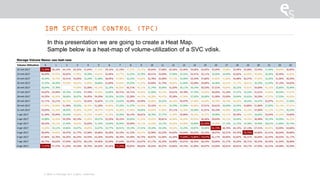
In this presentation we are going to create a Heat Map.
Sample below is a heat-map of volume-utilization of a SVC vdisk.
HEAT-MAP
© 2015 E-Storage All rights reserved
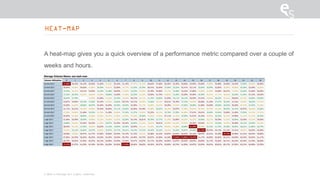
A heat-map gives you a quick overview of a performance metric compared over a couple of
weeks and hours.
HEAT-MAP OF SVC NODE PROCESSOR UTILIZATION
© 2015 E-Storage All rights reserved
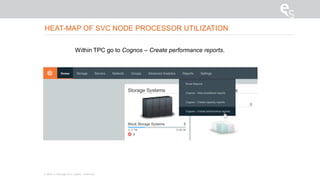
Within TPC go to Cognos – Create performance reports.
© 2015 E-Storage All rights reserved
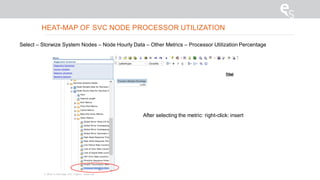
Select – Storwize System Nodes – Node Hourly Data – Other Metrics – Processor Utilization Percentage
After selecting the metric: right-click: insert
HEAT-MAP OF SVC NODE PROCESSOR UTILIZATION
© 2015 E-Storage All rights reserved
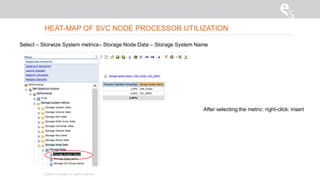
Select – Storwize System metrics– Storage Node Data – Storage System Name
After selecting the metric: right-click: insert
HEAT-MAP OF SVC NODE PROCESSOR UTILIZATION
© 2015 E-Storage All rights reserved
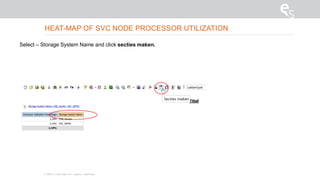
Select – Storage System Name and click secties maken.
HEAT-MAP OF SVC NODE PROCESSOR UTILIZATION
© 2015 E-Storage All rights reserved
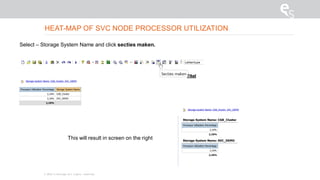
Select – Storage System Name and click secties maken.
This will result in screen on the right
HEAT-MAP OF SVC NODE PROCESSOR UTILIZATION
© 2015 E-Storage All rights reserved
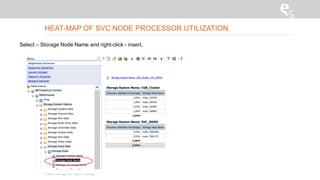
Select – Storage Node Name and right-click - insert.
HEAT-MAP OF SVC NODE PROCESSOR UTILIZATION
© 2015 E-Storage All rights reserved
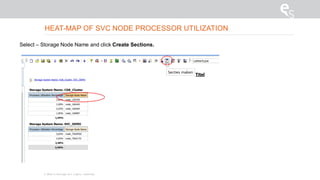
Select – Storage Node Name and click Create Sections.
HEAT-MAP OF SVC NODE PROCESSOR UTILIZATION
© 2015 E-Storage All rights reserved
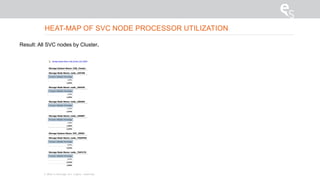
Result: All SVC nodes by Cluster.
HEAT-MAP OF SVC NODE PROCESSOR UTILIZATION
© 2015 E-Storage All rights reserved
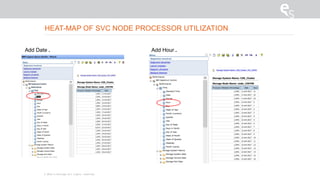
Add Hour .Add Date .
HEAT-MAP OF SVC NODE PROCESSOR UTILIZATION
HEAT-MAP OF NODE PROCESSOR UTILIZATION
© 2015 E-Storage All rights reserved
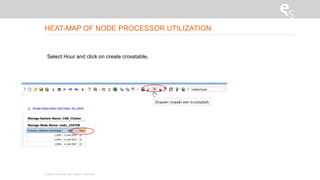
Select Hour and click on create crosstable.
HEAT-MAP OF NODE PROCESSOR UTILIZATION
© 2015 E-Storage All rights reserved
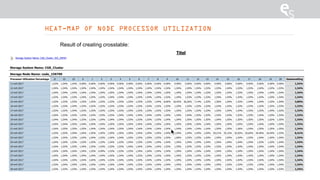
Result of creating crosstable:
© 2015 E-Storage All rights reserved
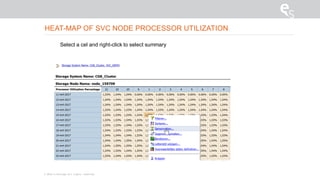
Select a cel and right-click to select summary
HEAT-MAP OF SVC NODE PROCESSOR UTILIZATION
HEAT-MAP OF NODE PROCESSOR UTILIZATION
© 2015 E-Storage All rights reserved
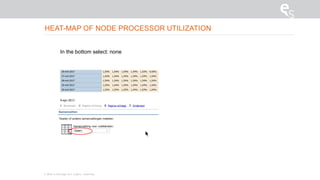
In the bottom select: none
HEAT-MAP OF NODE PROCESSOR UTILIZATION
© 2015 E-Storage All rights reserved
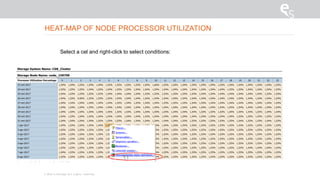
Select a cel and right-click to select conditions:
© 2015 E-Storage All rights reserved
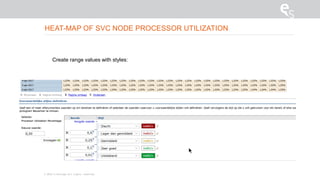
Create range values with styles:
HEAT-MAP OF SVC NODE PROCESSOR UTILIZATION
© 2015 E-Storage All rights reserved
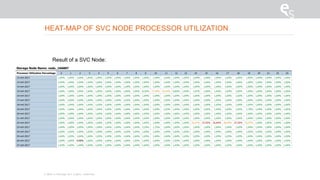
Result of a SVC Node:
HEAT-MAP OF SVC NODE PROCESSOR UTILIZATION
© 2015 E-Storage All rights reserved
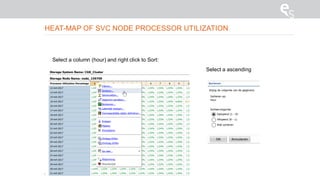
Select a column (hour) and right click to Sort:
Select a ascending
HEAT-MAP OF SVC NODE PROCESSOR UTILIZATION
© 2015 E-Storage All rights reserved
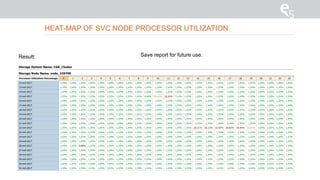
Result: Save report for future use.
HEAT-MAP OF SVC NODE PROCESSOR UTILIZATION
© 2015 E-Storage All rights reserved
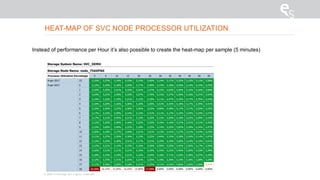
Instead of performance per Hour it’s also possible to create the heat-map per sample (5 minutes)
HEAT-MAP OF SVC NODE PROCESSOR UTILIZATION

IBM Spectrum Control creating a heat map with Cognos

  • 1.
    SPECTRUM CONTROL REPORTING Sampleof creating a Heat Map Johan van Arendonk
  • 2.
    IBM SPECTRUM CONTROL(TPC) © 2015 E-Storage All rights reserved In this presentation we are going to create a Heat Map. Sample below is a heat-map of volume-utilization of a SVC vdisk.
  • 3.
    HEAT-MAP © 2015 E-StorageAll rights reserved A heat-map gives you a quick overview of a performance metric compared over a couple of weeks and hours.
  • 4.
    HEAT-MAP OF SVCNODE PROCESSOR UTILIZATION © 2015 E-Storage All rights reserved Within TPC go to Cognos – Create performance reports.
  • 5.
    © 2015 E-StorageAll rights reserved Select – Storwize System Nodes – Node Hourly Data – Other Metrics – Processor Utilization Percentage After selecting the metric: right-click: insert HEAT-MAP OF SVC NODE PROCESSOR UTILIZATION
  • 6.
    © 2015 E-StorageAll rights reserved Select – Storwize System metrics– Storage Node Data – Storage System Name After selecting the metric: right-click: insert HEAT-MAP OF SVC NODE PROCESSOR UTILIZATION
  • 7.
    © 2015 E-StorageAll rights reserved Select – Storage System Name and click secties maken. HEAT-MAP OF SVC NODE PROCESSOR UTILIZATION
  • 8.
    © 2015 E-StorageAll rights reserved Select – Storage System Name and click secties maken. This will result in screen on the right HEAT-MAP OF SVC NODE PROCESSOR UTILIZATION
  • 9.
    © 2015 E-StorageAll rights reserved Select – Storage Node Name and right-click - insert. HEAT-MAP OF SVC NODE PROCESSOR UTILIZATION
  • 10.
    © 2015 E-StorageAll rights reserved Select – Storage Node Name and click Create Sections. HEAT-MAP OF SVC NODE PROCESSOR UTILIZATION
  • 11.
    © 2015 E-StorageAll rights reserved Result: All SVC nodes by Cluster. HEAT-MAP OF SVC NODE PROCESSOR UTILIZATION
  • 12.
    © 2015 E-StorageAll rights reserved Add Hour .Add Date . HEAT-MAP OF SVC NODE PROCESSOR UTILIZATION
  • 13.
    HEAT-MAP OF NODEPROCESSOR UTILIZATION © 2015 E-Storage All rights reserved Select Hour and click on create crosstable.
  • 14.
    HEAT-MAP OF NODEPROCESSOR UTILIZATION © 2015 E-Storage All rights reserved Result of creating crosstable:
  • 15.
    © 2015 E-StorageAll rights reserved Select a cel and right-click to select summary HEAT-MAP OF SVC NODE PROCESSOR UTILIZATION
  • 16.
    HEAT-MAP OF NODEPROCESSOR UTILIZATION © 2015 E-Storage All rights reserved In the bottom select: none
  • 17.
    HEAT-MAP OF NODEPROCESSOR UTILIZATION © 2015 E-Storage All rights reserved Select a cel and right-click to select conditions:
  • 18.
    © 2015 E-StorageAll rights reserved Create range values with styles: HEAT-MAP OF SVC NODE PROCESSOR UTILIZATION
  • 19.
    © 2015 E-StorageAll rights reserved Result of a SVC Node: HEAT-MAP OF SVC NODE PROCESSOR UTILIZATION
  • 20.
    © 2015 E-StorageAll rights reserved Select a column (hour) and right click to Sort: Select a ascending HEAT-MAP OF SVC NODE PROCESSOR UTILIZATION
  • 21.
    © 2015 E-StorageAll rights reserved Result: Save report for future use. HEAT-MAP OF SVC NODE PROCESSOR UTILIZATION
  • 22.
    © 2015 E-StorageAll rights reserved Instead of performance per Hour it’s also possible to create the heat-map per sample (5 minutes) HEAT-MAP OF SVC NODE PROCESSOR UTILIZATION