


<web/F>
Front-end Spectrum
The right foot first
Agenda
• Categorization of Web Applications
• DevOps – History and Today
• Enterprise Web Applications & AngularJS
• AngularJS Application Architecture
• Front-end Spectrum
< w e b/ F ><web/F>
Web Applications
Categorization
< w e b/ F ><web/F>
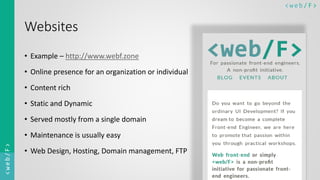
Websites
• Example – http://www.webf.zone
• Online presence for an organization or individual
• Content rich
• Static and Dynamic
• Served mostly from a single domain
• Maintenance is usually easy
• Web Design, Hosting, Domain management, FTP
< w e b/ F ><web/F>
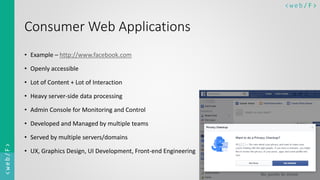
Consumer Web Applications
• Example – http://www.facebook.com
• Openly accessible
• Lot of Content + Lot of Interaction
• Heavy server-side data processing
• Admin Console for Monitoring and Control
• Developed and Managed by multiple teams
• Served by multiple servers/domains
• UX, Graphics Design, UI Development, Front-end Engineering
< w e b/ F ><web/F>
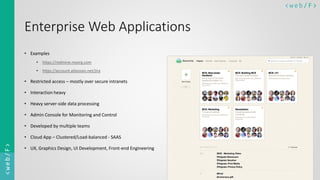
Enterprise Web Applications
• Examples
• https://redmine.myorg.com
• https://account.atlassian.net/jira
• Restricted access – mostly over secure intranets
• Interaction heavy
• Heavy server-side data processing
• Admin Console for Monitoring and Control
• Developed by multiple teams
• Cloud App – Clustered/Load-balanced - SAAS
• UX, Graphics Design, UI Development, Front-end Engineering
< w e b/ F ><web/F>
DevOps
History and today
< w e b/ F ><web/F>
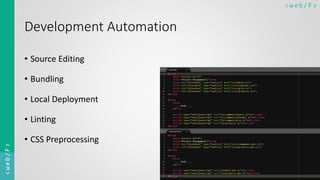
Development Automation
• Source Editing
• Bundling
• Local Deployment
• Linting
• CSS Preprocessing
< w e b/ F ><web/F>
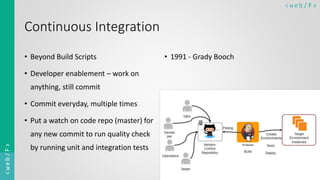
Continuous Integration
• Beyond Build Scripts
• Developer enablement – work on
anything, still commit
• Commit everyday, multiple times
• Put a watch on code repo (master) for
any new commit to run quality check
by running unit and integration tests
• 1991 - Grady Booch
< w e b/ F ><web/F>
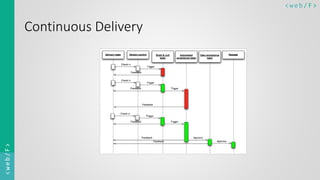
Continuous Delivery
• Beyond CI
• User Acceptance Tests (Staging)
• Release (Production)
• Very Recent
• Late 1990s – Extreme
Programming – Kent Beck
• Yahoo, Google, Amazon, Facebook
< w e b/ F ><web/F>
Continuous Delivery
< w e b/ F ><web/F>
DevOps
Today
• Beyond CI & CD
• Agile/UCD/Design Thinking =>
Rapid Sprints, Continuous Delivery
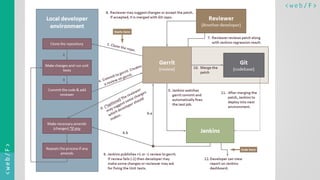
• Repo <-> Review <-> Bug Tracker
• Pipeline – Maven/Jenkins/Travis
• Dev - Integration - Staging - Prod
• Development Automation
• Continuous Integration
• Communication & Collaboration
• Continuous Delivery
< w e b/ F ><web/F>
< w e b/ F ><web/F>
DevOps
http://www.webf.zone – Website or Web Application?
< w e b/ F ><web/F>
Enterprise Web Apps & AngularJS
How well does that work?
< w e b/ F ><web/F>
Enterprise Applications
Display, manipulation & storage of large amounts of often complex data
and
the support or automation of business processes with that data
- Martin Fowler
< w e b/ F ><web/F>
Enterprise Web Application Challenges
• Heavy dependency on domain knowledge
• Integration with Legacy components
• Security
• Shotgun Surgery
• Documentation over productivity
• Organizational culture influence on
engineering workflow
• Bureaucracy Vs Agile / Slow decisions
• Too much Monitoring
• Restriction on tools
• Distributed & Remote teams
• Developer freedom
• Tools
• Practices
• Time-zone differences
< w e b/ F ><web/F>
Good parts of AngularJS
• Encourages good practices - Dependency Injections
• Testability - Dependency Injections
• Facilitates Collaboration
• Strong ‘View’ infrastructure - Abstractions from DOM Manipulations
• Promotes maintainable structure
• ngResource for RESTful front-end
< w e b/ F ><web/F>
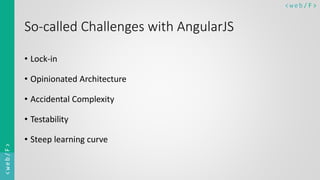
So-called Challenges with AngularJS
• Lock-in
• Opinionated Architecture
• Accidental Complexity
• Testability
• Steep learning curve
< w e b/ F ><web/F>
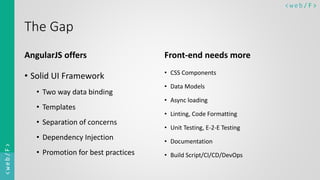
The Gap
AngularJS offers
• Solid UI Framework
• Two way data binding
• Templates
• Separation of concerns
• Dependency Injection
• Promotion for best practices
Front-end needs more
• CSS Components
• Data Models
• Async loading
• Linting, Code Formatting
• Unit Testing, E-2-E Testing
• Documentation
• Build Script/CI/CD/DevOps
< w e b/ F ><web/F>
AngularJS Application
Architecture
AngularJS as your {{hammer}}
< w e b/ F ><web/F>
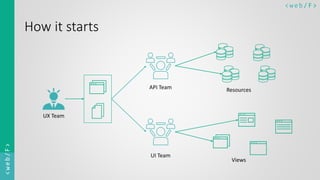
How it starts
UX Team
UI Team
API Team
Views
Resources
< w e b/ F ><web/F>
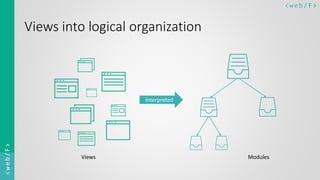
Views into logical organization
Interpreted
Views Modules
< w e b/ F ><web/F>
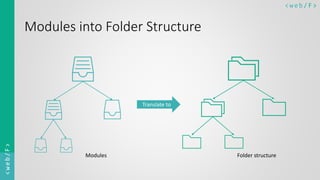
Modules into Folder Structure
Translate to
Folder structureModules
< w e b/ F ><web/F>
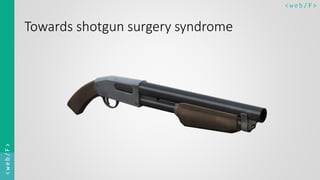
Towards shotgun surgery syndrome
< w e b/ F ><web/F>
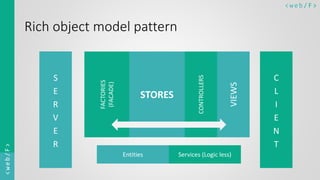
Rich object model pattern
S
E
R
V
E
R
C
L
I
E
N
T
VIEWS
CONTROLLERS
STORES
FACTORIES
(FACADE)
Entities Services (Logic less)
< w e b/ F ><web/F>
Something more beyond shotgun surgery
Angular has no say about
Rigidity
Fragility
Immobility
< w e b/ F ><web/F>
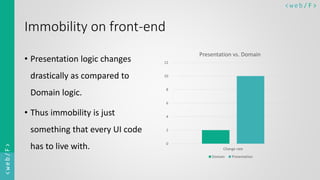
Immobility on front-end
• Presentation logic changes
drastically as compared to
Domain logic.
• Thus immobility is just
something that every UI code
has to live with. 0
2
4
6
8
10
12
Change rate
Presentation vs. Domain
Domain Presentation
< w e b/ F ><web/F>
Rigidity and Fragility
• But we as developers are responsible for introducing rigidity and
fragility into our system
• Worst part is we don’t even realize it
< w e b/ F ><web/F>
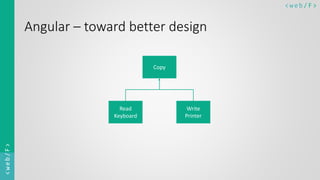
Angular – toward better design
Copy
Read
Keyboard
Write
Printer
< w e b/ F ><web/F>
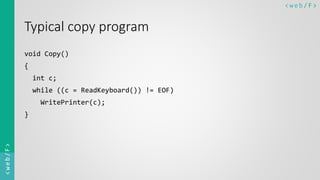
Typical copy program
void Copy()
{
int c;
while ((c = ReadKeyboard()) != EOF)
WritePrinter(c);
}
< w e b/ F ><web/F>
What happens when one of the low level module changes?
< w e b/ F ><web/F>
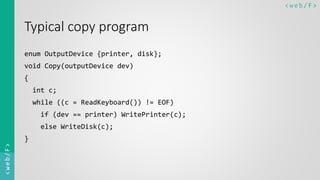
Typical copy program
enum OutputDevice {printer, disk};
void Copy(outputDevice dev)
{
int c;
while ((c = ReadKeyboard()) != EOF)
if (dev == printer) WritePrinter(c);
else WriteDisk(c);
}
< w e b/ F ><web/F>
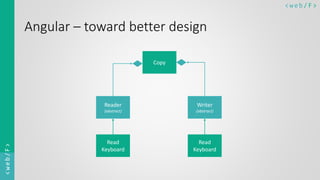
Angular – toward better design
Copy
Reader
(abstract)
Writer
(abstract)
Read
Keyboard
Read
Keyboard
< w e b/ F ><web/F>
Front-end Spectrum
Building the Technology Stack
< w e b/ F ><web/F>
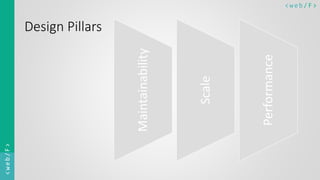
Design Pillars
Maintainability
Scale
Performance
< w e b/ F ><web/F>
DevOps Pipeline
• Integration
• Code repo setup
• Code review tool
• Bug Tracker
• Define Environments – INT-STG-PRD
• Deployment Script
• gulpfile.js + .travis.yml + deploy.sh
< w e b/ F ><web/F>
UI Framework
• AngularJS
• Use it as a hammer. But don’t forget to use the screw-driver, too.
• Namespace everything
• One Angular entity per file
• Avoid private functions – a guideline
• Group reusable smaller functions into Utility service
• Plan not to migrate to 2.0 but to leverage newer UI technologies
• E.g. Prefer ES5 properties instead of $scope.$watch
< w e b/ F ><web/F>
Handy libraries
• Lodash
• Sass
• Mocha, Chai, Sinon
• Foundation for Apps
• Iconic
< w e b/ F ><web/F>
Folder Structure
• Mapping a complete feature to one folder works best – A guideline
• Keep your build script in mind
• Have high respect for naming conventions
• Standard folders
< w e b/ F ><web/F>
Linting, Code Formatting
• Have a coding style guide
• Configure editors to follow those rules
• ESLint is by far the best linter
• Should you lint your CSS?
• Gulp tasks
< w e b/ F ><web/F>
Documentation
• ngdoc
• Simple declarative sentence, present tense, start with upper case
• Concise but comprehensive – what if argument is empty?
• Examples
< w e b/ F ><web/F>
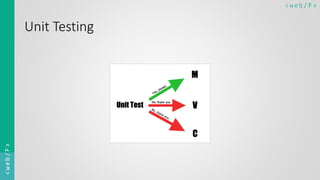
Unit Testing
< w e b/ F ><web/F>
Build Script
Gulp
• New functionality only
• One task = One thing
• Don’t throw err inside a stream
Useful Extensions
• concat, cssimport, eslint, gzip,
ignore, minify-css, ngdocs, ng-
annotate, postcss, rename, sass,
sourcemap, svg-sprite, uglify, util
< w e b/ F ><web/F>
Git Workflow Overview
• Never work on master
• One feature/bug = a local branch
• git fetch – git merge origin master – (on branch) git rebase master
• Use ‘drafts’ for incomplete push (Gerrit)
< w e b/ F ><web/F>
Thank you
Kumar Bhot
@UsableBytes | https://in.linkedin.com/in/kumarbhot
http://www.kumarbhot.com

I - Front-end Spectrum

  • 1.
  • 2.
    Agenda • Categorization ofWeb Applications • DevOps – History and Today • Enterprise Web Applications & AngularJS • AngularJS Application Architecture • Front-end Spectrum
  • 3.
    < w eb/ F ><web/F> Web Applications Categorization
  • 4.
    < w eb/ F ><web/F> Websites • Example – http://www.webf.zone • Online presence for an organization or individual • Content rich • Static and Dynamic • Served mostly from a single domain • Maintenance is usually easy • Web Design, Hosting, Domain management, FTP
  • 5.
    < w eb/ F ><web/F> Consumer Web Applications • Example – http://www.facebook.com • Openly accessible • Lot of Content + Lot of Interaction • Heavy server-side data processing • Admin Console for Monitoring and Control • Developed and Managed by multiple teams • Served by multiple servers/domains • UX, Graphics Design, UI Development, Front-end Engineering
  • 6.
    < w eb/ F ><web/F> Enterprise Web Applications • Examples • https://redmine.myorg.com • https://account.atlassian.net/jira • Restricted access – mostly over secure intranets • Interaction heavy • Heavy server-side data processing • Admin Console for Monitoring and Control • Developed by multiple teams • Cloud App – Clustered/Load-balanced - SAAS • UX, Graphics Design, UI Development, Front-end Engineering
  • 7.
    < w eb/ F ><web/F> DevOps History and today
  • 8.
    < w eb/ F ><web/F> Development Automation • Source Editing • Bundling • Local Deployment • Linting • CSS Preprocessing
  • 9.
    < w eb/ F ><web/F> Continuous Integration • Beyond Build Scripts • Developer enablement – work on anything, still commit • Commit everyday, multiple times • Put a watch on code repo (master) for any new commit to run quality check by running unit and integration tests • 1991 - Grady Booch
  • 10.
    < w eb/ F ><web/F> Continuous Delivery • Beyond CI • User Acceptance Tests (Staging) • Release (Production) • Very Recent • Late 1990s – Extreme Programming – Kent Beck • Yahoo, Google, Amazon, Facebook
  • 11.
    < w eb/ F ><web/F> Continuous Delivery
  • 12.
    < w eb/ F ><web/F> DevOps Today • Beyond CI & CD • Agile/UCD/Design Thinking => Rapid Sprints, Continuous Delivery • Repo <-> Review <-> Bug Tracker • Pipeline – Maven/Jenkins/Travis • Dev - Integration - Staging - Prod • Development Automation • Continuous Integration • Communication & Collaboration • Continuous Delivery
  • 13.
    < w eb/ F ><web/F>
  • 14.
    < w eb/ F ><web/F> DevOps http://www.webf.zone – Website or Web Application?
  • 15.
    < w eb/ F ><web/F> Enterprise Web Apps & AngularJS How well does that work?
  • 16.
    < w eb/ F ><web/F> Enterprise Applications Display, manipulation & storage of large amounts of often complex data and the support or automation of business processes with that data - Martin Fowler
  • 17.
    < w eb/ F ><web/F> Enterprise Web Application Challenges • Heavy dependency on domain knowledge • Integration with Legacy components • Security • Shotgun Surgery • Documentation over productivity • Organizational culture influence on engineering workflow • Bureaucracy Vs Agile / Slow decisions • Too much Monitoring • Restriction on tools • Distributed & Remote teams • Developer freedom • Tools • Practices • Time-zone differences
  • 18.
    < w eb/ F ><web/F> Good parts of AngularJS • Encourages good practices - Dependency Injections • Testability - Dependency Injections • Facilitates Collaboration • Strong ‘View’ infrastructure - Abstractions from DOM Manipulations • Promotes maintainable structure • ngResource for RESTful front-end
  • 19.
    < w eb/ F ><web/F> So-called Challenges with AngularJS • Lock-in • Opinionated Architecture • Accidental Complexity • Testability • Steep learning curve
  • 20.
    < w eb/ F ><web/F> The Gap AngularJS offers • Solid UI Framework • Two way data binding • Templates • Separation of concerns • Dependency Injection • Promotion for best practices Front-end needs more • CSS Components • Data Models • Async loading • Linting, Code Formatting • Unit Testing, E-2-E Testing • Documentation • Build Script/CI/CD/DevOps
  • 21.
    < w eb/ F ><web/F> AngularJS Application Architecture AngularJS as your {{hammer}}
  • 22.
    < w eb/ F ><web/F> How it starts UX Team UI Team API Team Views Resources
  • 23.
    < w eb/ F ><web/F> Views into logical organization Interpreted Views Modules
  • 24.
    < w eb/ F ><web/F> Modules into Folder Structure Translate to Folder structureModules
  • 25.
    < w eb/ F ><web/F> Towards shotgun surgery syndrome
  • 26.
    < w eb/ F ><web/F> Rich object model pattern S E R V E R C L I E N T VIEWS CONTROLLERS STORES FACTORIES (FACADE) Entities Services (Logic less)
  • 27.
    < w eb/ F ><web/F> Something more beyond shotgun surgery Angular has no say about Rigidity Fragility Immobility
  • 28.
    < w eb/ F ><web/F> Immobility on front-end • Presentation logic changes drastically as compared to Domain logic. • Thus immobility is just something that every UI code has to live with. 0 2 4 6 8 10 12 Change rate Presentation vs. Domain Domain Presentation
  • 29.
    < w eb/ F ><web/F> Rigidity and Fragility • But we as developers are responsible for introducing rigidity and fragility into our system • Worst part is we don’t even realize it
  • 30.
    < w eb/ F ><web/F> Angular – toward better design Copy Read Keyboard Write Printer
  • 31.
    < w eb/ F ><web/F> Typical copy program void Copy() { int c; while ((c = ReadKeyboard()) != EOF) WritePrinter(c); }
  • 32.
    < w eb/ F ><web/F> What happens when one of the low level module changes?
  • 33.
    < w eb/ F ><web/F> Typical copy program enum OutputDevice {printer, disk}; void Copy(outputDevice dev) { int c; while ((c = ReadKeyboard()) != EOF) if (dev == printer) WritePrinter(c); else WriteDisk(c); }
  • 34.
    < w eb/ F ><web/F> Angular – toward better design Copy Reader (abstract) Writer (abstract) Read Keyboard Read Keyboard
  • 35.
    < w eb/ F ><web/F> Front-end Spectrum Building the Technology Stack
  • 36.
    < w eb/ F ><web/F> Design Pillars Maintainability Scale Performance
  • 37.
    < w eb/ F ><web/F> DevOps Pipeline • Integration • Code repo setup • Code review tool • Bug Tracker • Define Environments – INT-STG-PRD • Deployment Script • gulpfile.js + .travis.yml + deploy.sh
  • 38.
    < w eb/ F ><web/F> UI Framework • AngularJS • Use it as a hammer. But don’t forget to use the screw-driver, too. • Namespace everything • One Angular entity per file • Avoid private functions – a guideline • Group reusable smaller functions into Utility service • Plan not to migrate to 2.0 but to leverage newer UI technologies • E.g. Prefer ES5 properties instead of $scope.$watch
  • 39.
    < w eb/ F ><web/F> Handy libraries • Lodash • Sass • Mocha, Chai, Sinon • Foundation for Apps • Iconic
  • 40.
    < w eb/ F ><web/F> Folder Structure • Mapping a complete feature to one folder works best – A guideline • Keep your build script in mind • Have high respect for naming conventions • Standard folders
  • 41.
    < w eb/ F ><web/F> Linting, Code Formatting • Have a coding style guide • Configure editors to follow those rules • ESLint is by far the best linter • Should you lint your CSS? • Gulp tasks
  • 42.
    < w eb/ F ><web/F> Documentation • ngdoc • Simple declarative sentence, present tense, start with upper case • Concise but comprehensive – what if argument is empty? • Examples
  • 43.
    < w eb/ F ><web/F> Unit Testing
  • 44.
    < w eb/ F ><web/F> Build Script Gulp • New functionality only • One task = One thing • Don’t throw err inside a stream Useful Extensions • concat, cssimport, eslint, gzip, ignore, minify-css, ngdocs, ng- annotate, postcss, rename, sass, sourcemap, svg-sprite, uglify, util
  • 45.
    < w eb/ F ><web/F> Git Workflow Overview • Never work on master • One feature/bug = a local branch • git fetch – git merge origin master – (on branch) git rebase master • Use ‘drafts’ for incomplete push (Gerrit)
  • 46.
    < w eb/ F ><web/F> Thank you Kumar Bhot @UsableBytes | https://in.linkedin.com/in/kumarbhot http://www.kumarbhot.com