Human-Computer Interaction
Lecture 2
Dr. Abdallah Hassan (abdallah@mena.vt.edu)
Remember
 Interaction design process involves three components
 User Research
 Design and Prototyping
 Evaluation (Improvement)
 User Research
 Working with users rather than guessing (user-centric design)
 Invisible interfaces (task-oriented design)
User research is important
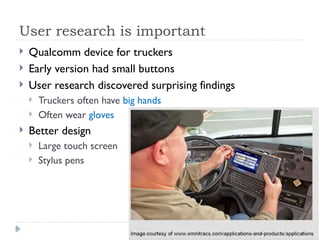
 Qualcomm device for truckers
 Early version had small buttons
 User research discovered surprising findings
 Truckers often have big hands
 Often wear gloves
 Better design
 Large touch screen
 Stylus pens
Case Study – Microsoft Office UI Design
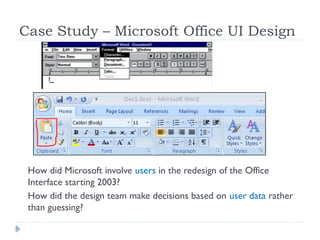
How did Microsoft involve users in the redesign of the Office
Interface starting 2003?
How did the design team make decisions based on user data rather
than guessing?
Jensen Harris material
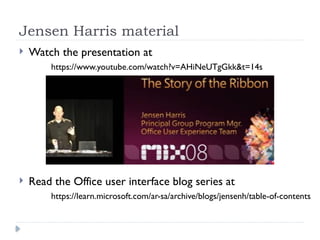
 Watch the presentation at
https://www.youtube.com/watch?v=AHiNeUTgGkk&t=14s
 Read the Office user interface blog series at
https://learn.microsoft.com/ar-sa/archive/blogs/jensenh/table-of-contents
Challenge of full-featured systems
 Microsoft Office is an example of a full-featured productivity
application
 This type of application is usually required to include several
features to fulfill the possible needs of its users
 The problem with the increased number of features
 Increased feeling that the application is complicated
 Increased difficulty to find or learn how to do things
 More focus on the tool than on the task
 Bloatware is a term often used to describe a product that
seem to have too many features, too many megabytes, too
slow, too difficult to use, or simply too much.
State of Microsoft Office 97 - 2003
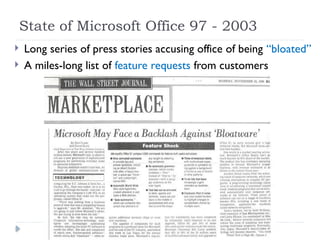
 Long series of press stories accusing office of being “bloated”
 A miles-long list of feature requests from customers
State of Microsoft Office 97 - 2003
 Since 1997, People were feeling less in control of the
program
 Menu and toolbar system was not scalable enough to fit the
richness of the product
 Menus and toolbars are essentially full, people did not even
notice new commands from version to version
 People were not finding or using new features
Earlier attempts to reduce perception of “bloat”
 Office 2000 introduced several new UI mechanisms
 Adaptive (Personalized) Menus
 Rafted toolbars
 The main idea behind the new UI mechanisms is to rely
on customization to hide unnecessary items so the user
does not see lots of menu items or toolbar buttons
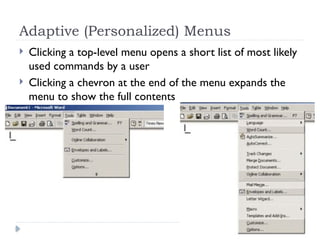
Adaptive (Personalized) Menus
 Clicking a top-level menu opens a short list of most likely
used commands by a user
 Clicking a chevron at the end of the menu expands the
menu to show the full contents
Rafted toolbars
 Two or more toolbars could share a line on the screen
 An algorithm predicts the least likely used toolbar
buttons by the user
 The least likely used buttons are moved from the toolbar
into an “overflow” area at the end
The added UI mechanisms failed
 Customization was not easy and was not accurate
 This led to added complexity and inefficiency to the
interface, why?
 Bad selection of short menu items appearing to the user
requires him an additional scan of the full menu (scanning
menus took twice as long)
 Features like adaptive menus and rafted toolbars were
turned off by default later in applications using them
“Auto-customization, unless it does a perfect job, is
usually worse than no customization at all”
Why UI design fails
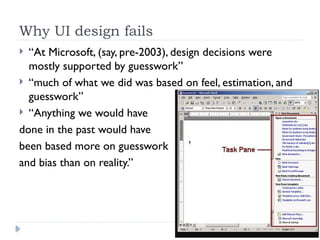
 “At Microsoft, (say, pre-2003), design decisions were
mostly supported by guesswork”
 “much of what we did was based on feel, estimation, and
guesswork”
 “Anything we would have
done in the past would have
been based more on guesswork
and bias than on reality.”
Office UI design decisions after 2003
 Microsoft Office Customer Experience Improvement
Program (CEIP)
 Office 2003 users see a balloon popping up asking "Help
Make Office Better.“
 Clicking on the balloon enrolls the user in the CEIP
program and collects anonymous data about how he uses
the software and on what kind of hardware
Data for Design team of Office 2007
 More than 1.3 billion sessions of usage data
 “We get so much Word and Outlook data that 70% of it
is thrown away”
 “For the first time, we have the data we need to make
intelligent decisions”
 which commands people use often and which they don't
 which commands are used in sequence with which other
commands
 which commands are used 7x more with the keyboard than
with the mouse
 how many documents they use at once
 how big people's screens are
Activity
 If you are involved in the design of a mobile application
for football lovers to watch matches and know match
results and statistics
 Think about a layout of the interface that you may
consider usable and easy
 Can you think of a plan of user research, how can you
conduct it to understand user needs and preferences
better
 Can you think how you can gather usage data similar to
the way Microsoft did for the design of Office 2007, what
data can be useful, how can this data help improve the UI

Human-Computer Interaction for Lecture 1

  • 1.
    Human-Computer Interaction Lecture 2 Dr.Abdallah Hassan (abdallah@mena.vt.edu)
  • 2.
    Remember  Interaction designprocess involves three components  User Research  Design and Prototyping  Evaluation (Improvement)  User Research  Working with users rather than guessing (user-centric design)  Invisible interfaces (task-oriented design)
  • 3.
    User research isimportant  Qualcomm device for truckers  Early version had small buttons  User research discovered surprising findings  Truckers often have big hands  Often wear gloves  Better design  Large touch screen  Stylus pens
  • 4.
    Case Study –Microsoft Office UI Design How did Microsoft involve users in the redesign of the Office Interface starting 2003? How did the design team make decisions based on user data rather than guessing?
  • 5.
    Jensen Harris material Watch the presentation at https://www.youtube.com/watch?v=AHiNeUTgGkk&t=14s  Read the Office user interface blog series at https://learn.microsoft.com/ar-sa/archive/blogs/jensenh/table-of-contents
  • 6.
    Challenge of full-featuredsystems  Microsoft Office is an example of a full-featured productivity application  This type of application is usually required to include several features to fulfill the possible needs of its users  The problem with the increased number of features  Increased feeling that the application is complicated  Increased difficulty to find or learn how to do things  More focus on the tool than on the task  Bloatware is a term often used to describe a product that seem to have too many features, too many megabytes, too slow, too difficult to use, or simply too much.
  • 7.
    State of MicrosoftOffice 97 - 2003  Long series of press stories accusing office of being “bloated”  A miles-long list of feature requests from customers
  • 8.
    State of MicrosoftOffice 97 - 2003  Since 1997, People were feeling less in control of the program  Menu and toolbar system was not scalable enough to fit the richness of the product  Menus and toolbars are essentially full, people did not even notice new commands from version to version  People were not finding or using new features
  • 9.
    Earlier attempts toreduce perception of “bloat”  Office 2000 introduced several new UI mechanisms  Adaptive (Personalized) Menus  Rafted toolbars  The main idea behind the new UI mechanisms is to rely on customization to hide unnecessary items so the user does not see lots of menu items or toolbar buttons
  • 10.
    Adaptive (Personalized) Menus Clicking a top-level menu opens a short list of most likely used commands by a user  Clicking a chevron at the end of the menu expands the menu to show the full contents
  • 11.
    Rafted toolbars  Twoor more toolbars could share a line on the screen  An algorithm predicts the least likely used toolbar buttons by the user  The least likely used buttons are moved from the toolbar into an “overflow” area at the end
  • 12.
    The added UImechanisms failed  Customization was not easy and was not accurate  This led to added complexity and inefficiency to the interface, why?  Bad selection of short menu items appearing to the user requires him an additional scan of the full menu (scanning menus took twice as long)  Features like adaptive menus and rafted toolbars were turned off by default later in applications using them “Auto-customization, unless it does a perfect job, is usually worse than no customization at all”
  • 13.
    Why UI designfails  “At Microsoft, (say, pre-2003), design decisions were mostly supported by guesswork”  “much of what we did was based on feel, estimation, and guesswork”  “Anything we would have done in the past would have been based more on guesswork and bias than on reality.”
  • 14.
    Office UI designdecisions after 2003  Microsoft Office Customer Experience Improvement Program (CEIP)  Office 2003 users see a balloon popping up asking "Help Make Office Better.“  Clicking on the balloon enrolls the user in the CEIP program and collects anonymous data about how he uses the software and on what kind of hardware
  • 15.
    Data for Designteam of Office 2007  More than 1.3 billion sessions of usage data  “We get so much Word and Outlook data that 70% of it is thrown away”  “For the first time, we have the data we need to make intelligent decisions”  which commands people use often and which they don't  which commands are used in sequence with which other commands  which commands are used 7x more with the keyboard than with the mouse  how many documents they use at once  how big people's screens are
  • 16.
    Activity  If youare involved in the design of a mobile application for football lovers to watch matches and know match results and statistics  Think about a layout of the interface that you may consider usable and easy  Can you think of a plan of user research, how can you conduct it to understand user needs and preferences better  Can you think how you can gather usage data similar to the way Microsoft did for the design of Office 2007, what data can be useful, how can this data help improve the UI