Essential Training.
HTML5 /CSS3
Muhammad Bilal
HTML5 | Agenda
 Front-end Technologies
 HTML Basics & Evolution
 Terminology: Tags, Attributes and Elements
 Basic Document Structure
 Common Elements Live Demo
 Section Elements
 <div> Usage Live Demo
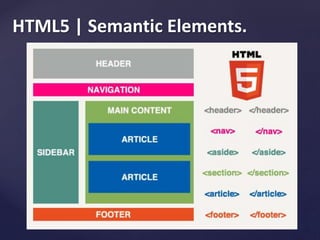
 HTML5 Semantic Elements
 Beyond Basics
 Useful Resources
 Time for Questions
HTML5 | Basics.
.html or .htm extention
 HTML files can be created with text
editors:
Notepad++, Sublime, Komodo…
 HTML editors (WYSIWYG Editors):
Adobe Dreamweaver, WebPage Maker...
HTML5 | Evolution.
1991 – HTML first mentioned,
Tim Berners-Lee – HTML tags
1993 – HTML (first public version, published at IETF)
1995 – HTML 2 – W3C
1997 – HTML 3.2 – “Wilbur”
1997 – HTML 4 – ”Cougar” – CSS
1999 – HTML 4.01 (final)
2001 – XHTML (final)
2008 – HTML5 / XHTML5 draft
2011 – feature complete HTML5
2022 – HTML5 – final specification
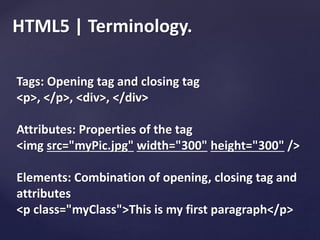
HTML5 | Terminology.
Tags: Opening tag and closing tag
<p>, </p>, <div>, </div>
Attributes: Properties of the tag
<img src="myPic.jpg" width="300" height="300" />
Elements: Combination of opening, closing tag and
attributes
<p class="myClass">This is my first paragraph</p>
HTML5 | Common Attributes.
 common: id, class, name, style
 specific: src, href, target
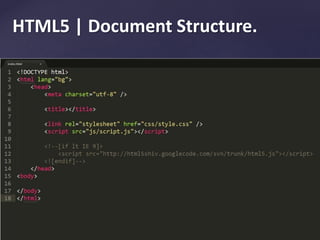
HTML5 | Document Structure.
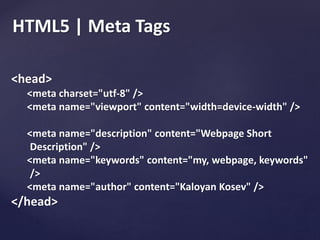
HTML5 | Meta Tags
<head>
<meta charset="utf-8" />
<meta name="viewport" content="width=device-width" />
<meta name="description" content="Webpage Short
Description" />
<meta name="keywords" content="my, webpage, keywords"
/>
<meta name="author" content="Kaloyan Kosev" />
</head>
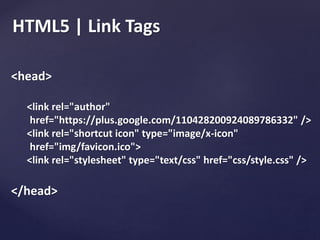
HTML5 | Link Tags
<head>
<link rel="author"
href="https://plus.google.com/110428200924089786332" />
<link rel="shortcut icon" type="image/x-icon"
href="img/favicon.ico">
<link rel="stylesheet" type="text/css" href="css/style.css" />
</head>
HTML5 | Section Elements
<div> - creates logical divisions within a page.
Example:
<div>
<p>Some small text here.</p>
<p>Something <strong>else.</strong></p>
</div>
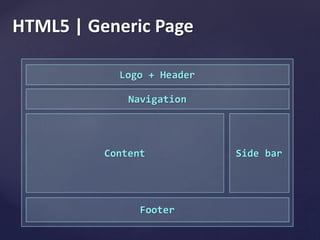
HTML5 | Generic Page
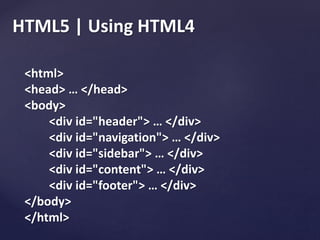
HTML5 | Using HTML4
<html>
<head> … </head>
<body>
<div id="header"> … </div>
<div id="navigation"> … </div>
<div id="sidebar"> … </div>
<div id="content"> … </div>
<div id="footer"> … </div>
</body>
</html>
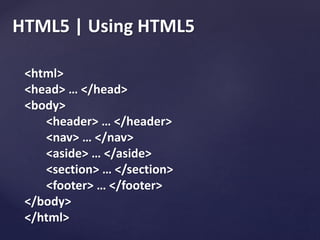
HTML5 | Using HTML5
<html>
<head> … </head>
<body>
<header> … </header>
<nav> … </nav>
<aside> … </aside>
<section> … </section>
<footer> … </footer>
</body>
</html>
HTML5 | Semantic Elements.
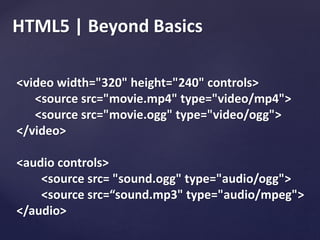
HTML5 | Beyond Basics
<video width="320" height="240" controls>
<source src="movie.mp4" type="video/mp4">
<source src="movie.ogg" type="video/ogg">
</video>
<audio controls>
<source src= "sound.ogg" type="audio/ogg">
<source src=“sound.mp3" type="audio/mpeg">
</audio>
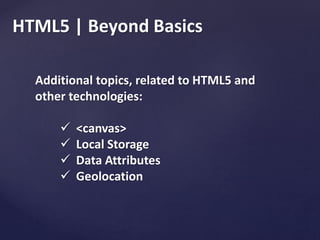
HTML5 | Beyond Basics
Additional topics, related to HTML5 and
other technologies:
 <canvas>
 Local Storage
 Data Attributes
 Geolocation
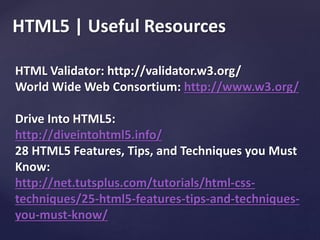
HTML5 | Useful Resources
HTML Validator: http://validator.w3.org/
World Wide Web Consortium: http://www.w3.org/
Drive Into HTML5:
http://diveintohtml5.info/
28 HTML5 Features, Tips, and Techniques you Must
Know:
http://net.tutsplus.com/tutorials/html-css-
techniques/25-html5-features-tips-and-techniques-
you-must-know/
Time for Questions.
HTML5
CSS3
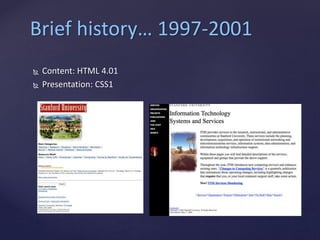
Brief history… 1997-2001
 Content: HTML 4.01
 Presentation: CSS1
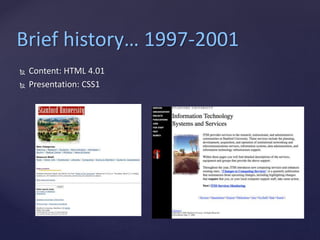
Brief history… 1997-2001
 Content: HTML 4.01
 Presentation: CSS1
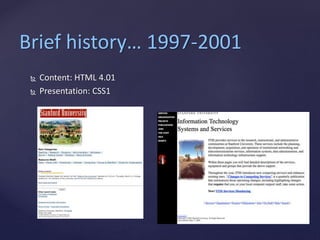
Brief history… 1997-2001
 Content: HTML 4.01
 Presentation: CSS1
CSS3 Modules
CSS3 has been split into "modules". It contains the "old CSS
specification" (which has been split into smaller pieces). In addition,
new modules are added.
Some of the most important CSS3 modules are:
Selectors
Box Model
Backgrounds and Borders
Image Values and Replaced Content
Text Effects
2D/3D Transformations
Animations
Multiple Column Layout
User Interface
CSS3 Borders
With CSS3, you can create rounded borders, add shadow to
boxes, and use an image as a border - without using a design
program, like Photoshop.
In this chapter you will learn about the following border
properties:
border-radius
box-shadow
border-image
CSS3 Backgrounds
CSS3 contains several new background properties,
which allow greater control of the background element.
In this chapter you will learn about the following background
properties:
background-size
background-origin
You will also learn how to use multiple background images.
{
background: url(img_flwr.gif);
background-size: 80px 60px;
background-repeat: no-repeat;
padding-top: 40px;
}
CSS3 gradients let you display smooth transitions between two or more specified
colors.
Earlier, you had to use images for these effects. However, by using CSS3 gradients
you can reduce download time and bandwidth usage. In addition, elements with
gradients look better when zoomed, because the gradient is generated by the
browser.
CSS3 defines two types of gradients:
Linear Gradients (goes down/up/left/right/diagonally)
Radial Gradients (defined by their center)
CSS3 Text Effects
CSS3 contains several new text features.
In this chapter you will learn about the
following text properties:
text-shadow
word-wrap
CSS3 Web Fonts - The @font-face Rule
Web fonts allow Web designers to use fonts that are not installed
on the user's computer.
When you have found/bought the font you wish to use, just
include the font file on your web server, and it will be
automatically downloaded to the user when needed.
Your "own" fonts are defined within the CSS3 @font-face rule.
CSS3 Transforms
CSS3 transforms allow you to translate, rotate, scale, and skew elements.
A transformation is an effect that lets an element change shape, size and
position.
CSS3 supports 2D and 3D transformations.
CSS3 2D Transforms
In this chapter you will learn about the following 2D transformation methods:
translate()
rotate()
scale()
skewX()
skewY()
matrix()
CSS3 3D Transforms
CSS3 allows you to format your elements using 3D transforms.
In this chapter you will learn about some of the 3D transform methods:
rotateX()
rotateY()
Click on the elements below, to see the difference between a 2D transform and a
3D transform:
What Are CSS3 Transitions?
CSS3 transitions are effects that let an element gradually change
from one style to another.
To do this, you must specify two things:
the CSS property you want to add an effect to
the duration of the effect
CSS3 Transitions
With CSS3, we can add an effect when changing from one style to
another, without using Flash or JavaScript
CSS3 Animations
CSS3 animations can replace animations created by Flash and JavaScript in existing
web pages
CSS3 @keyframes Rule
The @keyframes rule is where the animation is created.
Specify a CSS style inside the @keyframes rule and the animation will gradually change
from the current style to the new style.
CSS3 Animation
When an animation is created in the @keyframe rule, you must bind it to a selector,
otherwise the animation will have no effect.
Bind the animation to a selector (element) by specifying at least these two properties:
the name of the animation
the duration of the animation
CSS3 Multiple Columns
With CSS3, you can create multiple columns for laying out text - like in
newspapers!
In this chapter you will learn about the following multiple column properties:
column-count
column-gap
column-rule
CSS3 User Interface
In CSS3, some of the new user interface features are
resizing elements, box sizing, and outlining.
In this chapter you will learn about the following user
interface properties:
resize
box-sizing
outline-offset

html5_css3

  • 1.
  • 2.
    HTML5 | Agenda Front-end Technologies  HTML Basics & Evolution  Terminology: Tags, Attributes and Elements  Basic Document Structure  Common Elements Live Demo  Section Elements  <div> Usage Live Demo  HTML5 Semantic Elements  Beyond Basics  Useful Resources  Time for Questions
  • 3.
    HTML5 | Basics. .htmlor .htm extention  HTML files can be created with text editors: Notepad++, Sublime, Komodo…  HTML editors (WYSIWYG Editors): Adobe Dreamweaver, WebPage Maker...
  • 4.
    HTML5 | Evolution. 1991– HTML first mentioned, Tim Berners-Lee – HTML tags 1993 – HTML (first public version, published at IETF) 1995 – HTML 2 – W3C 1997 – HTML 3.2 – “Wilbur” 1997 – HTML 4 – ”Cougar” – CSS 1999 – HTML 4.01 (final) 2001 – XHTML (final) 2008 – HTML5 / XHTML5 draft 2011 – feature complete HTML5 2022 – HTML5 – final specification
  • 5.
    HTML5 | Terminology. Tags:Opening tag and closing tag <p>, </p>, <div>, </div> Attributes: Properties of the tag <img src="myPic.jpg" width="300" height="300" /> Elements: Combination of opening, closing tag and attributes <p class="myClass">This is my first paragraph</p>
  • 6.
    HTML5 | CommonAttributes.  common: id, class, name, style  specific: src, href, target
  • 7.
    HTML5 | DocumentStructure.
  • 8.
    HTML5 | MetaTags <head> <meta charset="utf-8" /> <meta name="viewport" content="width=device-width" /> <meta name="description" content="Webpage Short Description" /> <meta name="keywords" content="my, webpage, keywords" /> <meta name="author" content="Kaloyan Kosev" /> </head>
  • 9.
    HTML5 | LinkTags <head> <link rel="author" href="https://plus.google.com/110428200924089786332" /> <link rel="shortcut icon" type="image/x-icon" href="img/favicon.ico"> <link rel="stylesheet" type="text/css" href="css/style.css" /> </head>
  • 10.
    HTML5 | SectionElements <div> - creates logical divisions within a page. Example: <div> <p>Some small text here.</p> <p>Something <strong>else.</strong></p> </div>
  • 11.
  • 12.
    HTML5 | UsingHTML4 <html> <head> … </head> <body> <div id="header"> … </div> <div id="navigation"> … </div> <div id="sidebar"> … </div> <div id="content"> … </div> <div id="footer"> … </div> </body> </html>
  • 13.
    HTML5 | UsingHTML5 <html> <head> … </head> <body> <header> … </header> <nav> … </nav> <aside> … </aside> <section> … </section> <footer> … </footer> </body> </html>
  • 14.
  • 15.
    HTML5 | BeyondBasics <video width="320" height="240" controls> <source src="movie.mp4" type="video/mp4"> <source src="movie.ogg" type="video/ogg"> </video> <audio controls> <source src= "sound.ogg" type="audio/ogg"> <source src=“sound.mp3" type="audio/mpeg"> </audio>
  • 16.
    HTML5 | BeyondBasics Additional topics, related to HTML5 and other technologies:  <canvas>  Local Storage  Data Attributes  Geolocation
  • 17.
    HTML5 | UsefulResources HTML Validator: http://validator.w3.org/ World Wide Web Consortium: http://www.w3.org/ Drive Into HTML5: http://diveintohtml5.info/ 28 HTML5 Features, Tips, and Techniques you Must Know: http://net.tutsplus.com/tutorials/html-css- techniques/25-html5-features-tips-and-techniques- you-must-know/
  • 18.
  • 19.
  • 20.
    Brief history… 1997-2001 Content: HTML 4.01  Presentation: CSS1
  • 21.
    Brief history… 1997-2001 Content: HTML 4.01  Presentation: CSS1
  • 22.
    Brief history… 1997-2001 Content: HTML 4.01  Presentation: CSS1
  • 23.
    CSS3 Modules CSS3 hasbeen split into "modules". It contains the "old CSS specification" (which has been split into smaller pieces). In addition, new modules are added. Some of the most important CSS3 modules are: Selectors Box Model Backgrounds and Borders Image Values and Replaced Content Text Effects 2D/3D Transformations Animations Multiple Column Layout User Interface
  • 24.
    CSS3 Borders With CSS3,you can create rounded borders, add shadow to boxes, and use an image as a border - without using a design program, like Photoshop. In this chapter you will learn about the following border properties: border-radius box-shadow border-image
  • 25.
    CSS3 Backgrounds CSS3 containsseveral new background properties, which allow greater control of the background element. In this chapter you will learn about the following background properties: background-size background-origin You will also learn how to use multiple background images. { background: url(img_flwr.gif); background-size: 80px 60px; background-repeat: no-repeat; padding-top: 40px; }
  • 26.
    CSS3 gradients letyou display smooth transitions between two or more specified colors. Earlier, you had to use images for these effects. However, by using CSS3 gradients you can reduce download time and bandwidth usage. In addition, elements with gradients look better when zoomed, because the gradient is generated by the browser. CSS3 defines two types of gradients: Linear Gradients (goes down/up/left/right/diagonally) Radial Gradients (defined by their center)
  • 27.
    CSS3 Text Effects CSS3contains several new text features. In this chapter you will learn about the following text properties: text-shadow word-wrap
  • 28.
    CSS3 Web Fonts- The @font-face Rule Web fonts allow Web designers to use fonts that are not installed on the user's computer. When you have found/bought the font you wish to use, just include the font file on your web server, and it will be automatically downloaded to the user when needed. Your "own" fonts are defined within the CSS3 @font-face rule.
  • 29.
    CSS3 Transforms CSS3 transformsallow you to translate, rotate, scale, and skew elements. A transformation is an effect that lets an element change shape, size and position. CSS3 supports 2D and 3D transformations. CSS3 2D Transforms In this chapter you will learn about the following 2D transformation methods: translate() rotate() scale() skewX() skewY() matrix()
  • 30.
    CSS3 3D Transforms CSS3allows you to format your elements using 3D transforms. In this chapter you will learn about some of the 3D transform methods: rotateX() rotateY() Click on the elements below, to see the difference between a 2D transform and a 3D transform:
  • 31.
    What Are CSS3Transitions? CSS3 transitions are effects that let an element gradually change from one style to another. To do this, you must specify two things: the CSS property you want to add an effect to the duration of the effect CSS3 Transitions With CSS3, we can add an effect when changing from one style to another, without using Flash or JavaScript
  • 32.
    CSS3 Animations CSS3 animationscan replace animations created by Flash and JavaScript in existing web pages CSS3 @keyframes Rule The @keyframes rule is where the animation is created. Specify a CSS style inside the @keyframes rule and the animation will gradually change from the current style to the new style. CSS3 Animation When an animation is created in the @keyframe rule, you must bind it to a selector, otherwise the animation will have no effect. Bind the animation to a selector (element) by specifying at least these two properties: the name of the animation the duration of the animation
  • 33.
    CSS3 Multiple Columns WithCSS3, you can create multiple columns for laying out text - like in newspapers! In this chapter you will learn about the following multiple column properties: column-count column-gap column-rule
  • 34.
    CSS3 User Interface InCSS3, some of the new user interface features are resizing elements, box sizing, and outlining. In this chapter you will learn about the following user interface properties: resize box-sizing outline-offset