HTML5 CHEAT SHEET 
WHAT IS HTML? 
● HTML stands for Hypertext Markup Language.  
● It was initially released in 1993.  
● HTML structures the webpages that we visit online with paragraphs, headings, links, 
images, and more. 
● However, it doesn’t style the webpage with colors, sizing, borders, etc. (That’s what 
cascading style sheets are for, or CSS.) 
● You can think of HTML like the human face, and CSS is like makeup, hair styles, etc. 
WHAT’S NEW IN HTML5? 
HTML5 has been in development since 2007. However, it takes awhile to fully implement. 
Meaning many sites are not yet using it. The W3C (World Wide Web Consortium) is the 
organization behind setting the protocols and guidelines of HTML5. Don’t worry too much 
about this. 
Just know that HTML5 is the future of the web. It was designed to deliver rich content 
without the need for plugins. HTML5 can also deliver everything from graphics to music. 
Even better, HTML5 is cross-platform. It has been created to work on PCs, tablets, 
smartphones and even smart TVs. 


L E A R N T O C O D E W I T H . M E            1 
HTML5 CHEAT SHEET 
IMPORTANT: 
To create HTML documents, one must use a plain text editor. (Something like Microsoft 
Word, or Google Docs, will not work.) HTML files are saved with the extension .html. 
POPULAR TEXT EDITORS INCLUDE: 
● Sublime Text 
● Brackets 
● Atom 
● Text Wrangler 
● Notepad ++ 
You can learn more about text editors here.  


L E A R N T O C O D E W I T H . M E            2 
 
HTML5 CHEAT SHEET 
BASIC HTML TAGS (A REFRESHER) 
HEADINGS 
● Heading tags are used to define 
HTML headings 
● Tags go from <h1> through <h6> 
● <h1> has the most importance and 
<h6> is the least 
  < h1 >page title</ h1 > 
< h2 >page subtitle</ h2 > 
< h3 >subtitle with less 
importance than h2< h3 > 
< h4 >heading with less 
importance than h3</ h4 > 
< h5 >less important than h4</ h5 > 
< h6 >less important than h5</ h6 > 
PARAGRAPHS 
● The <p> tag defines a paragraph 
  < p >My paragraph text goes 
between “p” tags, like this. 
</ p > 
LINKING 
● The <a> tag is used for creating a URL 
link 
● Links take you from one page to 
another 
  < a  href = ”http:// 
learntocodewith.me” >This is a 
link</ a > 
IMAGES 
● The <img> tag defines an image in an 
HTML page 
● Images are not technically inserted 
into an HTML page, images are linked 
to HTML pages 
● The <img> tag creates a holding 
space for the referenced image 
  < img  src = ”girl­coding.png” 
alt = ”Girl Coding” > 
 
L E A R N T O C O D E W I T H . M E            3 
 
HTML5 CHEAT SHEET 
NEW HTML5 TAGS 
NEW MEDIA ELEMENTS 
 
TAG  DESCRIPTION 
<audio>  Defines sound or music content 
<embed>  Defines containers for external applications (like plug-ins) 
<source>  Defines sources for <video> and <audio> 
<track>   Defines tracks for <video> and <audio> 
<video>  Defines video or movie content 
 
NEW CANVAS TAG 
 
TAG  DESCRIPTION 
<canvas>  Defines graphic drawing using Javascript 
 
NEW FORM ELEMENTS 
 
TAG  DESCRIPTION 
<datalist>  Defines predefined options for input controls 
<keygen>  Defines a key-pair generator field (for forms) 
<output>  Defines the result of a calculation 
 
 
L E A R N T O C O D E W I T H . M E            4 
 
HTML5 CHEAT SHEET 
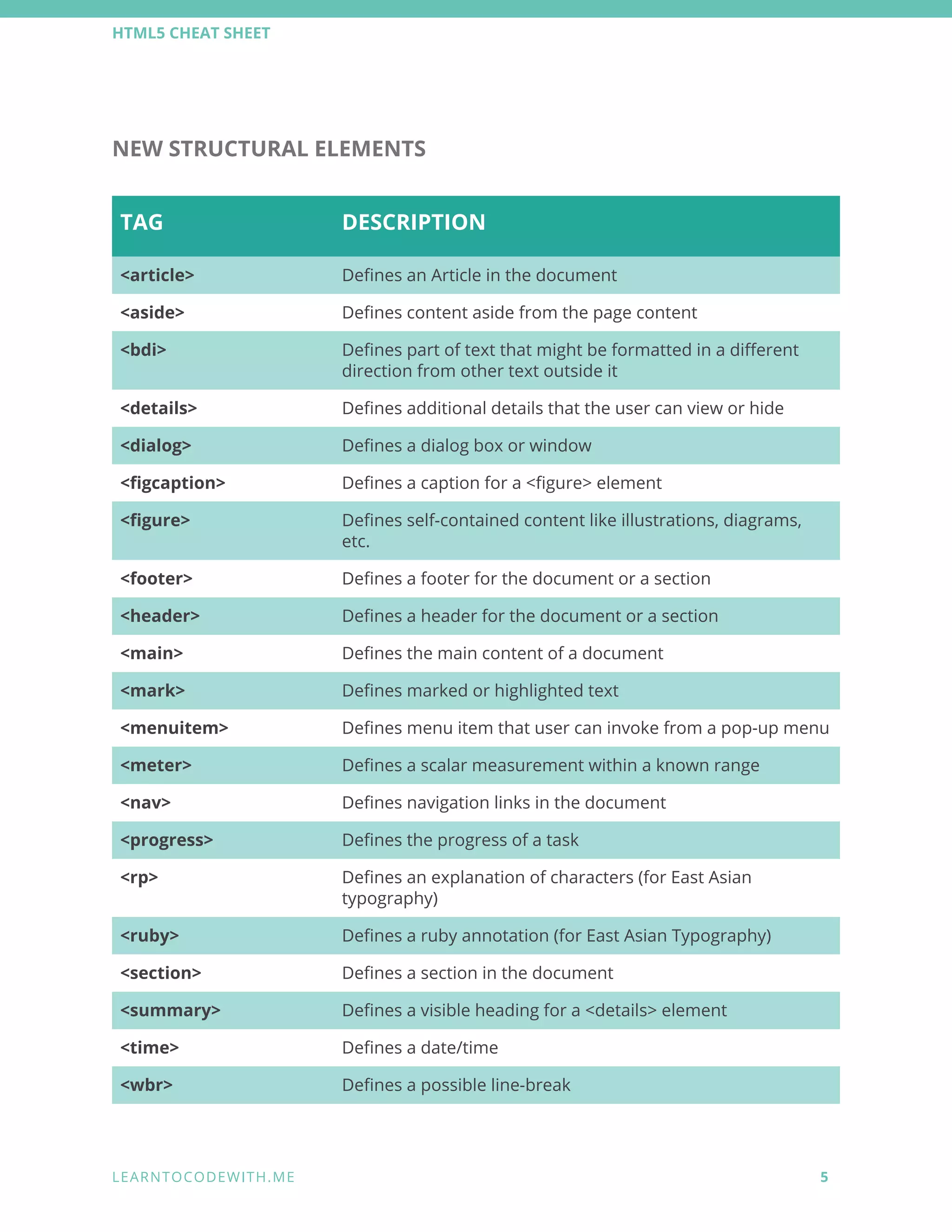
NEW STRUCTURAL ELEMENTS 
 
TAG  DESCRIPTION 
<article>  Defines an Article in the document 
<aside>  Defines content aside from the page content 
<bdi>  Defines part of text that might be formatted in a different 
direction from other text outside it 
<details>   Defines additional details that the user can view or hide 
<dialog>  Defines a dialog box or window 
<figcaption>  Defines a caption for a <figure> element 
<figure>  Defines self-contained content like illustrations, diagrams, 
etc. 
<footer>  Defines a footer for the document or a section 
<header>  Defines a header for the document or a section 
<main>  Defines the main content of a document 
<mark>  Defines marked or highlighted text 
<menuitem>  Defines menu item that user can invoke from a pop-up menu 
<meter>  Defines a scalar measurement within a known range 
<nav>  Defines navigation links in the document 
<progress>  Defines the progress of a task 
<rp>  Defines an explanation of characters (for East Asian 
typography) 
<ruby>  Defines a ruby annotation (for East Asian Typography) 
<section>  Defines a section in the document 
<summary>  Defines a visible heading for a <details> element 
<time>  Defines a date/time 
<wbr>  Defines a possible line-break 
 
L E A R N T O C O D E W I T H . M E            5 
 
HTML5 CHEAT SHEET 
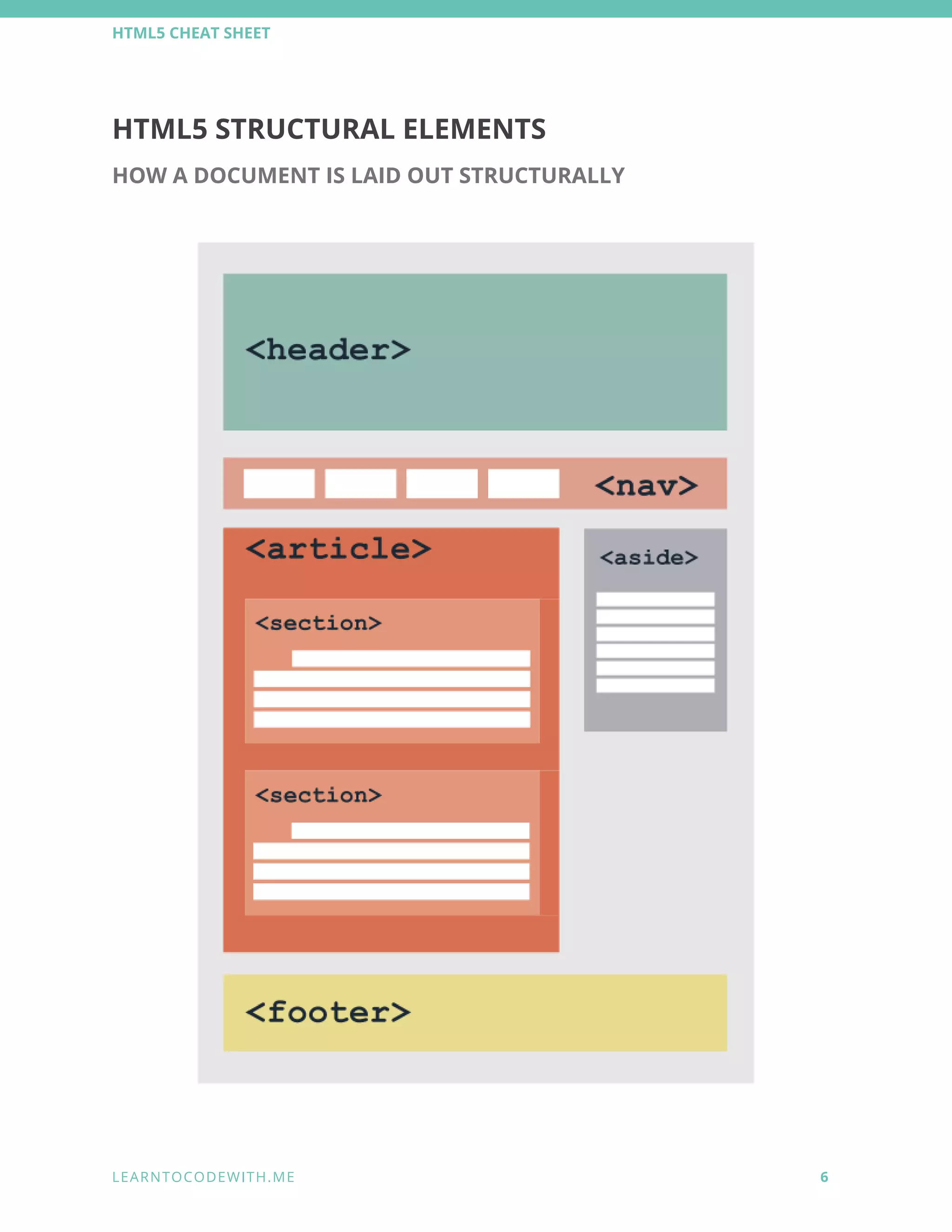
HTML5 STRUCTURAL ELEMENTS 
HOW A DOCUMENT IS LAID OUT STRUCTURALLY  
 
 
L E A R N T O C O D E W I T H . M E            6 
 
HTML5 CHEAT SHEET 
 
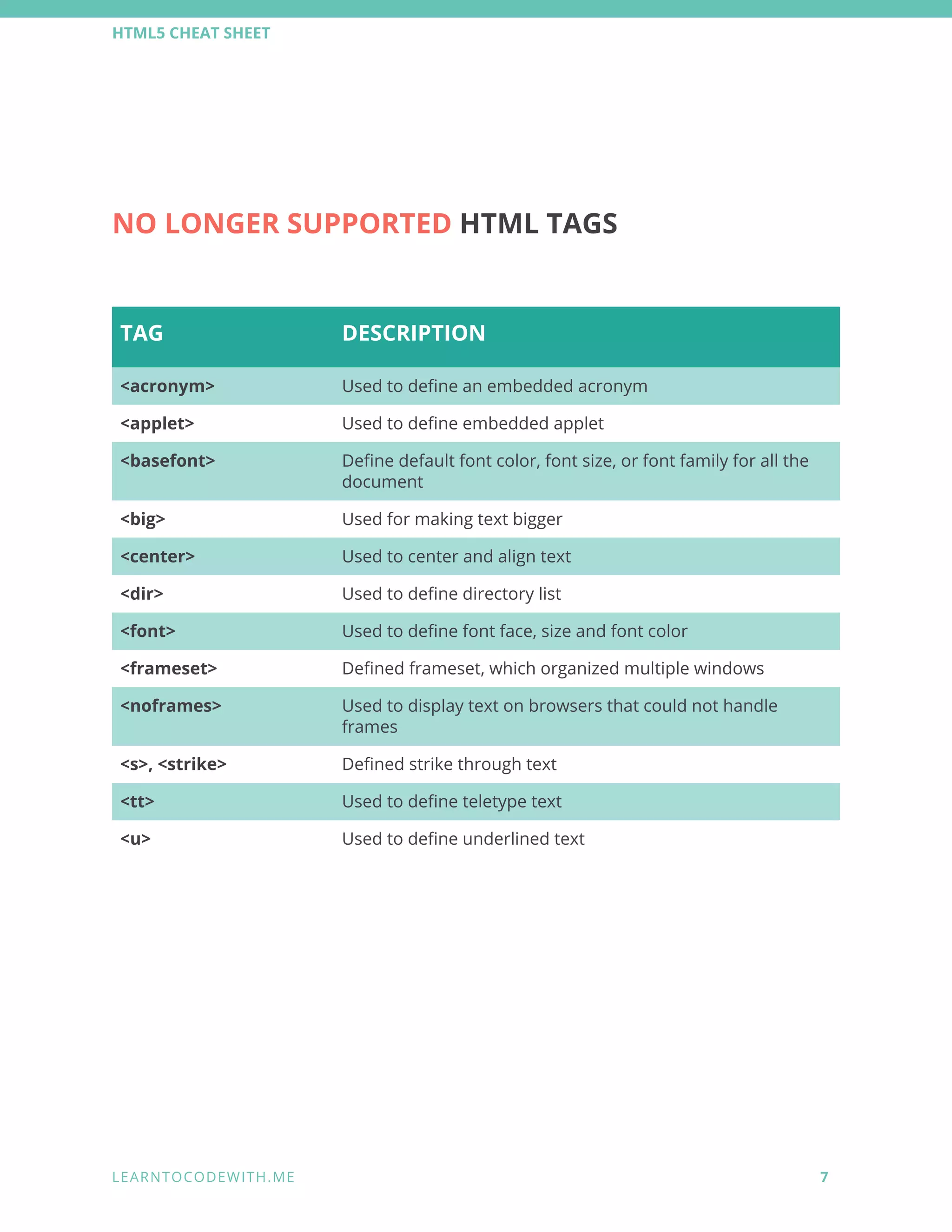
NO LONGER SUPPORTED HTML TAGS 
 
TAG  DESCRIPTION 
<acronym>  Used to define an embedded acronym 
<applet>  Used to define embedded applet 
<basefont>  Define default font color, font size, or font family for all the 
document 
<big>   Used for making text bigger 
<center>  Used to center and align text 
<dir>  Used to define directory list 
<font>  Used to define font face, size and font color 
<frameset>  Defined frameset, which organized multiple windows 
<noframes>  Used to display text on browsers that could not handle 
frames 
<s>, <strike>  Defined strike through text 
<tt>  Used to define teletype text 
<u>  Used to define underlined text 


L E A R N T O C O D E W I T H . M E            7 
 
HTML5 CHEAT SHEET 
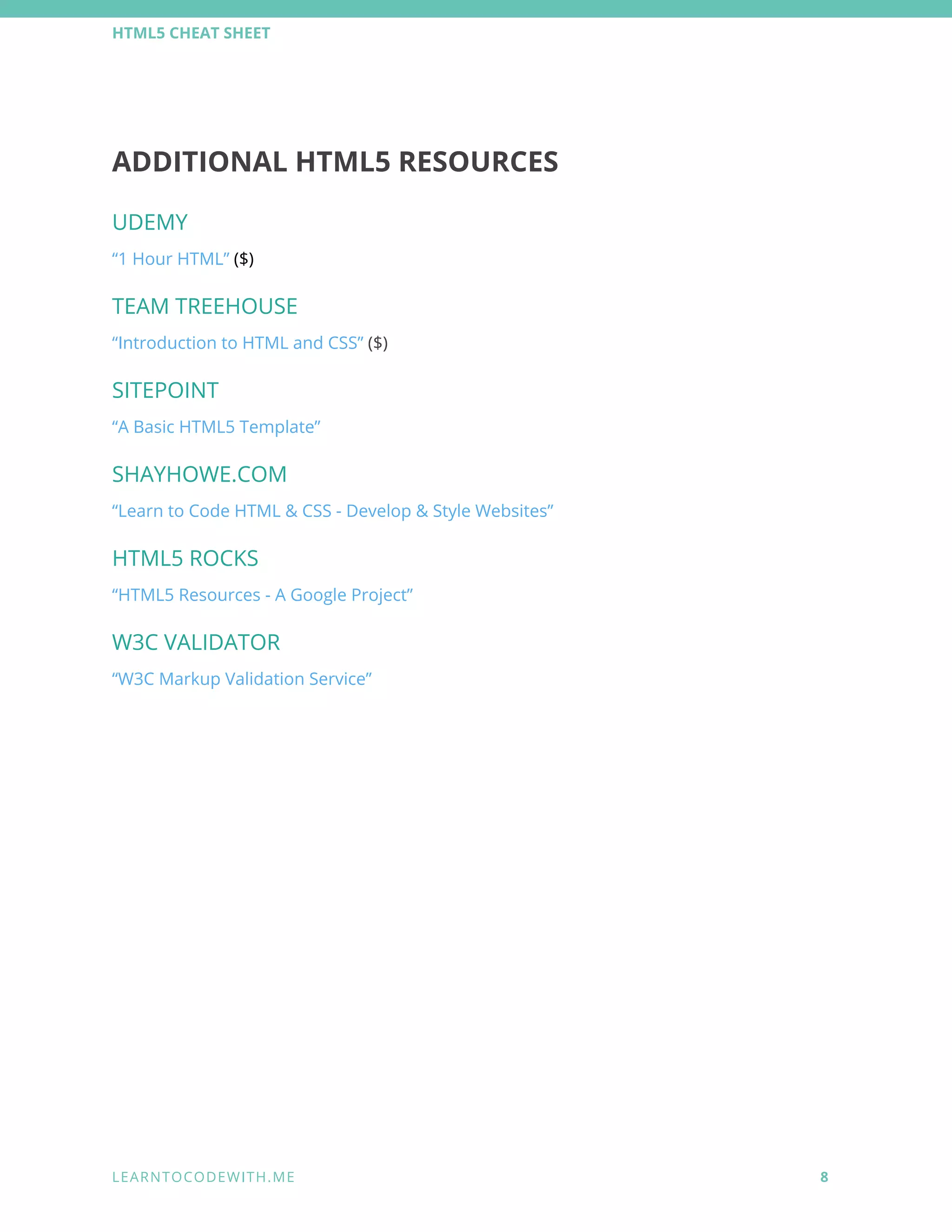
ADDITIONAL HTML5 RESOURCES 
UDEMY 
“1 Hour HTML” ($) 
TEAM TREEHOUSE 
“Introduction to HTML and CSS” ($) 
SITEPOINT 
“A Basic HTML5 Template” 
SHAYHOWE.COM 
“Learn to Code HTML & CSS - Develop & Style Websites” 
HTML5 ROCKS 
“HTML5 Resources - A Google Project” 
W3C VALIDATOR 
“W3C Markup Validation Service” 


L E A R N T O C O D E W I T H . M E            8 
 
HTML5 CHEAT SHEET 


Want to learn to code 
with other newbies? 


L E A R N T O C O D E W I T H . M E            9 
 

HTML5 cheat sheet