HTML5 Examples
drawing on canvas (paths, text, video),
 mouse events, timed events, objects,
       semantic elements, etc.
Overview
• Background
• Show and explain 4 examples, focus on
   o drawing paths (lines & arcs), rectangles & text on canvas
   o semantic elements
   o use of CSS for font families, decoration, color of text
   o translate, scale coordinate system
   o object oriented programming to produce stub application for dragging of
     'objects' using mouse events
   o change of cursor icon
   o video elements and drawing video on canvas
   o timed events
   o structured way for sequence of drawings
Background
• HTML5 is next new thing...still in development
   o canvas, video, semantic elements, events, etc.
• Browser support mixed
   o Firefox, Safari, Chrome, Opera ahead of IE
   o Firefox NOT always ahead, but it does have Error Console
• Formal W3C document is not easy to decipher...but/and
  many on-line sources, including you!

• My background: early career at IBM Research in robotics
  and manufacturing, now in academia, teaching math/cs,
  new media and also general education courses. I like
  programming!
Examples
• HTML5 logo, with scaling and use of CSS formatted footer
  http://faculty.purchase.edu/jeanine.meyer/html5/html5logoscale.html
• Application stub: drawing rectangles and ovals, drag and
  drop http://faculty.purchase.edu/jeanine.meyer/html5/build1.html
• Bouncing video masked to be a circle
  http://faculty.purchase.edu/jeanine.meyer/html5/videobounce.html
• Origami
  http://faculty.purchase.edu/jeanine.meyer/html5/origamifrog.html
  http://faculty.purchase.edu/jeanine.meyer/html5/origamifish.html
NOTE on these and other HTML5
examples
You always can look at the source using the View source
option in the browser.

Complex examples may have separate and multiple files,
especially for CSS and JavaScript.

Most people are open to comments.

I sometimes write tutorials...
HTML5 logo
• use beginPath, moveTo,
    lineTo, fill to draw
    shield
•   built on other work (they
    had the x,y positions for
    the shield, but no HTML)
    and this motivated a use of
    translate
•   added slider (new input
    type) -- use of another
    coordinate transformation:
    scale
•   used drawing text on
    canvas and [regular] text
•   used article and
    footer (CSS formatting)
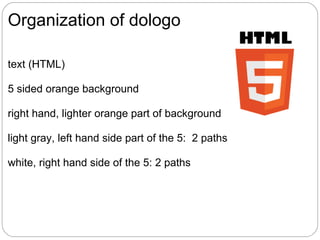
Organization of dologo

text (HTML)

5 sided orange background

right hand, lighter orange part of background

light gray, left hand side part of the 5: 2 paths

white, right hand side of the 5: 2 paths
Code snippets for logo
<input id="slide" type="range" min="0" max="100" value="100"
onChange="changescale(this.value)" step="10"/>

function changescale(val) {
factorvalue = val / 100;
dologo(); }

function dologo() {
   var offsety = 80 ;
   ctx.restore();
   ctx.save();
   ctx.clearRect(0,0,600,400);
   ctx.scale(factorvalue,factorvalue);
   ctx.fillText("HTML", 31,60);
   ctx.translate(0,offsety);
          ...
dologo, cont.

ctx.fillStyle = "#E34C26"; // given in W3C spec
ctx.beginPath();
ctx.moveTo(39, 250);
ctx.lineTo(17, 0);
ctx.lineTo(262, 0);
ctx.lineTo(239, 250);
ctx.lineTo(139, 278);
ctx.closePath();
ctx.fill();

....
CSS for footer, article
<style>
footer {display:block; border-top: 1px solid orange; margin:
10px; font-family: "Trebuchet MS", Arial, Helvetica, sans-serif;
font-weight: bold; }

article {display:block;
font-family: Georgia, "Times New Roman", Times, serif;
margin: 5px;}
</style>

NOTES
The border-top puts an orange line before footer.
The two font-family directives provide back-up.
The display:block directives provide the line breaks.
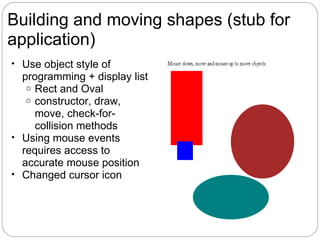
Building and moving shapes (stub for
application)
• Use object style of
  programming + display list
   o Rect and Oval
   o constructor, draw,
     move, check-for-
     collision methods
• Using mouse events
  requires access to
  accurate mouse position
• Changed cursor icon
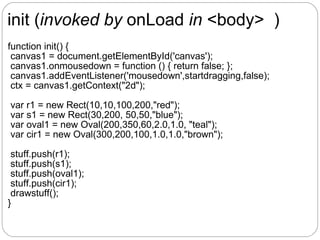
init (invoked by onLoad in <body> )
function init() {
 canvas1 = document.getElementById('canvas');
 canvas1.onmousedown = function () { return false; };
 canvas1.addEventListener('mousedown',startdragging,false);
 ctx = canvas1.getContext("2d");

var r1 = new Rect(10,10,100,200,"red");
var s1 = new Rect(30,200, 50,50,"blue");
var oval1 = new Oval(200,350,60,2.0,1.0, "teal");
var cir1 = new Oval(300,200,100,1.0,1.0,"brown");

 stuff.push(r1);
 stuff.push(s1);
 stuff.push(oval1);
 stuff.push(cir1);
 drawstuff();
}
drawstuff function

function drawstuff() {
    ctx.clearRect(0,0,600,500);
    for (var i=0;i<stuff.length;i++) {
        stuff[i].draw();
    }
 }


Code expects that each element of step will have a draw
method...
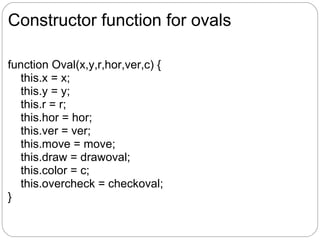
Constructor function for ovals

function Oval(x,y,r,hor,ver,c) {
  this.x = x;
  this.y = y;
  this.r = r;
  this.hor = hor;
  this.ver = ver;
  this.move = move;
  this.draw = drawoval;
  this.color = c;
  this.overcheck = checkoval;
}
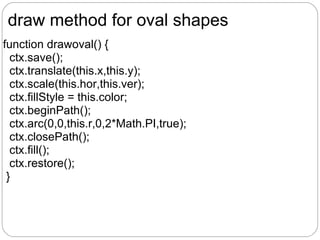
draw method for oval shapes
function drawoval() {
  ctx.save();
  ctx.translate(this.x,this.y);
  ctx.scale(this.hor,this.ver);
  ctx.fillStyle = this.color;
  ctx.beginPath();
  ctx.arc(0,0,this.r,0,2*Math.PI,true);
  ctx.closePath();
  ctx.fill();
  ctx.restore();
 }
definition of [what will be] overcheck
method
function checkoval(mx,my) {
//computes positions in translated &scaled coordinate system
var x1 = 0; //this is this.x - this.x
var y1 = 0;
var x2 = (mx-this.x)/this.hor;
var y2 = (my-this.y)/this.ver;
if (distsq(x1,y1,x2,y2)<=(this.r*this.r) ){
   return true
}
 else {
   return false
 }
}
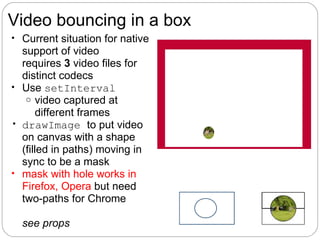
Video bouncing in a box
• Current situation for native
  support of video
  requires 3 video files for
  distinct codecs
• Use setInterval
   o video captured at
       different frames
• drawImage to put video
  on canvas with a shape
  (filled in paths) moving in
  sync to be a mask
• mask with hole works in
  Firefox, Opera but need
  two-paths for Chrome

  see props
setup including animaiton
function init(){
  ctx = document.getElementById('canvas').getContext('2d');
  v = document.getElementById("vid");
  v.addEventListener("ended",restart,false);
  // because loop doesn't work on FF
 v.width = v.videoWidth/3;
 v.height = v.videoHeight/3;
 videow = v.width;
 videoh = v.height;
 maskrad = .4*Math.min(videow,videoh);
 ctx.lineWidth = ballrad;
 ctx.strokeStyle ="rgb(200,0,50)";
 ctx.fillStyle="white";
 v.play();
 setInterval(drawscene,50);
 }
Code/markup for video
In body element
<video id="vid" loop="loop" preload="auto">
<source src="joshuahomerun.mp4" type='video/mp4; codecs="avc1.42E01E,
mp4a.40.2"'>
<source src="joshuahomerun.webmvp8.webm" type='video/webm; codec="vp8,
vorbis"'>
 <source src="joshuahomerun.theora.ogv" type='video/ogg; codecs="theora,
vorbis"'> Your browser does not accept the video tag.
 </video>

In script element, in init function...
v = document.getElementById("vid");

In script element, in drawscene, strategy is
  erase canvas
  draw video ctx.drawImage(v,ballx+boxx, bally+box, v.width,v.height);
  draw (white) filled in path to be the mask
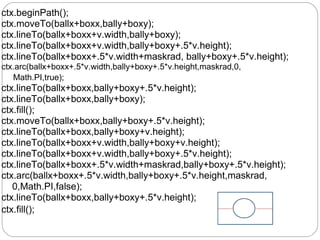
ctx.beginPath();
ctx.moveTo(ballx+boxx,bally+boxy);
ctx.lineTo(ballx+boxx+v.width,bally+boxy);
ctx.lineTo(ballx+boxx+v.width,bally+boxy+.5*v.height);
ctx.lineTo(ballx+boxx+.5*v.width+maskrad, bally+boxy+.5*v.height);
ctx.arc(ballx+boxx+.5*v.width,bally+boxy+.5*v.height,maskrad,0,
   Math.PI,true);
ctx.lineTo(ballx+boxx,bally+boxy+.5*v.height);
ctx.lineTo(ballx+boxx,bally+boxy);
ctx.fill();
ctx.moveTo(ballx+boxx,bally+boxy+.5*v.height);
ctx.lineTo(ballx+boxx,bally+boxy+v.height);
ctx.lineTo(ballx+boxx+v.width,bally+boxy+v.height);
ctx.lineTo(ballx+boxx+v.width,bally+boxy+.5*v.height);
ctx.lineTo(ballx+boxx+.5*v.width+maskrad,bally+boxy+.5*v.height);
ctx.arc(ballx+boxx+.5*v.width,bally+boxy+.5*v.height,maskrad,
   0,Math.PI,false);
ctx.lineTo(ballx+boxx,bally+boxy+.5*v.height);
ctx.fill();
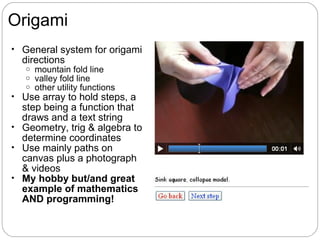
Origami
• General system for origami
  directions
   o   mountain fold line
   o   valley fold line
   o   other utility functions
• Use array to hold steps, a
  step being a function that
  draws and a text string
• Geometry, trig & algebra to
  determine coordinates
• Use mainly paths on
  canvas plus a photograph
  & videos
• My hobby but/and great
  example of mathematics
  AND programming!
Organize steps

• Use steps array
• Each element is itself an array, consisting of the name of a
   function that produces the drawing (or the photo or the
   video) and a piece of text.
var steps = [
  [directions,"Diagram conventions"],
  [showkami,"Make quarter turn."],
  [diamond1,"Fold top point to bottom point."],
  [triangleM,"Divide line into thirds and make valley folds and unfold "],
  [thirds,"Fold in half to the left."], ...

• I developed these step by step, including going back and inserting
   new steps
     demonstration of iterative design.
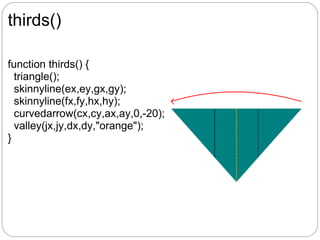
thirds()

function thirds() {
  triangle();
  skinnyline(ex,ey,gx,gy);
  skinnyline(fx,fy,hx,hy);
  curvedarrow(cx,cy,ax,ay,0,-20);
  valley(jx,jy,dx,dy,"orange");
}
The donext (step) function

function donext() {
   if (nextstep>=steps.length) {
      nextstep=steps.length-1;
   }
  v.pause();
  v.style.display = "none"; //erases last video played
  canvas1.height = 480; //restore height
  ctx.clearRect(0,0,cwidth,cheight);
  ctx.lineWidth = origwidth;
  steps[nextstep][0](); //invokes the function
  ta.innerHTML = steps[nextstep][1];
  nextstep++;
}
Thank you!

Google tools for webmasters

  • 1.
    HTML5 Examples drawing oncanvas (paths, text, video), mouse events, timed events, objects, semantic elements, etc.
  • 2.
    Overview • Background • Showand explain 4 examples, focus on o drawing paths (lines & arcs), rectangles & text on canvas o semantic elements o use of CSS for font families, decoration, color of text o translate, scale coordinate system o object oriented programming to produce stub application for dragging of 'objects' using mouse events o change of cursor icon o video elements and drawing video on canvas o timed events o structured way for sequence of drawings
  • 3.
    Background • HTML5 isnext new thing...still in development o canvas, video, semantic elements, events, etc. • Browser support mixed o Firefox, Safari, Chrome, Opera ahead of IE o Firefox NOT always ahead, but it does have Error Console • Formal W3C document is not easy to decipher...but/and many on-line sources, including you! • My background: early career at IBM Research in robotics and manufacturing, now in academia, teaching math/cs, new media and also general education courses. I like programming!
  • 4.
    Examples • HTML5 logo,with scaling and use of CSS formatted footer http://faculty.purchase.edu/jeanine.meyer/html5/html5logoscale.html • Application stub: drawing rectangles and ovals, drag and drop http://faculty.purchase.edu/jeanine.meyer/html5/build1.html • Bouncing video masked to be a circle http://faculty.purchase.edu/jeanine.meyer/html5/videobounce.html • Origami http://faculty.purchase.edu/jeanine.meyer/html5/origamifrog.html http://faculty.purchase.edu/jeanine.meyer/html5/origamifish.html
  • 5.
    NOTE on theseand other HTML5 examples You always can look at the source using the View source option in the browser. Complex examples may have separate and multiple files, especially for CSS and JavaScript. Most people are open to comments. I sometimes write tutorials...
  • 6.
    HTML5 logo • usebeginPath, moveTo, lineTo, fill to draw shield • built on other work (they had the x,y positions for the shield, but no HTML) and this motivated a use of translate • added slider (new input type) -- use of another coordinate transformation: scale • used drawing text on canvas and [regular] text • used article and footer (CSS formatting)
  • 7.
    Organization of dologo text(HTML) 5 sided orange background right hand, lighter orange part of background light gray, left hand side part of the 5: 2 paths white, right hand side of the 5: 2 paths
  • 8.
    Code snippets forlogo <input id="slide" type="range" min="0" max="100" value="100" onChange="changescale(this.value)" step="10"/> function changescale(val) { factorvalue = val / 100; dologo(); } function dologo() { var offsety = 80 ; ctx.restore(); ctx.save(); ctx.clearRect(0,0,600,400); ctx.scale(factorvalue,factorvalue); ctx.fillText("HTML", 31,60); ctx.translate(0,offsety); ...
  • 9.
    dologo, cont. ctx.fillStyle ="#E34C26"; // given in W3C spec ctx.beginPath(); ctx.moveTo(39, 250); ctx.lineTo(17, 0); ctx.lineTo(262, 0); ctx.lineTo(239, 250); ctx.lineTo(139, 278); ctx.closePath(); ctx.fill(); ....
  • 10.
    CSS for footer,article <style> footer {display:block; border-top: 1px solid orange; margin: 10px; font-family: "Trebuchet MS", Arial, Helvetica, sans-serif; font-weight: bold; } article {display:block; font-family: Georgia, "Times New Roman", Times, serif; margin: 5px;} </style> NOTES The border-top puts an orange line before footer. The two font-family directives provide back-up. The display:block directives provide the line breaks.
  • 11.
    Building and movingshapes (stub for application) • Use object style of programming + display list o Rect and Oval o constructor, draw, move, check-for- collision methods • Using mouse events requires access to accurate mouse position • Changed cursor icon
  • 12.
    init (invoked byonLoad in <body> ) function init() { canvas1 = document.getElementById('canvas'); canvas1.onmousedown = function () { return false; }; canvas1.addEventListener('mousedown',startdragging,false); ctx = canvas1.getContext("2d"); var r1 = new Rect(10,10,100,200,"red"); var s1 = new Rect(30,200, 50,50,"blue"); var oval1 = new Oval(200,350,60,2.0,1.0, "teal"); var cir1 = new Oval(300,200,100,1.0,1.0,"brown"); stuff.push(r1); stuff.push(s1); stuff.push(oval1); stuff.push(cir1); drawstuff(); }
  • 13.
    drawstuff function function drawstuff(){ ctx.clearRect(0,0,600,500); for (var i=0;i<stuff.length;i++) { stuff[i].draw(); } } Code expects that each element of step will have a draw method...
  • 14.
    Constructor function forovals function Oval(x,y,r,hor,ver,c) { this.x = x; this.y = y; this.r = r; this.hor = hor; this.ver = ver; this.move = move; this.draw = drawoval; this.color = c; this.overcheck = checkoval; }
  • 15.
    draw method foroval shapes function drawoval() { ctx.save(); ctx.translate(this.x,this.y); ctx.scale(this.hor,this.ver); ctx.fillStyle = this.color; ctx.beginPath(); ctx.arc(0,0,this.r,0,2*Math.PI,true); ctx.closePath(); ctx.fill(); ctx.restore(); }
  • 16.
    definition of [whatwill be] overcheck method function checkoval(mx,my) { //computes positions in translated &scaled coordinate system var x1 = 0; //this is this.x - this.x var y1 = 0; var x2 = (mx-this.x)/this.hor; var y2 = (my-this.y)/this.ver; if (distsq(x1,y1,x2,y2)<=(this.r*this.r) ){ return true } else { return false } }
  • 17.
    Video bouncing ina box • Current situation for native support of video requires 3 video files for distinct codecs • Use setInterval o video captured at different frames • drawImage to put video on canvas with a shape (filled in paths) moving in sync to be a mask • mask with hole works in Firefox, Opera but need two-paths for Chrome see props
  • 18.
    setup including animaiton functioninit(){ ctx = document.getElementById('canvas').getContext('2d'); v = document.getElementById("vid"); v.addEventListener("ended",restart,false); // because loop doesn't work on FF v.width = v.videoWidth/3; v.height = v.videoHeight/3; videow = v.width; videoh = v.height; maskrad = .4*Math.min(videow,videoh); ctx.lineWidth = ballrad; ctx.strokeStyle ="rgb(200,0,50)"; ctx.fillStyle="white"; v.play(); setInterval(drawscene,50); }
  • 19.
    Code/markup for video Inbody element <video id="vid" loop="loop" preload="auto"> <source src="joshuahomerun.mp4" type='video/mp4; codecs="avc1.42E01E, mp4a.40.2"'> <source src="joshuahomerun.webmvp8.webm" type='video/webm; codec="vp8, vorbis"'> <source src="joshuahomerun.theora.ogv" type='video/ogg; codecs="theora, vorbis"'> Your browser does not accept the video tag. </video> In script element, in init function... v = document.getElementById("vid"); In script element, in drawscene, strategy is erase canvas draw video ctx.drawImage(v,ballx+boxx, bally+box, v.width,v.height); draw (white) filled in path to be the mask
  • 20.
    ctx.beginPath(); ctx.moveTo(ballx+boxx,bally+boxy); ctx.lineTo(ballx+boxx+v.width,bally+boxy); ctx.lineTo(ballx+boxx+v.width,bally+boxy+.5*v.height); ctx.lineTo(ballx+boxx+.5*v.width+maskrad, bally+boxy+.5*v.height); ctx.arc(ballx+boxx+.5*v.width,bally+boxy+.5*v.height,maskrad,0, Math.PI,true); ctx.lineTo(ballx+boxx,bally+boxy+.5*v.height); ctx.lineTo(ballx+boxx,bally+boxy); ctx.fill(); ctx.moveTo(ballx+boxx,bally+boxy+.5*v.height); ctx.lineTo(ballx+boxx,bally+boxy+v.height); ctx.lineTo(ballx+boxx+v.width,bally+boxy+v.height); ctx.lineTo(ballx+boxx+v.width,bally+boxy+.5*v.height); ctx.lineTo(ballx+boxx+.5*v.width+maskrad,bally+boxy+.5*v.height); ctx.arc(ballx+boxx+.5*v.width,bally+boxy+.5*v.height,maskrad, 0,Math.PI,false); ctx.lineTo(ballx+boxx,bally+boxy+.5*v.height); ctx.fill();
  • 21.
    Origami • General systemfor origami directions o mountain fold line o valley fold line o other utility functions • Use array to hold steps, a step being a function that draws and a text string • Geometry, trig & algebra to determine coordinates • Use mainly paths on canvas plus a photograph & videos • My hobby but/and great example of mathematics AND programming!
  • 22.
    Organize steps • Usesteps array • Each element is itself an array, consisting of the name of a function that produces the drawing (or the photo or the video) and a piece of text. var steps = [ [directions,"Diagram conventions"], [showkami,"Make quarter turn."], [diamond1,"Fold top point to bottom point."], [triangleM,"Divide line into thirds and make valley folds and unfold "], [thirds,"Fold in half to the left."], ... • I developed these step by step, including going back and inserting new steps  demonstration of iterative design.
  • 23.
    thirds() function thirds() { triangle(); skinnyline(ex,ey,gx,gy); skinnyline(fx,fy,hx,hy); curvedarrow(cx,cy,ax,ay,0,-20); valley(jx,jy,dx,dy,"orange"); }
  • 24.
    The donext (step)function function donext() { if (nextstep>=steps.length) { nextstep=steps.length-1; } v.pause(); v.style.display = "none"; //erases last video played canvas1.height = 480; //restore height ctx.clearRect(0,0,cwidth,cheight); ctx.lineWidth = origwidth; steps[nextstep][0](); //invokes the function ta.innerHTML = steps[nextstep][1]; nextstep++; }
  • 25.

Editor's Notes

  • #2 I&apos;m happy to be with you today. This is the first time I&apos;ve done a remote workshop. One thing I will be struggling with is browsers. The state of HTML5 is that I want to show the examples in more than one browser....
  • #3 I&apos;m going to give some background and then demonstrate 4 simple examples that showcase some of the new features of HTML5,  namely canvas element: on which we can write code to draw shapes, using lines and arcs, fill in those shapes, draw rectangles, draw text, and draw images AND video. HTML5 also provides new, so-called semantic elements and I show the use of them and CSS for formatting. My second example makes use of a common programming technique object oriented or, perhaps better object oriented like. I also use something very much like a display list. I change the mouse cursor just to show how it is done. Video, native support of video, is one of the most heralded features of HTML5, so I will show that, in the form of a bouncing video. Lastly, I used drawing on canvas and images on canvas to produce directions for origami. I&apos;ll break for feedback and Q&amp;A and we can go back for more details.
  • #4 HTML5 is the next new thing and it is important to note that it still isn&apos;t official. Browser support is mixed. There is no one browser that does it all. IE is working at this. I did get a call from a Microsoft Web evangelist asking if he could work on the examples in my book and then making note on the publisher&apos;s site that they do work.... in IE9
  • #5 Let me show the examples, say some general words about each of them, and depending on the time, look at the code and/or answer questions.
  • #7 I was sent a query from a magazine on what I thought about the logo. I hadn&apos;t seen it, ... one of my students said he liked the 70s super hero vibe. It does beg to be done using html5 canvas instructions.... Now I found an example of drawing just the shield, so...how do I still use Daniel Davis&apos;s coordinates and add the HTML at the top? Answer: translate the coordinate system. Then, how do I re-draw the whole logo with scaled dimensions? Answer: again, use transformation of the coordinate system.  How do I get input on what the scaling is? Use the new input type=&amp;quot;range&amp;quot;. I found it interesting that Firefox doesn&apos;t support the range fully, but does degrade more or less nicely. The so-called semantic element types require formatting. I used border-top to get this line.
  • #12 This is what I term a stub for some real application (a student is doing this now). HTML5 provides support for mouse events. It uses addEventListener, which is how it is done in Flash. This is done for the canvas element as opposed to the canvas element 2d context, which is the thing with the methods for drawing. Canvas is a canvas: the drawing puts ink (paint) on the canvas, not objects. So I set up objects to be drawn, moved and examined for collisions. The mouse coordinates require some browser specific coding SIGH and also some CSS.... I need to do some calculations to determine when the mouse cursor was over an oval.
  • #18 I was excited about drawing video as an image on the canvas. My first attempt at drawing the video on canvas and putting a mask in front of it only worked on Firefox but not Chrome because the mask (rectangle plus hole) didn&apos;t work. With a two part mask, it appears to work on both, and maybe others.
  • #22 Origami is a longtime family interest. The Meyer family site has examples demonstrating different ways to display directions. I wanted to develop a methodology to do other diagrams, sticking to line drawings, but having the last one be a photo was okay. There are many beautiful origami sites.
  • #26 Look at coding? Discussion Please keep up the conversation....