HTML/CSS Best
Practices
-Bijay Yadav
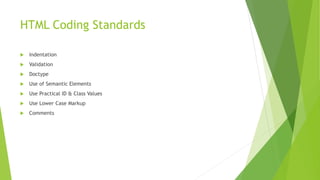
HTML Coding Standards
 Indentation
 Validation
 Doctype
 Use of Semantic Elements
 Use Practical ID & Class Values
 Use Lower Case Markup
 Comments
Indentation
 Should always reflect logical structure.
 Use tabs not spaces.
 Increases readability.
Validation
 Debugging Tool.
 Best Practices.
 Shows Professionalism.
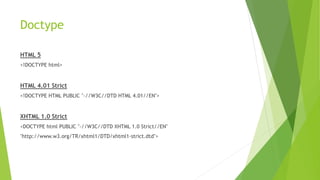
Doctype
HTML 5
<!DOCTYPE html>
HTML 4.01 Strict
<!DOCTYPE HTML PUBLIC "-//W3C//DTD HTML 4.01//EN">
XHTML 1.0 Strict
<DOCTYPE html PUBLIC "-//W3C//DTD XHTML 1.0 Strict//EN"
"http://www.w3.org/TR/xhtml1/DTD/xhtml1-strict.dtd">
Use of Semantic Elements
 Search Engine Friendly
 Shorter and download fasts
 Accessibility
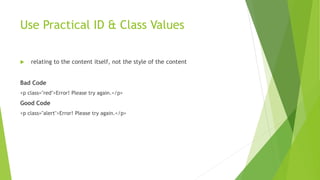
Use Practical ID & Class Values
 relating to the content itself, not the style of the content
Bad Code
<p class="red">Error! Please try again.</p>
Good Code
<p class="alert">Error! Please try again.</p>
Use Lower Case Markup
 Better Readability.
 Standard
 Common Practise
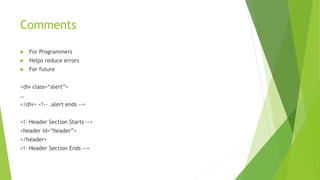
Comments
 For Programmers
 Helps reduce errors
 For future
<div class=“alert”>
…
</div> <!-- .alert ends -->
<!– Header Section Starts -->
<header id=“header”>
</header>
<!– Header Section Ends -->
CSS Coding Standards
 Structure
 Selectors
 Properties
 Vendor Prefixes
 Values
 Media Queries
 Commenting
Structure
 Use tabs, not spaces for indentation
 two blank lines between sections.
 one blank line between blocks in a section.
 Each selector should be on its own line.
 Property-value pairs should be on their own line.
 The closing brace should be flush left.
Eg.
#selector-1,
#selector-2,
#selector-3 {
background: #fff;
color: #000;
}
Selectors
 Use lowercase and separate words with hyphens when naming selectors.
 Refrain from using over-qualified selectors.
 Attribute selectors should use double quotes around values.
Eg.
#comment-form {
margin: 1em 0;
}
input[type="text"] {
line-height: 1.1;
}
Properties
 Should be followed by a colon and a space.
 Use lowercase, except for font names and vendor-specific properties.
 Use shorthand.
Property Ordering
 Display
 Positioning
 Box model
 Colors and Typography
 Other
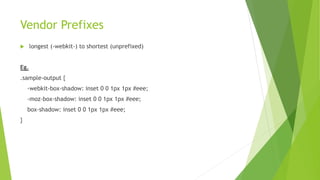
Vendor Prefixes
 longest (-webkit-) to shortest (unprefixed)
Eg.
.sample-output {
-webkit-box-shadow: inset 0 0 1px 1px #eee;
-moz-box-shadow: inset 0 0 1px 1px #eee;
box-shadow: inset 0 0 1px 1px #eee;
}
Values
 Space before the value, after the colon.
 Always end in a semicolon.
 Use double quotes rather than single quotes.
 0 values should not have units unless necessary.
 Line height should also be unit-less, unless necessary.
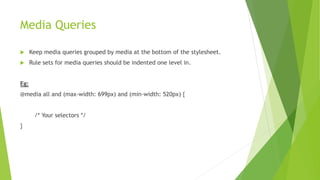
Media Queries
 Keep media queries grouped by media at the bottom of the stylesheet.
 Rule sets for media queries should be indented one level in.
Eg:
@media all and (max-width: 699px) and (min-width: 520px) {
/* Your selectors */
}
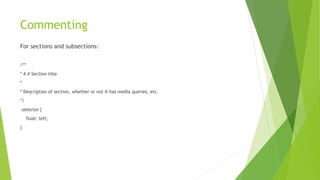
Commenting
For sections and subsections:
/**
* #.# Section title
*
* Description of section, whether or not it has media queries, etc.
*/
.selector {
float: left;
}
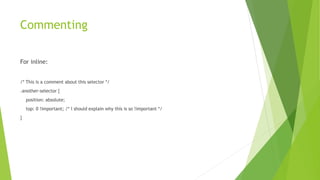
Commenting
For inline:
/* This is a comment about this selector */
.another-selector {
position: absolute;
top: 0 !important; /* I should explain why this is so !important */
}
Thank You!!!
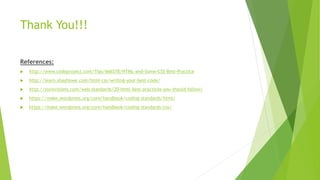
References:
 http://www.codeproject.com/Tips/666578/HTML-and-Some-CSS-Best-Practice
 http://learn.shayhowe.com/html-css/writing-your-best-code/
 http://sixrevisions.com/web-standards/20-html-best-practices-you-should-follow/
 https://make.wordpress.org/core/handbook/coding-standards/html/
 https://make.wordpress.org/core/handbook/coding-standards/css/

Html css best_practices

  • 1.
  • 2.
    HTML Coding Standards Indentation  Validation  Doctype  Use of Semantic Elements  Use Practical ID & Class Values  Use Lower Case Markup  Comments
  • 3.
    Indentation  Should alwaysreflect logical structure.  Use tabs not spaces.  Increases readability.
  • 4.
    Validation  Debugging Tool. Best Practices.  Shows Professionalism.
  • 5.
    Doctype HTML 5 <!DOCTYPE html> HTML4.01 Strict <!DOCTYPE HTML PUBLIC "-//W3C//DTD HTML 4.01//EN"> XHTML 1.0 Strict <DOCTYPE html PUBLIC "-//W3C//DTD XHTML 1.0 Strict//EN" "http://www.w3.org/TR/xhtml1/DTD/xhtml1-strict.dtd">
  • 6.
    Use of SemanticElements  Search Engine Friendly  Shorter and download fasts  Accessibility
  • 7.
    Use Practical ID& Class Values  relating to the content itself, not the style of the content Bad Code <p class="red">Error! Please try again.</p> Good Code <p class="alert">Error! Please try again.</p>
  • 8.
    Use Lower CaseMarkup  Better Readability.  Standard  Common Practise
  • 9.
    Comments  For Programmers Helps reduce errors  For future <div class=“alert”> … </div> <!-- .alert ends --> <!– Header Section Starts --> <header id=“header”> </header> <!– Header Section Ends -->
  • 10.
    CSS Coding Standards Structure  Selectors  Properties  Vendor Prefixes  Values  Media Queries  Commenting
  • 11.
    Structure  Use tabs,not spaces for indentation  two blank lines between sections.  one blank line between blocks in a section.  Each selector should be on its own line.  Property-value pairs should be on their own line.  The closing brace should be flush left. Eg. #selector-1, #selector-2, #selector-3 { background: #fff; color: #000; }
  • 12.
    Selectors  Use lowercaseand separate words with hyphens when naming selectors.  Refrain from using over-qualified selectors.  Attribute selectors should use double quotes around values. Eg. #comment-form { margin: 1em 0; } input[type="text"] { line-height: 1.1; }
  • 13.
    Properties  Should befollowed by a colon and a space.  Use lowercase, except for font names and vendor-specific properties.  Use shorthand.
  • 14.
    Property Ordering  Display Positioning  Box model  Colors and Typography  Other
  • 15.
    Vendor Prefixes  longest(-webkit-) to shortest (unprefixed) Eg. .sample-output { -webkit-box-shadow: inset 0 0 1px 1px #eee; -moz-box-shadow: inset 0 0 1px 1px #eee; box-shadow: inset 0 0 1px 1px #eee; }
  • 16.
    Values  Space beforethe value, after the colon.  Always end in a semicolon.  Use double quotes rather than single quotes.  0 values should not have units unless necessary.  Line height should also be unit-less, unless necessary.
  • 17.
    Media Queries  Keepmedia queries grouped by media at the bottom of the stylesheet.  Rule sets for media queries should be indented one level in. Eg: @media all and (max-width: 699px) and (min-width: 520px) { /* Your selectors */ }
  • 18.
    Commenting For sections andsubsections: /** * #.# Section title * * Description of section, whether or not it has media queries, etc. */ .selector { float: left; }
  • 19.
    Commenting For inline: /* Thisis a comment about this selector */ .another-selector { position: absolute; top: 0 !important; /* I should explain why this is so !important */ }
  • 20.
    Thank You!!! References:  http://www.codeproject.com/Tips/666578/HTML-and-Some-CSS-Best-Practice http://learn.shayhowe.com/html-css/writing-your-best-code/  http://sixrevisions.com/web-standards/20-html-best-practices-you-should-follow/  https://make.wordpress.org/core/handbook/coding-standards/html/  https://make.wordpress.org/core/handbook/coding-standards/css/