Spooky2
How to Test Generator's Output using
Spooky Remote
Our Users & Team
Official Support Website: www.spooky2.com
Official Purchasing Website: www.spooky2-mall.com
Email:echolee@cleanenergy-npt.com
or service@spooky2.com
To ensure that the generator's signal is being transmitted successfully,
we need to test its output, and the quickest way to do this is by
connecting a Spooky Remote to its correct Boost socket.
Official Support Website: www.spooky2.com
Official Purchasing Website: www.spooky2-mall.com
Email:echolee@cleanenergy-npt.com
or service@spooky2.com
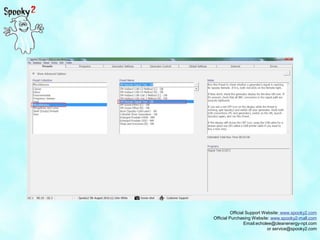
1. Click the Presets tab, then select the Miscellaneous Preset Collection.
2. In the center column, select the 5M Remote Signal Test - DB preset and
read the important Notes.
Official Support Website: www.spooky2.com
Official Purchasing Website: www.spooky2-mall.com
Email:echolee@cleanenergy-npt.com
or service@spooky2.com
Official Support Website: www.spooky2.com
Official Purchasing Website: www.spooky2-mall.com
Email:echolee@cleanenergy-npt.com
or service@spooky2.com
3. Click the Generator Control tab, tick Allow Channel Overwrites,
click the Generator Button, then click Start
Official Support Website: www.spooky2.com
Official Purchasing Website: www.spooky2-mall.com
Email:echolee@cleanenergy-npt.com
or service@spooky2.com
Official Support Website: www.spooky2.com
Official Purchasing Website: www.spooky2-mall.com
Email:echolee@cleanenergy-npt.com
or service@spooky2.com
Official Support Website: www.spooky2.com
Official Purchasing Website: www.spooky2-mall.com
Email:echolee@cleanenergy-npt.com
or service@spooky2.com
If both red LEDs on the Remote illuminate, you're ready to get to work. If not,
click the Presets tab again and refer to the preset's Notes for troubleshooting
instructions.
Official Support Website: www.spooky2.com
Official Purchasing Website: www.spooky2-mall.com
Email:echolee@cleanenergy-npt.com
or service@spooky2.com
Thank you!
Official Support Website: www.spooky2.com
Official Purchasing Website: www.spooky2-mall.com
Email:echolee@cleanenergy-npt.com
or service@spooky2.com
Thank you!

How to Test Generator's Output Using Spooky Remote

  • 1.
    Spooky2 How to TestGenerator's Output using Spooky Remote Our Users & Team
  • 2.
    Official Support Website:www.spooky2.com Official Purchasing Website: www.spooky2-mall.com Email:echolee@cleanenergy-npt.com or service@spooky2.com To ensure that the generator's signal is being transmitted successfully, we need to test its output, and the quickest way to do this is by connecting a Spooky Remote to its correct Boost socket.
  • 3.
    Official Support Website:www.spooky2.com Official Purchasing Website: www.spooky2-mall.com Email:echolee@cleanenergy-npt.com or service@spooky2.com 1. Click the Presets tab, then select the Miscellaneous Preset Collection. 2. In the center column, select the 5M Remote Signal Test - DB preset and read the important Notes.
  • 4.
    Official Support Website:www.spooky2.com Official Purchasing Website: www.spooky2-mall.com Email:echolee@cleanenergy-npt.com or service@spooky2.com
  • 5.
    Official Support Website:www.spooky2.com Official Purchasing Website: www.spooky2-mall.com Email:echolee@cleanenergy-npt.com or service@spooky2.com 3. Click the Generator Control tab, tick Allow Channel Overwrites, click the Generator Button, then click Start
  • 6.
    Official Support Website:www.spooky2.com Official Purchasing Website: www.spooky2-mall.com Email:echolee@cleanenergy-npt.com or service@spooky2.com
  • 7.
    Official Support Website:www.spooky2.com Official Purchasing Website: www.spooky2-mall.com Email:echolee@cleanenergy-npt.com or service@spooky2.com
  • 8.
    Official Support Website:www.spooky2.com Official Purchasing Website: www.spooky2-mall.com Email:echolee@cleanenergy-npt.com or service@spooky2.com If both red LEDs on the Remote illuminate, you're ready to get to work. If not, click the Presets tab again and refer to the preset's Notes for troubleshooting instructions.
  • 9.
    Official Support Website:www.spooky2.com Official Purchasing Website: www.spooky2-mall.com Email:echolee@cleanenergy-npt.com or service@spooky2.com Thank you!
  • 10.
    Official Support Website:www.spooky2.com Official Purchasing Website: www.spooky2-mall.com Email:echolee@cleanenergy-npt.com or service@spooky2.com Thank you!