How To Protect
Yourself Online


                  0
Scams are everywhere
• Top scams for 2011 and 2012

• Current scams:
  –   “Phishing” and Phoney fraud alerts
  –   Phoney fraud alerts
  –   Credit card scams and card “skimming”
  –   Nigerian 419 scams
  –   Work from home scams
  –   Auction and shopping
  –   Spyware
  –   Cheque overpayment, banking and online account

                                                       1
What should I do if I’m scammed?

• Contact ACCC on 1 300 302 502 or online at
  www.accc.gov.au

• Government has a new site to monitor and report on
  scams in Australia
   – www.scamwatch.gov.au
   – Call 1 300 795 995

• Immediately cancel your credit card and contact
  your bank or financial institution


                                                    2
Is online shopping safe?

• No laws in Australia dealing with online shopping

• Normal consumer protection applies to goods and
  services

• Purchasing with credit cards:
   – Saving details for future purchases?
   – Phone and internet payments-no presence required
   – Beware dumpster diving and magstripe copying


                                                        3
How can I protect myself shopping
online?
• Check refund/warranty guarantee policies
• Look for privacy and security policies
• Do due diligence: check reviews, scams
• Beware of hidden shipping, duty and other costs
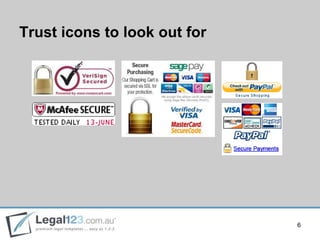
• Look for recognized secure/protect signs or icons
• Credit cards all have secure systems online (i.e.
  Verified by Visa) and look for „padlock‟ on screen


                                                       4
What about buying overseas?
• Consumer laws only protect within Australia
• Customs seize or duty may apply; GST applies
• Check with Customs, check price is AUD
• To protect:
   –   Check trader (ASIC search)
   –   Return, refund, warranty, insurance for loss/damage
   –   Complaints handling/dispute resolution
   –   Privacy, security and reviews
   –   Check country warning-high risk


                                                             5
Trust icons to look out for


                              6
How else can I protect myself?

• Change your passwords and PIN regularly

• Have alternative payment methods to credit cards
  for online purchases: i.e. PayPal

• Will an Online store keep your personal info private
   – Check privacy policy and reviews online

• Ensure your bank uses high end encryption
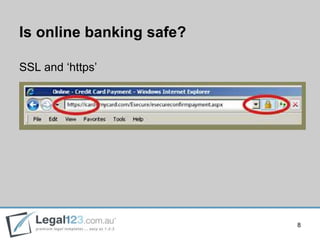
   – SSL and padlock


                                                         7
Is online banking safe?

SSL and „https‟


                          8
Is online banking safe?

• Never enter personal details in a site with a broken
  padlock or key

• Never enter personal details in a site that is missing
  the “s” on “https”

• If you think you have provided your account details
  to a scammer, contact your bank immediately

• NEVER use hotspots!


                                                           9
Safe password practices

• Never use birthday, address, telephone number

• Change them regularly

• Longer is better
   – Use combination of numbers & letters

• Regularly update your home/business computer with
  anti-virus and anti-spyware protection


                                                  10
What direction is Australia going?

• New Australian Consumer Protection legislation
  started January 2012
• New regulations and guidelines relating to
   –   Product safety
   –   Consumer rights
   –   Guarantees and warranties
   –   Receipts and invoices
   –   Reporting
• ALL businesses, both goods and services


                                                   11
Consumer protection highlights
• False and misleading advertising
   – Including price, origin, style and value

• Stricter definition of product safety
   – Plus new reporting requirements

• Warranty
   – Fit-for-purpose, refund, servicing and parts

• Unfair term in your contract will make it null & void


                                                          12
Your private bits
• Privacy laws are changing around the world
• Look for websites that have privacy policy: if they
  collect your information - they should have one!
• PP should tell you what they collect, how they
  collect, how they use, how they store & keep secure
• Never give your details in an email or by other
  unencrypted means


                                                        13
Privacy legislation

• Australia has strong and strict Privacy Laws

• Difficulty online-cannot legislate other countries

• Within Australia: require any external suppliers and
  providers to have same privacy restrictions


                                                         14
JP duties and electronic documents

• Can I certify an electronic document?
   – No, an electronic document cannot be considered an
     original document
   – includes a scanned image, a word processing file or
     any electronic file format, including files in Portable
     Document Format (PDF)
   – If a person asks you to certify a copy of a document
     sent to you by email, fax or other electronic
     means, you must decline to certify the copy


                                                             15
And lastly, best evidence

• These days of electronic signatures, fax machines,
  scanners mean the courts are faced with new
  evidence

• The digital evidence/electronic evidence

• Technology changing quickly requiring courts and
  court evidence to move in line with requirements


                                                       16
More information?
Go to www.Legal123.com.au


                            17

How to Protect Yourself Online

  • 1.
  • 2.
    Scams are everywhere •Top scams for 2011 and 2012 • Current scams: – “Phishing” and Phoney fraud alerts – Phoney fraud alerts – Credit card scams and card “skimming” – Nigerian 419 scams – Work from home scams – Auction and shopping – Spyware – Cheque overpayment, banking and online account 1
  • 3.
    What should Ido if I’m scammed? • Contact ACCC on 1 300 302 502 or online at www.accc.gov.au • Government has a new site to monitor and report on scams in Australia – www.scamwatch.gov.au – Call 1 300 795 995 • Immediately cancel your credit card and contact your bank or financial institution 2
  • 4.
    Is online shoppingsafe? • No laws in Australia dealing with online shopping • Normal consumer protection applies to goods and services • Purchasing with credit cards: – Saving details for future purchases? – Phone and internet payments-no presence required – Beware dumpster diving and magstripe copying 3
  • 5.
    How can Iprotect myself shopping online? • Check refund/warranty guarantee policies • Look for privacy and security policies • Do due diligence: check reviews, scams • Beware of hidden shipping, duty and other costs • Look for recognized secure/protect signs or icons • Credit cards all have secure systems online (i.e. Verified by Visa) and look for „padlock‟ on screen 4
  • 6.
    What about buyingoverseas? • Consumer laws only protect within Australia • Customs seize or duty may apply; GST applies • Check with Customs, check price is AUD • To protect: – Check trader (ASIC search) – Return, refund, warranty, insurance for loss/damage – Complaints handling/dispute resolution – Privacy, security and reviews – Check country warning-high risk 5
  • 7.
    Trust icons tolook out for 6
  • 8.
    How else canI protect myself? • Change your passwords and PIN regularly • Have alternative payment methods to credit cards for online purchases: i.e. PayPal • Will an Online store keep your personal info private – Check privacy policy and reviews online • Ensure your bank uses high end encryption – SSL and padlock 7
  • 9.
    Is online bankingsafe? SSL and „https‟ 8
  • 10.
    Is online bankingsafe? • Never enter personal details in a site with a broken padlock or key • Never enter personal details in a site that is missing the “s” on “https” • If you think you have provided your account details to a scammer, contact your bank immediately • NEVER use hotspots! 9
  • 11.
    Safe password practices •Never use birthday, address, telephone number • Change them regularly • Longer is better – Use combination of numbers & letters • Regularly update your home/business computer with anti-virus and anti-spyware protection 10
  • 12.
    What direction isAustralia going? • New Australian Consumer Protection legislation started January 2012 • New regulations and guidelines relating to – Product safety – Consumer rights – Guarantees and warranties – Receipts and invoices – Reporting • ALL businesses, both goods and services 11
  • 13.
    Consumer protection highlights •False and misleading advertising – Including price, origin, style and value • Stricter definition of product safety – Plus new reporting requirements • Warranty – Fit-for-purpose, refund, servicing and parts • Unfair term in your contract will make it null & void 12
  • 14.
    Your private bits •Privacy laws are changing around the world • Look for websites that have privacy policy: if they collect your information - they should have one! • PP should tell you what they collect, how they collect, how they use, how they store & keep secure • Never give your details in an email or by other unencrypted means 13
  • 15.
    Privacy legislation • Australiahas strong and strict Privacy Laws • Difficulty online-cannot legislate other countries • Within Australia: require any external suppliers and providers to have same privacy restrictions 14
  • 16.
    JP duties andelectronic documents • Can I certify an electronic document? – No, an electronic document cannot be considered an original document – includes a scanned image, a word processing file or any electronic file format, including files in Portable Document Format (PDF) – If a person asks you to certify a copy of a document sent to you by email, fax or other electronic means, you must decline to certify the copy 15
  • 17.
    And lastly, bestevidence • These days of electronic signatures, fax machines, scanners mean the courts are faced with new evidence • The digital evidence/electronic evidence • Technology changing quickly requiring courts and court evidence to move in line with requirements 16
  • 18.
    More information? Go towww.Legal123.com.au 17