BuildingSOA withTemenosT24 R11+ TAFC
By MahmoudElkholymelkholyeg@gmail.com
How to integrate java application with
Temenos T24 (TAFC)
By
MahmoudElkholy
Cairo,Egypt
melkholyeg@gmail.com
BuildingSOA withTemenosT24 R11+ TAFC
By MahmoudElkholymelkholyeg@gmail.com
Introduction
In thisarticle Iwill showtoyou stepbystephow to integrate yourT24 Core Bankingwithany
customerJavaapplication,thisisthe firststeptobuildintegratedSOA (Service Oriented
Architecture onanyBank that runsTemenosT24)
Thisarticle isthe firstof seriesof articlesthatwill guide youtoautomate andbuildadigital
environmentonanyBank that runsTemenosT24.
Youcan consider thisas first step youcan use to integrate any T24 applicationwithany other
system usingsimplejavaapplication,assampleof the applicationsusedforthis I used my self
this to make the below:
1- SendSMS notificationtocustomersbasedonspecifictransaction
2- Sendemail tocustomer/userforspecificevent
3- Generate xml filesfromrawdata
4- Generate PDFfilesfrom T24
5- Andlotsof otherapplications
6- Assumptions:
7- This example isvalid for TemenosT24 R11+ with TAFC engine
BuildingSOA withTemenosT24 R11+ TAFC
By MahmoudElkholymelkholyeg@gmail.com
Build your Java application using ECLIPSE
Preface
Thisexample willbe made verysimpletofocusonlyonhow to integrate withthe Core through
Java Application,howeverIusedthismethodmyself onmanyserviceslike makingautomated
SMS notificationsfromCore banking,automatedemail sending,conversionbetweenJSON and
XML formats,AML scanningandmany otherservicesthatcan be callednow easilyfromT24 via
Simple Javaapplication
Build your application:
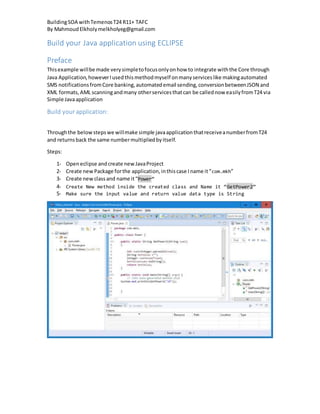
Throughthe belowstepswe willmake simple javaapplicationthatreceiveanumberfromT24
and returnsback the same numbermultipliedbyitself.
Steps:
1- Openeclipse andcreate new JavaProject
2- Create newPackage forthe application,inthiscase Iname it“com.mkh”
3- Create newclassand name it“Power”
4- Create New method inside the created class and Name it “GetPower2”
5- Make sure the input value and return value data type is String
BuildingSOA withTemenosT24 R11+ TAFC
By MahmoudElkholymelkholyeg@gmail.com
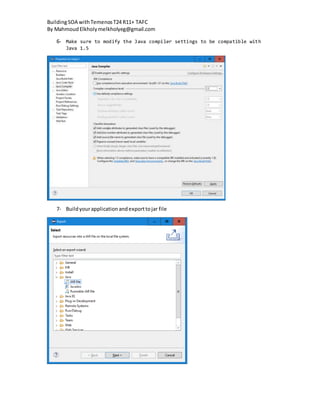
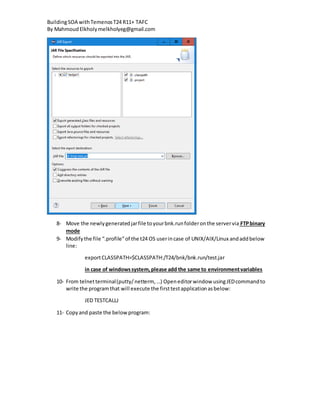
6- Make sure to modify the Java compiler settings to be compatible with
Java 1.5
7- Buildyourapplicationandexporttojar file
BuildingSOA withTemenosT24 R11+ TAFC
By MahmoudElkholymelkholyeg@gmail.com
8- Move the newlygeneratedjarfile toyourbnk.runfolderonthe servervia FTPbinary
mode
9- Modifythe file “.profile”of the t24 OS userincase of UNIX/AIX/Linux andaddbelow
line:
exportCLASSPATH=$CLASSPATH:/T24/bnk/bnk.run/test.jar
in case of windowssystem,please add the same to environmentvariables
10- From telnetterminal(putty/netterm, …) Openeditorwindow usingJEDcommandto
write the programthat will execute the firsttestapplicationasbelow:
JED TESTCALLJ
11- Copyand paste the belowprogram:
BuildingSOA withTemenosT24 R11+ TAFC
By MahmoudElkholymelkholyeg@gmail.com
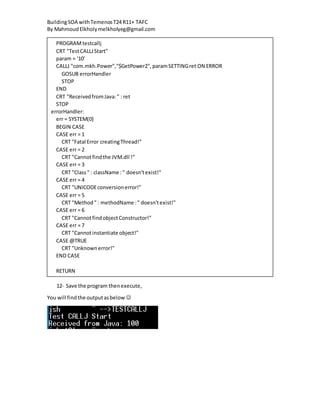
12- Save the program thenexecute,
You will findthe outputasbelow 
PROGRAMtestcallj
CRT "TestCALLJStart"
param = '10'
CALLJ "com.mkh.Power","$GetPower2",paramSETTINGret ON ERROR
GOSUB errorHandler
STOP
END
CRT "ReceivedfromJava:" : ret
STOP
errorHandler:
err = SYSTEM(0)
BEGIN CASE
CASE err = 1
CRT "Fatal Error creatingThread!"
CASE err = 2
CRT "Cannotfindthe JVM.dll !"
CASE err = 3
CRT "Class" : className :" doesn'texist!"
CASE err = 4
CRT "UNICODEconversionerror!"
CASE err = 5
CRT "Method" : methodName :" doesn'texist!"
CASE err = 6
CRT "CannotfindobjectConstructor!"
CASE err = 7
CRT "Cannotinstantiate object!"
CASE @TRUE
CRT "Unknownerror!"
END CASE
RETURN

How to integrate java application with temenos t24

  • 1.
    BuildingSOA withTemenosT24 R11+TAFC By MahmoudElkholymelkholyeg@gmail.com How to integrate java application with Temenos T24 (TAFC) By MahmoudElkholy Cairo,Egypt melkholyeg@gmail.com
  • 2.
    BuildingSOA withTemenosT24 R11+TAFC By MahmoudElkholymelkholyeg@gmail.com Introduction In thisarticle Iwill showtoyou stepbystephow to integrate yourT24 Core Bankingwithany customerJavaapplication,thisisthe firststeptobuildintegratedSOA (Service Oriented Architecture onanyBank that runsTemenosT24) Thisarticle isthe firstof seriesof articlesthatwill guide youtoautomate andbuildadigital environmentonanyBank that runsTemenosT24. Youcan consider thisas first step youcan use to integrate any T24 applicationwithany other system usingsimplejavaapplication,assampleof the applicationsusedforthis I used my self this to make the below: 1- SendSMS notificationtocustomersbasedonspecifictransaction 2- Sendemail tocustomer/userforspecificevent 3- Generate xml filesfromrawdata 4- Generate PDFfilesfrom T24 5- Andlotsof otherapplications 6- Assumptions: 7- This example isvalid for TemenosT24 R11+ with TAFC engine
  • 3.
    BuildingSOA withTemenosT24 R11+TAFC By MahmoudElkholymelkholyeg@gmail.com Build your Java application using ECLIPSE Preface Thisexample willbe made verysimpletofocusonlyonhow to integrate withthe Core through Java Application,howeverIusedthismethodmyself onmanyserviceslike makingautomated SMS notificationsfromCore banking,automatedemail sending,conversionbetweenJSON and XML formats,AML scanningandmany otherservicesthatcan be callednow easilyfromT24 via Simple Javaapplication Build your application: Throughthe belowstepswe willmake simple javaapplicationthatreceiveanumberfromT24 and returnsback the same numbermultipliedbyitself. Steps: 1- Openeclipse andcreate new JavaProject 2- Create newPackage forthe application,inthiscase Iname it“com.mkh” 3- Create newclassand name it“Power” 4- Create New method inside the created class and Name it “GetPower2” 5- Make sure the input value and return value data type is String
  • 4.
    BuildingSOA withTemenosT24 R11+TAFC By MahmoudElkholymelkholyeg@gmail.com 6- Make sure to modify the Java compiler settings to be compatible with Java 1.5 7- Buildyourapplicationandexporttojar file
  • 5.
    BuildingSOA withTemenosT24 R11+TAFC By MahmoudElkholymelkholyeg@gmail.com 8- Move the newlygeneratedjarfile toyourbnk.runfolderonthe servervia FTPbinary mode 9- Modifythe file “.profile”of the t24 OS userincase of UNIX/AIX/Linux andaddbelow line: exportCLASSPATH=$CLASSPATH:/T24/bnk/bnk.run/test.jar in case of windowssystem,please add the same to environmentvariables 10- From telnetterminal(putty/netterm, …) Openeditorwindow usingJEDcommandto write the programthat will execute the firsttestapplicationasbelow: JED TESTCALLJ 11- Copyand paste the belowprogram:
  • 6.
    BuildingSOA withTemenosT24 R11+TAFC By MahmoudElkholymelkholyeg@gmail.com 12- Save the program thenexecute, You will findthe outputasbelow  PROGRAMtestcallj CRT "TestCALLJStart" param = '10' CALLJ "com.mkh.Power","$GetPower2",paramSETTINGret ON ERROR GOSUB errorHandler STOP END CRT "ReceivedfromJava:" : ret STOP errorHandler: err = SYSTEM(0) BEGIN CASE CASE err = 1 CRT "Fatal Error creatingThread!" CASE err = 2 CRT "Cannotfindthe JVM.dll !" CASE err = 3 CRT "Class" : className :" doesn'texist!" CASE err = 4 CRT "UNICODEconversionerror!" CASE err = 5 CRT "Method" : methodName :" doesn'texist!" CASE err = 6 CRT "CannotfindobjectConstructor!" CASE err = 7 CRT "Cannotinstantiate object!" CASE @TRUE CRT "Unknownerror!" END CASE RETURN