How to Install Wordpress theme
which is on your local hard drive?
Date: 12June 2011
Summary Steps


  Log in to the WordPress Administration Panel.
1.Select the Appearance panel, then Themes.
2.Select Install Themes
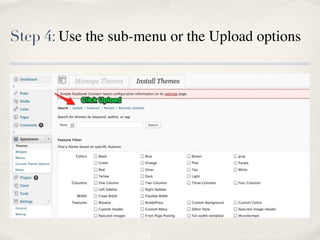
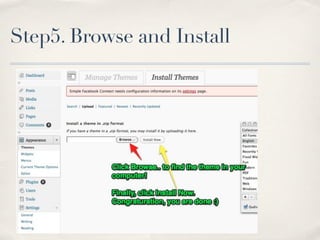
3.Use the sub-menu or the Upload options and click on Browse...
  to locate a Theme you have previously downloaded to your
  machine.
4.Click on the Install to complete the installation.
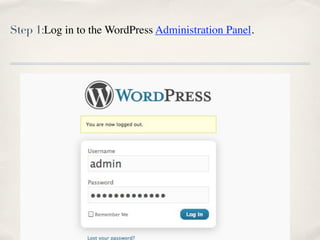
Step 1:Log in to the WordPress Administration Panel.
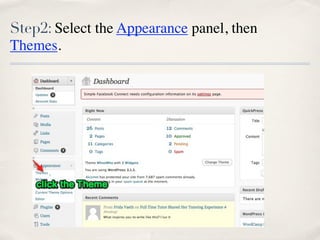
Step2: Select the Appearance panel, then
Themes.
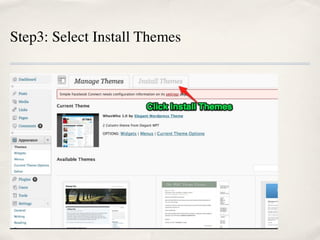
Step3: Select Install Themes
Step 4: Use the sub-menu or the Upload options
Step5. Browse and Install
You are done!

How to Install Wordpress theme which is on your local hard drive?

  • 1.
    How to InstallWordpress theme which is on your local hard drive? Date: 12June 2011
  • 2.
    Summary Steps Log in to the WordPress Administration Panel. 1.Select the Appearance panel, then Themes. 2.Select Install Themes 3.Use the sub-menu or the Upload options and click on Browse... to locate a Theme you have previously downloaded to your machine. 4.Click on the Install to complete the installation.
  • 3.
    Step 1:Log into the WordPress Administration Panel.
  • 4.
    Step2: Select theAppearance panel, then Themes.
  • 5.
  • 6.
    Step 4: Usethe sub-menu or the Upload options
  • 7.
  • 8.

Editor's Notes