Delete Pinterest
Account
WWW.HOWTODELETE..ORG
Things to consider before deleting a
Pinterest account
 All data associated with your account will be lost.
 You won’t be able to view the images that you have
pinned. All your pins will not be restored even if you
create a new account with the same username.
 The URL of your account will be free for others. You
might not be able to get it back later on; in case you
want to return back to Pinterest.
How to Delete Pinterest Account
Permanently?
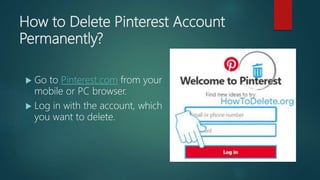
 Go to Pinterest.com from your
mobile or PC browser.
 Log in with the account, which
you want to delete.
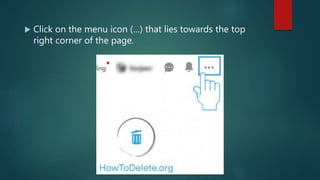
 Click on the menu icon (…) that lies towards the top
right corner of the page.
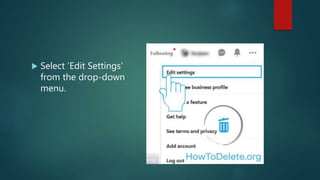
 Select ‘Edit Settings’
from the drop-down
menu.
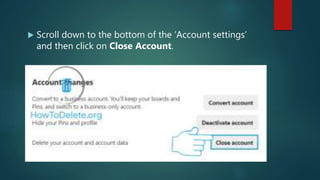
 Scroll down to the bottom of the ‘Account settings’
and then click on Close Account.
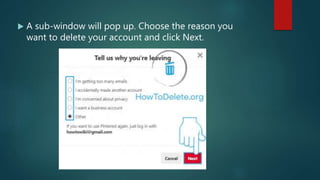
 A sub-window will pop up. Choose the reason you
want to delete your account and click Next.
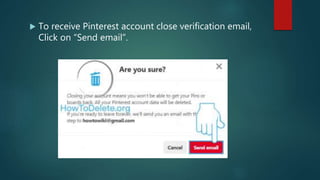
 To receive Pinterest account close verification email,
Click on “Send email”.
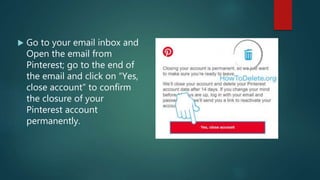
 Go to your email inbox and
Open the email from
Pinterest; go to the end of
the email and click on “Yes,
close account” to confirm
the closure of your
Pinterest account
permanently.
 This procedure is applicable to personal profiles only. To
delete a Business profile, you have to contact Pinterest admin
and request them to delete the account permanently.
 It will take 14 days to permanently delete entire information of
the account, your account remains deactivated for that period.
 In case you change your mind and want to return back then
all you have to do is log in with the old username and
password. Pinterest will send you a reactivation link and your
account will be activated.
Deactivate Pinterest Account
temporarily
 Log in to Pinterest account from a web-browser.
 Click on the menu icon (…) on the top right corner.
 Select “Edit Settings” from the drop-down menu.
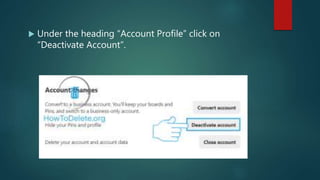
 Under the heading “Account Profile” click on
“Deactivate Account”.
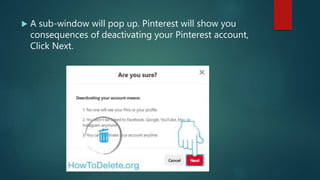
 A sub-window will pop up. Pinterest will show you
consequences of deactivating your Pinterest account,
Click Next.
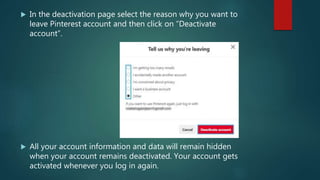
 In the deactivation page select the reason why you want to
leave Pinterest account and then click on “Deactivate
account”.
 All your account information and data will remain hidden
when your account remains deactivated. Your account gets
activated whenever you log in again.
Deactivate Pinterest profile of a
deceased person
There is an option to deactivate the profile of the deceased person. For
this you must write an email to care@pinterest.com. The email should
contain the following information:
 Your full name.
 Full name of the deceased person.
 A URL to the deceased person account. It shall be in the format as
http://pinterest.com/username
 Document verifying your relationship with the deceased person so as
to verify that you are authorized to close his/her account.
 Document verifying your relationship with the deceased person so as
to verify that you are authorized to close his/her account.
Source:
https://howtodelete.org/delete-pinterest-account/

How to delete Pinterest account?

  • 1.
  • 2.
    Things to considerbefore deleting a Pinterest account  All data associated with your account will be lost.  You won’t be able to view the images that you have pinned. All your pins will not be restored even if you create a new account with the same username.  The URL of your account will be free for others. You might not be able to get it back later on; in case you want to return back to Pinterest.
  • 3.
    How to DeletePinterest Account Permanently?  Go to Pinterest.com from your mobile or PC browser.  Log in with the account, which you want to delete.
  • 4.
     Click onthe menu icon (…) that lies towards the top right corner of the page.
  • 5.
     Select ‘EditSettings’ from the drop-down menu.
  • 6.
     Scroll downto the bottom of the ‘Account settings’ and then click on Close Account.
  • 7.
     A sub-windowwill pop up. Choose the reason you want to delete your account and click Next.
  • 8.
     To receivePinterest account close verification email, Click on “Send email”.
  • 9.
     Go toyour email inbox and Open the email from Pinterest; go to the end of the email and click on “Yes, close account” to confirm the closure of your Pinterest account permanently.
  • 10.
     This procedureis applicable to personal profiles only. To delete a Business profile, you have to contact Pinterest admin and request them to delete the account permanently.  It will take 14 days to permanently delete entire information of the account, your account remains deactivated for that period.  In case you change your mind and want to return back then all you have to do is log in with the old username and password. Pinterest will send you a reactivation link and your account will be activated.
  • 11.
    Deactivate Pinterest Account temporarily Log in to Pinterest account from a web-browser.  Click on the menu icon (…) on the top right corner.  Select “Edit Settings” from the drop-down menu.
  • 12.
     Under theheading “Account Profile” click on “Deactivate Account”.
  • 13.
     A sub-windowwill pop up. Pinterest will show you consequences of deactivating your Pinterest account, Click Next.
  • 14.
     In thedeactivation page select the reason why you want to leave Pinterest account and then click on “Deactivate account”.  All your account information and data will remain hidden when your account remains deactivated. Your account gets activated whenever you log in again.
  • 15.
    Deactivate Pinterest profileof a deceased person There is an option to deactivate the profile of the deceased person. For this you must write an email to care@pinterest.com. The email should contain the following information:  Your full name.  Full name of the deceased person.  A URL to the deceased person account. It shall be in the format as http://pinterest.com/username  Document verifying your relationship with the deceased person so as to verify that you are authorized to close his/her account.  Document verifying your relationship with the deceased person so as to verify that you are authorized to close his/her account.
  • 16.