How To Change A Slide Layout
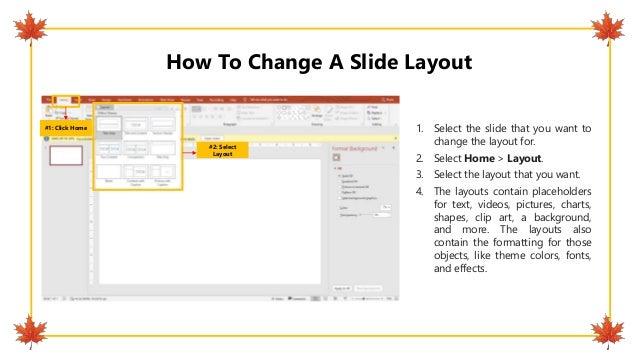
1. Select the slide that you want to
change the layout for.
2. Select Home > Layout.
3. Select the layout that you want.
4. The layouts contain placeholders
for text, videos, pictures, charts,
shapes, clip art, a background,
and more. The layouts also
contain the formatting for those
objects, like theme colors, fonts,
and effects.
#1: Click Home
#2: Select
Layout

How To Change A Slide Layout.pptx

  • 1.
    How To ChangeA Slide Layout 1. Select the slide that you want to change the layout for. 2. Select Home > Layout. 3. Select the layout that you want. 4. The layouts contain placeholders for text, videos, pictures, charts, shapes, clip art, a background, and more. The layouts also contain the formatting for those objects, like theme colors, fonts, and effects. #1: Click Home #2: Select Layout