How do I?
Storage FileSystemStorage
Portable Access to native features
Flat Hierarchy, always use full paths
Cleaned on uninstall Behavior varies on uninstall
Private to application Potentially exposed in some locations
Cached access Direct access
Great for small (cachable) files Great for larger files
Storage vs. File System
Storage, Files & SQL
Storage FileSystemStorage
Portable Access to native features
Flat Hierarchy, always use full paths
Cleaned on uninstall Behavior varies on uninstall
Private to application Potentially exposed in some locations
Cached access Direct access
Great for small (cachable) files Great for larger files
Storage vs. File System
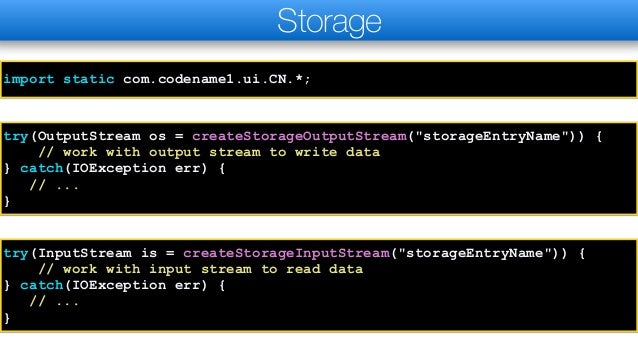
Storage
try(OutputStream os = createStorageOutputStream("storageEntryName")) {
// work with output stream to write data
} catch(IOException err) {
// ...
}
try(InputStream is = createStorageInputStream("storageEntryName")) {
// work with input stream to read data
} catch(IOException err) {
// ...
}
import static com.codename1.ui.CN.*;
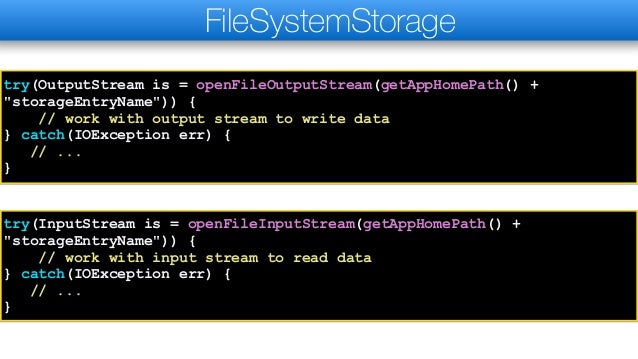
FileSystemStorage
try(OutputStream is = openFileOutputStream(getAppHomePath() +
"storageEntryName")) {
// work with output stream to write data
} catch(IOException err) {
// ...
}
try(InputStream is = openFileInputStream(getAppHomePath() +
"storageEntryName")) {
// work with input stream to read data
} catch(IOException err) {
// ...
}
SQLite
✦SQLite is a native C embeddable database engine that’s
available almost everywhere
✦It’s very customizable and as a result implementations on
various OS’s aren’t completely consistent
✦It’s available in Android, iOS, UWP, Desktop & JavaScript
✦SQLite is useful if you need a “real” database on the
device where you can perform fast queries
✦SQLite database files are stored in the “file system” as a
single file
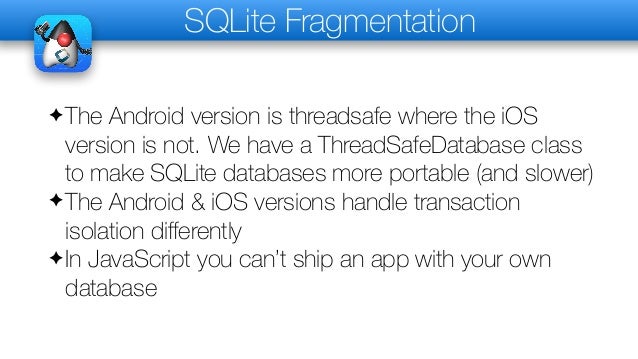
SQLite Fragmentation
✦The Android version is threadsafe where the iOS
version is not. We have a ThreadSafeDatabase class
to make SQLite databases more portable (and slower)
✦The Android & iOS versions handle transaction
isolation differently
✦In JavaScript you can’t ship an app with your own
database
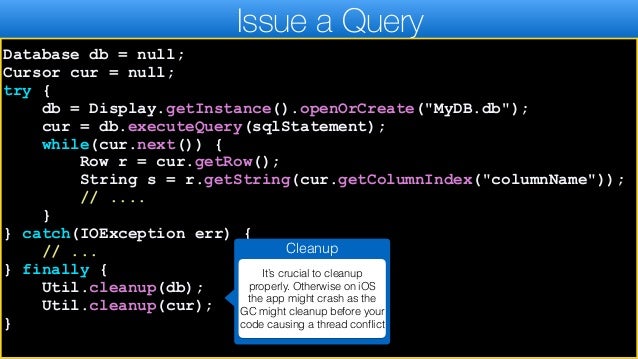
Issue a Query
Database db = null;
Cursor cur = null;
try {
db = Display.getInstance().openOrCreate("MyDB.db");
cur = db.executeQuery(sqlStatement);
while(cur.next()) {
Row r = cur.getRow();
String s = r.getString(cur.getColumnIndex("columnName"));
// ....
}
} catch(IOException err) {
// ...
} finally {
Util.cleanup(db);
Util.cleanup(cur);
}
Cleanup
It’s crucial to cleanup
properly. Otherwise on iOS
the app might crash as the
GC might cleanup before your
code causing a thread conflict
Shipping an App With a Database
✦One of the common use cases for SQLite is to ship
an app with a ready made database within the JAR:
String path = Display.getInstance().getDatabasePath("MyDB.db");
if(path != null && !existsInFileSystem(path)) {
try(InputStream i = getResourceAsStream("/MyDB.db");
OutputStream o = openFileOutputStream(path)) {
Util.copy(i, o);
} catch(IOException err) {
Log.e(err);
}
}
Tips
✦Apps in mobile devices are isolated from one another
you need to understand that desktop concepts don’t
apply
✦When in doubt use Storage
✦Use com.codename1.io.File to port java.io.File code
✦Try to use the app home when working with file
system for increased portability
✦Use Preferences to store simple data
Thank You!

How do I - Storage, FileSystem & SQL.pdf

  • 1.
  • 2.
    Storage FileSystemStorage Portable Accessto native features Flat Hierarchy, always use full paths Cleaned on uninstall Behavior varies on uninstall Private to application Potentially exposed in some locations Cached access Direct access Great for small (cachable) files Great for larger files Storage vs. File System Storage, Files & SQL
  • 3.
    Storage FileSystemStorage Portable Accessto native features Flat Hierarchy, always use full paths Cleaned on uninstall Behavior varies on uninstall Private to application Potentially exposed in some locations Cached access Direct access Great for small (cachable) files Great for larger files Storage vs. File System
  • 4.
    Storage try(OutputStream os =createStorageOutputStream("storageEntryName")) { // work with output stream to write data } catch(IOException err) { // ... } try(InputStream is = createStorageInputStream("storageEntryName")) { // work with input stream to read data } catch(IOException err) { // ... } import static com.codename1.ui.CN.*;
  • 5.
    FileSystemStorage try(OutputStream is =openFileOutputStream(getAppHomePath() + "storageEntryName")) { // work with output stream to write data } catch(IOException err) { // ... } try(InputStream is = openFileInputStream(getAppHomePath() + "storageEntryName")) { // work with input stream to read data } catch(IOException err) { // ... }
  • 6.
    SQLite ✦SQLite is anative C embeddable database engine that’s available almost everywhere ✦It’s very customizable and as a result implementations on various OS’s aren’t completely consistent ✦It’s available in Android, iOS, UWP, Desktop & JavaScript ✦SQLite is useful if you need a “real” database on the device where you can perform fast queries ✦SQLite database files are stored in the “file system” as a single file
  • 7.
    SQLite Fragmentation ✦The Androidversion is threadsafe where the iOS version is not. We have a ThreadSafeDatabase class to make SQLite databases more portable (and slower) ✦The Android & iOS versions handle transaction isolation differently ✦In JavaScript you can’t ship an app with your own database
  • 8.
    Issue a Query Databasedb = null; Cursor cur = null; try { db = Display.getInstance().openOrCreate("MyDB.db"); cur = db.executeQuery(sqlStatement); while(cur.next()) { Row r = cur.getRow(); String s = r.getString(cur.getColumnIndex("columnName")); // .... } } catch(IOException err) { // ... } finally { Util.cleanup(db); Util.cleanup(cur); } Cleanup It’s crucial to cleanup properly. Otherwise on iOS the app might crash as the GC might cleanup before your code causing a thread conflict
  • 9.
    Shipping an AppWith a Database ✦One of the common use cases for SQLite is to ship an app with a ready made database within the JAR: String path = Display.getInstance().getDatabasePath("MyDB.db"); if(path != null && !existsInFileSystem(path)) { try(InputStream i = getResourceAsStream("/MyDB.db"); OutputStream o = openFileOutputStream(path)) { Util.copy(i, o); } catch(IOException err) { Log.e(err); } }
  • 10.
    Tips ✦Apps in mobiledevices are isolated from one another you need to understand that desktop concepts don’t apply ✦When in doubt use Storage ✦Use com.codename1.io.File to port java.io.File code ✦Try to use the app home when working with file system for increased portability ✦Use Preferences to store simple data
  • 11.