1

Copyright © 2013, Oracle and/or its affiliates. All rights reserved.
Production Time Profiling
Out of the Box
Marcus Hirt
Consulting Member of Technical Staff
Program Agenda
 Introduction to Mission Control
 Convergence Status

 Brief Look at the JMX Console
 Java Flight Recorder

3

Copyright © 2013, Oracle and/or its affiliates. All rights reserved.
Program Agenda
 Experimental Plug-ins
 Future

 Resources

4

Copyright © 2013, Oracle and/or its affiliates. All rights reserved.
The following is intended to outline our general product direction. It is intended
for information purposes only, and may not be incorporated into any contract.
It is not a commitment to deliver any material, code, or functionality, and should
not be relied upon in making purchasing decisions. The development, release,
and timing of any features or functionality described for Oracle’s products
remains at the sole discretion of Oracle.

5

Copyright © 2013, Oracle and/or its affiliates. All rights reserved.
Java Mission Control Overview
The new JDK profiling and diagnostics tools platform
 A tools suite for production use (fine in development too)
– Basic monitoring
– Production time profiling and diagnostics

 Focus on low overhead
– Built into the JVM
– Already available runtime information
– High performance implementation
– More details during the Flight Recorder Tutorial

6

Copyright © 2013, Oracle and/or its affiliates. All rights reserved.
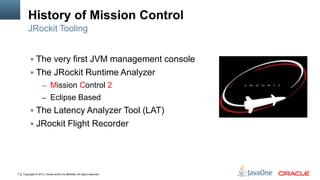
History of Mission Control
JRockit Tooling
 The very first JVM management console
 The JRockit Runtime Analyzer
– Mission Control 2
– Eclipse Based

 The Latency Analyzer Tool (LAT)
 JRockit Flight Recorder

7

Copyright © 2013, Oracle and/or its affiliates. All rights reserved.
JVM Convergence
Oracle + Sun
 JRockit & HotSpot features to merge
 Use HotSpot as base
 Mission Control for HotSpot
 Now released with 7u40!
 Unfortunately named 5.2.0

It’s really a 1.0.0 release…

8

Copyright © 2013, Oracle and/or its affiliates. All rights reserved.
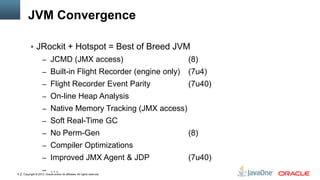
JVM Convergence
 JRockit + Hotspot = Best of Breed JVM
– JCMD (JMX access)

(8)

– Built-in Flight Recorder (engine only)

(7u4)

– Flight Recorder Event Parity

(7u40)

– On-line Heap Analysis
– Native Memory Tracking (JMX access)
– Soft Real-Time GC
– No Perm-Gen

(8)

– Compiler Optimizations
– Improved JMX Agent & JDP
9

– …

Copyright © 2013, Oracle and/or its affiliates. All rights reserved.

(7u40)
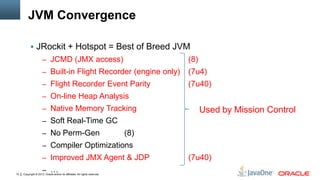
JVM Convergence
 JRockit + Hotspot = Best of Breed JVM
– JCMD (JMX access)

(8)

– Built-in Flight Recorder (engine only)

(7u4)

– Flight Recorder Event Parity

(7u40)

– On-line Heap Analysis
– Native Memory Tracking

Used by Mission Control

– Soft Real-Time GC
– No Perm-Gen

(8)

– Compiler Optimizations
– Improved JMX Agent & JDP
10

– …

Copyright © 2013, Oracle and/or its affiliates. All rights reserved.

(7u40)
Java Mission Control Toolset
(As delivered in the JDK 7u40 release)
 JMX Console
– For monitoring running Java processes in real time
– Monitoring of a few select key indicators
– The implementation in JMC is quite good!

 Java Flight Recorder
– Analogous to a data flight recorder (DFR) in a modern aircraft
– Profiling of running production systems!

11

Copyright © 2013, Oracle and/or its affiliates. All rights reserved.
Supported Platforms
Supported Platforms

 Client
– Windows, Linux [x86,x64], MacOSX [x64]
– Building for Solaris x86 and Sparc – not distributed, nor supported

 Server
– Windows, Linux [x86,x64], MacOSX [x64], Solaris [x86,x64,SPARC]

– For OS version specifics, see the 7u40 supported platforms.

12

Copyright © 2013, Oracle and/or its affiliates. All rights reserved.
JMC
INSTALLATION
AND USAGE

13

Copyright © 2013, Oracle and/or its affiliates. All rights reserved.
JMC installation
 JMC stand alone client
– Simply download and install the JDK (>=7u40)

 Eclipse version
– Install from update site on OTN:
https://download.oracle.com/technology/products/missioncontrol/updatesites/base/5.2.0/eclipse/

14

Copyright © 2013, Oracle and/or its affiliates. All rights reserved.
JMC installation, experimental plug-ins
 Two classes of experimental plug-ins
– Features we think may be useful, but want feedback on
– Features not necessarily useful for J2SE users

 Already configured in the stand alone client
– Choose Help | Install New Software…

 Eclipse version
– Install from update site on OTN:
https://download.oracle.com/technology/products/missioncontrol/updatesites/experimental/5.2.0/eclipse/

 Note that experimental plug-ins are:
– Not as thoroughly tested as JMC base
– Not supported
15

Copyright © 2013, Oracle and/or its affiliates. All rights reserved.
Starting the JMC client
 Just double-click on the launcher in bin

 Starting from the command line is useful for trouble shooting:

jmc –consoleLog –debug 2>&1 | more
 More info on http://hirt.se/blog/?p=281

 The logging settings file (in java.util.logging format) can be specified

from the preferences
– Window | Preferences | Java Mission Control | Logging Settings File

16

Copyright © 2013, Oracle and/or its affiliates. All rights reserved.
Starting the server
 To be able to access Flight Recorder
-XX:+UnlockCommercialFeatures -XX:+FlightRecorder

 Not dynamically enabled like in JRockit (yet)
 There are plenty of command line options for controlling JFR
– More on this in the Tutorial
– Some examples can be found on http://hirt.se/blog

17

Copyright © 2013, Oracle and/or its affiliates. All rights reserved.
Starting the Management Agent
For remote access

 Use the com.sun.management.jmxremote properties as normal
http://docs.oracle.com/javase/7/docs/technotes/guides/management/agent.html

 Don’t forget – rmi registry and server port can be set to the same

port – good for tunneling! (>=7u4)
com.sun.management.jmxremote.rmi.port
 To broadcast the presence of the agent on the network (7u40):

com.sun.management.jmxremote.autodiscovery=true
com.sun.management.jdp.name=mygroup/MyJVM (optional)
 Sometimes RMI will get the hostname wrong:
java.rmi.server.hostname=<hostname client should use>

18

Copyright © 2013, Oracle and/or its affiliates. All rights reserved.
TOOLS
WALK-THROUGH

19

Copyright © 2013, Oracle and/or its affiliates. All rights reserved.
The JMX Console
Highlights

 Simple but feature rich JMX Console
– JConsole on steroids

 Real time monitoring of key indicators
 Triggers
– Simple rules engine
– User can provide custom actions

 Various experimental plug-ins
– Coherence
– JConsole plug-in support
– …
20

Copyright © 2013, Oracle and/or its affiliates. All rights reserved.
JMX CONSOLE
DEMO

21

Copyright © 2013, Oracle and/or its affiliates. All rights reserved.
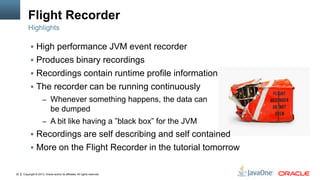
Flight Recorder
Highlights

 High performance JVM event recorder
 Produces binary recordings
 Recordings contain runtime profile information
 The recorder can be running continuously
– Whenever something happens, the data can

be dumped
– A bit like having a ”black box” for the JVM

 Recordings are self describing and self contained
 More on the Flight Recorder in the tutorial tomorrow

22

Copyright © 2013, Oracle and/or its affiliates. All rights reserved.
FLIGHT
RECORDER
DEMO

23

Copyright © 2013, Oracle and/or its affiliates. All rights reserved.
Experimental Plugins
Downloadable from within Mission Control

 WLS plug-in –> tutorial tomorrow
 DTrace plug-in
– Extended DScript language to produce self describing events
– Visualization similar to Flight Recorder

 JOverflow
– Tool for analyzing heap waste (empty/sparse collections)
– Uses hprof dumps
– First stab at using Java FX for visualization in a JMC plug-in

24

Copyright © 2013, Oracle and/or its affiliates. All rights reserved.
DTRACE DEMO

25

Copyright © 2013, Oracle and/or its affiliates. All rights reserved.
JOVERFLOW
DEMO

26

Copyright © 2013, Oracle and/or its affiliates. All rights reserved.
Java Mission Control Future

 Currently working on 5.3.0
– Will be released with JDK 8 and a later 7 update
– Improved JMX Console (Remote Diagnostic Commands and more)
– Improved content type handling and formatting
– 5.3.0 almost feature complete

 Also working on 6.0.0
– Automatic analysis of flight recordings

27

Copyright © 2013, Oracle and/or its affiliates. All rights reserved.
Some Java Mission Control Resources
Homepage:
http://oracle.com/missioncontrol
Twitter:
@javamissionctrl
@hirt

Blog:
http://hirt.se/blog

Facebook (not kidding!):
http://www.facebook.com/pages/Java-Mission-Control/275169442493206

28

Copyright © 2013, Oracle and/or its affiliates. All rights reserved.
Shameless Book Plug
Oracle JRockit: The Definitive Guide

29

Copyright © 2013, Oracle and/or its affiliates. All rights reserved.
“It's an invaluable piece of work.”
“I managed to do in one day what I've failed to do in 2+
weeks using <profiling tool> and <another profiling tool>.”
Maurizio Cimadamore
Ex Lang Tools,
Oracle

30

Copyright © 2013, Oracle and/or its affiliates. All rights reserved.
Graphic Section Divider

31

Copyright © 2013, Oracle and/or its affiliates. All rights reserved.
32

Copyright © 2013, Oracle and/or its affiliates. All rights reserved.

Production Time Profiling Out of the Box

  • 1.
    1 Copyright © 2013,Oracle and/or its affiliates. All rights reserved.
  • 2.
    Production Time Profiling Outof the Box Marcus Hirt Consulting Member of Technical Staff
  • 3.
    Program Agenda  Introductionto Mission Control  Convergence Status  Brief Look at the JMX Console  Java Flight Recorder 3 Copyright © 2013, Oracle and/or its affiliates. All rights reserved.
  • 4.
    Program Agenda  ExperimentalPlug-ins  Future  Resources 4 Copyright © 2013, Oracle and/or its affiliates. All rights reserved.
  • 5.
    The following isintended to outline our general product direction. It is intended for information purposes only, and may not be incorporated into any contract. It is not a commitment to deliver any material, code, or functionality, and should not be relied upon in making purchasing decisions. The development, release, and timing of any features or functionality described for Oracle’s products remains at the sole discretion of Oracle. 5 Copyright © 2013, Oracle and/or its affiliates. All rights reserved.
  • 6.
    Java Mission ControlOverview The new JDK profiling and diagnostics tools platform  A tools suite for production use (fine in development too) – Basic monitoring – Production time profiling and diagnostics  Focus on low overhead – Built into the JVM – Already available runtime information – High performance implementation – More details during the Flight Recorder Tutorial 6 Copyright © 2013, Oracle and/or its affiliates. All rights reserved.
  • 7.
    History of MissionControl JRockit Tooling  The very first JVM management console  The JRockit Runtime Analyzer – Mission Control 2 – Eclipse Based  The Latency Analyzer Tool (LAT)  JRockit Flight Recorder 7 Copyright © 2013, Oracle and/or its affiliates. All rights reserved.
  • 8.
    JVM Convergence Oracle +Sun  JRockit & HotSpot features to merge  Use HotSpot as base  Mission Control for HotSpot  Now released with 7u40!  Unfortunately named 5.2.0 It’s really a 1.0.0 release… 8 Copyright © 2013, Oracle and/or its affiliates. All rights reserved.
  • 9.
    JVM Convergence  JRockit+ Hotspot = Best of Breed JVM – JCMD (JMX access) (8) – Built-in Flight Recorder (engine only) (7u4) – Flight Recorder Event Parity (7u40) – On-line Heap Analysis – Native Memory Tracking (JMX access) – Soft Real-Time GC – No Perm-Gen (8) – Compiler Optimizations – Improved JMX Agent & JDP 9 – … Copyright © 2013, Oracle and/or its affiliates. All rights reserved. (7u40)
  • 10.
    JVM Convergence  JRockit+ Hotspot = Best of Breed JVM – JCMD (JMX access) (8) – Built-in Flight Recorder (engine only) (7u4) – Flight Recorder Event Parity (7u40) – On-line Heap Analysis – Native Memory Tracking Used by Mission Control – Soft Real-Time GC – No Perm-Gen (8) – Compiler Optimizations – Improved JMX Agent & JDP 10 – … Copyright © 2013, Oracle and/or its affiliates. All rights reserved. (7u40)
  • 11.
    Java Mission ControlToolset (As delivered in the JDK 7u40 release)  JMX Console – For monitoring running Java processes in real time – Monitoring of a few select key indicators – The implementation in JMC is quite good!  Java Flight Recorder – Analogous to a data flight recorder (DFR) in a modern aircraft – Profiling of running production systems! 11 Copyright © 2013, Oracle and/or its affiliates. All rights reserved.
  • 12.
    Supported Platforms Supported Platforms Client – Windows, Linux [x86,x64], MacOSX [x64] – Building for Solaris x86 and Sparc – not distributed, nor supported  Server – Windows, Linux [x86,x64], MacOSX [x64], Solaris [x86,x64,SPARC] – For OS version specifics, see the 7u40 supported platforms. 12 Copyright © 2013, Oracle and/or its affiliates. All rights reserved.
  • 13.
    JMC INSTALLATION AND USAGE 13 Copyright ©2013, Oracle and/or its affiliates. All rights reserved.
  • 14.
    JMC installation  JMCstand alone client – Simply download and install the JDK (>=7u40)  Eclipse version – Install from update site on OTN: https://download.oracle.com/technology/products/missioncontrol/updatesites/base/5.2.0/eclipse/ 14 Copyright © 2013, Oracle and/or its affiliates. All rights reserved.
  • 15.
    JMC installation, experimentalplug-ins  Two classes of experimental plug-ins – Features we think may be useful, but want feedback on – Features not necessarily useful for J2SE users  Already configured in the stand alone client – Choose Help | Install New Software…  Eclipse version – Install from update site on OTN: https://download.oracle.com/technology/products/missioncontrol/updatesites/experimental/5.2.0/eclipse/  Note that experimental plug-ins are: – Not as thoroughly tested as JMC base – Not supported 15 Copyright © 2013, Oracle and/or its affiliates. All rights reserved.
  • 16.
    Starting the JMCclient  Just double-click on the launcher in bin  Starting from the command line is useful for trouble shooting: jmc –consoleLog –debug 2>&1 | more  More info on http://hirt.se/blog/?p=281  The logging settings file (in java.util.logging format) can be specified from the preferences – Window | Preferences | Java Mission Control | Logging Settings File 16 Copyright © 2013, Oracle and/or its affiliates. All rights reserved.
  • 17.
    Starting the server To be able to access Flight Recorder -XX:+UnlockCommercialFeatures -XX:+FlightRecorder  Not dynamically enabled like in JRockit (yet)  There are plenty of command line options for controlling JFR – More on this in the Tutorial – Some examples can be found on http://hirt.se/blog 17 Copyright © 2013, Oracle and/or its affiliates. All rights reserved.
  • 18.
    Starting the ManagementAgent For remote access  Use the com.sun.management.jmxremote properties as normal http://docs.oracle.com/javase/7/docs/technotes/guides/management/agent.html  Don’t forget – rmi registry and server port can be set to the same port – good for tunneling! (>=7u4) com.sun.management.jmxremote.rmi.port  To broadcast the presence of the agent on the network (7u40): com.sun.management.jmxremote.autodiscovery=true com.sun.management.jdp.name=mygroup/MyJVM (optional)  Sometimes RMI will get the hostname wrong: java.rmi.server.hostname=<hostname client should use> 18 Copyright © 2013, Oracle and/or its affiliates. All rights reserved.
  • 19.
    TOOLS WALK-THROUGH 19 Copyright © 2013,Oracle and/or its affiliates. All rights reserved.
  • 20.
    The JMX Console Highlights Simple but feature rich JMX Console – JConsole on steroids  Real time monitoring of key indicators  Triggers – Simple rules engine – User can provide custom actions  Various experimental plug-ins – Coherence – JConsole plug-in support – … 20 Copyright © 2013, Oracle and/or its affiliates. All rights reserved.
  • 21.
    JMX CONSOLE DEMO 21 Copyright ©2013, Oracle and/or its affiliates. All rights reserved.
  • 22.
    Flight Recorder Highlights  Highperformance JVM event recorder  Produces binary recordings  Recordings contain runtime profile information  The recorder can be running continuously – Whenever something happens, the data can be dumped – A bit like having a ”black box” for the JVM  Recordings are self describing and self contained  More on the Flight Recorder in the tutorial tomorrow 22 Copyright © 2013, Oracle and/or its affiliates. All rights reserved.
  • 23.
    FLIGHT RECORDER DEMO 23 Copyright © 2013,Oracle and/or its affiliates. All rights reserved.
  • 24.
    Experimental Plugins Downloadable fromwithin Mission Control  WLS plug-in –> tutorial tomorrow  DTrace plug-in – Extended DScript language to produce self describing events – Visualization similar to Flight Recorder  JOverflow – Tool for analyzing heap waste (empty/sparse collections) – Uses hprof dumps – First stab at using Java FX for visualization in a JMC plug-in 24 Copyright © 2013, Oracle and/or its affiliates. All rights reserved.
  • 25.
    DTRACE DEMO 25 Copyright ©2013, Oracle and/or its affiliates. All rights reserved.
  • 26.
    JOVERFLOW DEMO 26 Copyright © 2013,Oracle and/or its affiliates. All rights reserved.
  • 27.
    Java Mission ControlFuture  Currently working on 5.3.0 – Will be released with JDK 8 and a later 7 update – Improved JMX Console (Remote Diagnostic Commands and more) – Improved content type handling and formatting – 5.3.0 almost feature complete  Also working on 6.0.0 – Automatic analysis of flight recordings 27 Copyright © 2013, Oracle and/or its affiliates. All rights reserved.
  • 28.
    Some Java MissionControl Resources Homepage: http://oracle.com/missioncontrol Twitter: @javamissionctrl @hirt Blog: http://hirt.se/blog Facebook (not kidding!): http://www.facebook.com/pages/Java-Mission-Control/275169442493206 28 Copyright © 2013, Oracle and/or its affiliates. All rights reserved.
  • 29.
    Shameless Book Plug OracleJRockit: The Definitive Guide 29 Copyright © 2013, Oracle and/or its affiliates. All rights reserved.
  • 30.
    “It's an invaluablepiece of work.” “I managed to do in one day what I've failed to do in 2+ weeks using <profiling tool> and <another profiling tool>.” Maurizio Cimadamore Ex Lang Tools, Oracle 30 Copyright © 2013, Oracle and/or its affiliates. All rights reserved.
  • 31.
    Graphic Section Divider 31 Copyright© 2013, Oracle and/or its affiliates. All rights reserved.
  • 32.
    32 Copyright © 2013,Oracle and/or its affiliates. All rights reserved.

Editor's Notes

  • #25 Thread start &amp; stopRecording metadata