GROUP 12
WINDI ASTRI (1501404005)
OLGA (1501404050)
RUMINI (1501404168)
How to register the
Hello English
application!
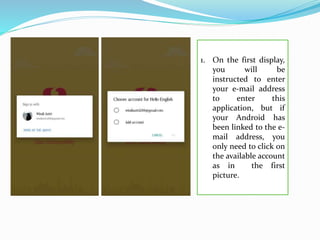
1. On the first display,
you will be
instructed to enter
your e-mail address
to enter this
application, but if
your Android has
been linked to the e-
mail address, you
only need to click on
the available account
as in the first
picture.
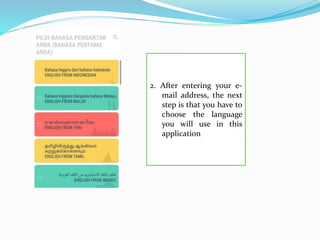
2. After entering your e-
mail address, the next
step is that you have to
choose the language
you will use in this
application
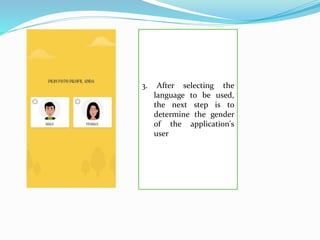
3. After selecting the
language to be used,
the next step is to
determine the gender
of the application's
user
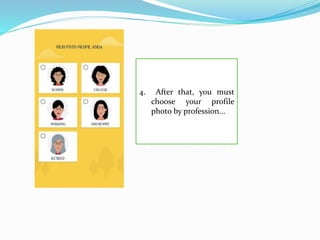
4. After that, you must
choose your profile
photo by profession...
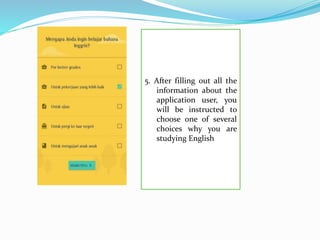
5. After filling out all the
information about the
application user, you
will be instructed to
choose one of several
choices why you are
studying English
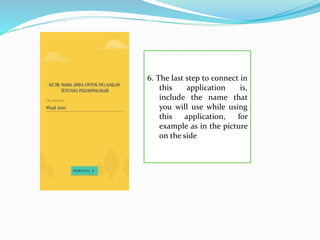
6. The last step to connect in
this application is,
include the name that
you will use while using
this application, for
example as in the picture
on the side
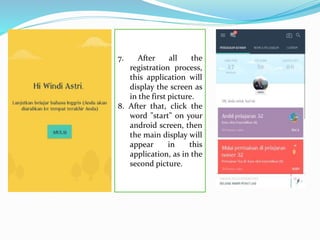
7. After all the
registration process,
this application will
display the screen as
in the first picture.
8. After that, click the
word "start" on your
android screen, then
the main display will
appear in this
application, as in the
second picture.
The Contents of the Hello English application
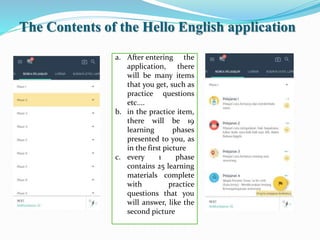
a. After entering the
application, there
will be many items
that you get, such as
practice questions
etc....
b. in the practice item,
there will be 19
learning phases
presented to you, as
in the first picture
c. every 1 phase
contains 25 learning
materials complete
with practice
questions that you
will answer, like the
second picture
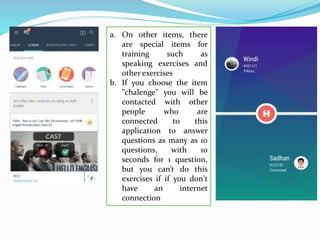
a. On other items, there
are special items for
training such as
speaking exercises and
other exercises
b. If you choose the item
"chalenge" you will be
contacted with other
people who are
connected to this
application to answer
questions as many as 10
questions, with 10
seconds for 1 question,
but you can’t do this
exercises if if you don't
have an internet
connection
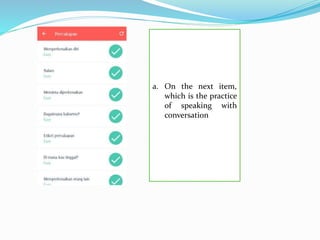
a. On the next item,
which is the practice
of speaking with
conversation
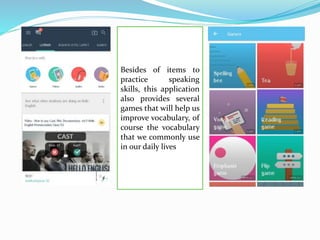
Besides of items to
practice speaking
skills, this application
also provides several
games that will help us
improve vocabulary, of
course the vocabulary
that we commonly use
in our daily lives
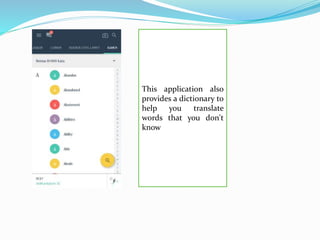
This application also
provides a dictionary to
help you translate
words that you don't
know
 Advantages :
 1. Looks attractive (has many colors)
 2. This application provides various items (such as games,
written exercises, speaking exercises)
 3. The preparation of practice questions in this application is
very good, starting with easier questions until the questions are
difficult for the higher level
 4. The games provided in this application are not just games
that we see in general, but this game aims to improve our
ability to speak English especially adding new vocabulary
 5. Can be used without having to connect with internet
services.
 Disvantages
 1. This application does not have a broader explanation of the
material.
 2. There are a number of items that we can only use if we have
Internet services such as chalenge item, and video item.
THANK YOU 

Hello English

  • 1.
    GROUP 12 WINDI ASTRI(1501404005) OLGA (1501404050) RUMINI (1501404168)
  • 2.
    How to registerthe Hello English application!
  • 4.
    1. On thefirst display, you will be instructed to enter your e-mail address to enter this application, but if your Android has been linked to the e- mail address, you only need to click on the available account as in the first picture.
  • 5.
    2. After enteringyour e- mail address, the next step is that you have to choose the language you will use in this application
  • 6.
    3. After selectingthe language to be used, the next step is to determine the gender of the application's user
  • 7.
    4. After that,you must choose your profile photo by profession...
  • 8.
    5. After fillingout all the information about the application user, you will be instructed to choose one of several choices why you are studying English
  • 9.
    6. The laststep to connect in this application is, include the name that you will use while using this application, for example as in the picture on the side
  • 10.
    7. After allthe registration process, this application will display the screen as in the first picture. 8. After that, click the word "start" on your android screen, then the main display will appear in this application, as in the second picture.
  • 11.
    The Contents ofthe Hello English application a. After entering the application, there will be many items that you get, such as practice questions etc.... b. in the practice item, there will be 19 learning phases presented to you, as in the first picture c. every 1 phase contains 25 learning materials complete with practice questions that you will answer, like the second picture
  • 12.
    a. On otheritems, there are special items for training such as speaking exercises and other exercises b. If you choose the item "chalenge" you will be contacted with other people who are connected to this application to answer questions as many as 10 questions, with 10 seconds for 1 question, but you can’t do this exercises if if you don't have an internet connection
  • 13.
    a. On thenext item, which is the practice of speaking with conversation
  • 14.
    Besides of itemsto practice speaking skills, this application also provides several games that will help us improve vocabulary, of course the vocabulary that we commonly use in our daily lives
  • 15.
    This application also providesa dictionary to help you translate words that you don't know
  • 16.
     Advantages : 1. Looks attractive (has many colors)  2. This application provides various items (such as games, written exercises, speaking exercises)  3. The preparation of practice questions in this application is very good, starting with easier questions until the questions are difficult for the higher level  4. The games provided in this application are not just games that we see in general, but this game aims to improve our ability to speak English especially adding new vocabulary  5. Can be used without having to connect with internet services.  Disvantages  1. This application does not have a broader explanation of the material.  2. There are a number of items that we can only use if we have Internet services such as chalenge item, and video item.
  • 17.