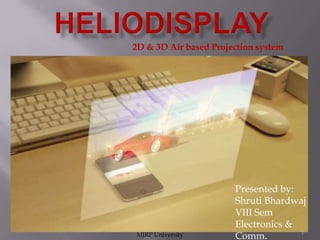
2D & 3D Air based Projection system

MJRP University

Presented by:
Shruti Bhardwaj
VIII Sem
Electronics &
1
Comm.
Contents
Introduction
Heliodisplay

&
screen Projector
History
Principal &
Working
Development in
this field
Negative Aspects
Applications
Conclusions
References

MJRP University

2








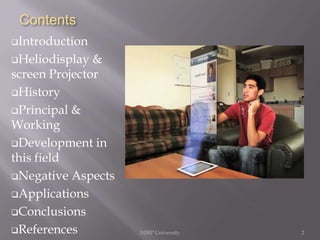
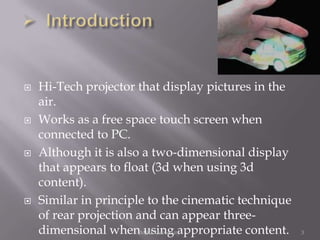
Hi-Tech projector that display pictures in the
air.
Works as a free space touch screen when
connected to PC.
Although it is also a two-dimensional display
that appears to float (3d when using 3d
content).
Similar in principle to the cinematic technique
of rear projection and can appear threedimensional whenMJRP University
using appropriate content.

3
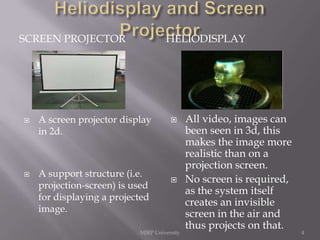
SCREEN PROJECTOR





HELIODISPLAY

A screen projector display
in 2d.

A support structure (i.e.
projection-screen) is used
for displaying a projected
image.





MJRP University

All video, images can
been seen in 3d, this
makes the image more
realistic than on a
projection screen.
No screen is required,
as the system itself
creates an invisible
screen in the air and
thus projects on that.

4




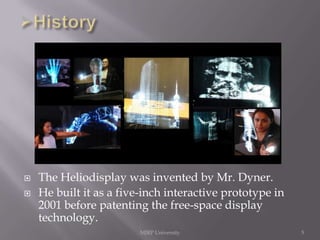
The Heliodisplay was invented by Mr. Dyner.
He built it as a five-inch interactive prototype in
2001 before patenting the free-space display
technology.
MJRP University

5






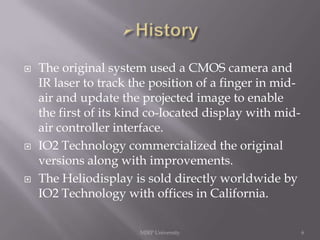
The original system used a CMOS camera and
IR laser to track the position of a finger in midair and update the projected image to enable
the first of its kind co-located display with midair controller interface.
IO2 Technology commercialized the original
versions along with improvements.
The Heliodisplay is sold directly worldwide by
IO2 Technology with offices in California.
MJRP University

6


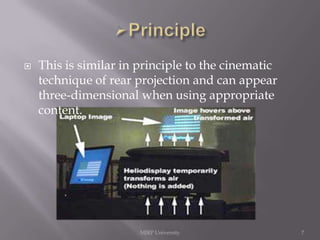
This is similar in principle to the cinematic
technique of rear projection and can appear
three-dimensional when using appropriate
content.

MJRP University

7




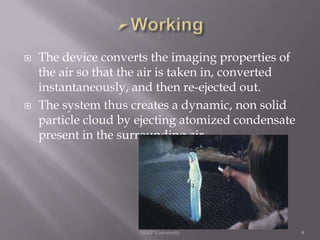
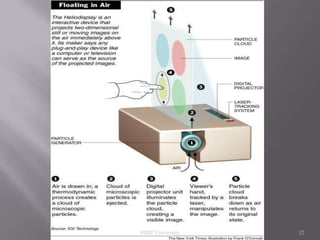
The device converts the imaging properties of
the air so that the air is taken in, converted
instantaneously, and then re-ejected out.
The system thus creates a dynamic, non solid
particle cloud by ejecting atomized condensate
present in the surrounding air.

MJRP University

8






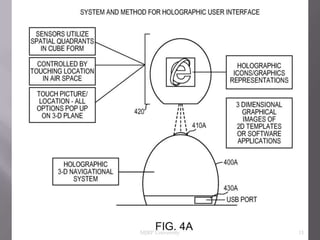
Now the projector projects the given input on
the virtual screen formed.
It can be considered as a touch screen on which
the elements of the image displayed can be
moved around with a fingertip.
The image can still be moved with a fingertip,
but it floats unsupported above a quietly
whirring gray box that is connected to a laptop
computer.

MJRP University

9
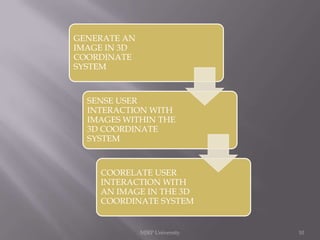
GENERATE AN
IMAGE IN 3D
COORDINATE
SYSTEM

SENSE USER
INTERACTION WITH
IMAGES WITHIN THE
3D COORDINATE
SYSTEM

COORELATE USER
INTERACTION WITH
AN IMAGE IN THE 3D
COORDINATE SYSTEM

MJRP University

10
MJRP University

11
MJRP University

12










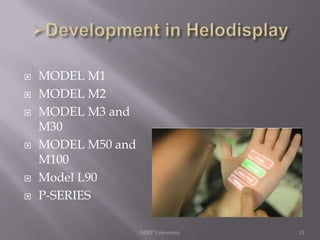
MODEL M1
MODEL M2
MODEL M3 and
M30
MODEL M50 and
M100
Model L90
P-SERIES
MJRP University

13









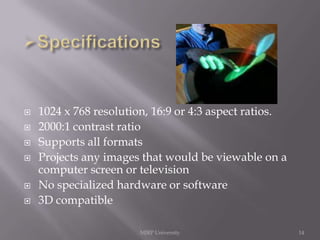
1024 x 768 resolution, 16:9 or 4:3 aspect ratios.
2000:1 contrast ratio
Supports all formats
Projects any images that would be viewable on a
computer screen or television
No specialized hardware or software
3D compatible
MJRP University

14











Device is light weight and can be converted into a
furniture
Nothing is added to air. Nothing affects air quality
projected images and video are two-dimensional,
but appear 3D since there is no physical depth
reference
Heliodisplay does not create fog, so no electronic
devices in the room are affected
Heliodisplay can be used in any country since it
works on 95-115 or 220-240 VAC
Heliodisplay, imagery can be seen up to 75 degrees
off aspect for a total viewing area of over 150
degrees
No special glasses required to see the display
MJRP University
15
Translucency is controlled by the Heliodisplay





Heliodisplay is very expensive
Viewing a Heliodisplay image in direct
sunlight is almost impossible
Screen is essentially air, so it can become
distorted with too much air movement in the
room

MJRP University

16








Advertising/promotion
Video conferencing
Virtual surgery and pre-operative planning
Military training programs
Gaming/artwork
Engineering/architecture plans
Build the Heliodisplay into furniture
MJRP University

17






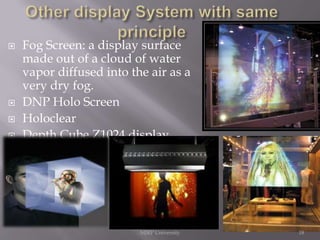
Fog Screen: a display surface
made out of a cloud of water
vapor diffused into the air as a
very dry fog.
DNP Holo Screen
Holoclear
Depth Cube Z1024 display

MJRP University

18








Heliodisplay has great potential and would be
ideal for collaborative work
Heliodisplay is still in the initial stages and the
flaws of cost and environment of positioning
will soon be overcome.
Several other thin air-displays are available but
Heliodisplay outclasses them, because of the
attention it draws and its maintainability, and
as a result it has more market value
Its various applications such as in advertising,
a board room etc suggests that its future scope
is very bright.
MJRP University

19
MJRP University

20

Heliodisplay

  • 1.
    2D & 3DAir based Projection system MJRP University Presented by: Shruti Bhardwaj VIII Sem Electronics & 1 Comm.
  • 2.
    Contents Introduction Heliodisplay & screen Projector History Principal & Working Developmentin this field Negative Aspects Applications Conclusions References MJRP University 2
  • 3.
        Hi-Tech projector thatdisplay pictures in the air. Works as a free space touch screen when connected to PC. Although it is also a two-dimensional display that appears to float (3d when using 3d content). Similar in principle to the cinematic technique of rear projection and can appear threedimensional whenMJRP University using appropriate content. 3
  • 4.
    SCREEN PROJECTOR   HELIODISPLAY A screenprojector display in 2d. A support structure (i.e. projection-screen) is used for displaying a projected image.   MJRP University All video, images can been seen in 3d, this makes the image more realistic than on a projection screen. No screen is required, as the system itself creates an invisible screen in the air and thus projects on that. 4
  • 5.
      The Heliodisplay wasinvented by Mr. Dyner. He built it as a five-inch interactive prototype in 2001 before patenting the free-space display technology. MJRP University 5
  • 6.
       The original systemused a CMOS camera and IR laser to track the position of a finger in midair and update the projected image to enable the first of its kind co-located display with midair controller interface. IO2 Technology commercialized the original versions along with improvements. The Heliodisplay is sold directly worldwide by IO2 Technology with offices in California. MJRP University 6
  • 7.
     This is similarin principle to the cinematic technique of rear projection and can appear three-dimensional when using appropriate content. MJRP University 7
  • 8.
      The device convertsthe imaging properties of the air so that the air is taken in, converted instantaneously, and then re-ejected out. The system thus creates a dynamic, non solid particle cloud by ejecting atomized condensate present in the surrounding air. MJRP University 8
  • 9.
       Now the projectorprojects the given input on the virtual screen formed. It can be considered as a touch screen on which the elements of the image displayed can be moved around with a fingertip. The image can still be moved with a fingertip, but it floats unsupported above a quietly whirring gray box that is connected to a laptop computer. MJRP University 9
  • 10.
    GENERATE AN IMAGE IN3D COORDINATE SYSTEM SENSE USER INTERACTION WITH IMAGES WITHIN THE 3D COORDINATE SYSTEM COORELATE USER INTERACTION WITH AN IMAGE IN THE 3D COORDINATE SYSTEM MJRP University 10
  • 11.
  • 12.
  • 13.
          MODEL M1 MODEL M2 MODELM3 and M30 MODEL M50 and M100 Model L90 P-SERIES MJRP University 13
  • 14.
          1024 x 768resolution, 16:9 or 4:3 aspect ratios. 2000:1 contrast ratio Supports all formats Projects any images that would be viewable on a computer screen or television No specialized hardware or software 3D compatible MJRP University 14
  • 15.
           Device is lightweight and can be converted into a furniture Nothing is added to air. Nothing affects air quality projected images and video are two-dimensional, but appear 3D since there is no physical depth reference Heliodisplay does not create fog, so no electronic devices in the room are affected Heliodisplay can be used in any country since it works on 95-115 or 220-240 VAC Heliodisplay, imagery can be seen up to 75 degrees off aspect for a total viewing area of over 150 degrees No special glasses required to see the display MJRP University 15 Translucency is controlled by the Heliodisplay
  • 16.
       Heliodisplay is veryexpensive Viewing a Heliodisplay image in direct sunlight is almost impossible Screen is essentially air, so it can become distorted with too much air movement in the room MJRP University 16
  • 17.
           Advertising/promotion Video conferencing Virtual surgeryand pre-operative planning Military training programs Gaming/artwork Engineering/architecture plans Build the Heliodisplay into furniture MJRP University 17
  • 18.
        Fog Screen: adisplay surface made out of a cloud of water vapor diffused into the air as a very dry fog. DNP Holo Screen Holoclear Depth Cube Z1024 display MJRP University 18
  • 19.
        Heliodisplay has greatpotential and would be ideal for collaborative work Heliodisplay is still in the initial stages and the flaws of cost and environment of positioning will soon be overcome. Several other thin air-displays are available but Heliodisplay outclasses them, because of the attention it draws and its maintainability, and as a result it has more market value Its various applications such as in advertising, a board room etc suggests that its future scope is very bright. MJRP University 19
  • 20.