Objective of Assignment:-
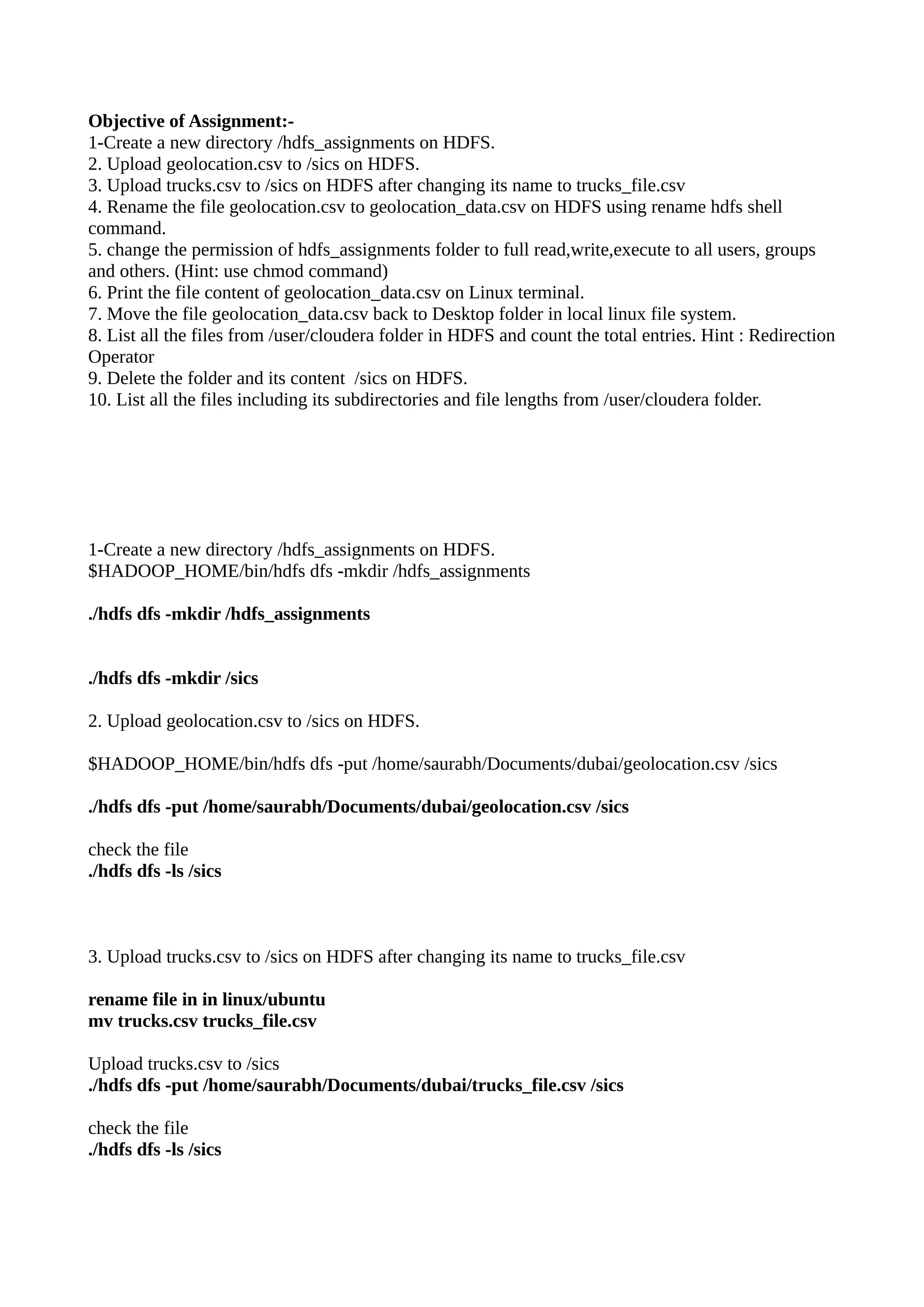
1-Create a new directory /hdfs_assignments on HDFS.
2. Upload geolocation.csv to /sics on HDFS.
3. Upload trucks.csv to /sics on HDFS after changing its name to trucks_file.csv
4. Rename the file geolocation.csv to geolocation_data.csv on HDFS using rename hdfs shell
command.
5. change the permission of hdfs_assignments folder to full read,write,execute to all users, groups
and others. (Hint: use chmod command)
6. Print the file content of geolocation_data.csv on Linux terminal.
7. Move the file geolocation_data.csv back to Desktop folder in local linux file system.
8. List all the files from /user/cloudera folder in HDFS and count the total entries. Hint : Redirection
Operator
9. Delete the folder and its content /sics on HDFS.
10. List all the files including its subdirectories and file lengths from /user/cloudera folder.
1-Create a new directory /hdfs_assignments on HDFS.
$HADOOP_HOME/bin/hdfs dfs -mkdir /hdfs_assignments
./hdfs dfs -mkdir /hdfs_assignments
./hdfs dfs -mkdir /sics
2. Upload geolocation.csv to /sics on HDFS.
$HADOOP_HOME/bin/hdfs dfs -put /home/saurabh/Documents/dubai/geolocation.csv /sics
./hdfs dfs -put /home/saurabh/Documents/dubai/geolocation.csv /sics
check the file
./hdfs dfs -ls /sics
3. Upload trucks.csv to /sics on HDFS after changing its name to trucks_file.csv
rename file in in linux/ubuntu
mv trucks.csv trucks_file.csv
Upload trucks.csv to /sics
./hdfs dfs -put /home/saurabh/Documents/dubai/trucks_file.csv /sics
check the file
./hdfs dfs -ls /sics
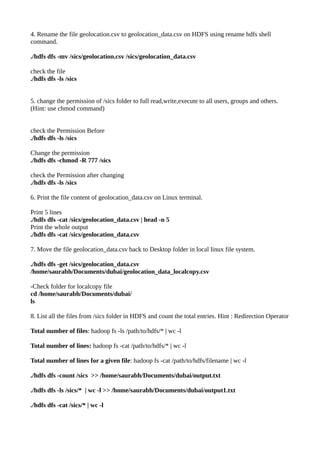
4. Rename the file geolocation.csv to geolocation_data.csv on HDFS using rename hdfs shell
command.
./hdfs dfs -mv /sics/geolocation.csv /sics/geolocation_data.csv
check the file
./hdfs dfs -ls /sics
5. change the permission of /sics folder to full read,write,execute to all users, groups and others.
(Hint: use chmod command)
check the Permission Before
./hdfs dfs -ls /sics
Change the permission
./hdfs dfs -chmod -R 777 /sics
check the Permission after changing
./hdfs dfs -ls /sics
6. Print the file content of geolocation_data.csv on Linux terminal.
Print 5 lines
./hdfs dfs -cat /sics/geolocation_data.csv | head -n 5
Print the whole output
./hdfs dfs -cat /sics/geolocation_data.csv
7. Move the file geolocation_data.csv back to Desktop folder in local linux file system.
./hdfs dfs -get /sics/geolocation_data.csv
/home/saurabh/Documents/dubai/geolocation_data_localcopy.csv
-Check folder for localcopy file
cd /home/saurabh/Documents/dubai/
ls
8. List all the files from /sics folder in HDFS and count the total entries. Hint : Redirection Operator
Total number of files: hadoop fs -ls /path/to/hdfs/* | wc -l
Total number of lines: hadoop fs -cat /path/to/hdfs/* | wc -l
Total number of lines for a given file: hadoop fs -cat /path/to/hdfs/filename | wc -l
./hdfs dfs -count /sics >> /home/saurabh/Documents/dubai/output.txt
./hdfs dfs -ls /sics/* | wc -l >> /home/saurabh/Documents/dubai/output1.txt
./hdfs dfs -cat /sics/* | wc -l
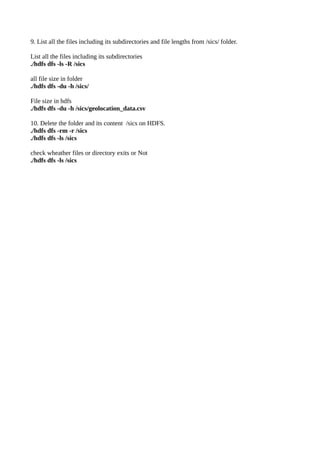
9. List all the files including its subdirectories and file lengths from /sics/ folder.
List all the files including its subdirectories
./hdfs dfs -ls -R /sics
all file size in folder
./hdfs dfs -du -h /sics/
File size in hdfs
./hdfs dfs -du -h /sics/geolocation_data.csv
10. Delete the folder and its content /sics on HDFS.
./hdfs dfs -rm -r /sics
./hdfs dfs -ls /sics
check wheather files or directory exits or Not
./hdfs dfs -ls /sics

Hdfs lab hands-on

  • 1.
    Objective of Assignment:- 1-Createa new directory /hdfs_assignments on HDFS. 2. Upload geolocation.csv to /sics on HDFS. 3. Upload trucks.csv to /sics on HDFS after changing its name to trucks_file.csv 4. Rename the file geolocation.csv to geolocation_data.csv on HDFS using rename hdfs shell command. 5. change the permission of hdfs_assignments folder to full read,write,execute to all users, groups and others. (Hint: use chmod command) 6. Print the file content of geolocation_data.csv on Linux terminal. 7. Move the file geolocation_data.csv back to Desktop folder in local linux file system. 8. List all the files from /user/cloudera folder in HDFS and count the total entries. Hint : Redirection Operator 9. Delete the folder and its content /sics on HDFS. 10. List all the files including its subdirectories and file lengths from /user/cloudera folder. 1-Create a new directory /hdfs_assignments on HDFS. $HADOOP_HOME/bin/hdfs dfs -mkdir /hdfs_assignments ./hdfs dfs -mkdir /hdfs_assignments ./hdfs dfs -mkdir /sics 2. Upload geolocation.csv to /sics on HDFS. $HADOOP_HOME/bin/hdfs dfs -put /home/saurabh/Documents/dubai/geolocation.csv /sics ./hdfs dfs -put /home/saurabh/Documents/dubai/geolocation.csv /sics check the file ./hdfs dfs -ls /sics 3. Upload trucks.csv to /sics on HDFS after changing its name to trucks_file.csv rename file in in linux/ubuntu mv trucks.csv trucks_file.csv Upload trucks.csv to /sics ./hdfs dfs -put /home/saurabh/Documents/dubai/trucks_file.csv /sics check the file ./hdfs dfs -ls /sics
  • 2.
    4. Rename thefile geolocation.csv to geolocation_data.csv on HDFS using rename hdfs shell command. ./hdfs dfs -mv /sics/geolocation.csv /sics/geolocation_data.csv check the file ./hdfs dfs -ls /sics 5. change the permission of /sics folder to full read,write,execute to all users, groups and others. (Hint: use chmod command) check the Permission Before ./hdfs dfs -ls /sics Change the permission ./hdfs dfs -chmod -R 777 /sics check the Permission after changing ./hdfs dfs -ls /sics 6. Print the file content of geolocation_data.csv on Linux terminal. Print 5 lines ./hdfs dfs -cat /sics/geolocation_data.csv | head -n 5 Print the whole output ./hdfs dfs -cat /sics/geolocation_data.csv 7. Move the file geolocation_data.csv back to Desktop folder in local linux file system. ./hdfs dfs -get /sics/geolocation_data.csv /home/saurabh/Documents/dubai/geolocation_data_localcopy.csv -Check folder for localcopy file cd /home/saurabh/Documents/dubai/ ls 8. List all the files from /sics folder in HDFS and count the total entries. Hint : Redirection Operator Total number of files: hadoop fs -ls /path/to/hdfs/* | wc -l Total number of lines: hadoop fs -cat /path/to/hdfs/* | wc -l Total number of lines for a given file: hadoop fs -cat /path/to/hdfs/filename | wc -l ./hdfs dfs -count /sics >> /home/saurabh/Documents/dubai/output.txt ./hdfs dfs -ls /sics/* | wc -l >> /home/saurabh/Documents/dubai/output1.txt ./hdfs dfs -cat /sics/* | wc -l
  • 3.
    9. List allthe files including its subdirectories and file lengths from /sics/ folder. List all the files including its subdirectories ./hdfs dfs -ls -R /sics all file size in folder ./hdfs dfs -du -h /sics/ File size in hdfs ./hdfs dfs -du -h /sics/geolocation_data.csv 10. Delete the folder and its content /sics on HDFS. ./hdfs dfs -rm -r /sics ./hdfs dfs -ls /sics check wheather files or directory exits or Not ./hdfs dfs -ls /sics