Model HD-5000M                                                                                                                 Model HD-5000M
                                                                                                                                 Setup Instructions
                    Your Projector’s
                              new Best Friend
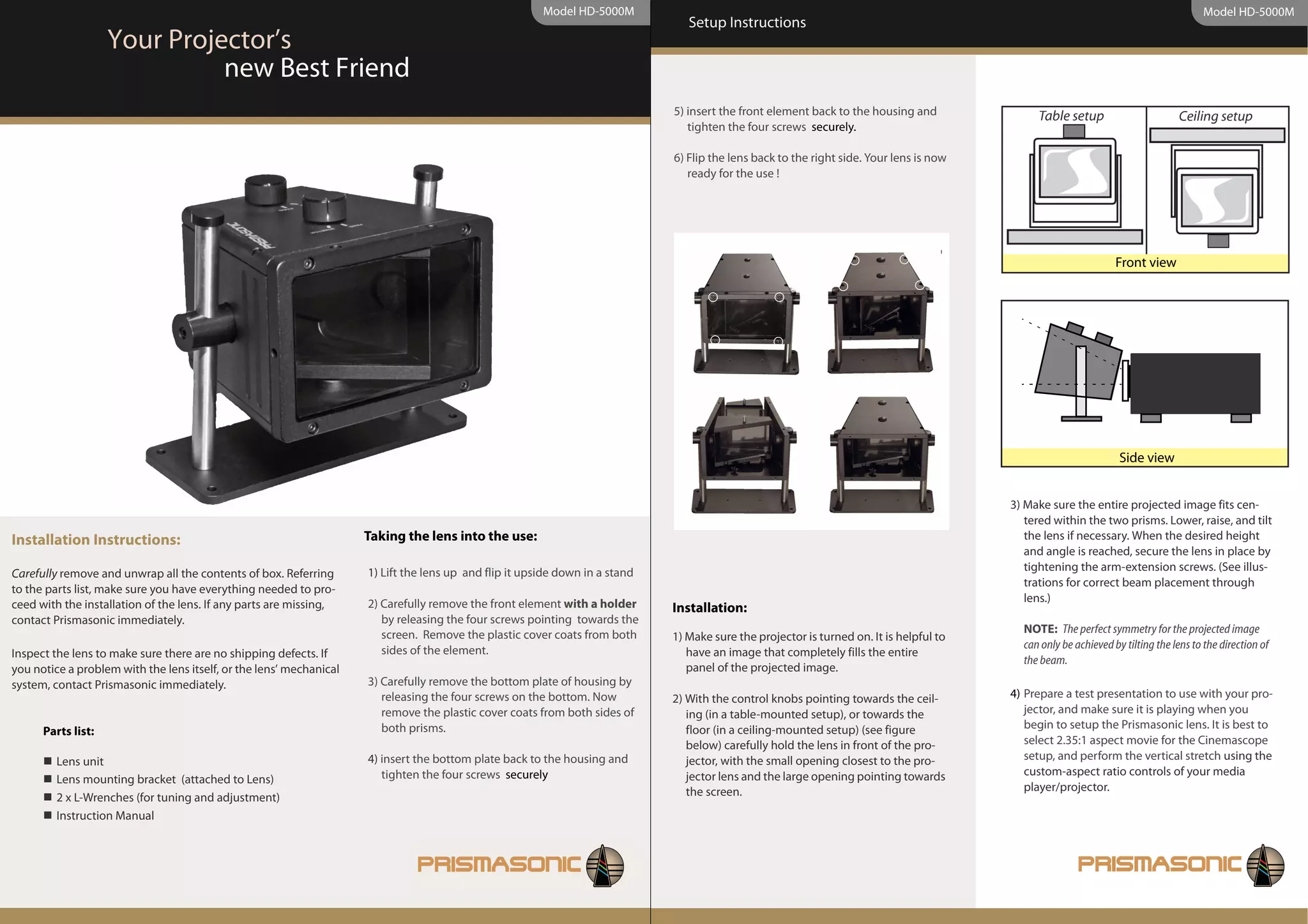
                                                                                                                              5) insert the front element back to the housing and              Table setup                        Ceiling setup
                                                                                                                                 tighten the four screws securely.

                                                                                                                              6) Flip the lens back to the right side. Your lens is now
                                                                                                                                 ready for the use !


                                                                                                                                                                                                                  Front view


                                                                                                                                                                                                                   Side view


                                                                                                                                                                                          3) Make sure the entire projected image fits cen-
                                                                                                                                                                                             tered within the two prisms. Lower, raise, and tilt
Installation Instructions:                                           Taking the lens into the use:                                                                                           the lens if necessary. When the desired height
                                                                                                                                                                                             and angle is reached, secure the lens in place by
                                                                                                                                                                                             tightening the arm-extension screws. (See illus-
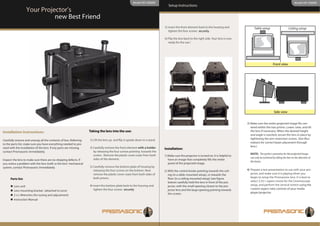
Carefully remove and unwrap all the contents of box. Referring       1) Lift the lens up and flip it upside down in a stand
                                                                                                                                                                                             trations for correct beam placement through
to the parts list, make sure you have everything needed to pro-
                                                                     2) Carefully remove the front element with a holder                                                                     lens.)
ceed with the installation of the lens. If any parts are missing,                                                             Installation:
contact Prismasonic immediately.                                        by releasing the four screws pointing towards the
                                                                        screen. Remove the plastic cover coats from both                                                                    NOTE: The perfect symmetry for the projected image
                                                                                                                              1) Make sure the projector is turned on. It is helpful to
                                                                        sides of the element.                                                                                               can only be achieved by tilting the lens to the direction of
Inspect the lens to make sure there are no shipping defects. If                                                                  have an image that completely fills the entire
                                                                                                                                                                                            the beam.
you notice a problem with the lens itself, or the lens’ mechanical                                                               panel of the projected image.
system, contact Prismasonic immediately.                             3) Carefully remove the bottom plate of housing by
                                                                        releasing the four screws on the bottom. Now          2) With the control knobs pointing towards the ceil-        4) Prepare a test presentation to use with your pro-
                                                                        remove the plastic cover coats from both sides of        ing (in a table-mounted setup), or towards the              jector, and make sure it is playing when you
                                                                        both prisms.                                             floor (in a ceiling-mounted setup) (see figure              begin to setup the Prismasonic lens. It is best to
      Parts list:
                                                                                                                                 below) carefully hold the lens in front of the pro-         select 2.35:1 aspect movie for the Cinemascope
         Lens unit                                                   4) insert the bottom plate back to the housing and          jector, with the small opening closest to the pro-          setup, and perform the vertical stretch using the
                                                                        tighten the four screws securely                         jector lens and the large opening pointing towards          custom-aspect ratio controls of your media
         Lens mounting bracket (attached to Lens)
                                                                                                                                 the screen.                                                 player/projector.
         2 x L-Wrenches (for tuning and adjustment)
         Instruction Manual
Model HD-5000M                                                                                                         Model HD-5000M
  Setup Instructions                                                       Setup Instructions


5)Carefully remove the front element with a holder                                     Maintenance:
   by releasing the four screws pointing towards the                                   Your Prismasonic lens was designed to require very minimal cleaning. It is best to
   screen, and put it in a clean, safe location.                                       only wipe the lens housing with a clean, damp, soft cloth when needed.

6) First move the prisms to the “pass” mode using the                                  The prisms should ONLY be cleaned if absolutely necessary and do so with great
   control knobs until the prisms stop. Make sure the                                  care...
   image is now rectangular and symmetrically in the
   centre of the 2.37:1 screen.
                                                                                       Cleaning the prisms:
7) Turn the control knobs to the ‘Wide’ position until                                 1) Only used optically safe lens-cleaning solutions and a clean, lint-free cloth certi-
   the prisms stop again. The tuning can be accom-                                        fied for cleaning of delicate lens materials (available at most camera shops).
   plished by manually adjusting the removable pin-
   stops inside the lens to match your screen per-                                     2) If dust or debris should become trapped in between the prisms, it is possible to
   fectly on both sides.                                                                  open the bottom plate of the housing and clean the prisms from the both sides.
                                                                                          Also a small amount of “air in a can” or a hand-operated camera lens air-squeezer
  NOTE: Tuning is done to the pinstop screws to                                           can be used (also available at most camera shops) to blow-away this unwanted
  where the prisms stop after turning the knobs to the                                    dust or debris.
  ‘wide’ position

8)Take the front element and secure it to the lens
   body using the four screws. You may slightly have
   to zoom in the picture after front element installa-
   tion
                                                                                           Make Your Notes Here
9) Adjust focus and picture to achieve the optimum
   settings in “Wide” mode, and note these settings
   for future reference.


You’re done. Now it’s as simple as turning the control
knobs to recall the settings for the Prismasonic, and
using the desired settings on your projector and
video playback machine/ video scaler / projector.

Hd5000m Manual Web

  • 1.
    Model HD-5000M Model HD-5000M Setup Instructions Your Projector’s new Best Friend 5) insert the front element back to the housing and Table setup Ceiling setup tighten the four screws securely. 6) Flip the lens back to the right side. Your lens is now ready for the use ! Front view Side view 3) Make sure the entire projected image fits cen- tered within the two prisms. Lower, raise, and tilt Installation Instructions: Taking the lens into the use: the lens if necessary. When the desired height and angle is reached, secure the lens in place by tightening the arm-extension screws. (See illus- Carefully remove and unwrap all the contents of box. Referring 1) Lift the lens up and flip it upside down in a stand trations for correct beam placement through to the parts list, make sure you have everything needed to pro- 2) Carefully remove the front element with a holder lens.) ceed with the installation of the lens. If any parts are missing, Installation: contact Prismasonic immediately. by releasing the four screws pointing towards the screen. Remove the plastic cover coats from both NOTE: The perfect symmetry for the projected image 1) Make sure the projector is turned on. It is helpful to sides of the element. can only be achieved by tilting the lens to the direction of Inspect the lens to make sure there are no shipping defects. If have an image that completely fills the entire the beam. you notice a problem with the lens itself, or the lens’ mechanical panel of the projected image. system, contact Prismasonic immediately. 3) Carefully remove the bottom plate of housing by releasing the four screws on the bottom. Now 2) With the control knobs pointing towards the ceil- 4) Prepare a test presentation to use with your pro- remove the plastic cover coats from both sides of ing (in a table-mounted setup), or towards the jector, and make sure it is playing when you both prisms. floor (in a ceiling-mounted setup) (see figure begin to setup the Prismasonic lens. It is best to Parts list: below) carefully hold the lens in front of the pro- select 2.35:1 aspect movie for the Cinemascope Lens unit 4) insert the bottom plate back to the housing and jector, with the small opening closest to the pro- setup, and perform the vertical stretch using the tighten the four screws securely jector lens and the large opening pointing towards custom-aspect ratio controls of your media Lens mounting bracket (attached to Lens) the screen. player/projector. 2 x L-Wrenches (for tuning and adjustment) Instruction Manual
  • 2.
    Model HD-5000M Model HD-5000M Setup Instructions Setup Instructions 5)Carefully remove the front element with a holder Maintenance: by releasing the four screws pointing towards the Your Prismasonic lens was designed to require very minimal cleaning. It is best to screen, and put it in a clean, safe location. only wipe the lens housing with a clean, damp, soft cloth when needed. 6) First move the prisms to the “pass” mode using the The prisms should ONLY be cleaned if absolutely necessary and do so with great control knobs until the prisms stop. Make sure the care... image is now rectangular and symmetrically in the centre of the 2.37:1 screen. Cleaning the prisms: 7) Turn the control knobs to the ‘Wide’ position until 1) Only used optically safe lens-cleaning solutions and a clean, lint-free cloth certi- the prisms stop again. The tuning can be accom- fied for cleaning of delicate lens materials (available at most camera shops). plished by manually adjusting the removable pin- stops inside the lens to match your screen per- 2) If dust or debris should become trapped in between the prisms, it is possible to fectly on both sides. open the bottom plate of the housing and clean the prisms from the both sides. Also a small amount of “air in a can” or a hand-operated camera lens air-squeezer NOTE: Tuning is done to the pinstop screws to can be used (also available at most camera shops) to blow-away this unwanted where the prisms stop after turning the knobs to the dust or debris. ‘wide’ position 8)Take the front element and secure it to the lens body using the four screws. You may slightly have to zoom in the picture after front element installa- tion Make Your Notes Here 9) Adjust focus and picture to achieve the optimum settings in “Wide” mode, and note these settings for future reference. You’re done. Now it’s as simple as turning the control knobs to recall the settings for the Prismasonic, and using the desired settings on your projector and video playback machine/ video scaler / projector.