Persona & Scenario
References
• https://www.interaction-design.org/
• https://www.usability.gov/
• https://www.keepitusable.com
• http://www.usabilitybok.org/persona
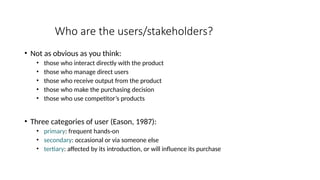
Who are the users/stakeholders?
• Not as obvious as you think:
• those who interact directly with the product
• those who manage direct users
• those who receive output from the product
• those who make the purchasing decision
• those who use competitor’s products
• Three categories of user (Eason, 1987):
• primary: frequent hands-on
• secondary: occasional or via someone else
• tertiary: affected by its introduction, or will influence its purchase
Know Your User
• Who are they?
• Probably not like you!
• Talk to them
• Watch them
• Use your imagination
Understanding users’ needs
• Need to take into account what people are good and bad at
• Consider what might help people in the way they currently do things
• Think through what might provide quality user experiences
• Listen to what people want and get them involved
• Use tried and tested user-centered methods
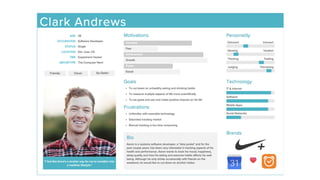
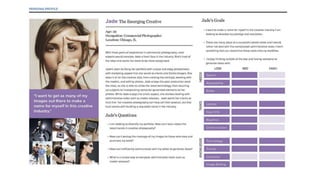
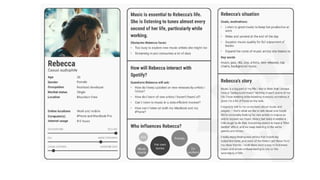
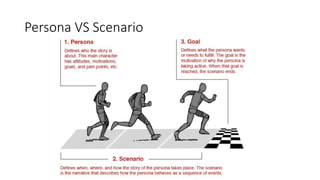
Persona
Persona
• A persona is a way to model, summarize and communicate research
about people who have been observed or researched in some way.
• A specific person but is not a real individual; rather, it is synthesized
from observations of many people.
• It enables the designer to focus on a manageable and memorable
cast of characters, instead of focusing on thousands of individuals.
• It aid designers to create different designs for different kinds of
people and to design for a specific somebody, rather than a generic
everybody.
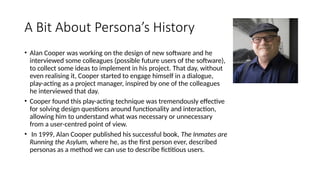
A Bit About Persona’s History
• Alan Cooper was working on the design of new software and he
interviewed some colleagues (possible future users of the software),
to collect some ideas to implement in his project. That day, without
even realising it, Cooper started to engage himself in a dialogue,
play-acting as a project manager, inspired by one of the colleagues
he interviewed that day.
• Cooper found this play-acting technique was tremendously effective
for solving design questions around functionality and interaction,
allowing him to understand what was necessary or unnecessary
from a user-centred point of view.
• In 1999, Alan Cooper published his successful book, The Inmates are
Running the Asylum, where he, as the first person ever, described
personas as a method we can use to describe fictitious users.
Benefit of Persona
• Creating personas will help you to understand your users’ needs,
experiences, behaviours and goals.
• Creating personas can help you step out of yourself. It can help you to
recognise that different people have different needs and expectations,
and it can also help you to identify with the user you’re designing for.
• Personas make the design task at hand less complex, they guide your
ideation processes, and they can help you to achieve the goal of
creating a good user experience for your target user group.
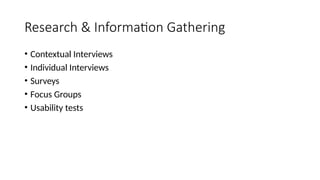
Research & Information Gathering
• Contextual Interviews
• Individual Interviews
• Surveys
• Focus Groups
• Usability tests
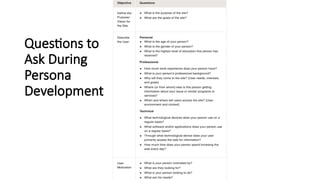
Questions to
Ask During
Persona
Development
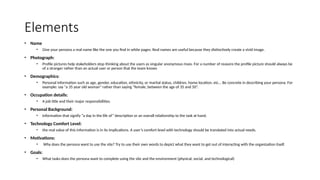
Elements
• Name
• Give your persona a real name like the one you find in white pages. Real names are useful because they distinctively create a vivid image.
• Photograph:
• Profile pictures help stakeholders stop thinking about the users as singular anonymous mass. For a number of reasons the profile picture should always be
of a stranger rather than an actual user or person that the team knows
• Demographics:
• Personal information such as age, gender, education, ethnicity, or marital status, children, home location, etc... Be concrete in describing your persona. For
example: say “a 35 year old woman” rather than saying “female, between the age of 35 and 50”.
• Occupation details:
• A job title and their major responsibilities.
• Personal Background:
• Information that signify “a day in the life of” description or an overall relationship to the task at hand.
• Technology Comfort Level:
• the real value of this information is in its implications. A user’s comfort level with technology should be translated into actual needs.
• Motivations:
• Why does the persona want to use the site? Try to use their own words to depict what they want to get out of interacting with the organization itself.
• Goals:
• What tasks does the persona want to complete using the site and the environment (physical, social, and technological)
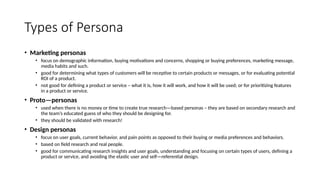
Types of Persona
• Marketing personas
• focus on demographic information, buying motivations and concerns, shopping or buying preferences, marketing message,
media habits and such.
• good for determining what types of customers will be receptive to certain products or messages, or for evaluating potential
ROI of a product.
• not good for defining a product or service – what it is, how it will work, and how it will be used; or for prioritizing features
in a product or service.
• Proto—personas
• used when there is no money or time to create true research—based personas – they are based on secondary research and
the team’s educated guess of who they should be designing for.
• they should be validated with research!
• Design personas
• focus on user goals, current behavior, and pain points as opposed to their buying or media preferences and behaviors.
• based on field research and real people.
• good for communicating research insights and user goals, understanding and focusing on certain types of users, defining a
product or service, and avoiding the elastic user and self—referential design.
Best Practice for Developing Persona
• Conduct user research: Answer the following questions: Who are your users and why are
they using the system? What behaviors, assumptions, and expectations color their view of
the system?
• Condense the research: Look for themes/characteristics that are specific, relevant, and
universal to the system and its users.
• Brainstorm: Organize elements into persona groups that represent your target users. Name
or classify each group.
• Refine: Combine and prioritize the rough personas. Separate them into primary, secondary,
and, if necessary, complementary categories. You should have roughly 3-5 personas and
their identified characteristics.
• Make them realistic: Develop the appropriate descriptions of each personas background,
motivations, and expectations. Do not include a lot of personal information. Be relevant
and serious; humor is not appropriate.
Characteristics of A Good Persona
• It reflect patterns observed in research
• It focus on the current state, not the future
• Realistic, not idealized
• Describe a challenging (but not impossible) design target
• Help to understand users’
• Context
• Behaviors
• Attitudes
• Needs
• Challenges/pain points
• Goals and motivations
Persona VS Scenario
Scenario
User Scenario
• Scenarios describe the stories and context behind why a specific user
or user group comes to your site. They note the goals and questions
to be achieved and sometimes define the possibilities of how the
user(s) can achieve them on the site.
• User scenarios are stories which designers create to show how users
might act to achieve a goal in a system or environment.
• Designers make scenarios to understand users’ motivations, needs,
barriers and more in the context of how they would use a design, and
to help ideate, iterate and usability-test optimal solutions.
What to consider..
• Who is the user? Use the personas that have been developed to reflect the
real, major user groups coming to your site.
• Why does the user come to the site? Note what motivates the user to come
to the site and their expectations upon arrival, if any.
• What goals does he/she have? Through task analysis, you can better
understand the what the user wants on your site and therefore what the site
must have for them to leave satisfied.
Some scenarios also answer:
• How can the user achieve their goals on the site? Define how the user can
achieve his/ her goal on the site, identifying the various possibilities and any
potential barriers.
Essential Point
• Provide the context of:
• Who – details of the persona.
• What their goals are.
• When they might perform tasks (including obstacles).
• Where they might do these (including obstacles).
• Why they want to do things, must perform subtasks, etc.
• Focus on the bigger picture but keep to the point – include the circumstances leading up to the
interaction, the factors that impact the user’s world and that might influence how they interact with a
solution (e.g., cultural context) and anything they may need before encountering or using the solution
(e.g., information).
• Make the scenario understandable for people who don’t have technical backgrounds – so everyone,
including stakeholders, can get on board with elements they can easily relate to and can stay open-
minded about necessary processes, etc.
• Keep user scenarios tightly centered on the users themselves – to ensure any ideas about design
features stay grounded in the reality of the users’ context.
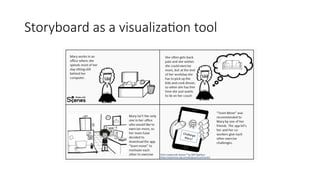
Storyboard as a visualization tool
Types of Scenario
• Goal- or Task-Based Scenarios
• Elaborated Scenarios
• Full Scale Task Scenarios
Goal- or Task-Based Scenarios
• state only what the user wants to do
• do not include any information on how the user would complete the
scenario.
• These scenarios are useful in helping to define your site architecture
and content.
• Examples:
• A parent is worried about a ten-year old refusing to drink milk and wants to
know if it really makes a difference that the child is getting very little calcium.
• You are traveling to Seattle for your job next week and you want to check on
the amount you can be reimbursed for meals and other expenses.
Elaborated Scenarios
• give more user story details, giving the team a deeper understanding of the users and
users’ characteristics that may help or hinder site interaction.
• Knowing this information the team is more likely to develop content, functionality, and
site behavior that users find comfortable and easy to work with.
• Example:
Mr. and Mrs. Macomb are retired school teachers who are now in their 70s. Their Social Security
checks are an important part of their income. They've just sold their big house and moved to a small
apartment. They know that one of the many chores they need to do now is tell the Social Security
Administration that they have moved. They don't know where the nearest Social Security office is
and it's getting harder for them to do a lot of walking or driving. If it is easy and safe enough, they
would like to use the computer to notify the Social Security Administration of their move. However,
they are somewhat nervous about doing a task like this by computer. They never used computers in
their jobs. However, their son, Steve, gave them a computer last year, set it up for them, and
showed them how to use email and go to websites. They have never been to the Social Security
Administration's website, so they don't know how it is organized. Also, they are reluctant to give out
personal information online, so they want to know how safe it is to tell the agency about their new
address this way.
Full Scale Task Scenario
• include the steps to accomplish the task.
• a full-scale scenario can either report all the steps that a specific user currently
takes to accomplish the task or it can describe the steps you plan to set up for
users in the new site.
• very similar to use cases, but the scenarios lay out the steps from the user's point
of view rather than from the website's point of view.
• They explain how the site supports the goal-oriented scenarios that you started
with
Scenario in Design
• Write down 10 to 30 of the most common reasons that users have for
visiting or tasks that users want to do.
• Scenarios can also work together with personas by serving as the
stories behind why the particular persona would come to your website.
• What does the persona hope to accomplish by visiting the website?
• What characteristics of the persona might help or hinder his or her site
interaction?
• Focus on users and their tasks rather than on your site's organization
and internal structure  you will know what content the site must
have and how it should be organized.

HCI - 4 - Persona & Scenario Human Computer Interaction.pptx

  • 1.
  • 2.
    References • https://www.interaction-design.org/ • https://www.usability.gov/ •https://www.keepitusable.com • http://www.usabilitybok.org/persona
  • 3.
    Who are theusers/stakeholders? • Not as obvious as you think: • those who interact directly with the product • those who manage direct users • those who receive output from the product • those who make the purchasing decision • those who use competitor’s products • Three categories of user (Eason, 1987): • primary: frequent hands-on • secondary: occasional or via someone else • tertiary: affected by its introduction, or will influence its purchase
  • 4.
    Know Your User •Who are they? • Probably not like you! • Talk to them • Watch them • Use your imagination
  • 5.
    Understanding users’ needs •Need to take into account what people are good and bad at • Consider what might help people in the way they currently do things • Think through what might provide quality user experiences • Listen to what people want and get them involved • Use tried and tested user-centered methods
  • 6.
  • 7.
    Persona • A personais a way to model, summarize and communicate research about people who have been observed or researched in some way. • A specific person but is not a real individual; rather, it is synthesized from observations of many people. • It enables the designer to focus on a manageable and memorable cast of characters, instead of focusing on thousands of individuals. • It aid designers to create different designs for different kinds of people and to design for a specific somebody, rather than a generic everybody.
  • 8.
    A Bit AboutPersona’s History • Alan Cooper was working on the design of new software and he interviewed some colleagues (possible future users of the software), to collect some ideas to implement in his project. That day, without even realising it, Cooper started to engage himself in a dialogue, play-acting as a project manager, inspired by one of the colleagues he interviewed that day. • Cooper found this play-acting technique was tremendously effective for solving design questions around functionality and interaction, allowing him to understand what was necessary or unnecessary from a user-centred point of view. • In 1999, Alan Cooper published his successful book, The Inmates are Running the Asylum, where he, as the first person ever, described personas as a method we can use to describe fictitious users.
  • 12.
    Benefit of Persona •Creating personas will help you to understand your users’ needs, experiences, behaviours and goals. • Creating personas can help you step out of yourself. It can help you to recognise that different people have different needs and expectations, and it can also help you to identify with the user you’re designing for. • Personas make the design task at hand less complex, they guide your ideation processes, and they can help you to achieve the goal of creating a good user experience for your target user group.
  • 13.
    Research & InformationGathering • Contextual Interviews • Individual Interviews • Surveys • Focus Groups • Usability tests
  • 14.
  • 15.
    Elements • Name • Giveyour persona a real name like the one you find in white pages. Real names are useful because they distinctively create a vivid image. • Photograph: • Profile pictures help stakeholders stop thinking about the users as singular anonymous mass. For a number of reasons the profile picture should always be of a stranger rather than an actual user or person that the team knows • Demographics: • Personal information such as age, gender, education, ethnicity, or marital status, children, home location, etc... Be concrete in describing your persona. For example: say “a 35 year old woman” rather than saying “female, between the age of 35 and 50”. • Occupation details: • A job title and their major responsibilities. • Personal Background: • Information that signify “a day in the life of” description or an overall relationship to the task at hand. • Technology Comfort Level: • the real value of this information is in its implications. A user’s comfort level with technology should be translated into actual needs. • Motivations: • Why does the persona want to use the site? Try to use their own words to depict what they want to get out of interacting with the organization itself. • Goals: • What tasks does the persona want to complete using the site and the environment (physical, social, and technological)
  • 16.
    Types of Persona •Marketing personas • focus on demographic information, buying motivations and concerns, shopping or buying preferences, marketing message, media habits and such. • good for determining what types of customers will be receptive to certain products or messages, or for evaluating potential ROI of a product. • not good for defining a product or service – what it is, how it will work, and how it will be used; or for prioritizing features in a product or service. • Proto—personas • used when there is no money or time to create true research—based personas – they are based on secondary research and the team’s educated guess of who they should be designing for. • they should be validated with research! • Design personas • focus on user goals, current behavior, and pain points as opposed to their buying or media preferences and behaviors. • based on field research and real people. • good for communicating research insights and user goals, understanding and focusing on certain types of users, defining a product or service, and avoiding the elastic user and self—referential design.
  • 17.
    Best Practice forDeveloping Persona • Conduct user research: Answer the following questions: Who are your users and why are they using the system? What behaviors, assumptions, and expectations color their view of the system? • Condense the research: Look for themes/characteristics that are specific, relevant, and universal to the system and its users. • Brainstorm: Organize elements into persona groups that represent your target users. Name or classify each group. • Refine: Combine and prioritize the rough personas. Separate them into primary, secondary, and, if necessary, complementary categories. You should have roughly 3-5 personas and their identified characteristics. • Make them realistic: Develop the appropriate descriptions of each personas background, motivations, and expectations. Do not include a lot of personal information. Be relevant and serious; humor is not appropriate.
  • 18.
    Characteristics of AGood Persona • It reflect patterns observed in research • It focus on the current state, not the future • Realistic, not idealized • Describe a challenging (but not impossible) design target • Help to understand users’ • Context • Behaviors • Attitudes • Needs • Challenges/pain points • Goals and motivations
  • 19.
  • 20.
  • 21.
    User Scenario • Scenariosdescribe the stories and context behind why a specific user or user group comes to your site. They note the goals and questions to be achieved and sometimes define the possibilities of how the user(s) can achieve them on the site. • User scenarios are stories which designers create to show how users might act to achieve a goal in a system or environment. • Designers make scenarios to understand users’ motivations, needs, barriers and more in the context of how they would use a design, and to help ideate, iterate and usability-test optimal solutions.
  • 22.
    What to consider.. •Who is the user? Use the personas that have been developed to reflect the real, major user groups coming to your site. • Why does the user come to the site? Note what motivates the user to come to the site and their expectations upon arrival, if any. • What goals does he/she have? Through task analysis, you can better understand the what the user wants on your site and therefore what the site must have for them to leave satisfied. Some scenarios also answer: • How can the user achieve their goals on the site? Define how the user can achieve his/ her goal on the site, identifying the various possibilities and any potential barriers.
  • 23.
    Essential Point • Providethe context of: • Who – details of the persona. • What their goals are. • When they might perform tasks (including obstacles). • Where they might do these (including obstacles). • Why they want to do things, must perform subtasks, etc. • Focus on the bigger picture but keep to the point – include the circumstances leading up to the interaction, the factors that impact the user’s world and that might influence how they interact with a solution (e.g., cultural context) and anything they may need before encountering or using the solution (e.g., information). • Make the scenario understandable for people who don’t have technical backgrounds – so everyone, including stakeholders, can get on board with elements they can easily relate to and can stay open- minded about necessary processes, etc. • Keep user scenarios tightly centered on the users themselves – to ensure any ideas about design features stay grounded in the reality of the users’ context.
  • 24.
    Storyboard as avisualization tool
  • 25.
    Types of Scenario •Goal- or Task-Based Scenarios • Elaborated Scenarios • Full Scale Task Scenarios
  • 26.
    Goal- or Task-BasedScenarios • state only what the user wants to do • do not include any information on how the user would complete the scenario. • These scenarios are useful in helping to define your site architecture and content. • Examples: • A parent is worried about a ten-year old refusing to drink milk and wants to know if it really makes a difference that the child is getting very little calcium. • You are traveling to Seattle for your job next week and you want to check on the amount you can be reimbursed for meals and other expenses.
  • 27.
    Elaborated Scenarios • givemore user story details, giving the team a deeper understanding of the users and users’ characteristics that may help or hinder site interaction. • Knowing this information the team is more likely to develop content, functionality, and site behavior that users find comfortable and easy to work with. • Example: Mr. and Mrs. Macomb are retired school teachers who are now in their 70s. Their Social Security checks are an important part of their income. They've just sold their big house and moved to a small apartment. They know that one of the many chores they need to do now is tell the Social Security Administration that they have moved. They don't know where the nearest Social Security office is and it's getting harder for them to do a lot of walking or driving. If it is easy and safe enough, they would like to use the computer to notify the Social Security Administration of their move. However, they are somewhat nervous about doing a task like this by computer. They never used computers in their jobs. However, their son, Steve, gave them a computer last year, set it up for them, and showed them how to use email and go to websites. They have never been to the Social Security Administration's website, so they don't know how it is organized. Also, they are reluctant to give out personal information online, so they want to know how safe it is to tell the agency about their new address this way.
  • 28.
    Full Scale TaskScenario • include the steps to accomplish the task. • a full-scale scenario can either report all the steps that a specific user currently takes to accomplish the task or it can describe the steps you plan to set up for users in the new site. • very similar to use cases, but the scenarios lay out the steps from the user's point of view rather than from the website's point of view. • They explain how the site supports the goal-oriented scenarios that you started with
  • 29.
    Scenario in Design •Write down 10 to 30 of the most common reasons that users have for visiting or tasks that users want to do. • Scenarios can also work together with personas by serving as the stories behind why the particular persona would come to your website. • What does the persona hope to accomplish by visiting the website? • What characteristics of the persona might help or hinder his or her site interaction? • Focus on users and their tasks rather than on your site's organization and internal structure  you will know what content the site must have and how it should be organized.