Build your first Real-Time App with
Streaming API

Hal Hildebrand
Vinod Mehra
Jeff Lai
Safe harbor
 Safe harbor statement under the Private Securities Litigation Reform Act of 1995:

 This presentation may contain forward-looking statements that involve risks, uncertainties, and assumptions. If any such uncertainties
 materialize or if any of the assumptions proves incorrect, the results of salesforce.com, inc. could differ materially from the results
 expressed or implied by the forward-looking statements we make. All statements other than statements of historical fact could be
 deemed forward-looking, including any projections of product or service availability, subscriber growth, earnings, revenues, or other
 financial items and any statements regarding strategies or plans of management for future operations, statements of belief, any
 statements concerning new, planned, or upgraded services or technology developments and customer contracts or use of our services.

 The risks and uncertainties referred to above include – but are not limited to – risks associated with developing and delivering new
 functionality for our service, new products and services, our new business model, our past operating losses, possible fluctuations in our
 operating results and rate of growth, interruptions or delays in our Web hosting, breach of our security measures, the outcome of
 intellectual property and other litigation, risks associated with possible mergers and acquisitions, the immature market in which we
 operate, our relatively limited operating history, our ability to expand, retain, and motivate our employees and manage our growth, new
 releases of our service and successful customer deployment, our limited history reselling non-salesforce.com products, and utilization
 and selling to larger enterprise customers. Further information on potential factors that could affect the financial results of
 salesforce.com, inc. is included in our annual report on Form 10-Q for the most recent fiscal quarter ended July 31, 2012. This
 documents and others containing important disclosures are available on the SEC Filings section of the Investor Information section of
 our Web site.

 Any unreleased services or features referenced in this or other presentations, press releases or public statements are not currently
 available and may not be delivered on time or at all. Customers who purchase our services should make the purchase decisions based
 upon features that are currently available. Salesforce.com, inc. assumes no obligation and does not intend to update these forward-
 looking statements.
Hal, Vinod, Jeff, Alex
Salesforce R&D
Before we begin

What you will need to follow along
    Have your DEV Org created and ready
    Install the Streaming Hands on Package
    See http://bit.ly/demo-setup for complete instructions
Note!
    Chrome browser support has a bug when showing maps!
Please use FireFox for this demo


                    See demo installation instructions at: http://bit.ly/demo-setup
What are we going to build

Build two scenarios
    Use geo location coordinates to plot Opportunities Real Time
      • Use browser based geo location to show where Opportunities taking place
      • Plot location on map based on Streaming API events
    Enable Real Time updates for a Leaderboard
      • Update page with sales results from different sales people
      • Use CometD to listen to Streaming API and get events


                     See demo installation instructions at: http://bit.ly/demo-setup
Short Introduction to Streaming

 •Clients concerned with changes in data
  • Data creation
  • Data update
 •Common solution is to poll for changes
  • Wastes resources on both client and server
 •Streaming API pushes changes to clients
  • Sets up continuous queries to monitor changes
  • JSON events describing changes
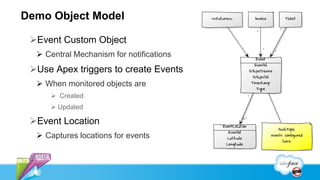
Demo Object Model

 Event Custom Object
   Central Mechanism for notifications
 Use Apex triggers to create Events
   When monitored objects are
      Created
      Updated

 Event Location
   Captures locations for events
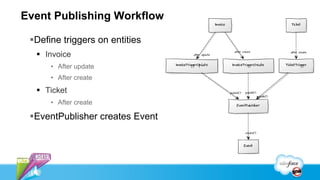
Event Publishing Workflow

 Define triggers on entities
   Invoice
      • After update
      • After create
   Ticket
      • After create

 EventPublisher creates Event
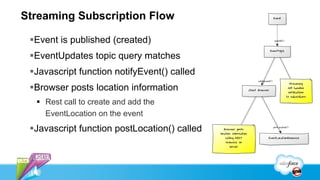
Streaming Subscription Flow

 Event is published (created)
 EventUpdates topic query matches
 Javascript function notifyEvent() called
 Browser posts location information
   Rest call to create and add the
    EventLocation on the event
 Javascript function postLocation() called
Add Apex triggers to desired entities

 Tickets
 Invoices
 Opportunities
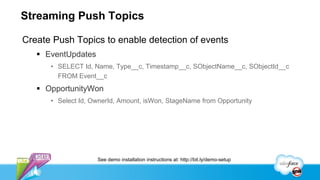
Streaming Push Topics

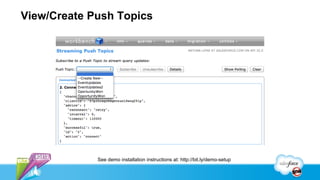
Create Push Topics to enable detection of events
    EventUpdates
      • SELECT Id, Name, Type__c, Timestamp__c, SObjectName__c, SObjectId__c
        FROM Event__c
    OpportunityWon
      • Select Id, OwnerId, Amount, isWon, StageName from Opportunity


                    See demo installation instructions at: http://bit.ly/demo-setup
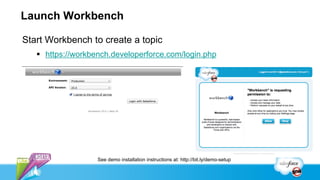
Launch Workbench

Start Workbench to create a topic
    https://workbench.developerforce.com/login.php


                   See demo installation instructions at: http://bit.ly/demo-setup
View/Create Push Topics


             See demo installation instructions at: http://bit.ly/demo-setup
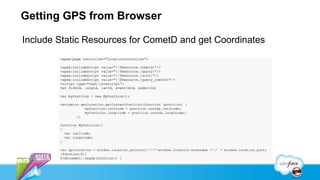
Getting GPS from Browser

Include Static Resources for CometD and get Coordinates
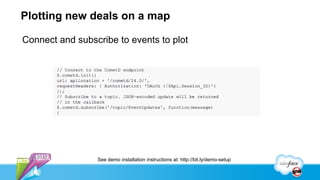
Plotting new deals on a map

Connect and subscribe to events to plot


                 See demo installation instructions at: http://bit.ly/demo-setup
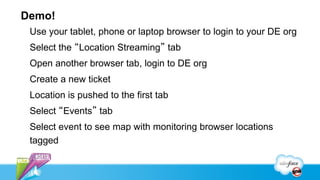
Demo!
 Use your tablet, phone or laptop browser to login to your DE org
 Select the “Location Streaming” tab
 Open another browser tab, login to DE org
 Create a new ticket
 Location is pushed to the first tab
 Select “Events” tab
 Select event to see map with monitoring browser locations
 tagged
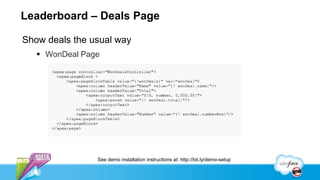
Leaderboard – Deals Page

Show deals the usual way
    WonDeal Page


                See demo installation instructions at: http://bit.ly/demo-setup
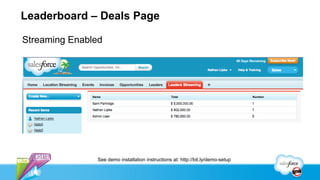
Leaderboard – Deals Page

Streaming Enabled


               See demo installation instructions at: http://bit.ly/demo-setup
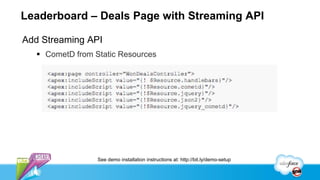
Leaderboard – Deals Page with Streaming API

Add Streaming API
    CometD from Static Resources


                  See demo installation instructions at: http://bit.ly/demo-setup
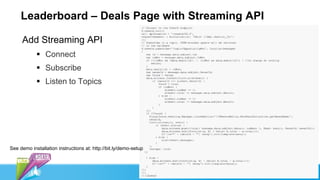
Leaderboard – Deals Page with Streaming API

     Add Streaming API
             Connect
             Subscribe
             Listen to Topics


See demo installation instructions at: http://bit.ly/demo-setup
Build Your First Real-time App with the Streaming API

Build Your First Real-time App with the Streaming API

  • 1.
    Build your firstReal-Time App with Streaming API Hal Hildebrand Vinod Mehra Jeff Lai
  • 2.
    Safe harbor Safeharbor statement under the Private Securities Litigation Reform Act of 1995: This presentation may contain forward-looking statements that involve risks, uncertainties, and assumptions. If any such uncertainties materialize or if any of the assumptions proves incorrect, the results of salesforce.com, inc. could differ materially from the results expressed or implied by the forward-looking statements we make. All statements other than statements of historical fact could be deemed forward-looking, including any projections of product or service availability, subscriber growth, earnings, revenues, or other financial items and any statements regarding strategies or plans of management for future operations, statements of belief, any statements concerning new, planned, or upgraded services or technology developments and customer contracts or use of our services. The risks and uncertainties referred to above include – but are not limited to – risks associated with developing and delivering new functionality for our service, new products and services, our new business model, our past operating losses, possible fluctuations in our operating results and rate of growth, interruptions or delays in our Web hosting, breach of our security measures, the outcome of intellectual property and other litigation, risks associated with possible mergers and acquisitions, the immature market in which we operate, our relatively limited operating history, our ability to expand, retain, and motivate our employees and manage our growth, new releases of our service and successful customer deployment, our limited history reselling non-salesforce.com products, and utilization and selling to larger enterprise customers. Further information on potential factors that could affect the financial results of salesforce.com, inc. is included in our annual report on Form 10-Q for the most recent fiscal quarter ended July 31, 2012. This documents and others containing important disclosures are available on the SEC Filings section of the Investor Information section of our Web site. Any unreleased services or features referenced in this or other presentations, press releases or public statements are not currently available and may not be delivered on time or at all. Customers who purchase our services should make the purchase decisions based upon features that are currently available. Salesforce.com, inc. assumes no obligation and does not intend to update these forward- looking statements.
  • 3.
    Hal, Vinod, Jeff,Alex Salesforce R&D
  • 4.
    Before we begin Whatyou will need to follow along  Have your DEV Org created and ready  Install the Streaming Hands on Package  See http://bit.ly/demo-setup for complete instructions Note! Chrome browser support has a bug when showing maps! Please use FireFox for this demo See demo installation instructions at: http://bit.ly/demo-setup
  • 5.
    What are wegoing to build Build two scenarios  Use geo location coordinates to plot Opportunities Real Time • Use browser based geo location to show where Opportunities taking place • Plot location on map based on Streaming API events  Enable Real Time updates for a Leaderboard • Update page with sales results from different sales people • Use CometD to listen to Streaming API and get events See demo installation instructions at: http://bit.ly/demo-setup
  • 6.
    Short Introduction toStreaming •Clients concerned with changes in data • Data creation • Data update •Common solution is to poll for changes • Wastes resources on both client and server •Streaming API pushes changes to clients • Sets up continuous queries to monitor changes • JSON events describing changes
  • 7.
    Demo Object Model Event Custom Object  Central Mechanism for notifications Use Apex triggers to create Events  When monitored objects are  Created  Updated Event Location  Captures locations for events
  • 8.
    Event Publishing Workflow Define triggers on entities  Invoice • After update • After create  Ticket • After create EventPublisher creates Event
  • 9.
    Streaming Subscription Flow Event is published (created) EventUpdates topic query matches Javascript function notifyEvent() called Browser posts location information  Rest call to create and add the EventLocation on the event Javascript function postLocation() called
  • 10.
    Add Apex triggersto desired entities Tickets Invoices Opportunities
  • 11.
    Streaming Push Topics CreatePush Topics to enable detection of events  EventUpdates • SELECT Id, Name, Type__c, Timestamp__c, SObjectName__c, SObjectId__c FROM Event__c  OpportunityWon • Select Id, OwnerId, Amount, isWon, StageName from Opportunity See demo installation instructions at: http://bit.ly/demo-setup
  • 12.
    Launch Workbench Start Workbenchto create a topic  https://workbench.developerforce.com/login.php See demo installation instructions at: http://bit.ly/demo-setup
  • 13.
    View/Create Push Topics See demo installation instructions at: http://bit.ly/demo-setup
  • 14.
    Getting GPS fromBrowser Include Static Resources for CometD and get Coordinates
  • 15.
    Plotting new dealson a map Connect and subscribe to events to plot See demo installation instructions at: http://bit.ly/demo-setup
  • 16.
    Demo! Use yourtablet, phone or laptop browser to login to your DE org Select the “Location Streaming” tab Open another browser tab, login to DE org Create a new ticket Location is pushed to the first tab Select “Events” tab Select event to see map with monitoring browser locations tagged
  • 18.
    Leaderboard – DealsPage Show deals the usual way  WonDeal Page See demo installation instructions at: http://bit.ly/demo-setup
  • 19.
    Leaderboard – DealsPage Streaming Enabled See demo installation instructions at: http://bit.ly/demo-setup
  • 20.
    Leaderboard – DealsPage with Streaming API Add Streaming API  CometD from Static Resources See demo installation instructions at: http://bit.ly/demo-setup
  • 21.
    Leaderboard – DealsPage with Streaming API Add Streaming API  Connect  Subscribe  Listen to Topics See demo installation instructions at: http://bit.ly/demo-setup