Hacking the RaspberryPi with Java8, JavaFX8 and add-
on hardware modules
Hands on Java8 and RaspberryPi
25 June 2014, jug.ch – Pance Cavkovski & Aleksandar Nikov
Netcetera | 2
pance.cavkovski@netcetera.com
Senior Software Engineer @ Netcetera Skopje
aleksandar.nikov@netcetera.com
Head of Software Engineering @ Netcetera Skopje
Pance Cavkovski
Aleksandar Nikov
About the speakers
Netcetera | 3
What will we present
About the session
• Using Java8 and JavaFX8 on Raspberry Pi
• Extending the RasPi with components
• Interfacing with the components via Java code
You should have at the moment:
• RasPi Model B with pre-configured Raspbian on an SD Card
• A set of components (10 resistors, 10 jumper wires, 2 LEDs, 1 LDR)
• Breadboard (with a taster installed on it)
• Arduino UNO/Leonardo
• ITEAD Studio NFC module
Online source at https://github.com/hsilomedus/hands-on-raspi
Netcetera | 4
 Lang: Lambda, Method references, default methods,
repeating annotations …
 Collections: StreamAPI, HashMaps improvements
 Compact profiles, Security and tools improvements
 JavaFX8: bundled with JDK8, UI components, new theme,
WebView, 3D graphics, print, css styling…
 Nashorn javascript engine
 New Date-Time, concurrency extensions, new Java DB…
 Linux ARM v6/v7 Hard Float ABI JDK8
Java8 is out!
Netcetera | 5
Get and use with RasPi and Raspbian
Java8 on ARM devices
- Get from http://www.oracle.com/technetwork/java/javase/downloads
 Specifically Linux ARM v6/v7 Hard Float ABI
- tar xfv jdk-8….tar.gz
- ./jdk1.8.0/bin/java and ./jdk1.8.0/bin/javac
- Need hardware access? Get pi4j: http://pi4j.com/
 Based on WiringPi
 Jar(s) ready for usage
Netcetera | 6
Java library for full access to the Raspberry Pi
pi4j
• JNI to the WiringPi C library
• Features
• Export & unexport GPIO pins
• Configure and Control GPIO pins for both input and output
• Interrupt-based listeners
• RS232 communication
• I2C and SPI support
• Extensions …
• Both managed and direct access to WiringPi
Netcetera | 7
JavaFX8
JavaFX is a set of graphics and media packages that enables developers to design,
create, test, debug and deploy rich client applications that operate consistently across
diverse platforms (tl;dr: Java framework for building RIA / Desktop apps)
• Java APIs, fully integrated in JavaSE
• Declarative in FXML or explicit in Java
• Swing interoperability
• CSS stylable UI components library, Modena theme
• 3D features, hardware acceleration, web view, high-performance media engine
• Canvas & printing API, rich text support
Netcetera | 8
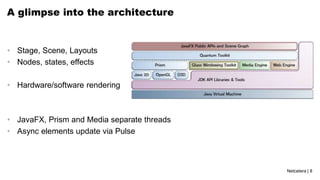
A glimpse into the architecture
• Stage, Scene, Layouts
• Nodes, states, effects
• Hardware/software rendering
• JavaFX, Prism and Media separate threads
• Async elements update via Pulse
Netcetera | 9
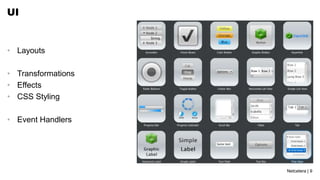
UI
• Layouts
• Transformations
• Effects
• CSS Styling
• Event Handlers
Netcetera | 10
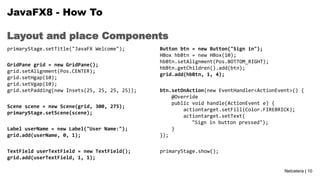
Layout and place Components
JavaFX8 - How To
primaryStage.setTitle("JavaFX Welcome");
GridPane grid = new GridPane();
grid.setAlignment(Pos.CENTER);
grid.setHgap(10);
grid.setVgap(10);
grid.setPadding(new Insets(25, 25, 25, 25));
Scene scene = new Scene(grid, 300, 275);
primaryStage.setScene(scene);
Label userName = new Label("User Name:");
grid.add(userName, 0, 1);
TextField userTextField = new TextField();
grid.add(userTextField, 1, 1);
Button btn = new Button("Sign in");
HBox hbBtn = new HBox(10);
hbBtn.setAlignment(Pos.BOTTOM_RIGHT);
hbBtn.getChildren().add(btn);
grid.add(hbBtn, 1, 4);
btn.setOnAction(new EventHandler<ActionEvent>() {
@Override
public void handle(ActionEvent e) {
actiontarget.setFill(Color.FIREBRICK);
actiontarget.setText(
"Sign in button pressed");
}
});
primaryStage.show();
Netcetera | 11
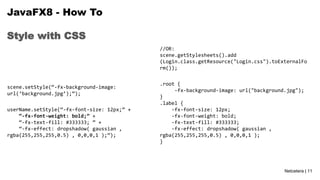
Style with CSS
JavaFX8 - How To
scene.setStyle(“-fx-background-image:
url(‘background.jpg’);”);
userName.setStyle(“-fx-font-size: 12px;” +
“-fx-font-weight: bold;” +
“-fx-text-fill: #333333; ” +
“-fx-effect: dropshadow( gaussian ,
rgba(255,255,255,0.5) , 0,0,0,1 );”);
//OR:
scene.getStylesheets().add
(Login.class.getResource("Login.css").toExternalFo
rm());
.root {
-fx-background-image: url("background.jpg");
}
.label {
-fx-font-size: 12px;
-fx-font-weight: bold;
-fx-text-fill: #333333;
-fx-effect: dropshadow( gaussian ,
rgba(255,255,255,0.5) , 0,0,0,1 );
}
Netcetera | 12
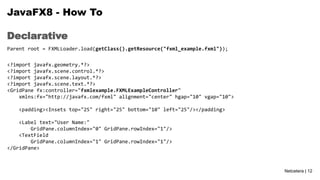
Declarative
JavaFX8 - How To
Parent root = FXMLLoader.load(getClass().getResource("fxml_example.fxml"));
<?import javafx.geometry.*?>
<?import javafx.scene.control.*?>
<?import javafx.scene.layout.*?>
<?import javafx.scene.text.*?>
<GridPane fx:controller="fxmlexample.FXMLExampleController"
xmlns:fx="http://javafx.com/fxml" alignment="center" hgap="10" vgap="10">
<padding><Insets top="25" right="25" bottom="10" left="25"/></padding>
<Label text="User Name:"
GridPane.columnIndex="0" GridPane.rowIndex="1"/>
<TextField
GridPane.columnIndex="1" GridPane.rowIndex="1"/>
</GridPane>
Netcetera | 13
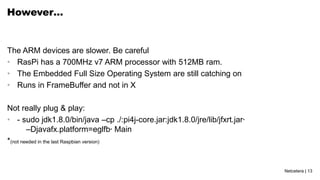
However…
The ARM devices are slower. Be careful
• RasPi has a 700MHz v7 ARM processor with 512MB ram.
• The Embedded Full Size Operating System are still catching on
• Runs in FrameBuffer and not in X
Not really plug & play:
• - sudo jdk1.8.0/bin/java –cp ./:pi4j-core.jar:jdk1.8.0/jre/lib/jfxrt.jar*
–Djavafx.platform=eglfb* Main
*(not needed in the last Raspbian version)
Netcetera | 14
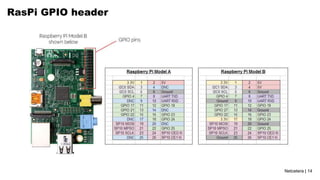
RasPi GPIO header
Netcetera | 15
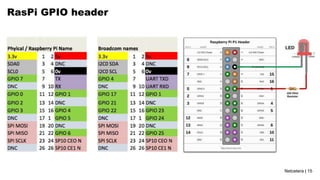
RasPi GPIO header
Netcetera | 16
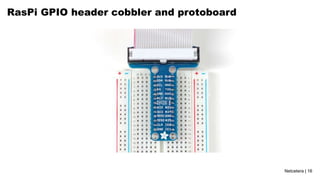
RasPi GPIO header cobbler and protoboard
Netcetera | 17
Examples
• LED Blink
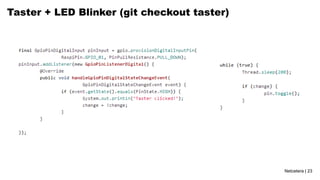
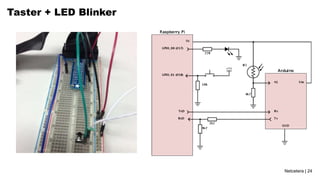
• Taster + LED Blinker
• Serial Comm + Arduino + Light Sensor + LED
• NFC Reader
• JavaFX LED and Taster
• Examples stored as git branches
• Source code available at https://github.com/hsilomedus/hands-on-raspi
Netcetera | 18
Checkout
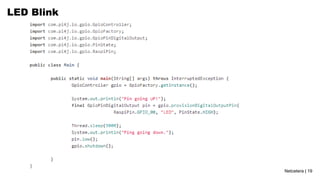
LED Blink
Open terminal
• cd hands-on-raspi/
• git checkout master
• Open the Main source file for inspection
• [ leafpad | vi | nano ] src/Main.java
Netcetera | 19
LED Blink
Netcetera | 20
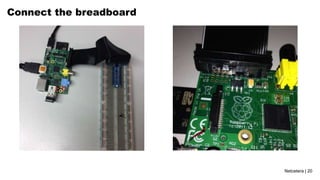
Connect the breadboard
Netcetera | 21
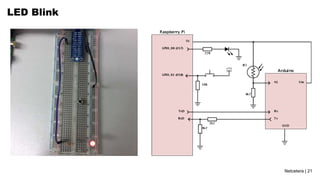
LED Blink
Netcetera | 22
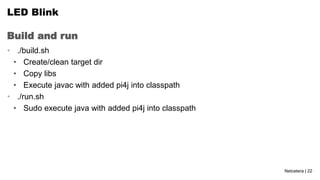
Build and run
LED Blink
• ./build.sh
• Create/clean target dir
• Copy libs
• Execute javac with added pi4j into classpath
• ./run.sh
• Sudo execute java with added pi4j into classpath
Netcetera | 23
Taster + LED Blinker (git checkout taster)
Netcetera | 24
Taster + LED Blinker
Netcetera | 25
Extend
Taster + two blinkers
• Use RaspiPin.GPIO_02
• Connect jumper cable + another 220 Ohms + Green LED in serial
• Code
• Make the LEDs to blink alternativelly
• Make the green LED to light up while the taster is down.
Netcetera | 26
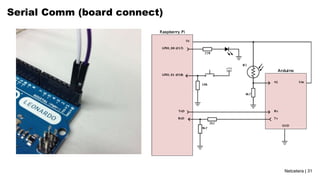
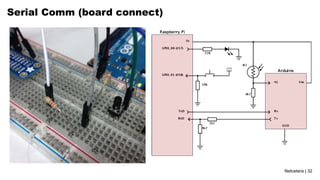
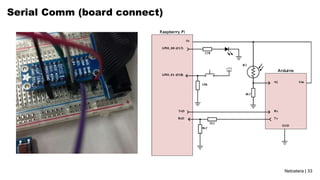
Serial Comm + Arduino + Light Sensor + LED
• Arduino
• Open-source electronics prototyping platform
• Programmable IC on board with header pins
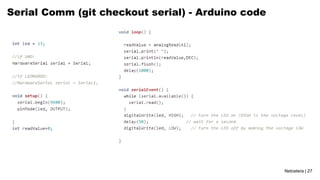
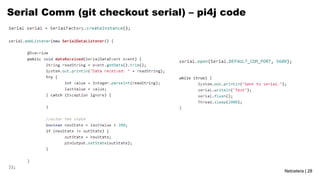
• Serial Communication
• Lightweight two-way communication between two devices
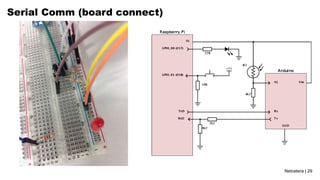
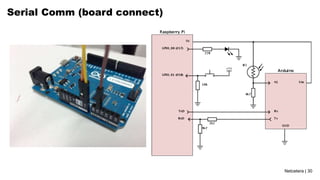
• Needs two connections: Rx1 to Tx2 and Rx2 to Tx1
• Needs compatible baud-rate (9600bps), data/stop/parity bits (8-N-1) and voltage
• Light Sensor
• Variable resistor based on light
• <1K on intense light, ~4k7 on daylight, > 70K on dark
Netcetera | 27
Serial Comm (git checkout serial) - Arduino code
Netcetera | 28
Serial Comm (git checkout serial) – pi4j code
Netcetera | 29
Serial Comm (board connect)
Netcetera | 30
Serial Comm (board connect)
Netcetera | 31
Serial Comm (board connect)
Netcetera | 32
Serial Comm (board connect)
Netcetera | 33
Serial Comm (board connect)
Netcetera | 34
Execute
Serial Comm
• Build & run
• Inspect the standard output
• Illuminate the sensor with your phone
• Cover the sensor with your finger
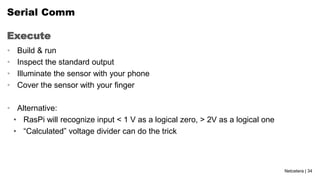
• Alternative:
• RasPi will recognize input < 1 V as a logical zero, > 2V as a logical one
• “Calculated” voltage divider can do the trick
Netcetera | 35
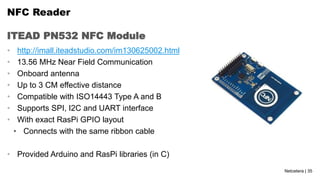
ITEAD PN532 NFC Module
NFC Reader
• http://imall.iteadstudio.com/im130625002.html
• 13.56 MHz Near Field Communication
• Onboard antenna
• Up to 3 CM effective distance
• Compatible with ISO14443 Type A and B
• Supports SPI, I2C and UART interface
• With exact RasPi GPIO layout
• Connects with the same ribbon cable
• Provided Arduino and RasPi libraries (in C)
Netcetera | 36
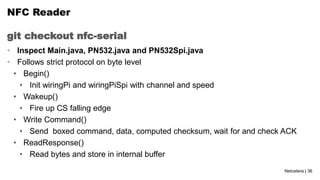
git checkout nfc-serial
NFC Reader
• Inspect Main.java, PN532.java and PN532Spi.java
• Follows strict protocol on byte level
• Begin()
• Init wiringPi and wiringPiSpi with channel and speed
• Wakeup()
• Fire up CS falling edge
• Write Command()
• Send boxed command, data, computed checksum, wait for and check ACK
• ReadResponse()
• Read bytes and store in internal buffer
Netcetera | 37
git checkout nfc-serial
NFC Reader
• Various commands
• getFirmwareVersion() [0x02]
• SAMConfig() [0x14, 0x01, 0x14, 0x01]
• readPassiveTargetID [0x4A, 0x01, baudrate]
• Auth/read/write Block (not implemented)
• Used non-managed pi4j approach
• Gpio.wiringPiSetup()
• Gpio.wiringPiSPISetup(SPICHANNEL, SPISPEED)
• Gpio.pinMode(pin, INPUT/OUTPUT) and Gpio.digitalWrite(pin, HIGH/LOW)
• Spi.wiringPiSPIDataRW(SPICHANNEL, dataToSend, 1);
Netcetera | 38
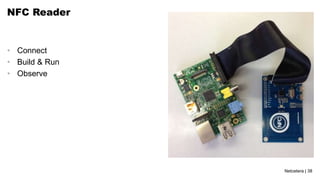
NFC Reader
• Connect
• Build & Run
• Observe
Netcetera | 39
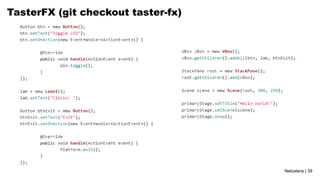
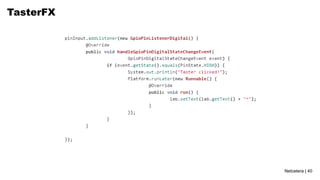
TasterFX (git checkout taster-fx)
Netcetera | 40
TasterFX
Netcetera | 41
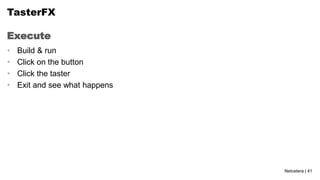
Execute
TasterFX
• Build & run
• Click on the button
• Click the taster
• Exit and see what happens
Netcetera | 42
Q & A
• https://twitter.com/hsilomedus
• http://hsilomedus.me/
• pance.cavkovski@netcetera.com

Hands on Java8 and RaspberryPi

  • 1.
    Hacking the RaspberryPiwith Java8, JavaFX8 and add- on hardware modules Hands on Java8 and RaspberryPi 25 June 2014, jug.ch – Pance Cavkovski & Aleksandar Nikov
  • 2.
    Netcetera | 2 pance.cavkovski@netcetera.com SeniorSoftware Engineer @ Netcetera Skopje aleksandar.nikov@netcetera.com Head of Software Engineering @ Netcetera Skopje Pance Cavkovski Aleksandar Nikov About the speakers
  • 3.
    Netcetera | 3 Whatwill we present About the session • Using Java8 and JavaFX8 on Raspberry Pi • Extending the RasPi with components • Interfacing with the components via Java code You should have at the moment: • RasPi Model B with pre-configured Raspbian on an SD Card • A set of components (10 resistors, 10 jumper wires, 2 LEDs, 1 LDR) • Breadboard (with a taster installed on it) • Arduino UNO/Leonardo • ITEAD Studio NFC module Online source at https://github.com/hsilomedus/hands-on-raspi
  • 4.
    Netcetera | 4 Lang: Lambda, Method references, default methods, repeating annotations …  Collections: StreamAPI, HashMaps improvements  Compact profiles, Security and tools improvements  JavaFX8: bundled with JDK8, UI components, new theme, WebView, 3D graphics, print, css styling…  Nashorn javascript engine  New Date-Time, concurrency extensions, new Java DB…  Linux ARM v6/v7 Hard Float ABI JDK8 Java8 is out!
  • 5.
    Netcetera | 5 Getand use with RasPi and Raspbian Java8 on ARM devices - Get from http://www.oracle.com/technetwork/java/javase/downloads  Specifically Linux ARM v6/v7 Hard Float ABI - tar xfv jdk-8….tar.gz - ./jdk1.8.0/bin/java and ./jdk1.8.0/bin/javac - Need hardware access? Get pi4j: http://pi4j.com/  Based on WiringPi  Jar(s) ready for usage
  • 6.
    Netcetera | 6 Javalibrary for full access to the Raspberry Pi pi4j • JNI to the WiringPi C library • Features • Export & unexport GPIO pins • Configure and Control GPIO pins for both input and output • Interrupt-based listeners • RS232 communication • I2C and SPI support • Extensions … • Both managed and direct access to WiringPi
  • 7.
    Netcetera | 7 JavaFX8 JavaFXis a set of graphics and media packages that enables developers to design, create, test, debug and deploy rich client applications that operate consistently across diverse platforms (tl;dr: Java framework for building RIA / Desktop apps) • Java APIs, fully integrated in JavaSE • Declarative in FXML or explicit in Java • Swing interoperability • CSS stylable UI components library, Modena theme • 3D features, hardware acceleration, web view, high-performance media engine • Canvas & printing API, rich text support
  • 8.
    Netcetera | 8 Aglimpse into the architecture • Stage, Scene, Layouts • Nodes, states, effects • Hardware/software rendering • JavaFX, Prism and Media separate threads • Async elements update via Pulse
  • 9.
    Netcetera | 9 UI •Layouts • Transformations • Effects • CSS Styling • Event Handlers
  • 10.
    Netcetera | 10 Layoutand place Components JavaFX8 - How To primaryStage.setTitle("JavaFX Welcome"); GridPane grid = new GridPane(); grid.setAlignment(Pos.CENTER); grid.setHgap(10); grid.setVgap(10); grid.setPadding(new Insets(25, 25, 25, 25)); Scene scene = new Scene(grid, 300, 275); primaryStage.setScene(scene); Label userName = new Label("User Name:"); grid.add(userName, 0, 1); TextField userTextField = new TextField(); grid.add(userTextField, 1, 1); Button btn = new Button("Sign in"); HBox hbBtn = new HBox(10); hbBtn.setAlignment(Pos.BOTTOM_RIGHT); hbBtn.getChildren().add(btn); grid.add(hbBtn, 1, 4); btn.setOnAction(new EventHandler<ActionEvent>() { @Override public void handle(ActionEvent e) { actiontarget.setFill(Color.FIREBRICK); actiontarget.setText( "Sign in button pressed"); } }); primaryStage.show();
  • 11.
    Netcetera | 11 Stylewith CSS JavaFX8 - How To scene.setStyle(“-fx-background-image: url(‘background.jpg’);”); userName.setStyle(“-fx-font-size: 12px;” + “-fx-font-weight: bold;” + “-fx-text-fill: #333333; ” + “-fx-effect: dropshadow( gaussian , rgba(255,255,255,0.5) , 0,0,0,1 );”); //OR: scene.getStylesheets().add (Login.class.getResource("Login.css").toExternalFo rm()); .root { -fx-background-image: url("background.jpg"); } .label { -fx-font-size: 12px; -fx-font-weight: bold; -fx-text-fill: #333333; -fx-effect: dropshadow( gaussian , rgba(255,255,255,0.5) , 0,0,0,1 ); }
  • 12.
    Netcetera | 12 Declarative JavaFX8- How To Parent root = FXMLLoader.load(getClass().getResource("fxml_example.fxml")); <?import javafx.geometry.*?> <?import javafx.scene.control.*?> <?import javafx.scene.layout.*?> <?import javafx.scene.text.*?> <GridPane fx:controller="fxmlexample.FXMLExampleController" xmlns:fx="http://javafx.com/fxml" alignment="center" hgap="10" vgap="10"> <padding><Insets top="25" right="25" bottom="10" left="25"/></padding> <Label text="User Name:" GridPane.columnIndex="0" GridPane.rowIndex="1"/> <TextField GridPane.columnIndex="1" GridPane.rowIndex="1"/> </GridPane>
  • 13.
    Netcetera | 13 However… TheARM devices are slower. Be careful • RasPi has a 700MHz v7 ARM processor with 512MB ram. • The Embedded Full Size Operating System are still catching on • Runs in FrameBuffer and not in X Not really plug & play: • - sudo jdk1.8.0/bin/java –cp ./:pi4j-core.jar:jdk1.8.0/jre/lib/jfxrt.jar* –Djavafx.platform=eglfb* Main *(not needed in the last Raspbian version)
  • 14.
  • 15.
  • 16.
    Netcetera | 16 RasPiGPIO header cobbler and protoboard
  • 17.
    Netcetera | 17 Examples •LED Blink • Taster + LED Blinker • Serial Comm + Arduino + Light Sensor + LED • NFC Reader • JavaFX LED and Taster • Examples stored as git branches • Source code available at https://github.com/hsilomedus/hands-on-raspi
  • 18.
    Netcetera | 18 Checkout LEDBlink Open terminal • cd hands-on-raspi/ • git checkout master • Open the Main source file for inspection • [ leafpad | vi | nano ] src/Main.java
  • 19.
  • 20.
    Netcetera | 20 Connectthe breadboard
  • 21.
  • 22.
    Netcetera | 22 Buildand run LED Blink • ./build.sh • Create/clean target dir • Copy libs • Execute javac with added pi4j into classpath • ./run.sh • Sudo execute java with added pi4j into classpath
  • 23.
    Netcetera | 23 Taster+ LED Blinker (git checkout taster)
  • 24.
    Netcetera | 24 Taster+ LED Blinker
  • 25.
    Netcetera | 25 Extend Taster+ two blinkers • Use RaspiPin.GPIO_02 • Connect jumper cable + another 220 Ohms + Green LED in serial • Code • Make the LEDs to blink alternativelly • Make the green LED to light up while the taster is down.
  • 26.
    Netcetera | 26 SerialComm + Arduino + Light Sensor + LED • Arduino • Open-source electronics prototyping platform • Programmable IC on board with header pins • Serial Communication • Lightweight two-way communication between two devices • Needs two connections: Rx1 to Tx2 and Rx2 to Tx1 • Needs compatible baud-rate (9600bps), data/stop/parity bits (8-N-1) and voltage • Light Sensor • Variable resistor based on light • <1K on intense light, ~4k7 on daylight, > 70K on dark
  • 27.
    Netcetera | 27 SerialComm (git checkout serial) - Arduino code
  • 28.
    Netcetera | 28 SerialComm (git checkout serial) – pi4j code
  • 29.
    Netcetera | 29 SerialComm (board connect)
  • 30.
    Netcetera | 30 SerialComm (board connect)
  • 31.
    Netcetera | 31 SerialComm (board connect)
  • 32.
    Netcetera | 32 SerialComm (board connect)
  • 33.
    Netcetera | 33 SerialComm (board connect)
  • 34.
    Netcetera | 34 Execute SerialComm • Build & run • Inspect the standard output • Illuminate the sensor with your phone • Cover the sensor with your finger • Alternative: • RasPi will recognize input < 1 V as a logical zero, > 2V as a logical one • “Calculated” voltage divider can do the trick
  • 35.
    Netcetera | 35 ITEADPN532 NFC Module NFC Reader • http://imall.iteadstudio.com/im130625002.html • 13.56 MHz Near Field Communication • Onboard antenna • Up to 3 CM effective distance • Compatible with ISO14443 Type A and B • Supports SPI, I2C and UART interface • With exact RasPi GPIO layout • Connects with the same ribbon cable • Provided Arduino and RasPi libraries (in C)
  • 36.
    Netcetera | 36 gitcheckout nfc-serial NFC Reader • Inspect Main.java, PN532.java and PN532Spi.java • Follows strict protocol on byte level • Begin() • Init wiringPi and wiringPiSpi with channel and speed • Wakeup() • Fire up CS falling edge • Write Command() • Send boxed command, data, computed checksum, wait for and check ACK • ReadResponse() • Read bytes and store in internal buffer
  • 37.
    Netcetera | 37 gitcheckout nfc-serial NFC Reader • Various commands • getFirmwareVersion() [0x02] • SAMConfig() [0x14, 0x01, 0x14, 0x01] • readPassiveTargetID [0x4A, 0x01, baudrate] • Auth/read/write Block (not implemented) • Used non-managed pi4j approach • Gpio.wiringPiSetup() • Gpio.wiringPiSPISetup(SPICHANNEL, SPISPEED) • Gpio.pinMode(pin, INPUT/OUTPUT) and Gpio.digitalWrite(pin, HIGH/LOW) • Spi.wiringPiSPIDataRW(SPICHANNEL, dataToSend, 1);
  • 38.
    Netcetera | 38 NFCReader • Connect • Build & Run • Observe
  • 39.
    Netcetera | 39 TasterFX(git checkout taster-fx)
  • 40.
  • 41.
    Netcetera | 41 Execute TasterFX •Build & run • Click on the button • Click the taster • Exit and see what happens
  • 42.
    Netcetera | 42 Q& A • https://twitter.com/hsilomedus • http://hsilomedus.me/ • pance.cavkovski@netcetera.com