IBM System and Technology Group


HACMP5.X 概念和实施规划


             IBM 中国技术支持中心
             8008101818
             010-84981188


     HACMP5.1 concept and planning   06/23/12   © 2004 IBM Corporation
IBM System and Technology Group


    目录
    – 什么是 HACMP?
    – 配置 HACMP 的规划和考虑
    – HACMP 的安装和配置
    – HACMP 的接管测试


2     HACMP5.1 concept and planning     06/23/12   © 2003 IBM Corporation
IBM System and Technology Group


    目录
    – 什么是 HACMP?
    – 配置 HACMP 的规划和考虑
    – HACMP 的安装和配置
    – HACMP 的接管测试


3     HACMP5.1 concept and planning     06/23/12   © 2003 IBM Corporation
IBM System and Technology Group


    HACMP—(High Availability Cluster Multi Processing)

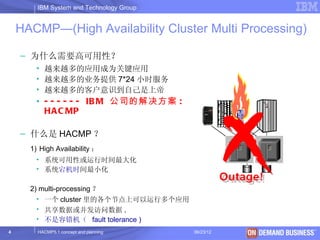
    – 为什么需要高可用性?
       • 越来越多的应用成为关键应用
       • 越来越多的业务提供 7*24 小时服务
       • 越来越多的客户意识到自己是上帝
       • - - - - - - IB M 公司的解决方案 :
         HA C MP

    – 什么是 HACMP ?
      1) High Availability :
       • 系统可用性或运行时间最大化
       • 系统宕机时间最小化

      2) multi-processing ?
        • 一个 cluster 里的各个节点上可以运行多个应用
        • 共享数据或并发访问数据 .
        • 不是容错机( fault tolerance )
4       HACMP5.1 concept and planning     06/23/12   © 2003 IBM Corporation
IBM System and Technology Group


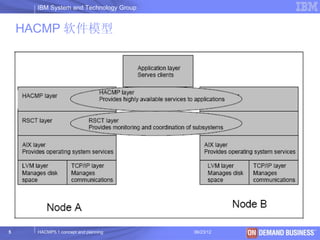
    HACMP 软件模型


5     HACMP5.1 concept and planning     06/23/12   © 2003 IBM Corporation
IBM System and Technology Group


    HACMP V5.x 的新特点
    ALL IN ONE:
    在 HACMP v5 之前,每个版本的 HACMP 软件都有四个模块, HAS ,
    CRM , ES 和 ESCRM ,用户在定购的时候根据需要选择其中一个模块
    ,从 HACMP v5 开始 IBM 只提供一个模块,包括以前四个模块的所有功
    能。
           简化了 HACMP Cluster 的配置与管
        理
         通过磁盘传输心跳信号 (Heartbeat
        over Disk)
         IPAT 通过 Alias 实现 (IPAT via Alias)
        ( 缺省方式 )
           用户自定义的资源组 (Custom RG)
    
                                                    高可用性
            快递磁盘接管 (Fast Disk Takeover)
     HACMP-XD


6           HACMP5.1 concept and planning     06/23/12     © 2003 IBM Corporation
IBM System and Technology Group


    目录
    – 什么是 HACMP?
    – 配置 HACMP 的规划和考虑
    – HACMP 的安装和配置
    – HACMP 的接管测试


7     HACMP5.1 concept and planning     06/23/12   © 2003 IBM Corporation
IBM System and Technology Group

Concept:
     Client : 提出请求,访问应用程序的客户端
     Node : 运行 AIX 和 HACMP 软件的服务器或 LPAR
     Boot IP : 网卡的初始 IP 地址 , AIX 启动后使用的地址
     Service IP : 对外服务的地址 , 会从一块网卡切换到另一块网卡
     Standby IP : 不再需要 .
     Application server : 运行在 HACMP 之上的应用软件,可以通过脚本启动 / 停
      止
     Resources : 可以从一个节点移动到另一个节点、具有高可用性特点的逻辑组
      件,包括文件系统、裸设备、 service IP 等
     Resources group : 把相关的 Resource 组织在一起,作为一个整体从一个节
      点移动到另一个节点来提供高可用性
     IP Address takeover : 在同一个逻辑网络中, IP 地址从一个网卡移动到另一个
      网卡
     Failover : 当主节点失效, RG 从主节点移动到备用节点的过程

8
     Fallback concept and planning
        HACMP5.1
                 : 当原来的节点修复后, RG 从备用节点回到原来的节点的过程IBM Corporation
                                     06/23/12 © 2003
IBM System and Technology Group


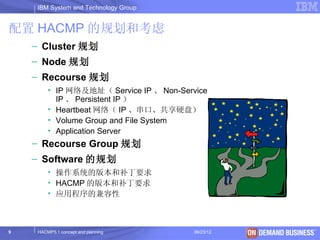
配置 HACMP 的规划和考虑
    – Cluster 规划
    – Node 规划
    – Recourse 规划
         • IP 网络及地址( Service IP 、 Non-Service
           IP 、 Persistent IP )
         • Heartbeat 网络( IP 、串口、共享硬盘)
         • Volume Group and File System
         • Application Server
    – Recourse Group 规划
    – Software 的规划
         • 操作系统的版本和补丁要求
         • HACMP 的版本和补丁要求
         • 应用程序的兼容性


9    HACMP5.1 concept and planning        06/23/12   © 2003 IBM Corporation
IBM System and Technology Group


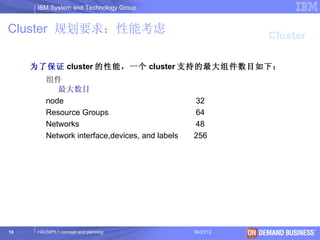
Cluster 规划要求:性能考虑
                                                             Cluster

     为了保证 cluster 的性能,一个 cluster 支持的最大组件数目如下:
         组件
            最大数目
         node                                    32
         Resource Groups                         64
         Networks                                48
         Network interface,devices, and labels   256


10    HACMP5.1 concept and planning              06/23/12   © 2003 IBM Corporation
IBM System and Technology Group


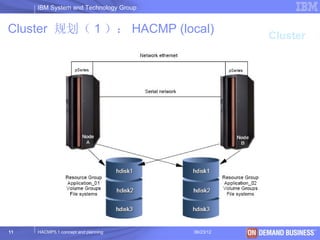
Cluster 规划( 1 ): HACMP (local)
                                                   Cluster


11   HACMP5.1 concept and planning     06/23/12   © 2003 IBM Corporation
IBM System and Technology Group


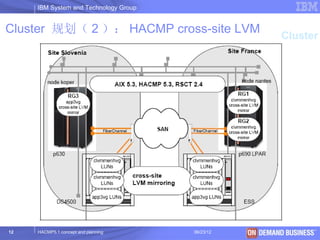
Cluster 规划( 2 ): HACMP cross-site LVM
                                                         Cluster


12   HACMP5.1 concept and planning     06/23/12   © 2003 IBM Corporation
IBM System and Technology Group


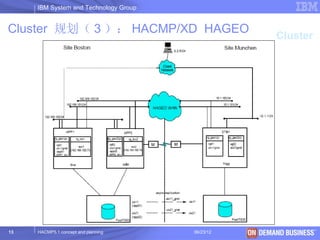
Cluster 规划( 3 ): HACMP/XD HAGEO
                                                       Cluster


13   HACMP5.1 concept and planning     06/23/12   © 2003 IBM Corporation
IBM System and Technology Group


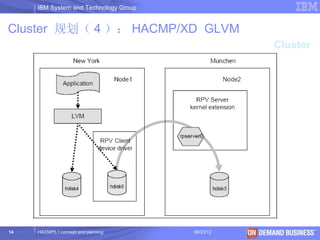
Cluster 规划( 4 ): HACMP/XD GLVM
                                                     Cluster


14   HACMP5.1 concept and planning     06/23/12   © 2003 IBM Corporation
IBM System and Technology Group


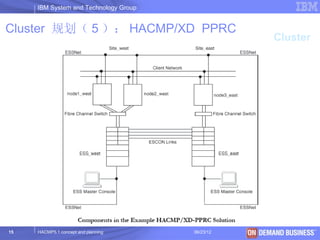
Cluster 规划( 5 ): HACMP/XD PPRC
                                                     Cluster


15   HACMP5.1 concept and planning     06/23/12   © 2003 IBM Corporation
IBM System and Technology Group


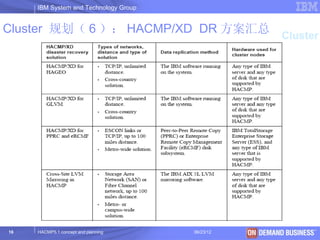
Cluster 规划( 6 ): HACMP/XD DR 方案汇总
                                                         Cluster


16   HACMP5.1 concept and planning     06/23/12   © 2003 IBM Corporation
IBM System and Technology Group


 Node 规划:配置要求
                                                         Node
     – 一个精心设计的 cluster 应该尽量避免单点故障
       ( SPOF), 为了达到这个目的,典型的 cluster 一
       般对硬件有如下要求 :

          – 至少 2 个 pseries 服务器作为 cluster 的节点(安装并运行
            HACMP, 每个节点的 AIX 版本和 HACMP 的版本要完全一致
            )
          – 内置硬盘:预留一定的硬盘空间满足 HACMP 的安装要求 ,
            MIRROR
          – I/O 插槽:要满足网卡、 HBA 卡(阵列和带库要分开)、串
            口卡
          – 至少一种 non-IP 网络,通常采用 RS232 网络,如果某些节
            点集成串口无法作心跳,要配 #2943 8 口异步卡,节点间要
            配串口线
          – 一个共享磁盘阵列( 7133/FastT/ESS 等 )

17   HACMP5.1 concept and planning     06/23/12   © 2003 IBM Corporation
IBM System and Technology Group


Resource: IP 网络规划                                     Resource

     – 用户的 IP 网络类型要求
           • Support: Ethernet, Token ring, FDDI
             , ATM , Etherchannel
           • Not support: SOCC,SLIP, FCS


     – 用户的 IP 网络资源规划

           •   Switch
           •   VLAN
           •   IPAT 方式
           •   IP 地址规划


18   HACMP5.1 concept and planning         06/23/12     © 2003 IBM Corporation
IBM System and Technology Group


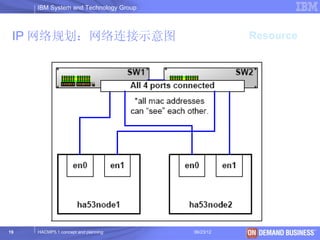
 IP 网络规划:网络连接示意图                                  Resource


19   HACMP5.1 concept and planning     06/23/12     © 2003 IBM Corporation
IBM System and Technology Group


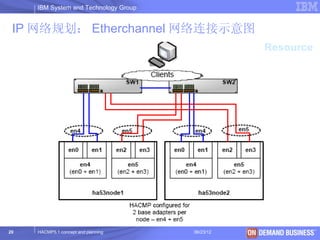
 IP 网络规划: Etherchannel 网络连接示意图
                                                  Resource


20   HACMP5.1 concept and planning     06/23/12   © 2003 IBM Corporation
IBM System and Technology Group

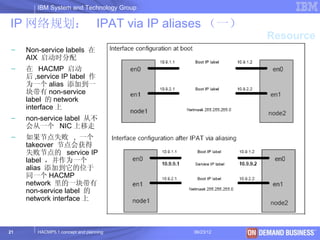
IP 网络规划: IPAT via IP aliases (一)
                                                     Resource
 –   Non-service labels 在
     AIX 启动时分配
 –   在 HACMP 启动
     后 ,service IP label 作
     为一个 alias 添加到一
     块带有 non-service
     label 的 network
     interface 上
 –   non-service label 从不
     会从一个 NIC 上移走
 –   如果节点失败 , 一个
     takeover 节点会获得
     失败节点的 service IP
     label ,并作为一个
     alias 添加到它的位于
     同一个 HACMP
     network 里的一块带有
     non-service label 的
     network interface 上


21      HACMP5.1 concept and planning     06/23/12   © 2003 IBM Corporation
IBM System and Technology Group

IP 网络规划: IPAT via IP aliases (二)
     设置 IPAT via IP aliases 功能                                   Resource
     #smitty hacmp
     Extended Configuration >
      Extended Topology Configuration >
       Configure HACMP Networks >
        Change/Show a Network in the HACMP Cluster >
          Change/Show an IP-Based Network in the HACMP Cluster

     Change/Show an IP-Based Network in the HACMP Cluster
     Type or select values in entry fields.
     Press Enter AFTER making all desired changes.
     [Entry Fields]
     * Network Name net_ether_01
       New Network Name []
     * Network Type [ether] +
     * Netmask [255.255.255.0] +
     * Enable IP Address Takeover via IP Aliases [Yes] +
       IP Address Offset for Heartbeating over IP Aliases []
     * Network Attribute public +


22   HACMP5.1 concept and planning                    06/23/12   © 2003 IBM Corporation
IBM System and Technology Group


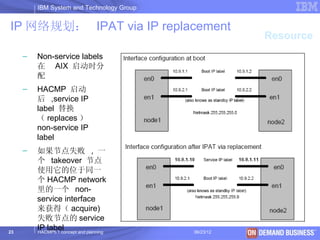
IP 网络规划: IPAT via IP replacement
                                                      Resource
     –   Non-service labels
         在 AIX 启动时分
         配
     –   HACMP 启动
         后 ,service IP
         label 替换
         ( replaces )
         non-service IP
         label
     –   如果节点失败 , 一
         个 takeover 节点
         使用它的位于同一
         个 HACMP network
         里的一个 non-
         service interface
         来获得( acquire)
         失败节点的 service
23
         IP label
         HACMP5.1 concept and planning     06/23/12   © 2003 IBM Corporation
IBM System and Technology Group


IP 网络规划: Persistent Node IP label
                                                     Resource
     Persistent Node IP label
           是一个 IP alias ,它可以分配给 cluster 里的一个特定节点
       •     How config -> extend configuration -> rc.net
       •     总是位于同一个节点
       •     可以位于一块已经拥有 service 或 non-service IP label 的网卡上
       •     不需在节点上安装额外的物理网卡
       •     不属于任何资源组
       •     能被用于对指定的节点进行管理
       •     每个节点可配置多个 .
       •     在节点启动后即可用,当 HACMP 服务停止后也始终保持可用
       •     如果网卡失败,它只会迁移到相同网络的同一个节点上的其它网卡
       •     如果节点失败,该 IP 标识不会迁移到群集中的其它节点


24    HACMP5.1 concept and planning     06/23/12      © 2003 IBM Corporation
IBM System and Technology Group


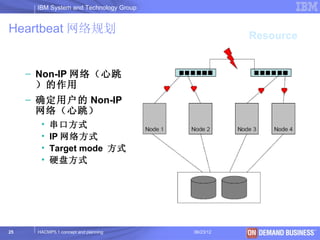
Heartbeat 网络规划
                                                   Resource


     – Non-IP 网络(心跳
       )的作用
     – 确定用户的 Non-IP
       网络(心跳)
       •   串口方式
       •   IP 网络方式
       •   Target mode 方式
       •   硬盘方式


25    HACMP5.1 concept and planning     06/23/12     © 2003 IBM Corporation
IBM System and Technology Group


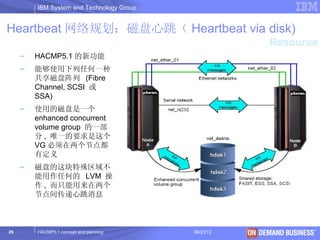
Heartbeat 网络规划:磁盘心跳( Heartbeat via disk)
                                                       Resource
     –   HACMP5.1 的新功能
     –   能够使用下列任何一种
         共享磁盘阵列 (Fibre
         Channel, SCSI 或
         SSA)
     –   使用的磁盘是一个
         enhanced concurrent
         volume group 的一部
         分 , 唯一的要求是这个
         VG 必须在两个节点都
         有定义
     –   磁盘的这块特殊区域不
         能用作任何的 LVM 操
         作 , 而只能用来在两个
         节点间传递心跳消息


26       HACMP5.1 concept and planning     06/23/12   © 2003 IBM Corporation
IBM System and Technology Group


 Volume Group and File System 规划
     – 确定存储设备的连接类型                                Resource
         • SCSI
         • SSA
         • FC
     – 了解用户需求划分存储资源
         • 划分 RAID
         • 创建逻辑盘
     – 确定 VG 的类型
         • Non-concurrent
         • Concurrent
         • Enhanced concurrent
     – 确定文件系统类型
         • jfs2
         • Jfs


27   HACMP5.1 concept and planning     06/23/12   © 2003 IBM Corporation
IBM System and Technology Group


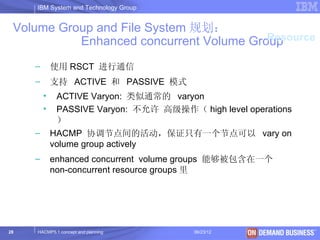
 Volume Group and File System 规划:
                                         Resource
           Enhanced concurrent Volume Group
     –       使用 RSCT 进行通信
     –       支持 ACTIVE 和 PASSIVE 模式
         •    ACTIVE Varyon: 类似通常的 varyon
         •    PASSIVE Varyon: 不允许 高级操作( high level operations
              )
     –       HACMP 协调节点间的活动,保证只有一个节点可以 vary on
             volume group actively
     –       enhanced concurrent volume groups 能够被包含在一个
             non-concurrent resource groups 里


28   HACMP5.1 concept and planning       06/23/12      © 2003 IBM Corporation
IBM System and Technology Group
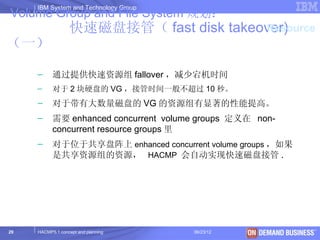
Volume Group and File System 规划:
                  快速磁盘接管( fast disk takeover)
                                         Resource
(一)

     –     通过提供快速资源组 fallover ,减少宕机时间
     –     对于 2 块硬盘的 VG ,接管时间一般不超过 10 秒。
     –     对于带有大数量磁盘的 VG 的资源组有显著的性能提高。
     –     需要 enhanced concurrent volume groups 定义在 non-
           concurrent resource groups 里
     –     对于位于共享盘阵上 enhanced concurrent volume groups ,如果
           是共享资源组的资源, HACMP 会自动实现快速磁盘接管 .


29   HACMP5.1 concept and planning     06/23/12      © 2003 IBM Corporation
IBM System and Technology Group

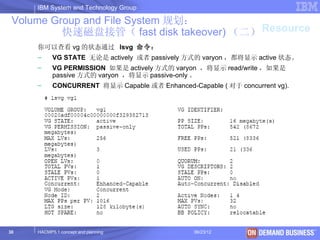
 Volume Group and File System 规划:
          快速磁盘接管( fast disk takeover) (二) Resource
     你可以查看 vg 的状态通过 lsvg 命令:
     –     VG STATE 无论是 actively 或者 passively 方式的 varyon ,都将显示 active 状态。
     –     VG PERMISSION 如果是 actively 方式的 varyon ,将显示 read/write ,如果是
           passive 方式的 varyon ,将显示 passive-only 。
     –     CONCURRENT 将显示 Capable 或者 Enhanced-Capable ( 对于 concurrent vg).


30   HACMP5.1 concept and planning              06/23/12           © 2003 IBM Corporation
IBM System and Technology Group


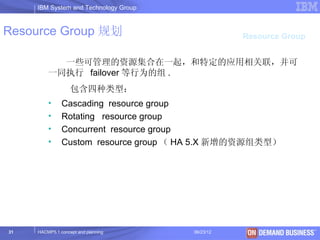
Resource Group 规划                                 Resource Group


           一些可管理的资源集合在一起,和特定的应用相关联,并可
         一同执行 failover 等行为的组 .
                   包含四种类型:
         •     Cascading resource group
         •     Rotating resource group
         •     Concurrent resource group
         •     Custom resource group ( HA 5.X 新增的资源组类型)


31   HACMP5.1 concept and planning     06/23/12        © 2003 IBM Corporation
IBM System and Technology Group


 Cascading Resource Group                                 Resource Group


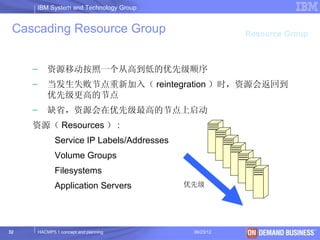
     –       资源移动按照一个从高到低的优先级顺序
     –       当发生失败节点重新加入( reintegration )时,资源会返回到
             优先级更高的节点
     –       缺省,资源会在优先级最高的节点上启动
     资源( Resources ) :
                Service IP Labels/Addresses
                Volume Groups
                Filesystems
                Application Servers           优先级


32       HACMP5.1 concept and planning         06/23/12       © 2003 IBM Corporation
IBM System and Technology Group


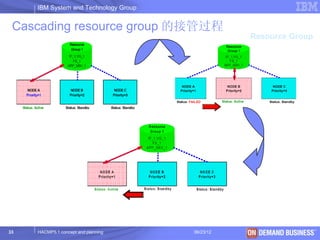
 Cascading resource group 的接管过程
                                                  Resource Group


33   HACMP5.1 concept and planning     06/23/12      © 2003 IBM Corporation
IBM System and Technology Group


 Cascading resource group 的属性                               Resource Group


 Cascading 资源组提供下面三种属性,这些属性需要在 hacmp 的 Extended
 configuration 菜单中设置。


      Cascading without fallback ( false )
      Inactive takeover ( false )
      Dynamic node priority ( false )
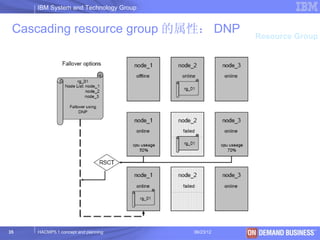
        – Cl_highest_free_mem – select the node with the highest
          percentage of free memory
        – Cl_highest_idle_cpu – select the node with the most avialable
          processor time
        – Cl_lowest_disk_busy – select the disk that is least busy


34      HACMP5.1 concept and planning           06/23/12             © 2003 IBM Corporation
IBM System and Technology Group


 Cascading resource group 的属性: DNP                Resource Group


35   HACMP5.1 concept and planning     06/23/12     © 2003 IBM Corporation
IBM System and Technology Group


Rotating resource group                                Resource Group

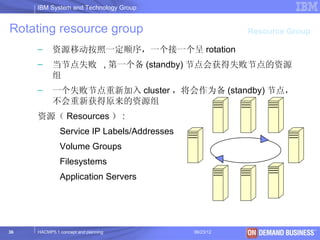
     –     资源移动按照一定顺序,一个接一个呈 rotation
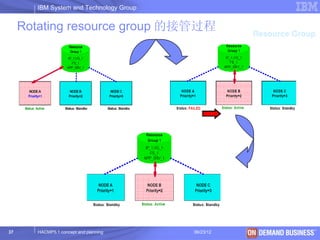
     –     当节点失败 , 第一个备 (standby) 节点会获得失败节点的资源
           组
     –     一个失败节点重新加入 cluster ,将会作为备 (standby) 节点,
           不会重新获得原来的资源组
     资源( Resources ) :
              Service IP Labels/Addresses
              Volume Groups
              Filesystems
              Application Servers


36   HACMP5.1 concept and planning          06/23/12      © 2003 IBM Corporation
IBM System and Technology Group


     Rotating resource group 的接管过程                  Resource Group


37      HACMP5.1 concept and planning    06/23/12     © 2003 IBM Corporation
IBM System and Technology Group


     Concurrent resource group                               Resource Group

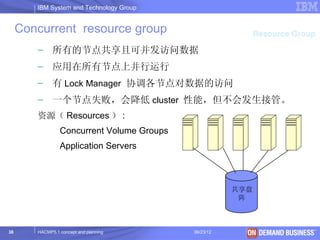
        – 所有的节点共享且可并发访问数据
        – 应用在所有节点上并行运行
        – 有 Lock Manager 协调各节点对数据的访问
        – 一个节点失败,会降低 cluster 性能,但不会发生接管。
        资源( Resources ) :
                 Concurrent Volume Groups
                 Application Servers


                                                       共享盘
                                                        阵


38      HACMP5.1 concept and planning       06/23/12           © 2003 IBM Corporation
IBM System and Technology Group


 Custom resource group
                                                      Resource Group

     – HACMP5.1 增加的新类型
     – HACMP 5.2 and later CUSTOM ONLY
     – 通过参数设置 , 可以精确定义有关资源组的
       startup,failover 和 fallback 行为的策略
     资源( Resources ) :
             Service IP Labels/Addresses
             Volume Groups
             Use forced varyon of volume groups, if necessary
           [false]
             Filesystems
             Application Servers


39   HACMP5.1 concept and planning         06/23/12        © 2003 IBM Corporation
IBM System and Technology Group


 Custom resource group                                                    Resource Group
     添加一个 custom resource group :
     #smitty hacmp
       Initialization and Standard Configuration >
        Configure HACMP Resource Groups >
          Add a Resource Group >
             Cascading
             Rotating
             Concurrent
             Custom
          Add a Custom Resource Group
     Type or select values in entry fields.
     Press Enter AFTER making all desired changes.
                                          [Entry Fields]
     * Resource Group Name                          []
     * Participating Node Names (Default Node Priority) [ ]           +

      Startup Policy                       Online On Home Node O> +
      Fallover Policy                      Fallover To Next Prio> +
      Fallback Policy                      Fallback To Higher Pr> +
40   HACMP5.1 concept and planning                       06/23/12            © 2003 IBM Corporation
IBM System and Technology Group


Custom resource group                                                                                            Resource Group


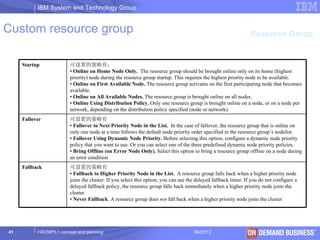
     Startup             可设置的策略有:
                         • Online on Home Node Only. The resource group should be brought online only on its home (highest
                         priority) node during the resource group startup. This requires the highest priority node to be available.
                         • Online on First Available Node. The resource group activates on the first participating node that becomes
                         available.
                         • Online on All Available Nodes. The resource group is brought online on all nodes.
                         • Online Using Distribution Policy. Only one resource group is brought online on a node, or on a node per
                         network, depending on the distribution policy specified (node or network).
     Fallover            可设置的策略有
                         • Fallover to Next Priority Node in the List. In the case of fallover, the resource group that is online on
                         only one node at a time follows the default node priority order specified in the resource group’s nodelist.
                         • Fallover Using Dynamic Node Priority. Before selecting this option, configure a dynamic node priority
                         policy that you want to use. Or you can select one of the three predefined dynamic node priority policies.
                         • Bring Offline (on Error Node Only). Select this option to bring a resource group offline on a node during
                         an error condition
     Fallback            可设置的策略有
                         • Fallback to Higher Priority Node in the List. A resource group falls back when a higher priority node
                         joins the cluster. If you select this option, you can use the delayed fallback timer. If you do not configure a
                         delayed fallback policy, the resource group falls back immediately when a higher priority node joins the
                         cluster.
                         • Never Fallback. A resource group does not fall back when a higher priority node joins the cluster


41         HACMP5.1 concept and planning                                             06/23/12                           © 2003 IBM Corporation
IBM System and Technology Group


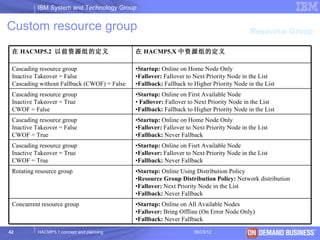
Custom resource group                                                                      Resource Group

 在 HACMP5.2 以前资源组的定义                         在 HACMP5.X 中资源组的定义

 Cascading resource group                    •Startup: Online on Home Node Only
 Inactive Takeover = False                   •Fallover: Fallover to Next Priority Node in the List
 Cascading without Fallback (CWOF) = False   •Fallback: Fallback to Higher Priority Node in the List
 Cascading resource group                    •Startup: Online on First Available Node
 Inactive Takeover = True                    • Fallover: Fallover to Next Priority Node in the List
 CWOF = False                                •Fallback: Fallback to Higher Priority Node in the List
 Cascading resource group                    •Startup: Online on Home Node Only
 Inactive Takeover = False                   •Fallover: Fallover to Next Priority Node in the List
 CWOF = True                                 •Fallback: Never Fallback
 Cascading resource group                    •Startup: Online on Fisrt Available Node
 Inactive Takeover = True                    •Fallover: Fallover to Next Priority Node in the List
 CWOF = True                                 •Fallback: Never Fallback
 Rotating resource group                     •Startup: Online Using Distribution Policy
                                             •Resource Group Distribution Policy: Network distribution
                                             •Fallover: Next Priority Node in the List
                                             •Fallback: Never Fallback
 Concurrent resource group                   •Startup: Online on All Available Nodes
                                             •Fallover: Bring Offline (On Error Node Only)
                                             •Fallback: Never Fallback

42        HACMP5.1 concept and planning                             06/23/12                     © 2003 IBM Corporation
IBM System and Technology Group

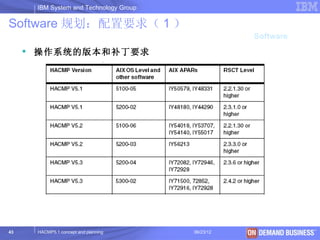
Software 规划:配置要求( 1 )
                                                   Software
      操作系统的版本和补丁要求


43    HACMP5.1 concept and planning     06/23/12     © 2003 IBM Corporation
IBM System and Technology Group


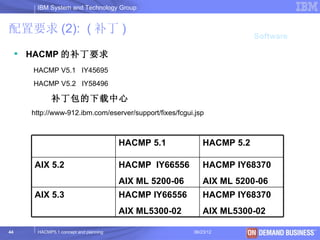
配置要求 (2): ( 补丁 )
                                                                        Software

      HACMP 的补丁要求
       HACMP V5.1 IY45695
       HACMP V5.2 IY58496

             补丁包的下载中心
       http://www-912.ibm.com/eserver/support/fixes/fcgui.jsp


                                        HACMP 5.1           HACMP 5.2

       AIX 5.2                          HACMP IY66556       HACMP IY68370
                                        AIX ML 5200-06      AIX ML 5200-06
       AIX 5.3                          HACMP IY66556       HACMP IY68370
                                        AIX ML5300-02       AIX ML5300-02

44      HACMP5.1 concept and planning                    06/23/12         © 2003 IBM Corporation
IBM System and Technology Group


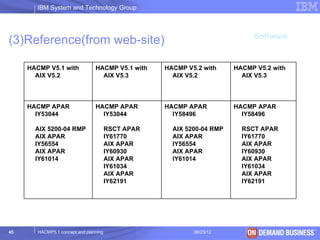
                                                                             Software
(3)Reference(from web-site)

     HACMP V5.1 with             HACMP V5.1 with    HACMP V5.2 with     HACMP V5.2 with
       AIX V5.2                    AIX V5.3           AIX V5.2            AIX V5.3


     HACMP APAR                  HACMP APAR         HACMP APAR          HACMP APAR
       IY53044                     IY53044            IY58496             IY58496

       AIX 5200-04 RMP                  RSCT APAR     AIX 5200-04 RMP     RSCT APAR
       AIX APAR                         IY61770       AIX APAR            IY61770
       IY56554                          AIX APAR      IY56554             AIX APAR
       AIX APAR                         IY60930       AIX APAR            IY60930
       IY61014                          AIX APAR      IY61014             AIX APAR
                                        IY61034                           IY61034
                                        AIX APAR                          AIX APAR
                                        IY62191                           IY62191


45      HACMP5.1 concept and planning                       06/23/12             © 2003 IBM Corporation
IBM System and Technology Group


 配置要求( 4 )                                                                Software


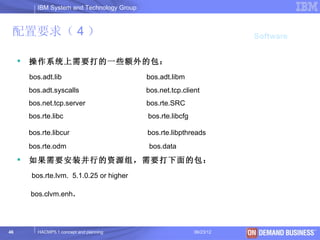
        操作系统上需要打的一些额外的包:
         bos.adt.lib                          bos.adt.libm
         bos.adt.syscalls                     bos.net.tcp.client
         bos.net.tcp.server                   bos.rte.SRC
         bos.rte.libc                         bos.rte.libcfg

         bos.rte.libcur                       bos.rte.libpthreads
         bos.rte.odm                           bos.data
        如果需要安装并行的资源组,需要打下面的包:
         bos.rte.lvm. 5.1.0.25 or higher

         bos.clvm.enh.


46          HACMP5.1 concept and planning                      06/23/12     © 2003 IBM Corporation
IBM System and Technology Group


配置要求( 5 )
                                                                                        Software


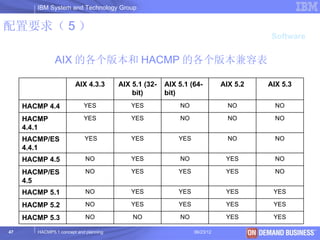
               AIX 的各个版本和 HACMP 的各个版本兼容表

                        AIX 4.3.3       AIX 5.1 (32-   AIX 5.1 (64-         AIX 5.2    AIX 5.3
                                            bit)       bit)
     HACMP 4.4              YES             YES            NO                 NO          NO

     HACMP                  YES             YES            NO                 NO          NO
     4.4.1
     HACMP/ES               YES             YES            YES                NO          NO
     4.4.1
     HACMP 4.5               NO             YES            NO                YES          NO

     HACMP/ES                NO             YES            YES               YES          NO
     4.5
     HACMP 5.1               NO             YES            YES               YES         YES

     HACMP 5.2               NO             YES            YES               YES         YES

     HACMP 5.3               NO             NO             NO                YES         YES

47      HACMP5.1 concept and planning                            06/23/12             © 2003 IBM Corporation
IBM System and Technology Group


     目录
     – 什么是 HACMP?
     – 配置 HACMP 的规划和考虑
     – HACMP 的安装和配置
     – HACMP 的接管测试


48     HACMP5.1 concept and planning     06/23/12   © 2003 IBM Corporation
IBM System and Technology Group


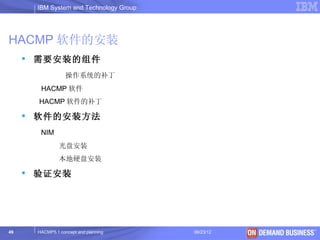
HACMP 软件的安装
      需要安装的组件
                  操作系统的补丁
       HACMP 软件
       HACMP 软件的补丁

      软件的安装方法
       NIM
               光盘安装
               本地硬盘安装

      验证安装


49    HACMP5.1 concept and planning     06/23/12   © 2003 IBM Corporation
IBM System and Technology Group

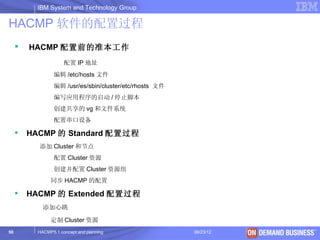
HACMP 软件的配置过程
        HACMP 配置前的准本工作
                      配置 IP 地址
                  编辑 /etc/hosts 文件
                  编辑 /usr/es/sbin/cluster/etc/rhosts 文件
                  编写应用程序的启动 / 停止脚本
                  创建共享的 vg 和文件系统
                  配置串口设备

        HACMP 的 Standard 配置过程
           添加 Cluster 和节点
                  配置 Cluster 资源
                  创建并配置 Cluster 资源组
                同步 HACMP 的配置

        HACMP 的 Extended 配置过程
             添加心跳

                定制 Cluster 资源
50         HACMP5.1 concept and planning                  06/23/12   © 2003 IBM Corporation
IBM System and Technology Group


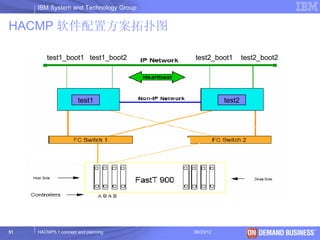
HACMP 软件配置方案拓扑图

         test1_boot1 test1_boot2       test2_boot1        test2_boot2


                      test1                       test2


51   HACMP5.1 concept and planning     06/23/12                  © 2003 IBM Corporation
IBM System and Technology Group


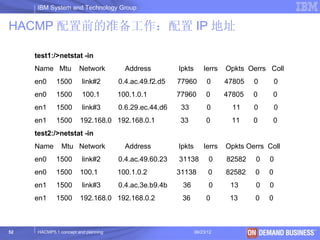
HACMP 配置前的准备工作:配置 IP 地址

     test1:/>netstat -in
     Name Mtu           Network         Address         Ipkts       Ierrs   Opkts Oerrs Coll
     en0      1500       link#2       0.4.ac.49.f2.d5   77960        0      47805   0        0
     en0      1500       100.1        100.1.0.1         77960        0      47805   0      0
     en1      1500       link#3       0.6.29.ec.44.d6    33          0        11    0         0
     en1      1500      192.168.0 192.168.0.1            33          0        11    0        0
     test2:/>netstat -in
     Name       Mtu Network             Address         Ipkts       Ierrs   Opkts Oerrs Coll
     en0      1500       link#2       0.4.ac.49.60.23   31138         0     82582   0     0
     en0      1500      100.1         100.1.0.2         31138         0     82582   0    0
     en1      1500       link#3       0.4.ac.3e.b9.4b    36           0      13     0     0
     en1      1500      192.168.0 192.168.0.2            36          0       13     0    0


52    HACMP5.1 concept and planning                             06/23/12                © 2003 IBM Corporation
IBM System and Technology Group


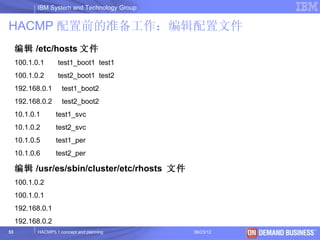
HACMP 配置前的准备工作:编辑配置文件
     编辑 /etc/hosts 文件
     100.1.0.1      test1_boot1 test1
     100.1.0.2      test2_boot1 test2
     192.168.0.1      test1_boot2
     192.168.0.2      test2_boot2
     10.1.0.1       test1_svc
     10.1.0.2       test2_svc
     10.1.0.5       test1_per
     10.1.0.6       test2_per

     编辑 /usr/es/sbin/cluster/etc/rhosts 文件
     100.1.0.2
     100.1.0.1
     192.168.0.1
     192.168.0.2
53          HACMP5.1 concept and planning     06/23/12   © 2003 IBM Corporation
IBM System and Technology Group

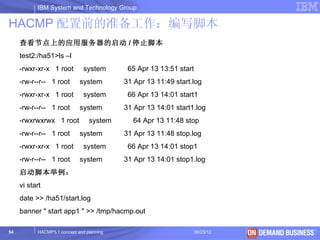
HACMP 配置前的准备工作:编写脚本
     查看节点上的应用服务器的启动 / 停止脚本
     test2:/ha51>ls –l
     -rwxr-xr-x 1 root         system       65 Apr 13 13:51 start
     -rw-r--r-- 1 root       system        31 Apr 13 11:49 start.log
     -rwxr-xr-x 1 root         system       66 Apr 13 14:01 start1
     -rw-r--r-- 1 root       system        31 Apr 13 14:01 start1.log
     -rwxrwxrwx 1 root           system      64 Apr 13 11:48 stop
     -rw-r--r-- 1 root       system        31 Apr 13 11:48 stop.log
     -rwxr-xr-x 1 root         system       66 Apr 13 14:01 stop1
     -rw-r--r-- 1 root       system        31 Apr 13 14:01 stop1.log
     启动脚本举例:
     vi start
     date >> /ha51/start.log
     banner " start app1 " >> /tmp/hacmp.out

54         HACMP5.1 concept and planning                            06/23/12   © 2003 IBM Corporation
IBM System and Technology Group

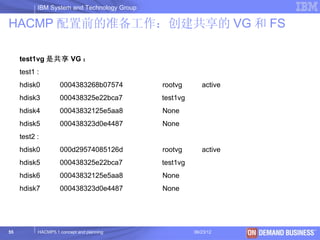
HACMP 配置前的准备工作:创建共享的 VG 和 FS

     test1vg 是共享 VG :
     test1 :
     hdisk0         0004383268b07574         rootvg       active
     hdisk3         000438325e22bca7         test1vg
     hdisk4         00043832125e5aa8         None
     hdisk5         000438323d0e4487         None
     test2 :
     hdisk0         000d29574085126d         rootvg       active
     hdisk5         000438325e22bca7         test1vg
     hdisk6         00043832125e5aa8         None
     hdisk7         000438323d0e4487         None


55         HACMP5.1 concept and planning               06/23/12    © 2003 IBM Corporation
IBM System and Technology Group


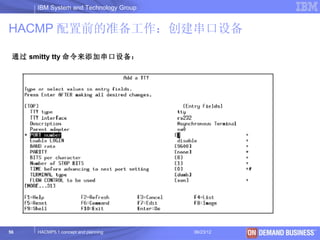
HACMP 配置前的准备工作:创建串口设备

 通过 smitty tty 命令来添加串口设备:


56   HACMP5.1 concept and planning     06/23/12   © 2003 IBM Corporation
IBM System and Technology Group
HACMP 的 Standard 配置过程:添加 CLUSTER 和节
点

     通过 smitty hacmp 命令,按照下列路径来添加 Cluster 和节点:
     -> Initialization and Standard Configuration
     -> Add Nodes to an HACMP Cluster 。


       * Cluster Name                                  [ha51tsc]
       New Nodes (via selected communication paths)    [test2_boot1
     test1_boot1]
       Currently Configured Node(s)


         注:这一步很重要,一般我们都是把每个节点的 boot1 作为 communication path .
         当回车以后,系统会自己 discover hacmp 的资源,并有详细的信息显示输出。

57         HACMP5.1 concept and planning              06/23/12        © 2003 IBM Corporation
IBM System and Technology Group


HACMP 的 Standard 配置过程:
      添加高可用资源 Service IP
     通过 smitty hacmp 命令,按照下列路径来添加 Service IP :
     -> Initialization and Standard Configuration
     -> Configure Resources to Make Highly Available
     -> Configure Service IP Labels/Addresses
     -> Add a Service IP Label/Address
               * IP Label/Address                   [test1_svc ]


                 Network Name                       [net_ether_02 ]


               * IP Label/Address                   [test2_svc ]


                 Network Name                       [net_ether_02 ]

     注:如果有多个应用服务器,则添加多个 Service IP 。
58         HACMP5.1 concept and planning                 06/23/12     © 2003 IBM Corporation
IBM System and Technology Group


HACMP 的 Standard 配置过程:
      添加高可用资源 Application Server
     通过 smitty hacmp 命令,按照下列路径来添加 Application Server :
     -> Initialization and Standard Configuration
     -> Configure Resources to Make Highly Available
     -> Configure Application Servers
     -> Add an Application Server


              * Server Name                         [app1]
              * Start Script                        [/ha51/start]
              * Stop Script                         [/ha51/stop]


     注:如果有多个应用服务器,则添加多个 Application Server 。


59         HACMP5.1 concept and planning                     06/23/12   © 2003 IBM Corporation
IBM System and Technology Group


HACMP 的 Standard 配置过程:
      添加高可用资源 VG 和 FS (一)
      注意在前面的步骤中我们看到已经有一个共享 VG test1vg 存在了,
       它使用传统的方法:
      – 在 test1 节点上创建 test1vg , lv, jfs
      – Varyoffvg
      – 在 test2 上 importvg
      – Varyoffvg
      我们也可以用 hacmp 的功能去创建 test2vg 和文件系统


60      HACMP5.1 concept and planning     06/23/12   © 2003 IBM Corporation
IBM System and Technology Group


HACMP 的 Standard 配置过程:
      添加高可用资源 VG 和 FS (二)
     通过 smitty hacmp 命令,按照下列路径来添加共享 VG :
     -> Initialization and Standard Configuration
     -> Configure Resources to Make Highly Available
     -> Configure Volume Groups, Logical Volumes and Filesystems
     -> Shared Volume Groups
     ->Create a Shared Volume Group

        Node Names                                  test1,test2
        PVID                                        00043832125e5aa8
       VOLUME GROUP name                                              [test2vg ]
        Physical partition SIZE in megabytes           4


       Volume group MAJOR NUMBER                    [49]

61         HACMP5.1 concept and planning                   06/23/12                © 2003 IBM Corporation
IBM System and Technology Group

HACMP 的 Standard 配置过程:
      添加高可用资源 VG 和 FS (三)
     通过 smitty hacmp 命令,按照下列路径来添加共享 FS :
     -> Initialization and Standard Configuration
     -> Configure Resources to Make Highly Available
     -> Configure Volume Groups, Logical Volumes and Filesystems
                                                       Node Names                           test1,test2
     -> Shared File Systems
                                                       Volume group name                    test1vg
     -> Journaled File Systems
                                                       * SIZE of file system                [10 ]
     ->Add a Journaled File System                     * MOUNT POINT                         [/test1jfs]
     ->Add a Standard Journaled File System             PERMISSIONS                          read/write


                                                        Mount OPTIONS                        []


                                                        Start Disk Accounting?               no


                                                        Fragment Size (bytes)                4096


                                                        Number of bytes per inode            4096


62          HACMP5.1 concept and planning               Allocation Group Size (MBytes)
                                                                06/23/12                      8
                                                                                         © 2003 IBM Corporation
IBM System and Technology Group
HACMP 的 Standard 配置过程:创建 Cluster 资源
组
     通过 smitty hacmp 命令,按照下列路径来添加资源组:
     -> Initialization and Standard Configuration
     -> Configure HACMP Resource Groups
     -> Add a Resource Group


            Cascading
            Rotating
            Concurrent
            Custom


            * Resource Group Name                                      [res1]
            * Participating Node Names / Default Node Priority         [test1 test2]


     注:如果有多个资源组,则按照同样方法添加即可。

63         HACMP5.1 concept and planning                    06/23/12                   © 2003 IBM Corporation
IBM System and Technology Group
 HACMP 的 Standard 配置过程:配置 Cluster 资源
 组
     通过 smitty hacmp 命令,按照下列路径来配置资源组:
     -> Initialization and Standard Configuration
     -> Configure HACMP Resource Groups
     -> Change/Show Resources for a Resource Group (standard)


         Resource Group Name                                      res1
         Participating Node Names (Default Node Priority)          test1 test2
         * Service IP Labels/Addresses                            [test1_svc]
                              Volume Groups
         [mtest1vg]                                    Filesystems (empty is ALL for
         VGs specified)            [/test1jfs]
         Application Servers                                       [mapp1]


     注:如果有多个资源组,则按照同样方法配置即可。

64         HACMP5.1 concept and planning                    06/23/12             © 2003 IBM Corporation
IBM System and Technology Group
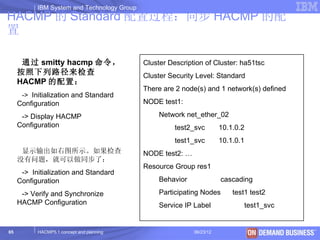
HACMP 的 Standard 配置过程:同步 HACMP 的配
置

      通过 smitty hacmp 命令,                    Cluster Description of Cluster: ha51tsc
     按照下列路径来检查                               Cluster Security Level: Standard
     HACMP 的配置:
                                             There are 2 node(s) and 1 network(s) defined
      -> Initialization and Standard
     Configuration                           NODE test1:

      -> Display HACMP                            Network net_ether_02
     Configuration                                     test2_svc        10.1.0.2
                                                       test1_svc        10.1.0.1
      显示输出如右图所示。如果检查                         NODE test2: …
     没有问题,就可以做同步了:
                                             Resource Group res1
      -> Initialization and Standard
     Configuration                                Behavior              cascading

      -> Verify and Synchronize                   Participating Nodes       test1 test2
     HACMP Configuration                          Service IP Label             test1_svc


65         HACMP5.1 concept and planning                     06/23/12                  © 2003 IBM Corporation
IBM System and Technology Group


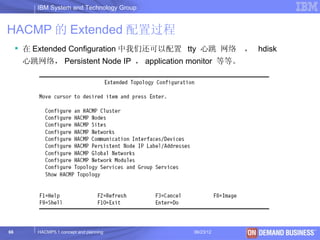
HACMP 的 Extended 配置过程
      在 Extended Configuration 中我们还可以配置 tty 心跳 网络         , hdisk
      心跳网络, Persistent Node IP , application monitor 等等。


66       HACMP5.1 concept and planning       06/23/12          © 2003 IBM Corporation
IBM System and Technology Group


HACMP 的 Extended 配置过程:设置 hdisk 心跳网络(一)
      首先,我们要一个 Enhanced concurrent VG , 这个 concurrent vg
     可以通过两种方法来建立。
  方法一:
      Mkvg –c convg ;在一个节点上 varyoffvg , 另一个节点上 importvg
  方法二:
           通过 smitty hacmp 命令,按照下列路径来添加 hdisk 心跳盘:
      -> Initialization and Standard Configuration
      -> Configure Resources to Make Highly Available
      -> Configure Concurrent Volume Groups and Logical Volumes
      -> Concurrent Volume Groups
      -> Create a Concurrent Volume Group

67      HACMP5.1 concept and planning            06/23/12   © 2003 IBM Corporation
IBM System and Technology Group


HACMP 的 Extended 配置过程:设置 hdisk 心跳网络(二)

         Node Names                             test1,test2
         PVID                                  000438323d0e4487
         VOLUME GROUP name                      convg
         PhysicalpartitionSIZEinmegabytes       4


         Volume group MAJOR NUMBER              [49]


         Enhanced Concurrent Mode               true

     其次,检查 hdisk 网络的状况,在一个节点上向 hdisk 写数据,从另一个节点上读数据,
     很像 我们在配置 tty 网络之前,检查一下 tty 是否连通。

       Add /usr/sbin/rsct/bin/ to /etc/environment 里的 path 中
       重新 login test1 和 test2 使 path 生效
       在 test1 上运行: dhb_read -p hdisk5 –r
       在 test2 上运行: dhb_read -p hdisk7 –t

68       HACMP5.1 concept and planning                  06/23/12   © 2003 IBM Corporation
IBM System and Technology Group


HACMP 的 Extended 配置过程:设置 hdisk 心跳网络(三)
     通过 smitty hacmp 命令,按照下列路径来添加 hdisk 心跳网络:
     -> Extended Configuration
     -> Extended Topology Configuration
     -> Configure HACMP Networks
     -> Add a network to the HACMP Cluster


                    # Pre-defined Serial Device Types
                    diskhb
                    rs232
                    tmscsi
                    tmssa


                    * Network Name[m                     [net_diskhb_01]
                    * Network Type                      diskhb

69         HACMP5.1 concept and planning                06/23/12           © 2003 IBM Corporation
IBM System and Technology Group

HACMP 的 Extended 配置过程:设置 hdisk 心跳网络(四)

     通过 smitty hacmp 命令,按照下列路径来添加 hdisk 心跳网络的接口设备:
     -> Extended Configuration
     -> Extended Topology Configuration
     -> Configure HACMP Communication Interfaces/Devices
     -> Add Communication Interfaces/Devices
     -> Add Pre-defined Communication Interfaces and Devices
     -> Communication Devices

                   * Device Name                     [heartbeatdisk5]
                   * Network Type                    diskhb
                   * Network Name                     net_diskhb_01
                   * Device Path                     [/dev/hdisk5]
                   * Node Name                       [test1]

     注:需要对 cluster 的所有节点都进行设置,做完之后,需要对 hacmp 进行检查和同步
     。
70         HACMP5.1 concept and planning                  06/23/12      © 2003 IBM Corporation
IBM System and Technology Group
HACMP 的 Extended 配置过程:设置串口心跳网
络
     通过 smitty hacmp 命令,按照下列路径来添加 RS232 类型的网络:
     -> Extended Configuration
     -> Extended Topology Configuration
     -> Configure HACMP Networks
     -> Add a network to the HACMP Cluster

     通过 smitty hacmp 命令,按照下列路径来添加 RS232 类型的接口设备:
     -> Extended Configuration
     -> Extended Topology Configuration
     -> Configure HACMP Communication Interfaces/Devices
     -> Add Communication Interfaces/Devices
     -> Add Pre-defined Communication Interfaces and Devices
     -> Communication Devices
     注:需要对 cluster 的所有节点都进行设置,做完之后,需要对 hacmp 进行检查和同步
     。
71         HACMP5.1 concept and planning                 06/23/12   © 2003 IBM Corporation
IBM System and Technology Group
HACMP 软件的 Extended 配置:设置 persistent IP
label

     通过 smitty hacmp 命令,按照下列路径来配置 persistent IP label :
     -> Extended Configuration
     -> Extended Topology Configuration
     -> Configure HACMP Persistent Node IP Label/Addresses
     -> Add a Persistent Node IP Label/Address

                      * Node Name                   test1
                      * Network Name                net_ether_02


                      Node IP Label/Address          test1_per


     注: persistent IP 配置并同步完成后,该 ip 立即被绑定到 boot1 上。
72         HACMP5.1 concept and planning                06/23/12   © 2003 IBM Corporation
IBM System and Technology Group


     目录
     – 什么是 HACMP?
     – 配置 HACMP 的规划和考虑
     – HACMP 的安装和配置
     – HACMP 的接管测试


73     HACMP5.1 concept and planning     06/23/12   © 2003 IBM Corporation
IBM System and Technology Group


HACMP 的接管测试

          用 (#smit clstart) 启动 HACMP 。
          用 (#tail -f /tmp/hacmp.out) 跟踪输出。
          用 (#netstat -in) 查看 en0 、 en1 的状态 , 看是否已从 boot 地址切换
           成 service 地址。
          用 (#lsvg -o) 查看是否 datavg 已经激活。
          正常启动后,用 (#smit clstop) 通过 takeover 方式 down 掉一个
           node ,查看是否 IP 被另一个 node 接管。
          手工拔插网线,验证 HACMP 的接管。


74       HACMP5.1 concept and planning         06/23/12   © 2003 IBM Corporation
IBM System and Technology Group


                                     Q&A:


75   HACMP5.1 concept and planning          06/23/12   © 2003 IBM Corporation

Hacmp5.x

  • 1.
    IBM System andTechnology Group HACMP5.X 概念和实施规划 IBM 中国技术支持中心 8008101818 010-84981188 HACMP5.1 concept and planning 06/23/12 © 2004 IBM Corporation
  • 2.
    IBM System andTechnology Group 目录 – 什么是 HACMP? – 配置 HACMP 的规划和考虑 – HACMP 的安装和配置 – HACMP 的接管测试 2 HACMP5.1 concept and planning 06/23/12 © 2003 IBM Corporation
  • 3.
    IBM System andTechnology Group 目录 – 什么是 HACMP? – 配置 HACMP 的规划和考虑 – HACMP 的安装和配置 – HACMP 的接管测试 3 HACMP5.1 concept and planning 06/23/12 © 2003 IBM Corporation
  • 4.
    IBM System andTechnology Group HACMP—(High Availability Cluster Multi Processing) – 为什么需要高可用性? • 越来越多的应用成为关键应用 • 越来越多的业务提供 7*24 小时服务 • 越来越多的客户意识到自己是上帝 • - - - - - - IB M 公司的解决方案 : HA C MP – 什么是 HACMP ? 1) High Availability : • 系统可用性或运行时间最大化 • 系统宕机时间最小化 2) multi-processing ? • 一个 cluster 里的各个节点上可以运行多个应用 • 共享数据或并发访问数据 . • 不是容错机( fault tolerance ) 4 HACMP5.1 concept and planning 06/23/12 © 2003 IBM Corporation
  • 5.
    IBM System andTechnology Group HACMP 软件模型 5 HACMP5.1 concept and planning 06/23/12 © 2003 IBM Corporation
  • 6.
    IBM System andTechnology Group HACMP V5.x 的新特点 ALL IN ONE: 在 HACMP v5 之前,每个版本的 HACMP 软件都有四个模块, HAS , CRM , ES 和 ESCRM ,用户在定购的时候根据需要选择其中一个模块 ,从 HACMP v5 开始 IBM 只提供一个模块,包括以前四个模块的所有功 能。  简化了 HACMP Cluster 的配置与管 理  通过磁盘传输心跳信号 (Heartbeat over Disk)  IPAT 通过 Alias 实现 (IPAT via Alias) ( 缺省方式 )  用户自定义的资源组 (Custom RG)  高可用性 快递磁盘接管 (Fast Disk Takeover)  HACMP-XD 6 HACMP5.1 concept and planning 06/23/12 © 2003 IBM Corporation
  • 7.
    IBM System andTechnology Group 目录 – 什么是 HACMP? – 配置 HACMP 的规划和考虑 – HACMP 的安装和配置 – HACMP 的接管测试 7 HACMP5.1 concept and planning 06/23/12 © 2003 IBM Corporation
  • 8.
    IBM System andTechnology Group Concept:  Client : 提出请求,访问应用程序的客户端  Node : 运行 AIX 和 HACMP 软件的服务器或 LPAR  Boot IP : 网卡的初始 IP 地址 , AIX 启动后使用的地址  Service IP : 对外服务的地址 , 会从一块网卡切换到另一块网卡  Standby IP : 不再需要 .  Application server : 运行在 HACMP 之上的应用软件,可以通过脚本启动 / 停 止  Resources : 可以从一个节点移动到另一个节点、具有高可用性特点的逻辑组 件,包括文件系统、裸设备、 service IP 等  Resources group : 把相关的 Resource 组织在一起,作为一个整体从一个节 点移动到另一个节点来提供高可用性  IP Address takeover : 在同一个逻辑网络中, IP 地址从一个网卡移动到另一个 网卡  Failover : 当主节点失效, RG 从主节点移动到备用节点的过程 8  Fallback concept and planning HACMP5.1 : 当原来的节点修复后, RG 从备用节点回到原来的节点的过程IBM Corporation 06/23/12 © 2003
  • 9.
    IBM System andTechnology Group 配置 HACMP 的规划和考虑 – Cluster 规划 – Node 规划 – Recourse 规划 • IP 网络及地址( Service IP 、 Non-Service IP 、 Persistent IP ) • Heartbeat 网络( IP 、串口、共享硬盘) • Volume Group and File System • Application Server – Recourse Group 规划 – Software 的规划 • 操作系统的版本和补丁要求 • HACMP 的版本和补丁要求 • 应用程序的兼容性 9 HACMP5.1 concept and planning 06/23/12 © 2003 IBM Corporation
  • 10.
    IBM System andTechnology Group Cluster 规划要求:性能考虑 Cluster 为了保证 cluster 的性能,一个 cluster 支持的最大组件数目如下: 组件 最大数目 node 32 Resource Groups 64 Networks 48 Network interface,devices, and labels 256 10 HACMP5.1 concept and planning 06/23/12 © 2003 IBM Corporation
  • 11.
    IBM System andTechnology Group Cluster 规划( 1 ): HACMP (local) Cluster 11 HACMP5.1 concept and planning 06/23/12 © 2003 IBM Corporation
  • 12.
    IBM System andTechnology Group Cluster 规划( 2 ): HACMP cross-site LVM Cluster 12 HACMP5.1 concept and planning 06/23/12 © 2003 IBM Corporation
  • 13.
    IBM System andTechnology Group Cluster 规划( 3 ): HACMP/XD HAGEO Cluster 13 HACMP5.1 concept and planning 06/23/12 © 2003 IBM Corporation
  • 14.
    IBM System andTechnology Group Cluster 规划( 4 ): HACMP/XD GLVM Cluster 14 HACMP5.1 concept and planning 06/23/12 © 2003 IBM Corporation
  • 15.
    IBM System andTechnology Group Cluster 规划( 5 ): HACMP/XD PPRC Cluster 15 HACMP5.1 concept and planning 06/23/12 © 2003 IBM Corporation
  • 16.
    IBM System andTechnology Group Cluster 规划( 6 ): HACMP/XD DR 方案汇总 Cluster 16 HACMP5.1 concept and planning 06/23/12 © 2003 IBM Corporation
  • 17.
    IBM System andTechnology Group Node 规划:配置要求 Node – 一个精心设计的 cluster 应该尽量避免单点故障 ( SPOF), 为了达到这个目的,典型的 cluster 一 般对硬件有如下要求 : – 至少 2 个 pseries 服务器作为 cluster 的节点(安装并运行 HACMP, 每个节点的 AIX 版本和 HACMP 的版本要完全一致 ) – 内置硬盘:预留一定的硬盘空间满足 HACMP 的安装要求 , MIRROR – I/O 插槽:要满足网卡、 HBA 卡(阵列和带库要分开)、串 口卡 – 至少一种 non-IP 网络,通常采用 RS232 网络,如果某些节 点集成串口无法作心跳,要配 #2943 8 口异步卡,节点间要 配串口线 – 一个共享磁盘阵列( 7133/FastT/ESS 等 ) 17 HACMP5.1 concept and planning 06/23/12 © 2003 IBM Corporation
  • 18.
    IBM System andTechnology Group Resource: IP 网络规划 Resource – 用户的 IP 网络类型要求 • Support: Ethernet, Token ring, FDDI , ATM , Etherchannel • Not support: SOCC,SLIP, FCS – 用户的 IP 网络资源规划 • Switch • VLAN • IPAT 方式 • IP 地址规划 18 HACMP5.1 concept and planning 06/23/12 © 2003 IBM Corporation
  • 19.
    IBM System andTechnology Group IP 网络规划:网络连接示意图 Resource 19 HACMP5.1 concept and planning 06/23/12 © 2003 IBM Corporation
  • 20.
    IBM System andTechnology Group IP 网络规划: Etherchannel 网络连接示意图 Resource 20 HACMP5.1 concept and planning 06/23/12 © 2003 IBM Corporation
  • 21.
    IBM System andTechnology Group IP 网络规划: IPAT via IP aliases (一) Resource – Non-service labels 在 AIX 启动时分配 – 在 HACMP 启动 后 ,service IP label 作 为一个 alias 添加到一 块带有 non-service label 的 network interface 上 – non-service label 从不 会从一个 NIC 上移走 – 如果节点失败 , 一个 takeover 节点会获得 失败节点的 service IP label ,并作为一个 alias 添加到它的位于 同一个 HACMP network 里的一块带有 non-service label 的 network interface 上 21 HACMP5.1 concept and planning 06/23/12 © 2003 IBM Corporation
  • 22.
    IBM System andTechnology Group IP 网络规划: IPAT via IP aliases (二) 设置 IPAT via IP aliases 功能 Resource #smitty hacmp Extended Configuration > Extended Topology Configuration > Configure HACMP Networks > Change/Show a Network in the HACMP Cluster > Change/Show an IP-Based Network in the HACMP Cluster Change/Show an IP-Based Network in the HACMP Cluster Type or select values in entry fields. Press Enter AFTER making all desired changes. [Entry Fields] * Network Name net_ether_01 New Network Name [] * Network Type [ether] + * Netmask [255.255.255.0] + * Enable IP Address Takeover via IP Aliases [Yes] + IP Address Offset for Heartbeating over IP Aliases [] * Network Attribute public + 22 HACMP5.1 concept and planning 06/23/12 © 2003 IBM Corporation
  • 23.
    IBM System andTechnology Group IP 网络规划: IPAT via IP replacement Resource – Non-service labels 在 AIX 启动时分 配 – HACMP 启动 后 ,service IP label 替换 ( replaces ) non-service IP label – 如果节点失败 , 一 个 takeover 节点 使用它的位于同一 个 HACMP network 里的一个 non- service interface 来获得( acquire) 失败节点的 service 23 IP label HACMP5.1 concept and planning 06/23/12 © 2003 IBM Corporation
  • 24.
    IBM System andTechnology Group IP 网络规划: Persistent Node IP label Resource Persistent Node IP label 是一个 IP alias ,它可以分配给 cluster 里的一个特定节点 • How config -> extend configuration -> rc.net • 总是位于同一个节点 • 可以位于一块已经拥有 service 或 non-service IP label 的网卡上 • 不需在节点上安装额外的物理网卡 • 不属于任何资源组 • 能被用于对指定的节点进行管理 • 每个节点可配置多个 . • 在节点启动后即可用,当 HACMP 服务停止后也始终保持可用 • 如果网卡失败,它只会迁移到相同网络的同一个节点上的其它网卡 • 如果节点失败,该 IP 标识不会迁移到群集中的其它节点 24 HACMP5.1 concept and planning 06/23/12 © 2003 IBM Corporation
  • 25.
    IBM System andTechnology Group Heartbeat 网络规划 Resource – Non-IP 网络(心跳 )的作用 – 确定用户的 Non-IP 网络(心跳) • 串口方式 • IP 网络方式 • Target mode 方式 • 硬盘方式 25 HACMP5.1 concept and planning 06/23/12 © 2003 IBM Corporation
  • 26.
    IBM System andTechnology Group Heartbeat 网络规划:磁盘心跳( Heartbeat via disk) Resource – HACMP5.1 的新功能 – 能够使用下列任何一种 共享磁盘阵列 (Fibre Channel, SCSI 或 SSA) – 使用的磁盘是一个 enhanced concurrent volume group 的一部 分 , 唯一的要求是这个 VG 必须在两个节点都 有定义 – 磁盘的这块特殊区域不 能用作任何的 LVM 操 作 , 而只能用来在两个 节点间传递心跳消息 26 HACMP5.1 concept and planning 06/23/12 © 2003 IBM Corporation
  • 27.
    IBM System andTechnology Group Volume Group and File System 规划 – 确定存储设备的连接类型 Resource • SCSI • SSA • FC – 了解用户需求划分存储资源 • 划分 RAID • 创建逻辑盘 – 确定 VG 的类型 • Non-concurrent • Concurrent • Enhanced concurrent – 确定文件系统类型 • jfs2 • Jfs 27 HACMP5.1 concept and planning 06/23/12 © 2003 IBM Corporation
  • 28.
    IBM System andTechnology Group Volume Group and File System 规划: Resource Enhanced concurrent Volume Group – 使用 RSCT 进行通信 – 支持 ACTIVE 和 PASSIVE 模式 • ACTIVE Varyon: 类似通常的 varyon • PASSIVE Varyon: 不允许 高级操作( high level operations ) – HACMP 协调节点间的活动,保证只有一个节点可以 vary on volume group actively – enhanced concurrent volume groups 能够被包含在一个 non-concurrent resource groups 里 28 HACMP5.1 concept and planning 06/23/12 © 2003 IBM Corporation
  • 29.
    IBM System andTechnology Group Volume Group and File System 规划: 快速磁盘接管( fast disk takeover) Resource (一) – 通过提供快速资源组 fallover ,减少宕机时间 – 对于 2 块硬盘的 VG ,接管时间一般不超过 10 秒。 – 对于带有大数量磁盘的 VG 的资源组有显著的性能提高。 – 需要 enhanced concurrent volume groups 定义在 non- concurrent resource groups 里 – 对于位于共享盘阵上 enhanced concurrent volume groups ,如果 是共享资源组的资源, HACMP 会自动实现快速磁盘接管 . 29 HACMP5.1 concept and planning 06/23/12 © 2003 IBM Corporation
  • 30.
    IBM System andTechnology Group Volume Group and File System 规划: 快速磁盘接管( fast disk takeover) (二) Resource 你可以查看 vg 的状态通过 lsvg 命令: – VG STATE 无论是 actively 或者 passively 方式的 varyon ,都将显示 active 状态。 – VG PERMISSION 如果是 actively 方式的 varyon ,将显示 read/write ,如果是 passive 方式的 varyon ,将显示 passive-only 。 – CONCURRENT 将显示 Capable 或者 Enhanced-Capable ( 对于 concurrent vg). 30 HACMP5.1 concept and planning 06/23/12 © 2003 IBM Corporation
  • 31.
    IBM System andTechnology Group Resource Group 规划 Resource Group 一些可管理的资源集合在一起,和特定的应用相关联,并可 一同执行 failover 等行为的组 . 包含四种类型: • Cascading resource group • Rotating resource group • Concurrent resource group • Custom resource group ( HA 5.X 新增的资源组类型) 31 HACMP5.1 concept and planning 06/23/12 © 2003 IBM Corporation
  • 32.
    IBM System andTechnology Group Cascading Resource Group Resource Group – 资源移动按照一个从高到低的优先级顺序 – 当发生失败节点重新加入( reintegration )时,资源会返回到 优先级更高的节点 – 缺省,资源会在优先级最高的节点上启动 资源( Resources ) : Service IP Labels/Addresses Volume Groups Filesystems Application Servers 优先级 32 HACMP5.1 concept and planning 06/23/12 © 2003 IBM Corporation
  • 33.
    IBM System andTechnology Group Cascading resource group 的接管过程 Resource Group 33 HACMP5.1 concept and planning 06/23/12 © 2003 IBM Corporation
  • 34.
    IBM System andTechnology Group Cascading resource group 的属性 Resource Group Cascading 资源组提供下面三种属性,这些属性需要在 hacmp 的 Extended configuration 菜单中设置。  Cascading without fallback ( false )  Inactive takeover ( false )  Dynamic node priority ( false ) – Cl_highest_free_mem – select the node with the highest percentage of free memory – Cl_highest_idle_cpu – select the node with the most avialable processor time – Cl_lowest_disk_busy – select the disk that is least busy 34 HACMP5.1 concept and planning 06/23/12 © 2003 IBM Corporation
  • 35.
    IBM System andTechnology Group Cascading resource group 的属性: DNP Resource Group 35 HACMP5.1 concept and planning 06/23/12 © 2003 IBM Corporation
  • 36.
    IBM System andTechnology Group Rotating resource group Resource Group – 资源移动按照一定顺序,一个接一个呈 rotation – 当节点失败 , 第一个备 (standby) 节点会获得失败节点的资源 组 – 一个失败节点重新加入 cluster ,将会作为备 (standby) 节点, 不会重新获得原来的资源组 资源( Resources ) : Service IP Labels/Addresses Volume Groups Filesystems Application Servers 36 HACMP5.1 concept and planning 06/23/12 © 2003 IBM Corporation
  • 37.
    IBM System andTechnology Group Rotating resource group 的接管过程 Resource Group 37 HACMP5.1 concept and planning 06/23/12 © 2003 IBM Corporation
  • 38.
    IBM System andTechnology Group Concurrent resource group Resource Group – 所有的节点共享且可并发访问数据 – 应用在所有节点上并行运行 – 有 Lock Manager 协调各节点对数据的访问 – 一个节点失败,会降低 cluster 性能,但不会发生接管。 资源( Resources ) : Concurrent Volume Groups Application Servers 共享盘 阵 38 HACMP5.1 concept and planning 06/23/12 © 2003 IBM Corporation
  • 39.
    IBM System andTechnology Group Custom resource group Resource Group – HACMP5.1 增加的新类型 – HACMP 5.2 and later CUSTOM ONLY – 通过参数设置 , 可以精确定义有关资源组的 startup,failover 和 fallback 行为的策略 资源( Resources ) : Service IP Labels/Addresses Volume Groups Use forced varyon of volume groups, if necessary [false] Filesystems Application Servers 39 HACMP5.1 concept and planning 06/23/12 © 2003 IBM Corporation
  • 40.
    IBM System andTechnology Group Custom resource group Resource Group 添加一个 custom resource group : #smitty hacmp Initialization and Standard Configuration > Configure HACMP Resource Groups > Add a Resource Group > Cascading Rotating Concurrent Custom Add a Custom Resource Group Type or select values in entry fields. Press Enter AFTER making all desired changes. [Entry Fields] * Resource Group Name [] * Participating Node Names (Default Node Priority) [ ] + Startup Policy Online On Home Node O> + Fallover Policy Fallover To Next Prio> + Fallback Policy Fallback To Higher Pr> + 40 HACMP5.1 concept and planning 06/23/12 © 2003 IBM Corporation
  • 41.
    IBM System andTechnology Group Custom resource group Resource Group Startup 可设置的策略有: • Online on Home Node Only. The resource group should be brought online only on its home (highest priority) node during the resource group startup. This requires the highest priority node to be available. • Online on First Available Node. The resource group activates on the first participating node that becomes available. • Online on All Available Nodes. The resource group is brought online on all nodes. • Online Using Distribution Policy. Only one resource group is brought online on a node, or on a node per network, depending on the distribution policy specified (node or network). Fallover 可设置的策略有 • Fallover to Next Priority Node in the List. In the case of fallover, the resource group that is online on only one node at a time follows the default node priority order specified in the resource group’s nodelist. • Fallover Using Dynamic Node Priority. Before selecting this option, configure a dynamic node priority policy that you want to use. Or you can select one of the three predefined dynamic node priority policies. • Bring Offline (on Error Node Only). Select this option to bring a resource group offline on a node during an error condition Fallback 可设置的策略有 • Fallback to Higher Priority Node in the List. A resource group falls back when a higher priority node joins the cluster. If you select this option, you can use the delayed fallback timer. If you do not configure a delayed fallback policy, the resource group falls back immediately when a higher priority node joins the cluster. • Never Fallback. A resource group does not fall back when a higher priority node joins the cluster 41 HACMP5.1 concept and planning 06/23/12 © 2003 IBM Corporation
  • 42.
    IBM System andTechnology Group Custom resource group Resource Group 在 HACMP5.2 以前资源组的定义 在 HACMP5.X 中资源组的定义 Cascading resource group •Startup: Online on Home Node Only Inactive Takeover = False •Fallover: Fallover to Next Priority Node in the List Cascading without Fallback (CWOF) = False •Fallback: Fallback to Higher Priority Node in the List Cascading resource group •Startup: Online on First Available Node Inactive Takeover = True • Fallover: Fallover to Next Priority Node in the List CWOF = False •Fallback: Fallback to Higher Priority Node in the List Cascading resource group •Startup: Online on Home Node Only Inactive Takeover = False •Fallover: Fallover to Next Priority Node in the List CWOF = True •Fallback: Never Fallback Cascading resource group •Startup: Online on Fisrt Available Node Inactive Takeover = True •Fallover: Fallover to Next Priority Node in the List CWOF = True •Fallback: Never Fallback Rotating resource group •Startup: Online Using Distribution Policy •Resource Group Distribution Policy: Network distribution •Fallover: Next Priority Node in the List •Fallback: Never Fallback Concurrent resource group •Startup: Online on All Available Nodes •Fallover: Bring Offline (On Error Node Only) •Fallback: Never Fallback 42 HACMP5.1 concept and planning 06/23/12 © 2003 IBM Corporation
  • 43.
    IBM System andTechnology Group Software 规划:配置要求( 1 ) Software  操作系统的版本和补丁要求 43 HACMP5.1 concept and planning 06/23/12 © 2003 IBM Corporation
  • 44.
    IBM System andTechnology Group 配置要求 (2): ( 补丁 ) Software  HACMP 的补丁要求 HACMP V5.1 IY45695 HACMP V5.2 IY58496 补丁包的下载中心 http://www-912.ibm.com/eserver/support/fixes/fcgui.jsp HACMP 5.1 HACMP 5.2 AIX 5.2 HACMP IY66556 HACMP IY68370 AIX ML 5200-06 AIX ML 5200-06 AIX 5.3 HACMP IY66556 HACMP IY68370 AIX ML5300-02 AIX ML5300-02 44 HACMP5.1 concept and planning 06/23/12 © 2003 IBM Corporation
  • 45.
    IBM System andTechnology Group Software (3)Reference(from web-site) HACMP V5.1 with HACMP V5.1 with HACMP V5.2 with HACMP V5.2 with AIX V5.2 AIX V5.3 AIX V5.2 AIX V5.3 HACMP APAR HACMP APAR HACMP APAR HACMP APAR IY53044 IY53044 IY58496 IY58496 AIX 5200-04 RMP RSCT APAR AIX 5200-04 RMP RSCT APAR AIX APAR IY61770 AIX APAR IY61770 IY56554 AIX APAR IY56554 AIX APAR AIX APAR IY60930 AIX APAR IY60930 IY61014 AIX APAR IY61014 AIX APAR IY61034 IY61034 AIX APAR AIX APAR IY62191 IY62191 45 HACMP5.1 concept and planning 06/23/12 © 2003 IBM Corporation
  • 46.
    IBM System andTechnology Group 配置要求( 4 ) Software  操作系统上需要打的一些额外的包: bos.adt.lib bos.adt.libm bos.adt.syscalls bos.net.tcp.client bos.net.tcp.server bos.rte.SRC bos.rte.libc bos.rte.libcfg bos.rte.libcur bos.rte.libpthreads bos.rte.odm bos.data  如果需要安装并行的资源组,需要打下面的包: bos.rte.lvm. 5.1.0.25 or higher bos.clvm.enh. 46 HACMP5.1 concept and planning 06/23/12 © 2003 IBM Corporation
  • 47.
    IBM System andTechnology Group 配置要求( 5 ) Software AIX 的各个版本和 HACMP 的各个版本兼容表 AIX 4.3.3 AIX 5.1 (32- AIX 5.1 (64- AIX 5.2 AIX 5.3 bit) bit) HACMP 4.4 YES YES NO NO NO HACMP YES YES NO NO NO 4.4.1 HACMP/ES YES YES YES NO NO 4.4.1 HACMP 4.5 NO YES NO YES NO HACMP/ES NO YES YES YES NO 4.5 HACMP 5.1 NO YES YES YES YES HACMP 5.2 NO YES YES YES YES HACMP 5.3 NO NO NO YES YES 47 HACMP5.1 concept and planning 06/23/12 © 2003 IBM Corporation
  • 48.
    IBM System andTechnology Group 目录 – 什么是 HACMP? – 配置 HACMP 的规划和考虑 – HACMP 的安装和配置 – HACMP 的接管测试 48 HACMP5.1 concept and planning 06/23/12 © 2003 IBM Corporation
  • 49.
    IBM System andTechnology Group HACMP 软件的安装  需要安装的组件 操作系统的补丁 HACMP 软件 HACMP 软件的补丁  软件的安装方法 NIM 光盘安装 本地硬盘安装  验证安装 49 HACMP5.1 concept and planning 06/23/12 © 2003 IBM Corporation
  • 50.
    IBM System andTechnology Group HACMP 软件的配置过程  HACMP 配置前的准本工作 配置 IP 地址 编辑 /etc/hosts 文件 编辑 /usr/es/sbin/cluster/etc/rhosts 文件 编写应用程序的启动 / 停止脚本 创建共享的 vg 和文件系统 配置串口设备  HACMP 的 Standard 配置过程 添加 Cluster 和节点 配置 Cluster 资源 创建并配置 Cluster 资源组 同步 HACMP 的配置  HACMP 的 Extended 配置过程 添加心跳 定制 Cluster 资源 50 HACMP5.1 concept and planning 06/23/12 © 2003 IBM Corporation
  • 51.
    IBM System andTechnology Group HACMP 软件配置方案拓扑图 test1_boot1 test1_boot2 test2_boot1 test2_boot2 test1 test2 51 HACMP5.1 concept and planning 06/23/12 © 2003 IBM Corporation
  • 52.
    IBM System andTechnology Group HACMP 配置前的准备工作:配置 IP 地址 test1:/>netstat -in Name Mtu Network Address Ipkts Ierrs Opkts Oerrs Coll en0 1500 link#2 0.4.ac.49.f2.d5 77960 0 47805 0 0 en0 1500 100.1 100.1.0.1 77960 0 47805 0 0 en1 1500 link#3 0.6.29.ec.44.d6 33 0 11 0 0 en1 1500 192.168.0 192.168.0.1 33 0 11 0 0 test2:/>netstat -in Name Mtu Network Address Ipkts Ierrs Opkts Oerrs Coll en0 1500 link#2 0.4.ac.49.60.23 31138 0 82582 0 0 en0 1500 100.1 100.1.0.2 31138 0 82582 0 0 en1 1500 link#3 0.4.ac.3e.b9.4b 36 0 13 0 0 en1 1500 192.168.0 192.168.0.2 36 0 13 0 0 52 HACMP5.1 concept and planning 06/23/12 © 2003 IBM Corporation
  • 53.
    IBM System andTechnology Group HACMP 配置前的准备工作:编辑配置文件 编辑 /etc/hosts 文件 100.1.0.1 test1_boot1 test1 100.1.0.2 test2_boot1 test2 192.168.0.1 test1_boot2 192.168.0.2 test2_boot2 10.1.0.1 test1_svc 10.1.0.2 test2_svc 10.1.0.5 test1_per 10.1.0.6 test2_per 编辑 /usr/es/sbin/cluster/etc/rhosts 文件 100.1.0.2 100.1.0.1 192.168.0.1 192.168.0.2 53 HACMP5.1 concept and planning 06/23/12 © 2003 IBM Corporation
  • 54.
    IBM System andTechnology Group HACMP 配置前的准备工作:编写脚本 查看节点上的应用服务器的启动 / 停止脚本 test2:/ha51>ls –l -rwxr-xr-x 1 root system 65 Apr 13 13:51 start -rw-r--r-- 1 root system 31 Apr 13 11:49 start.log -rwxr-xr-x 1 root system 66 Apr 13 14:01 start1 -rw-r--r-- 1 root system 31 Apr 13 14:01 start1.log -rwxrwxrwx 1 root system 64 Apr 13 11:48 stop -rw-r--r-- 1 root system 31 Apr 13 11:48 stop.log -rwxr-xr-x 1 root system 66 Apr 13 14:01 stop1 -rw-r--r-- 1 root system 31 Apr 13 14:01 stop1.log 启动脚本举例: vi start date >> /ha51/start.log banner " start app1 " >> /tmp/hacmp.out 54 HACMP5.1 concept and planning 06/23/12 © 2003 IBM Corporation
  • 55.
    IBM System andTechnology Group HACMP 配置前的准备工作:创建共享的 VG 和 FS test1vg 是共享 VG : test1 : hdisk0 0004383268b07574 rootvg active hdisk3 000438325e22bca7 test1vg hdisk4 00043832125e5aa8 None hdisk5 000438323d0e4487 None test2 : hdisk0 000d29574085126d rootvg active hdisk5 000438325e22bca7 test1vg hdisk6 00043832125e5aa8 None hdisk7 000438323d0e4487 None 55 HACMP5.1 concept and planning 06/23/12 © 2003 IBM Corporation
  • 56.
    IBM System andTechnology Group HACMP 配置前的准备工作:创建串口设备 通过 smitty tty 命令来添加串口设备: 56 HACMP5.1 concept and planning 06/23/12 © 2003 IBM Corporation
  • 57.
    IBM System andTechnology Group HACMP 的 Standard 配置过程:添加 CLUSTER 和节 点 通过 smitty hacmp 命令,按照下列路径来添加 Cluster 和节点: -> Initialization and Standard Configuration -> Add Nodes to an HACMP Cluster 。 * Cluster Name [ha51tsc] New Nodes (via selected communication paths) [test2_boot1 test1_boot1] Currently Configured Node(s) 注:这一步很重要,一般我们都是把每个节点的 boot1 作为 communication path . 当回车以后,系统会自己 discover hacmp 的资源,并有详细的信息显示输出。 57 HACMP5.1 concept and planning 06/23/12 © 2003 IBM Corporation
  • 58.
    IBM System andTechnology Group HACMP 的 Standard 配置过程: 添加高可用资源 Service IP 通过 smitty hacmp 命令,按照下列路径来添加 Service IP : -> Initialization and Standard Configuration -> Configure Resources to Make Highly Available -> Configure Service IP Labels/Addresses -> Add a Service IP Label/Address * IP Label/Address [test1_svc ] Network Name [net_ether_02 ] * IP Label/Address [test2_svc ] Network Name [net_ether_02 ] 注:如果有多个应用服务器,则添加多个 Service IP 。 58 HACMP5.1 concept and planning 06/23/12 © 2003 IBM Corporation
  • 59.
    IBM System andTechnology Group HACMP 的 Standard 配置过程: 添加高可用资源 Application Server 通过 smitty hacmp 命令,按照下列路径来添加 Application Server : -> Initialization and Standard Configuration -> Configure Resources to Make Highly Available -> Configure Application Servers -> Add an Application Server * Server Name [app1] * Start Script [/ha51/start] * Stop Script [/ha51/stop] 注:如果有多个应用服务器,则添加多个 Application Server 。 59 HACMP5.1 concept and planning 06/23/12 © 2003 IBM Corporation
  • 60.
    IBM System andTechnology Group HACMP 的 Standard 配置过程: 添加高可用资源 VG 和 FS (一)  注意在前面的步骤中我们看到已经有一个共享 VG test1vg 存在了, 它使用传统的方法: – 在 test1 节点上创建 test1vg , lv, jfs – Varyoffvg – 在 test2 上 importvg – Varyoffvg  我们也可以用 hacmp 的功能去创建 test2vg 和文件系统 60 HACMP5.1 concept and planning 06/23/12 © 2003 IBM Corporation
  • 61.
    IBM System andTechnology Group HACMP 的 Standard 配置过程: 添加高可用资源 VG 和 FS (二) 通过 smitty hacmp 命令,按照下列路径来添加共享 VG : -> Initialization and Standard Configuration -> Configure Resources to Make Highly Available -> Configure Volume Groups, Logical Volumes and Filesystems -> Shared Volume Groups ->Create a Shared Volume Group Node Names test1,test2 PVID 00043832125e5aa8 VOLUME GROUP name   [test2vg ] Physical partition SIZE in megabytes    4 Volume group MAJOR NUMBER [49] 61 HACMP5.1 concept and planning 06/23/12 © 2003 IBM Corporation
  • 62.
    IBM System andTechnology Group HACMP 的 Standard 配置过程: 添加高可用资源 VG 和 FS (三) 通过 smitty hacmp 命令,按照下列路径来添加共享 FS : -> Initialization and Standard Configuration -> Configure Resources to Make Highly Available -> Configure Volume Groups, Logical Volumes and Filesystems Node Names test1,test2 -> Shared File Systems Volume group name test1vg -> Journaled File Systems * SIZE of file system [10 ] ->Add a Journaled File System * MOUNT POINT [/test1jfs] ->Add a Standard Journaled File System PERMISSIONS read/write Mount OPTIONS [] Start Disk Accounting? no Fragment Size (bytes) 4096 Number of bytes per inode 4096 62 HACMP5.1 concept and planning Allocation Group Size (MBytes) 06/23/12 8 © 2003 IBM Corporation
  • 63.
    IBM System andTechnology Group HACMP 的 Standard 配置过程:创建 Cluster 资源 组 通过 smitty hacmp 命令,按照下列路径来添加资源组: -> Initialization and Standard Configuration -> Configure HACMP Resource Groups -> Add a Resource Group Cascading Rotating Concurrent Custom * Resource Group Name [res1] * Participating Node Names / Default Node Priority [test1 test2] 注:如果有多个资源组,则按照同样方法添加即可。 63 HACMP5.1 concept and planning 06/23/12 © 2003 IBM Corporation
  • 64.
    IBM System andTechnology Group HACMP 的 Standard 配置过程:配置 Cluster 资源 组 通过 smitty hacmp 命令,按照下列路径来配置资源组: -> Initialization and Standard Configuration -> Configure HACMP Resource Groups -> Change/Show Resources for a Resource Group (standard) Resource Group Name res1 Participating Node Names (Default Node Priority) test1 test2 * Service IP Labels/Addresses [test1_svc] Volume Groups [mtest1vg] Filesystems (empty is ALL for VGs specified) [/test1jfs] Application Servers [mapp1] 注:如果有多个资源组,则按照同样方法配置即可。 64 HACMP5.1 concept and planning 06/23/12 © 2003 IBM Corporation
  • 65.
    IBM System andTechnology Group HACMP 的 Standard 配置过程:同步 HACMP 的配 置 通过 smitty hacmp 命令, Cluster Description of Cluster: ha51tsc 按照下列路径来检查 Cluster Security Level: Standard HACMP 的配置: There are 2 node(s) and 1 network(s) defined -> Initialization and Standard Configuration NODE test1: -> Display HACMP Network net_ether_02 Configuration test2_svc 10.1.0.2 test1_svc 10.1.0.1 显示输出如右图所示。如果检查 NODE test2: … 没有问题,就可以做同步了: Resource Group res1 -> Initialization and Standard Configuration Behavior cascading -> Verify and Synchronize Participating Nodes test1 test2 HACMP Configuration Service IP Label test1_svc 65 HACMP5.1 concept and planning 06/23/12 © 2003 IBM Corporation
  • 66.
    IBM System andTechnology Group HACMP 的 Extended 配置过程  在 Extended Configuration 中我们还可以配置 tty 心跳 网络 , hdisk 心跳网络, Persistent Node IP , application monitor 等等。 66 HACMP5.1 concept and planning 06/23/12 © 2003 IBM Corporation
  • 67.
    IBM System andTechnology Group HACMP 的 Extended 配置过程:设置 hdisk 心跳网络(一) 首先,我们要一个 Enhanced concurrent VG , 这个 concurrent vg 可以通过两种方法来建立。  方法一: Mkvg –c convg ;在一个节点上 varyoffvg , 另一个节点上 importvg  方法二: 通过 smitty hacmp 命令,按照下列路径来添加 hdisk 心跳盘: -> Initialization and Standard Configuration -> Configure Resources to Make Highly Available -> Configure Concurrent Volume Groups and Logical Volumes -> Concurrent Volume Groups -> Create a Concurrent Volume Group 67 HACMP5.1 concept and planning 06/23/12 © 2003 IBM Corporation
  • 68.
    IBM System andTechnology Group HACMP 的 Extended 配置过程:设置 hdisk 心跳网络(二) Node Names test1,test2 PVID 000438323d0e4487 VOLUME GROUP name convg PhysicalpartitionSIZEinmegabytes 4 Volume group MAJOR NUMBER [49] Enhanced Concurrent Mode true 其次,检查 hdisk 网络的状况,在一个节点上向 hdisk 写数据,从另一个节点上读数据, 很像 我们在配置 tty 网络之前,检查一下 tty 是否连通。 Add /usr/sbin/rsct/bin/ to /etc/environment 里的 path 中 重新 login test1 和 test2 使 path 生效 在 test1 上运行: dhb_read -p hdisk5 –r 在 test2 上运行: dhb_read -p hdisk7 –t 68 HACMP5.1 concept and planning 06/23/12 © 2003 IBM Corporation
  • 69.
    IBM System andTechnology Group HACMP 的 Extended 配置过程:设置 hdisk 心跳网络(三) 通过 smitty hacmp 命令,按照下列路径来添加 hdisk 心跳网络: -> Extended Configuration -> Extended Topology Configuration -> Configure HACMP Networks -> Add a network to the HACMP Cluster # Pre-defined Serial Device Types diskhb rs232 tmscsi tmssa * Network Name[m [net_diskhb_01] * Network Type diskhb 69 HACMP5.1 concept and planning 06/23/12 © 2003 IBM Corporation
  • 70.
    IBM System andTechnology Group HACMP 的 Extended 配置过程:设置 hdisk 心跳网络(四) 通过 smitty hacmp 命令,按照下列路径来添加 hdisk 心跳网络的接口设备: -> Extended Configuration -> Extended Topology Configuration -> Configure HACMP Communication Interfaces/Devices -> Add Communication Interfaces/Devices -> Add Pre-defined Communication Interfaces and Devices -> Communication Devices * Device Name [heartbeatdisk5] * Network Type diskhb * Network Name net_diskhb_01 * Device Path [/dev/hdisk5] * Node Name [test1] 注:需要对 cluster 的所有节点都进行设置,做完之后,需要对 hacmp 进行检查和同步 。 70 HACMP5.1 concept and planning 06/23/12 © 2003 IBM Corporation
  • 71.
    IBM System andTechnology Group HACMP 的 Extended 配置过程:设置串口心跳网 络 通过 smitty hacmp 命令,按照下列路径来添加 RS232 类型的网络: -> Extended Configuration -> Extended Topology Configuration -> Configure HACMP Networks -> Add a network to the HACMP Cluster 通过 smitty hacmp 命令,按照下列路径来添加 RS232 类型的接口设备: -> Extended Configuration -> Extended Topology Configuration -> Configure HACMP Communication Interfaces/Devices -> Add Communication Interfaces/Devices -> Add Pre-defined Communication Interfaces and Devices -> Communication Devices 注:需要对 cluster 的所有节点都进行设置,做完之后,需要对 hacmp 进行检查和同步 。 71 HACMP5.1 concept and planning 06/23/12 © 2003 IBM Corporation
  • 72.
    IBM System andTechnology Group HACMP 软件的 Extended 配置:设置 persistent IP label 通过 smitty hacmp 命令,按照下列路径来配置 persistent IP label : -> Extended Configuration -> Extended Topology Configuration -> Configure HACMP Persistent Node IP Label/Addresses -> Add a Persistent Node IP Label/Address * Node Name test1 * Network Name net_ether_02 Node IP Label/Address test1_per 注: persistent IP 配置并同步完成后,该 ip 立即被绑定到 boot1 上。 72 HACMP5.1 concept and planning 06/23/12 © 2003 IBM Corporation
  • 73.
    IBM System andTechnology Group 目录 – 什么是 HACMP? – 配置 HACMP 的规划和考虑 – HACMP 的安装和配置 – HACMP 的接管测试 73 HACMP5.1 concept and planning 06/23/12 © 2003 IBM Corporation
  • 74.
    IBM System andTechnology Group HACMP 的接管测试  用 (#smit clstart) 启动 HACMP 。  用 (#tail -f /tmp/hacmp.out) 跟踪输出。  用 (#netstat -in) 查看 en0 、 en1 的状态 , 看是否已从 boot 地址切换 成 service 地址。  用 (#lsvg -o) 查看是否 datavg 已经激活。  正常启动后,用 (#smit clstop) 通过 takeover 方式 down 掉一个 node ,查看是否 IP 被另一个 node 接管。  手工拔插网线,验证 HACMP 的接管。 74 HACMP5.1 concept and planning 06/23/12 © 2003 IBM Corporation
  • 75.
    IBM System andTechnology Group Q&A: 75 HACMP5.1 concept and planning 06/23/12 © 2003 IBM Corporation