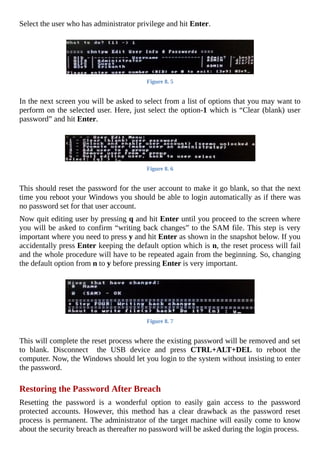
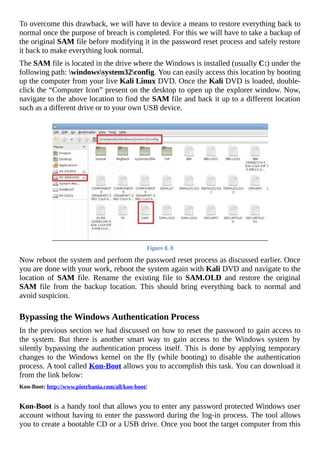
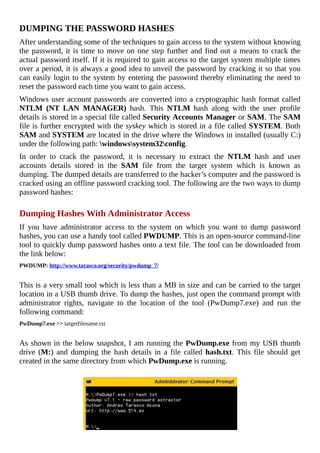
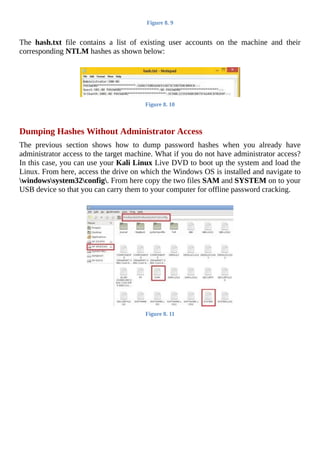
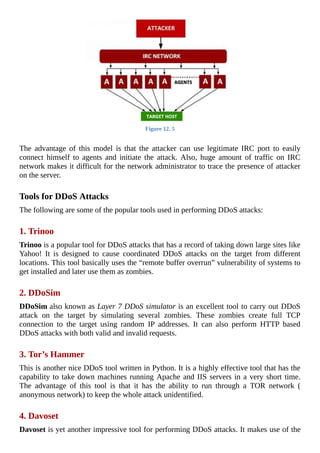
HOW	TO	HACK
HACKING	SECRETS	EXPOSED
A	BEGINNER’S	GUIDE
	
By:	Srikanth	Ramesh
howtohack.gohacking.com
	
Copyright	Notice
This	 book	 shall	 not	 be	 copied	 or	 reproduced	 unless	 you	 have	 obtained	 specific
permissions	for	the	same	from	the	author	Srikanth	Ramesh.	Any	unauthorized	use,
distribution	or	reproduction	of	this	eBook	is	strictly	prohibited.
	
Liability	Disclaimer
The	information	provided	in	this	book	is	to	be	used	for	educational	purposes	only.
The	creator	of	this	book	is	in	no	way	responsible	for	any	misuse	of	the	information
provided.	All	of	the	information	presented	in	this	book	is	meant	to	help	the	reader
develop	a	hacker	defence	attitude	so	as	to	prevent	the	attacks	discussed.	In	no	way
shall	the	information	provided	here	be	used	to	cause	any	kind	of	damage	directly	or
indirectly.	 The	 word	 “Hack”	 or	 “Hacking”	 used	 extensively	 throughout	 this	 book
shall	be	regarded	as	“Ethical	Hack”	or	“Ethical	hacking”	respectively.
You	implement	all	the	information	provided	in	this	book	at	your	own	risk.
	
©	Copyright	2014	by	Srikanth	Ramesh.	All	rights	reserved.
Table	of	Contents
PREFACE
Chapter	1	-	Introduction
WHAT	IS	HACKING?
HACKER	CLASSIFICATION
ESSENTIAL	TERMINOLOGIES
HACKING	FAQS
Chapter	2	-	Essential	Concepts
COMPUTER	NETWORK
NETWORK	HOST
NETWORK	PROTOCOL
NETWORK	PORT
NETWORK	PACKET
DOMAIN	NAME	SYSTEM	(DNS)
FIREWALL
PROXY	SERVER
Chapter	3	-	Introduction	to	Linux
WHY	LINUX?
WINDOWS	VS.	LINUX
CHOOSING	A	LINUX	DISTRIBUTION
RUNNING	LINUX	FROM	A	LIVE	DISK
LINUX	BASICS
FURTHER	REFERENCES
Chapter	4	-	Programming
WHY	PROGRAMMING?
WHERE	SHOULD	I	START?
Chapter	5	-	Footprinting
WHAT	IS	FOOTPRINTING?
INFORMATION	GATHERING	METHODOLOGY
COUNTERMEASURES
Chapter	6	-	Scanning
DETECTING	LIVE	SYSTEMS
TYPES	OF	SCANNING
TOOLS	FOR	SCANNING
OS	FINGERPRINTING
CONCEALING	YOUR	IDENTITY
COUNTERMEASURES
Chapter	7	-	Hacking	Passwords
DICTIONARY	ATTACK
BRUTE-FORCE	ATTACK
RAINBOW	TABLE
PHISHING	ATTACK
COUNTERMEASURES
Chapter	8	-	Hacking	Windows
GAINING	ACCESS	TO	THE	SYSTEM
DUMPING	THE	PASSWORD	HASHES
CRACKING	THE	WINDOWS	PASSWORD
COUNTERMEASURES
Chapter	9	-	Malware
MALWARE	VARIANTS	AND	COMMON	TECHNIQUES
COUNTERMEASURES
Chapter	10	-	Hiding	Information
WINDOWS	HIDDEN	ATTRIBUTE
NTFS	ALTERNATE	DATA	STREAMS
STEGANOGRAPHY
USING	TOOLS	FOR	HIDING	INFORMATION
Chapter	11	-	Sniffing
TYPES	OF	SNIFFING
TECHNIQUES	FOR	ACTIVE	SNIFFING
DNS	CACHE	POISONING
MAN-IN-THE-MIDDLE	ATTACK
TOOLS	FOR	SNIFFING
COUNTERMEASURES
Chapter	12	-	Denial	of	Service
WHAT	IS	DENIAL	OF	SERVICE	(DOS)	ATTACK?
DISTRIBUTED	DENIAL	OF	SERVICE	(DDOS)	ATTACK
COUNTERMEASURES
Chapter	13	-	Wireless	Hacking
WIRELESS	NETWORK	BASICS
WIRELESS	SNIFFING
WIRED	EQUIVALENT	PRIVACY	(WEP)
WI-FI	PROTECTED	ACCESS	(WPA)
DENIAL	OF	SERVICE	(DOS)	ATTACKS
COUNTERMEASURES
Chapter	14	-	Web	Application	Vulnerabilities
WEB	APPLICATION	BASICS
TYPES	OF	WEB	APPLICATION	VULNERABILITIES
TOOLS	FOR	VULNERABILITY	SCANNING
Chapter	15	-	Hacking	Internet	Users
COMMON	HACKING	TECHNIQUES
CONCLUSION
PREFACE
	
Congratulations	on	your	purchase	of	“Hacking	Secrets	Exposed:	A	Beginner’s	Guide“.
This	book	will	take	you	through	the	concepts	of	computer	hacking	in	a	very	simple	and
easy	to	follow	manner	so	that	even	the	readers	with	no	prior	knowledge	of	hacking	should
be	 able	 to	 easily	 understand	 the	 concept.	 To	 start	 off,	 all	 you	 need	 is	 a	 little	 working
knowledge	of	computers,	operating	system	(Windows)	and	an	Internet	connection.
Many	of	the	popular	books	that	I	have	read	on	ethical	hacking	are	mostly	suitable	only	for
those	 who	 already	 have	 a	 considerable	 amount	 of	 knowledge	 in	 the	 field.	 Also,	 these
books	dive	too	much	into	the	theory	part	presenting	the	reader	with	lots	of	unnecessary
explanation,	 thereby	 adding	 to	 the	 bulk	 of	 the	 book.	 This	 may	 cause	 the	 reader	 to
gradually	lose	interest	in	the	book	or	quit	reading	in	the	mid	way.
So,	I	decided	to	come	up	with	a	book	that	demands	no	prior	knowledge	of	the	topic	and	is
easy	for	the	readers	to	follow	and	comprehend	at	every	point.	Instead	of	stuffing	the	book
with	conventional	paragraphing	kind	of	content,	I	prefer	to	present	the	topics	in	an	easy	to
follow	manner	by	including	bullet	points,	illustrations	and	practical	examples.	This	may
keep	the	book	slender	but	it	still	manages	to	effectively	appeal	to	the	reader’s	quest	for
knowledge.	I	have	also	decided	to	drop	obsolete	concepts	and	techniques	from	the	book
and	only	keep	those	that	are	active	and	feasible	in	the	present	day	scenario.
When	you	finish	reading	this	book,	you	should	be	able	to	apply	the	knowledge	and	skills
that	you	have	gained	in	many	ways:
	
You	 can	 adopt	 the	 hacker’s	 mindset	 and	 start	 to	 think	 and	 react	 to	 situations	 and
problems	just	like	the	hacker	would	do.	After	all,	hacking	is	just	a	mindset	more	than
a	skill	set!	
	
You	should	easily	be	able	to	protect	yourself	from	all	those	wicked	hackers	out	there
by	maintaining	the	security	of	your	online	accounts,	web	server	or	your	own	personal
computer.
	
This	book	lays	the	foundation	required	to	start	off	your	career	as	an	ethical	hacker
where	you	can	begin	to	apply	the	knowledge	and	skills	in	your	profession.	
	
HOW	TO	USE	THIS	BOOK?
This	 book	 will	 cover	 the	 concepts	 of	 computer	 hacking	 for	 both	 Windows	 and	 Linux
operating	systems.	For	Windows	based	practical	examples	and	illustrations,	I	have	used
my	Windows	8.1	 PC.	 For	 Linux	 based	 examples	 I	 have	 used	 Kali	 Linux	 1.0.9a	 live
DVD.	 Since	 most	 examples	 are	 not	 specific	 of	 the	 operating	 system	 version,	 you	 can
implement	them	on	any	version	of	Windows	and	Linux	installed	on	your	computer.	
Each	chapter	including	all	the	concepts	presented	in	this	book	are	laid	out	in	a	hierarchical
manner	where	one	concept	forms	the	foundation	for	the	other.	This	may	not	be	true	for
every	chapter	but	in	many	cases	the	concepts	discussed	in	the	earlier	part	of	the	book	may
seem	 to	 form	 the	 key	 elements	 in	 understanding	 the	 subsequent	 concepts.	 Therefore,	 I
recommend	reading	this	book	in	an	orderly	manner	and	not	skip	the	concepts	or	chapters
in	between.
Throughout	this	book,	you	will	be	presented	with	many	illustrative	examples,	analogies
and	 eye-catching	 diagrams	 that	 will	 not	 only	 make	 the	 whole	 understanding	 process
easier,	but	also	makes	the	learning	process	a	fun!	I	hope	you	like	this	book	and	enjoy	the
concepts	presented	in	it.
Chapter	1	-	Introduction
	
I	bet	most	of	you	are	really	excited	to	get	started.	But,	before	we	actually	move	on	to
learning	how	to	hack,	let	us	begin	to	understand	what	hacking	really	means.
WHAT	IS	HACKING?
In	 the	 field	 of	 computer	 security,	 hacking	 simply	 refers	 to	 the	 act	 of	 exploiting	 the
weakness	that	exists	in	a	computer	system	or	a	computer	network.
In	other	works,	a	hacker	is	someone	who	has	developed	a	deeper	interest	in	understanding
how	the	computer	system	or	the	software	program	works,	so	that	he	can	take	control	of	the
computer	by	exploiting	any	of	the	existing	vulnerabilities	in	it.
HACKER	CLASSIFICATION
Based	on	the	attitude	and	skill	level	they	possess,	hackers	are	classified	into	the	following
types:
	
White	Hat	Hacker:	A	white	hat	hacker	(also	known	as	ethical	hacker)	is	someone
who	uses	his	skills	only	for	defensive	purposes	such	as	penetration	testing.	These
type	of	hackers	are	often	hired	by	many	organizations	in	order	to	ensure	the	security
of	their	information	systems.
	
Black	Hat	Hacker:		A	black	hat	hacker	(also	known	as	cracker)	is	someone	who
always	uses	his	skills	for	offensive	purposes.	The	intention	of	black	hat	hackers	is	to
gain	money	or	take	personal	revenge	by	causing	damage	to	information	systems.
	
Grey	Hat	Hacker:		A	grey	hat	hacker	is	someone	who	falls	in	between	the	white	hat
and	black	hat	category.	This	type	of	hacker	may	use	his	skills	both	for	defensive	and
offensive	purposes.
Script	Kiddie:	A	script	kiddie	is	a	wannabe	hacker.	These	are	the	ones	who	lack	the
knowledge	of	how	a	computer	system	really	works	but	use	ready-made	programs,
tools	and	scripts	to	break	into	computers.
ESSENTIAL	TERMINOLOGIES
Before	proceeding	further,	the	following	are	some	of	the	essential	terminologies	in	the
field	of	hacking	that	one	should	be	aware	of:
	
Vulnerability:	A	vulnerability	is	an	existing	weakness	that	can	allow	the	attacker	to
compromise	the	security	of	the	system.
	
Exploit:	An	exploit	is	a	defined	way	(piece	of	software,	set	of	commands	etc.)	that
takes	advantage	of	an	existing	vulnerability	to	breach	the	security	of	an	IT	system.
	
Threat:	A	threat	 is	 a	 possible	 danger	 that	 can	 exploit	 an	 existing	 vulnerability	 to
cause	possible	harm.
	
Attack:	An	attack	 is	 any	 action	 that	 violates	 the	 security	 of	 the	 system.	 In	 other
words,	it	is	an	assault	on	the	system	security	that	is	derived	from	an	existing	threat.
HACKING	FAQS
Here	is	a	small	list	of	some	of	the	frequently	asked	questions	about	hacking:
	
How	long	does	it	take	to	become	a	hacker?
Hacking	is	not	something	that	can	be	mastered	overnight.	It	really	takes	quite	some	time
to	understand	and	implement	the	skills	that	actually	put	you	in	the	hacker’s	shoes.
So,	 for	 anyone	 who	 is	 wanting	 to	 become	 a	 hacker,	 all	 it	 takes	 is	 some	 creativity,
willingness	to	learn	and	perseverance.
	
What	skills	do	I	need	to	become	a	hacker?
In	 order	 to	 become	 a	 hacker,	 it	 is	 essential	 to	 have	 a	 basic	 understanding	 of	 how	 a
computer	system	works.	For	example,	you	may	start	off	with	basics	of	operating	system,
computer	networks	and	some	programming.
At	this	point	in	time,	you	need	not	worry	much	about	this	question	as	this	book	will	take
you	through	all	those	necessary	concepts	to	establish	the	skills	that	you	need	to	possess	as
a	hacker.
	
What	is	the	best	way	to	learn	hacking?
As	said	earlier,	the	best	way	to	learn	hacking	is	to	start	off	with	the	basics.	Once	you	have
established	the	basic	skills,	you	can	take	it	even	further	by	going	through	the	books	that
discuss	individual	topics	in	a	much	detailed	fashion.	Do	not	forget	the	power	of	Internet
when	it	comes	to	acquiring	and	expanding	your	knowledge.
Chapter	2	-	Essential	Concepts
	
Now,	let	us	begin	to	understand	some	of	the	basic	concepts	that	are	essential	in	laying	the
groundwork	for	our	journey	of	learning	how	to	hack.	Before	actually	jumping	into	the
hands-on	approach,	it	is	highly	necessary	for	one	to	have	a	thorough	understanding	of	the
basics	of	computer	network	and	their	working	model.	In	this	chapter	you	will	find	a	brief
description	 of	 various	 concepts	 and	 terminologies	 related	 to	 computer	 networks,
encryption	and	security.
COMPUTER	NETWORK
A	 computer	 network	 is	 a	 group	 of	 two	 or	 more	 computers	 linked	 together	 so	 that
communication	 between	 individual	 computers	 is	 made	 possible.	 Some	 of	 the	 common
types	of	computer	network	include:
	
Local	Area	Network	(LAN)
This	 is	 a	 type	 of	 computer	 network	 where	 interconnected	 computers	 are	 situated	 very
close	to	each	other	say	for	example,	inside	the	same	building.
	
Wide	Area	Network	(WAN)
This	is	a	type	of	computer	network	where	interconnected	computers	are	separated	by	a
large	distance	(a	few	km	to	few	hundreds	of	km)	and	are	connected	using	telephone	lines
or	radio	waves.
	
Internet
The	Internet	is	the	largest	network	which	interconnects	various	LANs	and	WANs.	It	is	a
global	system	of	various	interconnected	computer	networks	belonging	to	government	or
private	organizations.
NETWORK	HOST
A	network	host	(or	simply	referred	to	as	a	host)	can	be	any	computer	or	network	device
connected	 to	 the	 computer	 network.	 This	 computer	 can	 be	 a	 terminal	 or	 a	 web	 server
offering	services	to	its	clients.
NETWORK	PROTOCOL													
A	network	protocol	(or	just	referred	to	as	protocol)	is	a	set	of	rules	and	conventions	that
are	 necessary	 for	 the	 communication	 between	 two	 network	 devices.	 For	 example,	 two
computers	on	a	network	can	communicate	only	if	they	agree	to	follow	the	protocols.
The	following	are	some	of	the	most	widely	referred	network	protocols:
	
Internet	Protocol	(IP	Address)
An	Internet	Protocol	address	(IP	address)	is	a	unique	number	assigned	to	each	computer
or	device	(such	as	printer)	so	that	each	of	them	can	be	uniquely	identified	on	the	network.
	
Types	of	IP	Address:
	
Private	IP	Address:	A	private	IP	address	is	the	one	that	is	assigned	to	a	computer	on	the
Local	Area	Network	(LAN).	A	typical	example	of	private	IP	address	would	be	something
like:
192.168.0.2
	
Public	 IP	 Address:	 A	 public	 IP	 address	 is	 the	 one	 that	 is	 assigned	 to	 a	 computer
connected	to	the	Internet.	An	example	public	IP	address	would	be	something	like:
59.93.115.125
	
In	most	cases	a	computer	gets	connected	to	the	ISP	network	using	a	private	IP.	Once	a
computer	is	on	the	ISP	network	it	will	be	assigned	a	public	IP	address	using	which	the
communication	with	the	Internet	is	made	possible.
	
How	to	Find	the	IP	Address	of	a	Computer?
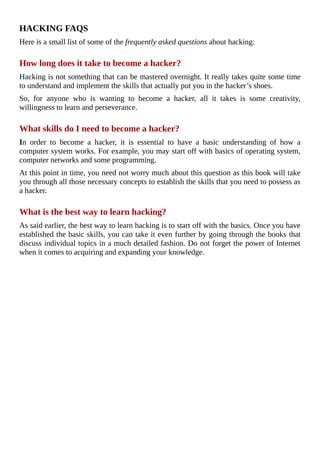
Finding	your	public	IP	is	extremely	simple.	Just	type	“what	is	my	IP”	on	Google	to	see
your	public	IP	address	displayed	in	search	results.
	
Figure	2.	1
	
In	order	to	find	your	private	IP,	just	open	the	command	prompt	window	(type	cmd	in	the
“Run”	box)	and	enter	the	following	command:
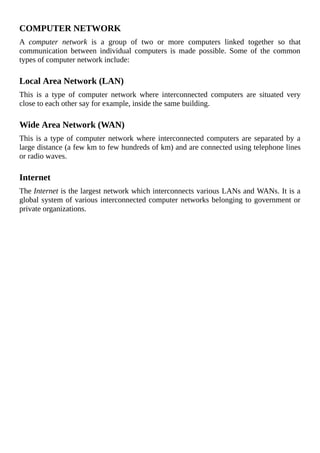
ipconfig/all
	
Figure	2.	2
	
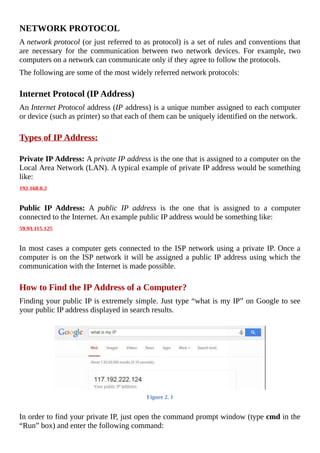
This	will	display	a	long	list	of	details	about	your	computer’s	network	devices	and	their
configuration.	To	see	your	private	IP	address,	just	scroll	down	to	find	something	as	“IPv4
Address”	which	is	nothing	but	your	private	IP.
Figure	2.	3
	
Hyper	Text	Transfer	Protocol	(HTTP)
The	Hyper	Text	Transfer	Protocol	provides	a	standard	for	communication	between	web
browsers	and	the	server.	It	is	one	of	the	most	widely	used	protocol	on	the	Internet	for
requesting	documents	such	as	web	pages	and	images.
Example:	http://www.example.com
	
File	Transfer	Protocol	(FTP)
The	 File	 Transfer	 Protocol	 provides	 a	 standard	 for	 transferring	 files	 between	 two
computers	 on	 the	 network.	 FTP	 is	 most	 widely	 used	 in	 carrying	 out	 upload/download
operations	between	a	server	and	a	workstation.
Example:ftp://www.example.com
	
Simple	Main	Transfer	Protocol	(SMTP)
The	 Simple	 Mail	 Transfer	 Protocol	 provides	 a	 standard	 for	 sending	 e-mails	 from	 one
server	 to	 another.	 Most	 e-mail	 systems	 that	 send	 mail	 over	 the	 Internet	 use	 SMTP	 to
exchange	messages	between	the	server.
	
Telnet
Telnet	is	a	network	protocol	that	allows	you	to	connect	to	remote	hosts	on	the	Internet	or
on	a	local	network.	It	requires	a	telnet	client	software	to	implement	the	protocol	using
which	the	connection	is	established	with	the	remote	computer.
In	 most	 cases	 telnet	 requires	 you	 to	 have	 a	 username	 and	 a	 password	 to	 establish
connection	 with	 the	 remote	 host.	 Occasionally,	 some	 hosts	 also	 allow	 users	 to	 make
connection	as	a	guest	or	public.
After	the	connection	is	made,	one	can	use	text	based	commands	to	communicate	with	the
remote	host.	The	syntax	for	using	the	telnet	command	is	as	follows:
telnet	<hostname	or	IP>	port
	
Example:telnet	127.0.0.1	25
	
SSH	(Secure	Shell)
SSH	is	a	protocol	similar	to	telnet	which	also	facilitates	connection	to	remote	hosts	for
communication.	However,	SSH	has	an	upper	hand	over	telnet	in	terms	of	security.	Telnet
was	primarily	designed	to	operate	within	the	local	network	and	hence	does	not	take	care	of
security.	 On	 the	 other	 hand	 SSH	 manages	 to	 offer	 total	 security	 while	 connecting	 to
remote	hosts	on	a	remote	network	or	Internet.
Akin	to	telnet	SSH	also	uses	a	client	software	and	requires	a	username	and	password	to
establish	connection	with	the	remote	host.
NETWORK	PORT
A	computer	may	be	running	several	services	on	it	like	HTTP	(web	server),	SMTP,	FTP
and	so	on.	Each	of	these	services	are	uniquely	identified	by	a	number	called	network	port
(or	simply	referred	to	as	port).	If	a	computer	wants	to	avail	a	specific	service	from	another
computer,	 it	 has	 to	 establish	 a	 connection	 to	 it	 on	 the	 exact	 port	 number	 where	 the
intended	service	is	running.
For	example,	if	a	terminal	is	to	request	a	web	document	from	a	remote	server	using	HTTP,
it	has	to	first	establish	a	connection	with	the	remote	server	on	port	80	(HTTP	service	runs
on	port	80)	before	placing	the	request.
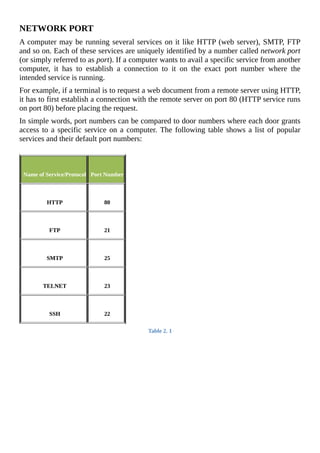
In	simple	words,	port	numbers	can	be	compared	to	door	numbers	where	each	door	grants
access	to	a	specific	service	on	a	computer.	The	following	table	shows	a	list	of	popular
services	and	their	default	port	numbers:
	
	
	Name	of	Service/Protocol
	
	Port	Number
	
	HTTP
	
	80
	
	FTP
	
	21
	
	SMTP
	
	25
	
	TELNET
	
	23
	
	SSH
	
	22
Table	2.	1
NETWORK	PACKET
A	network	packet	(data	packet,	datagram	or	simply	called	as	packet)	is	a	basic	unit	of	data
sent	from	one	host	to	another	over	a	network.	When	data	(such	as	a	mail,	message	or	a
file)	has	to	be	transmitted	between	two	hosts,	it	is	fragmented	into	small	structures	called
packets	and	are	reassembled	at	the	destination	to	make	the	original	data	chunk.
Each	packet	consists	of	the	fragmented	data	along	with	the	necessary	information	that	will
help	it	get	to	its	destination	such	as	the	sender’s	IP	address,	intended	receiver’s	IP	address,
target	port	number,	the	total	number	of	packets	the	original	data	chunk	has	been	broken
into	and	the	sequence		number	of	the	particular	packet.
DOMAIN	NAME	SYSTEM	(DNS)
A	Domain	Name	System	or	Domain	Name	Service	(DNS)	is	a	network	protocol	whose	job
is	to	map	domain	names	such	as	“gohacking.com”	to	its	corresponding	IP	address	like
“104.28.6.51”.
Since	Internet	is	the	mother	of	millions	of	computers		each	having	a	unique	IP	address,	it
becomes	impossible	for	people	to	remember	the	IP	address	of	each	and	every	computer
they	 want	 to	 access.	 So,	 in	 order	 to	 make	 this	 process	 simpler	 the	 concept	 of	 domain
names	was	introduced.	As	a	result	users	can	easily	access	any	website	just	by	typing	their
domain	names	in	the	browser’s	address	bas	such	as	“google.com”	or	“yahoo.com”	without
having	to	remember	their	actual	IP	addresses.
However,	since	the	network	protocol	understands	only	the	IP	address	and	not	the	domain
names,	it	is	necessary	to	translate	the	domain	name	back	to	its	corresponding	IP	address
before	 establishing	 a	 connection	 with	 the	 target	 server.	 This	 is	 where	 DNS	 comes	 in
handy.
Your	 Internet	 Service	 Provider	 has	 a	 DNS	 server	 which	 maintains	 a	 huge	 record	 of
existing	domain	names	and	their	corresponding	IP	addresses.	Each	time	you	type	the	URL
such	as	“http://www.google.com”	on	your	browser’s	address	bar,	your	computer	will	use
the	 DNS	 server	 from	 the	 ISP	 and	 translates	 the	 domain	 name	 “google.com”	 to	 its
corresponding	IP	address	to	make	a	connection	with	the	Google’s	server.	All	this	process
will	happen	in	a	split	second	behind	the	scenes	and	hence	goes	unnoticed.
	
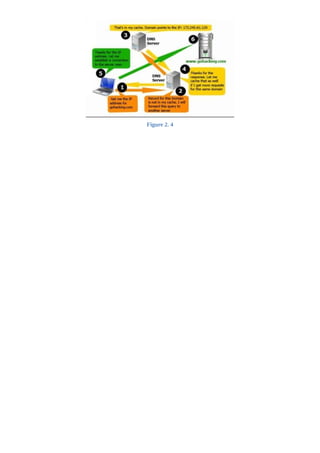
How	DNS	Works?
Let	us	understand	the	working	of	Domain	Name	System	using	the	following	example:
Whenever	 you	 type	 a	 URL	 such	 as	 “http://www.gohacking.com”	 on	 your	 browser’s
address	bar,	your	computer	will	send	a	request	to	the	local	name	server	(the	ISP	DNS
server)	to	resolve	the	domain	name	to	its	corresponding	IP	address.	This	request	is	often
referred	to	as	a	DNS	query.
The	local	name	server	will	receive	the	query	to	find	out	whether	it	contains	the	matching
name	and	IP	address	in	its	database.	If	found,	the	corresponding	IP	address	(response)	is
returned.	If	not,	the	query	is	automatically	passed	on	to	another	DNS	server	that	is	in	the
next	higher	level	of	DNS	hierarchy.	This	process	continues	until	the	query	reaches	the
DNS	server	that	contains	the	matching	name	and	IP	address.	The	IP	address	(response)
then	flows	back	the	chain	in	the	reverse	order	to	your	computer.	The	following	figure	2.4
illustrates	the	above	process.
Figure	2.	4
FIREWALL
Firewalls	are	basically	a	barrier	between	your	computer	(or	a	network)	and	the	Internet
(outside	world).	A	firewall	can	be	simply	compared	to	a	security	guard	who	stands	at	the
entrance	of	your	house	and	filters	the	visitors	coming	to	your	place.	He	may	allow	some
visitors	 to	 enter	 while	 deny	 others	 whom	 he	 suspects	 of	 being	 intruders.	 Similarly	 a
firewall	 is	 a	 software	 program	 or	 a	 hardware	 device	 that	 filters	 the	 information
(packets)	coming	through	the	Internet	to	your	personal	computer	or	a	computer	network.
	
How	Firewall	Works?
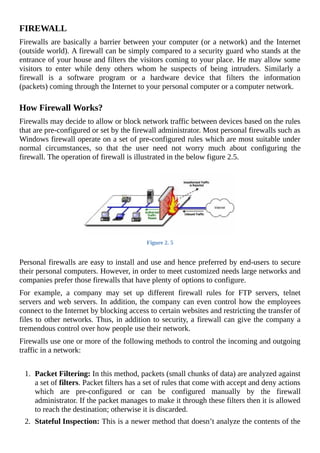
Firewalls	may	decide	to	allow	or	block	network	traffic	between	devices	based	on	the	rules
that	are	pre-configured	or	set	by	the	firewall	administrator.	Most	personal	firewalls	such	as
Windows	firewall	operate	on	a	set	of	pre-configured	rules	which	are	most	suitable	under
normal	 circumstances,	 so	 that	 the	 user	 need	 not	 worry	 much	 about	 configuring	 the
firewall.	The	operation	of	firewall	is	illustrated	in	the	below	figure	2.5.
	
Figure	2.	5
	
Personal	firewalls	are	easy	to	install	and	use	and	hence	preferred	by	end-users	to	secure
their	personal	computers.	However,	in	order	to	meet	customized	needs	large	networks	and
companies	prefer	those	firewalls	that	have	plenty	of	options	to	configure.
For	 example,	 a	 company	 may	 set	 up	 different	 firewall	 rules	 for	 FTP	 servers,	 telnet
servers	and	web	servers.	In	addition,	the	company	can	even	control	how	the	employees
connect	to	the	Internet	by	blocking	access	to	certain	websites	and	restricting	the	transfer	of
files	to	other	networks.	Thus,	in	addition	to	security,	a	firewall	can	give	the	company	a
tremendous	control	over	how	people	use	their	network.
Firewalls	use	one	or	more	of	the	following	methods	to	control	the	incoming	and	outgoing
traffic	in	a	network:
	
1.	 Packet	Filtering:	In	this	method,	packets	(small	chunks	of	data)	are	analyzed	against
a	set	of	filters.	Packet	filters	has	a	set	of	rules	that	come	with	accept	and	deny	actions
which	 are	 pre-configured	 or	 can	 be	 configured	 manually	 by	 the	 firewall
administrator.	If	the	packet	manages	to	make	it	through	these	filters	then	it	is	allowed
to	reach	the	destination;	otherwise	it	is	discarded.
2.	 Stateful	Inspection:	This	is	a	newer	method	that	doesn’t	analyze	the	contents	of	the
packets.	 Instead,	 it	 compares	 certain	 key	 aspects	 of	 each	 packet	 to	 a	 database	 of
trusted	 source.	 Both	 incoming	 and	 outgoing	 packets	 are	 compared	 against	 this
database	 and	 if	 the	 comparison	 yields	 a	 reasonable	 match,	 then	 the	 packets	 are
allowed	to	travel	further.	Otherwise	they	are	discarded.
	
Firewall	Configuration:
Firewalls	can	be	configured	by	adding	one	or	more	filters	based	on	several	conditions	as
mentioned	below:
	
1.	 											IP	addresses:	In	any	case,	if	an	IP	address	outside	the	network	is	said	to	be
unfavourable,	then	it	is	possible	to	set		filter	to	block	all	the	traffic	to	and	from
that	IP	address.	For	example,	if	a	certain	IP	address	is	found	to	be	making	too
many	 connections	 to	 a	 server,	 the	 administrator	 may	 decide	 to	 block
traffic	from	this	IP	using	the	firewall.
2.	 	 	 	 	 	 	 	 	 	 	 Domain	names:	Since	it	is	difficult	to	remember	the	IP	addresses,	it	is	an
easier	 and	 smarter	 way	 to	 configure	 the	 firewalls	 by	 adding	 filters	 based	 on
domain	names.	By	setting	up	a	domain	filter,	a	company	may	decide	to	block	all
access	 to	 certain	 domain	 names,	 or	 may	 provide	 access	 only	 to	 a	 list	 of
selected	domain	names.
3.	 	 	 	 	 	 	 	 	 	 	 Ports/Protocols:	If	the	services	running	on	a	given	port	is	intended	for	the
public	or	network	users,	they	are	usually	kept	open.	Otherwise	they	are	blocked
using	 the	 firewall	 so	 as	 to	 prevent	 intruders	 from	 using	 the	 open	 ports	 for
making	unauthorized	connections.
4.	 										Specific	words	or	phrases:	A	firewall	can	be	configured	to	filter	one	or	more
specific	words	or	phrases	so	that	both	the	incoming	and	outgoing	packets	are
scanned	for	the	words	in	the	filter.
For	 example,	 you	 may	 set	 up	 a	 firewall	 rule	 to	 filter	 any	 packet	 that
contains	an	offensive	term	or	a	phrase	that	you	may	decide	to	block	from
entering	or	leaving	your	network.
	
Hardware	vs.	Software	Firewall:
Hardware	firewalls	provide	higher	level	of	security	and	hence	preferred	for	servers	where
security	 has	 the	 top	 most	 priority.	 The	 software	 firewalls	 on	 the	 other	 hand	 are	 less
expensive	and	hence	preferred	in	home	computers	and	laptops.
Hardware	 firewalls	 usually	 come	 as	 an	 in-built	 unit	 of	 a	 router	 and	 provide	 maximum
security	as	it	filters	each	packet	at	the	hardware	level	itself	even	before	it	manages	to	enter
your	computer.	A	good	example	is	the	Linksys	Cable/DSL	router.
PROXY	SERVER
In	a	computer	network,	a	proxy	server	is	any	computer	system	offering	a	service	that	acts
as	an	intermediary	between	the	two	communicating	parties,	the	client	and	the	server.
In	the	presence	of	a	proxy	server,	there	is	no	direct	communication	between	the	client	and
the	server.	Instead,	the	client	connects	to	the	proxy	server	and	sends	requests	for	resources
such	as	a	document,	web	page	or	a	file	that	resides	on	a	remote	server.	The	proxy	server
handles	 this	 request	 by	 fetching	 the	 required	 resources	 from	 the	 remote	 server	 and
forwarding	the	same	to	the	client.
	
How	Proxy	Server	Works?
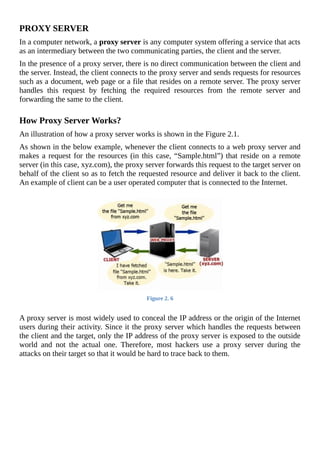
An	illustration	of	how	a	proxy	server	works	is	shown	in	the	Figure	2.1.
As	shown	in	the	below	example,	whenever	the	client	connects	to	a	web	proxy	server	and
makes	a	request	for	the	resources	(in	this	case,	“Sample.html”)	that	reside	on	a	remote
server	(in	this	case,	xyz.com),	the	proxy	server	forwards	this	request	to	the	target	server	on
behalf	of	the	client	so	as	to	fetch	the	requested	resource	and	deliver	it	back	to	the	client.
An	example	of	client	can	be	a	user	operated	computer	that	is	connected	to	the	Internet.
	
Figure	2.	6
	
A	proxy	server	is	most	widely	used	to	conceal	the	IP	address	or	the	origin	of	the	Internet
users	during	their	activity.	Since	it	the	proxy	server	which	handles	the	requests	between
the	client	and	the	target,	only	the	IP	address	of	the	proxy	server	is	exposed	to	the	outside
world	 and	 not	 the	 actual	 one.	 Therefore,	 most	 hackers	 use	 a	 proxy	 server	 during	 the
attacks	on	their	target	so	that	it	would	be	hard	to	trace	back	to	them.
Chapter	3	-	Introduction	to	Linux
	
Linux	 is	 a	 UNIX-like	 operating	 system	 which	 is	 open-source	 and	 freely	 available	 for
download.	Compared	to	Windows	operating	system	Linux	is	more	secure,	stable,	reliable,
multi-user	capable	and	compatible	with	both	server	and	desktop	usage.	This	makes	it	one
of	the	most	popular	operating	system	next	to	Windows.
WHY	LINUX?
As	 an	 ethical	 hacker,	 it	 is	 most	 essential	 to	 have	 a	 sound	 understanding	 of	 the	 Linux
platform,	its	usage	and	commands.	Linux	is	widely	recognized	as	the	“hacker’s	operating
system”	and	if	you	are	wondering	why,	the	reasons	are	below:
	
Since	it	is	a	freeware,	highly	secure	and	stable	operating	system,	millions	of	servers
on	the	Internet	runs	on	Linux.
	
Unlike	Windows	OS	which	is	built	on	graphical	user	interface	(GUI),	Linux	is	built
on	command	user	interface	(CUI)	and	thus	offers	greater	control	and	customization
options	for	hackers.
	
Some	of	the	best	hacking	scripts	and	programs	are	designed	only	for	Linux.
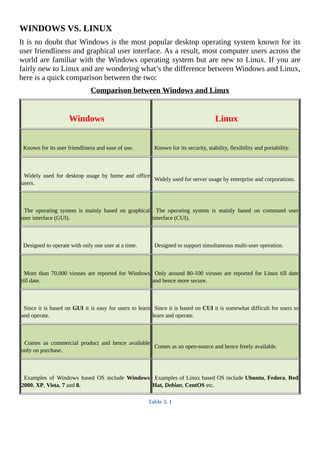
WINDOWS	VS.	LINUX
It	is	no	doubt	that	Windows	is	the	most	popular	desktop	operating	system	known	for	its
user	friendliness	and	graphical	user	interface.	As	a	result,	most	computer	users	across	the
world	are	familiar	with	the	Windows	operating	system	but	are	new	to	Linux.	If	you	are
fairly	new	to	Linux	and	are	wondering	what’s	the	difference	between	Windows	and	Linux,
here	is	a	quick	comparison	between	the	two:
Comparison	between	Windows	and	Linux
	
	Windows
	
	Linux
	
	Known	for	its	user	friendliness	and	ease	of	use.
	
	Known	for	its	security,	stability,	flexibility	and	portability.
	
	Widely	 used	 for	 desktop	 usage	 by	 home	 and	 office
users.
	
	Widely	used	for	server	usage	by	enterprise	and	corporations.
	
	The	 operating	 system	 is	 mainly	 based	 on	 graphical
user	interface	(GUI).
	
	 The	 operating	 system	 is	 mainly	 based	 on	 command	 user
interface	(CUI).
	
	Designed	to	operate	with	only	one	user	at	a	time.
	
	Designed	to	support	simultaneous	multi-user	operation.
	
	More	than	70,000	viruses	are	reported	for	Windows
till	date.
	
	Only	around	80-100	viruses	are	reported	for	Linux	till	date
and	hence	more	secure.
	
	Since	it	is	based	on	GUI	it	is	easy	for	users	to	learn
and	operate.
	
	Since	it	is	based	on	CUI	it	is	somewhat	difficult	for	users	to
learn	and	operate.
	
	Comes	 as	 commercial	 product	 and	 hence	 available
only	on	purchase.
	
	Comes	as	an	open-source	and	hence	freely	available.
	
	Examples	 of	 Windows	 based	 OS	 include	 Windows
2000,	XP,	Vista,	7	and	8.
	
	Examples	of	Linux	based	OS	include	Ubuntu,	Fedora,	Red
Hat,	Debian,	CentOS	etc.
Table	3.	1
CHOOSING	A	LINUX	DISTRIBUTION
A	 Linux	 distribution	 is	 a	 collection	 of	 software	 and	 applications	 compiled	 around	 the
Linux	kernel	(central	component	of	the	operating	system).	You	can	choose	from	a	wide
variety	of	Linux	distributions	like	Ubuntu,	Fedora	or	Debian	where	each	of	them	contain
their	own	collection	of	software	and	applications	but	shares	a	common	Linux	kernel.	As	a
beginner	you	can	choose	Ubuntu	as	it	easy	to	install	and	user	friendly.	You	can	find	the
download	link	and	installation	guide	from	the	official	Ubuntu	website	for	which	the	link	is
mentioned	below:
Official	Ubuntu	Website:	http://www.ubuntu.com/
RUNNING	LINUX	FROM	A	LIVE	DISK
There	are	two	ways	to	use	a	Linux	operating	system.	One	is	to	install	the	operating	system
on	to	the	hard	drive	just	like	you	do	it	for	the	Windows.	However,	this	method	requires	a
prior	experience	of	installing	and	configuring	the	operating	systems.	If	you	are	new	to
Linux	or	do	not	have	a	prior	experience	of	OS	installation,	you	can	use	a	live	disk	option
such	as	CD	or	DVD	to	run	and	use	Linux.	This	in	fact	is	a	good	alternative	to	installation
and	provides	an	easy	way	to	get	Linux	running	on	your	system	without	modifying	any	of
its	 previous	 settings	 and	 existing	 file	 system.	 But	 this	 option	 does	 not	 save	 your	 work
upon	 shutting	 down	 your	 computer	 and	 hence	 suitable	 only	 for	 usage	 like	 penetration
testing	and	learning.
One	of	my	favourite	distribution	for	hacking	and	penetration	testing	is	Kali	Linux.	This	is
based	 on	 Debian	 GNU/Linux	 platform	 and	 comes	 in	 the	 form	 of	 a	 live	 DVD	 with	 an
option	to	install	as	well.	You	can	download	the	ISO	image	for	the	DVD	version	freely
from	the	Kali	Linux	official	website.	The	link	to	the	website	is	given	below:
Kali	Website:	https://www.kali.org/downloads/
	
After	the	download	is	complete	you	can	burn	the	ISO	image	onto	the	DVD	using	a	free
program	 like	 ImgBurn.	 This	 should	 give	 you	 a	 bootable	 live	 Kali	 DVD.	 For	 your
reference,	I	have	used	the	64-bit	1.0.9a	version	of	the	Kali	Linux	live	DVD	in	all	my
examples	and	demonstrations	throughout	this	book.
LINUX	BASICS
Linux	operating	system	was	developed	in	1991	by	Linus	Torvalds	when	he	was	a	student
of	Helsinki	University,	Finland.	He	posted	about	the	source	code	that	he	developed	in	the
Minix	news	group.	The	feedback	was	good	and	the	source	code	started	to	spread	around
the	 world	 via	 FTP	 and	 over	 the	 years	 Linux	 became	 a	 very	 popular	 operating	 system.
Today,	many	great	network	programs,	security	tools	and	servers	including	DNS,	Email
and	Web	server	are	being	developed	for	Linux	by	programmers	and	hackers	around	the
world.
	
Linux	System	Organization
The	functioning	of	Linux	is	organized	in	terms	of	the	following	layers	as	shown	in	the
Figure	below:
	
Hardware	Layer	consists	of	the	actual	hardware	devices	like	CPU,	Memory,	Hard
Disk	Drive	etc.
	
Kernel	is	the	core	component	which	lies	at	the	heart	of	the	operating	system	that
directly	interacts	with	the	hardware	using	the	machine	language.
	
Figure	3.	1
	
	
Shell	(or	the	command	interpreter)	acts	as	a	mediator	that	takes	commands	from	the
user	and	then	conveys	them	to	the	kernel	which	ultimately	executes	them.
	
Tools	 and	 Applications	 reside	 on	 the	 outer	 crust	 and	 gives	 user	 most	 of	 the
functionalities	of	an	operating	system.
	
Linux	Directory	Structure
A	 directory	structure	 is	 the	 way	 in	 which	 the	 file	 system	 and	 its	 files	 of	 an	 operating
system	are	displayed	to	the	user.	People	who	are	new	to	the	Linux	operating	system	and
the	structure	of	its	File	System	often	find	it	troublesome	and	messed	up	in	dealing	with
the	files	and	their	location.	So,	let	us	begin	to	explore	some	of	the	basic	information	about
the	Linux	File	System.
Any	standard	Linux	distribution	has	the	following	directory	structure	as	shown	below:
	
Figure	3.	2
	
Below	is	a	brief	description	of	the	purpose	and	contents	of	each	directory:
	
/	-	ROOT	Directory
Every	single	file	and	the	directory	of	the	Linux	file	system	starts	from	the	root	directory.
Only	“root”	user	has	the	write	privilege	to	this	directory.
	
/bin	-	Binaries
Contains	executable	binary	files	required	for	booting	and	repairing	of	the	system.	Also
contains	file	and	commands	required	to	run	in	single	user-mode	such	as:	ls,	ping,	grep	etc.
	
/lib	-	System	Libraries
Contains	system	libraries	and	kernel	modules	required	for	the	booting	of	the	system.
	
/dev	-	Device	Files
Contains	device	related	files	for	all	the	hardware	devices	of	the	system.
	
/etc	-	Configuration	Files
Contains	 configuration	 files	 required	 by	 all	 programs.	 It	 also	 contains	 start-up	 and
shutdown	shell	scripts	used	to	start	or	stop	individual	programs.
	
/home	-	Home	Directories
This	forms	the	“home	directory”	of	individual	users	to	store	their	personal	information.
Every	time	a	new	user	is	added,	a	new	directory	is	created	in	the	name	of	the	user	under
“/home”.
	
/user	-	User	Programs
This	 directory	 is	 used	 to	 store	 executable	 binaries,	 documentation,	 source-code	 files
and	libraries	for	second	level	programs.
	
/tmp	-	Temporary	Files
Contains	temporary	files	for	system	and	users.
	
/var	-	Variable	Files
Contains	files	whose	size	is	expected	to	grow.	Examples	of	such	files	include	log	files,
print	queues,	lock	files	and	temp	files.
	
Linux	Commands
All	 commands	 in	 Linux	 are	 typed	 in	 lowercase	 and	 are	 case	 sensitive.	 Each	 Linux
command	 has	 to	 be	 typed	 and	 executed	 in	 a	 window	 called	 “terminal	 emulator”	 or
simply	 referred	 to	 as	 a	 terminal.	 It	 is	 a	 program	 similar	 to	 the	 command	 prompt	 of
Microsoft	Windows	where	a	user	can	run	the	commands	and	get	the	results	displayed.	A
terminal	 simply	 takes	 the	 user	 commands,	 passes	 it	 on	 to	 the	 shell	 for	 execution	 and
displays	the	results	back	to	the	user.
To	run	commands	in	the	terminal,	you	will	have	to	first	load	the	Linux	from	the	Live
DVD	that	you	have	created.	To	do	this,	just	insert	the	Kali	Linux	DVD	into	the	drive,	boot
from	it	and	select	the	“Live	option”.	Once	the	booting	is	completed	you	should	see	your
desktop	loaded	on	your	screen.
To	start	the	terminal	window,	just	click	right-click	on	the	desktop	and	select	the	option
Open	in	Terminal	as	shown	in	the	below	snapshot	3.1:
Figure	3.	3
Once	the	terminal	window	is	loaded	you	should	be	able	to	start	typing	the	commands.	A
snapshot	of	the	terminal	window	is	shown	below:
	
Figure	3.	4
	
Creating	Files
There	are	two	commands	for	creating	files:	touch	and	cat.	Here	is	how	they	are	to	be
used:
#	touch	sample
	
This	 creates	 an	 empty	 file	 called	 “sample”.	 If	 you	 want	 to	 create	 multiple	 empty	 files
quickly	it	can	be	done	as	follows:
#	touch	sample1	sample2	sample3	sample4	sample5
	
In	order	to	store	a	few	lines	of	data	onto	the	file	just	type	the	following	command:
#	cat	>	sample
When	you	press	the	Enter	key,	you	will	find	the	cursor	positioned	in	the	next	line	waiting
for	you	to	type	the	content	that	you	want	to	store	in	the	file	“sample”.	Just	type	in	the
following	line:
This	is	a	sample	file	containing	some	sample	text.
	
Once	 you	 are	 done,	 press	 Ctrl+D.	 This	 will	 save	 the	 contents	 onto	 the	 file	 and
automatically	 take	 you	 back	 to	 the	 #	 prompt.	 Now,	 to	 display	 the	 contents	 of	 the	 file
“sample”	just	type	the	command	as	follows:
#	cat	sample
	
This	should	display	the	contents	of	the	file	as	shown	in	the	snapshot	below:
	
Figure	3.	5
	
Editing	Files
To	edit	a	given	file	one	has	to	use	the	vi	command.	In	order	to	edit	a	given	file	“sample”
the	command	is	as	follows:
#	vi	sample
	
When	you	type	the	above	command	and	hit	Enter,	you	should	see	the	contents	of	the	file
“sample”	displayed	in	the	vi	editor	window	as	shown	in	the	Figure	3.6:
	
Figure	3.	6
	
In	order	to	start	your	edit	process	you	need	to	enter	the	INSERT	mode	by	pressing	the	key
i.	Now,	your	cursor	should	move	freely	inside	the	editor	window	allowing	you	to	make
necessary	changes	to	the	content.	Once	you	are	done	with	the	editing,	press	the	Esc	key.
Now	type	:wq	as	shown	in	the	below	snapshot	and	hit	Enter.	The	w	stands	for	write/save
and	q	stands	for	quit.	This	should	save	changes	to	your	file,	close	the	vi	editor	and	take
you	back	to	the	#	prompt.	If	you	are	to	quit	without	saving	changes	just	type	:q!	instead	of
:wq	and	hit	Enter.
	
Figure	3.	7
Listing	Files	and	Directories
To	 display	 the	 list	 of	 files	 and	 directories	 the	 command	 used	 is	 ls.	 ls	 is	 the	 Linux
equivalent	of	DIR	command	in	Windows.	To	list	the	files	and	directories	just	type	the
following	command	and	hit	Enter.
#	ls
	
Deleting	Files	and	Directories
In	 Linux	 rm	 command	 is	 used	 to	 delete	 files	 and	 directories.	 To	 delete	 a	 file	 use	 the
command	as	shown	below:
#	rm	samplefile
	
When	you	hit	Enter,	you	are	asked	for	delete	confirmation.	Just	type	y	and	hit	Enter
again.	This	should	complete	the	deletion	of	the	file	“samplefile”.
To	delete	a	directory	and	all	its	contents	use	the	following	command:
#	rm	-r	sampledir
	
When	you	hit	Enter,	you	are	asked	for	a	delete	confirmation.	Just	type	y	and	hit	Enter
again.	This	should	complete	the	deletion	of	the	directory	“sampledir”	and	all	the	contents
inside	it.
	
Logging	Out
Once	you	are	done	with	your	work,	you	can	close	the	terminal	window	using	the	 exit
command	as	follows:
#	exit
Connecting	to	a	Remote	Host
So	 far	 we	 have	 discussed	 ways	 to	 execute	 commands	 on	 your	 own	 Linux	 computer.
However,	 since	 Linux	 is	 a	 multi-user	 operating	 system	 it	 is	 possible	 for	 the	 users	 to
connect	 to	 a	 computer	 running	 Linux	 even	 if	 they	 are	 miles	 away	 from	 its	 physical
location.	In	this	section	we	will	discuss	some	of	the	ways	through	which	you	can	connect
to	a	remote	computer	and	execute	commands	on	it.
SSH	(Secure	Shell)	is	the	most	popular	and	the	easiest	way	to	accomplish	this	task.	This
is	a	protocol	that	allows	a	client	to	connect	to	a	remote	host	and	carry	out	operations	on	it.
	
SSH	on	Linux
If	you	are	on	a	Linux	computer,	connecting	to	another	Linux	computer	is	very	easy.	Just
open	the	Terminal	window	and	type	the	following	command:
Command	Syntax:ssh	username@host
	
Here	username	means	username	of	your	account	on	the	remote	computer	and	host	can	be
a	domain	name	such	as	xyz.com	or	the	IP	address	of	the	remote	computer.	The	following
examples	make	it	more	clear:
#	ssh	john@xyz.com
	
#	ssh	john@66.226.71.129
	
#	ssh	root@xyz.com
	
#	ssh	root@66.226.71.129
	
If	the	user	exists	on	the	target	machine,	the	connection	will	be	established	and	you	will	be
asked	 to	 enter	 the	 password.	 Once	 you	 enter	 the	 password	 and	 hit	 Enter	 (password
entered	will	be	invisible	due	to	security	reasons),	you	will	be	granted	access	to	the	target
Linux	 machine	 where	 you	 are	 free	 to	 execute	 any	 command	 on	 it	 as	 discussed	 in	 the
previous	section.
	
SSH	on	Windows
You	can	connect	to	a	remote	Linux	machine	even	if	you	are	using	a	Windows	computer.
This	can	be	done	using	a	small	freeware	program	called	PuTTY	which	is	an	SSH	client
and	a	terminal	emulator	for	Windows.	You	can	download	it	from	the	link	below:
Download	PuTTY:	http://www.chiark.greenend.org.uk/~sgtatham/putty/download.html
	
After	the	download,	double-click	on	the	application	putty.exe,	enter	the	hostname	or	IP
address	of	the	target	machine,	select	the	SSH	option	and	click	on	the	button	“Open”	as
shown	in	the	below	snapshot:
Figure	3.	8
	
This	should	establish	the	connection	with	the	remote	Linux	machine	and	ask	you	to	enter
the	 Login	 as	 (username)	 followed	 by	 the	 password	 (will	 be	 invisible	 due	 to	 security
reasons).	 Once	 you	 have	 entered	 the	 correct	 login	 details	 you	 will	 be	 able	 to	 execute
commands	on	the	target	machine.
FURTHER	REFERENCES
This	chapter	has	dealt	with	some	of	the	basic	concepts	and	command	examples	of	Linux
operating	system	so	as	to	lay	the	groundwork	for	your	further	learning.	In	order	to	emerge
as	 a	 professional	 hacker,	 it	 is	 necessary	 to	 have	 a	 sound	 understanding	 on	 Linux	 and
master	 its	 commands.	 For	 this	 reason,	 I	 have	 a	 few	 recommendations	 for	 your	 further
references.
Here	is	a	list	of	some	of	the	useful	websites	to	expand	your	Linux	knowledge:
	
Linux	Official	Website
	
Free	Linux	Training
	
Linux	Knowledge	Base
	
Linux	Visual	Training
	
Here	is	a	list	of	some	of	the	great	books	worth	reading:
	
How	Linux	Works
	
A	Practical	Guide	to	Linux	Commands,	Editors,	and	Shell	Programming
Chapter	4	-	Programming
	
The	need	to	possess	the	knowledge	of	programming	as	a	hacker	is	one	of	the	most	debated
topics	in	the	hacker’s	community.	Even	though	the	availability	of	a	variety	of	ready-made
tools	on	the	Internet	has	considerably	eliminated	the	need	for	programming,	many	still
argue	that	having	a	knowledge	of	programming	can	be	a	great	advantage	for	the	hacker.
WHY	PROGRAMMING?
At	this	point	you	might	be	asking	yourself:	“Do	I	need	to	learn	programming?”	Well,	this
question	is	hard	to	answer	as	it	all	depends	on	individual	goals.	While	some	people	hate
programming	and	love	to	stick	with	readily	available	tools,	there	are	a	few	who	would	like
to	give	programming	a	try.	Remember,	it	is	still	possible	to	be	a	fairly	good	ethical	hacker
without	 knowing	 any	 programming	 at	 all	 provided	 you	 really	 master	 the	 theoretical
concepts	of	hacking	and	know	how	to	use	the	tools	effectively.
However,	if	you	are	to	take	my	personal	advice,	I	still	recommend	that	you	learn	some
basics	of	programming	so	that	you	will	have	a	much	better	understating	of	the	situations.
A	knowledge	of	programming	can	give	you	the	following	added	benefits:
	
You	can	code	your	own	exploit	for	freshly	discovered	vulnerabilities	without	having
to	wait	for	someone	to	develop	a	tool.
	
You	can	modify	the	existing	source	code	to	meet	your	customized	needs.
	
You	will	be	regarded	as	an	elite	ethical	hacker	in	the	hacker’s	community.
	
At	last	you	can	avoid	people	classifying	you	as	a	script	kiddie.
WHERE	SHOULD	I	START?
If	you	are	completely	new	to	the	world	of	computer	programming,	my	recommendation	is
to	start	off	with	the	basics	such	as	learning	programming	languages	like	C,	HTML	(Hyper
Text	Markup	Language),	PHP	and	JavaScript.	C	is	a	wonderful	programming	language
for	beginners	that	plays	a	prominent	role	in	establishing	the	foundation	for	learning	other
languages.	The	following	are	some	of	the	freely	available	websites	to	learn	C:
	
C	Programming
	
Learn-C
	
C4Learn
	
Once	you	are	done	with	the	basics	of	C,	learning	HTML,	PHP	and	JavaScript	becomes
fairly	simple.	The	following	are	the	freely	available	websites	to	learn	HTML,	PHP	and
JavaScript:
	
HTML	Tutorial	w3schools
	
PHP	Tutorial	w3schools
	
JavaScript	Tutorial	w3schools
	
In	 addition	 to	 free	 resources	 you	 can	 even	 consider	 purchasing	 books	 if	 you	 are	 more
serious	about	programming.	The	following	are	few	of	the	great	books	worth	reading:
	
The	C	Programming	Language
	
HTML	&	CSS:	A	Beginner’s	Guide
	
Programming	PHP
	
JavaScript	for	Beginners
	
Once	you	have	made	up	your	mind,	you	can	start	to	learn	and	practice	programming	as	a
separate	 journey	 without	 having	 to	 pause	 pursuing	 your	 hacking	 tutorials.	 In	 most
circumstances	ethical	hacking	or	penetration	testing	is	independent	of	programming	and
hence	you	can	learn	them	simultaneously.	If	you	are	not	yet	ready	for	programming,	you
may	even	complete	reading	this	book	and	later	decide	on	programming.
Chapter	5	-	Footprinting
	
Before	the	real	fun	of	hacking	begins,	there	comes	two	important	steps	in	the	intelligence
gathering	process	known	as	footprinting	and	scanning	to	be	performed	by	the	hacker.	This
chapter	 will	 deal	 with	 the	 first	step	called	footprinting	 which	 simply	 means	 gathering
information	about	the	target.
WHAT	IS	FOOTPRINTING?
Footprinting	 refers	 to	 the	 process	 of	 gathering	 information	 about	 a	 specific	 computer
system	or	a	network	environment	and	the	company	it	belongs	to.	This	is	the	preparatory
phase	for	the	hacker	where	he	gathers	as	much	information	as	he	can	so	as	to	find	ways	to
intrude	into	the	target.	Footprinting	can	reveal	the	vulnerabilities	of	the	target	system	and
improve	the	ways	in	which	they	can	be	exploited.
Footprinting	has	to	be	done	in	a	slow	and	methodological	manner	where	the	hacker	spends
90%	 of	 his	 time	 in	 blueprinting	 the	 security	 profile	 of	 the	 target	 and	 only	 10%	 in
launching	the	attack.	Footprinting	can	actually	help	hacker	decide	on	the	type	of	attack
that	is	most	suitable	for	the	target.
INFORMATION	GATHERING	METHODOLOGY
Suppose	 if	 a	 hacker	 decides	 to	 break	 into	 a	 target-company,	 he	 can	 only	 do	 so	 after
blueprinting	 the	 target	 and	 assessing	 the	 possible	 vulnerabilities.	 Based	 on	 this
information,	the	hacker	can	carry	out	possible	attacks	such	as	breaking	into	the	company’s
database,	hacking	its	website	or	causing	denial	of	service.	The	following	are	some	of	the
different	types	of	information	that	a	hacker	could	gather	before	actually	carrying	out	the
attack:
	
Obtaining	the	Domain	Name	Information
Various	background	information	about	the	target	website	(domain	name)	such	as	the	name
of	its	owner	and	registrar,	date	of	its	registration,	expiry	date,	name	servers	associated,
contact	details	associated	with	it	such	as	email,	phone	and	address	can	be	found	out	by
performing	a	Whois	lookup.	The	following	are	some	of	the	popular	websites	where	you
can	perform	Whois	lookup	on	any	domain	to	uncover	its	background	information:
http://www.whois.com/whois/
	
https://who.is/
	
http://whois.domaintools.com/
	
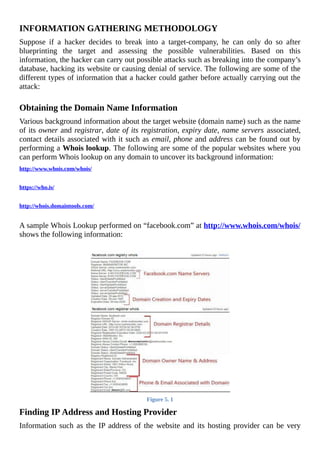
A	sample	Whois	Lookup	performed	on	“facebook.com”	at	http://www.whois.com/whois/
shows	the	following	information:
	
Figure	5.	1
Finding	IP	Address	and	Hosting	Provider
Information	such	as	the	IP	address	of	the	website	and	its	hosting	provider	can	be	very
crucial.	This	can	be	easily	found	out	using	the	following	website:
WhoIsHostingThis:	http://www.whoishostingthis.com/
	
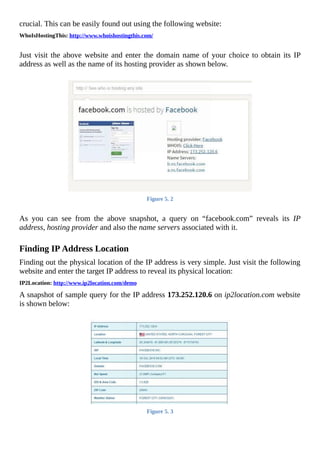
Just	visit	the	above	website	and	enter	the	domain	name	of	your	choice	to	obtain	its	IP
address	as	well	as	the	name	of	its	hosting	provider	as	shown	below.
	
Figure	5.	2
	
As	 you	 can	 see	 from	 the	 above	 snapshot,	 a	 query	 on	 “facebook.com”	 reveals	 its	 IP
address,	hosting	provider	and	also	the	name	servers	associated	with	it.
	
Finding	IP	Address	Location
Finding	out	the	physical	location	of	the	IP	address	is	very	simple.	Just	visit	the	following
website	and	enter	the	target	IP	address	to	reveal	its	physical	location:
IP2Location:	http://www.ip2location.com/demo
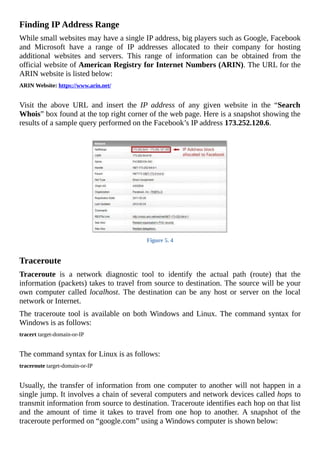
A	snapshot	of	sample	query	for	the	IP	address	173.252.120.6	on	ip2location.com	website
is	shown	below:
	
Figure	5.	3
Finding	IP	Address	Range
While	small	websites	may	have	a	single	IP	address,	big	players	such	as	Google,	Facebook
and	 Microsoft	 have	 a	 range	 of	 IP	 addresses	 allocated	 to	 their	 company	 for	 hosting
additional	 websites	 and	 servers.	 This	 range	 of	 information	 can	 be	 obtained	 from	 the
official	website	of	American	Registry	for	Internet	Numbers	(ARIN).	The	URL	for	the
ARIN	website	is	listed	below:
ARIN	Website:	https://www.arin.net/
	
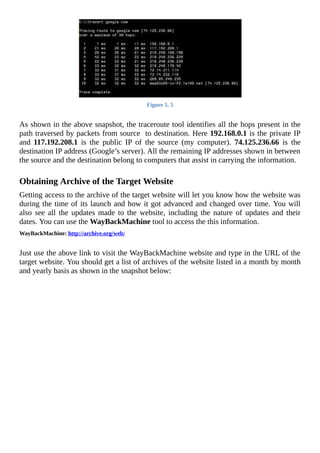
Visit	 the	 above	 URL	 and	 insert	 the	 IP	 address	 of	 any	 given	 website	 in	 the	 “Search
Whois”	box	found	at	the	top	right	corner	of	the	web	page.	Here	is	a	snapshot	showing	the
results	of	a	sample	query	performed	on	the	Facebook’s	IP	address	173.252.120.6.
	
Figure	5.	4
	
Traceroute
Traceroute	 is	 a	 network	 diagnostic	 tool	 to	 identify	 the	 actual	 path	 (route)	 that	 the
information	(packets)	takes	to	travel	from	source	to	destination.	The	source	will	be	your
own	computer	called	 localhost.	 The	 destination	 can	 be	 any	 host	 or	 server	 on	 the	 local
network	or	Internet.
The	traceroute	tool	is	available	on	both	Windows	and	Linux.	The	command	syntax	for
Windows	is	as	follows:
tracert	target-domain-or-IP
	
The	command	syntax	for	Linux	is	as	follows:
traceroute	target-domain-or-IP
	
Usually,	the	transfer	of	information	from	one	computer	to	another	will	not	happen	in	a
single	jump.	It	involves	a	chain	of	several	computers	and	network	devices	called	hops	to
transmit	information	from	source	to	destination.	Traceroute	identifies	each	hop	on	that	list
and	 the	 amount	 of	 time	 it	 takes	 to	 travel	 from	 one	 hop	 to	 another.	 A	 snapshot	 of	 the
traceroute	performed	on	“google.com”	using	a	Windows	computer	is	shown	below:
Figure	5.	5
	
As	shown	in	the	above	snapshot,	the	traceroute	tool	identifies	all	the	hops	present	in	the
path	traversed	by	packets	from	source		to	destination.	Here	192.168.0.1	is	the	private	IP
and	 117.192.208.1	 is	 the	 public	 IP	 of	 the	 source	 (my	 computer).	 74.125.236.66	 is	 the
destination	IP	address	(Google’s	server).	All	the	remaining	IP	addresses	shown	in	between
the	source	and	the	destination	belong	to	computers	that	assist	in	carrying	the	information.
	
Obtaining	Archive	of	the	Target	Website
Getting	access	to	the	archive	of	the	target	website	will	let	you	know	how	the	website	was
during	the	time	of	its	launch	and	how	it	got	advanced	and	changed	over	time.	You	will
also	 see	 all	 the	 updates	 made	 to	 the	 website,	 including	 the	 nature	 of	 updates	 and	 their
dates.	You	can	use	the	WayBackMachine	tool	to	access	the	this	information.
WayBackMachine:	http://archive.org/web/
	
Just	use	the	above	link	to	visit	the	WayBackMachine	website	and	type	in	the	URL	of	the
target	website.	You	should	get	a	list	of	archives	of	the	website	listed	in	a	month	by	month
and	yearly	basis	as	shown	in	the	snapshot	below:
Figure	5.	6
COUNTERMEASURES
I	 hope	 you	 are	 now	 aware	 of	 several	 ways	 using	 which	 you	 can	 successfully	 perform
footprinting	to	gather	a	whole	lot	of	information	about	the	target.	Once	you	are	done	with
organizing	the	data	that	you	have	obtained	through	the	footprinting	process,	you	can	sit
back	and	analyze	them	to	find	out	possible	vulnerabilities	in	any	of	the	technologies	used
in	the	website.
Many	network	administrators	often	fail	to	update	vulnerable	software	and	scripts	running
on	their	server	to	the	latest	version.	This	can	open	an	opportunity	for	the	hacker	to	exploit
and	gain	access	to	the	system.	Therefore,	it	is	important	to	identify	and	patch	the	existing
vulnerabilities	on	a	regular	basis	and	also	limit	the	amount	of	sensitive	information	leaked
to	the	Internet.
Chapter	6	-	Scanning
	
After	gathering		a	variety	of	information	about	the	target	through	footprinting,	it	is	time	to
move	on	to	the	next	step	called	scanning.	Scanning	is	the	second	step	in	the	intelligence
gathering	process	of	a	hacker	where	information	about	specific	IP	addresses,	operating
systems,	 their	 architecture	 and	 services	 running	 on	 computers	 can	 be	 obtained.	 Unlike
footprinting	 which	 gathers	 information	 passively	 from	 various	 third	 party	 sources,
scanning	involves	actively	engaging	with	the	target	to	obtain	information.
DETECTING	LIVE	SYSTEMS
The	first	step	in	the	process	of	scanning	is	to	determine	whether	the	target	is	alive	or	not.
This	can	be	done	using	the	ping	tool	that	is	readily	available	on	both	Windows	and	Linux
computers.	Just	open	the	command	prompt	if	you	are	on	Windows	or	terminal	window	if
you	are	on	Linux	and	type	ping	followed	by	the	target	IP	address	as	shown	below:
ping	173.252.120.6
	
If	the	target	is	alive	and	online,	you	should	get	a	reply	from	the	target	or	you	if	the	target	is
not	alive	you	will	get	a	response	saying	“ping	request	cannot	find	the	host”.
	
Angry	IP	Scanner
You	can	even	ping	a	range	of	IP	addresses	all	at	once	using	a	nice	tool	called	“Angry	IP
Scanner”.	It	is	an	open-source	cross-platform	network	scanner	tool	packed	with	several
useful	features.
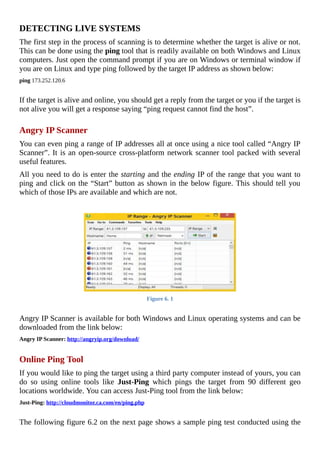
All	you	need	to	do	is	enter	the	starting	and	the	ending	IP	of	the	range	that	you	want	to
ping	and	click	on	the	“Start”	button	as	shown	in	the	below	figure.	This	should	tell	you
which	of	those	IPs	are	available	and	which	are	not.
Figure	6.	1
	
Angry	IP	Scanner	is	available	for	both	Windows	and	Linux	operating	systems	and	can	be
downloaded	from	the	link	below:
Angry	IP	Scanner:	http://angryip.org/download/
	
Online	Ping	Tool
If	you	would	like	to	ping	the	target	using	a	third	party	computer	instead	of	yours,	you	can
do	 so	 using	 online	 tools	 like	 Just-Ping	 which	 pings	 the	 target	 from	 90	 different	 geo
locations	worldwide.	You	can	access	Just-Ping	tool	from	the	link	below:
Just-Ping:	http://cloudmonitor.ca.com/en/ping.php
	
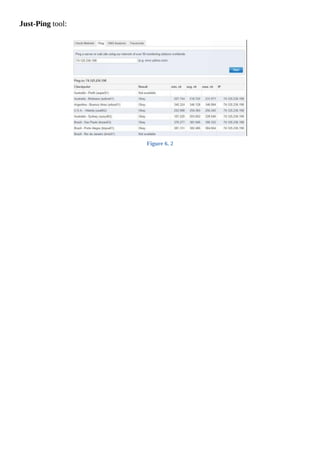
The	following	figure	6.2	on	the	next	page	shows	a	sample	ping	test	conducted	using	the
Just-Ping	tool:
	
Figure	6.	2
TYPES	OF	SCANNING
Now,	let	us	discuss	one	by	one	some	of	the	different	types	of	scanning	that	are	in	place.
	
Port	Scanning
Port	scanning	involves	sending	a	series	of	messages	to	the	target	computer	to	discover
the	types	of	network	services	running	on	it.	Since	each	service	is	associated	with	a	“well
known”	port	number,	performing	a	port	scan	on	the	target	will	reveal	the	ports	that	are
open.	So,	when	a	port	is	said	to	be	open	the	service	associated	with	it	is	said	to	be	active
and	running,	thereby	opening	up	the	opportunity	for	the	attacker	to	break	into	it.
For	example,	if	a	port	scan	on	the	target	shows	that	port	80	and	port	25	are	open,	that
means	the	target	computer	has	a	HTTP	service	(web	server)	and	an	SMTP	service	(email
service)	running	on	it	respectively.
	
Network	Scanning
Network	scanning	is	a	procedure	for	identifying	active	hosts	on	the	target	network	either
for	 the	 purpose	 of	 attacking	 them	 or	 for	 security	 assessment.	 In	 this	 way	 it	 would	 be
possible	for	the	hacker	to	make	a	list	of	vulnerable	hosts	for	direct	attack	or	to	use	them
indirectly	to	attack	other	hosts.
	
Vulnerability	Scanning
Vulnerability	 scanning	 involves	 the	 use	 of	 automated	 tools	 known	 as	 vulnerability
scanners	to	proactively	identify	security	vulnerabilities	of	computer	systems	in	a	network.
These	 tools	 will	 scan	 the	 target	 to	 find	 out	 the	 presence	 of	 known	 flaws	 that	 are
susceptible	to	exploits.
TOOLS	FOR	SCANNING
The	following	are	some	of	the	popular	tools	available	for	scanning:
	
Nmap
Nmap	 is	 a	 popular	 open-source	 tool	 for	 network	 discovery	 and	 security	 auditing	 that
works	on	different	platforms	like	Linux,	Windows	and	Mac.	It	basically	comes	in	the	form
of	a	command	line	interface;	however,	to	facilitate	the	ease	of	use	it	is	also	available	in	a
GUI	format	called	Zenmap.	For	Windows	machines,	you	can	install	the	“self-installer”
version	 of	 Nmap	 that	 comes	 in	 the	 “.exe”	 format.	 The	 download	 link	 for	 the	 same	 in
available	below:
Nmap	Download:	http://nmap.org/download.html
	
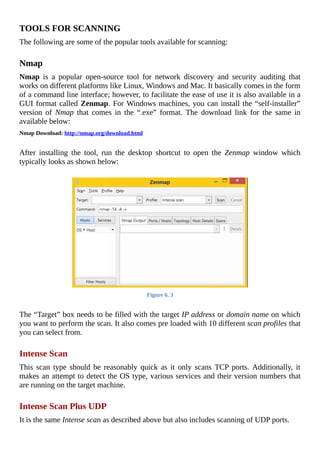
After	 installing	 the	 tool,	 run	 the	 desktop	 shortcut	 to	 open	 the	 Zenmap	 window	 which
typically	looks	as	shown	below:
	
Figure	6.	3
	
The	“Target”	box	needs	to	be	filled	with	the	target	IP	address	or	domain	name	on	which
you	want	to	perform	the	scan.	It	also	comes	pre	loaded	with	10	different	scan	profiles	that
you	can	select	from.
	
Intense	Scan
This	 scan	 type	 should	 be	 reasonably	 quick	 as	 it	 only	 scans	 TCP	 ports.	 Additionally,	 it
makes	an	attempt	to	detect	the	OS	type,	various	services	and	their	version	numbers	that
are	running	on	the	target	machine.
	
Intense	Scan	Plus	UDP
It	is	the	same	Intense	scan	as	described	above	but	also	includes	scanning	of	UDP	ports.
Intense	Scan,	all	TCP	Ports
Unlike	the	normal	Intense	scan	which	only	scans	a	list	of	1000	most	common	ports,	the
“Intense	scan,	all	TCP	ports”	scans	all	available	65535	ports.
	
Intense	Scan,	No	Ping
This	option	will	exclude	pinging	the	target	from	the	Intense	scan.	You	may	use	this	option
when	you	already	know	that	the	target	is	up	or	is	blocking	ping	requests.
	
Ping	Scan
This	option	will	only	ping	the	target	but	does	not	perform	port	scanning	of	any	type.
	
Quick	Scan
Scans	faster	than	the	Intense	scan	by	limiting	the	number	of	TCP	ports	scanned	to	only	the
top	100	most	common	TCP	ports.
	
Quick	Scan	Plus
Quick	scan	plus	adds	OS	detection	and	a	bit	of	version	detection	features	to	Quick	scan.
	
Quick	Traceroute
This	option	will	show	you	the	route	that	the	packets	take	to	reach	the	target	starting	with
the	localhost	(source	or	your	own	computer).
	
Regular	Scan
This	will	perform	the	ping	and	TCP	port	scan	of	1000	default	ports	on	the	target.
	
Slow	Comprehensive	Scan
This	scan	will	try	all	possible	options	to	uncover	as	much	information	as	it	can	about	the
target.	It	uses	three	different	protocols:	TCP,	UDP	and	SCTP	in	order	to	detect	hosts.
Out	of	all	the	10	scanning	options,	I	reckon	Intense	Scan	to	be	appropriate	under	most
conditions.	Just	fill	the	“Target”	box,	select	the	“Intense	scan”	profile	and	hit	the	“Scan”
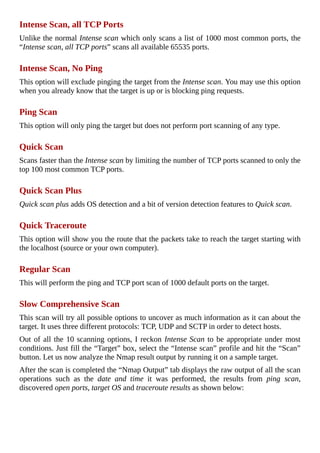
button.	Let	us	now	analyze	the	Nmap	result	output	by	running	it	on	a	sample	target.
After	the	scan	is	completed	the	“Nmap	Output”	tab	displays	the	raw	output	of	all	the	scan
operations	 such	 as	 the	 date	 and	 time	 it	 was	 performed,	 the	 results	 from	 ping	 scan,
discovered	open	ports,	target	OS	and	traceroute	results	as	shown	below:
Figure	6.	4
	
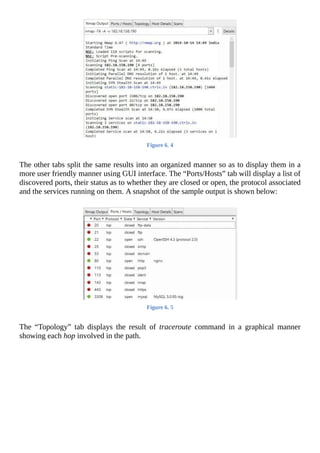
The	other	tabs	split	the	same	results	into	an	organized	manner	so	as	to	display	them	in	a
more	user	friendly	manner	using	GUI	interface.	The	“Ports/Hosts”	tab	will	display	a	list	of
discovered	ports,	their	status	as	to	whether	they	are	closed	or	open,	the	protocol	associated
and	the	services	running	on	them.	A	snapshot	of	the	sample	output	is	shown	below:
	
Figure	6.	5
	
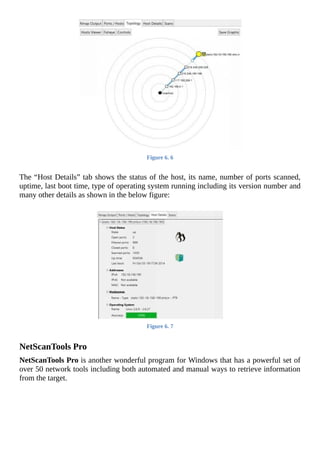
The	 “Topology”	 tab	 displays	 the	 result	 of	 traceroute	 command	 in	 a	 graphical	 manner
showing	each	hop	involved	in	the	path.
Figure	6.	6
	
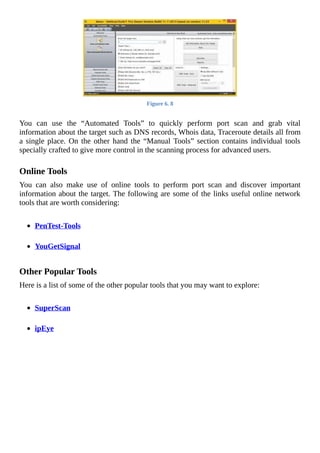
The	“Host	Details”	tab	shows	the	status	of	the	host,	its	name,	number	of	ports	scanned,
uptime,	last	boot	time,	type	of	operating	system	running	including	its	version	number	and
many	other	details	as	shown	in	the	below	figure:
	
Figure	6.	7
	
NetScanTools	Pro
NetScanTools	Pro	is	another	wonderful	program	for	Windows	that	has	a	powerful	set	of
over	50	network	tools	including	both	automated	and	manual	ways	to	retrieve	information
from	the	target.
Figure	6.	8
	
You	 can	 use	 the	 “Automated	 Tools”	 to	 quickly	 perform	 port	 scan	 and	 grab	 vital
information	about	the	target	such	as	DNS	records,	Whois	data,	Traceroute	details	all	from
a	single	place.	On	the	other	hand	the	“Manual	Tools”	section	contains	individual	tools
specially	crafted	to	give	more	control	in	the	scanning	process	for	advanced	users.
	
Online	Tools
You	 can	 also	 make	 use	 of	 online	 tools	 to	 perform	 port	 scan	 and	 discover	 important
information	about	the	target.	The	following	are	some	of	the	links	useful	online	network
tools	that	are	worth	considering:
	
PenTest-Tools
	
YouGetSignal
	
Other	Popular	Tools
Here	is	a	list	of	some	of	the	other	popular	tools	that	you	may	want	to	explore:
	
SuperScan
	
ipEye
OS	FINGERPRINTING
OS	fingerprinting	is	the	process	of	detecting	the	operating	system	of	the	target	host	or	a
network.	The	following	are	some	of	the	commonly	used	OS	fingerprinting	methods.
	
Active	Fingerprinting
Active	fingerprinting	 is	 the	 method	 in	 which	 specially	 crafted	 packets	 are	 sent	 to	 the
target	 system	 and	 the	 response	 is	 noted.	 Since	 different	 operating	 systems	 respond	 to
source	packets	in	different	ways,	this	response	can	be	analyzed	to	determine	the	target	OS.
One	of	the	simple	example	is	the	use	of	Nmap	tool	as	discussed	in	the	previous	section
which	employs	active	fingerprinting	method	to	determine	the	target	OS.
	
Banner	Grabbing
Another	commonly	used	method	of	active	fingerprinting	is	called	banner	grabbing.	This
can	be	done	using	a	simple	tool	called	telnet.	Telnet	is	readily	available	on	Windows	XP
and	previous	versions.	For	Windows	Vista,	7	and	8	machines	you	need	to	activate	the	in-
built	telnet	tool	before	you	can	use	it.	Just	search	for	“how	to	enable	telnet	on	windows”
on	Google	to	find	detailed	instructions	for	enabling	telnet	client	on	your	computer.
Once	 you	 have	 enabled	 the	 telnet	 client	 on	 your	 computer,	 banner	 grabbing	 is	 pretty
simple.	Just	type	the	following	command	in	the	command	prompt	to	detect	the	operating
system	running	on	the	target:
telnet	target-domain-or-IP	80
	
This	will	open	the	connection	with	the	target.	Next	type	the	text	exactly	as	follows	HEAD
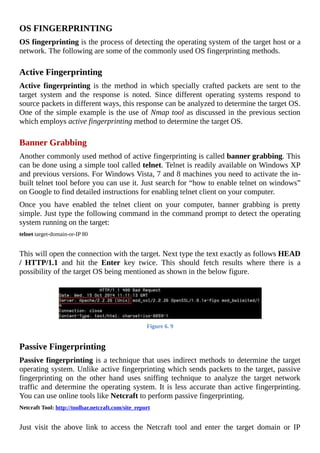
/	 HTTP/1.1	 and	 hit	 the	 Enter	 key	 twice.	 This	 should	 fetch	 results	 where	 there	 is	 a
possibility	of	the	target	OS	being	mentioned	as	shown	in	the	below	figure.
	
Figure	6.	9
	
Passive	Fingerprinting
Passive	fingerprinting	is	a	technique	that	uses	indirect	methods	to	determine	the	target
operating	system.	Unlike	active	fingerprinting	which	sends	packets	to	the	target,	passive
fingerprinting	 on	 the	 other	 hand	 uses	 sniffing	 technique	 to	 analyze	 the	 target	 network
traffic	and	determine	the	operating	system.	It	is	less	accurate	than	active	fingerprinting.
You	can	use	online	tools	like	Netcraft	to	perform	passive	fingerprinting.
Netcraft	Tool:	http://toolbar.netcraft.com/site_report
	
Just	 visit	 the	 above	 link	 to	 access	 the	 Netcraft	 tool	 and	 enter	 the	 target	 domain	 or	 IP
address	to	know	the	target	operating	system,	possible	vulnerabilities,	its	risk	rating	and
other	useful	information.
CONCEALING	YOUR	IDENTITY
Concealing	you	true	identity	during	the	processes	like	footprinting	and	scanning	is	very
much	necessary	as	there	is	a	real	chance	of	the	target	tracing	back	to	you.	Some	of	the
methods	that	you	can	employ	to	conceal	your	identity	are	discussed	below.
	
Using	a	Proxy
A	proxy	server	can	be	used	to	conceal	your	real	IP	address	while	performing	scanning	and
hack	attempts	on	the	target.	Since	the	IP	address	tells	everything	about	you,	concealing	it
using	a	proxy	can	be	highly	effective	in	hiding	your	origin.
Even	 though	 there	 are	 different	 types	 of	 proxies	 available,	 I	 recommend	 using	 a	 VPN
proxy	service	to	hide	your	IP	address.	VPN	services	are	fast	and	provide	reliable	ways	not
only	to	hide	your	IP	address	but	also	to	protect	your	data	and	identity	over	the	Internet.
Here	are	a	few	popular	VPN	services	that	you	can	try:
	
HideMyAss	Proxy
	
VyprVPN	Proxy
	
Alternatively	you	can	also	use	a	chain	of	public	proxies	to	further	enhance	your	stealth
operation	using	free	tools	like	Proxifier	and	SocksChain.	Please	note	that	using	public
proxies	can	slow	down	your	speed	and	hence	VPN	proxies	are	more	recommended	as	they
best	serve	the	purpose.
The	other	way	to	hide	your	identity	is	by	using	online	tools	for	pinging	and	scanning	the
target.	 During	 the	 use	 of	 online	 tools,	 the	 IP	 address	 of	 the	 server	 hosting	 the	 tools	 is
exposed	to	the	target	and	not	the	one	that	belongs	to	the	actual	attacker.
Once	you	have	gathered	a	long	list	of	information	about	the	target	through	footprinting
and	 scanning,	 it	 is	 time	 to	 analyze	 them	 for	 possible	 vulnerabilities	 in	 the	 operating
system,	technologies	or	services	running	on	the	target.	You	can	make	use	of	the	following
websites	to	find	information	about	latest	vulnerabilities	and	exploits:
	
1.	 http://www.securiteam.com
	
2.	 http://www.zone-h.org
	
3.	 http://www.securityfocus.com
	
4.	 http://www.packetstormsecurity.com
5.	 http://www.cybercrime.gov
COUNTERMEASURES
So	far,	you	have	learnt	different	scanning	techniques	to	discover	information	about	the
target.	Now	let	us	look	into	some	of	the	countermeasures	that	one	can	take	to	prevent	vital
information	from	leaking	into	the	hands	of	an	attacker.
	
Configure	web	servers	to	prevent	information	leakage.
	
Disable	unwanted/unused	services	and	protocols.
	
Use	an	Intrusion	Detection	System	(IDS)	to	detect	and	log	port	scans.
Chapter	7	-	Hacking	Passwords
	
Password	hacking	is	one	of	the	hottest	and	most	widely	discussed	topics	in	the	field	of
computer	 hacking.	 In	 today’s	 world,	 passwords	 alone	 play	 a	 key	 role	 in	 deciding	 the
security	of	a	web	server	or	any	other	computer	system.	As	a	result,	hacking	the	password
is	one	of	the	easiest	and	sometimes	the	only	way	to	gain	access	to	the	system.	In	this
chapter,	you	will	be	introduced	to	various	password	hacking	techniques	that	are	frequently
used	in	the	hacking	industry.
To	begin	with,	I	will	let	you	know	some	of	the	obvious,	simple	yet	effective	techniques	to
hack	passwords:
	
1.	 Social	Engineering:	This	type	of	technique	involves	psychological	manipulation	of
people	 into	 performing	 actions	 that	 lead	 to	 the	 disclosure	 of	 their	 confidential
information.	In	other	words,	social	engineering	is	just	a	trick	played	by	the	hacker	to
gain	the	trust	of	people	so	that	they	reveal	the	password	by	themselves.	
	
Scenario-1:	The	hacker	may	call	the	target	person	by	pretending	himself	as	a	bank
official	and	ask	him	to	confirm	his	password	stating	that	this	has	to	be	done	as	a	part
of	an	ongoing	verification	program.	In	most	cases,	the	target	person	on	the	other	end
believes	this	and	reveals	his	password	to	the	hacker.
	
Scenario-2:	 In	 order	 to	 avoid	 suspicion,	 instead	 of	 directly	 asking	 the	 victim	 to
reveal	the	password,	the	hacker	may	obtain	other	vital	information	such	as	the	“Date
of	Birth”,	“Place	of	Birth”,	“High	School	Details”	etc.	from	the	target	person.	Using
these	details,	the	hacker	can	easily	reset	the	password	and	gain	unauthorized	access.	
	
Even	 though	 social	 engineering	 seems	 simple,	 it	 is	 proven	 that	 most	 people
would	easily	fall	victim	to	this	attack.	Lack	of	awareness	among	people	is	the
prime	reason	for	the	success	behind	this	trick.
	
2.	 Guessing:	As	most	people	are	known	to	use	easy	to	remember	words	such	as	their
“pet’s	 name”,	 “phone	 number”,	 “child’s	 name”	 etc.	 as	 their	 passwords,	 it	 is	 often
possible	for	the	hacker	to	easily	guess	the	password.
	
3.	 Shoulder	 surfing:	 It	 is	 the	 act	 of	 spying	 on	 one’s	 keyboard	 from	 behind	 the
shoulders	as	a	person	types	his/her	password.	This	technique	works	well	particularly
in	crowded	areas	such	as	cyber	cafes	and	ATMs	where	people	are	usually	unaware	of
what	is	happening	behind	their	shoulders.
After	understanding	some	of	the	simple	password	hacking	techniques,	it	is	time	to	move
on	to	the	next	level.		Now,	let	us	jump	into	some	of	the	serious	methods	that	hackers	use	to
crack	passwords:
DICTIONARY	ATTACK
A	dictionary	attack	is	a	type	of	password	cracking	technique	where	a	long	list	of	words
from	the	dictionary	is	repeatedly	tried	against	the	target	until	the	right	match	is	found.	This
technique	can	be	used	to	crack	passwords	that	contain	words	found	in	the	dictionary.
Generally,	the	success	of	a	dictionary	attack	is	based	on	the	fact	that	most	people	have	a
tendency	to	use	easy	to	remember	passwords	that	are	found	in	the	dictionary.	However,	if
one	uses	a	strong	password	with	a	combination	of	alphabets	and	numbers	or	introducing	a
slight	variation	to	the	actual	spelling	would	make	it	impossible	for	the	dictionary	attack	to
crack	such	passwords.	
One	of	my	favourite	tool	to	carry	out	the	dictionary	attack	is	Brutus.	It	is	a	remote	online
password	 cracker	 that	 works	 on	 Windows	 platform	 and	 can	 be	 downloaded	 from	 the
following	link:
Brutus	Download:	http://www.hoobie.net/brutus/
	
NOTE:	Some	antivirus	programs	are	known	to	have	conflict	with	the	Brutus	application.
So,	it	is	recommend	that	you	temporarily	disable	your	antivirus	before	running	the	Brutus
application.
	
Now,	 let	 me	 give	 you	 a	 small	 demo	 on	 how	 to	 use	 Brutus.	 Here	 is	 a	 step-by-step
procedure:
	
1.	 After	downloading	the	tool	from	the	above	link,	unzip	the	package	into	a	new	empty
folder.
	
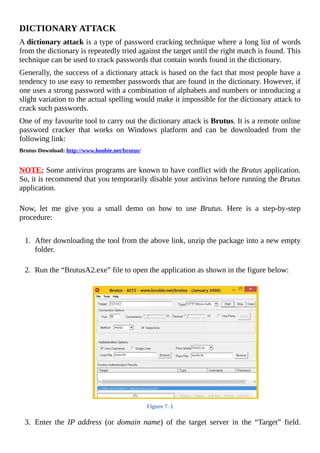
2.	 Run	the	“BrutusA2.exe”	file	to	open	the	application	as	shown	in	the	figure	below:
	
Figure	7.	1
	
3.	 Enter	 the	 IP	address	 (or	 domain	name)	 of	 the	 target	 server	 in	 the	 “Target”	 field.
Select	the	type	of	password	that	you	want	to	crack	from	the	“Type”	field	or	enter
your	own	custom	port	number	in	the	“Port”	field”.
	
4.	 If	you	know	the	username	for	which	you	want	hack	the	password	for,	then	check	the
“Single	User”	option	and	enter	the	username	in	the	“UserID”	field.	Otherwise	leave
the	 default	 settings	 to	 work	 as	 it	 is	 so	 that	 the	 username	 list	 is	 loaded	 from	 the
“users.txt”	file.
	
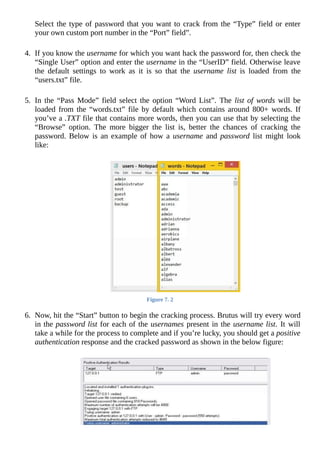
5.	 In	 the	 “Pass	 Mode”	 field	 select	 the	 option	 “Word	 List”.	 The	 list	of	words	will	be
loaded	from	the	“words.txt”	file	by	default	which	contains	around	800+	words.	If
you’ve	a	.TXT	file	that	contains	more	words,	then	you	can	use	that	by	selecting	the
“Browse”	 option.	 The	 more	 bigger	 the	 list	 is,	 better	 the	 chances	 of	 cracking	 the
password.	Below	is	an	example	of	how	a	username	and	password	 list	 might	 look
like:
	
Figure	7.	2
	
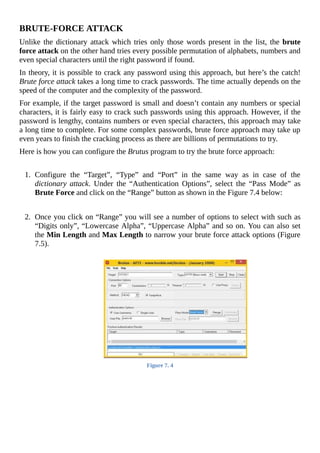
6.	 Now,	hit	the	“Start”	button	to	begin	the	cracking	process.	Brutus	will	try	every	word
in	the	password	list	for	each	of	the	usernames	present	in	the	username	list.	It	will
take	a	while	for	the	process	to	complete	and	if	you’re	lucky,	you	should	get	a	positive
authentication	response	and	the	cracked	password	as	shown	in	the	below	figure:
Figure	7.	3
	
NOTE:	It	is	always	a	smart	idea	to	use	a	proxy	before	attempting	this	hacking	process.
This	will	prevent	your	real	IP	address	from	being	stored	in	the	logs	of	remote	server	and
thus	reduces	the	chances	of	being	traced	back.
BRUTE-FORCE	ATTACK
Unlike	the	dictionary	attack	which	tries	only	those	words	present	in	the	list,	the	brute
force	attack	on	the	other	hand	tries	every	possible	permutation	of	alphabets,	numbers	and
even	special	characters	until	the	right	password	if	found.
In	theory,	it	is	possible	to	crack	any	password	using	this	approach,	but	here’s	the	catch!
Brute	force	attack	takes	a	long	time	to	crack	passwords.	The	time	actually	depends	on	the
speed	of	the	computer	and	the	complexity	of	the	password.
For	example,	if	the	target	password	is	small	and	doesn’t	contain	any	numbers	or	special
characters,	it	is	fairly	easy	to	crack	such	passwords	using	this	approach.	However,	if	the
password	is	lengthy,	contains	numbers	or	even	special	characters,	this	approach	may	take
a	long	time	to	complete.	For	some	complex	passwords,	brute	force	approach	may	take	up
even	years	to	finish	the	cracking	process	as	there	are	billions	of	permutations	to	try.
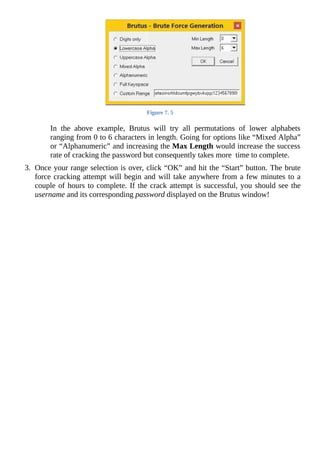
Here	is	how	you	can	configure	the	Brutus	program	to	try	the	brute	force	approach:
	
1.	 Configure	 the	 “Target”,	 “Type”	 and	 “Port”	 in	 the	 same	 way	 as	 in	 case	 of	 the
dictionary	attack.	 Under	 the	 “Authentication	 Options”,	 select	 the	 “Pass	 Mode”	 as
Brute	Force	and	click	on	the	“Range”	button	as	shown	in	the	Figure	7.4	below:
	
	
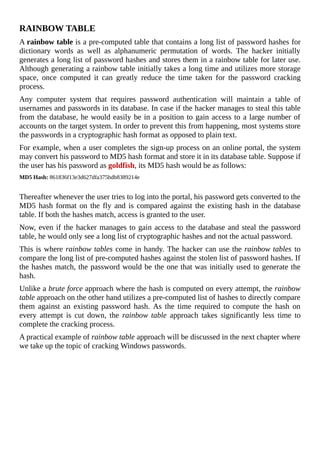
2.	 Once	you	click	on	“Range”	you	will	see	a	number	of	options	to	select	with	such	as
“Digits	only”,	“Lowercase	Alpha”,	“Uppercase	Alpha”	and	so	on.	You	can	also	set
the	Min	Length	and	Max	Length	to	narrow	your	brute	force	attack	options	(Figure
7.5).
	
Figure	7.	4
Figure	7.	5
	
In	 the	 above	 example,	 Brutus	 will	 try	 all	 permutations	 of	 lower	 alphabets
ranging	from	0	to	6	characters	in	length.	Going	for	options	like	“Mixed	Alpha”
or	“Alphanumeric”	and	increasing	the	Max	Length	would	increase	the	success
rate	of	cracking	the	password	but	consequently	takes	more		time	to	complete.
	
3.	 Once	your	range	selection	is	over,	click	“OK”	and	hit	the	“Start”	button.	The	brute
force	cracking	attempt	will	begin	and	will	take	anywhere	from	a	few	minutes	to	a
couple	of	hours	to	complete.	If	the	crack	attempt	is	successful,	you	should	see	the
username	and	its	corresponding	password	displayed	on	the	Brutus	window!
RAINBOW	TABLE
A	rainbow	table	is	a	pre-computed	table	that	contains	a	long	list	of	password	hashes	for
dictionary	 words	 as	 well	 as	 alphanumeric	 permutation	 of	 words.	 The	 hacker	 initially
generates	a	long	list	of	password	hashes	and	stores	them	in	a	rainbow	table	for	later	use.
Although	generating	a	rainbow	table	initially	takes	a	long	time	and	utilizes	more	storage
space,	 once	 computed	 it	 can	 greatly	 reduce	 the	 time	 taken	 for	 the	 password	 cracking
process.
Any	 computer	 system	 that	 requires	 password	 authentication	 will	 maintain	 a	 table	 of
usernames	and	passwords	in	its	database.	In	case	if	the	hacker	manages	to	steal	this	table
from	the	database,	he	would	easily	be	in	a	position	to	gain	access	to	a	large	number	of
accounts	on	the	target	system.	In	order	to	prevent	this	from	happening,	most	systems	store
the	passwords	in	a	cryptographic	hash	format	as	opposed	to	plain	text.
For	example,	when	a	user	completes	the	sign-up	process	on	an	online	portal,	the	system
may	convert	his	password	to	MD5	hash	format	and	store	it	in	its	database	table.	Suppose	if
the	user	has	his	password	as	goldfish,	its	MD5	hash	would	be	as	follows:
MD5	Hash:	861836f13e3d627dfa375bdb8389214e
	
Thereafter	whenever	the	user	tries	to	log	into	the	portal,	his	password	gets	converted	to	the
MD5	hash	format	on	the	fly	and	is	compared	against	the	existing	hash	in	the	database
table.	If	both	the	hashes	match,	access	is	granted	to	the	user.
Now,	even	if	the	hacker	manages	to	gain	access	to	the	database	and	steal	the	password
table,	he	would	only	see	a	long	list	of	cryptographic	hashes	and	not	the	actual	password.
This	is	where	rainbow	tables	come	in	handy.	The	hacker	can	use	the	rainbow	tables	to
compare	the	long	list	of	pre-computed	hashes	against	the	stolen	list	of	password	hashes.	If
the	hashes	match,	the	password	would	be	the	one	that	was	initially	used	to	generate	the
hash.
Unlike	a	brute	force	approach	where	the	hash	is	computed	on	every	attempt,	the	rainbow
table	approach	on	the	other	hand	utilizes	a	pre-computed	list	of	hashes	to	directly	compare
them	 against	 an	 existing	 password	 hash.	 As	 the	 time	 required	 to	 compute	 the	 hash	 on
every	 attempt	 is	 cut	 down,	 the	 rainbow	table	 approach	 takes	 significantly	 less	 time	 to
complete	the	cracking	process.
A	practical	example	of	rainbow	table	approach	will	be	discussed	in	the	next	chapter	where
we	take	up	the	topic	of	cracking	Windows	passwords.
PHISHING	ATTACK
Phishing	 is	 a	 form	 of	 social	 engineering	 technique	 used	 by	 hackers	 to	 gather	 sensitive
information	 such	 as	 usernames,	 passwords	 and	 credit	 card	 details	 by	 posing	 as
a	trustworthy	person	or	organization.
Phishing	 scams	 usually	 sends	 an	 email	 message	 to	 users	 requesting	 for	 their	 personal
information,	or	redirects	them	to	a	website	where	they	are	required	to	enter	their	personal
information.
In	most	cases,	a	phishing	email	directs	the	victims	to	follow	a	link	leading	to	a	website
where	 they	 will	 have	 to	 enter	 their	 login	 details	 or	 other	 confidential	 information.	 In
reality	 this	 website	 is	 a	 fake	 one	 created	 by	 the	 hacker	 (often	 referred	 to	 as	 spoofed
website)	 which	 is	 an	 exact	 replica	 of	 the	 original	 or	 appears	 similar.	 When	 the	 victim
enters	his/her	login	details	on	a	spoofed	page	they	are	actually	stolen	away	by	the	hacker.
For	example,	the	hacker	may	send	an	email	that	pretends	to	have	been	appearing	from	the
bank	where	the	victim	maintains	an	account	and	ask	him/her	to	update	the	login	details	by
following	the	link	present	in	the	email.	The	email	further	mentions	that	this	update	process
is	 mandatory	 and	 failing	 to	 do	 so	 will	 result	 in	 the	 bank	 account	 being	 locked.	 As	 a
response,	the	victim	clicks	on	the	link	where	he/she	will	be	taken	to	the	fake	login	page
that	looks	similar	to	the	original	one.	However,	when	the	login	details	are	entered,	they	are
recorded	 and	 stored	 on	 the	 website	 for	 later	 access	 by	 the	 hacker.	 The	 victim	 remains
unaware	of	the	entire	process	but	the	hacker	skilfully	manages	to	hack	the	password.
COUNTERMEASURES
After	addressing	some	of	the	popular	password	cracking	techniques,	let	us	now	look	at
some	 of	 the	 countermeasures	 that	 can	 be	 taken	 to	 protect	 ourselves	 from	 the	 above
mentioned	attacks.
	
Social	Engineering
The	measures	needed	to	protect	yourself	from	social	engineering	attacks	are	pretty	simple
and	straight	forward.	Never	disclose	your	password	or	any	other	personal	information	to
anyone	via	phone	or	email.	Attackers	may	even	try	to	convince	you	by	pretending	to	be	an
authorized	person	with	whom	you	can	share	the	personal	details	with.	But	remember	that
passwords	 are	 meant	 only	 to	 be	 entered	 on	 login	 pages	 and	 not	 to	 be	 shared	 with	 any
person	at	all.
	
Guessing	and	Shoulder	Surfing
Always	make	sure	that	your	password	does	not	contain	your	pet	names,	birth	date,	family
member	names	or	anything	as	such	that	are	easy	to	be	guessed.	It	is	recommended	that
your	 password	 contains	 a	 combination	 of	 hard	 to	 guess	 words,	 numbers	 and	 special
characters.
As	far	as	the	shoulder	surfing	is	concerned,	you	can	avoid	the	same	by	making	sure	that
no	one	else	behind	you	is	watching	the	movement	of	your	fingers	over	the	keyboard	when
your	are	typing	the	password.
	
Dictionary	Attack
To	protect	yourself	from	a	dictionary	attack,	all	you	need	to	do	is	make	sure	that	your
password	 does	 not	 contain	 words	 from	 dictionary.	 That	 means,	 your	 password	 is	 not
something	 like	 “apple”,	 “lotus”	 or	 “mango”.	 Instead	 use	 words	 that	 are	 not	 in	 the
dictionary.	You	can	also	use	a	phrase	like	str0ngpAss??	as	your	password	so	that	it	cannot
be	cracked	using	the	dictionary	attack	approach.
	
Brute-Force	Attack	and	Rainbow	Table
Brute-Force	attacks	often	become	successful	when	the	passwords	are	short.	That	means,
by	keeping	the	password	long	enough	you	can	make	it	hard	for	the	attacker	to	crack	it.
Usually	a	password	whose	length	is	of	8	characters	was	considered	long	enough	and	safe
in	 the	 past.	 However,	 this	 is	 not	 the	 case	 in	 the	 present	 day	 scenario	 as	 the	 modern
computers	have	high	speed	processing	capabilities	to	try	thousands	of		guesses	per	second.
So,	in	order	to	make	your	password	immune	to	brute-force	attack	make	sure	it	is	larger
than	8	characters	and	is	a	combinations	of	alphabets,	numbers	and	special	characters.
You	 can	 avoid	 rainbow	 table	 attack	 on	 your	 passwords	 by	 making	 it	 too	 long.	 If	 your
password	 is	 more	 than	 12	 or	 14	 characters,	 it	 would	 be	 extremely	 time	 consuming	 to
create	tables	for	them.	This	should	keep	you	protected	from	such	attacks.
Phishing	Attack
You	can	avoid	phishing	attack	by	following	the	below	mentioned	guidelines:
	
Do	not	respond	to	suspicious	emails	that	ask	you	to	give	your	personal	information.
If	you	are	unsure	whether	an	email	request	is	legitimate,	verify	the	same	by	calling
the	 respective	 bank/company.	 Always	 use	 the	 telephone	 numbers	 printed	 on	 your
bank	records	or	statements	and	not	those	mentioned	in	the	suspicious	email.
	
Do	not	use	the	links	in	an	email,	instant	messenger	or	chat	conversation	to	enter	a
website.	Instead,	always	type	the	URL	of	the	website	on	your	browser’s	address	bar
to	get	into	a	website.
	
Legitimate	websites	always	use	a	secure	connection	(https://)	on	those	pages	which
are	intended	to	gather	sensitive	information	such	as	passwords,	account	numbers	or
credit	card	details.	You	will	see	a	lock	icon	 	in	your	browser’s	address	bar	which
indicates	 a	 secure	 connection.	 On	 some	 websites	 like	 “PayPal”	 which	 uses	 an
extended	validation	certificate,	the	address	bar	turns	GREEN	as	shown	below:
Figure	7.	6
	
Even	 if	 the	 login	 page	 is	 not	 secure	 (https://)	 the	 target	 website	 may	 still	 be
legitimate.	However,	look	for	misspellings	like	www.papyal.com,	www.payapl.com
or	 paypal.somethingelse.com	 instead	 of	 the	 legitimate	 site	 www.paypal.com	 and
make	sure	that	the	login	details	are	only	entered	on	the	legitimate	web	page.
Chapter	8	-	Hacking	Windows
	
Being	one	of	the	most	popular	operating	systems	in	the	world,	Windows	has	its	presence
on	almost	every	computer	system	today.	So,	in	the	field	of	ethical	hacking	understanding
the	techniques	to	hack	into	Windows	systems	becomes	highly	significant.	Let	us	now	look
into	 some	 of	 these	 techniques	 using	 which	 you	 can	 successfully	 manage	 to	 hack	 any
Windows	computer.
GAINING	ACCESS	TO	THE	SYSTEM
Gaining	 access	 to	 a	 password	 protected	 user	 account	 especially	 the	 one	 with
“administrator	privileges”	forms	the	key	element	in	hacking	Windows.	The	following	are
the	two	important	techniques	using	which	you	can	gain	access	to	any	protected	account	on
Windows	without	actually	knowing	the	password.
	
Resetting	the	Windows	Password
If	you	wish	to	gain	access	to	a	Windows	computer	whose	account	is	password	protected,
resetting	the	password	is	an	easy	option.	Windows	stores	all	its	account	information	and
encrypted	passwords	in	a	file	called	“SAM”.	By	modifying	the	“SAM”	file	it	is	possible	to
reset	 the	 password	 of	 any	 user	 account	 including	 that	 of	 the	 “administrator”.	 You	 can
accomplish	this	task	using	a	small	open-source	tool	known	as	Offline	NT	Password	&
Registry	Editor.	This	utility	works	offline,	that	means	you	need	to	shut	down	and	boot	up
the	 target	 computer	 using	 a	 CD	 or	 USB	 device	 such	 as	 thumb	 drive.	 The	 tool	 has	 the
following	features:
	
										You	do	not	need	to	know	the	old	password	to	set	a	new	one.
	
										This	tool	will	allow	you	to	reset	the	password	of	any	user	account.
	
										This	tool	can	also	detect	and	unlock	locked	or	disabled	out	user	accounts.
	
You	can	download	the	tool	from	the	link	below:
Download:	http://pogostick.net/~pnh/ntpasswd/
	
Resources	to	create	a	bootable	CD	and	bootable	USB	device	are	available	for	download
separately.	Both	works	similarly	and	is	a	matter	of	your	convenience.	However,	in	this
book	I	will	give	a	demonstration	of	the	USB	version	to	reset	the	existing	password.	To
create	a	bootable	USB	drive,	download	and	unzip	the	USB	version	of	the	tool	from	the
above	link	by	following	the	simple	instructions	given	in	the	readme.txt	file.
Once	you	have	the	bootable	USB	device	in	your	hand,	plug-in	the	device	and	boot	from	it.
Make	sure	that	you	have	enabled	the	USB	boot	option	and	set	the	top	boot	priority	for
your	 USB	 device	 in	 BIOS.	 Step-by-step	 instructions	 to	 complete	 the	 password	 reset
process	is	given	below:
Figure	8.	1
	
Once	the	tool	is	running	from	your	USB	device,	you	should	see	the	screen	similar	to	the
one	shown	above.	Just	follow	the	screen	instructions	and	the	tool	will	automatically	detect
the	partition	on	which	the	Windows	is	installed.	Usually	the	right	options	are	preloaded	in
the	square	bracket	as	shown	in	the	below	snapshot.	So,	just	pressing	Enter	key	should
work.
	
Figure	8.	2
	
In		the	next	step,	you	will	be	asked	to	“select	which	part	of	the	registry	to	load”.	You	need
to	select	the	option-1	that	is	“Password	rest	[sam]”	which	is	preloaded	by	default	as	shown
below.	So	just	press	Enter	to	proceed.
	
Figure	8.	3
	
In	the	next	step,	select	the	option-1	which	is	“Edit	user	data	and	passwords”	as	shown
below	and	hit	Enter.
	
Figure	8.	4
	
Now,	 you	 should	 see	 a	 list	 of	 “Usernames”	 and	 their	 “Admin”	 status	 being	 displayed.
Select	the	user	who	has	administrator	privilege	and	hit	Enter.
	
Figure	8.	5
	
In	the	next	screen	you	will	be	asked	to	select	from	a	list	of	options	that	you	may	want	to
perform	on	the	selected	user.	Here,	just	select	the	option-1	which	is	“Clear	(blank)	user
password”	and	hit	Enter.
	
Figure	8.	6
	
This	should	reset	the	password	for	the	user	account	to	make	it	go	blank,	so	that	the	next
time	you	reboot	your	Windows	you	should	be	able	to	login	automatically	as	if	there	was
no	password	set	for	that	user	account.
Now	quit	editing	user	by	pressing	q	and	hit	Enter	until	you	proceed	to	the	screen	where
you	will	be	asked	to	confirm	“writing	back	changes”	to	the	SAM	file.	This	step	is	very
important	where	you	need	to	press	y	and	hit	Enter	as	shown	in	the	snapshot	below.	If	you
accidentally	press	Enter	keeping	the	default	option	which	is	n,	the	reset	process	will	fail
and	the	whole	procedure	will	have	to	be	repeated	again	from	the	beginning.	So,	changing
the	default	option	from	n	to	y	before	pressing	Enter	is	very	important.
	
Figure	8.	7
	
This	will	complete	the	reset	process	where	the	existing	password	will	be	removed	and	set
to	 blank.	 Disconnect	 	 the	 USB	 device	 and	 press	 CTRL+ALT+DEL	 to	 reboot	 the
computer.	Now,	the	Windows	should	let	you	login	to	the	system	without	insisting	to	enter
the	password.
	
Restoring	the	Password	After	Breach
Resetting	 the	 password	 is	 a	 wonderful	 option	 to	 easily	 gain	 access	 to	 the	 password
protected	 accounts.	 However,	 this	 method	 has	 a	 clear	 drawback	 as	 the	 password	 reset
process	is	permanent.	The	administrator	of	the	target	machine	will	easily	come	to	know
about	the	security	breach	as	thereafter	no	password	will	be	asked	during	the	login	process.
To	overcome	this	drawback,	we	will	have	to	device	a	means	to	restore	everything	back	to
normal	once	the	purpose	of	breach	is	completed.	For	this	we	will	have	to	take	a	backup	of
the	original	SAM	file	before	modifying	it	in	the	password	reset	process	and	safely	restore
it	back	to	make	everything	look	normal.
The	SAM	file	is	located	in	the	drive	where	the	Windows	is	installed	(usually	C:)	under	the
following	path:	windowssystem32config.	You	can	easily	access	this	location	by	booting
up	the	computer	from	your	live	Kali	Linux	DVD.	Once	the	Kali	DVD	is	loaded,	double-
click	the	“Computer	Icon”	present	on	the	desktop	to	open	up	the	explorer	window.	Now,
navigate	to	the	above	location	to	find	the	SAM	file	and	back	it	up	to	a	different	location
such	as	a	different	drive	or	to	your	own	USB	device.
	
Figure	8.	8
Now	reboot	the	system	and	perform	the	password	reset	process	as	discussed	earlier.	Once
you	are	done	with	your	work,	reboot	the	system	again	with	Kali	DVD	and	navigate	to	the
location	 of	 SAM	 file.	 Rename	 the	 existing	 file	 to	 SAM.OLD	 and	 restore	 the	 original
SAM	 file	 from	 the	 backup	 location.	 This	 should	 bring	 everything	 back	 to	 normal	 and
avoid	suspicion.
	
Bypassing	the	Windows	Authentication	Process
In	the	previous	section	we	had	discussed	on	how	to	reset	the	password	to	gain	access	to
the	 system.	 But	 there	 is	 another	 smart	 way	 to	 gain	 access	 to	 the	 Windows	 system	 by
silently	bypassing	the	authentication	process	itself.	This	is	done	by	applying	temporary
changes	to	the	Windows	kernel	on	the	fly	(while	booting)	to	disable	the	authentication
process.	A	tool	called	Kon-Boot	allows	you	to	accomplish	this	task.	You	can	download	it
from	the	link	below:
Kon-Boot:	http://www.piotrbania.com/all/kon-boot/
	
Kon-Boot	is	a	handy	tool	that	allows	you	to	enter	any	password	protected	Windows	user
account	without	having	to	enter	the	password	during	the	log-in	process.	The	tool	allows
you	to	create	a	bootable	CD	or	a	USB	drive.	Once	you	boot	the	target	computer	from	this
bootable	device,	it	will	virtually	modify	parts	of	Windows	kernel	to	load	the	operating
system	 in	 a	 special	 mode	 where	 you	 will	 not	 be	 insisted	 to	 enter	 the	 password.	 The
advantage	of	this	tool	is	that	all	the	changes	are	temporary	and	disappear	after	reboot,	so
that	 everything	 looks	 normal	 thereafter	 and	 does	 not	 arouse	 suspicion	 of	 a	 possible
security	breach.
DUMPING	THE	PASSWORD	HASHES
After	understanding	some	of	the	techniques	to	gain	access	to	the	system	without	knowing
the	password,	it	is	time	to	move	on	one	step	further	and	find	out	a	means	to	crack	the
actual	password	itself.	If	it	is	required	to	gain	access	to	the	target	system	multiple	times
over	a	period,	it	is	always	a	good	idea	to	unveil	the	password	by	cracking	it	so	that	you
can	easily	login	to	the	system	by	entering	the	password	thereby	eliminating	the	need	to
reset	the	password	each	time	you	want	to	gain	access.
Windows	user	account	passwords	are	converted	into	a	cryptographic	hash	format	called
NTLM	 (NT	 LAN	 MANAGER)	 hash.	 This	 NTLM	 hash	 along	 with	 the	 user	 profile
details	is	stored	in	a	special	file	called	Security	Accounts	Manager	or	SAM.	The	SAM
file	is	further	encrypted	with	the	syskey	which	is	stored	in	a	file	called	SYSTEM.	Both
SAM	and	SYSTEM	are	located	in	the	drive	where	the	Windows	in	installed	(usually	C:)
under	the	following	path:	windowssystem32config.
In	 order	 to	 crack	 the	 password,	 it	 is	 necessary	 to	 extract	 the	 NTLM	 hash	 and	 user
accounts	 details	 stored	 in	 the	 SAM	 file	 from	 the	 target	 system	 which	 is	 known	 as
dumping.	The	dumped	details	are	transferred	to	the	hacker’s	computer	and	the	password	is
cracked	using	an	offline	password	cracking	tool.	The	following	are	the	two	ways	to	dump
password	hashes:
	
Dumping	Hashes	With	Administrator	Access
If	 you	 have	 administrator	 access	 to	 the	 system	 on	 which	 you	 want	 to	 dump	 password
hashes,	you	can	use	a	handy	tool	called	PWDUMP.	This	is	an	open-source	command-line
tool	to	quickly	dump	password	hashes	onto	a	text	file.	The	tool	can	be	downloaded	from
the	link	below:
PWDUMP:	http://www.tarasco.org/security/pwdump_7/
	
This	is	a	very	small	tool	which	is	less	than	a	MB	in	size	and	can	be	carried	to	the	target
location	in	a	USB	thumb	drive.	To	dump	the	hashes,	just	open	the	command	prompt	with
administrator	 rights,	 navigate	 to	 the	 location	 of	 the	 tool	 (PwDump7.exe)	 and	 run	 the
following	command:
PwDump7.exe	>>	targetfilename.txt
	
As	shown	in	the	below	snapshot,	I	am	running	the	PwDump.exe	from	my	USB	thumb
drive	(M:)	 and	 dumping	 the	 hash	 details	 in	 a	 file	 called	 hash.txt.	This	file	should	get
created	in	the	same	directory	from	which	PwDump.exe	is	running.
Figure	8.	9
	
The	 hash.txt	 file	 contains	 a	 list	 of	 existing	 user	 accounts	 on	 the	 machine	 and	 their
corresponding	NTLM	hashes	as	shown	below:
	
Figure	8.	10
	
Dumping	Hashes	Without	Administrator	Access
The	 previous	 section	 shows	 how	 to	 dump	 password	 hashes	 when	 you	 already	 have
administrator	access	to	the	target	machine.	What	if	you	do	not	have	administrator	access?
In	this	case,	you	can	use	your	Kali	Linux	Live	DVD	to	boot	up	the	system	and	load	the
Linux.	From	here,	access	the	drive	on	which	the	Windows	OS	is	installed	and	navigate	to
windowssystem32config.	From	here	copy	the	two	files	SAM	and	SYSTEM	on	to	your
USB	device	so	that	you	can	carry	them	to	your	computer	for	offline	password	cracking.
	
Figure	8.	11
CRACKING	THE	WINDOWS	PASSWORD
After	 successfully	 dumping	 the	 password	 hashes,	 we	 can	 now	 easily	 crack	 them	 using
different	tools	and	approaches	as	mentioned	below:
	
Using	Rainbow	Tables
As	 discussed	 in	 the	 previous	 chapter,	 a	 rainbow	 table	 contains	 a	 list	 of	 pre-computed
hashes	 that	 can	 be	 instantly	 compared	 against	 the	 dumped	 password	 hash	 to	 crack	 the
password.	This	is	so	far	the	best	and	the	fasted	method	to	successfully	crack	the	Windows
password.	 For	 this	 we	 will	 use	 an	 open-source	 tool	 called	 Ophcrack	 that	 can	 be
downloaded	from	the	link	below:
Ophcrack	Website	:	http://ophcrack.sourceforge.net/
	
From	 the	 above	 link,	 download	 the	 installable	 version	 of	 Ophcrack	 (not	 the	 Live	 CD
version)	and	install	it	on	your	system.	During	the	installation	process,	when	the	option
comes	up	to	download	rainbow	tables,	uncheck	them	all	and	just	install	the	program.	It	is
always	better	to	download	the	rainbow	tables	separately.
	
Figure	8.	12
	
Once	you	have	it	installed	on	your	system,	go	to	the	Ophcrack	website	from	the	above
link	and	click	on	Tables	in	the	navigation	menu.	Here	you	should	see	a	list	of	rainbow
tables	you	can	download.
If	you	want	to	crack	the	passwords	of	Windows	XP	and	prior	operating	systems	download
the	tables	from	the	LM	hashes	section.	For	operating	systems	after	XP	such	as	Windows
Vista,	7	and	8	download	the	tables	from	the	NT	hashes	section.
Figure	8.	13
Figure	8.	14
	
Figure	8.	15
Figure	8.	16
	
As	shown	in	the	above	snapshots,	as	the	character	set	increases	the	size	of	the	table	grows
bigger.	Bigger	the	table	higher	the	chance	of	successful	cracking.	You	can	download	the
one	that	best	matches	your	needs.	For	the	purpose	of	demonstration,	I	am	using	the	“Vista
proba	free”	table	on	my	Windows	8	machine	with	Ophcrack.	Here	is	a	step-by-step	guide
on	how	to	use	this	tool	to	crack	passwords.
	
1.	 Open	the	Ophcrack	tool	by	double-clicking	the	icon	on	the	desktop.
	
2.	 From	the	main	Ophcrack	window,	click	on	“Tables”	button	and	select	the	table	that
you	have	downloaded	from	the	list.	Now	click	on	“Install”	button,	load	the	folder	that
contains	the	downloaded	tables	and	click	on	“OK”.
	
	
Figure	8.	17
	
	
3.	 Next,	 to	 load	 the	 dumped	 password	 hashes,	 click	 on	 “Load”	 button,	 select
“PWDUMP	 file”	 option	 and	 load	 the	 hash.txt	 file	 obtained	 by	 running	 the
PWDUMP	tool	on	target	machine.	If	you	have	SAM	and	SYSTEM	files	instead	of
hash.txt,	you	can	choose	the	option	Encrypted	SAM	instead	of	“PWDUMP	file”
and	select	the	folder	which	contains	those	two	files.
Figure	8.	18
	
	
4.	 When	 everything	 is	 loaded	 and	 ready	 as	 shown	 in	 the	 above	 snapshot,	 click	 on
“Crack”	button	and	site	back	patiently.	The	cracking	process	will	take	from	anywhere
between	few	minutes	to	few	hours	to	complete	depending	upon	the	size	of	the	table
and	 strength	 of	 the	 password.	 If	 it	 is	 successful,	 the	 cracked	 password	 will	 be
displayed	along	with	the	time	taken	to	crack	as	shown	below:
	
Figure	8.	19
	
If	you	become	unsuccessful	in	cracking	the	password,	you	may	try	a	different	rainbow
table	that	covers	more	characters	and	long	passwords.
	
Using	Brute-Force	Approach
Even	 though	 using	 rainbow	 tables	 is	 by	 far	 the	 fastest	 and	 the	 best	 approach	 to	 crack
passwords,	it	may	not	be	successful	for	long	and	strong	passwords	as	hash	tables	for	such
passwords	 are	 hard	 to	 find.	 So,	 brute-force	 approach	 becomes	 inevitable	 under	 these
situations.	But	remember	it	may	take	a	very	long	time	ranging	from	a	few	hours	to	few
days	to	complete	the	cracking	process.	Since	Ophcrack	is	not	so	effective	for	the	brute-
force	approach,	we	will	use	another	powerful	tool	called	L0phtCrack	which	is	available
from	the	link	below:
L0PhtCrack	Download:	http://www.l0phtcrack.com/download.html
	
After	installing	L0phtCrack,	Click	on	“Import	hashes”	button	from	the	main	window	to
load	the	hashes.	You	have	the	option	to	load	the	hashes	from	both	the	“PWDUMP	file”	as
well	as	“SAM	file”.
	
Figure	8.	20
	
Click	on	the	“Session	Options”	button	to	further	configure	different	auditing	options	such
as	dictionary	and	brute-force	attacks.	You	can	enable	or	disable	specific	attacks	and	also
customize	 character	 set,	 password	 length	 and	 range	 options	 for	 brute-force	 approach.
Configuring	 the	 auditing	 options	 wisely	 can	 avoid	 unnecessary	 time	 delay	 and	 thereby
speed	up	the	password	cracking	process.
Once	 you	 are	 done	 with	 loading	 the	 hashes	 and	 configuring	 the	 options,	 click	 on	 the
“Begin”	button.	This	will	initiate	the	cracking	process	and	the	time	consumed	to	crack	the
password	 depends	 on	 various	 factors	 like	 the	 password	 strength	 (length	 +	 presence	 of
alphanumeric	+	special	characters),	type	of	attack	(dictionary,	hybrid	or	brute-force)	and
the	speed	of	your	computer.
If	the	password	cracking	process	is	successful	you	should	see	the	cracked	password	next
to	the	user	name	in	the	L0phtCrack	window	as	shown	below:
Figure	8.	21
	
Sniffing	Password	Hashes	on	a	Network
If	your	computer	is	on	a	network	such	as	office	or	school,	it	is	possible	to	remotely	import
the	password	hashes	of	other	computers	on	the	network	without	the	need	to	gain	physical
access	to	them.	This	method	is	called	sniffing	and	L0phtCrack	6	and	above	supports	this
option.
To	sniff	password	hashes	from	other	computers,	just	click	on	the	“Import	From	Sniffer”
button	on	the	main	window.		If	more	than	one	network	interface	is	detected,	the	“Select
Network	 Interface”	 dialog	 box	 allows	 you	 to	 choose	 the	 interface	 to	 sniff	 on.	 After
choosing	your	interface,	the	“SMB	Packet	Capture	Output”	dialog	box	appears	where	you
need	to	click	on	“Start	Sniffing”.
If	the	hashes	are	captured,	they	are	immediately	displayed	in	the	dialog	box	after	which
you	can	hit	“Stop	Sniffing”	and	click	on	“Import”	button	to	load	the	password	hashes	for
cracking.
COUNTERMEASURES
In	order	to	secure	your	Windows	computer	from	all	those	possible	attacks	as	mentioned	in
this	chapter,	the	following	are	some	of	the	countermeasures	that	you	need	to	follow:
	
Do	not	allow	strangers	to	access	your	computer	during	your	absence.
	
If	the	computer	is	on	a	public	network	such	as	school	or	office,	password	protect
those	accounts	with	administrator	access	and	only	give	limited	accounts	to	the	users.
	
Always	use	a	strong	password	that	is	hard	to	guess.	Strong	passwords	contain	a	mix
of	alphanumeric	and	special	characters	that	are	long	enough	to	avoid	rainbow	table
and	brute-force	approaches.
	
Disable	access	to	CD/DVD	drives	and	USB	devices	on	public	networks.
	
Configure	BIOS	to	disable	booting	from	USB,	CD/DVD	and	other	portable	devices.
	
Password	protect	your	computer	BIOS	so	that	it	would	not	be	possible	for	an	attacker
to	modify	its	settings	and	gain	access.
Chapter	9	-	Malware
	
Malware	is	a	collective	term	used	to	represent	virus,	worms,	spyware	and	other	malicious
programs	out	there	on	the	Internet.	In	simple	words,	any	software	program	that	is	intended
to	cause	direct	or	indirect	harm	to	the	computer	system	is	referred	to	as	a	malware.
Some	malware	programs	can	cause	serious	problems	such	as	destroying	the	system	files,
causing	 disruption	 to	 the	 computer	 operation	 or	 gathering	 sensitive	 information	 while
others	 may	 only	 have	 a	 light	 impact	 such	 as	 redirecting	 websites	 to	 load	 pornographic
content	or	annoying	the	users	with	pop-ups	and	banners.
MALWARE	VARIANTS	AND	COMMON	TECHNIQUES
Once	the	hacker	has	gained	access	to	the	target	and	has	administrator	privileges	on	it,	the
following	are	some	of	the	malware	programs	that	he	can	use	to	take	further	control	of	the
system:
Computer	Virus
As	we	all	know,	this	is	the	type	of	malware	that	has	become	highly	popular	and	is	one	of
the	 most	 widely	 discussed	 topic	 in	 the	 field	 of	 computer	 security.	 A	 virus	 is	 just	 a
computer	program	that	is	designed	to	take	unauthorized	control	of	the	infected	computer
so	as	to	cause	harm	to	the	system’s	data	or	degrade	its	performance.
	
Mode	of	Operation:
Computer	viruses	operates	by	attaching	themselves	to	an	already	existing	file	or	program
and	replicates	itself	to	spread	from	one	computer	to	another.	In	most	cases,	they	tend	to
infect	executable	files	that	are	parts	of	legitimate	programs.	So,	whenever	the	infected	file
is	 executed	 on	 a	 new	 computer,	 the	 virus	 gets	 activated	 and	 begins	 to	 operate	 by
replicating	further	or	causing	the	intended	damage	to	the	system.
A	virus	cannot	perform	its	task	of	harming	and	replication	unless	it	is	allowed	to	execute.
This	is	the	reason	why	viruses	often	choose	an	executable	file	as	its	host	and	get	attached
to	them.	Viruses	are	mainly	classified	into	two	types:
Non-Resident	Viruses:	This	kind	of	virus	will	execute	along	with	its	host,	perform	the
needful	action	of	finding	and	infecting	the	other	possible	files	and	eventually	transfers	the
control	back	to	the	main	program	(host).	The	operation	of	the	virus	will	terminate	along
with	that	of	its	host.
Resident	Viruses:	In	case	of	resident	viruses,	whenever	the	infected	program	is	run	by	the
user,	 the	 virus	 gets	 activated,	 loads	 its	 replication	 module	 into	 the	 memory	 and	 then
transfers	the	control	back	to	the	main	program.	In	this	case,	the	virus	still	remains	active	in
the	memory	waiting	for	an	opportunity	to	find	and	infect	other	files	even	after	the	main
program	(host)	has	been	terminated.
	
Damages	Caused:
Viruses	are	known	to	cause	destruction	of	data	and	software	programs.	In	some	cases,	a
virus	may	do	nothing	other	than	just	replicating	itself.	However,	they	are	responsible	for
using	a	large	portion	of	the	system	resources	such	as	CPU	and	memory	which	results	in
the	performance	degradation	of	the	computer.
	
Worms
Worms	are	standalone	computer	programs	with	a	malicious	intent	that	spread	from	one
computer	to	another.	Unlike	viruses,	worms	have	the	ability	to	operate	independently	and
hence	do	not	attach	themselves	to	another	program.
	
Mode	of	Operation:
Worms	 often	 use	 a	 computer	 network	 to	 spread	 itself	 by	 exploiting	 the	 security
vulnerabilities	 that	 exist	 inside	 the	 individual	 computers.	 In	 most	 cases,	 worms	 are
designed	only	to	spread	without	causing	any	serious	change	to	the	computer	system.
Damages	Caused:
Unlike	 viruses,	 worms	 do	 not	 cause	 damage	 to	 the	 system	 files	 and	 other	 important
programs.	However,	they	are	responsible	for	consuming	the	bandwidth	thereby	degrading
the	performance	of	the	network.
	
Remote	Administration	Tools	(RATs)
A	 remote	 administration	 tool	 (RAT)	 is	 a	 piece	 of	 software	 that	 allows	 a	 hacker	 to
remotely	take	control	of	the	target	system	to	execute	commands	and	carry	out	operations
on	it.	With	the	help	of	RATs	a	hacker	can	control	the	target	system	as	if	he	has	physical
access	to	it.
	
Mode	of	Operation:
A	RAT	can	be	installed	manually	by	the	attacker	when	he	gets	administrator	access	to	a
system.	 They	 can	 also	 be	 attached	 to	 other	 malicious	 programs	 like	 a	 trojan	 horse	 to
deliver	it	to	the	target	system.	Once	installed	a	RAT	can	immediately	allow	the	hacker	to
remotely	take	control	of	the	system.
	
Damages	Caused:
With	the	help	of	a	RAT,	an	attacker	can	carry	out	the	following	operations	on	the	target
system:
	
	
Watch	Live	screen	activities	and	capture	screenshots.
Read/Write/Upload/Download	files	and	folders.
Install/Uninstall	additional	malware	programs.
Modify	Registry	such	as	add/edit/delete	entries.
Power	off/Reboot	the	system.
As	you	can	see	from	the	above	list,	there	is	virtually	no	operation	that	the	attacker	cannot
perform	with	the	use	of	a	RAT.	Some	of	the	examples	of	popular	RATs	include	PsTools,
Radmin	and	LogMeIn.
	
Keystroke	Loggers
A	keystroke	logger	(or	simply	known	as	a	keylogger)	is	a	program	that	is	designed	to
record	every	keystroke	typed	on	the	computer’s	keyboard.
	
Mode	of	Operation:
A	 keylogger	 program	 can	 be	 installed	 manually	 with	 physical	 access	 to	 the	 system	 or
remotely	using	a	other	programs	like	RAT.	Once	the	installation	is	complete	a	keylogger
operates	in	a	complete	stealth	mode	by	hiding	itself	from	well	known	places	such	as	the
programs	folder,	system	tray,	add/remove	programs,	task	manager	etc.	so	that	the	victims
of	the	computer	will	remain	unaware	of	its	presence.
	
Damages	Caused:
A	 keylogger	 will	 capture	 every	 keystroke	 typed	 on	 the	 computer’s	 keyboard	 including
passwords,	bank	logins,	credit	card	details,	emails,	chat	conversation	etc.	and	stores	the
logs	in	a	safe	place	so	as	to	be	accessible	only	to	the	attacker.	Some	keyloggers	can	also
send	the	logs	via	email	or	upload	them	to	the	hacker’s	FTP	account.
Some	of	the	popular	keystroke	loggers	include	Elite	Keylogger,	Powered	Keylogger	and
Actual	Keylogger.
	
Spyware
Spyware	is	a	type	of	malicious	software	that	can	collect	information	about	the	activities	of
the	target	computer	without	the	knowledge	of	its	users.	Most	spyware	programs	also	come
pre-loaded	with	a	keylogger	which	makes	them	more	powerful.	These	type	of	programs
are	often	installed	by	the	owner	or	administrator	of	the	computer	in	order	to	monitor	the
activities	 of	 the	 users	 on	 it.	 This	 can	 be	 a	 parent	 trying	 to	 monitor	 his/her	 child	 or	 a
company	owner	trying	to	monitor	their	employees.	Unfortunately,	it	can	also	be	used	by
hackers	and	criminals	to	spy	on	users	of	their	target	machines.
	
Mode	of	Operation:
Spywares	 are	 designed	 to	 operate	 in	 a	 totally	 stealth	 mode	 so	 that	 its	 presence	 is
completely	hidden	from	the	users	of	the	computer.	Once	installed,	they	silently	monitor	all
the	activities	of	the	computer	such	as	keystrokes,	web	activity,	screenshots,	emails,	IM
logs	 etc.	 These	 logs	 are	 stored	 secretly	 for	 later	 access	 or	 uploaded	 online	 so	 that	 the
installer	of	the	spyware	program	can	have	access	to	them.
	
Damages	Caused:
Apart	from	monitoring,	spywares	do	not	cause	any	damage	to	the	computer.	However,	in
some	cases	the	affected	computer	may	experience	degradation	in	its	performance.
SniperSpy,	SpyAgent	and	WebWatcher	are	some	of	the	examples	of	popular	spyware
programs.
	
Rootkits
Rootkit	 is	 a	 special	 type	 of	 malicious	 program	 designed	 by	 the	 hacker	 to	 hide	 certain
programs	like	spyware,	keyloggers	and	other	processes	from	normal	methods	of	detection
so	as	to	enable	continued	privileged	access	to	the	target	computer.
	
Mode	of	operation:
Rootkits	are	often	installed	by	the	attacker	as	soon	as	he	gains	administrator	level	access
to	the	target.	Rootkits	operate	by	modifying	the	kernel	of	the	operating	system	itself	which
makes	it	really	hard	to	detect.
	
Damage	caused:
Rootkits	cause	a	serious	damage	to	the	system	as	it	modifies	the	OS	kernel	to	carry	out
operations.	Unless	it	is	removed	completely,	it	can	be	very	dangerous.
	
Trojan	Horse
A	trojan	horse	or	simply	called	as	trojan	is	a	type	of	malicious	program	that	disguises
itself	as	something	that	is	legitimate	or	useful.	The	main	purpose	of	a	trojan	is	to	gain	the
trust	of	the	user	by	disguising	itself	as	a	useful	program	or	other	utility,	so	that	it	gets	the
permission	to	be	installed.	But,	from	the	back	end	it	is	designed	to	grant	unauthorized
control	of	the	computer	to	the	hacker	by	installing	a	RAT,	Spyware	or	a	Rootkit.
	
Mode	of	Operation:
A	Trojan	horse	do	not	depend	on	the	host	to	carry	out	its	operation.	So,	unlike	a	computer
virus,	it	does	not	tend	to	attach	itself	to	other	files.	Trojans	are	often	disguised	as	video
codec,	software	cracks,	keygens	and	other	similar	programs	downloaded	from	untrusted
sources.	 So,	 one	 has	 to	 be	 careful	 about	 those	 untrusted	 websites	 that	 offer	 free
downloads.
One	of	the	most	popular	example	is	the	DNSChanger	Trojan	that	was	designed	to	hijack
the	 DNS	 servers	 of	 the	 victimized	 computers.	 It	 was	 distributed	 by	 some	 of	 the	 rogue
pornographic	websites	as	a	video	codec	needed	to	view	online	content.
	
Damages	Caused:
Trojan	horses	are	known	to	cause	a	wide	variety	of	damages	such	as	stealing	passwords
and	login	details,	electronic	money	theft,	logging	keystrokes,	modifying	or	deleting	files,
monitoring	user	activity	and	so	on.
COUNTERMEASURES
The	 following	 are	 some	 of	 the	 countermeasures	 that	 you	 can	 take	 to	 prevent	 malware
attack	on	your	systems:
	
Deploy	a	two-way	firewall	which	manages	both	inbound	as	well	as	outbound	traffic.
Install	a	good	antivirus	program	and	keep	it	up	to	date.	Periodically	run	full	system
scans	to	detect	and	remove	keylogger,	spyware	and	rootkits.
Keep	up	to	date	on	all	security	software	patches.	Use	automatic	updates	to	keep	your
Windows	patched	for	latest	threats	and	vulnerabilities.
Install	 additional	 security	 programs	 such	 as	 antispyware,	 anti-keyloggers	 and	 anti-
rootkits.
Run	 with	 least	 privilege.	 Log	 in	 as	 administrator	 only	 when	 required.	 For	 lighter
activities	like	browsing	the	Internet	and	reading	emails	login	with	an	account	that	has
limited	access.
Scan	unknown	programs	with	an	up	to	date	antivirus	software	before	installing	them
on	your	system.
Take	periodic	backups	of	your	system	so	that	in	case	of	data	loss	or	damage	from
malware	you	could	easily	revert	back	to	a	previous	date	of	normal	working	condition.
Chapter	10	-	Hiding	Information
	
Once	the	hackers	gain	access	and	take	control	of	the	system,	the	next	step	they	may	try	to
do	is	to	hide	some	critical	files	and	information	on	it.	The	hacker	may	decide	to	hide	files
for	later	execution	or	use	the	victim’s	compromised	system	to	store	information	secretly	so
that	it	can	be	accessed	later	and	sent	to	the	final	destination	where	it	is	intended	to	go.	In
this	chapter	we	will	discuss	some	of	the	popular	techniques	to	hide	files	and	information
on	a	system.	Let	us	start	with	the	simple	ones	and	gradually	advance	to	more	complex
techniques.
WINDOWS	HIDDEN	ATTRIBUTE
Using	the	Windows	built-in	hidden	attribute	is	by	far	the	simple	and	easiest	way	to	hide
files	and	folders	on	a	system.	To	enable	hidden	attribute	just	follow	the	instructions	as
given	below:
	
1.	 Right-click	on	the	file	or	folder	that	you	intend	to	hide	and	select	“Properties”	from
the	pop-up	menu.
	
2.	 In	the	“Properties”	window,	under	the	“Attributes”	section	check	the	box	which	says
“Hidden”	and	click	on	“OK”.
	
This	will	make	the	selected	file	or	folder	go	invisible.	To	view	the	hidden	files	and	folders
follow	the	instruction	below:
	
1.	 Open	the	“Control	Panel”	by	clicking	the	“Start”	button
	
	
2.	 Now	click	on	“Appearance	and	Personalization”	and	then	on	“Folder	Options”.
	
	
3.	 Switch	to	“View”	tab,	check	the	option	“Show	hidden	files,	folders	and	drives”	under
“Advanced	Settings”	and	click	on	“OK”.
	
This	should	unhide	all	the	hidden	files	and	folders.	However,	the	drawback	of	this	method
is	that	most	users	are	aware	of	this	and	hence	the	hidden	files	can	easily	be	uncovered.	In
order	 to	 counter	 this	 drawback,	 some	 of	 the	 advanced	 information	 hiding	 methods	 are
discussed	below.
NTFS	ALTERNATE	DATA	STREAMS
Alternate	 Data	 Stream	 (ADS)	 is	 a	 Windows	 hidden	 stream	 supported	 on	 NTFS	 file
system	 used	 to	 store	 metadata	 of	 a	 file	 such	 as	 attributes,	 word	 count,	 access	 and
modification	 time	 etc.	 Whenever	 a	 file	 is	 created	 on	 NTFS	 file	 system,	 Windows
automatically	creates	an	ADS	for	it.	Even	in	directory	listing	only	the	actual	file	is	visible
but	its	ADS	is	kept	hidden.
It	is	even	possible	to	add	additional	ADS	to	an	existing	file	to	store	hidden	information	in
it.	 Hackers	 often	 use	 this	 technique	 to	 store	 malicious	 codes	 in	 compromised	 systems
without	the	knowledge	of	the	victims.
Suppose	if	you	want	to	hide	information	inside	an	image	or	any	other	file,	just	follow	the
steps	mentioned	below:
	
1.	 Open	the	Windows	command	prompt.
	
2.	 Type	the	following	command	and	hit	Enter.
	
Command	Syntax:	notepad	file-name:ADS-name


Example	Command:	notepad	flowers.jpg:hiddeninfo
	
	
Figure	10.	1
	
As	 shown	 in	 the	 above	 snapshot,	 I	 am	 issuing	 the	 above	 command	 on
flowers.jpg	present	inside	the	folder	named	Hidden	Info.
	
3.	 Now	Windows	will	create	a	new	 ADS	for	the	specified	file	and	open	it	in	a	new
notepad	 with	 a	 message	 window	 “Do	 you	 want	 to	 create	 a	 new	 file?”	 as	 shown
below.
Figure	10.	2
	
	
4.	 Click	on	“Yes”,	and	type	the	content	that	you	wish	to	hide	on	to	it	and	once	you	are
done	save	and	close	the	notepad.
	
5.	 Now,	all	your	secret	message	will	be	stored	in	a	new	ADS	called	hiddeninfo	inside
the	file	flowers.jpg.
	
To	the	outside	world,	the	flowers.jpg	is	just	an	image	file	but	only	the	hacker	know	that	it
contains	hidden	data	inside	it.	Even	if	the	file	is	moved	to	another	system	(NTFS	only),	it
still	carries	the	hidden	information	along	with	it.
To	view	the	hidden	info	all	you	need	to	do	is	again	type	the	same	command	as	notepad
flowers.jpg:hiddeninfo	in	the	command	prompt.	This	will	open	up	the	ADS	contained
inside	the	flowers.jpg	file	in	a	notepad	displaying	all	the	hidden	text	that	was	previously
stored.
ADS	technique	has	a	small	drawback!	If	this	file	is	copied	or	moved	on	to	a	different	file
system	 such	 as	 FAT32,	 all	 the	 ADS	 information	 will	 be	 dropped	 and	 the	 hidden
information	will	be	lost.
STEGANOGRAPHY
Steganography	 is	 a	 means	 of	 obscuring	 data	 where	 secret	 messages	 are	 hidden
inside	computer	files	such	as	images,	sound	files,	videos	and	even	executable	files,	so	that
no	one	except	the	creator	will	know	about	the	existence	of	stealth	information	in	it.
Steganography	 may	 also	 involve	 the	 usage	 of	 cryptography	 where	 the	 message	 is	 first
encrypted	 before	 it	 is	 concealed	 in	 another	 file.	 Generally,	 the	 messages	 appear	 to	 be
something	else	such	as	an	image,	sound	or	video	so	that	the	presence	of	secret	data	in	it
remains	unsuspected.
The	main	advantage	of	steganography	over	other	information	hiding	methods	is	that,	it
will	 not	 arose	 suspicion	 even	 if	 the	 files	 fall	 in	 the	 hands	 of	 a	 third	 party.	 Unlike
cryptography	 which	 only	 encrypts	 information,	 stegnography	 uses	 both	 encryption	 and
obscurity	of	data	in	a	normal	file.	This	makes	stegnanography	hard	to	detect	as	the	files
look	completely	normal	from	outside.
Stegnographic	 tools	 implement	 intelligent	 algorithms	 to	 carefully	 embed	 the	 encrypted
text	messages	or	binary	data	inside	other	larger	files	such	as	an	image,	audio,	video	or	an
executable	file.	Some	tools	will	embed	the	encrypted	data	at	the	end	of	another	file	so	that
there	will	be	enough	room	for	storing	larger	data.
There	 are	 many	 steganograpic	 tools	 available	 online	 but	 only	 a	 few	 are	 able	 to	 work
flawlessly.	I	did	not	find	any	tool	that	worked	perfectly	on	both	small	and	large	data.	To
counter	this	problem,	I	have		managed	to	develop	my	own	tool	that	can	work	perfectly	on
all	 types	 of	 files	 and	 all	 size	 of	 data.	 I	 have	 named	 the	 tool	 as	 StegoMagic.	 You	 can
download	it	from	the	following	link.
Download	StegoMagic
	
The	zip	file	contains	two	versions	of	StegoMagic:	One	for	encrypting	the	text	messages
and	 the	 other	 for	 encrypting	 binary	 files.	 StegoMagic_TXT	 can	 be	 used	 to	 hide	 text
messages	in	other	files	such	as	an	image	or	a	sound	file.	StegoMagic_BIN	can	be	used	to
hide	one	binary	file	in	another	such	as	an	executable	file	inside	an	image	or	an	image
inside	a	video	file	and	so	on.
	
Figure	10.	3
With	StegoMagic,	 there	 is	 no	 limitation	 on	 the	 size	 and	 type	 of	 the	 file	 that	 you	 are
intending	to	hide.	For	example,	you	can	hide	a	video	of	size	1	GB	in	an	image	of	size	1
MB	 or	 hide	 an	 executable	 file	 inside	 a	 WORD	 document.	 The	 tool	 is	 pretty
straightforward	to	use	and	requires	no	special	understanding	of	the	concept.
At	the	end	of	the	encryption	process,	a	secret	decryption	key	will	be	generated	and	the
same	is	required	during	the	decryption	process.
	
How	to	Use	StegoMagic?
Suppose	you	want	to	hide	a	text	message	inside	a	.JPG	image	file:
	
1.	 Place	 the	 .JPG	 image	 file	 and	 the	 text	 file	 (.txt)	 in	 the	 same	 folder	 as	 that
of	StegoMagic_TXT.exe
2.	 Run	 StegoMagic_TXT.exe	 (with	 administrator	 rights)	 and	 follow	 the	 screen
instructions	to	embed	the	text	message	inside	the	JPG	image.
3.	 Note	down	the	secret	decryption	key.
4.	 Now	 you	 can	 send	 this	 image	 to	 your	 friend	 via	 email.	 To	 decrypt	 the	 hidden
message,	your	friend	should	load	this	JPG	file	onto	the	StegoMagic	tool	and	use
the	secret	decryption	key.
USING	TOOLS	FOR	HIDING	INFORMATION
You	 can	 also	 use	 several	 open-source	 tools	 and	 programs	 to	 hide	 important	 files	 and
folders	on	a	given	system.	Here	is	a	list	of	are	some	of	the	handy	tools	that	you	can	use:
	
1.	Free	Hide	Folder
This	is	a	freeware	tool	for	Windows	that	can	hide	any	number	of	folders	and	make	them
go	 completely	 invisible	 for	 others.	 You	 also	 have	 the	 option	 to	 password	 protect	 the
program	for	additional	safety.
	
2.	Wise	Folder	Hider
Wise	 Folder	 Hider	 is	 a	 freeware	 used	 to	 hide	 your	 personal	 folder(s)	 or	 file(s)	 to
somewhere	else	in	your	PC	or	in	removable	devices,	in	which	way	you	can	protect	your
privacy	with	passwords	by	following	easy	steps.
	
3.	WinMend	Folder	Hidden
WinMend	Folder	Hidden	is	a	free	file/folder	hiding	tool.	While	ensuring	the	absolute
system	safety,	this	application	can	quickly	hide	files	and	folders	on	local	partitions	and/or
on	removable	devices.	The	hidden	files/folders	will	be	safely	hidden	whether	the	drive	is
accessed	 in	 another	 operating	 system	 on	 the	 same	 computer	 or	 reinstalled	 on	 another
computer.	You	can	set	a	password	for	this	application.	Hidden	data	can	be	displayed	and
unhidden	only	when	the	user	enters	the	valid	password.
Chapter	11	-	Sniffing
	
Sniffing	 (also	 called	 as	 packet	 sniffing)	 refers	 to	 the	 use	 of	 a	 device	 or	 program	 to
capture	vital	information	from	a	wired	or	wireless	network	traffic	using	data	interception
technology.	The	objective	of	sniffing	is	to	steal	various	information	such	as	passwords	of
applications	like	email	and	FTP,	contents	in	the	email,	chat	conversations,	files	that	are	in
transfer	from	one	system	to	another	and	so	on.
Protocols	 that	 send	 and	 receive	 data	 in	 a	 raw	 format	 without	 encryption	 are	 easily
susceptible	 to	 sniffing	 attack.	 Here	 is	 a	 list	 of	 some	 of	 the	 common	 protocols	 that	 are
vulnerable	to	sniffing:
	
Telnet:	Keystrokes	including	usernames	and	passwords.
	
HTTP:	Data	sent	in	clear	text.
	
SMTP:	Passwords	and	data	sent	in	clear	text.
	
FTP:	Passwords	and	data	sent	in	clear	text.
	
POP:	Passwords	and	data	sent	in	clear	text.
TYPES	OF	SNIFFING
Sniffing	is	mainly	classified	into	two	types	as	follows:
	
Passive	Sniffing
Passive	sniffing	is	fairly	simple	which	involves	just	connecting	to	the	target	network	and
waiting	for	the	packets	to	arrive	at	your	host	for	sniffing.	This	type	of	sniffing	works	only
in	 an	 unswitched	 network	 environment	 where	 the	 individual	 hosts	 are	 interconnected
using	a	hub.
In	a	hub	type	of	network	environment,	traffic	(packets)	from	all	hosts	are	sent	to	all	ports
on	the	network.	This	makes	it	possible	for	the	hacker’s	computer	to	secretly	intercept	and
sniff	packets	that	belong	to	other	computers	on	the	same	network.
In	order	to	carry	out	passive	sniffing,	the	hacker	will	simply	hook	up	his	laptop	to	the
network	and	runs	a	sniffing	software	to	silently	capture	the	packets	that	arrive	at	his	port.
Since	passive	sniffing	works	by	simply	exploiting	the	existing	vulnerability	of	unswitched
networks	without	making	additional	modifications,	it	is	often	hard	to	detect.
	
Active	Sniffing
Active	sniffing	is	the	one	that	is	often	performed	on	a	switched	network	environment.
Here	individual	hosts	on	the	network	are	interconnected	using	switches	that	keeps	record
of	MAC	addresses	(hardware	addresses)	of	all	hosts	connected	to	it.	With	this	information
the	switch	can	identify	which	system	is	sitting	on	which	port	so	that	when	the	packets	are
received	they	are	intelligently	filtered	and	forwarded	only	to	the	intended	ports.
This	makes	the	packet	sniffing	very	difficult	on	switched	network	as	the	traffic	from	all
hosts	does	not	flow	to	all	ports	on	the	network.	However,	it	is	still	possible	to	actively
sniff	packets	on	switched	networks	using	techniques	such	as	ARP	poisoning	and	MAC
flooding	which	are	discussed	below.
TECHNIQUES	FOR	ACTIVE	SNIFFING
Since	most	computer	networks	today	uses	switches	instead	of	hubs,	active	sniffing	proves
more	 feasible	 under	 practical	 conditions.	 The	 following	 are	 some	 of	 the	 important
techniques	used	in	active	sniffing:
	
ARP	Poisoning
Before	 actually	 going	 into	 ARP	 poisoning,	 let	 us	 first	 try	 to	 understand	 what	 ARP
actually	means.
What	is	an	ARP?
ARP	 which	 stands	 for	 Address	 Resolution	 Protocol	 is	 responsible	 for	 converting	 IP
address	to	a	physical	address	called	MAC	address	in	a	network.	Each	host	on	a	network
has	a	MAC	address	associated	with	it	which	is	embedded	in	its	hardware	component	such
as	NIC	(Network	Interface	Controller).	This	MAC	address	is	used	to	physically	identify	a
host	on	the	network	and	forward	packets	to	it.
When	 one	 host	 wants	 to	 send	 data	 to	 another,	 it	 broadcasts	 an	 ARP	 message	 to	 an	 IP
address	requesting	for	its	corresponding	physical	address.	The	host	with	the	IP	address	in
the	request	replies	with	its	physical	address	after	which	the	data	is	forwarded	to	it.	This
ARP	request	is	cached	immediately	and	stored	in	an	ARP	table	to	ease	further	lookups.
So,	ARP	poisoning	(also	known	as	ARP	spoofing)	is	where	the	hacker	goes	and	pollutes
the	entries	in	the	ARP	table	to	perform	data	interception	between	two	machines	in	the
network.	For	this,	whenever	a	source	host	sends	an	ARP	message	requesting	for	the	MAC
address	of	target	host,	the	hacker	broadcasts	the	MAC	address	of	his	machine	so	that	all
the	 packets	 are	 routed	 to	 him	 and	 not	 the	 target	 host	 that	 is	 intended	 to	 receive.	 The
following	figure	shows	an	illustration	of	how	ARP	poisoning	is	performed.
	
Figure	11.	1
	
As	shown	in	the	above	example	John,	Adam	and	the	attacker	all	three	share	the	same
network.	 John	 decides	 to	 send	 a	 message	 to	 Adam	 where	 his	 computer	 knows	 the	 IP
address	of	Adam	as	192.168.1.3	but	does	not	know	its	MAC	address.	So	it	will	broadcast
an	ARP	message	requesting	for	the	MAC	address	of	192.168.1.3.	But,	the	Attacker	will
poison	the	ARP	cache	table	by	spoofing	Adam’s	IP	address	and	mapping	his	(attacker’s)
MAC	address	on	to.	As	a	result,	John’s	traffic	gets	forwarded	to	the	attacker’s	computer
where	he	sniffs	all	the	vital	information	and	forwards	the	same	to	Adam	so	as	to	make
everything	look	normal.
	
Tools	for	APR	Poisoning
The	following	are	some	of	the	tools	that	can	be	used	to	carry	out	ARP	poisoning:
	
1.	Ettercap
This	is	an	open-source	network	security	tool	used	for	performing	sniffing	and	man-in-the-
middle	 attacks	 on	 a	 local	 network.	 It	 is	 capable	 of	 intercepting	 network	 traffic	 and
capturing	vital	information	like	passwords	and	emails.	It	works	by	putting	the	network
interface	device	into	promiscuous	mode	and	poisoning	ARP	entries	of	the	target	machines
to	sniff	traffic	even	on	switched	network	environment.	It	can	be	downloaded	from	the	link
below:
Download	Ettercap:	http://ettercap.github.io/ettercap/
	
2.	Nightawk
This	is	a	simple	tool	for	performing	ARP	spoofing	and	password	sniffing.	It	has	the	ability
to	capture	passwords	from	web	login	forms	implemented	on	protocols	like	HTTP,	FTP,
SMTP	and	POP.	It	can	be	downloaded	from	the	link	below:
Download	Nightawk:	https://code.google.com/p/nighthawk/
	
MAC	Flooding
MAC	 flooding	 is	 another	 type	 of	 sniffing	 technique	 used	 in	 a	 switched	 network
environment	 that	 basically	 involves	 flooding	 the	 switch	 with	 numerous	 unnecessary
requests.	Since	switches	have	limited	memory	and	processing	capabilities	to	map	MAC
addresses	to	physical	ports,	they	gets	confused	and	hits	their	limitation.
When	switches	hits	their	limitation	they	will	fall	into	an	open	state	and	starts	acting	just
like	 a	 hub.	 That	 means,	 all	 traffic	 gets	 forwarded	 to	 all	 ports	 just	 like	 in	 case	 of	 an
unswitched	network	so	that	the	attacker	can	easily	sniff	the	required	information.
	
Tools	for	MAC	Flooding
EtherFlood	is	an	easy	to	use	open-source	tool	to	carryout	MAC	flooding	in	a	switched
network	environment.		The	download	link	EtherFlood	is	mentioned	below:
Download	EtherFlood:	http://ntsecurity.nu/toolbox/etherflood/
DNS	CACHE	POISONING
DNS	 cache	 poisoning	 (also	 known	 as	 DNS	 spoofing)	 is	 a	 technique	 similar	 to	 ARP
poisoning	 where	 the	 Domain	 Name	 System	 (DNS)	 resolver’s	 cache	 is	 polluted	 by
introducing	 manipulated	 data	 into	 it.	 So,	 whenever	 users	 try	 to	 access	 websites,	 the
poisoned	 DNS	 server	 returns	 an	 incorrect	 IP	 address	 thereby	 directing	 the	 users	 to	 the
attacker’s	computers.
The	 DNS	 is	 responsible	 for	 mapping	 the	 human	 readable	 domain	 names	 to	 their
corresponding	addresses.	In	order	to	improve	the	speed	of	resolution,	DNS	servers	often
cache	 the	 previously	 obtained	 query	 results.	 Before	 caching	 or	 forwarding	 the	 query
results,	the	DNS	server	has	to	validate	the	response	obtained	from	other	servers	to	make
sure	that	it	has	come	from	an	authoritative	source.
However,	 some	 servers	 are	 configured	 with	 less	 security	 features	 where	 they	 fail	 to
properly	 validate	 the	 source	 of	 response.	 Hackers	 can	 exploit	 this	 vulnerability	 to
introduce	malicious	records	to	the	DNS	cache	so	as	to	redirect	a	large	group	of	Internet
users	to	their	computers.	When	a	DNS	cache	is	said	to	be	poisoned,	it	will	affect	all	those
Internet	 users	 who	 have	 configured	 their	 systems	 to	 use	 it	 as	 their	 DNS	 server.	 The
following	figure	illustrates	the	working	of	DNS	cache	poisoning	attack.
	
Figure	11.	2
	
As	shown	in	the	above	figure,	a	user	will	place	a	request	to	the	DNS	server	for	resolving
“facebook.com”.	Since	the	DNS	server	does	not	have	the	IP	in	its	cache,	it	forwards	the
same	request	to	the	next	DNS	server.	Now,	a	rouge	DNS	server	picks	up	the	request	and
replies	 with	 a	 fake	 IP	 for	 the	 query	 “facebook.com”.	 Without	 actually	 validating	 the
response,	the	DNS	server	forwards	the	result	to	the	user	and	also	stores	the	result	in	its
cache.	As	a	result	the	cache	gets	poisoned.
The	user	is	now	directed	towards	the	fake	“Facebook”	server	maintained	by	the	hacker
instead	of	the	real	one.	All	the	subsequent	requests	from	other	users	for	“facebook.com”	is
also	answered	by	the	compromised	DNS	server	using	its	poisoned	cache	data.
In	this	way	it	is	possible	for	the	hacker	to	victimize	a	large	group	of	people	and	hijack
their	personal	information	such	as	passwords,	emails,	bank	logins	and	other	valuable	data.
MAN-IN-THE-MIDDLE	ATTACK
Man-in-the-middle	is	referred	to	a	kind	of	attack	where	the	attacker	intercepts	an	ongoing
communication	 between	 two	 hosts	 in	 a	 network	 with	 an	 ability	 to	 sniff	 the	 data	 or
manipulate	 the	 packets	 exchanged	 between	 two	 communicating	 parties.	 This	 attack	 is
somewhat	similar	to	the	one	shown	in	the	figure	11.1	from	the	previous	section.
Another	good	example	of	man-in-the-middle	attack	is	an	active	eavesdropping	carried	out
by	the	attacker	by	making	two	independent	connections	with	the	victims	to	make	them
believe	 that	 they	 are	 chatting	 with	 each	 other.	 But	 the	 entire	 conversation	 is	 actually
controlled	by	the	attacker	as	illustrated	in	the	following	figure	11.3.
	
Figure	11.	3
TOOLS	FOR	SNIFFING
After	going	far	enough	into	the	theoretical	concepts	of	sniffing,	let	us	now	look	at	some	of
the	popular	sniffing	tools	and	learn	how	to	use	them	to	carry	out	various	kinds	of	attacks.
	
WireShark
Wireshark	 is	 free	 and	 open-source	 packet	 analyzer	 program	 used	 for	 network
troubleshooting	 and	 analysis.	 It	 is	 available	 for	 both	 Windows	 and	 Linux	 operating
systems	and	can	be	downloaded	from	the	following	link:
Download	WireShark:	https://www.wireshark.org/download.html
	
Once	you	have	installed	WireShark	on	your	Windows	computer,	start	the	program	by
running	it	with	administrator	privileges.
	
Figure	11.	4
	
From	 the	 menu	 options,	 click	 on	 “Capture”	 and	 select	 “Options”	 from	 the	 drop	 down
menu.	This	will	show	a	list	of	available	interface	devices	for	sniffing.
	
Figure	11.	5
	
You	can	either	select	a	particular	device	or	choose	to	capture	on	all	interfaces.	Also	make
sure	that	“promiscuous	mode”	is	activated.	When	you	are	done	click	on	the	“Start”	button
to	begin	the	sniffing	process.
This	will	start	capturing	all	the	incoming	and	outgoing	traffic	on	the	network	as	shown	in
the	figure	11.6	below:
	
Figure	11.	6
	
Run	this	tool	for	as	long	as	you	want	and	when	you	feel	that	you	are	done	with	capturing
enough	 data,	 stop	 the	 sniffing	 process	 by	 pressing	 the	 “Stop”	 button	 displayed	 in	 red
colour	at	the	top.
In	order	to	analyze	the	captured	data,	you	will	have	to	set	filters	in	for	filtering	the	type	of
data	that	you	are	looking	for.	For	example,	if	one	is	looking	to	capture	passwords	from
login	forms	which	are	normally	sent	using	the	HTTP	POST	request	method,	you	can	set
the	filter	as	http.request.method	==	“POST”.	This	will	help	you	narrow	your	results	and
find	what	you	are	looking	for.
Once	the	filter	is	set,	right-click	on	the	desired	result	that	you	want	to	analyze	and	select
“Follow	TCP	Stream”.	This	will	open	up	the	entire	TCP	stream	in	a	new	window.	Here
you	 can	 carefully	 analyze	 the	 data	 to	 find	 out	 the	 password	 entered	 by	 users	 in
unencrypted	login	forms	as	shown	in	the	sample	snapshot	below.
Figure	11.	7
	
You	can	use	different	filters	for	analyzing	different	types	of	data.	For	instance	if	you	want
to	analyze	the	FTP	results,	set	the	filter	as	ftp	and	follow	the	TCP	stream.
	
Cain	&	Abel
This	is	another	powerful	network	sniffer	which	has	many	other	built-in	features	such	as
password	cracking,	ARP	poisoning	and	MAC	spoofing.	It	proves	as	an	all-in-one	tool	for
performing	 various	 attacks	 such	 as	 sniffing,	 man-in-the-middle	 attack	 and	 ARP	 cache
poisoning.
	
Figure	11.	8
You	can	download	this	tool	from	the	following	link:
Download	Cain	&	Abel:	http://www.oxid.it/cain.html
	
SMAC
SMAC	is	a	handy	tool	that	allows	you	to	spoof	the	MAC	address	on	your	machine.	Using
this	tool	it	is	possible	to	set	the	MAC	address	of	your	choice	so	as	to	easily	fool	other
machines	on	the	network	to	send	their	information	to	your	machine.
The	following	snapshot	shows	the	SMAC	tool	in	action:
Figure	11.	9
	
The	download	link	for	SMAC	is	given	below:
SMAC	Download	:	http://www.klcconsulting.net/smac/
COUNTERMEASURES
After	knowing	about	various	sniffing	methods	and	the	tools	used	to	carry	out	them,	it	is
time	to	shed	some	light	on	possible	countermeasures	that	can	be	taken	to	prevent	such
attacks	on	your	network.
	
Restrict	 physical	 access	 to	 the	 network	 for	 unintended	 users.	 This	 will	 stop	 the
attacker	from	installing	the	packet	sniffer	on	the	network.
	
Use	 encryption	 on	 the	 network	 so	 that	 even	 if	 the	 attacker	 manages	 to	 sniff	 the
packets,	he	will	not	be	able	to	see	the	information	in	a	plain	text	format.
	
Permanently	adding	the	MAC	address	of	the	gateway	to	the	ARP	cache	will	prevent
the	attacker	from	ARP	spoofing	the	gateway.
	
In	case	of	a	small	network	using	static	IP	addresses	and	static	ARP	tables	will	prevent
hackers	from	adding	spoofed	ARP	entries.
	
In	case	of	a	large	network	install	switches	that	come	with	port	security	features	which
makes	it	impossible	to	spoof.
	
Use	 tools	 like	 Arpwatch	 or	 an	 IDS	 (Intrusion	 Detection	 System)	 to	 monitor	 and
detect	sniffing	activities	on	the	network.
Chapter	12	-	Denial	of	Service
	
In	 this	 chapter	 we	 will	 take	 a	 closer	 look	 at	 what	 exactly	 are	 denial	of	service	(DoS)
attacks,	 their	 different	 types	 and	 tools	 used	 to	 perform	 them.	 In	 the	 recent	 years,	 DoS
attacks	have	simply	grown	from	mere	annoyances	to	more	serious	and	high-profile	threats
to	 business	 and	 e-commerce	 websites.	 This	 is	 the	 type	 of	 attack	 that	 the	 hackers	 have
successfully	used	to	temporarily	bring	down	major	online	providers	like	Yahoo!,	eBay	and
other	big	players.	So,	having	a	clear	understanding	of	the	DoS	attacks	and	their	working
principle	 seems	 highly	 essential	 for	 anyone	 who	 needs	 to	 excel	 in	 the	 field	 of	 ethical
hacking.
WHAT	IS	DENIAL	OF	SERVICE	(DOS)	ATTACK?
A	 denial	 of	 service	(DoS)	 attack	 is	 an	 attempt	 to	 make	 a	 system,	 service	 or	 network
completely	unusable	to	its	intended	users	or	significantly	slow	down	its	performance	by
overloading	its	resources.
In	most	cases,	if	an	attacker	is	unable	to	gain	unauthorized	access	to	the	target	system	he
finally	decides	to	carry	out	a	DoS	attack	by	trying	to	crash	its	resources.	The	aftermath	of
the	DoS	attack	can	lead	to	financial	losses	especially	if	the	affected	website	or	server	is
associated	with	e-commerce	activities.	It	may	also	affect	the	goodwill	of	the	company	or
organization	that	has	become	a	victim	of	the	attack	as	there	is	a	clear	chance	of	people
losing	trust	in	using	its	services.
	
Objectives	of	DoS	Attacks
The	objective	of	a	DoS	attack	is	not	to	gain	unauthorized	access	to	the	system	but	rather	to
prevent	the	legitimate	users	of	its	service	from	accessing	it.	To	accomplish	this,	an	attacker
may	use	different	means	such	as:
	
Attempt	to	flood	the	traffic	to	the	target	network	so	as	to	make	it	unreachable	to	its
intended	users.
	
Attempt	to	disrupt	connections	between	two	machines	on	the	network	which	may
lead	to	denial	of	service.
	
Attempt	to	prevent	a	particular	individual	from	accessing	the	service	or	disrupt
only	a	specific	service	from	getting	accessed.
	
DoS	Attack	Techniques
The	following	are	some	of	the	common	techniques	employed	in	denial	of	service	attack:
	
1.	Smurf	Attack	(ICMP	flood)
In	 this	 type	 of	 DoS	 attack,	 the	 attacker	 broadcasts	 a	 large	 amount	 of	 Internet	 Control
Message	Protocol	(ICMP)	echo	request	packets	to	a	computer	network	with	a	spoofed	IP
address	of	the	target	host	(victim).	This	will	flood	the	target	host	with	lots	of	ping	replies
(ICMP	echo	replies)	from	the	network	which	makes	it	impossible	to	handle.	There	is	also
a	variant	of	smurf	attack	called	fraggle	 attack	 where	 UDP	 packets	 are	 used	 instead	 of
ICMP	packets.	The	following	figure	illustrates	the	mechanism	of	a	smurf	attack:
Figure	12.	1
	
2.	Ping	of	Death	(POD)
In	this	kind	of	attack,	the	attacker	deliberately	sends	an	IP	packet	larger	than	the	allowed
size	of	65,535	bytes.	Since	the	size	exceeds	the	maximum	allowed	limit,	it	is	split	across
multiple	IP	packets	known	as	fragments	and	sent	to	the	target	host.	However,	when	the
target	tries	to	reassemble	the	packet	on	its	end,	the	fragments	add	up	to	more	than	the
allowed	 size	 of	 65,535	 bytes.	 Being	 unable	 to	 handle	 oversized	 packets,	 the	 operating
system	will	freeze,	reboot	or	simply	crash	thereby	causing	all	the	services	running	on	it	to
become	unavailable	to	the	legitimate	users.
In	this	way,	the	attacker	becomes	successful	in	causing	a	denial	of	service	using	the	ping
of	death	technique.
	
3.	Teardrop	Attack
Teardrop	attack	involves	sending	IP	fragments	with	oversized	payload	and	overlapping
offset	value	especially	in	the	second	or	later	fragment.	If	the	receiving	operating	system	is
unable	to	aggregate	the	packets	accordingly,	it	can	lead	to	system	crash.
	
4.	SYN	Flood	Attack
The	SYN	flood	attack	exploits	a	known	weakness	in	the	TCP	connection	sequence	called
the	“three-way	handshake”.	According	to	this,	a	host	sends	SYN	Request	to	the	target
server	 which	 responds	 with	 a	 SYN-ACK	 back	 to	 the	 host.	 Finally	 the	 requesting	 host
sends	an	ACK	Response	back	to	the	server	which	completes	the	three-way	handshake
process	to	establish	the	connection.
However,	in	case	of	a	SYN	attack,	a	large	number	bogus	TCP	SYN	requests	are	sent	to	the
target	 server	 but	 the	 SYN-ACK	 response	 sent	 back	 from	 the	 server	 is	 not	 answered.
Sometimes	the	attacker	may	even	use	a	spoofed	IP	address	while	sending	a	SYN	request.
For	each	SYN	request	from	the	attacker,	the	victim	server	allocates	resources	and	keeps
waiting	for	the	ACK	from	the	requesting	source	(attacker).	Since	no	ACK	is	received,	the
server	 gets	 flooded	 with	 a	 large	 amount	 of	 half-open	 connections	 thereby	 leading	 to
resource	exhaustion	resulting	in	a	denial	of	service.	SYN	flood	attack	is	demonstrated	in
the	following	figure.
	
Figure	12.	2
	
Tools	for	DoS	Attacks
Now,	let	us	look	at	some	of	the	popular	tools	used	for	DoS	attacks.
	
1.	Slowloris
Slowloris	is	a	tool	built	for	Linux	platform	that	targets	hosts	running	web	servers	such	as
Apache,	 dhttpd,	 Tomcat	 and	 GoAhead.	 This	 tool	 works	 by	 sending	 too	 many	 HTTP
headers	to	the	target	server	but	never	completes	it.	Slowloris	is	designed	to	take	down	a
target	web	server	from	a	single	machine	by	holding	as	many	connections	to	it	as	possible.
This	will	eventually	overflow	the	maximum	connections	that	the	target	web	server	can
handle	thereby	leading	to	a	denial	of	service	for	other	legitimate	connections.
	
2.	QSlowloris
This	 tool	 works	 on	 the	 same	 principle	 as	 that	 of	 Slowloris	 but	 has	 a	 graphical	 user
interface	for	ease	of	use	and	works	on	Windows	platform.
	
3.	PyLoris
PyLoris	is	basically	a	testing	tool	for	servers	but	can	also	be	used	to	perform	DoS	attacks.
It	can	target	various	protocols	including	HTTP,	FTP,	SMTP,	IMAP	and	Telnet.
	
4.	LOIC	(Low	Orbit	Ion	Cannon)
LOIC	is	an	open-source	network	stress	testing	and	DoS	tool.	It	floods	the	target	server
with	a	large	amount	of	TCP	or	UDP	packets	resulting	in	a	denial	of	service.
DISTRIBUTED	DENIAL	OF	SERVICE	(DDOS)	ATTACK
A	distributed	denial	of	service	attack	happens	when	the	attack	on	the	target	host	originates
from	 multiple	 compromised	 systems.	 Before	 launching	 the	 attack,	 the	 attacker
compromises	 multiple	 systems	 from	 one	 or	 more	 networks	 using	 trojans	 and	 other
techniques.	These	compromised	systems	are	known	as	zombies	where	the	attacker	uses
them	to	launch	a	DDoS	attack	on	the	final	target.
The	advantages	of	distributed	denial	of	service	is	that	since	multiple	systems	are	used,	the
target	can	easily	be	flooded	with	too	much	traffic	eventually	causing	it	to	go	down.	A
more	clear	understanding	can	be	obtained	using	the	following	figure	12.3	which	illustrates
the	mechanism	involved	in	a	typical	DDoS	attack.
	
Figure	12.	3
	
Characteristics	of	DDoS	Attack
	
When	compared	to	a	DoS	attack,	DDoS	is	a	large	scale	coordinated	attack	on	the
target	using	large	number	of	pre-compromised	systems	(zombies).
	
DDoS	attack	works	under	two	levels.	The	final	target	which	is	under	direct	attack	is
known	as	the	“primary	victim”	while	the	zombies	used	to	attack	it	are	referred	to	as
“secondary	victims”.
	
	
As	the	attack	originates	from	multiple	network	locations	and	involves	large	number
of	zombies,	it	is	often	hard	to	detect	or	prevent.
	
A	simple	DoS	attack	which	originates	from	a	single	IP	address	can	easily	be	blocked
at	 the	 firewall	 level.	 But	 a	 DDoS	 attack	 which	 originates	 from	 twenty	 to	 thirty
thousand	different	systems	(IP	addresses)	is	extremely	hard	to	detect.
	
Even	if	the	company	makes	a	guess	work	and	manages	to	block	multiple	IP	addresses
at	its	firewall,	there	is	a	clear	chance	of	real	users	being	adversely	affected	as	it	is
hard	to	differentiate	between	genuine	and	malicious	traffic.
	
DDoS	Attack	Mechanism
Now	let	us	look	at	some	of	the	DDoS	attack	models	that	are	commonly	in	place:
	
Agent	Handler	Model
Agent	 handler	 model	 is	 one	 of	 the	 popular	 DDoS	 mechanisms	 where	 the	 attacker
cleverly	designs	the	attack	in	a	hierarchical	manner	so	as	to	improve	its	effectiveness	and
also	make	it	hard	to	detect	and	trace	back.
At	 the	 first	 level,	 the	 attacker	 compromises	 a	 set	 of	 computers	 and	 installs	 a	 handler
program	 on	 them.	 At	 the	 second	 level,	 the	 attacker	 compromises	 another	 large	 set	 of
computers	commonly	referred	to	as	“agents”	or	“zombies”	which	are	controlled	by	the
“handlers”.
	
Figure	12.	4
	
So,	 during	 the	 time	 of	 attack,	 the	 attacker	 cleverly	 sits	 at	 the	 top	 of	 the	 hierarchy
controlling	the	handlers	which	in	turn	initiate	the	agents	(zombies)	to	attack	the	target	host
(victim).	Since	the	attacker	safely	hides	in	the	background,	this	type	of	attack	makes	it
really	hard	to	trace	back	to	the	source.
	
IRC	Based	Model
IRC	based	model	is	similar	to	the	above	discussed	“agent	handler	model”	but	the	only
difference	 is	 that,	 the	 attacker	 makes	 use	 of	 an	 “Internet	 Relay	 Chat	 (IRC)	 network”
instead	of	handlers	to	connect	to	the	agents.
Figure	12.	5
	
The	 advantage	 of	 this	 model	 is	 that	 the	 attacker	 can	 use	 legitimate	 IRC	 port	 to	 easily
connect	 himself	 to	 agents	 and	 initiate	 the	 attack.	 Also,	 huge	 amount	 of	 traffic	 on	 IRC
network	makes	it	difficult	for	the	network	administrator	to	trace	the	presence	of	attacker
on	the	server.
	
Tools	for	DDoS	Attacks
The	following	are	some	of	the	popular	tools	used	in	performing	DDoS	attacks:
	
1.	Trinoo
Trinoo	is	a	popular	tool	for	DDoS	attacks	that	has	a	record	of	taking	down	large	sites	like
Yahoo!	 It	 is	 designed	 to	 cause	 coordinated	 DDoS	 attacks	 on	 the	 target	 from	 different
locations.	This	tool	basically	uses	the	“remote	buffer	overrun”	vulnerability	of	systems	to
get	installed	and	later	use	them	as	zombies.
	
2.	DDoSim
DDoSim	also	known	as	Layer	7	DDoS	simulator	is	an	excellent	tool	to	carry	out	DDoS
attack	 on	 the	 target	 by	 simulating	 several	 zombies.	 These	 zombies	 create	 full	 TCP
connection	 to	 the	 target	 using	 random	 IP	 addresses.	 It	 can	 also	 perform	 HTTP	 based
DDoS	attacks	with	both	valid	and	invalid	requests.
	
3.	Tor’s	Hammer
This	is	another	nice	DDoS	tool	written	in	Python.	It	is	a	highly	effective	tool	that	has	the
capability	to	take	down	machines	running	Apache	and	IIS	servers	in	a	very	short	time.
The	 advantage	 of	 this	 tool	 is	 that	 it	 has	 the	 ability	 to	 run	 through	 a	 TOR	 network	 (
anonymous	network)	to	keep	the	whole	attack	unidentified.
	
4.	Davoset
Davoset	is	yet	another	impressive	tool	for	performing	DDoS	attacks.	It	makes	use	of	the
“abuse	of	functionality”	vulnerability	on	sites	to	use	them	as	zombies	and	cause	DDoS
attacks	on	the	target.
COUNTERMEASURES
After	 exploring	 a	 fair	 amount	 of	 information	 about	 different	 types	 DoS	 attacks,	 their
mechanism	and	various	tools	used	in	performing	them,	let	us	now	look	at	some	of	the
countermeasures	that	one	can	take	to	stop	or	mitigate	such	attacks	from	happening	on	your
systems.
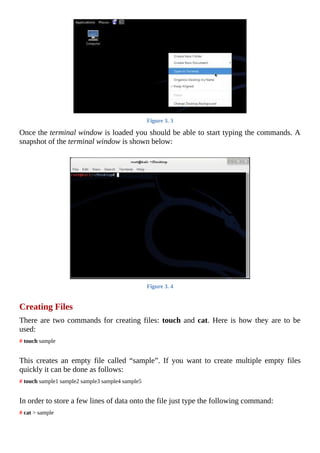
	
Using	an	IDS	(Intrusion	Detection	System)	and	IPS	(Intrusion	prevention	System)
can	be	of	a	great	advantage	when	it	comes	to	detection	and	prevention	of	DoS/DDoS
attacks	at	an	early	stage.
	
Blacklist	IP	addresses	that	are	found	to	be	the	source	of	a	possible	DoS	attack.
	
Ingress	Filtering:	 Make	 sure	 that	 the	 incoming	 packets	 are	 coming	 from	 a	 valid
source.
	
Egress	 Filtering:	 Scan	 all	 the	 outgoing	 packets	 for	 malicious	 data	 before	 they
actually	leave	the	network.
	
Since	it	is	possible	to	easily	spoof	the	IP	address	of	incoming	DDoS	packets,	there	is
a	good	chance	that	the	packets	will	not	represent	a	valid	source.	So,	configure	the
firewall	to	drop	packets	that	do	not	represent	a	valid	source	address.
	
Place	a	firewall	or	packet	sniffer	that	filters	out	all	incoming	traffic	that	does	not	have
an	originating	IP	address.
	
Increase	 the	 available	 bandwidth	 or	 resources	 to	 prevent	 the	 services	 from	 going
down	quickly	during	an	attack.
	
Load	Balancing:	Use	a	multiple	server	architecture	and	balance	the	incoming	load
on	each	server.	This	can	help	improve	performance	as	well	as	mitigate	the	effects	of
DDoS	attacks.
Chapter	13	-	Wireless	Hacking
	
The	usage	of	wireless	networks	are	becoming	increasingly	popular	these	days	due	to	their
operation	flexibility	and	low	cost	setup.	Wireless	networks	such	as	WLANs	allow	users	to
access	network	resources	from	anywhere	in	the	campus	using	mobile	devices	like	laptops
and	 tablets.	 This	 offers	 a	 great	 deal	 of	 flexibility	 to	 students	 and	 employees,	 thereby
eliminating	the	need	to	always	stick	to	their	desks	during	their	work	time.
However,	on	the	flipside	of	all	its	advantages	lies	major	security	issues.	As	more	and	more
companies	have	now	started	using	wireless	technologies	in	their	network,	these	security
issues	puts	the	business	on	a	high	risk.	As	opposed	to	wired	networks,	wireless	technology
does	not	limit	physical	access	to	an	outsider	such	as	a	hacker.	Today,	with	all	the	readily
available	tools	it	is	easily	possible	for	the	hacker	to	compromise	loopholes	in	the	wireless
security	system	and	gain	access	to	the	network.
In	 this	 chapter	 we	 will	 look	 at	 some	 of	 the	 common	 vulnerabilities	 that	 exists	 in	 the
wireless	 networking	 technology,	 ways	 to	 exploit	 them	 for	 gaining	 access	 and	 also	 the
countermeasures	for	preventing	them.
WIRELESS	NETWORK	BASICS
Before	jumping	into	the	actual	hacking,	let	us	go	through	some	of	the	basic	concepts	of
wireless	networking.
The	wireless	standard	is	commonly	represented	as	802.11	and	is	used	to	setup	wireless
local	 area	 networks	 (WLANs)	 in	 environments	 such	 as	 schools	 and	 offices.	 802.11
standard	has	3	leading	protocols	(or	extensions)	as	follows:
	
1.	 802.11a	 -	 It	 offers	 higher	 speed	 (up	 to	 54-Mbps),	 more	 channels	 and	 less
interferences.
	
2.	 802.11b	-	This	protocol	is	also	popularly	known	as	“Wi-Fi”.	This	is	the	standard	that
was	used	in	most	of	the	Wi-Fi	hotspots.
	
3.	 802.11g	 -	 This	 is	 similar	 to	 the	 802.11b	 protocol	 but	 provides	 much	 faster
transmission.
	
Components	of	Wireless	Network
A	wireless	network	comprises	of	the	following	3	basic	components:
	
Figure	13.	1
	
	
1.	 Wi-Fi	Radio	Device:	This	can	be	any	device	that	has	a	wireless	card	(NIC)	built	into
it	such	as	a	laptop,	tablet,	Wi-Fi	enabled	PC	or	a	cell	phone.
	
2.	 Access	Point:	This	is	the	device	which	allows	Wi-Fi	radio	devices	to	connect	to	the
wireless	network	using	Wi-Fi-	standards.	The	AP	then	has	a	wired	connection	to	the
router.	However,	most	modern	routers	now	come	with	built-in	APs	to	eliminate	the
need	for	an	extra	device.
3.	 Gateway:	 Routers	 are	 connected	 to	 the	 gateways	 which	 then	 connects	 the	 whole
network	to	the	Internet.
	
Detecting	Wireless	Networks	(War-Driving)
To	detect	a	wireless	network	such	as	a	Wi-Fi	Access	Point,	you	can	start	roaming	in	a
technology	park,	downtown	area	or	simply	through	the	walls	of	your	own	building	using
your	 Wi-Fi	 capable	 device	 (such	 as	 laptops	 and	 palm	 devices)	 with	 a	 “war-driving”
software.	Some	of	the	popular	war-driving	software	programs	are	listed	below:
	
Netstumbler:	 This	 is	 a	 Windows	 based	 war-driving	 tool	 that	 can	 detect	 wireless
networks	and	also	mark	their	position	with	a	GPS.
	
MiniStumbler:	This	is	a	portable	version	of	NetStumbler	that	can	be	installed	on
handheld	computers.
	
Vistumbler:	 This	 is	 another	 handy	 war-driving	 tool	 for	 Windows	 based	 operating
systems.
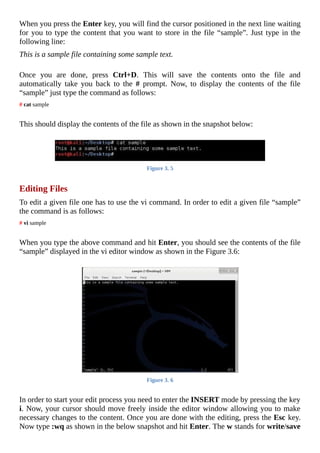
	
Kismet:	 This	 is	 a	 Linux	 based	 wireless	 sniffing	 tool	 that	 also	 has	 the	 ability	 to
perform	war-driving.
	
Wifi	Scanner:	This	is	a	GUI	based	Windows	tool	to	detect	all	the	available	APs	in
your	surroundings.
Please	 note	 that	 all	 wireless	 network	 cards	 (NICs)	 are	 not	 same	 and	 some	 may	 not	 be
compatible	with	the	above	mentioned	war-driving	tools.	In	that	case	you	will	have	to	use
the	software	that	came	with	your	wireless	NIC	for	detecting	access	points.
WIRELESS	SNIFFING
Wireless	sniffing	is	no	different	than	the	“wired	sniffing”	that	we	have	already	discussed
in	 the	 earlier	 chapter	 but	 the	 only	 difference	 here	 is	 that	 this	 one	 is	 performed	 on	 a
wireless	environment.	In	this	case	the	protocol	used	for	sniffing	is	802.11.	Since	radio
waves	are	omnidirectional,	it	is	easily	possible	to	carry	out	a	“man-in-the-middle”	attack
and	capture	all	the	packets	from	the	wireless	traffic	available	in	your	range.
	
Configuring	Wireless	Cards	for	Promiscuous	Mode
Promiscuous	mode	allows	the	NIC	(Network	Interface	Card)	to	capture	all	the	network
traffic	 that	 arrives	 at	 it	 instead	 of	 capturing	 only	 those	 that	 are	 intended	 for	 the	 NIC.
Unless	your	wireless	card	is	configured	to	operate	in	promiscuous	mode,	it	is	not	possible
to	perform	wireless	sniffing.
Most	 wireless	 network	 cards	 do	 not	 support	 promiscuous	 mode	 on	 Windows	 operating
system	and	hence	one	has	to	use	Linux	to	successfully	perform	wireless	sniffing.	If	you
still	want	to	perform	sniffing	on	Windows,	you	can	use	a	special	type	of	wireless	card
known	as	AirPcap	which	is	far	too	expensive	compared	to	normal	ones.	AirPcap	cards
can	be	used	on	Windows	with	sniffing	programs	like	“WireShark”	and	“Cain&Abel“,	but
for	all	other	cards	one	has	to	use	Linux	platform.
	
Tools	for	Wireless	Sniffing
Let	us	look	at	some	of	the	widely	used	tools	for	performing	wireless	sniffing:
	
Wireshark
Wireshark	is	one	of	my	favourite	packet	sniffing	tool	as	it	is	easy	to	use	and	supports
GUI.	 Even	 though	 it	 works	 on	 Windows,	 I	 am	 using	 Linux	 operating	 system	 in	 my
wireless	 sniffing	 demonstration	 as	 promiscuous	 mode	 is	 not	 supported	 on	 Windows
platform.	I	am	using	TP-LINK	TL-WN722N	for	this	demo	as	it	is	fully	compatible	with
Kali	 Linux	 that	 I	 am	 running	 it	 on.	 If	 you	 have	 a	 different	 wireless	 card	 or	 need	 to
purchase	one,	please	make	sure	that	it	is	compatible	with	the	Linux	kernel	that	you	will	be
using	it	on.	Since	Kali	Linux	is	packed	with	Wireshark	and	all	other	useful	tools	there	is
no	need	to	install	it	separately.	Follow	the	below	instructions	to	perform	a	sample	wireless
sniffing:
	
1.	 Boot	up	your	computer	from	your	Live	Kali	Linux	DVD.
	
2.	 Once	the	Linux	is	loaded,	plug-in	your	USB	wireless	card.
	
3.	 Open	the	“Terminal”	window	and	type	the	following	command:
	
iwconfig
Figure	13.	2
	
	
4.	 If	your	wireless	card	is	compatible,	you	should	see	your	device	listed	as	shown	in	the
above	snapshot	as	“wlan0”.
	
5.	 The	next	step	is	to	put	the	card	into	the	monitoring	mode	(promiscuous	mode).	For
this,	type	the	following	command:
	
	
airmon-ng	start	wlan0
	
	
On	my	computer,	wireless	card	is	listed	as	“wlan0”.	So,	I	have	entered	“wlan0”
in	 the	 command.	 If	 your	 computer	 has	 a	 different	 listing	 such	 as	 “wlan1”	 or
“wlan2”,	then	you	need	to	replace	the	same	in	the	above	command.
6.	 After	you	execute	the	command	successfully,	your	computer	will	create	a	new	virtual
wireless	card	and	enable	“monitor	mode”	in	it.	In	my	case	it	is	“mon0”	as	shown	in
the	below	snapshot.
	
Figure	13.	3
	
	
7.	 Now	it	is	time	to	use	Wireshark	to	start	capturing	the	packets.	To	start	Wireshark,
click	on	Applications	 ->	 Kali	 Linux	 ->	 Top	 10	 Security	 Tools	 ->	 wireshark	 as
shown	below:
	
Figure	13.	4
	
	
8.	 Now,	 from	 the	 Wireshark	 main	 window,	 select	 “mon0”	 from	 the	 Interface	 List,
double-click	on	it	and	select	option	to	capture	packets	in	both	“promiscuous	mode”
and	“monitor	mode”.	Next	click	on	OK.
	
Figure	13.	5
	
	
9.	 Once	you	are	done,	click	on	the	“Start”	button	to	begin	sniffing.	This	should	capture
packets	 from	 all	 the	 nearby	 available	 wireless	 networks.	 The	 following	 snapshot
shows	a	sample	packet	capture:
Figure	13.	6
	
The	following	are	some	of	the	other	wireless	sniffing	tools	worth	considering:
	
Ethereal
This	is	another	Linux	based	sniffing	tool	that	works	both	on	wired	and	wireless	networks.
It	comes	as	a	built-in	security	testing	tool	in	Kali	Linux.
	
OmniPeek	Wireless
OmniPeek	 is	 a	 commercial	 802.11	 sniffer	 tool	 packet	 with	 tons	 of	 useful	 features	 for
network	monitoring.	It	works	on	Windows	platform.
WIRED	EQUIVALENT	PRIVACY	(WEP)
WEP	is	a	component	of	802.11	WLAN	networks	designed	to	provide	confidentiality	of
data	in	the	wireless	networks.	Unlike	wired	networks	where	it	is	possible	to	limit	physical
access	 only	 to	 trusted	 users,	 the	 same	 is	 not	 possible	 in	 case	 of	 a	 wireless	 network.
Therefore,	in	order	to	overcome	this	limitation	a	special	type	of	encryption	called	WEP	is
used	to	prevent	attackers	from	intercepting	the	wireless	data.
However,	 there	 is	 a	 clear	 weakness	 in	 the	 WEP	 security	 system	 that	 can	 be	 exploited.
Once	enough	data	packets	are	captured	and	given	ample	time,	the	attacker	can	easily	crack
the	WEP	key	used	for	encryption	so	as	to	decrypt	all	information	back	to	raw	data.
	
Cracking	WEP	Encryption
The	following	tools	are	used	popularly	for	cracking	WEP	encryption	key/password:
	
Aircrack-NG
This	 is	 a	 popular	 tool	 used	 on	 Linux	 to	 crack	 802.11	 WEP	 encryption	 keys.	 It	 is	 a
command	line	tool	that	comes	as	a	built-in	feature	in	Kali	Linux	package	and	can	easily	be
used	 by	 loading	 it	 from	 the	 live	 DVD.	 Since	 it	 takes	 a	 long	 list	 of	 commands	 and
procedures	 to	 crack	 WEP	 passwords,	 I	 have	 decided	 to	 omit	 the	 demo	 of	 the	 cracking
process	from	this	book.	But	you	can	still	Google	for	“how	to	crack	WEP	encryption”	to
find	many	step-by-step	procedures	that	describe	the	actual	cracking	process.
	
WEPCrack
WEPCrack	is	another	popular	tool	for	cracking	802.11	secret	keys.	This	is	the	first	tool	to
give	a	public	demonstration	on	how	WEP	encryption	can	be	exploited.
WI-FI	PROTECTED	ACCESS	(WPA)
WPA	 is	 another	 wireless	 security	 standard	 that	 was	 mainly	 developed	 to	 address	 the
shortcomings	of	WEP.	WPA	uses	a	different	encryption	standard	which	is	better	than	that
of	WEP	and	is	designed	as	a	software	upgrade.
However,	 a	 flaw	 in	 this	 security	 feature	 called	 Wi-Fi	 Protected	 Setup	 (WPS)	 allows
WPA	passwords	to	be	cracked	using	brute-force	approach.	Most	access	points	have	WPS
enabled	by	default	and	hence	remain	vulnerable.
	
Cracking	WPA	Passwords
Here	is	a	step-by-step	demonstration	of	cracking	WPA	password	using	the	Reaver	tool
that	comes	with	Kali	Linux.
	
1.	 Boot	 your	 computer	 using	 the	 Kali	 Live	 DVD	 and	 also	 plug-in	 the	 USB	 wireless
card.
	
2.	 Open	the	terminal	window	and	type	the	command	iwconfig	to	make	sure	that	your
card	is	detected.
	
Figure	13.	7
	
	
3.	 Once	you	see	your	card	listed	(wlan0)	as	shown	above,	type	the	following	command
to	put	your	card	into	the	“monitoring	mode”	and	start	using	it.
	
airmon-ng	start	wlan0
	
This	should	activate	“monitoring	mode”	for	your	card.	On	my	computer	it	is
enabled	on	“mon0”	as	shown	in	the	below	snapshot.
Figure	13.	8
	
	
4.	 Now	type	the	following	command	to	detect	nearby	WPS	enabled	access	points.
	
wash	-i	mon0	-C
	
This	should	perform	a	scan	and	list	all	the	nearby	access	points	as	shown	below.
Once	access	points	are	detected,	press	Ctrl+C	to	stop	the	scanning	process.
	
Figure	13.	9
	
	
5.	 As	shown	above,	there	is	one	listing	which	shows	a	vulnerable	access	point	with	an
“ESSID”	NETGEAR31.	Now	issue	the	following	command	to	perform	brute	force
attack	on	the	target.
	
	
reaver	-i	mon0	-b	2C:B0:5D:68:93:D6	-vv
	
	
Please	note	that	you	will	have	to	replace	“2C:B0:5D:68:93:D6”	with	the	BSSID
of	the	target	AP	in	your	case.
	
6.	 The	cracking	process	will	take	a	few	hours	to	complete	and	if	everything	goes	well
you	should	see	the	cracked	PIN	and	passphrase	in	the	results	as	shown	in	the	below
snapshot:
Figure	13.	10
	
Other	Tools	for	Cracking	WPA
The	following	are	some	of	the	other	WPA	cracking	tools	that	you	can	try:
	
coWPAtty:	 This	 is	 a	 Linux	 based	 tool	 which	 uses	 dictionary	 approach	 and	 pre-
computed	hash	files	(similar	to	rainbow	tables)	to	crack	WPA	passphrases.
	
Hashcat:	This	is	one	of	the	fastest	CPU-based	password	cracking	tool	which	uses
different	approaches	like	dictionary,	brute-force	and	hybrid	types	of	attacks.	It	comes
for	both	Windows	and	Linux	operating	systems.
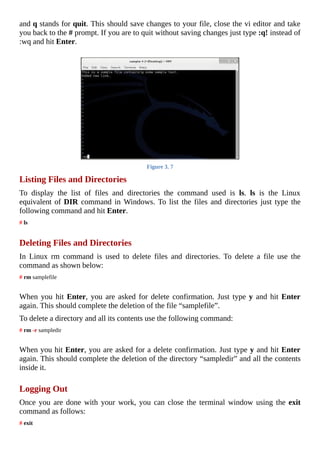
DENIAL	OF	SERVICE	(DOS)	ATTACKS
Just	 like	 wired	 networks,	 wireless	 networks	 are	 also	 susceptible	 to	 denial	 of	 service
attacks.	Since	WLANs	use	radio	waves	on	public	frequencies	for	sending	and	receiving
the	traffic,	it	is	easy	to	use	other	traffic	from	the	same	band	to	cause	interference.	If	the
attacker	fails	to	gain	access	to	the	network,	he	may	use	DoS	as	a	final	option	to	attack	the
network.	DoS	attacks	cause	all	the	existing	connections	to	the	network	to	get	dropped	and
also	 prevents	 new	 connections	 from	 happening	 thereby	 causing	 the	 WLAN	 virtually
unusable.
	
Tools	for	Wireless	DoS
Kali	Linux	has	a	handful	of	built-in	tools	and	features	to	cause	DoS	attacks	on	WLANs.
Most	of	these	tools	works	by	sending	de-authentication	packets	instead	of	authentication
packets	to	access	points	which	causes	the	network	to	drop	all	the	existing	connections.
Other	 way	 to	 flood	 network	 is	 by	 sending	 authentication	 requests	 to	 APs	 with
inappropriate	status	codes	or	random	client	MACs.
Some	of	the	popular	tools	for	wireless	DoS	include	Void11,	Fatajack	and	FakeAP	(for
spoofing	or	creating	large	number	of	fake	access	points	in	an	attempt	to	confuse	clients).
COUNTERMEASURES
The	following	are	some	of	the	countermeasures	that	one	can	employ	to	prevent	possible
attacks	on	a	wireless	network:
	
MAC	Address	Filtering:	This	feature	uses	a	pre-defined	list	of	MAC	addresses	of
the	clients’	wireless	NICs	who	are	allowed	to	connect	to	the	network.	This	way	it	is
possible	to	prevent	strangers	from	accessing	the	WLANs.
	
Hidden	SSID:	Preventing	an	AP	to	stop	broadcasting	its	SSID	makes	it	go	invisible
and	hence	becomes	inaccessible	to	attackers.
	
WPA	instead	of	WEP:	Since	WEP	has	well	known	security	issues,	it	is	always	safe
to	use	alternate	encryption	standards	such	as	WPA	or	WPA2	over	WEP.
	
Disable	WPS:	Since	WPS	(Wi-Fi	Protected	Setup)	is	said	to	have	flaws,	enabling	it
makes	 WPA	 vulnerable.	 Therefore,	 it	 is	 necessary	 to	 manually	 disable	 the	 WPS
feature	where	in	most	routers	it	comes	pre-activated	by	default.
	
Firewall:	 Using	 a	 firewall	 with	 strong	 rules	 helps	 filter	 unauthorized	 traffic	 and
prevent	brute-force	attacks.
Chapter	14	-	Web	Application	Vulnerabilities
	
Weakness	in	web	applications	allow	hackers	to	carry	out	various	malicious	attacks	such	as
hijacking	accounts,	stealing	identities,	gaining	access	to	confidential	information	and	so
on.	 In	 this	 chapter	 we	 will	 look	 at	 some	 of	 the	 common	 vulnerabilities	 found	 in	 web
applications	and	ways	to	exploit	them.
WEB	APPLICATION	BASICS
A	web	application	is	a	client/server	software	that	runs	on	a	computer	and	interacts	with	the
users	or	other	systems	using	protocols	such	as	HTTP.	Most	web	applications	are	typically
written	 using	 programming	 languages	 like	 Java,	 PHP,	 Perl,	 Microsoft	 .NET	 and	 so	 on.
Each	server	has	multiple	web	applications	running	on	it	using	which	it	is	possible	to	make
back	and	forth	communication	between	the	client	and	the	server	for	carrying	out	tasks
such	 executing	 database	 queries,	 retrieving	 files	 etc.	 The	 following	 steps	 explain	 the
working	of	web	applications	on	a	server:
	
1.	 The	client	makes	a	request	for	a	web	page	by	typing	its	URL	on	the	browser.
	
2.	 The	 target	 web	 server	 receives	 this	 request	 and	 forwards	 the	 same	 to	 the	 web
applications	residing	on	it.
	
3.	 The	web	applications	will	process	the	request	to	fetch	all	the	necessary	information
required	for	the	output	(such	as	querying	database,	processing	image	etc.)	and	sends
it	back	to	the	web	server.
	
4.	 The	web	server	forwards	the	output	back	to	the	requesting	client’s	browser.
	
Figure	14.	1
TYPES	OF	WEB	APPLICATION	VULNERABILITIES
Now,	 let	 us	 discuss	 some	 of	 the	 different	 types	 of	 vulnerabilities	 found	 in	 web
applications,	how	they	work	and	ways	to	exploit	them.
	
Cross-Site	Scripting	(XSS)
Cross-site	scripting	(also	known	as	XSS)	is	a	type	of	attack	that	injects	malicious	scripts
(such	as	JavaScript,	ActiveX,	VBScript,	Flash	etc.)	into	vulnerable	web	pages	of	a	site.
This	malicious	script	gets	stored	on	the	website	itself	and	whenever	users	visit	this	site	or
browse	its	pages	the	script	gets	launched	on	the	client’s	side	to	initiate	an	attack.	In	simple
words	XSS	is	a	type	of	attack	that	exploits	a	vulnerable	site	and	uses	it	as	an	intermediary
to	carry	out	attacks	on	the	end	users.
	
Key	Concepts	of	XSS
	
XSS	is	a	web	based	attack	performed	on	vulnerable	web	applications.
	
In	XSS	attacks,	the	final	target	or	the	victim	is	the	end-user	and	not	the	vulnerable
application.
	
Here,	the	vulnerable	web	page	or	application	is	used	just	as	a	conduit	to	reach	the
final	target	who	is	the	end	user.
	
Impact	of	XSS	Attack
When	attackers	succeed	in	exploiting	XSS	vulnerabilities,	they	can	perform	the	following
activities	on	the	client	side:
	
Gain	access	to	session	cookies	and	hijack	user	accounts.
	
Spread	worms,	virus	and	Trojans.
	
Gain	access	to	the	end	user’s	files	and	directories.
	
Remotely	control	the	user’s	browser	activity.
	
XSS	Scenario
Let	us	assume	that	a	hacker	discovers	an	XSS	vulnerability	in	one	of	the	web	applications
of	a	large	website	like	facebook.com.	The	hacker	exploits	this	vulnerability	and	injects	a
malicious	code	on	to	one	of	the	Facebook’s	web	page.	Whenever	users	visit	this	page,	the
malicious	 code	 runs	 on	 their	 browser	 and	 steals	 their	 session	 cookie	 and	 sends	 this
information	back	to	the	hacker.	The	attacker	will	now	use	this	cookie	to	hijack	the	user’s
session	and	easily	gain	access	to	his/her	Facebook	account.
	
XSS	Countermeasures
Today,	 modern	 websites	 rely	 heavily	 on	 complex	 web	 applications	 to	 deliver	 dynamic
content	outputs	based	on	user	specific	needs	and	preferences.	Unlike	static	websites,	it	is
not	possible	for	the	dynamic	websites	to	exercise	complete	control	over	how	their	output
is	 interpreted	 by	 the	 client.	 This	 may	 open	 up	 a	 possibility	 for	 the	 presence	 of	 XSS
vulnerabilities	in	one	or	more	web	applications	used	by	the	dynamic	website.	You	can	take
up	the	following	countermeasures	to	stop	XSS	attacks	on	your	websites:
	
Strictly	validate	all	the	incoming	data	to	the	web	applications	before	execution.
	
Adopt	a	strict	security	policy	to	prevent	people	from	directly	submitting	scripts	to	the
server.
	
Filter	the	input	data	to	remove	any	of	the	existing	scripts	in	it	before	processing	them.
	
SQL	Injection
Web	 applications	 use	 databases	 to	 store	 data	 needed	 for	 websites	 to	 deliver	 specific
content	to	visitors	and	render	other	useful	information.	Databases	may	also	contain	other
vital	information	such	as	user	credentials,	financial	documentations,	user	specific	data	and
many	other	confidential	information.	Whenever	legitimate	users	place	a	request	to	view	or
modify	 this	 information,	 SQL	 queries	 (also	 called	 SQL	 commands)	 are	 used	 by	 web
application	to	fetch	or	modify	the	data	stored	in	the	databases.
SQL	injection	is	a	type	of	attack	where	the	attacker	tries	to	pass	SQL	command	itself
(instead	of	text	data)	through	the	web	application	for	execution	by	the	backend	database.
Here	the	attacker	injects	specially	crafted	SQL	commands	to	input	fields	such	as	search
boxes,	login	fields,	feedback	forms	etc.	that	are	meant	to	receive	valid	data.	If	the	web
applications	fail	to	properly	validate	the	input	before	passing	it	on	to	the	database,	this
may	 grant	 unauthorized	 access	 to	 the	 attacker	 and	 permit	 him	 to	 view	 or	 modify
information	from	the	database.
	
Key	Concepts	of	SQL	Injection
	
SQL	injection	is	a	software	vulnerability	that	occurs	when	user	data	inputs	are	sent
directly	to	the	SQL	interpreter	for	execution	without	proper	validation.
	
Attackers	use	input	fields	to	pass	specially	crafted	SQL	queries	in	an	attempt	to	trick
the	interpreter	to	execute	unintended	commands	on	the	database.
Impact	of	SQL	Injection	Attack
Upon	 success,	 an	 SQL	 injection	 attack	 may	 allow	 the	 hacker	 to	 perform	 the	 following
activities:
	
Bypass	user	authentication	and	gain	unauthorized	access.
	
Gain	access	to	important	parts	of	the	database	and	view	unintended	data.
	
Add	or	remove	new	entries	to	the	database.
	
Sometimes	it	is	even	possible	to	completely	wipe	out	the	contents	of	the	database.
	
SQL	Injection	Example
Let	us	assume	that	there	exists	a	login	page	designed	to	allow	users	to	access	a	restricted
area	of	the	website	upon	authenticating	their	credentials.	When	a	genuine	user	enters	his
“username”	and	“password”	in	the	login	field,	the	web	application	executes	an	SQL	query
in	the	background	on	a	database	which	contains	a	list	of	usernames	and	passwords.	If	the
“username-password”	 pair	 is	 said	 to	 be	 matching	 the	 user	 is	 granted	 access;	 otherwise
access	is	denied.
Suppose	when	a	genuine	user	enters	his	credentials	as	follows:
Username:	tom
Password:	pass2000
	
The	SQL	query	used	to	perform	this	match	would	be	something	as	follows:
SELECT	*	FROM	users	WHERE	username=‘tom’	and	password=‘pass2000’
	
Here	 the	 above	 SQL	 query	 is	 trying	 to	 find	 a	 row	 in	 the	 database	 by	 matching	 the
“username-password”	 pair	 using	 the	 logical	 and	 operator.	 The	 and	 operator	 returns
TRUE	only	when	both	the	operands	(username	&	password)	matches.	Otherwise	access
will	be	denied.
Imagine	what	would	happen	when	a	hacker	discovers	a	SQL	injection	vulnerability	on	this
login	 page.	 He	 would	 inject	 a	 specially	 crafted	 SQL	 command	 into	 the	 login	 field	 as
follows:
Username:	tom
Password:	‘	or	‘1’=‘1
	
The	 vulnerable	 web	 application	 simply	 passes	 the	 data	 in	 the	 password	 field	 without
proper	validation	and	hence	it	gets	interpreted	as	an	SQL	command	instead	of	a	normal
text	data.	Now,	the	SQL	query	used	to	perform	this	match	would	be	something	as	follows:
SELECT	*	FROM	users	WHERE	username=‘tom’	and	password=”	or	‘1’=‘1’
	
Here	the	logical	operator	or	holds	TRUE	even	if	only	one	of	its	operands	matches.	In
this	case	‘1’=‘1’	matches	and	hence	the	hacker	is	granted	access	to	the	restricted	area	for
the	 website.	 This	 way,	 the	 SQL	 injection	 vulnerability	 helps	 hacker	 bypass	 the
authentication	system	and	gain	unauthorized	access	to	the	system.
	
SQL	Injection	Countermeasures
	
Adopt	an	input	validation	technique	to	sanitize	the	user	input	before	passing	it	on	to
the	database	applications	for	execution.
	
Users	must	be	given	least	permission	when	they	are	allowed	to	access	the	database.
	
Web	 applications	 must	 not	 be	 allowed	 to	 access	 database	 with	 administrator
privileges.	 Instead	 use	 a	 limited	 account	 when	 accessing	 databases	 via	 web
applications.
	
Command	Injection
Command	injection	(also	known	as	shell	injection)	is	a	type	of	attack	where	the	attacker
exploits	 vulnerable	 web	 applications	 to	 inject	 malicious	 codes	 into	 the	 backend
applications	in	order	to	seek	unauthorized	access	to	data	or	network	resources.	This	attack
is	very	similar	to	the	SQL	injection	attack	described	above.
Dynamic	web	pages	use	web	applications	to	present	user	specific	data	and	carry	out	other
dynamic	operations	such	as	retrieving	the	contents	of	a	file,	sending	emails	etc.	These	web
applications	in	turn	make	use	of	underlying	programs	such	as	shell	scripts	and	operating
system	calls	to	complete	specific	requests	and	actions.
If	web	applications	such	as	form	fields	fail	to	sanitize	user	input	data	before	passing	the
same	to	the	backend	applications,	an	attacker	can	easily	exploit	them	to	perform	command
injection	attack.
	
Command	Injection	Countermeasures
The	following	are	some	of	the	countermeasures	that	can	be	employed	to	prevent	command
injection	attacks:
	
Properly	 sanitize	 and	 validate	 the	 user	 input	 data	 to	 remove	 any	 of	 the	 existing
malicious	content.
	
Structure	 requests	 so	 that	 all	 supplied	 parameters	 are	 treated	 as	 data	 instead	 of
potentially	executable	content.
Make	sure	that	you	strip	out	potentially	dangerous	characters	like	semicolons,	pipes
(|)	 and	 ampersands	 (&)	 from	 user	 input	 before	 passing	 it	 onto	 the	 underlying
programs.
	
If	possible,	avoid	passing	user	given	arguments	to	OS	programs.
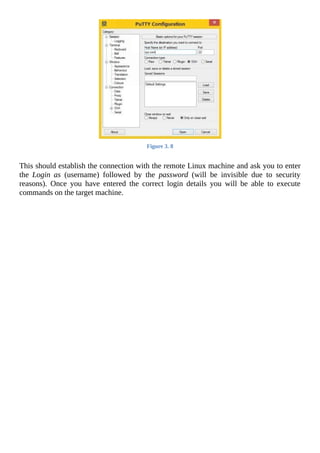
	
Buffer	Overflow
Buffer	overflow	(also	known	as	buffer	overrun)	is	a	type	of	exploit	that	takes	advantage
of	vulnerable	applications	that	are	waiting	to	process	user	inputs.	A	web	application	is	said

to	 be	 vulnerable	 to	 this	 kind	 of	 attack	 when	 the	 application,	 while	 writing	 data	 to	 the
buffer	overruns	the	buffer	limit	and	overwrites	to	adjacent	memory.
	
Key	Concepts	of	Buffer	Overflow
	
Buffer	overflow	happens	when	the	size	of	user	input	data	is	larger	than	its	allocated
buffer	size	and	the	application	overruns	its	buffer’s	boundary	when	writing	the	input
to	the	memory.
	
The	goal	is	to	trigger	buffer	overflows	in	vulnerable	applications	through	inputs	that
are	designed	to	execute	malicious	codes	or	alter	the	normal	flow	of	the	program	to
the	flow	determined	by	the	hacker.
	
Types	of	Buffer	Overflows
Buffer	overflow	attacks	can	be	classified	into	two	main	types	as	follows:
	
Heap	based	attacks
	
Stack	based	attacks
	
Heap	based	attack	works	by	flooding	the	memory	space	that	is	dynamically	allocated	to	a
program,	but	the	difficulty	involved	in	carrying	out	such	attacks	makes	them	rare.	On	the
other	hand	stack	based	attacks	are	the	easiest	and	hence	most	widely	performed	by	the
attackers.
	
Stack	Buffer	Overflow	Example
A	stack	is	a	computer	memory	used	when	one	function	within	a	program	calls	another.
This	stack	contains	data,	local	variables	(variables	that	are	private	to	a	function),	function
arguments	and	most	importantly	the	return	address	of	the	instruction	to	return	when	one
function	finishes.	In	other	words,	when	“FunctionA”	calls	“FunctionB”,	the	CPU	needs	to
know	where	to	go	back	when	“FunctionB”	finishes	its	task	and	this	return	address	(back	to
“FunctionA”)	is	stored	in	the	stack.
Consider	the	following	sample	code:
void	functionA	()
{
functionB	(	ReadUserName	(socket)	);
}
	
void	functionB	(char	*name)
{
char	name_arr[10];
strcpy	(name_arr,	name);
}
	
In	the	above	example,	functionA	reads	the	string	(user	name)	from	the	from	the	user	and
passes	it	on	to	the	functionB	for	copying	the	same	to	a	buffer	(name_arr[10])	for	which
the	 size	 allocated	 is	 10	 bytes.	 When	 the	 attacker	 enters	 a	 cleverly	 devised	 input	 name
whose	 size	 is	 larger	 than	 10	 bytes,	 the	 data	 can	 overflow	 beyond	 the	 memory	 parts
assigned	 to	 “name_arr”	 resulting	 in	 a	 buffer	 overflow.	 Remember	 that	 a	 stack	 also
contains	return	address	for	functionA	when	functionB	completes	its	execution.	When	the
buffer	overflows,	the	attacker	can	manipulate	the	stack	to	set	his	own	return	address	to	the
point	where	his	malicious	program	exists	in	the	buffer.	In	this	way,	the	attacker	can	exploit
stack	overflow	vulnerability	in	web	applications	to	execute	his	own	malicious	codes	and
take	control	of	the	system.
	
Buffer	Overflow	Countermeasures
	
Validate	input	length	of	data	in	forms	before	passing	them	on	to	the	functions.
	
Practice	safe	and	secure	coding	habits	when	dealing	with	buffers.
	
Use	tools	like	Stack	Shield	and	Stack	Guard	for	Linux	systems	to	defend	against
stack	overflow	attacks.
	
Directory	Traversal
Directory	traversal	is	a	type	of	HTTP	vulnerability	used	by	hackers	to	gain	access	to
restricted	directories	and	file	system	on	a	web	server.	Directory	traversal	attack	happens
due	to	the	web	servers’s	inability	to	validate/filter	user	inputs.	Web	applications	developed
using	 programming	 languages	 like	 PHP,	 Python,	 Perl,	 Apache	 and	 ColdFusion	 are
commonly	vulnerable	to	this	type	of	attack.
Key	Concepts	of	Directory	Traversal
	
Using	 this	 vulnerability	 attackers	 can	 browse	 directories	 and	 files	 that	 are	 outside
normal	application	access.
	
This	type	of	attack	exposes	directory	structure,	underlying	web	server	and	operating
system	of	the	vulnerable	machine.
	
Attack	allows	hacker	to	gain	access	to	restricted	pages	and	confidential	information
on	the	system.
	
Directory	Traversal	Countermeasures
	
Properly	validate	user	inputs	from	browsers.
	
Employ	 filters	 to	 block	 URLs	 containing	 commands	 and	 escape	 codes	 that	 are
commonly	used	by	attackers.
	
Define	access	rights	to	protected	areas	of	the	website	so	as	to	restrict	normal	user
access.
	
Keep	your	web	server	software	up-to-date	with	latest	patches	and	updates.
TOOLS	FOR	VULNERABILITY	SCANNING
The	following	are	some	of	the	popular	tools	that	can	be	used	to	find	vulnerabilities	in	web
applications.
	
Acunetix:	 This	 is	 an	 enterprise	 level	 web	 application	 vulnerability	 scanner	 and
penetration	testing	tool	available	for	Windows	machines.
	
W3af:	This	is	an	open	source	web	application	attack	and	audit	tool	for	Linux,	BSD,
Mac	and	Windows	machines.
	
Vega:	 This	 tool	 is	 used	 to	 find	 and	 fix	 commonly	 found	 web	 application
vulnerabilities	like	XSS,	SQL	injection	and	more.	It	is	an	open	source	tool	written	in
Java	and	available	for	both	Windows	and	Linux	operating	systems.
	
Arachni:	This	is	a	powerful	open	source	tool	used	by	penetration	testers	and	system
administrators	to	evaluate	the	security	of	web	applications.	The	tool	is	available	for
Linux	and	Mac	platforms.
	
X5S:	X5S	is	a	powerful	tool	designed	to	find	cross-site	scripting	vulnerabilities	in
web	applications.
Chapter	15	-	Hacking	Internet	Users
	
Due	 to	 a	 rapid	 increase	 in	 the	 number	 of	 Internet	 users	 in	 the	 recent	 years,	 malicious
hackers	have	now	started	to	target	individual	users	for	their	attack.	Numerous	client	side
vulnerabilities	such	as	browser	flaws	and	lack	of	security	awareness	among	the	Internet
users	has	made	them	an	easy	target	for	hackers.	In	this	chapter	let	us	look	at	some	of	the
popular	ways	to	hack	Internet	users	and	also	the	countermeasures	to	prevent	them.
	
Objectives	of	Hacking	Internet	Users
Hackers	target	individual	users	for	a	wide	variety	of	reasons	as	mentioned	below:
	
For	 gaining	 access	 to	 confidential	 information	 such	 as	 credit	 cards	 details,	 bank
logins,	account	information	etc.
	
To	take	control	of	user’s	online	accounts	such	as	Email,	Facebook	and	other	social
network	accounts.
	
To	earn	advertising	revenue	by	forcefully	driving	users	to	online	advertisements	such
as	banners	and	pop-ups.
	
To	use	individual	users	for	attacking	other	systems	such	as	causing	a	DDoS	attack.
	
Sometimes	even	for	fun	or	to	show-off	talent	among	the	hacker’s	community.
COMMON	HACKING	TECHNIQUES
The	following	are	some	of	the	popularly	used	techniques	to	hack	individual	users	on	the
Internet:
	
Session	Hijacking	(Cookie	Hijacking)
Since	web	pages	have	no	memories,	they	have	to	use	a	means	to	identify	and	authenticate
individual	 users	 accessing	 web	 pages.	 Especially	 when	 people	 are	 accessing	 restricted
pages	or	secure	area	which	require	password	authentication,	the	website	needs	a	means	to
remember	users	individually	after	their	successful	logins.	For	example,	when	people	log
into	 their	 Facebook	 account	 (by	 entering	 password),	 they	 may	 access	 several	 different
pages	until	they	finally	sign	out.	It	would	be	impractical	to	ask	users	to	re-enter	password
each	time	they	access	a	different	page.
	
Session	Cookies
Therefore,	in	order	to	remember	individual	users,	websites	store	a	small	file	called	session
cookie	 on	 the	 client	 side	 (in	 the	 user’s	 browser)	 which	 contains	 unique	 authentication

information	about	the	user’s	active	session.	These	cookies	help	identify	individual	users
throughout	the	website.	When	the	user	hits	the	log	out	button	or	closes	the	browser,	the
session	is	said	to	expire.
So,	when	a	hacker	manages	to	steal	the	cookies	of	an	active	session	he	may	inject	them	to
his	 browser	 to	 gain	 unauthorized	 to	 any	 online	 account	 such	 as	 emails,	 social	 media
accounts	 and	 so	 on.	 This	 technique	 is	 known	 as	 session	hijacking	 (also	 referred	 to	 as
cookie	hijacking	or	cookie	stealing).
	
Session	Hijacking	Demo
Below	is	a	demonstration	of	typical	session	hijacking	performed	on	a	sample	Facebook
account.	Here	the	hacker	may	use	different	techniques	such	as	cross-site	scripting	(XSS)	or
packet	sniffing	to	steal	the	target	user’s	session	cookies.
Even	though	Facebook	stores	several	cookies	in	the	browser	after	successful	login,	there
are	 only	 two	 important	 cookies	 that	 contains	 authentication	 data	 to	 decide	 an	 active
session.	The	names	of	these	two	cookies	are	as	follows:
	
1.	 c_user
	
2.	 xs
	
In	order	to	hijack	an	active	session,	one	has	to	gain	access	to	the	contents	of	the	above	two
cookies.	Snapshots	of	the	sample	data	contained	in	these	two	cookies	are	shown	below:
Figure	15.	1
	
Figure	15.	2
	
Once	you	have	access	to	the	contents	of	the	above	two	session	cookies	“c_user”	and	“xs”
it	is	time	to	inject	them	to	your	browser	and	gain	access	to	the	target	user’s	Facebook
account.	A	Firefox	extension	called	“Advanced	Cookie	Manager”	makes	this	job	a	lot
simpler.	It	provides	an	option	to	add	and	edit	cookies	stored	on	Firefox.	Here	is	a	step-by-
step	instruction	to	inject	cookie	to	Firefox	browser:
	
Install	the	add-on	Advanced	Cookie	Manager	to	your	Firefox	browser	and	open	it
by	clicking	the	icon	present	in	the	toolbar.
	
Switch	to	the	“Manage	Cookies”	tab	and	click	on	the	“Add	Cookies”	button.
	
To	create	the	“c_user”	cookie	fill	in	all	the	details	exactly	as	shown	in	the	below
snapshot	expect	for	the	“Value”	field	which	has	to	be	replaced	by	the	content	from
the	hijacked	cookie.	Once	you	are	done	click	on	“Add”	button.
Figure	15.	3
	
	
Again	click	on	“Add	Cookie”	button	to	create	the	cookie	“xs”	in	the	same	way.	After
filling	the	details	as	shown	below	click	on	“Add”	button.	Do	not	forget	to	replace	the
“Value”	field	with	the	content	from	your	hijacked	“xs”	cookie:
	
Figure	15.	4
	
After	 you	 have	 finished	 creating	 these	 two	 cookies,	 close	 the	 “Advanced	 Cookie
Manager”	and	load	the	Facebook	page.	You	should	automatically	be	logged	into	the
target	user’s	account	where	you	have	the	complete	access.
Once	you	are	logged,	you	can	access	the	account	as	long	as	the	target	user’s	session	is
active.	That	means,	you	can	access	the	account	in	parallel	from	your	own	computer	until
the	user	hits	“Log	Out”	button	on	his/her	computer.
Session	Hijacking	Countermeasures
The	 following	 are	 some	 of	 the	 countermeasures	 to	 prevent	 session	 hijacking	 on	 your
computer:
	
Use	encryption	standards	such	as	SSL	(HTTPS)	to	prevent	cookie	hijacks	via	packet
sniffing.
	
Use	an	up-to-date	browser	program	to	prevent	browser	exploits.
Configure	browser	to	stop	running	unverified	scripts	and	also	avoid	using	browser
plug-ins	from	untrusted	sources.
	
Email	Hacking
Email	hacking	is	one	of	the	prevailing	hot	topics	in	the	field	of	ethical	hacking.	A	hacker
can	gain	access	to	a	wide	variety	of	private	information	about	the	target	user	if	he	manager
to	 hack	 his/her	 email	 account.	 Some	 of	 the	 possible	 ways	 to	 hack	 email	 accounts	 are
discussed	below.
	
Keylogging
Using	a	spyware	program	such	as	keylogger	is	the	easiest	way	to	hack	an	email	or	any
other	online	account	password.	All	you	need	to	do	is	just	install	the	keylogger	program	on
the	computer	where	the	target	user	is	likely	to	access	his/her	email	account	from.	These
spyware	 programs	 are	 designed	 to	 operate	 in	 a	 total	 stealth	 mode	 and	 hence	 remains
completely	hidden	from	normal	users.	Once	the	keystrokes	are	recorded	you	can	unlock
the	program	using	a	hot	key	combination	or	password	to	view	the	logs.	The	logs	contain
all	 the	 keystrokes	 typed	 on	 the	 computer	 keyboard	 including	 the	 usernames	 and
passwords.
Modern	 keylogger	 programs	 like	 Realtime-Spy,	 SpyAgent	 and	 SniperSpy	 supports
remote	 monitoring	 feature	 where	 you	 can	 view	 the	 logs	 even	 from	 a	 remote	 location.
Some	of	them	also	have	a	feature	to	send	logs	through	email	and	FTP.
Even	 though	 keyloggers	 can	 make	 the	 hacking	 process	 a	 lot	 simpler,	 they	 have	 a	 few
drawbacks.	Most	of	these	programs	have	to	be	installed	manually	on	the	target	computer
for	which	you	need	to	have	physical	access	to	it.	Also,	there	is	a	chance	of	anti-spyware
programs	detecting	and	deleting	the	keylogger	installation	on	the	computer.
	
Phishing
Phishing	is	another	popular	and	highly	effective	technique	used	by	attackers	to	hack	email
and	other	online	accounts.	Most	Internet	users	would	easily	fall	prey	and	become	victims
to	this	type	of	attack.	However,	to	device	a	phishing	attack,	one	has	to	have	at	least	a	basic
knowledge	of	HTML	and	programming.
Steps	Involved	in	Phishing	Attack:
The	hacker	first	creates	a	replica	of	the	target	login	page	such	as	Gmail,	Yahoo!	or
any	other	online	account.
	
This	page	is	designed	to	submit	all	login	information	(username	and	password)	on	the
form	 fields	 to	 a	 local	 database	 instead	 of	 the	 actual	 website.	 Hacker	 would	 use	 a
scripting	language	such	as	PHP	and	a	database	such	as	MySQL	to	accomplish	this.
	
Once	the	page	is	integrated	to	the	script	and	database,	the	hacker	uploads	the	whole
setup	to	a	hosting	server	so	as	to	make	the	phishing	page	go	online.
	
The	 hacker	 chooses	 a	 matching	 domain	 (such	 as	 gamil.com,	 gmail-account.com,
yahoo-mail.com	etc.)	for	his	phishing	page	so	as	to	avoid	any	suspicion.
	
Once	the	phishing	page	is	live	and	working,	the	hacker	drives	people	to	this	phishing
page	by	spreading	the	phishing	link	via	email,	Internet	Messenger	and	forums.
	
Since	phishing	pages	look	exactly	the	same	as	the	real	one,	people	enter	their	login
details	 on	 these	 pages	 where	 they	 are	 stolen	 away	 and	 gets	 stored	 in	 the	 hacker’s
database.
	
Session	Hijacking
As	 discussed	 earlier,	 it	 is	 possible	 to	 gain	 access	 to	 an	 email	 account	 through	 session
hijacking.	By	stealing	the	cookies	of	an	active	session	and	injecting	them	to	one’s	own
browser,	it	is	possible	to	gain	access	to	the	target	email	account.	However,	if	the	target
user	closes	his/her	ongoing	session	by	logging	out,	you	will	no	longer	be	able	to	access	the
account.	 Also,	 unlike	 keylogging	 and	 phishing,	 this	 method	 does	 not	 grant	 you	 the
password	of	the	target	account	and	hence	you	will	not	be	able	to	re-access	it	at	a	later
time.
	
Unlocking	Stored	Passwords
Most	users	prefer	to	store	the	password	details	of	email	and	other	online	accounts	in	the
browser	to	enable	speedy	access.	Sometimes	login	details	of	offline	email	clients	such	as
Outlook	are	also	stored	on	the	computer.	This	makes	them	vulnerable	to	hackers.	Nirsoft
provides	a	handful	of	free	tools	to	recover	such	stored	passwords	on	Windows.	You	can
download	the	tools	from	the	link	provided	below:
Download:	http://www.nirsoft.net/password_recovery_tools.html
	
Email	Hacking	Countermeasures
Below	 are	 some	 of	 the	 countermeasures	 that	 you	 can	 adopt	 to	 prevent	 your	 email	 and
other	online	accounts	from	getting	hacked:
Install	a	good	antivirus	and	anti-spyware	program	on	your	computer	and	keep	them
up-to-date.
	
Password	protect	your	operating	system	so	that	no	one	can	access	your	computer	in
your	absence.
	
Always	perform	a	malware	scan	on	programs	before	installing	them.
	
Avoid	accessing	your	accounts	in	public	places	such	as	cyber	cafes.
	
Make	sure	that	HTTPS	is	on	when	you	are	accessing	your	emails.
	
Do	 not	 click	 on	 the	 links	 in	 your	 email	 or	 forum	 to	 enter	 the	 login	 page.	 Instead
always	type	the	URL	of	the	website	in	the	browser’s	address	bar	and	also	make	sure
that	HTTPS	is	enabled	on	your	login	page.
	
Avoid	storing	your	login	details	on	the	browser	unless	you	are	the	only	user	on	the
computer.
	
Other	Ways	to	Hack	Internet	Users
The	following	are	some	of	the	other	hacking	methods	that	are	common	in	practice:
	
JavaScript:	 Since	 most	 client-side	 applications	 are	 written	 in	 JavaScript,	 it	 also
makes	 a	 wonderful	 tool	 for	 hackers	 to	 write	 malicious	 programs	 for	 exploiting
browser	 vulnerabilities.	 Due	 to	 lack	 of	 security	 awareness	 among	 users,	 they	 can
easily	 be	 fooled	 into	 entering	 sensitive	 information	 or	 navigating	 to	 malicious
websites.	It	can	also	be	used	to	carry	out	other	attacks	such	as	cross-site	scripting	and
phishing.
	
Malware:	Using	malware	is	another	popular	way	of	hacking	Internet	users.	Hackers
make	use	of	malware	programs	like	virus	and	Trojan	horses	to	accomplish	their	task
by	affecting	large	number	of	people.	A	popular	example	of	such	attack	is	the	use	of
“DNSChanger”	Trojan	which	affected	millions	of	Internet	users	by	hijacking	their
DNS	servers.
	
Instant	Messaging:	Attackers	can	also	target	IM	users	by	sending	them	unsolicited
offers	 in	 the	 form	 of	 files	 and	 links.	 This	 may	 mislead	 the	 users	 into	 installing
malware	or	navigating	to	malicious	websites.
CONCLUSION
	
I	would	like	to	congratulate	your	effort	for	making	it	through	the	whole	book.	Throughout
the	 course	 of	 this	 book	 you	 have	 been	 introduced	 to	 various	 hacking	 techniques	 and
security	concepts	that	has	laid	a	solid	foundation	to	present	yourself	as	an	ethical	hacker.
However,	as	the	name	of	this	book	itself	suggests,	this	is	just	a	beginning.	In	the	field	of
information	security,	there	is	always	a	room	and	need	for	learning	new	things	and	quest
for	 expanding	 knowledge	 remains	 forever.	 Remember,	 present	 day	 hacking	 techniques
may	no	longer	work	for	the	future!	As	new	vulnerabilities	get	discovered	old	ones	get
patched.	So,	you	as	an	ethical	hacker	must	always	have	an	update	on	the	latest	security
news	and	newly	discovered	vulnerabilities.
	
FURTHER	READING
In	order	to	make	it	easy	for	the	beginners	and	first	time	readers,	I	have	simplified	some	of
the	topics	in	the	book.	However,	each	of	them	can	be	expanded	and	discussed	in	a	much
deeper	way.	You	can	always	choose	your	favourite	topic	from	the	book	and	begin	to	learn
more	about	it.
One	of	the	best	way	to	expand	knowledge	is	by	purchasing	a	book	on	a	specific	topic	and
further	pursuing	it.	In	addition	you	can	learn	more	on	individual	topics	by	joining	online
communities	where	you	can	discuss	your	problems	and	find	quick	solutions	from	experts.
Here	is	a	compilation	of	some	of	the	useful	links	that	help	expand	your	knowledge	on	the
subject:
	
HackThisSite:	One	of	the	best	site	that	offers	an	excellent	platform	to	learn,	test	and
expand	your	hacking	skills.
	
Hellbound	Hackers:	 Another	 website	 that	 gives	 in-depth	 information	 on	 various
security	related	topics.
	
Astalavista:	This	is	a	wonderful	place	to	learn	about	latest	security	exploits,	hacking
techniques,	code	cracking	and	more.
	
Hack	Forums:	Here	you	can	discuss	and	interact	with	large	group	of	likeminded
people	and	experts	to	find	information	and	solutions	for	various	topics	and	problems
about	hacking.
	
Codecall:	This	website	provides	all	the	programming	resources	needed	for	writing
your	own	codes	and	exploits.
Go4Expert:	 This	 is	 another	 community	 offering	 free	 help	 and	 resources	 on
programming	and	web	development.
	
SUGGESTIONS	AND	FEEDBACK
I	 hope	 you	 found	 this	 book	 informative	 and	 are	 satisfied	 with	 the	 way	 things	 are
presented.	Should	you	have	any	questions,	comments	or	feedback	feel	free	to	get	in	touch
with	my	email	address	mentioned	below:
	
Email:	info@gohacking.com
	
best	regards,
Srikanth	Ramesh
Table	of	Contents
PREFACE
Chapter	1	-	Introduction
WHAT	IS	HACKING?
HACKER	CLASSIFICATION
ESSENTIAL	TERMINOLOGIES
HACKING	FAQS
Chapter	2	-	Essential	Concepts
COMPUTER	NETWORK
NETWORK	HOST
NETWORK	PROTOCOL
NETWORK	PORT
NETWORK	PACKET
DOMAIN	NAME	SYSTEM	(DNS)
FIREWALL
PROXY	SERVER
Chapter	3	-	Introduction	to	Linux
WHY	LINUX?
WINDOWS	VS.	LINUX
CHOOSING	A	LINUX	DISTRIBUTION
RUNNING	LINUX	FROM	A	LIVE	DISK
LINUX	BASICS
FURTHER	REFERENCES
Chapter	4	-	Programming
WHY	PROGRAMMING?
WHERE	SHOULD	I	START?
Chapter	5	-	Footprinting
WHAT	IS	FOOTPRINTING?
INFORMATION	GATHERING	METHODOLOGY
COUNTERMEASURES
Chapter	6	-	Scanning
DETECTING	LIVE	SYSTEMS
TYPES	OF	SCANNING
TOOLS	FOR	SCANNING
OS	FINGERPRINTING
CONCEALING	YOUR	IDENTITY
COUNTERMEASURES
Chapter	7	-	Hacking	Passwords
DICTIONARY	ATTACK
BRUTE-FORCE	ATTACK
RAINBOW	TABLE
PHISHING	ATTACK
COUNTERMEASURES
Chapter	8	-	Hacking	Windows
GAINING	ACCESS	TO	THE	SYSTEM
DUMPING	THE	PASSWORD	HASHES
CRACKING	THE	WINDOWS	PASSWORD
COUNTERMEASURES
Chapter	9	-	Malware
MALWARE	VARIANTS	AND	COMMON	TECHNIQUES
COUNTERMEASURES
Chapter	10	-	Hiding	Information
WINDOWS	HIDDEN	ATTRIBUTE
NTFS	ALTERNATE	DATA	STREAMS
STEGANOGRAPHY
USING	TOOLS	FOR	HIDING	INFORMATION
Chapter	11	-	Sniffing
TYPES	OF	SNIFFING
TECHNIQUES	FOR	ACTIVE	SNIFFING
DNS	CACHE	POISONING
MAN-IN-THE-MIDDLE	ATTACK
TOOLS	FOR	SNIFFING
COUNTERMEASURES
Chapter	12	-	Denial	of	Service
WHAT	IS	DENIAL	OF	SERVICE	(DOS)	ATTACK?
DISTRIBUTED	DENIAL	OF	SERVICE	(DDOS)	ATTACK
COUNTERMEASURES
Chapter	13	-	Wireless	Hacking
WIRELESS	NETWORK	BASICS
WIRELESS	SNIFFING
WIRED	EQUIVALENT	PRIVACY	(WEP)
WI-FI	PROTECTED	ACCESS	(WPA)
DENIAL	OF	SERVICE	(DOS)	ATTACKS
COUNTERMEASURES
Chapter	14	-	Web	Application	Vulnerabilities
WEB	APPLICATION	BASICS
TYPES	OF	WEB	APPLICATION	VULNERABILITIES
TOOLS	FOR	VULNERABILITY	SCANNING
Chapter	15	-	Hacking	Internet	Users
COMMON	HACKING	TECHNIQUES
Hacking secrets exposeda beginner's guide by ChatKro.com Pakistani Chat Room

Hacking secrets exposeda beginner's guide by ChatKro.com Pakistani Chat Room