H2O.ai Confidential
Label Your Data
with H2O Label Genie
H2O.ai Confidential
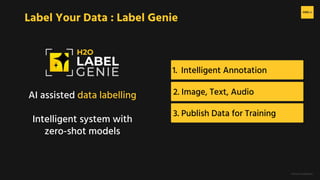
1. Intelligent Annotation
Label Your Data : Label Genie
AI assisted data labelling
Intelligent system with
zero-shot models
2. Image, Text, Audio
3. Publish Data for Training
H2O.ai Confidential
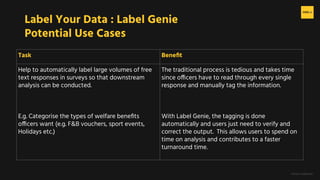
Label Your Data : Label Genie
Potential Use Cases
Task Benefit
Help to automatically label large volumes of free
text responses in surveys so that downstream
analysis can be conducted.
E.g. Categorise the types of welfare benefits
officers want (e.g. F&B vouchers, sport events,
Holidays etc.)
The traditional process is tedious and takes time
since officers have to read through every single
response and manually tag the information.
With Label Genie, the tagging is done
automatically and users just need to verify and
correct the output. This allows users to spend on
time on analysis and contributes to a faster
turnaround time.
H2O.ai Confidential
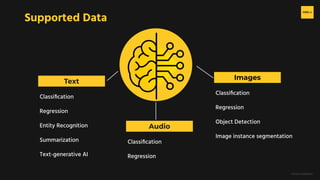
Supported Data
Text
Images
Classification
Regression
Entity Recognition
Summarization
Text-generative AI
Classification
Regression
Object Detection
Image instance segmentation
Audio
Classification
Regression
H2O.ai Confidential
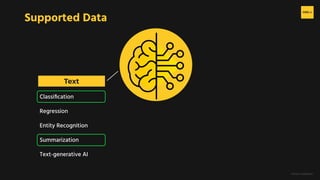
Supported Data
Text
Classification
Regression
Entity Recognition
Summarization
Text-generative AI
H2O.ai Confidential
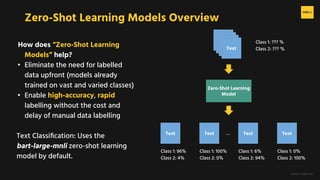
Zero-Shot Learning Models Overview
How does “Zero-Shot Learning
Models” help?
• Eliminate the need for labelled
data upfront (models already
trained on vast and varied classes)
• Enable high-accuracy, rapid
labelling without the cost and
delay of manual data labelling
Text Classification: Uses the
bart-large-mnli zero-shot learning
model by default.
Zero-Shot Learning
Model
Text
Text
Text
Text
Text Text Text
Text
Class 1: 96%
Class 2: 4%
Class 1: 100%
Class 2: 0%
Class 1: 6%
Class 2: 94%
Class 1: 0%
Class 2: 100%
Class 1: ??? %
Class 2: ??? %
…
H2O.ai Confidential
Label Your Data : Label Genie
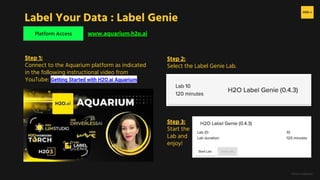
Platform Access www.aquarium.h2o.ai
Step 1:
Connect to the Aquarium platform as indicated
in the following instructional video from
YouTube: Getting Started with H2O.ai Aquarium
Step 2:
Select the Label Genie Lab.
Step 3:
Start the
Lab and
enjoy!
H2O.ai Confidential
1. Platform Access 2. Labelling 3. Publishing
Label Your Data : Label Genie
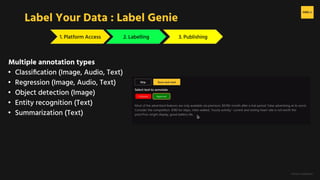
Multiple annotation types
• Classification (Image, Audio, Text)
• Regression (Image, Audio, Text)
• Object detection (Image)
• Entity recognition (Text)
• Summarization (Text)
H2O.ai Confidential
1. Platform Access 2. Labelling 3. Publishing
Label Your Data : Label Genie
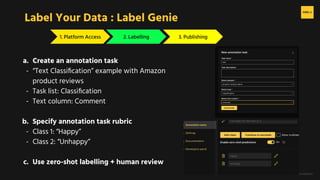
a. Create an annotation task
- “Text Classification” example with Amazon
product reviews
- Task list: Classification
- Text column: Comment
b. Specify annotation task rubric
- Class 1: “Happy”
- Class 2: “Unhappy”
c. Use zero-shot labelling + human review
H2O.ai Confidential
1. Platform Access 2. Labelling 3. Publishing
Label Your Data : Label Genie
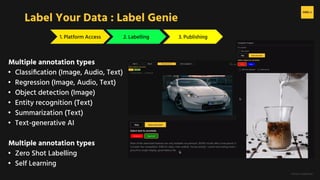
Multiple annotation types
• Classification (Image, Audio, Text)
• Regression (Image, Audio, Text)
• Object detection (Image)
• Entity recognition (Text)
• Summarization (Text)
• Text-generative AI
Multiple annotation types
• Zero Shot Labelling
• Self Learning
H2O.ai Confidential
1. Platform Access 2. Labelling 3. Publishing
Label Your Data : Label Genie
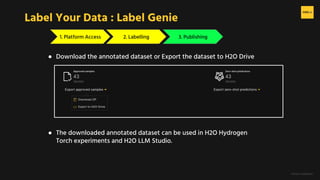
● Download the annotated dataset or Export the dataset to H2O Drive
● The downloaded annotated dataset can be used in H2O Hydrogen
Torch experiments and H2O LLM Studio.
H2O.ai Confidential
Summary
Label Your Data with Label Genie
- AI-Assisted Data Labelling
- Zero-shot learning for intelligent annotation, reducing manual effort
- Support labelling for text, image, and audio
- Annotation types include: classification, regression, object detection, entity recognition, and summarisation
- Workflow
- Data -> Define Annotation Rubric -> Annotate -> Export
- Data Publishing and Export
- Export labelled datasets and use them in H2O Hydrogen Torch or H2O LLM Studio for model training
H2O.ai Confidential

H2O Label Genie Starter Track - Support Presentation

  • 1.
    H2O.ai Confidential Label YourData with H2O Label Genie
  • 2.
    H2O.ai Confidential 1. IntelligentAnnotation Label Your Data : Label Genie AI assisted data labelling Intelligent system with zero-shot models 2. Image, Text, Audio 3. Publish Data for Training
  • 3.
    H2O.ai Confidential Label YourData : Label Genie Potential Use Cases Task Benefit Help to automatically label large volumes of free text responses in surveys so that downstream analysis can be conducted. E.g. Categorise the types of welfare benefits officers want (e.g. F&B vouchers, sport events, Holidays etc.) The traditional process is tedious and takes time since officers have to read through every single response and manually tag the information. With Label Genie, the tagging is done automatically and users just need to verify and correct the output. This allows users to spend on time on analysis and contributes to a faster turnaround time.
  • 4.
    H2O.ai Confidential Supported Data Text Images Classification Regression EntityRecognition Summarization Text-generative AI Classification Regression Object Detection Image instance segmentation Audio Classification Regression
  • 5.
  • 6.
    H2O.ai Confidential Zero-Shot LearningModels Overview How does “Zero-Shot Learning Models” help? • Eliminate the need for labelled data upfront (models already trained on vast and varied classes) • Enable high-accuracy, rapid labelling without the cost and delay of manual data labelling Text Classification: Uses the bart-large-mnli zero-shot learning model by default. Zero-Shot Learning Model Text Text Text Text Text Text Text Text Class 1: 96% Class 2: 4% Class 1: 100% Class 2: 0% Class 1: 6% Class 2: 94% Class 1: 0% Class 2: 100% Class 1: ??? % Class 2: ??? % …
  • 7.
    H2O.ai Confidential Label YourData : Label Genie Platform Access www.aquarium.h2o.ai Step 1: Connect to the Aquarium platform as indicated in the following instructional video from YouTube: Getting Started with H2O.ai Aquarium Step 2: Select the Label Genie Lab. Step 3: Start the Lab and enjoy!
  • 8.
    H2O.ai Confidential 1. PlatformAccess 2. Labelling 3. Publishing Label Your Data : Label Genie Multiple annotation types • Classification (Image, Audio, Text) • Regression (Image, Audio, Text) • Object detection (Image) • Entity recognition (Text) • Summarization (Text)
  • 9.
    H2O.ai Confidential 1. PlatformAccess 2. Labelling 3. Publishing Label Your Data : Label Genie a. Create an annotation task - “Text Classification” example with Amazon product reviews - Task list: Classification - Text column: Comment b. Specify annotation task rubric - Class 1: “Happy” - Class 2: “Unhappy” c. Use zero-shot labelling + human review
  • 10.
    H2O.ai Confidential 1. PlatformAccess 2. Labelling 3. Publishing Label Your Data : Label Genie Multiple annotation types • Classification (Image, Audio, Text) • Regression (Image, Audio, Text) • Object detection (Image) • Entity recognition (Text) • Summarization (Text) • Text-generative AI Multiple annotation types • Zero Shot Labelling • Self Learning
  • 11.
    H2O.ai Confidential 1. PlatformAccess 2. Labelling 3. Publishing Label Your Data : Label Genie ● Download the annotated dataset or Export the dataset to H2O Drive ● The downloaded annotated dataset can be used in H2O Hydrogen Torch experiments and H2O LLM Studio.
  • 12.
    H2O.ai Confidential Summary Label YourData with Label Genie - AI-Assisted Data Labelling - Zero-shot learning for intelligent annotation, reducing manual effort - Support labelling for text, image, and audio - Annotation types include: classification, regression, object detection, entity recognition, and summarisation - Workflow - Data -> Define Annotation Rubric -> Annotate -> Export - Data Publishing and Export - Export labelled datasets and use them in H2O Hydrogen Torch or H2O LLM Studio for model training
  • 13.