Guaranteeing successful EHR
implementations
EHRs implementations are difficult, don’t go it alone
Shahid N. Shah, CEO
NETSPECTIVE

Who is Shahid?
•
•
•

•

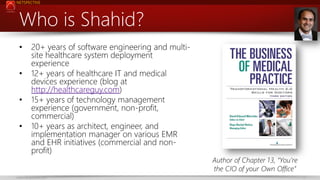
20+ years of software engineering and multisite healthcare system deployment
experience
12+ years of healthcare IT and medical
devices experience (blog at
http://healthcareguy.com)
15+ years of technology management
experience (government, non-profit,
commercial)
10+ years as architect, engineer, and
implementation manager on various EMR
and EHR initiatives (commercial and nonprofit)

www.netspective.com

Author of Chapter 13, “You’re
the CIO of your Own Office”
2
NETSPECTIVE

Why listen to me?
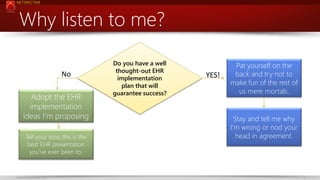
No
Adopt the EHR
implementation
ideas I’m proposing
Tell your boss this is the
best EHR presentation
you’ve ever been to.

www.netspective.com

Do you have a well
thought-out EHR
implementation
plan that will
guarantee success?

YES!

Pat yourself on the
back and try not to
make fun of the rest of
us mere mortals.

Stay and tell me why
I’m wrong or nod your
head in agreement.

3
NETSPECTIVE

We can help your project today
• EHR implementations are very difficult and you will
probably need help. Your EHR vendor will not be enough.

• If you like what I presented, we are available to help with
your EHR implementation efforts, especially where
technology and clinical / business folks must
communicate better.
• Our contact information is at the end of this deck.

www.netspective.com

4
NETSPECTIVE

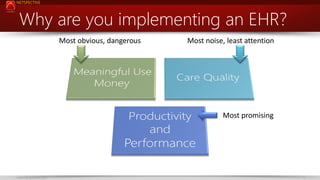
Why are you implementing an EHR?
Most obvious, dangerous

Most noise, least attention

Most promising

www.netspective.com

5
NETSPECTIVE

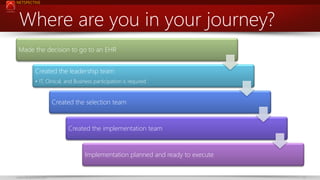
Where are you in your journey?
Made the decision to go to an EHR
Created the leadership team
• IT, Clinical, and Business participation is required

Created the selection team

Created the implementation team

Implementation planned and ready to execute

www.netspective.com

6
NETSPECTIVE

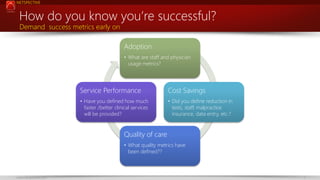
How do you know you’re successful?
Demand success metrics early on

Adoption
• What are staff and physician
usage metrics?

Service Performance

Cost Savings

• Have you defined how much
faster /better clinical services
will be provided?

• Did you define reduction in
tests, staff, malpractice
insurance, data entry, etc.?

Quality of care
• What quality metrics have
been defined??

www.netspective.com

7
NETSPECTIVE

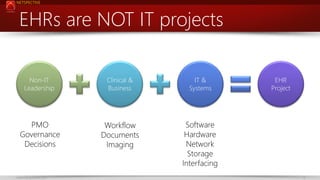
EHRs are NOT IT projects
Non-IT
Leadership

Clinical &
Business

IT &
Systems

PMO
Governance
Decisions

Workflow
Documents
Imaging

Software
Hardware
Network
Storage
Interfacing

www.netspective.com

EHR
Project

8
NETSPECTIVE

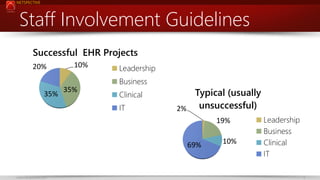
Staff Involvement Guidelines
Successful EHR Projects
20%

10%

Leadership
Business

35%

35%

Clinical
IT

Typical (usually
unsuccessful)
2%
19%
69%

www.netspective.com

10%

Leadership
Business
Clinical
IT
9
NETSPECTIVE

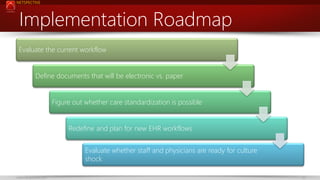
Implementation Roadmap
Evaluate the current workflow

Define documents that will be electronic vs. paper
Figure out whether care standardization is possible
Redefine and plan for new EHR workflows

Evaluate whether staff and physicians are ready for culture
shock
www.netspective.com

10
NETSPECTIVE

www.netspective.com

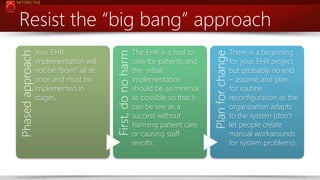
The EHR is a tool to
care for patients and
the initial
implementation
should be as minimal
as possible so that it
can be see as a
success without
harming patient care
or causing staff
revolts.

Plan for change

Your EHR
implementation will
not be “born” all at
once and must be
implemented in
stages.

First, do no harm

Phased approach

Resist the “big bang” approach
There is a beginning
for your EHR project
but probably no end
– assume and plan
for routine
reconfiguration as the
organization adapts
to the system (don’t
let people create
manual workarounds
for system problems).

11
NETSPECTIVE

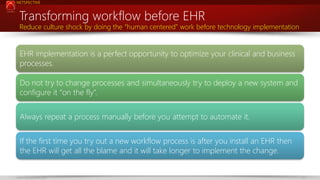
Transforming workflow before EHR

Reduce culture shock by doing the “human centered” work before technology implementation

EHR implementation is a perfect opportunity to optimize your clinical and business
processes.
Do not try to change processes and simultaneously try to deploy a new system and
configure it “on the fly”.
Always repeat a process manually before you attempt to automate it.
If the first time you try out a new workflow process is after you install an EHR then
the EHR will get all the blame and it will take longer to implement the change.

www.netspective.com

12
NETSPECTIVE

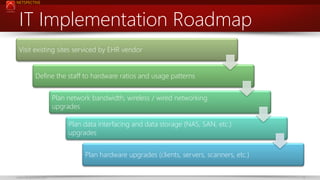
IT Implementation Roadmap
Visit existing sites serviced by EHR vendor

Define the staff to hardware ratios and usage patterns
Plan network bandwidth, wireless / wired networking
upgrades
Plan data interfacing and data storage (NAS, SAN, etc.)
upgrades
Plan hardware upgrades (clients, servers, scanners, etc.)
www.netspective.com

13
NETSPECTIVE

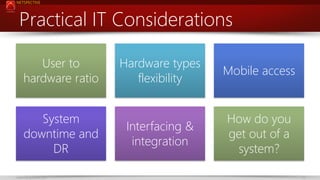
Practical IT Considerations
User to
hardware ratio
System
downtime and
DR
www.netspective.com

Hardware types
flexibility

Mobile access

Interfacing &
integration

How do you
get out of a
system?
14
NETSPECTIVE

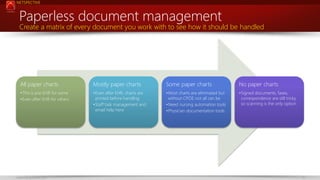
Paperless document management

Create a matrix of every document you work with to see how it should be handled

All paper charts

Mostly paper charts

Some paper charts

No paper charts

•This is pre-EHR for some
•Even after EHR for others

•Even after EHR, charts are
printed before handling
•Staff task management and
email help here

•Most charts are eliminated but
without CPOE not all can be
•Need nursing automation tools
•Physician documentation tools

•Signed documents, faxes,
correspondence are still tricky
so scanning is the only option

www.netspective.com

15
NETSPECTIVE

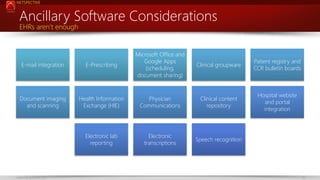
Ancillary Software Considerations
EHRs aren’t enough

E-mail integration

E-Prescribing

Microsoft Office and
Google Apps
(scheduling,
document sharing)

Document imaging
and scanning

Health Information
Exchange (HIE)

Physician
Communications

Clinical content
repository

Electronic lab
reporting

Electronic
transcriptions

Speech recognition

www.netspective.com

Clinical groupware

Patient registry and
CCR bulletin boards

Hospital website
and portal
integration

16
NETSPECTIVE

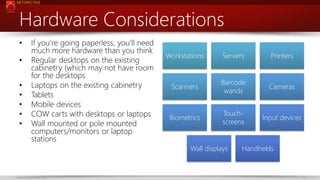
Hardware Considerations
•

•
•
•
•
•
•

If you’re going paperless, you’ll need
much more hardware than you think
Regular desktops on the existing
cabinetry (which may not have room
for the desktops
Laptops on the existing cabinetry
Tablets
Mobile devices
COW carts with desktops or laptops
Wall mounted or pole mounted
computers/monitors or laptop
stations

Workstations

Servers

Printers

Scanners

Barcode
wands

Cameras

Biometrics

Touchscreens

Input devices

Wall displays

www.netspective.com

Handhelds

17
NETSPECTIVE

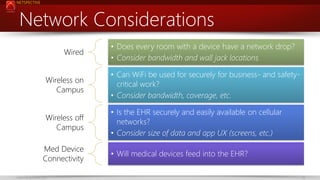
Network Considerations
Wired

• Does every room with a device have a network drop?
• Consider bandwidth and wall jack locations

Wireless on
Campus

• Can WiFi be used for securely for business- and safetycritical work?
• Consider bandwidth, coverage, etc.

Wireless off
Campus

• Is the EHR securely and easily available on cellular
networks?
• Consider size of data and app UX (screens, etc.)

Med Device
Connectivity
www.netspective.com

• Will medical devices feed into the EHR?
18
NETSPECTIVE

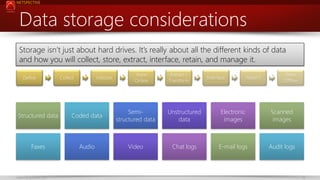
Data storage considerations
Storage isn’t just about hard drives. It’s really about all the different kinds of data
and how you will collect, store, extract, interface, retain, and manage it.
Define

Collect

Validate

Store
Online

Extract /
Transform

Interface

Retain?

Store
Offline

Structured data

Coded data

Semistructured data

Unstructured
data

Electronic
images

Scanned
images

Faxes

Audio

Video

Chat logs

E-mail logs

Audit logs

www.netspective.com

19
NETSPECTIVE

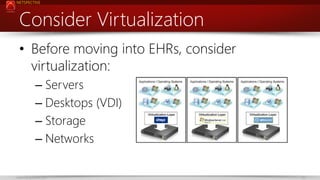
Consider Virtualization
• Before moving into EHRs, consider
virtualization:
– Servers
– Desktops (VDI)
– Storage
– Networks
www.netspective.com

20
NETSPECTIVE

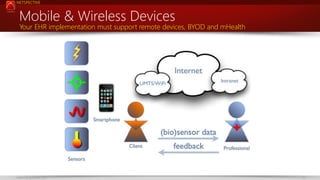
Mobile & Wireless Devices

Your EHR implementation must support remote devices, BYOD and mHealth

www.netspective.com

21
NETSPECTIVE

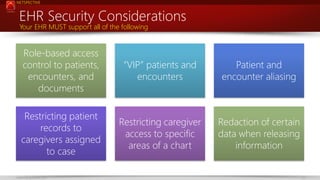
EHR Security Considerations
Your EHR MUST support all of the following

Role-based access
control to patients,
encounters, and
documents

“VIP” patients and
encounters

Patient and
encounter aliasing

Restricting patient
records to
caregivers assigned
to case

Restricting caregiver
access to specific
areas of a chart

Redaction of certain
data when releasing
information

www.netspective.com

22
NETSPECTIVE

IT Security goes beyond encryption
• What level of access do technical staff—both internal staff and vendor—
need to support the system?
• Does system support require access to the application database where
patient data are stored?
• Can all sensitive information be blocked from support staff’s view and
access?
• Can troubleshooting be achieved through the use of test data rather
than live records?
• What means are used for remote support?
• For systems hosted by vendors, what audit trails are in place to monitor
vendor staff activity? Does the vendor provide access to these logs?
• Are audit trails of routine maintenance available?
www.netspective.com

23
NETSPECTIVE

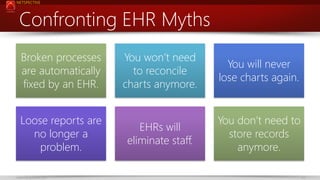
Confronting EHR Myths
Broken processes
are automatically
fixed by an EHR.
Loose reports are
no longer a
problem.
www.netspective.com

You won’t need
to reconcile
charts anymore.

You will never
lose charts again.

EHRs will
eliminate staff.

You don’t need to
store records
anymore.
24
Visit
http://www.netspective.com
http://www.healthcareguy.com
E-mail shahid.shah@netspective.com
Follow @ShahidNShah
Call 202-713-5409

Thank You. Hire us.

Guaranteeing successful EHR implementations

  • 1.
    Guaranteeing successful EHR implementations EHRsimplementations are difficult, don’t go it alone Shahid N. Shah, CEO
  • 2.
    NETSPECTIVE Who is Shahid? • • • • 20+years of software engineering and multisite healthcare system deployment experience 12+ years of healthcare IT and medical devices experience (blog at http://healthcareguy.com) 15+ years of technology management experience (government, non-profit, commercial) 10+ years as architect, engineer, and implementation manager on various EMR and EHR initiatives (commercial and nonprofit) www.netspective.com Author of Chapter 13, “You’re the CIO of your Own Office” 2
  • 3.
    NETSPECTIVE Why listen tome? No Adopt the EHR implementation ideas I’m proposing Tell your boss this is the best EHR presentation you’ve ever been to. www.netspective.com Do you have a well thought-out EHR implementation plan that will guarantee success? YES! Pat yourself on the back and try not to make fun of the rest of us mere mortals. Stay and tell me why I’m wrong or nod your head in agreement. 3
  • 4.
    NETSPECTIVE We can helpyour project today • EHR implementations are very difficult and you will probably need help. Your EHR vendor will not be enough. • If you like what I presented, we are available to help with your EHR implementation efforts, especially where technology and clinical / business folks must communicate better. • Our contact information is at the end of this deck. www.netspective.com 4
  • 5.
    NETSPECTIVE Why are youimplementing an EHR? Most obvious, dangerous Most noise, least attention Most promising www.netspective.com 5
  • 6.
    NETSPECTIVE Where are youin your journey? Made the decision to go to an EHR Created the leadership team • IT, Clinical, and Business participation is required Created the selection team Created the implementation team Implementation planned and ready to execute www.netspective.com 6
  • 7.
    NETSPECTIVE How do youknow you’re successful? Demand success metrics early on Adoption • What are staff and physician usage metrics? Service Performance Cost Savings • Have you defined how much faster /better clinical services will be provided? • Did you define reduction in tests, staff, malpractice insurance, data entry, etc.? Quality of care • What quality metrics have been defined?? www.netspective.com 7
  • 8.
    NETSPECTIVE EHRs are NOTIT projects Non-IT Leadership Clinical & Business IT & Systems PMO Governance Decisions Workflow Documents Imaging Software Hardware Network Storage Interfacing www.netspective.com EHR Project 8
  • 9.
    NETSPECTIVE Staff Involvement Guidelines SuccessfulEHR Projects 20% 10% Leadership Business 35% 35% Clinical IT Typical (usually unsuccessful) 2% 19% 69% www.netspective.com 10% Leadership Business Clinical IT 9
  • 10.
    NETSPECTIVE Implementation Roadmap Evaluate thecurrent workflow Define documents that will be electronic vs. paper Figure out whether care standardization is possible Redefine and plan for new EHR workflows Evaluate whether staff and physicians are ready for culture shock www.netspective.com 10
  • 11.
    NETSPECTIVE www.netspective.com The EHR isa tool to care for patients and the initial implementation should be as minimal as possible so that it can be see as a success without harming patient care or causing staff revolts. Plan for change Your EHR implementation will not be “born” all at once and must be implemented in stages. First, do no harm Phased approach Resist the “big bang” approach There is a beginning for your EHR project but probably no end – assume and plan for routine reconfiguration as the organization adapts to the system (don’t let people create manual workarounds for system problems). 11
  • 12.
    NETSPECTIVE Transforming workflow beforeEHR Reduce culture shock by doing the “human centered” work before technology implementation EHR implementation is a perfect opportunity to optimize your clinical and business processes. Do not try to change processes and simultaneously try to deploy a new system and configure it “on the fly”. Always repeat a process manually before you attempt to automate it. If the first time you try out a new workflow process is after you install an EHR then the EHR will get all the blame and it will take longer to implement the change. www.netspective.com 12
  • 13.
    NETSPECTIVE IT Implementation Roadmap Visitexisting sites serviced by EHR vendor Define the staff to hardware ratios and usage patterns Plan network bandwidth, wireless / wired networking upgrades Plan data interfacing and data storage (NAS, SAN, etc.) upgrades Plan hardware upgrades (clients, servers, scanners, etc.) www.netspective.com 13
  • 14.
    NETSPECTIVE Practical IT Considerations Userto hardware ratio System downtime and DR www.netspective.com Hardware types flexibility Mobile access Interfacing & integration How do you get out of a system? 14
  • 15.
    NETSPECTIVE Paperless document management Createa matrix of every document you work with to see how it should be handled All paper charts Mostly paper charts Some paper charts No paper charts •This is pre-EHR for some •Even after EHR for others •Even after EHR, charts are printed before handling •Staff task management and email help here •Most charts are eliminated but without CPOE not all can be •Need nursing automation tools •Physician documentation tools •Signed documents, faxes, correspondence are still tricky so scanning is the only option www.netspective.com 15
  • 16.
    NETSPECTIVE Ancillary Software Considerations EHRsaren’t enough E-mail integration E-Prescribing Microsoft Office and Google Apps (scheduling, document sharing) Document imaging and scanning Health Information Exchange (HIE) Physician Communications Clinical content repository Electronic lab reporting Electronic transcriptions Speech recognition www.netspective.com Clinical groupware Patient registry and CCR bulletin boards Hospital website and portal integration 16
  • 17.
    NETSPECTIVE Hardware Considerations • • • • • • • If you’regoing paperless, you’ll need much more hardware than you think Regular desktops on the existing cabinetry (which may not have room for the desktops Laptops on the existing cabinetry Tablets Mobile devices COW carts with desktops or laptops Wall mounted or pole mounted computers/monitors or laptop stations Workstations Servers Printers Scanners Barcode wands Cameras Biometrics Touchscreens Input devices Wall displays www.netspective.com Handhelds 17
  • 18.
    NETSPECTIVE Network Considerations Wired • Doesevery room with a device have a network drop? • Consider bandwidth and wall jack locations Wireless on Campus • Can WiFi be used for securely for business- and safetycritical work? • Consider bandwidth, coverage, etc. Wireless off Campus • Is the EHR securely and easily available on cellular networks? • Consider size of data and app UX (screens, etc.) Med Device Connectivity www.netspective.com • Will medical devices feed into the EHR? 18
  • 19.
    NETSPECTIVE Data storage considerations Storageisn’t just about hard drives. It’s really about all the different kinds of data and how you will collect, store, extract, interface, retain, and manage it. Define Collect Validate Store Online Extract / Transform Interface Retain? Store Offline Structured data Coded data Semistructured data Unstructured data Electronic images Scanned images Faxes Audio Video Chat logs E-mail logs Audit logs www.netspective.com 19
  • 20.
    NETSPECTIVE Consider Virtualization • Beforemoving into EHRs, consider virtualization: – Servers – Desktops (VDI) – Storage – Networks www.netspective.com 20
  • 21.
    NETSPECTIVE Mobile & WirelessDevices Your EHR implementation must support remote devices, BYOD and mHealth www.netspective.com 21
  • 22.
    NETSPECTIVE EHR Security Considerations YourEHR MUST support all of the following Role-based access control to patients, encounters, and documents “VIP” patients and encounters Patient and encounter aliasing Restricting patient records to caregivers assigned to case Restricting caregiver access to specific areas of a chart Redaction of certain data when releasing information www.netspective.com 22
  • 23.
    NETSPECTIVE IT Security goesbeyond encryption • What level of access do technical staff—both internal staff and vendor— need to support the system? • Does system support require access to the application database where patient data are stored? • Can all sensitive information be blocked from support staff’s view and access? • Can troubleshooting be achieved through the use of test data rather than live records? • What means are used for remote support? • For systems hosted by vendors, what audit trails are in place to monitor vendor staff activity? Does the vendor provide access to these logs? • Are audit trails of routine maintenance available? www.netspective.com 23
  • 24.
    NETSPECTIVE Confronting EHR Myths Brokenprocesses are automatically fixed by an EHR. Loose reports are no longer a problem. www.netspective.com You won’t need to reconcile charts anymore. You will never lose charts again. EHRs will eliminate staff. You don’t need to store records anymore. 24
  • 25.