October 8, 2009
Open Source  Public  Workstations  (in)  Libraries
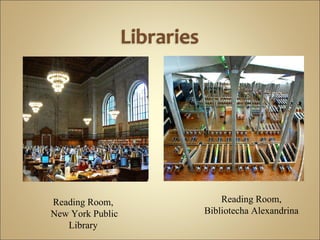
Reading Room,  New York Public Library  Reading Room, Bibliotecha Alexandrina
 
 
Open source?
open source adjective Computing   denoting software for which the original source  code is made freely available and may be  redistributed with or without modification.
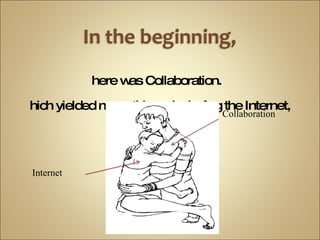
there was Collaboration.  Which yielded many things, including the Internet, Collaboration Internet
But in the beginning, there was no open source.  Not by that name, at least.
 
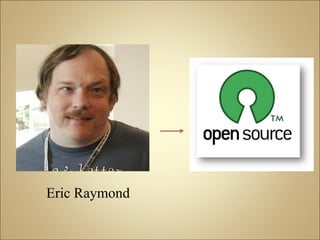
Eric Raymond +
in the Why ?
“ computer software is an increasingly critical factor in the world economy and in the strategic calculations of businesses”


Open Source Operating System Many varieties, customizable Ubuntu Linux most popular for desktop OS www.ubuntu.com
Similar to Linux Licensed differently Usually used for server applications Not commonly used on desktops www.openbsd.org
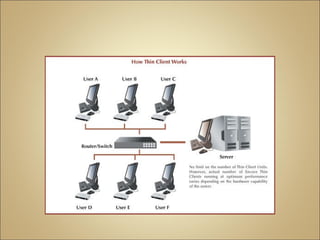
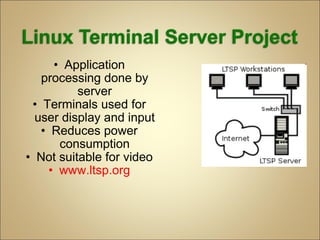
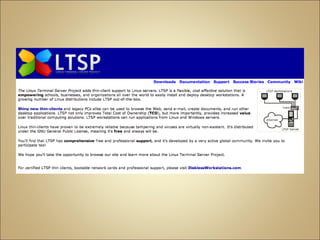
Application processing done by server Terminals used for user display and input Reduces power consumption Not suitable for video www.ltsp.org
Open source alternative to Microsoft Office Includes word processing, spreadsheet, and presentation software Help and support available www.openoffice.org
Open-source internet browser www.mozilla.com/en-US/firefox
Open source multimedia player Can be used on Windows, Mac OS/X, and Linux Download:  www.mplayerhq.hu/design7/dload.html
Allows users to run Windows applications under Linux Not all applications are compatible www.winehq.org
Case Studies in Depth:  Crawford County Federated Library System and Howard County Library
Employee Training Effective meetings  Detailed project plans  In-house technical support Technical support personnel should be familiar with open source applications Employees have a clear sense the benefits of open source software Provide leading edge services to patrons Encourage risk taking Provide tech support Use project management software
Benefits : More reliable than Windows Less viruses Saved $35,000 by not upgrading to Windows XP Positive user feedback Complaints: Not enough word processing workstations Timed sessions Not enough resources to keep it up-to-date
Howard County signed with Open Sense Solutions in 2005. Loaded OpenOffice.org, Firefox, MPlayer, RealPlayer, Adobe Reader, and a large game selection on all public-access computers. Implemented longer session times.
Benefits: Connects all seven branches Efficiently utilizes funding Owning something that adds to library infrastructure rather than leasing from a vendor Complaints: Some websites don’t work with Firefox Difficulties printing with Linux
Added the Opera and Mozilla browsers to its primary browser, Firefox. Also, CCFLS continues to maintain one public access computer that has Windows. Began using Foomatic, an open source project that simplifies printing for Linux.
 
Goals (2005) 1. Reduce the maintenance load for the public-access workstations. 2. Reduce the cost of public Internet access while increasing its availability.
 
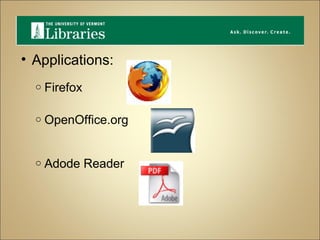
Applications:  Firefox  OpenOffice.org   Adode Reader 
Benefits : Reduced maintenance load for individual public-access workstations. Lowered cost of providing public Internet access to more users. No software security issues
Goals (late 2003): 1. Create low-maintenance kiosks in the               Student Union. 2.  Avoid Windows security issues.
 
Applications: Firefox R- kiosk Surveys   Programmable signage
Expanded from 5 LTSP terminals to 22 terminals Terminals are located in the Student Union, Campus Health, Campus Recreation, and the School of Pharmacy
Benefits: LTSP is easy to manage. Low cost terminal software fits within UNC budget. LTSP increases security.
Open source software can provide libraries with cost-effective alternatives to proprietary software. Questions & Comments

Group 2 Pres

  • 1.
  • 2.
    Open Source Public Workstations (in) Libraries
  • 3.
    Reading Room, New York Public Library Reading Room, Bibliotecha Alexandrina
  • 4.
  • 5.
  • 6.
  • 7.
    open source adjectiveComputing denoting software for which the original source code is made freely available and may be redistributed with or without modification.
  • 8.
    there was Collaboration. Which yielded many things, including the Internet, Collaboration Internet
  • 9.
    But in thebeginning, there was no open source. Not by that name, at least.
  • 10.
  • 11.
  • 12.
  • 13.
    “ computer softwareis an increasingly critical factor in the world economy and in the strategic calculations of businesses”
  • 14.
  • 15.
  • 16.
  • 17.
    Open Source OperatingSystem Many varieties, customizable Ubuntu Linux most popular for desktop OS www.ubuntu.com
  • 18.
    Similar to LinuxLicensed differently Usually used for server applications Not commonly used on desktops www.openbsd.org
  • 19.
    Application processing doneby server Terminals used for user display and input Reduces power consumption Not suitable for video www.ltsp.org
  • 20.
    Open source alternativeto Microsoft Office Includes word processing, spreadsheet, and presentation software Help and support available www.openoffice.org
  • 21.
    Open-source internet browserwww.mozilla.com/en-US/firefox
  • 22.
    Open source multimediaplayer Can be used on Windows, Mac OS/X, and Linux Download: www.mplayerhq.hu/design7/dload.html
  • 23.
    Allows users torun Windows applications under Linux Not all applications are compatible www.winehq.org
  • 24.
    Case Studies inDepth: Crawford County Federated Library System and Howard County Library
  • 25.
    Employee Training Effectivemeetings Detailed project plans In-house technical support Technical support personnel should be familiar with open source applications Employees have a clear sense the benefits of open source software Provide leading edge services to patrons Encourage risk taking Provide tech support Use project management software
  • 26.
    Benefits : Morereliable than Windows Less viruses Saved $35,000 by not upgrading to Windows XP Positive user feedback Complaints: Not enough word processing workstations Timed sessions Not enough resources to keep it up-to-date
  • 27.
    Howard County signedwith Open Sense Solutions in 2005. Loaded OpenOffice.org, Firefox, MPlayer, RealPlayer, Adobe Reader, and a large game selection on all public-access computers. Implemented longer session times.
  • 28.
    Benefits: Connects allseven branches Efficiently utilizes funding Owning something that adds to library infrastructure rather than leasing from a vendor Complaints: Some websites don’t work with Firefox Difficulties printing with Linux
  • 29.
    Added the Operaand Mozilla browsers to its primary browser, Firefox. Also, CCFLS continues to maintain one public access computer that has Windows. Began using Foomatic, an open source project that simplifies printing for Linux.
  • 30.
  • 31.
    Goals (2005) 1.Reduce the maintenance load for the public-access workstations. 2. Reduce the cost of public Internet access while increasing its availability.
  • 32.
  • 33.
    Applications: Firefox OpenOffice.org   Adode Reader 
  • 34.
    Benefits : Reducedmaintenance load for individual public-access workstations. Lowered cost of providing public Internet access to more users. No software security issues
  • 35.
    Goals (late 2003):1. Create low-maintenance kiosks in the               Student Union. 2.  Avoid Windows security issues.
  • 36.
  • 37.
    Applications: Firefox R-kiosk Surveys   Programmable signage
  • 38.
    Expanded from 5LTSP terminals to 22 terminals Terminals are located in the Student Union, Campus Health, Campus Recreation, and the School of Pharmacy
  • 39.
    Benefits: LTSP iseasy to manage. Low cost terminal software fits within UNC budget. LTSP increases security.
  • 40.
    Open source softwarecan provide libraries with cost-effective alternatives to proprietary software. Questions & Comments

Editor's Notes

  • #3 The title of this LTR is a mouthful. What does it really mean? Before we start lecturing about software and case studies, let’s parse this phrase, beginning with the last word in the list.
  • #4 This is the main reading room of the central branch of the NY Public Library (the one with the lions perching out front). A great hall, in the foreground there is a grouping of computer workstations (probably to search the catalog) and then beyond are study tables and stacks. On the right is the reading room of the current library of Alexandria (finished in 200?, UNESCO project, include slide of exterior). Similar set up: computer workstations set amid a large space sanctioned for reading.
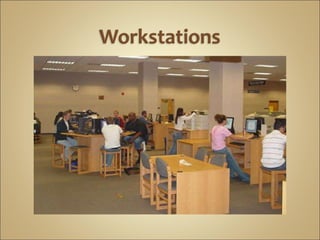
  • #5 Computer workstations in a college setting. More about this later.
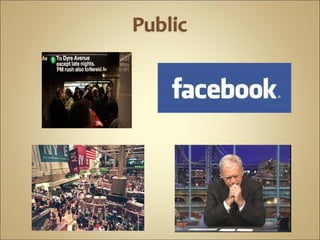
  • #6 We all know the distinction between public and private – although in this age of Facebook and Web 2.0, they are not such distinct entities. (include pic of letterman
  • #7 Open source is one of those sound bites that I for one have heard a lot but, before this presentation, didn’t know how to define.
  • #11 Scientists developed ARPANET in order to communicate and share resources. This was the original form of the internet They collaborated on source code and building the basis of what we now call the Internet. This collaboration, what we would now call “open source”, didn’t have a name. Back then, the scientists probably thought of it as R&D. Once computers took hold – especially personal computers – proprietary software became the norm. Simultaneous with all of this, a hacker community took shape, challenging big business, which eventually led to the pivotal moment in 1998.
  • #12 Shortly after Netscape made its announcement, Eric Raymond, writer and hacker, championed the term open source in 1998. He and several others in Palo Alto CA seized the opportunity to make a new business model. They renamed “free software” asopen source. The Netscape announcement was a pivotal moment in the hacker revolution.
  • #14 This of course applies to libraries! Open source software saves libraries the expense of licensing
  • #31 So far we have discussed using open source software in public libraries. However, some of us will become academic librarians at universities. The next 2 case studies focus on how universities can implement open source software.
  • #32 Around 2005, library administrators at the University of Vermont, Burlington started to investigate open source software for their public-access workstations. One of their motivations for doing so was the desire to reduce the maintenance load for public-access workstations. Their second motivation was to reduce the cost of providing public Internet access while increasing its availability.
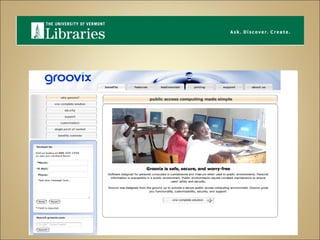
  • #33 UVM's library contracted with the vendor Open Sense Solutions to install, maintain, and update 45 open-access Groovix Linux workstations, which had a multi-user configuration and did not require authentication.
  • #34   Firefox, OpenOffice, and Adode Reader are some examples of the open source applications that run on UVM mutli-user workstations.
  • #35 UVM reported that using Groovix Linux distribution on public-access workstations helped reduce their maintenance load, lowered the cost of public Internet access, and UVM reported fewer software security issues. Importantly, there was no reported user dissatisfaction with the workstations. Overall, library administrations considered the project a success.
  • #36 The last case study involves the University of North Carolina Chapel Hill. Late in 2003 UNC decided to investigate using open source software in order to create low-maintenance kiosks in the Student Union while avoiding Windows securing issues.
  • #37 To meet their goals, UNC decided to use Linux Terminal Server Project to provide public-access Internet browsing.   As explained earlier, LTSP is a thin-client arrangment in which a single Linux server runs most of the processing. Although this case study does not involve UNC libraries, it is an example of how libraries could provide public Internet browsing to users.
  • #38 The LTSP Kiosks at UNC run Firefox for Web-browsing and R-KIOSK, which is a Firefox add-on that manages user capabilities.  The Kiosks also run surveys and programmable signage for UNC.
  • #39 During the project UNC expanded from 5 to 22 terminals that were located in the Student Union as well as other campus locations.
  • #40 UNC reported that the project was a success for several reasons. To begin, LTSP is easy to manage. Software updates are handled on the server and are easy to automate. Secondly, the low cost terminal software fit within UNC’s budget; however, UNC recommended investing in quality server hardware to improve performance. Lastly, LTSP increases security because user capabilities can be managed and any user processes can be ended by the server. Neither the UNC administrators or users reported any complaints about the terminals.
  • #41 As future librarians and information specialists we might have to make decisions about choosing open source software solutions. As such, we need to be aware of its benefits and drawbacks as an alternative to propriety software.