The Basics 2015
Craig Johnson
Grant Administrator
Department of Medicine
crjohnson@medicine.washington.edu
221-3383
Instructor
Objectives
By the end of this class you will:
• Know what Grants.gov is and when to
use it
• Understand the 2 options for submitting
applications from the UW
• Know how to find funding opportunities
supported by Grants.gov
• Understand the UW process for
submitting Grants.gov applications
• Gain hands-on experience using
Agenda
Grants.gov Overview
Two ways to complete applications
Preparation time
What info do I need?
Where do I get it?
Finding & completing the Adobe
formset
Final Check and downloading
Q&A
What is Grants.gov?
• An electronic portal that allows users
to find, apply for, and manage over
1,000 grant opportunities from 26
different Federal agencies
When do I use Grants.gov?
• Depends on the agency and program
requirements.
• Some sponsors (e.g., NIH, NOAA)
currently use Grants.gov
• NSF has it’s own system (Fastlane)
Two Ways to Complete Grants.gov
Applications
#1 Adobe
– Search and download forms direct from
Grants.gov
– Complete forms
– Attach to eGC1 and route
– OSP will upload and submit your
application
– Errors and warning messages provided by
OSP
Two Ways to Complete Grants.gov
Applications
#2 SAGE Grant Runner
–Complete the forms directly in SAGE
(combined with eGC1)
–Route for campus approvals
–OSP submits application with a click
of a button
–Errors and warning messages
appear in eGC1 History &
Comments
SAGE Grant Runner
Grant Runner combines the eGC1 &
sponsor forms for some NIH funding
opportunities requiring SF424 R&R forms,
including Modular, Detailed and
Subaward Budgets
• Getting Started Grant Runner Guide
http://depts.washington.edu/research
/Docs/grant_runner_getting_started.p
df
• https://www.washington.edu/research
Getting Started
• NIH’s system is called eRA Commons.
• In order to apply to NIH, every PI (or
grad student) must have an active
account in Commons.
• Contact your Department
Administrator to request an NIH
Commons login account.
Getting Started
• Your computer is loaded with the most
currently supported version of Adobe
(9.1.2.)
– Grants.gov warns -anyone entering text on
the forms should be using the same version of
Adobe.
• Search, download and become familiar
with the Program Announcement and
instructions
• Schedule so that submission is in
compliance with GIM19
UW Routing and Submission
Process
Routing
on
Campus
In OSP
Review
by OSP
Admin
Navigating the Submission
Freeway
OSP transmits
application & receives
confirmation
Grants.gov performs
basic check
GRANT00001234
Agency System
(NIH)
eRA Commons
AN1234567
Grants.gov National Submission
Funnel
Grants.gov
UCLA
USC
UW
Everyone’s Goal:
100% success in submitting error free
UW Deadlines
(Submit Proposal)
GIM 19
7+ days:
– All final business elements and draft scope of work
– Approved by campus reviewers and IN OSP
– OSP needs to be able to do a meaningful review
3+ days:
– Final proposal in complete & final format
– Status = IN OSP by 5pm
-3 days:
– Any application received by OSP after 5pm 3 business days
before the sponsor deadline will not be reviewed and will be
sent back to the PI/Dept
– Waiver Process
https://www.washington.edu/research/osp/gim/gim19.html
Sponsor Deadlines
(Submit Proposal)
Any hard deadline that is missed will
usually result in the application being
returned without review
• Hint
– Create a calendar using the sponsor
deadline
– Count back 3 and 7 business days
UW
Holiday
-2
-10
-1-3-4
-8 -7 -6
-9
7 Day Rule
3+ Day Rule
all business components
complete/final + draft
version of the science
(Research Strategy)
all proposal components
complete/final + final version
of the science (Research
Strategy)
What is due when?
QUIZ
When am I really ready to
submit?
All required eGC1 fields completed
All COMPLETED sponsor forms attached
IRB or IACUC studies / protocol approval dates
IRB / IACUC modifications applied for
Attached paperwork for subcontracts or
consultants
Research Plan & budget is attached in FINAL form
Attachments are in correct format (NIH=PDF only)
F&A rate is in accordance with GIM 13A
Any required waivers approved (e.g. IDC, e-GC1
addendum, GIM 19)
Then RTS = YES!!
Demonstration of Grant.gov
System
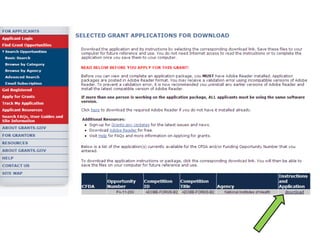
• Finding Grant Opportunities
• Download Instructions
• Download application package
• Complete application package
• Viewing and Printing application package
• Email acknowledgements and notifications
http://www.washington.edu/research/
http://www.washington.edu/research/funding/opportunities/
Finding a Grant Opportunity
To download
application
For a full copy
of the instructions
Enter your email address here if you would like
updates on this PA
Save both to your desktop
7 Steps to
Submit NIH proposal via
Grants.gov1. Download application package via
Grants.gov
2. Complete the application package
3. Complete a eGC1 in SAGE.
4. Upload application package to GC-1
and route to OSP
5. OSP will review & submit final
application
6. Validation process (multiple emails
3 Steps to
Submit NIH Proposal via Grant
Runner1. Create, complete and submit to OSP
a new eGC1 in SAGE containing the
application package.
2. Real time validation info contained
within SAGE History and Comments.
3. Validation of NIH proposals via eRA
Commons.
Where do I look for more
info?
• NSF website:
http://www.nsf.gov
• NIH Instructions for 424 Forms
http://grants1.nih.gov/grants/funding/
424/index.htm
• NIH ERA’s Commons website:
https://commons.era.nih.gov/commo
ns
• Avoid Common Errors:
http://era.nih.gov/ElectronicReceipt/a
voiding_errors.htm
http://grants.nih.gov/grants/ElectronicReceipt/faq.htm
Where can I go for help?
For technical questions:
http://grants.gov/ or 1-800-518-4726
For NIH’s overall plan for electronic
receipt, contact NIH Grants info at
grantsinfo@nih.gov
For UW procedure and process:
Contact OSP Help Desk at 685-4362 or
osphelp@u.washington.edu
For Grant Runner questions:
Contact the SAGE Help Desk at 685-
8335 or sagehelp@uw.edu.
Helpful Tips
• Always review the Program Announcement for
requirements (i.e. page limits, documentation,
etc.).
• Answer “Yes” on the eGC1 Ready-to-Submit
(RTS) question only when the proposal is ready
for submission
• The budget & SF424 form must have same start
date.
• Make sure to use the correct DUNS#.
• Level of effort must be listed on detailed
budget.
• Do not use headers and footers on documents.
• Grants.gov warns: ANYONE inserting text into an
More Helpful Tips
NIH Only:
• Make sure PI information in eRA Commons
matches the name used on the
application.
• Convert document attachments to PDF
format.
• Do not use “Assemble PDF Portfolio”
function in Adobe
Questions & Answers
In Closing
Course evaluations will be emailed
shortly following class.
THANKS FOR YOUR PARTICIPATION!

Grants.gov.10.2015

  • 1.
  • 2.
    Craig Johnson Grant Administrator Departmentof Medicine crjohnson@medicine.washington.edu 221-3383 Instructor
  • 3.
    Objectives By the endof this class you will: • Know what Grants.gov is and when to use it • Understand the 2 options for submitting applications from the UW • Know how to find funding opportunities supported by Grants.gov • Understand the UW process for submitting Grants.gov applications • Gain hands-on experience using
  • 4.
    Agenda Grants.gov Overview Two waysto complete applications Preparation time What info do I need? Where do I get it? Finding & completing the Adobe formset Final Check and downloading Q&A
  • 5.
    What is Grants.gov? •An electronic portal that allows users to find, apply for, and manage over 1,000 grant opportunities from 26 different Federal agencies
  • 6.
    When do Iuse Grants.gov? • Depends on the agency and program requirements. • Some sponsors (e.g., NIH, NOAA) currently use Grants.gov • NSF has it’s own system (Fastlane)
  • 7.
    Two Ways toComplete Grants.gov Applications #1 Adobe – Search and download forms direct from Grants.gov – Complete forms – Attach to eGC1 and route – OSP will upload and submit your application – Errors and warning messages provided by OSP
  • 8.
    Two Ways toComplete Grants.gov Applications #2 SAGE Grant Runner –Complete the forms directly in SAGE (combined with eGC1) –Route for campus approvals –OSP submits application with a click of a button –Errors and warning messages appear in eGC1 History & Comments
  • 9.
    SAGE Grant Runner GrantRunner combines the eGC1 & sponsor forms for some NIH funding opportunities requiring SF424 R&R forms, including Modular, Detailed and Subaward Budgets • Getting Started Grant Runner Guide http://depts.washington.edu/research /Docs/grant_runner_getting_started.p df • https://www.washington.edu/research
  • 10.
    Getting Started • NIH’ssystem is called eRA Commons. • In order to apply to NIH, every PI (or grad student) must have an active account in Commons. • Contact your Department Administrator to request an NIH Commons login account.
  • 11.
    Getting Started • Yourcomputer is loaded with the most currently supported version of Adobe (9.1.2.) – Grants.gov warns -anyone entering text on the forms should be using the same version of Adobe. • Search, download and become familiar with the Program Announcement and instructions • Schedule so that submission is in compliance with GIM19
  • 12.
    UW Routing andSubmission Process Routing on Campus In OSP Review by OSP Admin
  • 14.
    Navigating the Submission Freeway OSPtransmits application & receives confirmation Grants.gov performs basic check GRANT00001234 Agency System (NIH) eRA Commons AN1234567
  • 15.
  • 16.
    UW Deadlines (Submit Proposal) GIM19 7+ days: – All final business elements and draft scope of work – Approved by campus reviewers and IN OSP – OSP needs to be able to do a meaningful review 3+ days: – Final proposal in complete & final format – Status = IN OSP by 5pm -3 days: – Any application received by OSP after 5pm 3 business days before the sponsor deadline will not be reviewed and will be sent back to the PI/Dept – Waiver Process https://www.washington.edu/research/osp/gim/gim19.html
  • 17.
    Sponsor Deadlines (Submit Proposal) Anyhard deadline that is missed will usually result in the application being returned without review • Hint – Create a calendar using the sponsor deadline – Count back 3 and 7 business days UW Holiday -2 -10 -1-3-4 -8 -7 -6 -9
  • 18.
    7 Day Rule 3+Day Rule all business components complete/final + draft version of the science (Research Strategy) all proposal components complete/final + final version of the science (Research Strategy) What is due when? QUIZ
  • 19.
    When am Ireally ready to submit? All required eGC1 fields completed All COMPLETED sponsor forms attached IRB or IACUC studies / protocol approval dates IRB / IACUC modifications applied for Attached paperwork for subcontracts or consultants Research Plan & budget is attached in FINAL form Attachments are in correct format (NIH=PDF only) F&A rate is in accordance with GIM 13A Any required waivers approved (e.g. IDC, e-GC1 addendum, GIM 19) Then RTS = YES!!
  • 20.
    Demonstration of Grant.gov System •Finding Grant Opportunities • Download Instructions • Download application package • Complete application package • Viewing and Printing application package • Email acknowledgements and notifications
  • 21.
  • 22.
    Finding a GrantOpportunity
  • 23.
    Finding a GrantOpportunity
  • 24.
    Finding a GrantOpportunity
  • 26.
    To download application For afull copy of the instructions
  • 29.
    Enter your emailaddress here if you would like updates on this PA Save both to your desktop
  • 30.
    7 Steps to SubmitNIH proposal via Grants.gov1. Download application package via Grants.gov 2. Complete the application package 3. Complete a eGC1 in SAGE. 4. Upload application package to GC-1 and route to OSP 5. OSP will review & submit final application 6. Validation process (multiple emails
  • 31.
    3 Steps to SubmitNIH Proposal via Grant Runner1. Create, complete and submit to OSP a new eGC1 in SAGE containing the application package. 2. Real time validation info contained within SAGE History and Comments. 3. Validation of NIH proposals via eRA Commons.
  • 32.
    Where do Ilook for more info? • NSF website: http://www.nsf.gov • NIH Instructions for 424 Forms http://grants1.nih.gov/grants/funding/ 424/index.htm • NIH ERA’s Commons website: https://commons.era.nih.gov/commo ns • Avoid Common Errors: http://era.nih.gov/ElectronicReceipt/a voiding_errors.htm
  • 33.
  • 34.
    Where can Igo for help? For technical questions: http://grants.gov/ or 1-800-518-4726 For NIH’s overall plan for electronic receipt, contact NIH Grants info at grantsinfo@nih.gov For UW procedure and process: Contact OSP Help Desk at 685-4362 or osphelp@u.washington.edu For Grant Runner questions: Contact the SAGE Help Desk at 685- 8335 or sagehelp@uw.edu.
  • 35.
    Helpful Tips • Alwaysreview the Program Announcement for requirements (i.e. page limits, documentation, etc.). • Answer “Yes” on the eGC1 Ready-to-Submit (RTS) question only when the proposal is ready for submission • The budget & SF424 form must have same start date. • Make sure to use the correct DUNS#. • Level of effort must be listed on detailed budget. • Do not use headers and footers on documents. • Grants.gov warns: ANYONE inserting text into an
  • 36.
    More Helpful Tips NIHOnly: • Make sure PI information in eRA Commons matches the name used on the application. • Convert document attachments to PDF format. • Do not use “Assemble PDF Portfolio” function in Adobe
  • 37.
  • 38.
    In Closing Course evaluationswill be emailed shortly following class. THANKS FOR YOUR PARTICIPATION!