GP Connect Webinar
CareLineLive
NHS England
Digitising Social Care
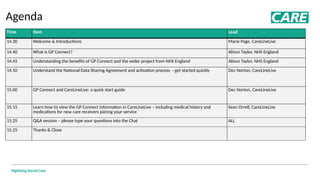
Agenda
Time​ Item​ Lead​
14.30 Welcome & Introductions Marie Page, CareLineLive
14.40 What is GP Connect? Alison Taylor, NHS England
14.45 Understanding the benefits of GP Connect and the wider project from NHS England Alison Taylor, NHS England
14.50 Understand the National Data Sharing Agreement and activation process - get started quickly Dec Norton, CareLineLive
15.00 GP Connect and CareLineLive: a quick start guide Dec Norton, CareLineLive
15.15 Learn how to view the GP Connect information in CareLineLive – including medical history and
medications for new care receivers joining your service
Sean Orrell, CareLineLive
15.25 Q&A session – please type your questions into the Chat ALL
15.25 Thanks & Close
GP Connect Overview
Alison Taylor
Senior Programme Manager - Nurse
NHS England Digitising Social Care
Digitising Social Care
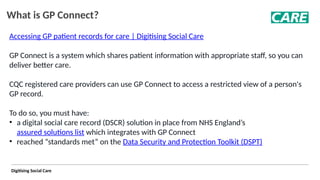
What is GP Connect?
Accessing GP patient records for care | Digitising Social Care
GP Connect is a system which shares patient information with appropriate staff, so you can
deliver better care.
CQC registered care providers can use GP Connect to access a restricted view of a person's
GP record.
To do so, you must have:
• a digital social care record (DSCR) solution in place from NHS England’s
assured solutions list which integrates with GP Connect
• reached “standards met” on the Data Security and Protection Toolkit (DSPT)
Digitising Social Care
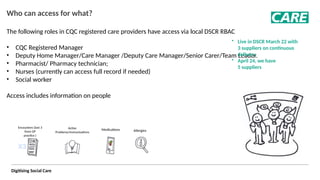
Who can access for what?
The following roles in CQC registered care providers have access via local DSCR RBAC ​
• CQC Registered Manager
• Deputy Home Manager/Care Manager /Deputy Care Manager/Senior Carer/Team Leader.
• Pharmacist/ Pharmacy technician;
• Nurses (currently can access full record if needed)​
• Social worker
Access includes information on people
X3
Encounters (last 3
from GP
practice )
Active
Problems/Immunisations
Medications Allergies
• Live in DSCR March 22 with
3 suppliers on continuous
delivery​
• April 24, we have
5 suppliers
Digitising Social Care
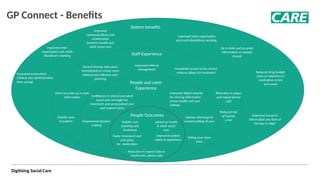
GP Connect - Benefits
People Outcomes
System benefits
Up to date and accurate
information on people
shared
Staff Experience
Improved inter-
organisation and multi-
disciplinary working
People and carer
Experience
Telling your story
once
Most accurate up to date
information
Reduction in paper
and repeat phone

calls
Immediate access to the record
reduces delays for treatment
Record sharing with peers
immediately to create more
tailored and effective care
planning
Improved referral
management
Reduced risk
of human
error
Holistic view
of patient Joined up health
& adult social
care
Confidence in clinical and adult
social care oversight for
treatment and personalised care
and support plans
Reduction in repeat tests or
treatments, phone calls
Faster treatment and
care plans
inc. medication
Improved
communications and
relationships
between health and
adult social care
Quicker discharge to
onward setting of care
Improved patient
safety & experience
Improved digital security
for sharing information
across health and care
settings
Increased productivity
(clinical and administration
time saving)
Improved inter-organisation
and multi-disciplinary working
Empowered decision
making
Holistic care
planning and
treatment
Improved access to
information any time of
the day or night
Reduced drug budget
costs as reduction in
medication errors
and waste
Digitising Social Care
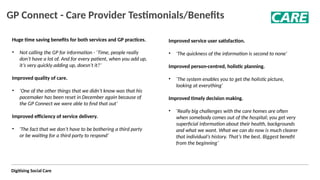
GP Connect - Care Provider Testimonials/Benefits
Huge time saving benefits for both services and GP practices.
• Not calling the GP for information - ‘Time, people really
don’t have a lot of. And for every patient, when you add up,
it’s very quickly adding up, doesn’t it?’ ​
Improved quality of care. ​
• ‘One of the other things that we didn’t know was that his
pacemaker has been reset in December again because of
the GP Connect we were able to find that out’ ​
​
Improved efficiency of service delivery.
​
• 'The fact that we don’t have to be bothering a third party
or be waiting for a third party to respond’ ​
​
Improved service user satisfaction. ​
​
​
• ‘The quickness of the information is second to none’ ​
​
​
Improved person-centred, holistic planning. ​
​
​
• ‘The system enables you to get the holistic picture,
looking at everything' ​
​
​
​
Improved timely decision making. ​
• ‘Really big challenges with the care homes are often
when somebody comes out of the hospital; you get very
superficial information about their health, backgrounds
and what we want. What we can do now is much clearer
that individual’s history. That’s the best. Biggest benefit
from the beginning’
Digitising Social Care
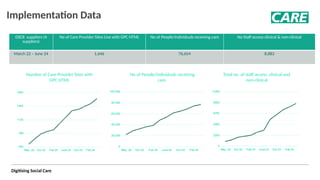
Implementation Data
DSCR suppliers​
​(4
suppliers)
No of Care Provider Sites Live with GPC HTML​
​
​ No of People/Individuals receiving care​
​
​ No Staff access clinical & non-clinical​
​
​
March 22 – June 2​
​
4 1,646 76,654 8,883
Number of Care Provider Sites with
GPC HTML
No of People/individuals receiving
care
Total no. of staff access, clinical and
non-clinical
Understand the National Data Sharing
Agreement (NDSA) and activation
process - get started quickly
Dec Norton, CareLineLive
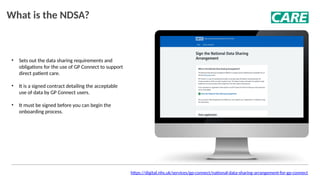
• Sets out the data sharing requirements and
obligations for the use of GP Connect to support
direct patient care.
• It is a signed contract detailing the acceptable
use of data by GP Connect users.
• It must be signed before you can begin the
onboarding process.
What is the NDSA?
https://digital.nhs.uk/services/gp-connect/national-data-sharing-arrangement-for-gp-connect
Signing the NDSA
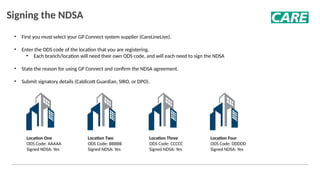
• First you must select your GP Connect system supplier (CareLineLive).​
• Enter the ODS code of the location that you are registering.
• Each branch/location will need their own ODS code, and will each need to sign the NDSA
• State the reason for using GP Connect and confirm the NDSA agreement.​
• Submit signatory details (Caldicott Guardian, SIRO, or DPO).
Location One
ODS Code: AAAAA
Signed NDSA: Yes
Location Two
ODS Code: BBBBB
Signed NDSA: Yes
Location Three
ODS Code: CCCCC
Signed NDSA: Yes
Location Four
ODS Code: DDDDD
Signed NDSA: Yes
GP Connect activation requirements
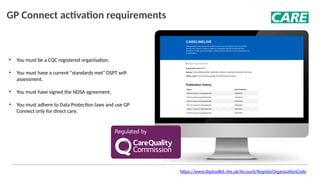
• You must be a CQC registered organisation.
• You must have a current "standards met" DSPT self-
assessment.
• You must have signed the NDSA agreement.
• You must adhere to Data Protection laws and use GP
Connect only for direct care.
https://www.dsptoolkit.nhs.uk/Account/RegisterOrganisationCode
GP Connect and CareLineLive: a quick
start guide
Dec Norton, CareLineLive
Digitising Social Care
Register your interest
Once you have completed the pre-requisites (DSPT and NDSA), get in touch with us to register your interest.
You can contact us using the GP Connect pages on our website or help site:
• https://carelinelive.com/our-solution/gp-connect-integration/
We will then engage with the GP Connect Operations Team to acquire your unique credentials. Note that existing
credentials from other system suppliers cannot be used with CareLineLive.
Digitising Social Care
Start preparing
Once you have notified CareLineLive about your intent to use GP Connect, you should start preparing the following:
• A list of users
• You'll need to set up any users that you intend to have access to GP Connect
• Users who are to have full access to the GP Connect record will require their professional identification details to be
recorded in CareLineLive
• Valid NHS Number for each Client
• This is captured in the ‘Identifiers’ section in the Client Overview section
• Capture Client Consent
• A new ‘Client choices’ section is available in the Clients module where consent can be stored and amended
• We'd suggest getting written consent
Digitising Social Care
Activating GP Connect
Once you've been successfully registered with the GP Connect Operations Team, we'll be in touch to arrange a short
onboarding session where we will:
• Configure your CareLineLive environment
• Walk you through recording consent for each service user
• Verify that the connection is successful
• Show you how to add and management additional GP Connect users
Digitising Social Care
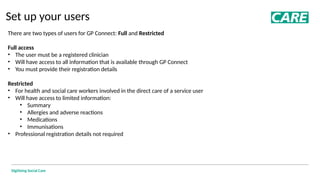
Set up your users
There are two types of users for GP Connect: Full and Restricted
Full access
• The user must be a registered clinician
• Will have access to all information that is available through GP Connect
• You must provide their registration details
Restricted
• For health and social care workers involved in the direct care of a service user
• Will have access to limited information:
• Summary
• Allergies and adverse reactions
• Medications
• Immunisations
• Professional registration details not required
Learn how to view the GP Connect information in
CareLineLive – including medical history and
medications for new residents joining your service
Sean Orrell, CareLineLive
Digitising Social Care
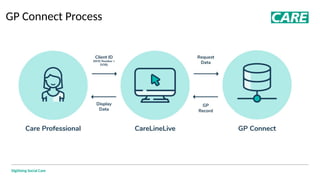
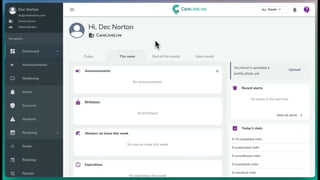
GP Connect Process
Digitising Social Care
NHS Number
Digitising Social Care
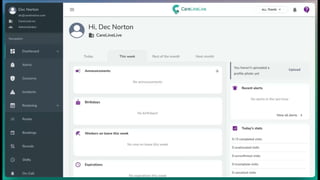
Recording consent
Digitising Social Care
Accessing GP Connect
Digitising Social Care
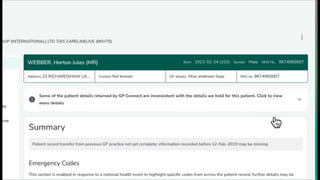
GP Connect: Demographic inconsistencies
Digitising Social Care
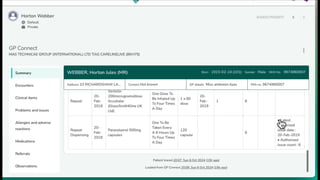
GP Connect: Summary
Digitising Social Care
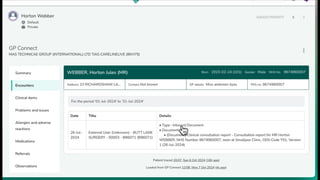
GP Connect: Encounters
Digitising Social Care
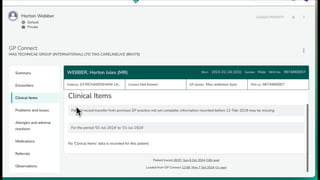
GP Connect: Clinical items
Digitising Social Care
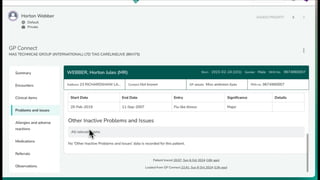
GP Connect: Problems and issues
Digitising Social Care
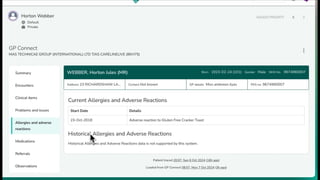
GP Connect: Allergies and adverse reactions
Digitising Social Care
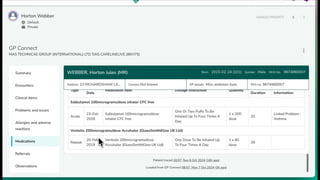
GP Connect: Medications
Digitising Social Care
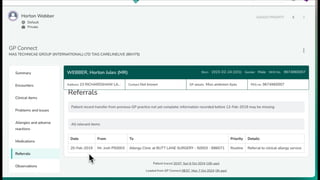
GP Connect: Referrals
Digitising Social Care
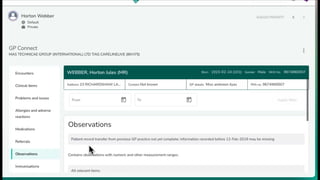
GP Connect: Observations
Digitising Social Care
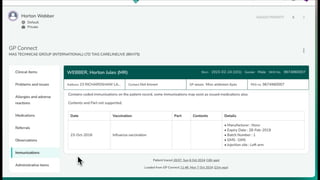
GP Connect: Immunisations
Digitising Social Care
GP Connect: Administrative items
Digitising Social Care
FAQs
Who can use GP Connect?
• There are two levels of access for GP Connect, a full view for clinicians (registration details required) and a reduced view for non-
clinical users
I'm based outside of England, can I use GP Connect?
• Unfortunately not, GP Connect is only available for England
Is GP Connect included in my CareLineLive subscription?
• Yes, there is no additional charge for using the GP Connect service within CareLineLive.
What are the benefits of GP Connect?
• GP Connect users can access the GP records instantly, reducing time taken to retrieve key information and not waiting in-queues on
the phone.
What patient records can I access?
• GP Connect records can only be accessed for those who are in receipt of direct care from your company. You will need to capture and
evidence that the service user has granted permission for the record to be accessed.
Is CareLineLive as part of the DSC Assured Supplier List?
• Yes, CareLineLive are proud to be a DSC assured supplier
Digitising Social Care
THANK YOU FOR YOUR
TIME
QUESTIONS
Come and say hi at stand F70
Digitising Social Care
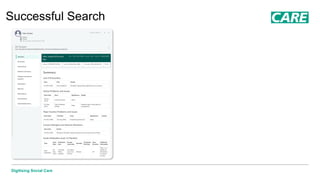
Successful Search
Digitising Social Care
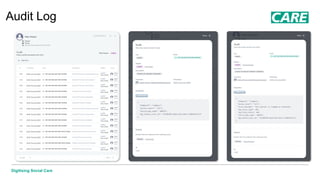
Audit Log
Digitising Social Care
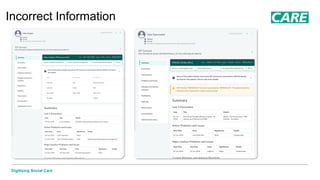
Incorrect Information
Digitising Social Care
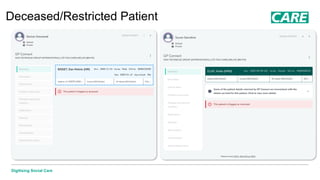
Deceased/Restricted Patient

GP Connect and CareLineLive - Webinar Slide Deck

  • 1.
  • 2.
    Digitising Social Care Agenda Time​Item​ Lead​ 14.30 Welcome & Introductions Marie Page, CareLineLive 14.40 What is GP Connect? Alison Taylor, NHS England 14.45 Understanding the benefits of GP Connect and the wider project from NHS England Alison Taylor, NHS England 14.50 Understand the National Data Sharing Agreement and activation process - get started quickly Dec Norton, CareLineLive 15.00 GP Connect and CareLineLive: a quick start guide Dec Norton, CareLineLive 15.15 Learn how to view the GP Connect information in CareLineLive – including medical history and medications for new care receivers joining your service Sean Orrell, CareLineLive 15.25 Q&A session – please type your questions into the Chat ALL 15.25 Thanks & Close
  • 3.
    GP Connect Overview AlisonTaylor Senior Programme Manager - Nurse NHS England Digitising Social Care
  • 4.
    Digitising Social Care Whatis GP Connect? Accessing GP patient records for care | Digitising Social Care GP Connect is a system which shares patient information with appropriate staff, so you can deliver better care. CQC registered care providers can use GP Connect to access a restricted view of a person's GP record. To do so, you must have: • a digital social care record (DSCR) solution in place from NHS England’s assured solutions list which integrates with GP Connect • reached “standards met” on the Data Security and Protection Toolkit (DSPT)
  • 5.
    Digitising Social Care Whocan access for what? The following roles in CQC registered care providers have access via local DSCR RBAC ​ • CQC Registered Manager • Deputy Home Manager/Care Manager /Deputy Care Manager/Senior Carer/Team Leader. • Pharmacist/ Pharmacy technician; • Nurses (currently can access full record if needed)​ • Social worker Access includes information on people X3 Encounters (last 3 from GP practice ) Active Problems/Immunisations Medications Allergies • Live in DSCR March 22 with 3 suppliers on continuous delivery​ • April 24, we have 5 suppliers
  • 6.
    Digitising Social Care GPConnect - Benefits People Outcomes System benefits Up to date and accurate information on people shared Staff Experience Improved inter- organisation and multi- disciplinary working People and carer Experience Telling your story once Most accurate up to date information Reduction in paper and repeat phone calls Immediate access to the record reduces delays for treatment Record sharing with peers immediately to create more tailored and effective care planning Improved referral management Reduced risk of human error Holistic view of patient Joined up health & adult social care Confidence in clinical and adult social care oversight for treatment and personalised care and support plans Reduction in repeat tests or treatments, phone calls Faster treatment and care plans inc. medication Improved communications and relationships between health and adult social care Quicker discharge to onward setting of care Improved patient safety & experience Improved digital security for sharing information across health and care settings Increased productivity (clinical and administration time saving) Improved inter-organisation and multi-disciplinary working Empowered decision making Holistic care planning and treatment Improved access to information any time of the day or night Reduced drug budget costs as reduction in medication errors and waste
  • 7.
    Digitising Social Care GPConnect - Care Provider Testimonials/Benefits Huge time saving benefits for both services and GP practices. • Not calling the GP for information - ‘Time, people really don’t have a lot of. And for every patient, when you add up, it’s very quickly adding up, doesn’t it?’ ​ Improved quality of care. ​ • ‘One of the other things that we didn’t know was that his pacemaker has been reset in December again because of the GP Connect we were able to find that out’ ​ ​ Improved efficiency of service delivery. ​ • 'The fact that we don’t have to be bothering a third party or be waiting for a third party to respond’ ​ ​ Improved service user satisfaction. ​ ​ ​ • ‘The quickness of the information is second to none’ ​ ​ ​ Improved person-centred, holistic planning. ​ ​ ​ • ‘The system enables you to get the holistic picture, looking at everything' ​ ​ ​ ​ Improved timely decision making. ​ • ‘Really big challenges with the care homes are often when somebody comes out of the hospital; you get very superficial information about their health, backgrounds and what we want. What we can do now is much clearer that individual’s history. That’s the best. Biggest benefit from the beginning’
  • 8.
    Digitising Social Care ImplementationData DSCR suppliers​ ​(4 suppliers) No of Care Provider Sites Live with GPC HTML​ ​ ​ No of People/Individuals receiving care​ ​ ​ No Staff access clinical & non-clinical​ ​ ​ March 22 – June 2​ ​ 4 1,646 76,654 8,883 Number of Care Provider Sites with GPC HTML No of People/individuals receiving care Total no. of staff access, clinical and non-clinical
  • 9.
    Understand the NationalData Sharing Agreement (NDSA) and activation process - get started quickly Dec Norton, CareLineLive
  • 10.
    • Sets outthe data sharing requirements and obligations for the use of GP Connect to support direct patient care. • It is a signed contract detailing the acceptable use of data by GP Connect users. • It must be signed before you can begin the onboarding process. What is the NDSA? https://digital.nhs.uk/services/gp-connect/national-data-sharing-arrangement-for-gp-connect
  • 11.
    Signing the NDSA •First you must select your GP Connect system supplier (CareLineLive).​ • Enter the ODS code of the location that you are registering. • Each branch/location will need their own ODS code, and will each need to sign the NDSA • State the reason for using GP Connect and confirm the NDSA agreement.​ • Submit signatory details (Caldicott Guardian, SIRO, or DPO). Location One ODS Code: AAAAA Signed NDSA: Yes Location Two ODS Code: BBBBB Signed NDSA: Yes Location Three ODS Code: CCCCC Signed NDSA: Yes Location Four ODS Code: DDDDD Signed NDSA: Yes
  • 12.
    GP Connect activationrequirements • You must be a CQC registered organisation. • You must have a current "standards met" DSPT self- assessment. • You must have signed the NDSA agreement. • You must adhere to Data Protection laws and use GP Connect only for direct care. https://www.dsptoolkit.nhs.uk/Account/RegisterOrganisationCode
  • 13.
    GP Connect andCareLineLive: a quick start guide Dec Norton, CareLineLive
  • 14.
    Digitising Social Care Registeryour interest Once you have completed the pre-requisites (DSPT and NDSA), get in touch with us to register your interest. You can contact us using the GP Connect pages on our website or help site: • https://carelinelive.com/our-solution/gp-connect-integration/ We will then engage with the GP Connect Operations Team to acquire your unique credentials. Note that existing credentials from other system suppliers cannot be used with CareLineLive.
  • 15.
    Digitising Social Care Startpreparing Once you have notified CareLineLive about your intent to use GP Connect, you should start preparing the following: • A list of users • You'll need to set up any users that you intend to have access to GP Connect • Users who are to have full access to the GP Connect record will require their professional identification details to be recorded in CareLineLive • Valid NHS Number for each Client • This is captured in the ‘Identifiers’ section in the Client Overview section • Capture Client Consent • A new ‘Client choices’ section is available in the Clients module where consent can be stored and amended • We'd suggest getting written consent
  • 16.
    Digitising Social Care ActivatingGP Connect Once you've been successfully registered with the GP Connect Operations Team, we'll be in touch to arrange a short onboarding session where we will: • Configure your CareLineLive environment • Walk you through recording consent for each service user • Verify that the connection is successful • Show you how to add and management additional GP Connect users
  • 17.
    Digitising Social Care Setup your users There are two types of users for GP Connect: Full and Restricted Full access • The user must be a registered clinician • Will have access to all information that is available through GP Connect • You must provide their registration details Restricted • For health and social care workers involved in the direct care of a service user • Will have access to limited information: • Summary • Allergies and adverse reactions • Medications • Immunisations • Professional registration details not required
  • 19.
    Learn how toview the GP Connect information in CareLineLive – including medical history and medications for new residents joining your service Sean Orrell, CareLineLive
  • 20.
  • 21.
  • 22.
  • 23.
  • 24.
    Digitising Social Care GPConnect: Demographic inconsistencies
  • 25.
    Digitising Social Care GPConnect: Summary
  • 26.
    Digitising Social Care GPConnect: Encounters
  • 27.
    Digitising Social Care GPConnect: Clinical items
  • 28.
    Digitising Social Care GPConnect: Problems and issues
  • 29.
    Digitising Social Care GPConnect: Allergies and adverse reactions
  • 30.
    Digitising Social Care GPConnect: Medications
  • 31.
    Digitising Social Care GPConnect: Referrals
  • 32.
    Digitising Social Care GPConnect: Observations
  • 33.
    Digitising Social Care GPConnect: Immunisations
  • 34.
    Digitising Social Care GPConnect: Administrative items
  • 35.
    Digitising Social Care FAQs Whocan use GP Connect? • There are two levels of access for GP Connect, a full view for clinicians (registration details required) and a reduced view for non- clinical users I'm based outside of England, can I use GP Connect? • Unfortunately not, GP Connect is only available for England Is GP Connect included in my CareLineLive subscription? • Yes, there is no additional charge for using the GP Connect service within CareLineLive. What are the benefits of GP Connect? • GP Connect users can access the GP records instantly, reducing time taken to retrieve key information and not waiting in-queues on the phone. What patient records can I access? • GP Connect records can only be accessed for those who are in receipt of direct care from your company. You will need to capture and evidence that the service user has granted permission for the record to be accessed. Is CareLineLive as part of the DSC Assured Supplier List? • Yes, CareLineLive are proud to be a DSC assured supplier
  • 36.
    Digitising Social Care THANKYOU FOR YOUR TIME QUESTIONS
  • 37.
    Come and sayhi at stand F70
  • 38.
  • 39.
  • 40.
  • 41.

Editor's Notes

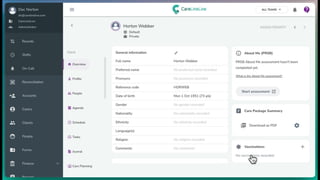
  • #21 NHS NUMBER First we need need to make sure that the client has an NHS number recorded in their profile; Validation: we may sure that the format is correct Won't be cross-referenced with actual demographic details (name etc) until GP Connect is loaded NEXT: CLIENT CHOICES
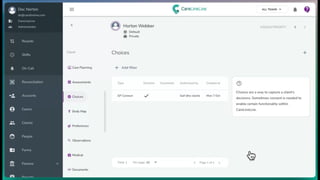
  • #22 CLIENT CHOICES Next, we need to ensure that you've recorded the client's consent to their GP record being accessed via CareLineLive. This is done using Client Choices. Additional context about how/when the choice was made Who made it for them (i.e. NOK, POA) Who supported them (i.e. care worker) Documented evidence (i.e. signed agreement) NEXT: GP CONNECT
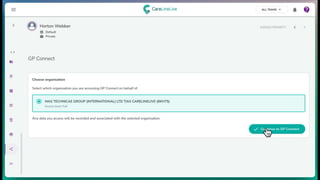
  • #23 GP CONNECT TAB Click the GP Connect tab in the client's profile If not configured correctly, you will be presented with an error message NEXT: DATA CONSISTENCY
  • #24 DATA CONSISTENCY System will check if the details returned by GP Connect match what has been stored in CLL Useful as a data quality exercise, to ensure that the details you have captured match those stored by the NHS NEXT: SUMMARY
  • #25 SUMMARY First screen when you load GP Connect Includes: Active problems and issues Current medication issues Repeat medications Current allergies and adverse reactions Last three encounters NEXT: ENCOUNTERS
  • #26 ENCOUNTERS Full access only Includes: Direct encounters (i.e. GP visit) Unplanned encounters (i.e. out of hours clinic) Indirect encounters (i.e. GP reviewing test results) NEXT: CLINICAL ITEMS
  • #27 CLINICAL ITEMS Full access only Items of information relating to the care, health, or wellbeing of the patient Could include screening and past medical history NEXT: PROBLEMS AND ISSUES
  • #28 PROBLEMS AND ISSUES Full access only Includes: Any issue that is significant to a patient, and impacts their health or wellbeing. Disease Surgery Social issues (bereavement, unemployment) NEXT: ALLERGIES AND ADVERSE REACTIONS
  • #29 ALLERGIES AND ADVERSE REACTIONS Self explanatory? NEXT: MEDICATONS
  • #30 MEDICATIONS Current and past medication Dosage instructions Discontinuation details Additional information (i.e. linked problems) Medication issues NEXT: REFERRALS
  • #31 REFERRALS Full access only Details of referrals to other services or departments NEXT: OBSERVATIONS
  • #32 OBSERVATIONS Full access only Clinical observations recorded by health professionals During assessment or direct care of patients Examples include: Blood pressure Weight Height Temperature NEXT: IMMUNISATIONS
  • #33 IMMUNISATIONS Immunisations and vaccinations May also contain information such as declined vaccinations NEXT: ADMINISTRATIVE ITEMS
  • #34 ADMINISTRATIVE ITEMS Full access only Tasks such as: Scheduling and administering encounters Communication with other organisations Critical safety processes
  • #36 Potential questions: Is the data synced between GP Connect and CLL? No – it is a read-only view and none of the data is stored in CLL Can carers access it via the mobile app? No – it is only available on the web How quickly can we be up and running? Existing customers: 2 weeks New customers: 4 weeks (including CLL onboarding)