GWT
Google Web Toolkit, Pronounced as "gwit“
Original author(s) Google, Now distributed under Apache License 2.0 since 2012
Initial release May 16, 2006; about 11 years ago
Stable release 2.8.0 / October 20, 2016; 3 months ago
GWT 3.0 May 2017 Tentative
Pankaj K. Bhasker
Pankaj.bhasker709@gmail.com
JUG Hyderabad
21 Jan 2017
ALL ABOUT GWT
• Introduction
• What is GWT?
• Why GWT?
• Who is using GWT?
• Installation and configuration
• GWT Architecture
• Bootstrap sequence
• Structure of GWT App
• GWT generate files
• debugging and Deployment
• Traditional Example Hallo World
• Client server communication in GWT
• Demos.
• Future of GWT
• GWT 3.0
• GWT related Important Links
• Questions
WHAT IS GWT?
• GWT is a development toolkit for building and optimizing complex
browser-based ajax applications. It's an open source framework used by
thousands of developers around the world. You write your source code in
Java using your favorite IDE like Eclipse, IntelliJ IDEA or whatever
text editor you prefer, then compile it down into JavaScript output,
which runs in all browsers: Internet Explorer, Google Chrome, FireFox,
Safari, etc.
• Its main aim is to give facility to the Java developer to develop web
application without having an expertise of HTML, JavaScript and Ajax.
• The developer writes there front end in the Java programming language,
and the GWT compiler converts these Java classes to browser-compliant
optimized Java Script and HTML.
• GWT's Java-to-JavaScript compiler converts the application into a set of
JavaScript and HTML files using permutations which we have configured
into module descriptor file
You can use all of your favourite Java development tools (Eclipse, IntelliJ, JProfiler, JUnit) for
AJAX development.
Static type checking in the Java language boosts productivity while reducing errors.
Common Java-script errors (typos, type mismatches) are easily caught at compile time
rather than by users at runtime.
Code prompting/completion is widely available.
Java-based OO designs are easier to communicate and understand, thus making your AJAX
code base more comprehensible with less documentation.
WHY GWT?
WHO IS USING GWT?
There are the bunch of applications which are developed in GWT. GWT is used by many products at Google,
including : AdWords, AdSense, Flights, Hotel Finder, Offers, Wallet, Blogger, Google Sheets, Parts of Maps,
Orkut , angry birds too and Google Inbox (May 28, 2015).
So, Here is few of the products which used GWT as there front hand.
https://inbox.google.com
http://wallet.google.com
https://www.google.com/flights/
http://adwords.google.com/
http://chrome.angrybirds.com/
http://evernote.com/
https://www.google.com/adsense/start
http://gwtreferencelist.appspot.com/
http://finbudget.com/
http://www.ovirt.org/
http://bibale.com/
http://bookedin.net/
https://www.scenechronize.com
http://www.whirled.com/
http://drawmics.com/
LET’S START
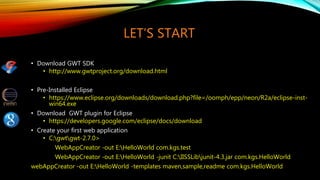
• Download GWT SDK
• http://www.gwtproject.org/download.html
• Pre-Installed Eclipse
• https://www.eclipse.org/downloads/download.php?file=/oomph/epp/neon/R2a/eclipse-inst-
win64.exe
• Download GWT plugin for Eclipse
• https://developers.google.com/eclipse/docs/download
• Create your first web application
• C:gwtgwt-2.7.0>
WebAppCreator -out E:HelloWorld com.kgs.test
WebAppCreator -out E:HelloWorld -junit C:IISSLibjunit-4.3.jar com.kgs.HelloWorld
webAppCreator -out E:HelloWorld -templates maven,sample,readme com.kgs.HelloWorld
GOOGLE WEB TOOLKIT ARCHITECTURE
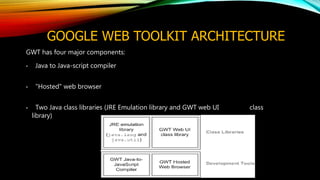
GWT has four major components:
• Java to Java-script compiler
• "Hosted" web browser
• Two Java class libraries (JRE Emulation library and GWT web UI class
library)
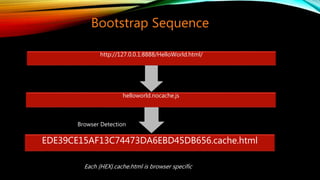
http://127.0.0.1:8888/HelloWorld.html/
helloworld.nocache.js
EDE39CE15AF13C74473DA6EBD45DB656.cache.html
Browser Detection
Bootstrap Sequence
Each {HEX}.cache.html is browser specific
Browser Detection
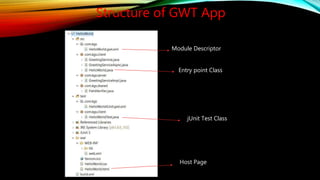
Structure of GWT App
Module Descriptor
Entry point Class
Host Page
jUnit Test Class
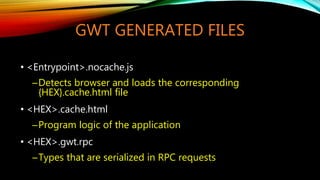
GWT GENERATED FILES
• <Entrypoint>.nocache.js
─Detects browser and loads the corresponding
{HEX}.cache.html file
• <HEX>.cache.html
─Program logic of the application
• <HEX>.gwt.rpc
─Types that are serialized in RPC requests
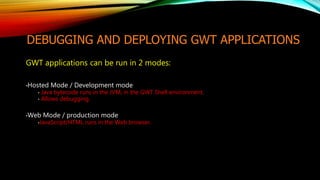
DEBUGGING AND DEPLOYING GWT APPLICATIONS
GWT applications can be run in 2 modes:
•Hosted Mode / Development mode
• Java bytecode runs in the JVM, in the GWT Shell environment.
• Allows debugging.
•Web Mode / production mode
•JavaScript/HTML runs in the Web browser.
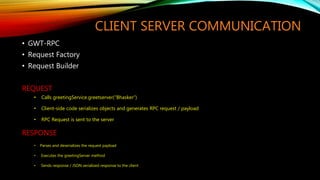
CLIENT SERVER COMMUNICATION
• GWT-RPC
• Request Factory
• Request Builder
REQUEST
• Calls greetingService.greetserver(“Bhasker”)
• Client-side code serializes objects and generates RPC request / payload
• RPC Request is sent to the server
RESPONSE
• Parses and deserializes the request payload
• Executes the greetingServer method
• Sends response / JSON serialized response to the client
FEW DEMO BUILT ON GWT
• http://www.gwtproject.org/examples.html
• http://gwtmaterialdesign.github.io/gwt-material-patterns/
• http://gwtmaterialdesign.github.io/gwt-material-demo/snapshot/
• http://gwtmaterialdesign.github.io/gwt-material-patterns/snapshot/#google_contacts
• http://gwtmaterialdesign.github.io/gwt-material-patterns/snapshot/#google_inbox
• http://gwtmaterialdesign.github.io/gwt-material-patterns/snapshot/#google_drive
• http://www.smartclient.com/smartgwt/showcase/#main
• http://vaadin.github.io/gwt-polymer-elements/demo/#paper/ItemSample
• http://samples.gwtproject.org/samples/Mail/Mail.html
• http://samples.gwtproject.org/samples/Showcase/Showcase.html#!CwCheckBox
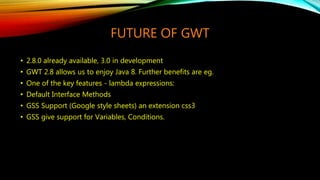
FUTURE OF GWT
• 2.8.0 already available, 3.0 in development
• GWT 2.8 allows us to enjoy Java 8. Further benefits are eg.
• One of the key features - lambda expressions:
• Default Interface Methods
• GSS Support (Google style sheets) an extension css3
• GSS give support for Variables, Conditions.
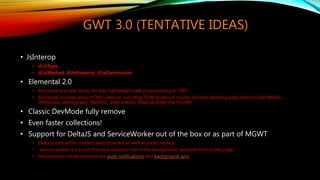
GWT 3.0 (TENTATIVE IDEAS)
• JsInterop
• @JsType
• @JsMethod, @JsProperty, @JsConstructor
• Elemental 2.0
• Elemental is a new library for fast, lightweight web programming in GWT.
• Elemental includes every HTML5 feature, including DOM access of course, but also bleeding edge features like WebGL,
WebAudio, WebSockets, WebRTC, Web Intents, Shadow DOM, the File API.
• Classic DevMode fully remove
• Even faster collections!
• Support for DeltaJS and ServiceWorker out of the box or as part of MGWT
• Delta.js runs within modern web browsers as well as under node.js.
• service worker is a script that your browser runs in the background, separate from a web page
• they already include features like push notifications and background sync
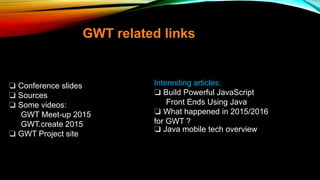
❏ Conference slides
❏ Sources
❏ Some videos:
GWT Meet-up 2015
GWT.create 2015
❏ GWT Project site
GWT related links
Interesting articles:
❏ Build Powerful JavaScript
Front Ends Using Java
❏ What happened in 2015/2016
for GWT ?
❏ Java mobile tech overview
QUESTIONS
THANKS

Google web toolkit ( Gwt )

  • 1.
    GWT Google Web Toolkit,Pronounced as "gwit“ Original author(s) Google, Now distributed under Apache License 2.0 since 2012 Initial release May 16, 2006; about 11 years ago Stable release 2.8.0 / October 20, 2016; 3 months ago GWT 3.0 May 2017 Tentative Pankaj K. Bhasker Pankaj.bhasker709@gmail.com JUG Hyderabad 21 Jan 2017
  • 2.
    ALL ABOUT GWT •Introduction • What is GWT? • Why GWT? • Who is using GWT? • Installation and configuration • GWT Architecture • Bootstrap sequence • Structure of GWT App • GWT generate files • debugging and Deployment • Traditional Example Hallo World • Client server communication in GWT • Demos. • Future of GWT • GWT 3.0 • GWT related Important Links • Questions
  • 3.
    WHAT IS GWT? •GWT is a development toolkit for building and optimizing complex browser-based ajax applications. It's an open source framework used by thousands of developers around the world. You write your source code in Java using your favorite IDE like Eclipse, IntelliJ IDEA or whatever text editor you prefer, then compile it down into JavaScript output, which runs in all browsers: Internet Explorer, Google Chrome, FireFox, Safari, etc. • Its main aim is to give facility to the Java developer to develop web application without having an expertise of HTML, JavaScript and Ajax. • The developer writes there front end in the Java programming language, and the GWT compiler converts these Java classes to browser-compliant optimized Java Script and HTML. • GWT's Java-to-JavaScript compiler converts the application into a set of JavaScript and HTML files using permutations which we have configured into module descriptor file
  • 4.
    You can useall of your favourite Java development tools (Eclipse, IntelliJ, JProfiler, JUnit) for AJAX development. Static type checking in the Java language boosts productivity while reducing errors. Common Java-script errors (typos, type mismatches) are easily caught at compile time rather than by users at runtime. Code prompting/completion is widely available. Java-based OO designs are easier to communicate and understand, thus making your AJAX code base more comprehensible with less documentation. WHY GWT?
  • 5.
    WHO IS USINGGWT? There are the bunch of applications which are developed in GWT. GWT is used by many products at Google, including : AdWords, AdSense, Flights, Hotel Finder, Offers, Wallet, Blogger, Google Sheets, Parts of Maps, Orkut , angry birds too and Google Inbox (May 28, 2015). So, Here is few of the products which used GWT as there front hand. https://inbox.google.com http://wallet.google.com https://www.google.com/flights/ http://adwords.google.com/ http://chrome.angrybirds.com/ http://evernote.com/ https://www.google.com/adsense/start http://gwtreferencelist.appspot.com/ http://finbudget.com/ http://www.ovirt.org/ http://bibale.com/ http://bookedin.net/ https://www.scenechronize.com http://www.whirled.com/ http://drawmics.com/
  • 6.
    LET’S START • DownloadGWT SDK • http://www.gwtproject.org/download.html • Pre-Installed Eclipse • https://www.eclipse.org/downloads/download.php?file=/oomph/epp/neon/R2a/eclipse-inst- win64.exe • Download GWT plugin for Eclipse • https://developers.google.com/eclipse/docs/download • Create your first web application • C:gwtgwt-2.7.0> WebAppCreator -out E:HelloWorld com.kgs.test WebAppCreator -out E:HelloWorld -junit C:IISSLibjunit-4.3.jar com.kgs.HelloWorld webAppCreator -out E:HelloWorld -templates maven,sample,readme com.kgs.HelloWorld
  • 7.
    GOOGLE WEB TOOLKITARCHITECTURE GWT has four major components: • Java to Java-script compiler • "Hosted" web browser • Two Java class libraries (JRE Emulation library and GWT web UI class library)
  • 8.
  • 9.
    Structure of GWTApp Module Descriptor Entry point Class Host Page jUnit Test Class
  • 10.
    GWT GENERATED FILES •<Entrypoint>.nocache.js ─Detects browser and loads the corresponding {HEX}.cache.html file • <HEX>.cache.html ─Program logic of the application • <HEX>.gwt.rpc ─Types that are serialized in RPC requests
  • 11.
    DEBUGGING AND DEPLOYINGGWT APPLICATIONS GWT applications can be run in 2 modes: •Hosted Mode / Development mode • Java bytecode runs in the JVM, in the GWT Shell environment. • Allows debugging. •Web Mode / production mode •JavaScript/HTML runs in the Web browser.
  • 12.
    CLIENT SERVER COMMUNICATION •GWT-RPC • Request Factory • Request Builder REQUEST • Calls greetingService.greetserver(“Bhasker”) • Client-side code serializes objects and generates RPC request / payload • RPC Request is sent to the server RESPONSE • Parses and deserializes the request payload • Executes the greetingServer method • Sends response / JSON serialized response to the client
  • 13.
    FEW DEMO BUILTON GWT • http://www.gwtproject.org/examples.html • http://gwtmaterialdesign.github.io/gwt-material-patterns/ • http://gwtmaterialdesign.github.io/gwt-material-demo/snapshot/ • http://gwtmaterialdesign.github.io/gwt-material-patterns/snapshot/#google_contacts • http://gwtmaterialdesign.github.io/gwt-material-patterns/snapshot/#google_inbox • http://gwtmaterialdesign.github.io/gwt-material-patterns/snapshot/#google_drive • http://www.smartclient.com/smartgwt/showcase/#main • http://vaadin.github.io/gwt-polymer-elements/demo/#paper/ItemSample • http://samples.gwtproject.org/samples/Mail/Mail.html • http://samples.gwtproject.org/samples/Showcase/Showcase.html#!CwCheckBox
  • 14.
    FUTURE OF GWT •2.8.0 already available, 3.0 in development • GWT 2.8 allows us to enjoy Java 8. Further benefits are eg. • One of the key features - lambda expressions: • Default Interface Methods • GSS Support (Google style sheets) an extension css3 • GSS give support for Variables, Conditions.
  • 15.
    GWT 3.0 (TENTATIVEIDEAS) • JsInterop • @JsType • @JsMethod, @JsProperty, @JsConstructor • Elemental 2.0 • Elemental is a new library for fast, lightweight web programming in GWT. • Elemental includes every HTML5 feature, including DOM access of course, but also bleeding edge features like WebGL, WebAudio, WebSockets, WebRTC, Web Intents, Shadow DOM, the File API. • Classic DevMode fully remove • Even faster collections! • Support for DeltaJS and ServiceWorker out of the box or as part of MGWT • Delta.js runs within modern web browsers as well as under node.js. • service worker is a script that your browser runs in the background, separate from a web page • they already include features like push notifications and background sync
  • 16.
    ❏ Conference slides ❏Sources ❏ Some videos: GWT Meet-up 2015 GWT.create 2015 ❏ GWT Project site GWT related links Interesting articles: ❏ Build Powerful JavaScript Front Ends Using Java ❏ What happened in 2015/2016 for GWT ? ❏ Java mobile tech overview
  • 17.