Download free for 30 days
Sign in
Upload
Language (EN)
Support
Business
Mobile
Social Media
Marketing
Technology
Art & Photos
Career
Design
Education
Presentations & Public Speaking
Government & Nonprofit
Healthcare
Internet
Law
Leadership & Management
Automotive
Engineering
Software
Recruiting & HR
Retail
Sales
Services
Science
Small Business & Entrepreneurship
Food
Environment
Economy & Finance
Data & Analytics
Investor Relations
Sports
Spiritual
News & Politics
Travel
Self Improvement
Real Estate
Entertainment & Humor
Health & Medicine
Devices & Hardware
Lifestyle
Change Language
Language
English
Español
Português
Français
Deutsche
Cancel
Save
EN
Uploaded by
洋史 東平
5,204 views
Google Chrome on Android を自動実行
Android 端末上の Google Chrome をパソコンから自動実行する方法について概要を説明します。
Technology
◦
Read more
3
Save
Share
Embed
Embed presentation
Download
Download to read offline
1
/ 27
2
/ 27
3
/ 27
4
/ 27
5
/ 27
6
/ 27
7
/ 27
8
/ 27
9
/ 27
10
/ 27
11
/ 27
12
/ 27
13
/ 27
14
/ 27
15
/ 27
16
/ 27
17
/ 27
18
/ 27
19
/ 27
20
/ 27
21
/ 27
22
/ 27
23
/ 27
24
/ 27
25
/ 27
26
/ 27
27
/ 27
More Related Content
PDF
Getting Started With Cypress
by
Knoldus Inc.
PDF
ソーシャルゲームの課金認証共通基盤をどう設計したか
by
Yugo Shimizu
PPTX
ARM LinuxのMMUはわかりにくい
by
wata2ki
PDF
Postman: An Introduction for Testers
by
Postman
PPTX
Gitlab CI/CD
by
JEMLI Fathi
PDF
Automated testing with Cypress
by
Yong Shean Chong
PPTX
Selenium WebDriver training
by
Vijay Krishnan Ramaswamy
PDF
Serenity-BDD training
by
Savvycom Savvycom
Getting Started With Cypress
by
Knoldus Inc.
ソーシャルゲームの課金認証共通基盤をどう設計したか
by
Yugo Shimizu
ARM LinuxのMMUはわかりにくい
by
wata2ki
Postman: An Introduction for Testers
by
Postman
Gitlab CI/CD
by
JEMLI Fathi
Automated testing with Cypress
by
Yong Shean Chong
Selenium WebDriver training
by
Vijay Krishnan Ramaswamy
Serenity-BDD training
by
Savvycom Savvycom
What's hot
PPTX
PowerShellでWebブラウザ(Selenium Webdriver)を動かした話
by
洋史 東平
PPTX
#ATAGTR2021 Presentation - "Selenium 4 Observability – a 90 Min Hands on Lab"
by
Agile Testing Alliance
PDF
Quinoa: A modern Quarkus UI with no hassles | DevNation tech Talk
by
Red Hat Developers
PPT
Selenium ppt
by
Pavan Kumar
PDF
Automation Testing using Selenium
by
Naresh Chintalcheru
PPTX
Cypress Testing.pptx
by
JasmeenShrestha
PPTX
BDD with CucumberJS and WebdriverIO
by
M Rizwanur Rashid
PDF
Introduction to Testcontainers
by
VMware Tanzu
PPTX
Introduction to Bdd and cucumber
by
Nibu Baby
PDF
Samba4を「ふつうに」使おう!(2015/08/08 OSC 2015 Kansai@Kyoto)
by
基信 高橋
PDF
Cypress vs Selenium WebDriver: Better, Or Just Different? -- by Gil Tayar
by
Applitools
PPTX
Test Automation and Selenium
by
Karapet Sarkisyan
PDF
Cross browser testing using BrowserStack
by
RapidValue
PDF
01 DevOps and Azure DevOps overview
by
Alan Tsai
PPTX
Selenium WebDriver Tutorial | Selenium WebDriver Tutorial For Beginner | Sele...
by
Simplilearn
PDF
べき等データベースマイグレーションツールmigu
by
Naoya Inada
PDF
Redmineでチケット駆動開発を実践する~チケットに分割して統治せよ
by
akipii Oga
PPSX
Selenium WebDriver with Java
by
Fayis-QA
PPTX
ロボットシステムのつくりかた 〜Robot Operating Systemというアプローチ〜
by
Hideki Takase
PDF
Gui自動テストツール基本
by
Tsuyoshi Yumoto
PowerShellでWebブラウザ(Selenium Webdriver)を動かした話
by
洋史 東平
#ATAGTR2021 Presentation - "Selenium 4 Observability – a 90 Min Hands on Lab"
by
Agile Testing Alliance
Quinoa: A modern Quarkus UI with no hassles | DevNation tech Talk
by
Red Hat Developers
Selenium ppt
by
Pavan Kumar
Automation Testing using Selenium
by
Naresh Chintalcheru
Cypress Testing.pptx
by
JasmeenShrestha
BDD with CucumberJS and WebdriverIO
by
M Rizwanur Rashid
Introduction to Testcontainers
by
VMware Tanzu
Introduction to Bdd and cucumber
by
Nibu Baby
Samba4を「ふつうに」使おう!(2015/08/08 OSC 2015 Kansai@Kyoto)
by
基信 高橋
Cypress vs Selenium WebDriver: Better, Or Just Different? -- by Gil Tayar
by
Applitools
Test Automation and Selenium
by
Karapet Sarkisyan
Cross browser testing using BrowserStack
by
RapidValue
01 DevOps and Azure DevOps overview
by
Alan Tsai
Selenium WebDriver Tutorial | Selenium WebDriver Tutorial For Beginner | Sele...
by
Simplilearn
べき等データベースマイグレーションツールmigu
by
Naoya Inada
Redmineでチケット駆動開発を実践する~チケットに分割して統治せよ
by
akipii Oga
Selenium WebDriver with Java
by
Fayis-QA
ロボットシステムのつくりかた 〜Robot Operating Systemというアプローチ〜
by
Hideki Takase
Gui自動テストツール基本
by
Tsuyoshi Yumoto
More from 洋史 東平
PPTX
Microsoft Excelでgoogle chromeを動かした話
by
洋史 東平
PPTX
関東地方で北海道を味わおう~上京した皆様へ~
by
洋史 東平
PPTX
Microsoft ExcelでWebブラウザ(Selenium WebDriver)を動かした話
by
洋史 東平
PPTX
関東地方で北海道を味わおう ~北海道の宿がとれない皆様へ~
by
洋史 東平
PPTX
ぼくnmonです
by
洋史 東平
PDF
大人の事情が自販機に超自然現象を起こした アマゾンライダー編
by
洋史 東平
PDF
大人の事情が自販機に 超自然現象を起こした Xライダー編
by
洋史 東平
PDF
大人の事情は自販機に超自然現象を起こさなかったのか? ライダーマン
by
洋史 東平
PDF
大人の事情が自販機に超自然現象を起こした V3(ヴイスリャー)
by
洋史 東平
PDF
大人の事情が自販機に超自然現象を起こした その2
by
洋史 東平
PDF
大人の事情が自販機に超自然現象を起こした
by
洋史 東平
PPTX
自販機の超自然現象 果たして収まるか?
by
洋史 東平
PDF
続・自動販売機の大人の事情をテストした
by
洋史 東平
PPTX
自動販売機の大人の事情をテストした
by
洋史 東平
PPTX
bashでWebブラウザ(Selenium WebDriver)を動かした話
by
洋史 東平
PDF
OSUnC川越2016
by
洋史 東平
PPTX
Selenium WebDriverでFreeBSD 10.2のGoogle Chromeを自動実行
by
洋史 東平
PDF
FreeBSD 10.2(amd64)でSelenium WebDriverを動かしてみた
by
洋史 東平
PDF
Solaris 11.3(x86)でSelenium WebDriverを動かしてみた
by
洋史 東平
PDF
OSCで何したの?
by
洋史 東平
Microsoft Excelでgoogle chromeを動かした話
by
洋史 東平
関東地方で北海道を味わおう~上京した皆様へ~
by
洋史 東平
Microsoft ExcelでWebブラウザ(Selenium WebDriver)を動かした話
by
洋史 東平
関東地方で北海道を味わおう ~北海道の宿がとれない皆様へ~
by
洋史 東平
ぼくnmonです
by
洋史 東平
大人の事情が自販機に超自然現象を起こした アマゾンライダー編
by
洋史 東平
大人の事情が自販機に 超自然現象を起こした Xライダー編
by
洋史 東平
大人の事情は自販機に超自然現象を起こさなかったのか? ライダーマン
by
洋史 東平
大人の事情が自販機に超自然現象を起こした V3(ヴイスリャー)
by
洋史 東平
大人の事情が自販機に超自然現象を起こした その2
by
洋史 東平
大人の事情が自販機に超自然現象を起こした
by
洋史 東平
自販機の超自然現象 果たして収まるか?
by
洋史 東平
続・自動販売機の大人の事情をテストした
by
洋史 東平
自動販売機の大人の事情をテストした
by
洋史 東平
bashでWebブラウザ(Selenium WebDriver)を動かした話
by
洋史 東平
OSUnC川越2016
by
洋史 東平
Selenium WebDriverでFreeBSD 10.2のGoogle Chromeを自動実行
by
洋史 東平
FreeBSD 10.2(amd64)でSelenium WebDriverを動かしてみた
by
洋史 東平
Solaris 11.3(x86)でSelenium WebDriverを動かしてみた
by
洋史 東平
OSCで何したの?
by
洋史 東平
Google Chrome on Android を自動実行
1.
Google Chrome on Androidを 自動実行 東平洋史
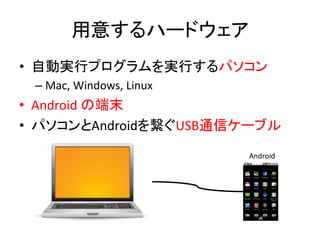
2.
用意するハードウェア • 自動実行プログラムを実行するパソコン – Mac,
Windows, Linux • Android の端末 • パソコンとAndroidを繋ぐUSB通信ケーブル Android
3.
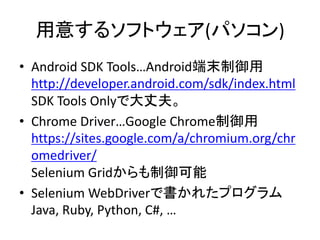
用意するソフトウェア(パソコン) • Android SDK
Tools…Android端末制御用 http://developer.android.com/sdk/index.html SDK Tools Onlyで大丈夫。 • Chrome Driver…Google Chrome制御用 https://sites.google.com/a/chromium.org/chr omedriver/ Selenium Gridからも制御可能 • Selenium WebDriverで書かれたプログラム Java, Ruby, Python, C#, …
4.
ここで 実習
5.
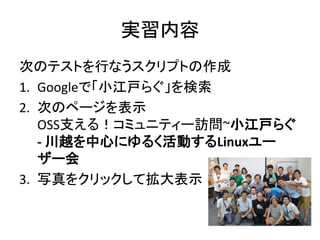
実習内容 次のテストを行なうスクリプトの作成 1. Googleで「小江戸らぐ」を検索 2. 次のページを表示 OSS支える!コミュニティー訪問~小江戸らぐ -
川越を中心にゆるく活動するLinuxユー ザー会 3. 写真をクリックして拡大表示
6.
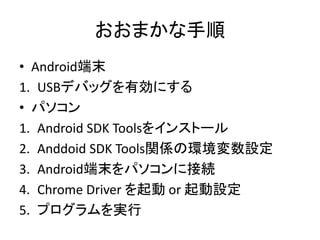
おおまかな手順 • Android端末 1. USBデバッグを有効にする •
パソコン 1. Android SDK Toolsをインストール 2. Anddoid SDK Tools関係の環境変数設定 3. Android端末をパソコンに接続 4. Chrome Driver を起動 or 起動設定 5. プログラムを実行
7.
USBデバッグを有効にする(Android) 1. (Android 4.2以降の場合)[開発者向けオプ ション]がデフォルトで非表示になっているた め、次のようにして表示させる。 1.
[設定|<デバイス種別>情報]を開く 2. [ビルド番号]を 7 回タップする。 2. [開発者向けオプション]の[USB デバッグ] オプションをオンにする
8.
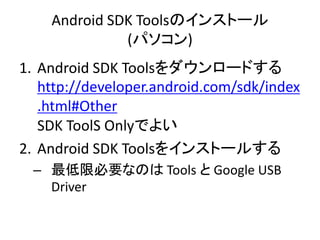
Android SDK Toolsのインストール (パソコン) 1.
Android SDK Toolsをダウンロードする http://developer.android.com/sdk/index .html#Other SDK ToolS Onlyでよい 2. Android SDK Toolsをインストールする – 最低限必要なのは Tools と Google USB Driver
9.
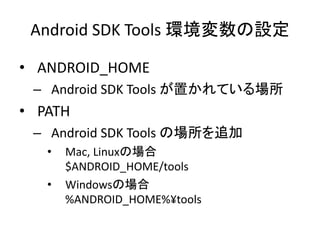
Android SDK Tools
環境変数の設定 • ANDROID_HOME – Android SDK Tools が置かれている場所 • PATH – Android SDK Tools の場所を追加 • Mac, Linuxの場合 $ANDROID_HOME/tools • Windowsの場合 %ANDROID_HOME%¥tools
10.
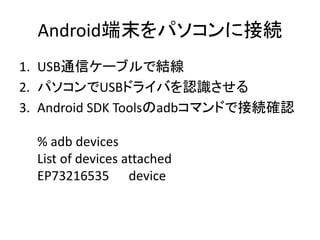
Android端末をパソコンに接続 1. USB通信ケーブルで結線 2. パソコンでUSBドライバを認識させる 3.
Android SDK Toolsのadbコマンドで接続確認 % adb devices List of devices attached EP73216535 device
11.
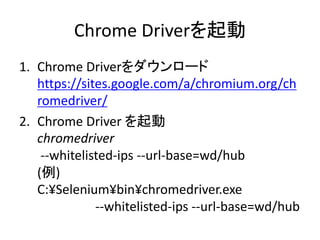
Chrome Driverを起動 1. Chrome
Driverをダウンロード https://sites.google.com/a/chromium.org/ch romedriver/ 2. Chrome Driver を起動 chromedriver --whitelisted-ips --url-base=wd/hub (例) C:¥Selenium¥bin¥chromedriver.exe --whitelisted-ips --url-base=wd/hub
12.
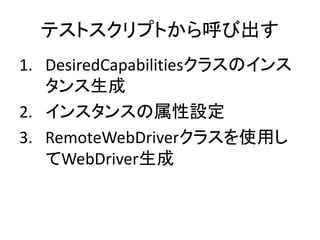
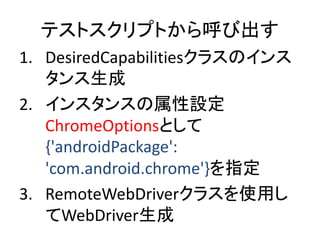
テストスクリプトから呼び出す 1. DesiredCapabilitiesクラスのインス タンス生成 2. インスタンスの属性設定 ChromeOptionsとして {'androidPackage': 'com.android.chrome'}を指定 3.
RemoteWebDriverクラスを使用し てWebDriver生成
13.
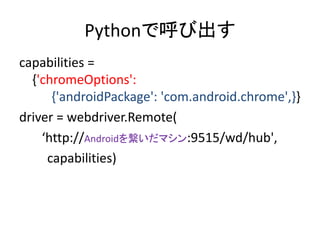
Pythonで呼び出す capabilities = {'chromeOptions': {'androidPackage': 'com.android.chrome',}} driver
= webdriver.Remote( ‘http://Androidを繋いだマシン:9515/wd/hub', capabilities)
14.
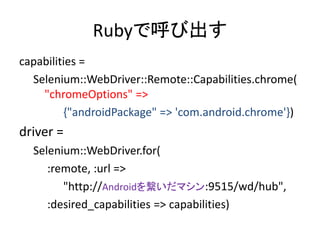
Rubyで呼び出す capabilities = Selenium::WebDriver::Remote::Capabilities.chrome( "chromeOptions" => {"androidPackage"
=> 'com.android.chrome'}) driver = Selenium::WebDriver.for( :remote, :url => "http://Androidを繋いだマシン:9515/wd/hub", :desired_capabilities => capabilities)
15.
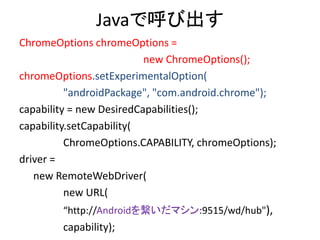
Javaで呼び出す ChromeOptions chromeOptions = new
ChromeOptions(); chromeOptions.setExperimentalOption( "androidPackage", "com.android.chrome"); capability = new DesiredCapabilities(); capability.setCapability( ChromeOptions.CAPABILITY, chromeOptions); driver = new RemoteWebDriver( new URL( “http://Androidを繋いだマシン:9515/wd/hub"), capability);
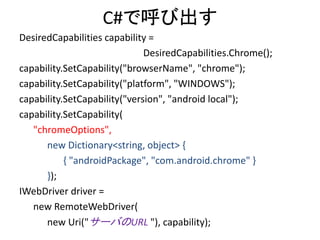
16.
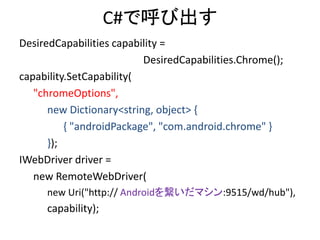
C#で呼び出す DesiredCapabilities capability = DesiredCapabilities.Chrome(); capability.SetCapability( "chromeOptions", new
Dictionary<string, object> { { "androidPackage", "com.android.chrome" } }); IWebDriver driver = new RemoteWebDriver( new Uri("http:// Androidを繋いだマシン:9515/wd/hub"), capability);
17.
おまけ
18.
Selenium Grid で 遠隔操作
19.
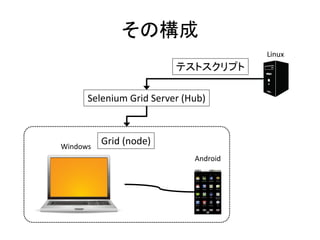
その構成 Selenium Grid Server
(Hub) Linux Grid (node) テストスクリプト Windows Android
20.
Selenium Grid Nodeの設定 {“capabilities”: [
{"androidPackage": "com.android.chrome", “platform”: "WINDOWS", “browserName”: "chrome", “maxInstances”: 1, “version”: “Android", “seleniumProtocol”: “WebDriver“ }, … ], }
21.
テストスクリプトから呼び出す 1. DesiredCapabilitiesクラスのインス タンス生成 2. インスタンスの属性設定 3.
RemoteWebDriverクラスを使用し てWebDriver生成
22.
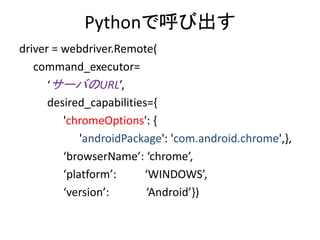
Pythonで呼び出す driver = webdriver.Remote( command_executor= ‘サーバのURL’, desired_capabilities={ 'chromeOptions':
{ 'androidPackage': 'com.android.chrome',}, ‘browserName’: ‘chrome’, ‘platform’: ‘WINDOWS’, ‘version’: ‘Android’})
23.
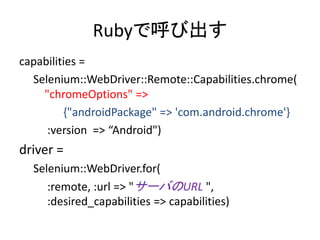
Rubyで呼び出す capabilities = Selenium::WebDriver::Remote::Capabilities.chrome( "chromeOptions" => {"androidPackage"
=> 'com.android.chrome'} :version => “Android") driver = Selenium::WebDriver.for( :remote, :url => "サーバのURL ", :desired_capabilities => capabilities)
24.
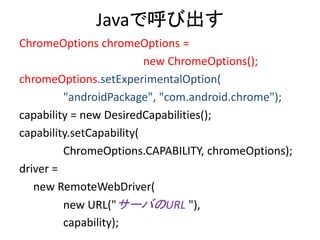
Javaで呼び出す ChromeOptions chromeOptions = new
ChromeOptions(); chromeOptions.setExperimentalOption( "androidPackage", "com.android.chrome"); capability = new DesiredCapabilities(); capability.setCapability( ChromeOptions.CAPABILITY, chromeOptions); driver = new RemoteWebDriver( new URL("サーバのURL "), capability);
25.
C#で呼び出す DesiredCapabilities capability = DesiredCapabilities.Chrome(); capability.SetCapability("browserName",
"chrome"); capability.SetCapability("platform", "WINDOWS"); capability.SetCapability("version", "android local"); capability.SetCapability( "chromeOptions", new Dictionary<string, object> { { "androidPackage", "com.android.chrome" } }); IWebDriver driver = new RemoteWebDriver( new Uri("サーバのURL "), capability);
26.
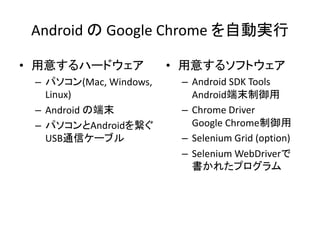
Android の Google
Chrome を自動実行 • 用意するハードウェア – パソコン(Mac, Windows, Linux) – Android の端末 – パソコンとAndroidを繋ぐ USB通信ケーブル • 用意するソフトウェア – Android SDK Tools Android端末制御用 – Chrome Driver Google Chrome制御用 – Selenium Grid (option) – Selenium WebDriverで 書かれたプログラム
27.
おしまい (^.^)/~~~
Download


![USBデバッグを有効にする(Android)
1. (Android 4.2以降の場合)[開発者向けオプ
ション]がデフォルトで非表示になっているた
め、次のようにして表示させる。
1. [設定|<デバイス種別>情報]を開く
2. [ビルド番号]を 7 回タップする。
2. [開発者向けオプション]の[USB デバッグ]
オプションをオンにする](https://image.slidesharecdn.com/googlechromeonandroid-150711071138-lva1-app6892/85/Google-Chrome-on-Android-7-320.jpg)


![Selenium Grid Nodeの設定
{“capabilities”:
[ {"androidPackage": "com.android.chrome",
“platform”: "WINDOWS",
“browserName”: "chrome",
“maxInstances”: 1,
“version”: “Android",
“seleniumProtocol”: “WebDriver“
},
…
],
}](https://image.slidesharecdn.com/googlechromeonandroid-150711071138-lva1-app6892/85/Google-Chrome-on-Android-20-320.jpg)