Google Apps Script Overview
@fckey
Focus of this document
This document more focuses on what you
can do in GAS rather than how to.
You can use this doc to get to know about
GAS in very high level. Please google how
you can actually achieve something you
want to.
What is GAS?
Integrated with G Suite apps and enable us to
• Manage data from program
• Create extension/add-on and publish
All on a JavaScript platform in the cloud
Official movie
How to start GAS?
1. Go to Google Drive in Chrome
2. Click "Apps Script” in the “New” button
• If Apps Script doesn’t exist, click
“Connect More Apps” then add it
Web based editor
Once you start GAS, editor page will be
shown in the browser.
• Play around with myFunction
https://script.google.com/home
Form
Form can be defined and auto-generated
by GAS
Official movie
https://developers.google.com/apps-
script/reference/forms/form-app
Form (cont.)
Form can be associated with
spreadsheet
When submitting the form, the
results can be modified before
saving them by using Trigger
(explain later)
Trigger
Trigger runs specific function when
specific event is happened
There are two types of trigger which are
“Simple Trigger” or “Installable Trigger”
https://developers.google.com/apps-
script/guides/triggers/
Trigger (cont.)
Simple Trigger
• Predefined trigger for editing, opening
Installable trigger
• Defied by user function for form
submittion or batch processing
Spreadsheet
GAS can interact with Google Spreadsheet
Form’s response is stored in Spreadsheet
by default, but also can be associated with
specific sheet
https://developers.google.com/apps-
script/reference/spreadsheet/
spreadsheet-app
Spreadsheet (cont.)
Macro can be created by GAS. You can
use it as formula, or create menu button
to call it
Web Page
GAS allow us to host static web page
Sever is provided by Google so it’s free
Data in Docs can be fetched by GAS and it
can be imported in the Web page by
creating HTML file
Work locally
GAS is executed in the Web based editor,
but scripts can be downloaded via clasp
clasp is command line tool provided by
Google.
Editing and version control from local PC
can be done
Sample Use-case
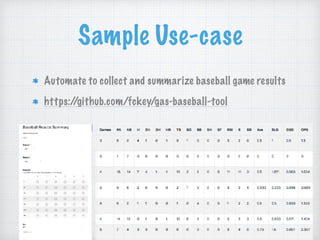
Automate to collect and summarize baseball game results
https://github.com/fckey/gas-baseball-tool
Sample Use-case (cont.)
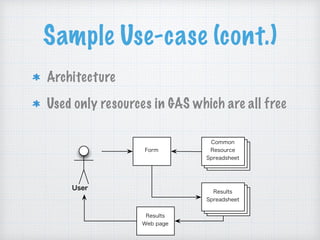
Architecture
Used only resources in GAS which are all free
Results
Spreadsheet
User
Form
Common
Resource
Spreadsheet
Results
Web page
Useful Links
Official web page
Official Samples
Official Resources

Google Apps Script Overview

  • 1.
    Google Apps ScriptOverview @fckey
  • 2.
    Focus of thisdocument This document more focuses on what you can do in GAS rather than how to. You can use this doc to get to know about GAS in very high level. Please google how you can actually achieve something you want to.
  • 3.
    What is GAS? Integratedwith G Suite apps and enable us to • Manage data from program • Create extension/add-on and publish All on a JavaScript platform in the cloud Official movie
  • 4.
    How to startGAS? 1. Go to Google Drive in Chrome 2. Click "Apps Script” in the “New” button • If Apps Script doesn’t exist, click “Connect More Apps” then add it
  • 5.
    Web based editor Onceyou start GAS, editor page will be shown in the browser. • Play around with myFunction https://script.google.com/home
  • 6.
    Form Form can bedefined and auto-generated by GAS Official movie https://developers.google.com/apps- script/reference/forms/form-app
  • 7.
    Form (cont.) Form canbe associated with spreadsheet When submitting the form, the results can be modified before saving them by using Trigger (explain later)
  • 8.
    Trigger Trigger runs specificfunction when specific event is happened There are two types of trigger which are “Simple Trigger” or “Installable Trigger” https://developers.google.com/apps- script/guides/triggers/
  • 9.
    Trigger (cont.) Simple Trigger •Predefined trigger for editing, opening Installable trigger • Defied by user function for form submittion or batch processing
  • 10.
    Spreadsheet GAS can interactwith Google Spreadsheet Form’s response is stored in Spreadsheet by default, but also can be associated with specific sheet https://developers.google.com/apps- script/reference/spreadsheet/ spreadsheet-app
  • 11.
    Spreadsheet (cont.) Macro canbe created by GAS. You can use it as formula, or create menu button to call it
  • 12.
    Web Page GAS allowus to host static web page Sever is provided by Google so it’s free Data in Docs can be fetched by GAS and it can be imported in the Web page by creating HTML file
  • 13.
    Work locally GAS isexecuted in the Web based editor, but scripts can be downloaded via clasp clasp is command line tool provided by Google. Editing and version control from local PC can be done
  • 14.
    Sample Use-case Automate tocollect and summarize baseball game results https://github.com/fckey/gas-baseball-tool
  • 15.
    Sample Use-case (cont.) Architecture Usedonly resources in GAS which are all free Results Spreadsheet User Form Common Resource Spreadsheet Results Web page
  • 16.
    Useful Links Official webpage Official Samples Official Resources