Google App engine

Senthilkumar M
Copyright@share2create License

1
What is Google App Engine?
• Google App Engine is a complete development
stack that uses familiar technologies to build
and host applications on the
same infrastructure used at Google.

Copyright@share2create License

2
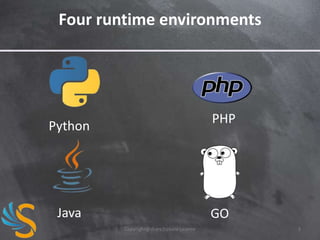
Four runtime environments

PHP

Python

Java

GO
Copyright@share2create License

3
Your code runs in a sandbox
• Secure environment that provides limited
access to the underlying operating system.
• The sandbox allows App Engine to
• distribute web requests across multiple servers
• start and stop servers to meet traffic demands
• isolate apps in a secure, reliable environment
• abstract hardware, operating system and
physical location of the web server
Copyright@share2create License

4
Sandbox limitations
• outbound connections: only through the provided URL
fetch and email services or the experimental Socket API.
• inbound connections: only HTTP(s) on ports 80/443.
• File system access: writing files is not allowed. An
application can read only files uploaded with the
application code.
• no native code: libraries that depend on native code
are generally not available.
• time limits: app code must terminate within given time
limits. (60s for web requests, 10m for tasks but
unlimited time for backend jobs)
Copyright@share2create License

5
Storing data
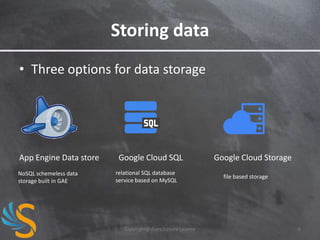
• Three options for data storage

App Engine Data store
NoSQL schemeless data
storage built in GAE

Google Cloud SQL
relational SQL database
service based on MySQL

Copyright@share2create License

Google Cloud Storage
file based storage

6
What special in host on GAE
• No fixed cost pay only on what you use
• FREE!!!!
• Your APP running on the platform which
powers Google service.
• App can be scalable to any extend.

Copyright@share2create License

7
Lets Run your First App
• Download the SDK
• Go
to https://developers.google.com/appengine/
downloads and grab the Python installer.
• Download Python 2.7 installer.
• Go to
http://www.python.org/download/releases/2.7/
Copyright@share2create License

8
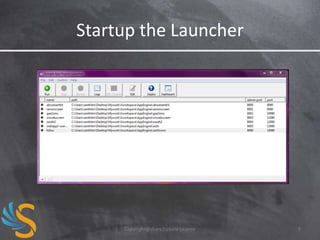
Startup the Launcher

Copyright@share2create License

9
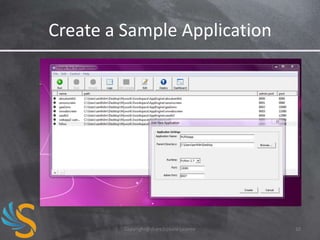
Create a Sample Application

Copyright@share2create License

10
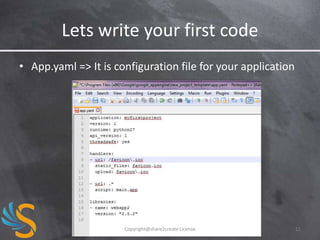
Lets write your first code
• App.yaml => It is configuration file for your application

Copyright@share2create License

11
Main.py
#!/usr/bin/env python
import webapp2
class MainHandler(webapp2.RequestHandler):
def get(self):
self.response.write('Hello world!')
app = webapp2.WSGIApplication([
('/', MainHandler)], debug=True)

Copyright@share2create License

12
Datastore(s)
• There are two implementations of datastore
• The original one is implemented
in google.appengine.ext.db
• The new one is called NDB and it is
implemented in google.appengine.ext.ndb
• They are very similar but not identical
• We will cover NDB
Copyright@share2create License

13
Creating Data store Entity
from google.appengine.ext import ndb
class Contact(ndb.Model):
name = ndb.StringProperty()
email = ndb.StringProperty()
birth_date = ndb.DateProperty()

Copyright@share2create License

14
Querying the Data store
from google.appengine.ext import ndb
def StoresByCity(city, limit):
query = Store.query(Store.city == city).order(Store.name)
return query.fetch(limit, projection=[Store.name, Store.address])

•
•
•
•

The Data store API is Object Oriented.
Queries are objects
Filters and projections are specified by calling methods
Make sure you know the limits!

Copyright@share2create License

15
Querying the Data store with GQL
from google.appengine.ext import ndb
def query_info():
qry = ndb.gql("SELECT * FROM Account WHERE balance < :1", 100)
return qry

• You can write queries with GQL, a SQL-like language.
• GQL is translated to NDB's native query API. (This is the
opposite of what traditional ORM libraries do!)

Copyright@share2create License

16
View templates
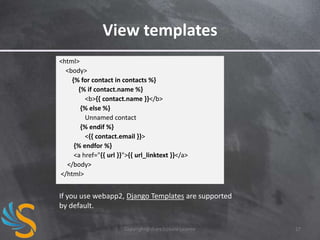
<html>
<body>
{% for contact in contacts %}
{% if contact.name %}
<b>{{ contact.name }}</b>
{% else %}
Unnamed contact
{% endif %}
<{{ contact.email }}>
{% endfor %}
<a href="{{ url }}">{{ url_linktext }}</a>
</body>
</html>

If you use webapp2, Django Templates are supported
by default.
Copyright@share2create License

17
Dispatch to view templates
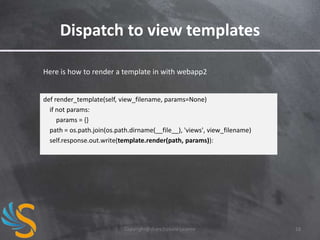
Here is how to render a template in with webapp2

def render_template(self, view_filename, params=None)
if not params:
params = {}
path = os.path.join(os.path.dirname(__file__), 'views', view_filename)
self.response.out.write(template.render(path, params)):

Copyright@share2create License

18
Memcache
• Memcache is a high-performance, distributed
memory object caching system.
• Can be used to minimize hits to the Datastore
or to save transient state information.
from google.appengine.api import memcache
def get_data():
data = memcache.get('key')
if data is not None:
return data
else:
data = self.query_for_data()
memcache.add('key', data, 60)
return data
Copyright@share2create License

19
My sample host apps
•
•
•
•

Check out this links
http://senonscreen.appspot.com/
http://me2mentor.appspot.com/
http://sentengo.appspot.com/

Copyright@share2create License

20
Questions?

Copyright@share2create License

21
Copyright@share2create License

22

Google app engine

  • 1.
    Google App engine SenthilkumarM Copyright@share2create License 1
  • 2.
    What is GoogleApp Engine? • Google App Engine is a complete development stack that uses familiar technologies to build and host applications on the same infrastructure used at Google. Copyright@share2create License 2
  • 3.
  • 4.
    Your code runsin a sandbox • Secure environment that provides limited access to the underlying operating system. • The sandbox allows App Engine to • distribute web requests across multiple servers • start and stop servers to meet traffic demands • isolate apps in a secure, reliable environment • abstract hardware, operating system and physical location of the web server Copyright@share2create License 4
  • 5.
    Sandbox limitations • outboundconnections: only through the provided URL fetch and email services or the experimental Socket API. • inbound connections: only HTTP(s) on ports 80/443. • File system access: writing files is not allowed. An application can read only files uploaded with the application code. • no native code: libraries that depend on native code are generally not available. • time limits: app code must terminate within given time limits. (60s for web requests, 10m for tasks but unlimited time for backend jobs) Copyright@share2create License 5
  • 6.
    Storing data • Threeoptions for data storage App Engine Data store NoSQL schemeless data storage built in GAE Google Cloud SQL relational SQL database service based on MySQL Copyright@share2create License Google Cloud Storage file based storage 6
  • 7.
    What special inhost on GAE • No fixed cost pay only on what you use • FREE!!!! • Your APP running on the platform which powers Google service. • App can be scalable to any extend. Copyright@share2create License 7
  • 8.
    Lets Run yourFirst App • Download the SDK • Go to https://developers.google.com/appengine/ downloads and grab the Python installer. • Download Python 2.7 installer. • Go to http://www.python.org/download/releases/2.7/ Copyright@share2create License 8
  • 9.
  • 10.
    Create a SampleApplication Copyright@share2create License 10
  • 11.
    Lets write yourfirst code • App.yaml => It is configuration file for your application Copyright@share2create License 11
  • 12.
    Main.py #!/usr/bin/env python import webapp2 classMainHandler(webapp2.RequestHandler): def get(self): self.response.write('Hello world!') app = webapp2.WSGIApplication([ ('/', MainHandler)], debug=True) Copyright@share2create License 12
  • 13.
    Datastore(s) • There aretwo implementations of datastore • The original one is implemented in google.appengine.ext.db • The new one is called NDB and it is implemented in google.appengine.ext.ndb • They are very similar but not identical • We will cover NDB Copyright@share2create License 13
  • 14.
    Creating Data storeEntity from google.appengine.ext import ndb class Contact(ndb.Model): name = ndb.StringProperty() email = ndb.StringProperty() birth_date = ndb.DateProperty() Copyright@share2create License 14
  • 15.
    Querying the Datastore from google.appengine.ext import ndb def StoresByCity(city, limit): query = Store.query(Store.city == city).order(Store.name) return query.fetch(limit, projection=[Store.name, Store.address]) • • • • The Data store API is Object Oriented. Queries are objects Filters and projections are specified by calling methods Make sure you know the limits! Copyright@share2create License 15
  • 16.
    Querying the Datastore with GQL from google.appengine.ext import ndb def query_info(): qry = ndb.gql("SELECT * FROM Account WHERE balance < :1", 100) return qry • You can write queries with GQL, a SQL-like language. • GQL is translated to NDB's native query API. (This is the opposite of what traditional ORM libraries do!) Copyright@share2create License 16
  • 17.
    View templates <html> <body> {% forcontact in contacts %} {% if contact.name %} <b>{{ contact.name }}</b> {% else %} Unnamed contact {% endif %} <{{ contact.email }}> {% endfor %} <a href="{{ url }}">{{ url_linktext }}</a> </body> </html> If you use webapp2, Django Templates are supported by default. Copyright@share2create License 17
  • 18.
    Dispatch to viewtemplates Here is how to render a template in with webapp2 def render_template(self, view_filename, params=None) if not params: params = {} path = os.path.join(os.path.dirname(__file__), 'views', view_filename) self.response.out.write(template.render(path, params)): Copyright@share2create License 18
  • 19.
    Memcache • Memcache isa high-performance, distributed memory object caching system. • Can be used to minimize hits to the Datastore or to save transient state information. from google.appengine.api import memcache def get_data(): data = memcache.get('key') if data is not None: return data else: data = self.query_for_data() memcache.add('key', data, 60) return data Copyright@share2create License 19
  • 20.
    My sample hostapps • • • • Check out this links http://senonscreen.appspot.com/ http://me2mentor.appspot.com/ http://sentengo.appspot.com/ Copyright@share2create License 20
  • 21.
  • 22.