Gitbook FAQ’s
Sharing Technology
Becky Peltz
Seattle University
rpeltz@seattleu.edu
Online Learning Consortium
Acceleration Workshop
November 2018
My Bio Instructor at Seattle University
School of New and Continuing Studies
Web Application Technology Studies
MBA and 30+ years programming in Seattle
Objectives for
Workshop
Publish some content to the web
Share how “Guide on the Side” needs a variety of tools
to engage students and provide information so that
they can work on their own
Compare a book format to an FAQ and see how they
are alike
Understand what material belongs in a FAQ and what
doesn’t
Become familiar with tools to write locally and publish
online
Work through the process that I am using to publish
FAQ’s online using Gitbook Static Site Generator
Sample Gitbooks
See my medium blog on this topic
Let’s look at some other final products
Web Application Technology Studies FAQ
JavaScript Applications with Vue.js Shawn Rider
Gitbook in the Cloud
legacy.gitbook.com
www.gitbook.com
Why am I using my own process?
Audience
How many are online instructors? What subjects?
How many have written a book? Want to write a book?
How many have published a book? In print? On the
web?
How many are instructors are looking for a way to
share information on the web as you would in an FAQ?
Any Web Developers?
How many have set up the environment - Github
account, Gitbook Editor, VS Code Environment?
My Problem I want to have a reference point that I can use to share
information that I know many online students will
want to see.
Open Source
Yay!
Git, Github, and
Gitbook
Git is a program that helps maintain a versioned file
repository. It can “push” to local or remote
repositories
Github.com is a cloud based location that acts as s
remote repository for storing personal files for free. It
provides an easy and free method for publishing to a
static file server: github.io
● Is it worth learning?
● Who uses it?
● Who owns it?
legacy.Gitbook.com is cloud based tool for writing
books
Gitbook toolchain is a set of tools for creating
gitbooks on your own
Prepare your Local
Environment Node: a JavaScript runner
NPM: comes with Node a JavaScript package manager
Git: a program to help with versioning text
Github: a repository to store markdown and host HTML
Gitbook Editor: word processor that produces markdown
Gitbook CLI: a command line interface to create html
from markdown and translate plugins
Visual Studio Code: stay organized
Gulp: a JavaScript task runner
Gitbook
Publishable
Template
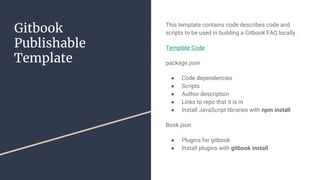
This template contains code describes code and
scripts to be used in building a Gitbook FAQ locally.
Template Code
package.json
● Code dependencies
● Scripts
● Author description
● Links to repo that it is in
● Install JavaScript libraries with npm install
Book.json
● Plugins for gitbook
● Install plugins with gitbook install
The Process in
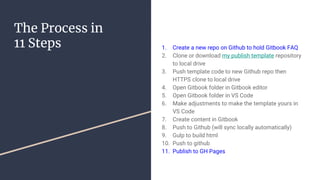
11 Steps 1. Create a new repo on Github to hold Gitbook FAQ
2. Clone or download my publish template repository
to local drive
3. Push template code to new Github repo then
HTTPS clone to local drive
4. Open Gitbook folder in Gitbook editor
5. Open Gitbook folder in VS Code
6. Make adjustments to make the template yours in
VS Code
7. Create content in Gitbook
8. Push to Github (will sync locally automatically)
9. Gulp to build html
10. Push to github
11. Publish to GH Pages
Time to brainstorm
how to use this
Subject matter books
FAQ’s
Students can use it to create cheat sheets
Anything else?

Gitbook FAQs

  • 1.
    Gitbook FAQ’s Sharing Technology BeckyPeltz Seattle University rpeltz@seattleu.edu Online Learning Consortium Acceleration Workshop November 2018
  • 2.
    My Bio Instructorat Seattle University School of New and Continuing Studies Web Application Technology Studies MBA and 30+ years programming in Seattle
  • 3.
    Objectives for Workshop Publish somecontent to the web Share how “Guide on the Side” needs a variety of tools to engage students and provide information so that they can work on their own Compare a book format to an FAQ and see how they are alike Understand what material belongs in a FAQ and what doesn’t Become familiar with tools to write locally and publish online Work through the process that I am using to publish FAQ’s online using Gitbook Static Site Generator
  • 4.
    Sample Gitbooks See mymedium blog on this topic Let’s look at some other final products Web Application Technology Studies FAQ JavaScript Applications with Vue.js Shawn Rider
  • 5.
    Gitbook in theCloud legacy.gitbook.com www.gitbook.com Why am I using my own process?
  • 6.
    Audience How many areonline instructors? What subjects? How many have written a book? Want to write a book? How many have published a book? In print? On the web? How many are instructors are looking for a way to share information on the web as you would in an FAQ? Any Web Developers? How many have set up the environment - Github account, Gitbook Editor, VS Code Environment?
  • 7.
    My Problem Iwant to have a reference point that I can use to share information that I know many online students will want to see.
  • 8.
  • 9.
    Git, Github, and Gitbook Gitis a program that helps maintain a versioned file repository. It can “push” to local or remote repositories Github.com is a cloud based location that acts as s remote repository for storing personal files for free. It provides an easy and free method for publishing to a static file server: github.io ● Is it worth learning? ● Who uses it? ● Who owns it? legacy.Gitbook.com is cloud based tool for writing books Gitbook toolchain is a set of tools for creating gitbooks on your own
  • 10.
    Prepare your Local EnvironmentNode: a JavaScript runner NPM: comes with Node a JavaScript package manager Git: a program to help with versioning text Github: a repository to store markdown and host HTML Gitbook Editor: word processor that produces markdown Gitbook CLI: a command line interface to create html from markdown and translate plugins Visual Studio Code: stay organized Gulp: a JavaScript task runner
  • 11.
    Gitbook Publishable Template This template containscode describes code and scripts to be used in building a Gitbook FAQ locally. Template Code package.json ● Code dependencies ● Scripts ● Author description ● Links to repo that it is in ● Install JavaScript libraries with npm install Book.json ● Plugins for gitbook ● Install plugins with gitbook install
  • 12.
    The Process in 11Steps 1. Create a new repo on Github to hold Gitbook FAQ 2. Clone or download my publish template repository to local drive 3. Push template code to new Github repo then HTTPS clone to local drive 4. Open Gitbook folder in Gitbook editor 5. Open Gitbook folder in VS Code 6. Make adjustments to make the template yours in VS Code 7. Create content in Gitbook 8. Push to Github (will sync locally automatically) 9. Gulp to build html 10. Push to github 11. Publish to GH Pages
  • 13.
    Time to brainstorm howto use this Subject matter books FAQ’s Students can use it to create cheat sheets Anything else?