Getting started with
MonoGame using
Visual Studio for Mac
DARKSIDE OF MONOGAME
SIMON JACKSON
AUTHOR AND MICROSOFT MVP
@SIMONDARKSIDEJ
Headline Information
• MonoGame 3.8 is about to release
 .NETCore and .NetStandard support
 New .NetCore tools delivery
 No MSI!!
• Visual Studio for Mac is the new preferred
method for Mac development (Xamarin
Studio on Steroids)
Getting Started – Visual Studio for Mac
Session will cover what is needed for:
• Developing games forWindows desktop / Linux /
OpenGL
• Building Content Pipeline Projects
• Developing Games for Android
• Developing Games for iOS
• Developing Games for MacOS
*Windows 10 UWP not supported on Mac
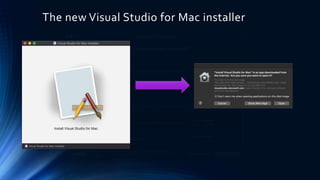
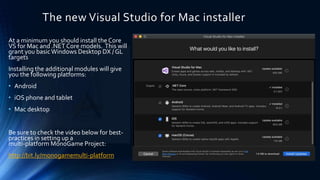
The new Visual Studio for Mac installer
At a minimum you should install the Core
VS for Mac and .NET Core models. This will
grant you basicWindows Desktop DX / GL
targets
Installing the additional modules will give
you the following platforms:
• Android
• iOS phone and tablet
• Mac desktop
Be sure to check the video below for best-
practices in setting up a
multi-platform MonoGame Project:
http://bit.ly/monogamemulti-platform
New for MonoGame 3.8 - .NET Core support
• MonoGame 3.8 changes the way
MonoGame is deployed.
• New NuGet by default supported
projects, no installer needed.
• Templates are now deployed byVisual
Studio Extension.
• Command-Line Interface (CLI) options
available.
• MonoGame just got way cooler.
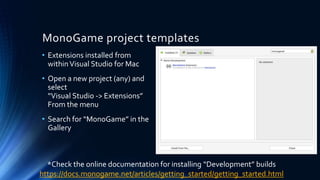
MonoGame project templates
• Extensions installed from
withinVisual Studio for Mac
• Open a new project (any) and
select
“Visual Studio -> Extensions”
From the menu
• Search for “MonoGame” in the
Gallery
*Check the online documentation for installing “Development” builds
https://docs.monogame.net/articles/getting_started/getting_started.html
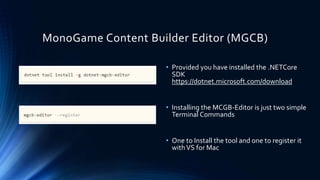
MonoGame Content Builder Editor (MGCB)
• Provided you have installed the .NETCore
SDK
https://dotnet.microsoft.com/download
• Installing the MCGB-Editor is just two simple
Terminal Commands
• One to Install the tool and one to register it
withVS for Mac
Building for Android
WHAT IS REQUIRED FOR ANDROID DEVELOPMENT
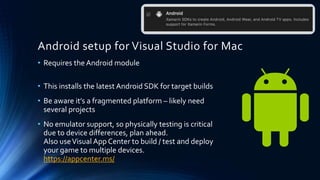
Android setup for Visual Studio for Mac
• Requires the Android module
• This installs the latest Android SDK for target builds
• Be aware it’s a fragmented platform – likely need
several projects
• No emulator support, so physically testing is critical
due to device differences, plan ahead.
Also useVisual App Center to build / test and deploy
your game to multiple devices.
https://appcenter.ms/
Building for iOS
WHAT IS REQUIRED FOR APPLE IPHONE/IPAD DEVELOPMENT
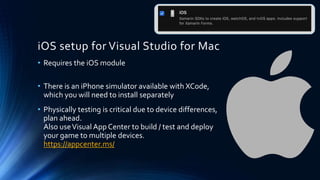
iOS setup for Visual Studio for Mac
• Requires the iOS module
• There is an iPhone simulator available with XCode,
which you will need to install separately
• Physically testing is critical due to device differences,
plan ahead.
Also useVisual App Center to build / test and deploy
your game to multiple devices.
https://appcenter.ms/
Building for MacOS
WHAT IS REQUIRED FOR APPLE DESKTOP DEVELOPMENT
iOS setup for Visual Studio for Mac
• Requires the macOS module
• Test and build on your device
• Don’t forget to get other testers on older hardware if
you intend to support them
Other considerations
Other considerations building with
MonoGame
• Plan your content
If targeting multiple platforms, try to use a
single shared content project to reduce
overhead
Add additional “platform specific” content
projects only when required
• Market early
It’s essential to build up good relations with
each market store. Almost never too early to
“get out in front”
• Test often
Some platforms will require more testing
than others, plan to test deployment and not
just gameplay. Use test tools where possible.
Thanks for watching
DARKSIDE OF MONOGAME
SIMON JACKSON
AUTHOR AND MICROSOFT MVP
@SIMONDARKSIDEJ

Getting started with mono game on visual studio for mac

  • 1.
    Getting started with MonoGameusing Visual Studio for Mac DARKSIDE OF MONOGAME SIMON JACKSON AUTHOR AND MICROSOFT MVP @SIMONDARKSIDEJ
  • 2.
    Headline Information • MonoGame3.8 is about to release  .NETCore and .NetStandard support  New .NetCore tools delivery  No MSI!! • Visual Studio for Mac is the new preferred method for Mac development (Xamarin Studio on Steroids)
  • 3.
    Getting Started –Visual Studio for Mac Session will cover what is needed for: • Developing games forWindows desktop / Linux / OpenGL • Building Content Pipeline Projects • Developing Games for Android • Developing Games for iOS • Developing Games for MacOS *Windows 10 UWP not supported on Mac
  • 4.
    The new VisualStudio for Mac installer
  • 5.
    The new VisualStudio for Mac installer At a minimum you should install the Core VS for Mac and .NET Core models. This will grant you basicWindows Desktop DX / GL targets Installing the additional modules will give you the following platforms: • Android • iOS phone and tablet • Mac desktop Be sure to check the video below for best- practices in setting up a multi-platform MonoGame Project: http://bit.ly/monogamemulti-platform
  • 6.
    New for MonoGame3.8 - .NET Core support • MonoGame 3.8 changes the way MonoGame is deployed. • New NuGet by default supported projects, no installer needed. • Templates are now deployed byVisual Studio Extension. • Command-Line Interface (CLI) options available. • MonoGame just got way cooler.
  • 7.
    MonoGame project templates •Extensions installed from withinVisual Studio for Mac • Open a new project (any) and select “Visual Studio -> Extensions” From the menu • Search for “MonoGame” in the Gallery *Check the online documentation for installing “Development” builds https://docs.monogame.net/articles/getting_started/getting_started.html
  • 8.
    MonoGame Content BuilderEditor (MGCB) • Provided you have installed the .NETCore SDK https://dotnet.microsoft.com/download • Installing the MCGB-Editor is just two simple Terminal Commands • One to Install the tool and one to register it withVS for Mac
  • 9.
    Building for Android WHATIS REQUIRED FOR ANDROID DEVELOPMENT
  • 10.
    Android setup forVisual Studio for Mac • Requires the Android module • This installs the latest Android SDK for target builds • Be aware it’s a fragmented platform – likely need several projects • No emulator support, so physically testing is critical due to device differences, plan ahead. Also useVisual App Center to build / test and deploy your game to multiple devices. https://appcenter.ms/
  • 11.
    Building for iOS WHATIS REQUIRED FOR APPLE IPHONE/IPAD DEVELOPMENT
  • 12.
    iOS setup forVisual Studio for Mac • Requires the iOS module • There is an iPhone simulator available with XCode, which you will need to install separately • Physically testing is critical due to device differences, plan ahead. Also useVisual App Center to build / test and deploy your game to multiple devices. https://appcenter.ms/
  • 13.
    Building for MacOS WHATIS REQUIRED FOR APPLE DESKTOP DEVELOPMENT
  • 14.
    iOS setup forVisual Studio for Mac • Requires the macOS module • Test and build on your device • Don’t forget to get other testers on older hardware if you intend to support them
  • 15.
  • 16.
    Other considerations buildingwith MonoGame • Plan your content If targeting multiple platforms, try to use a single shared content project to reduce overhead Add additional “platform specific” content projects only when required • Market early It’s essential to build up good relations with each market store. Almost never too early to “get out in front” • Test often Some platforms will require more testing than others, plan to test deployment and not just gameplay. Use test tools where possible.
  • 17.
    Thanks for watching DARKSIDEOF MONOGAME SIMON JACKSON AUTHOR AND MICROSOFT MVP @SIMONDARKSIDEJ