Get Connected! Stay Informed with Blackboard for  Maize Middle School
What is Blackboard? Blackboard is a web-based program that allows students to review information from their teachers about assignments, upcoming events, classroom rules and procedures, and much more. Parents can also stay informed by logging in using their child’s login.
How do I get to Blackboard?   Simply go to our district website: www.usd266.com
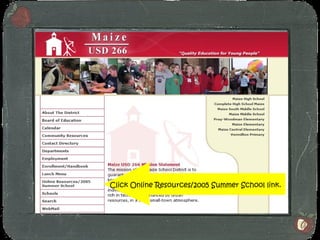
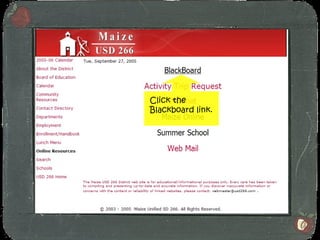
Click Online Resources/2005 Summer School link.
Click the Blackboard link.
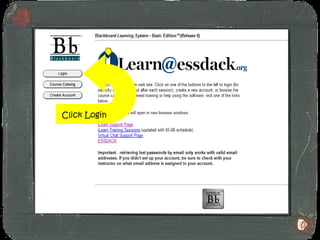
Click Login
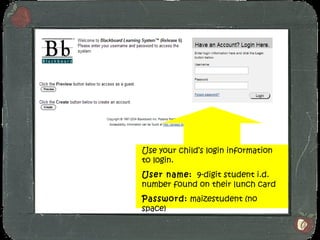
Use your child’s login information to login. User name:   9-digit student i.d. number found on their lunch card Password:  maizestudent (no space)
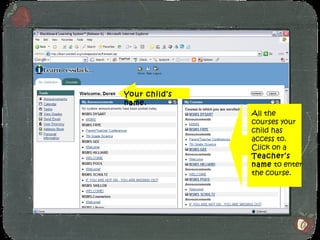
Your child’s name. All the courses your child has access to.  Click on a  Teacher’s name  to enter the course.
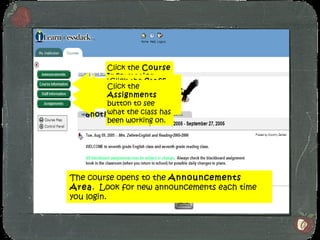
The course opens to the  Announcements Area .  Look for new announcements each time you login. Click one of the buttons to move to another area. Click the  Course Information  button to see classroom rules, procedures, etc. Click the  Staff Information  button to see contact information. Click the  Assignments  button to see what the class has been working on.
Note: Assignments are subject to change!
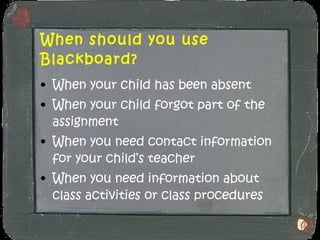
When should you use Blackboard? When your child has been absent When your child forgot part of the assignment When you need contact information for your child’s teacher When you need information about class activities or class procedures
Login today and stay connected!

Get connected! bb parent show

  • 1.
    Get Connected! StayInformed with Blackboard for Maize Middle School
  • 2.
    What is Blackboard?Blackboard is a web-based program that allows students to review information from their teachers about assignments, upcoming events, classroom rules and procedures, and much more. Parents can also stay informed by logging in using their child’s login.
  • 3.
    How do Iget to Blackboard? Simply go to our district website: www.usd266.com
  • 4.
    Click Online Resources/2005Summer School link.
  • 5.
  • 6.
  • 7.
    Use your child’slogin information to login. User name: 9-digit student i.d. number found on their lunch card Password: maizestudent (no space)
  • 8.
    Your child’s name.All the courses your child has access to. Click on a Teacher’s name to enter the course.
  • 9.
    The course opensto the Announcements Area . Look for new announcements each time you login. Click one of the buttons to move to another area. Click the Course Information button to see classroom rules, procedures, etc. Click the Staff Information button to see contact information. Click the Assignments button to see what the class has been working on.
  • 10.
    Note: Assignments aresubject to change!
  • 11.
    When should youuse Blackboard? When your child has been absent When your child forgot part of the assignment When you need contact information for your child’s teacher When you need information about class activities or class procedures
  • 12.
    Login today andstay connected!