GEOGEBRA
Dynamic Mathematical Software
R.A.Hemaa Nandini,
II M.Sc Mathematics,
P.G. Department of Mathematics,
Vellalar College for Women,
Erode.
Overview
 ABSTRACT
 INTRODUCTION
 HISTORY OF GEOGEBRA
2002 – 2007
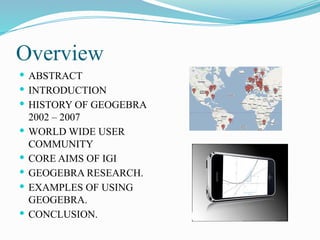
 WORLD WIDE USER
COMMUNITY
 CORE AIMS OF IGI
 GEOGEBRA RESEARCH.
 EXAMPLES OF USING
GEOGEBRA.
 CONCLUSION.
Abstract
This paper shows GeoGebra software is
helpful in teaching mathematics. GeoGebra is an
interactive geometry, algebra, statistics and
calculus application, intended for learning and
teaching mathematics and science from primary
school to university level. It can be used for lively
and problem oriented teaching and encourage
mathematical experiments and discoveries both in
classroom and at home. In this work we show the
history, development and uses of Geogebra.
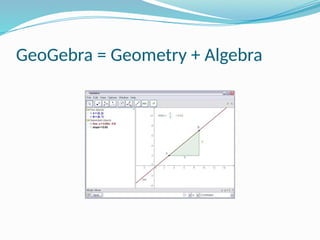
GeoGebra = Geometry + Algebra
INTRODUCTION
 The software GeoGebra was created by Markus Hohenwarter
at the university of Salzburg in 2002. It was designed to
combine features of interactive geometry software. GeoGebra is
dynamic mathematics software for schools that joins geometry,
algebra and calculus. It was used to construct vectors, segments,
lines, polygons and conic sections as well as functions. The
equations and coordinates can be entered directly. Thus,
GeoGebra has the ability to deal with variables for numbers,
vectors and points. It finds derivatives and integrals of functions
and offers commands like root and vertex.
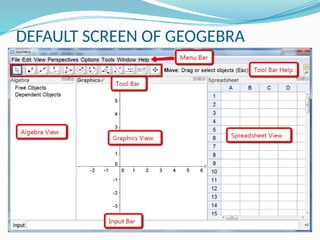
DEFAULT SCREEN OF GEOGEBRA
 The image above shows the default screen of
GeoGebra software. By default, the Algebra View and
Graphics View are displayed in the GeoGebra window.
 The Toolbar consists of a series of toolboxes
containing a collection of related tools. These tools are used
to create graphs in the Graphics View. At the same time the
corresponding coordinates and equations are displayed in the
Algebra View. Each View has its own Toolbar and therefore,
it gives access to a different set of tools.
 The Input Bar at the bottom of the GeoGebra window is
used to directly enter coordinates, equations, commands,
or functions. After pressing the Enter key, the algebraic
representation of these objects is shown in the Algebra
View while their graphical representation is displayed in
the Graphics View.
 GeoGebra offers a 3D Graphics View, a CAS View
to use GeoGebra (Computer Algebra System) for
symbolic computations, a Spreadsheet View to work with
data and statistical concepts, as well as a Probability
Calculator to calculate and graph probability distributions.
All Views of GeoGebra are linked dynamically.
History of GeoGebra
2002 - 2007
 Mar 2002: Master’s thesis in Computer Science &
Mathematics Education
 !! Nov 2002: European Academic Software Award
 !! May 2005: GeoGebra Wiki.
 !! Feb 2006: PhD project in Mathematics
Education funded by Austrian Academy of
Sciences
 !! December 2007: International GeoGebra
Institute.
World Wide User Community
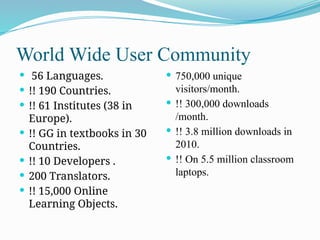
 56 Languages.
 !! 190 Countries.
 !! 61 Institutes (38 in
Europe).
 !! GG in textbooks in 30
Countries.
 !! 10 Developers .
 200 Translators.
 !! 15,000 Online
Learning Objects.
 750,000 unique
visitors/month.
 !! 300,000 downloads
/month.
 !! 3.8 million downloads in
2010.
 !! On 5.5 million classroom
laptops.
GeoGebra Research
 Important part in the aims IGI.
 !! Evidence for improvement.
 "!Software development.
 "!Training.
 "!Teaching and learning.
 !! Theoretical basis.
Core Aims of International
Geogebra Institute
 !!Teacher training .
 "!Offer workshops.
 !! Material and software
development
 "!Share free materials
 !! Research
 "!Encourage and
coordinate collaborative
research.
• !! Involve more teachers in
the community.
 !! Schools experimenting
with the use of GeoGebra.
 !! Be able to offer more
support.
 !! Sponsors can donate to
schools.
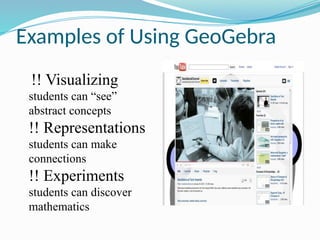
Examples of Using GeoGebra
!! Visualizing
students can “see”
abstract concepts
!! Representations
students can make
connections
!! Experiments
students can discover
mathematics
CONCLUSION
 The benefits of introduction dynamic mathematics
software GeoGebra into teaching and learning process.
We conclude that all students, from any level of
mathematical knowledge can be encour­
aged to study
mathematics by using this applica­
tion. Current trends in
the teaching of science call for the use of visualization
techniques, and GeoGebra fits perfectly this trend. The use
of this software tools allows students to discover a wider
range of function types, and provides students to make the
connections between symbolic and visual representations.
GeoGebra
http://geogebra.org
THANK YOU!

GEOGEBRA DYNAMIC MATHEMATICAL SOFTWARE ALL

  • 1.
    GEOGEBRA Dynamic Mathematical Software R.A.HemaaNandini, II M.Sc Mathematics, P.G. Department of Mathematics, Vellalar College for Women, Erode.
  • 2.
    Overview  ABSTRACT  INTRODUCTION HISTORY OF GEOGEBRA 2002 – 2007  WORLD WIDE USER COMMUNITY  CORE AIMS OF IGI  GEOGEBRA RESEARCH.  EXAMPLES OF USING GEOGEBRA.  CONCLUSION.
  • 3.
    Abstract This paper showsGeoGebra software is helpful in teaching mathematics. GeoGebra is an interactive geometry, algebra, statistics and calculus application, intended for learning and teaching mathematics and science from primary school to university level. It can be used for lively and problem oriented teaching and encourage mathematical experiments and discoveries both in classroom and at home. In this work we show the history, development and uses of Geogebra.
  • 4.
  • 5.
    INTRODUCTION  The softwareGeoGebra was created by Markus Hohenwarter at the university of Salzburg in 2002. It was designed to combine features of interactive geometry software. GeoGebra is dynamic mathematics software for schools that joins geometry, algebra and calculus. It was used to construct vectors, segments, lines, polygons and conic sections as well as functions. The equations and coordinates can be entered directly. Thus, GeoGebra has the ability to deal with variables for numbers, vectors and points. It finds derivatives and integrals of functions and offers commands like root and vertex.
  • 6.
  • 7.
     The imageabove shows the default screen of GeoGebra software. By default, the Algebra View and Graphics View are displayed in the GeoGebra window.  The Toolbar consists of a series of toolboxes containing a collection of related tools. These tools are used to create graphs in the Graphics View. At the same time the corresponding coordinates and equations are displayed in the Algebra View. Each View has its own Toolbar and therefore, it gives access to a different set of tools.
  • 8.
     The InputBar at the bottom of the GeoGebra window is used to directly enter coordinates, equations, commands, or functions. After pressing the Enter key, the algebraic representation of these objects is shown in the Algebra View while their graphical representation is displayed in the Graphics View.  GeoGebra offers a 3D Graphics View, a CAS View to use GeoGebra (Computer Algebra System) for symbolic computations, a Spreadsheet View to work with data and statistical concepts, as well as a Probability Calculator to calculate and graph probability distributions. All Views of GeoGebra are linked dynamically.
  • 9.
    History of GeoGebra 2002- 2007  Mar 2002: Master’s thesis in Computer Science & Mathematics Education  !! Nov 2002: European Academic Software Award  !! May 2005: GeoGebra Wiki.  !! Feb 2006: PhD project in Mathematics Education funded by Austrian Academy of Sciences  !! December 2007: International GeoGebra Institute.
  • 10.
    World Wide UserCommunity  56 Languages.  !! 190 Countries.  !! 61 Institutes (38 in Europe).  !! GG in textbooks in 30 Countries.  !! 10 Developers .  200 Translators.  !! 15,000 Online Learning Objects.  750,000 unique visitors/month.  !! 300,000 downloads /month.  !! 3.8 million downloads in 2010.  !! On 5.5 million classroom laptops.
  • 11.
    GeoGebra Research  Importantpart in the aims IGI.  !! Evidence for improvement.  "!Software development.  "!Training.  "!Teaching and learning.  !! Theoretical basis.
  • 12.
    Core Aims ofInternational Geogebra Institute  !!Teacher training .  "!Offer workshops.  !! Material and software development  "!Share free materials  !! Research  "!Encourage and coordinate collaborative research. • !! Involve more teachers in the community.  !! Schools experimenting with the use of GeoGebra.  !! Be able to offer more support.  !! Sponsors can donate to schools.
  • 13.
    Examples of UsingGeoGebra !! Visualizing students can “see” abstract concepts !! Representations students can make connections !! Experiments students can discover mathematics
  • 14.
    CONCLUSION  The benefitsof introduction dynamic mathematics software GeoGebra into teaching and learning process. We conclude that all students, from any level of mathematical knowledge can be encour­ aged to study mathematics by using this applica­ tion. Current trends in the teaching of science call for the use of visualization techniques, and GeoGebra fits perfectly this trend. The use of this software tools allows students to discover a wider range of function types, and provides students to make the connections between symbolic and visual representations.
  • 15.