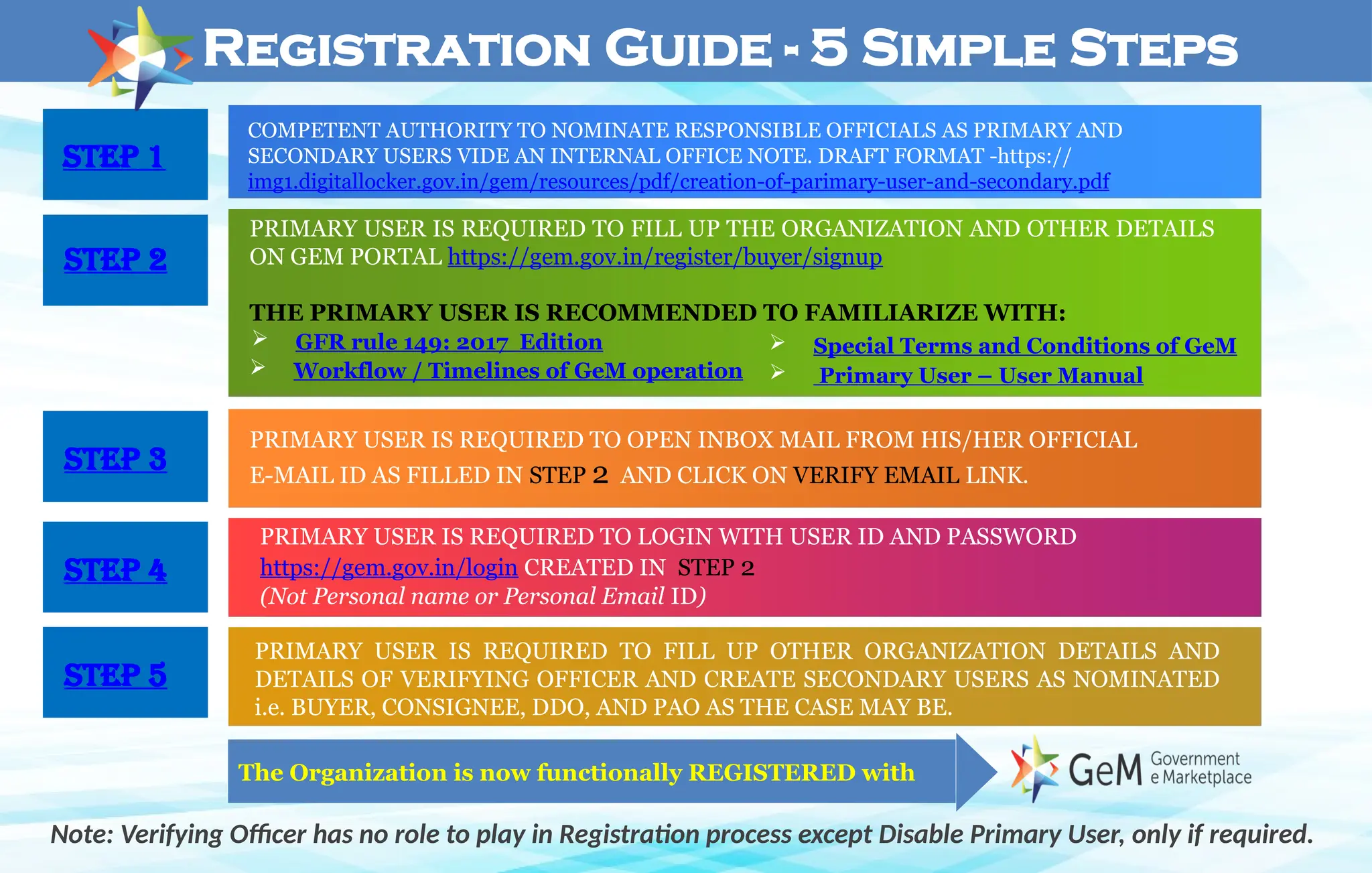
Registration Guide - 5 Simple Steps
Note: Verifying Officer has no role to play in Registration process except Disable Primary User, only if required.
PRIMARY USER IS REQUIRED TO FILL UP THE ORGANIZATION AND OTHER DETAILS
ON GEM PORTAL https://gem.gov.in/register/buyer/signup
THE PRIMARY USER IS RECOMMENDED TO FAMILIARIZE WITH:
 Workflow / Timelines of GeM operation
 Special Terms and Conditions of GeM
 Primary User – User Manual
PRIMARY USER IS REQUIRED TO OPEN INBOX MAIL FROM HIS/HER OFFICIAL
E-MAIL ID AS FILLED IN STEP 2 AND CLICK ON VERIFY EMAIL LINK.
PRIMARY USER IS REQUIRED TO LOGIN WITH USER ID AND PASSWORD
https://gem.gov.in/login CREATED IN STEP 2
(Not Personal name or Personal Email ID)
PRIMARY USER IS REQUIRED TO FILL UP OTHER ORGANIZATION DETAILS AND
DETAILS OF VERIFYING OFFICER AND CREATE SECONDARY USERS AS NOMINATED
i.e. BUYER, CONSIGNEE, DDO, AND PAO AS THE CASE MAY BE.
The Organization is now functionally REGISTERED with
 GFR rule 149: 2017 Edition
Step 1
Step 2
Step 3
Step 4
Step 5
Step 3
Step 4
Step 5
Step 2
COMPETENT AUTHORITY TO NOMINATE RESPONSIBLE OFFICIALS AS PRIMARY AND
SECONDARY USERS VIDE AN INTERNAL OFFICE NOTE. DRAFT FORMAT -https://
img1.digitallocker.gov.in/gem/resources/pdf/creation-of-parimary-user-and-secondary.pdf
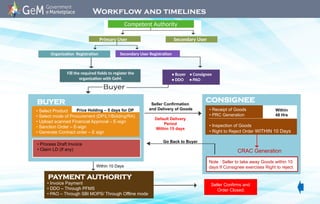
Competent Authority
Workflow and timelines
Primary User Secondary User
Organization Registration Secondary User Registration
Fill the required fields to register the
organization with GeM.
• Buyer • Consignee
• DDO • PAO
• Select Product
• Select mode of Procurement (DP/L1/Bidding/RA)
• Upload scanned Financial Approval – E-sign
• Sanction Order – E-sign
• Generate Contract order – E sign
CRAC Generation
Go Back to Buyer
Seller Confirmation
and Delivery of Goods
Default Delivery
Period
Within 15 days
Within 10 Days
• Process Draft Invoice
• Claim LD (If any)
• Invoice Payment
• DDO – Through PFMS
• PAO – Through SBI MOPS/ Through Offline mode
Seller Confirms and
Order Closed.
• Receipt of Goods
• PRC Generation
• Inspection of Goods
• Right to Reject Order WITHIN 10 Days
CONSIGNEE
BUYER
PAYMENT AUTHORITY
Note : Seller to take away Goods within 10
days If Consignee exercises Right to reject.
Price Holding – 5 days for DP Within
48 Hrs
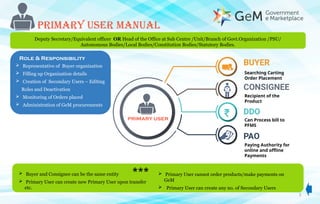
PRIMARY USER MANUAL
Searching Carting
Order Placement
Recipient of the
Product
Can Process bill to
PFMS
Paying Authority for
online and offline
Payments
 Representative of Buyer organization
 Filling up Organization details
 Creation of Secondary Users – Editing
Roles and Deactivation
 Monitoring of Orders placed
 Administration of GeM procurements
Role & Responsibility
3
 Buyer and Consignee can be the same entity
 Primary User can create new Primary User upon transfer
etc.
 Primary User cannot order products/make payments on
GeM
 Primary User can create any no. of Secondary Users
PRIMARY USER
***
Deputy Secretary/Equivalent officer OR Head of the Office at Sub Centre /Unit/Branch of Govt.Organization /PSU/
Autonomous Bodies/Local Bodies/Constitution Bodies/Statutory Bodies.
4
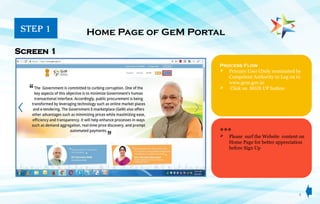
Process Flow
 Primary User (Duly nominated by
Competent Authority to Log on to
www.gem.gov.in
 Click on SIGN UP button
Home Page of GeM Portal
Screen 1
***
 Please surf the Website content on
Home Page for better appreciation
before Sign Up
STEP 1
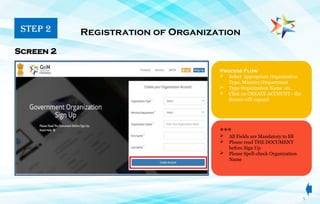
Process Flow
 Select appropriate Organization
Type, Ministry/Department
 Type Organization Name etc.
 Click on CREATE ACCOUNT - the
Screen will expand
Registration of Organization
Screen 2
 All Fields are Mandatory to fill
 Please read THE DOCUMENT
before Sign Up
 Please Spell-check Organization
Name
STEP 2
5
***
6
Process Flow
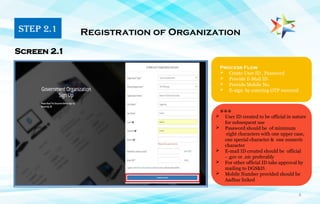
 Create User ID , Password
 Provide E-Mail ID
 Provide Mobile No.
 E-sign by entering OTP received
Registration of Organization
Screen 2.1
***
 User ID created to be official in nature
for subsequent use
 Password should be of minimum
eight characters with one upper case,
one special character & one numeric
character
 E-mail ID created should be official
- .gov or .nic preferably
 For other official ID take approval by
mailing to DGS&D.
 Mobile Number provided should be
Aadhar linked
STEP 2.1
7
Process Flow
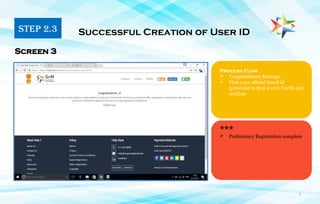
 Congratulatory Message
 Visit your official Email id
(provided in Step 2.1) to Verify and
confirm
Successful Creation of User ID
Screen 3
***
STEP 2.3
 Preliminary Registration complete
8
Process Flow
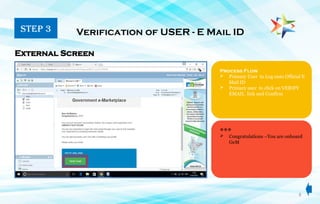
 Primary User to Log onto Official E
Mail ID
 Primary user to click on VERIFY
EMAIL link and Confirm
Verification of USER - E Mail ID
External Screen
***
STEP 3
 Congratulations –You are onboard
GeM
9
9
Process Flow
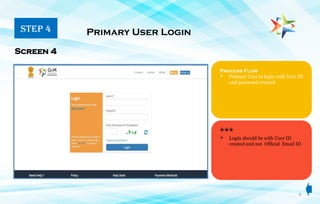
 Primary User to login with User ID
and password created
Primary User Login
Screen 4
***
 Login should be with User ID
created and not Official Email ID
STEP 4
10
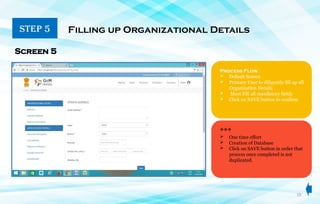
STEP 5 Filling up Organizational Details
Screen 5
Process Flow
 Default Screen
 Primary User to diligently fill up all
Organization Details
 Must Fill all mandatory fields
 Click on SAVE button to confirm
***
 One time effort
 Creation of Database
 Click on SAVE button in order that
process once completed is not
duplicated.
11
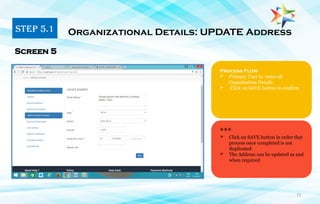
Process Flow
 Primary User to enter all
Organization Details
 Click on SAVE button to confirm
Organizational Details: UPDATE Address
Screen 5
***
 Click on SAVE button in order that
process once completed is not
duplicated.
 The Address can be updated as and
when required
STEP 5.1
12
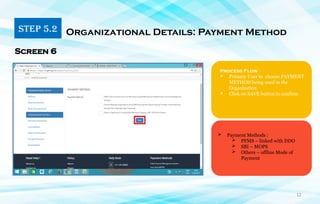
STEP 5.2 Organizational Details: Payment Method
Process Flow
 Primary User to choose PAYMENT
METHOD being used in the
Organization
 Click on SAVE button to confirm
 Payment Methods :
 PFMS – linked with DDO
 SBI – MOPS
 Others – offline Mode of
Payment
Screen 6
13
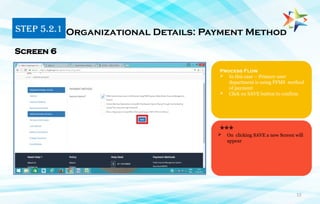
Process Flow
 In this case – Primary user
department is using PFMS method
of payment
 Click on SAVE button to confirm
Organizational Details: Payment Method
Screen 6
***
STEP 5.2.1
 On clicking SAVE a new Screen will
appear
14
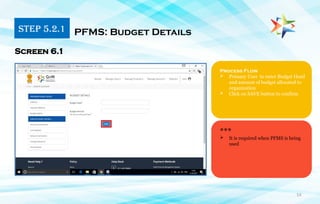
Process Flow
 Primary User to enter Budget Head
and amount of budget allocated to
organization
 Click on SAVE button to confirm
PFMS: Budget Details
Screen 6.1
***
 It is required when PFMS is being
used
STEP 5.2.1
15
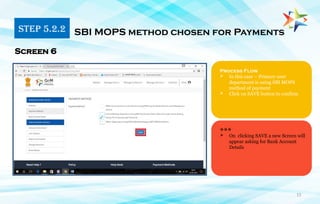
Process Flow
 In this case – Primary user
department is using SBI MOPS
method of payment
 Click on SAVE button to confirm
SBI MOPS method chosen for Payments
Screen 6
***
 On clicking SAVE a new Screen will
appear asking for Bank Account
Details
STEP 5.2.2
16
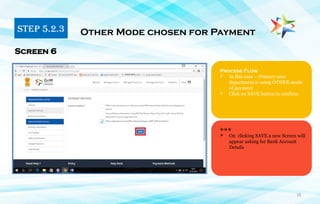
Process Flow
 In this case – Primary user
department is using OTHER mode
of payment
 Click on SAVE button to confirm
Other Mode chosen for Payment
Screen 6
***
 On clicking SAVE a new Screen will
appear asking for Bank Account
Details
STEP 5.2.3
17
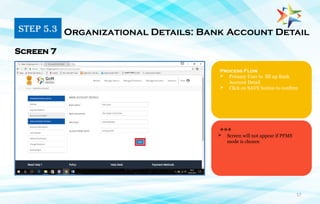
Process Flow
 Primary User to fill up Bank
Account Detail
 Click on SAVE button to confirm
Organizational Details: Bank Account Detail
Screen 7
***
STEP 5.3
 Screen will not appear if PFMS
mode is chosen
18
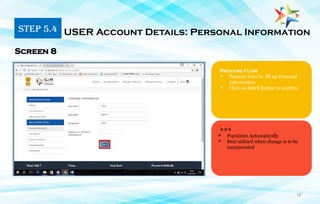
Process Flow
 Primary User to fill up Personal
Information
 Click on SAVE button to confirm
Screen 8
***
STEP 5.4 USER Account Details: Personal Information
 Populates Automatically
 Best utilized when change is to be
incorporated
19
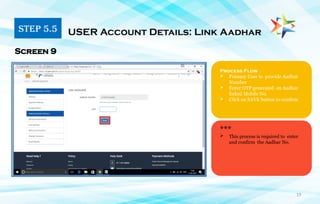
Process Flow
 Primary User to provide Aadhar
Number
 Enter OTP generated on Aadhar
linked Mobile No.
 Click on SAVE button to confirm
USER Account Details: Link Aadhar
Screen 9
***
 This process is required to enter
and confirm the Aadhar No.
STEP 5.5
20
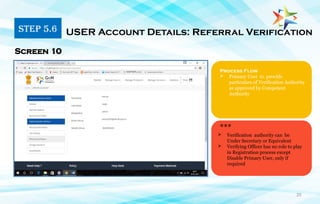
Process Flow
 Primary User to provide
particulars of Verification Authority
as approved by Competent
Authority
Screen 10
***
 Verification authority can be
Under Secretary or Equivalent
 Verifying Officer has no role to play
in Registration process except
Disable Primary User, only if
required
STEP 5.6 USER Account Details: Referral Verification
21
1. Primary user must have a phone number
Linked with Aadhar Card
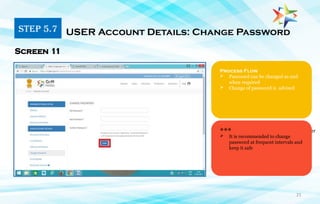
Process Flow
 Password can be changed as and
when required
 Change of password is advised
Screen 11
***
 It is recommended to change
password at frequent intervals and
keep it safe
STEP 5.7 USER Account Details: Change Password
22
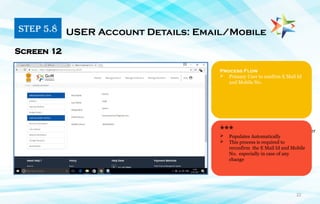
1. Primary user must have a phone number
Linked with Aadhar Card
Process Flow
 Primary User to confirm E Mail Id
and Mobile No.
Screen 12
***
 Populates Automatically
 This process is required to
reconfirm the E Mail Id and Mobile
No. especially in case of any
change
STEP 5.8 USER Account Details: Email/Mobile
23
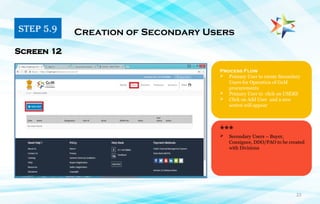
Process Flow
 Primary User to create Secondary
Users for Operation of GeM
procurements
 Primary User to click on USERS
 Click on Add User and a new
screen will appear
Screen 12
***
STEP 5.9 Creation of Secondary Users
 Secondary Users – Buyer,
Consignee, DDO/PAO to be created
with Divisions
24
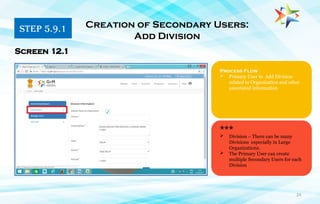
Process Flow
 Primary User to Add Division
related to Organization and other
associated information
Creation of Secondary Users:
Add Division
Screen 12.1
***
 Division – There can be many
Divisions especially in Large
Organizations.
 The Primary User can create
multiple Secondary Users for each
Division
STEP 5.9.1
25
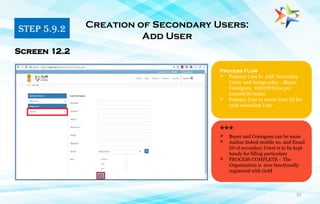
Process Flow
 Primary User to Add Secondary
Users and Assign roles - Buyer,
Consignee, DDO/PAO as per
created Divisions
 Primary User to create User ID for
each secondary User
Screen 12.2
***
 Buyer and Consignee can be same
 Aashar linked mobile no. and Email
ID of secondary Users is to be kept
handy for filling particulars
 PROCESS COMPLETE - The
Organization is now functionally
registered with GeM
STEP 5.9.2 Creation of Secondary Users:
Add User
26
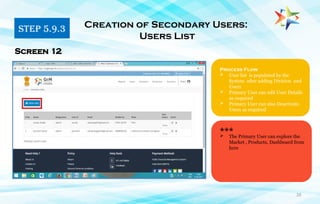
STEP 5.9.3 Creation of Secondary Users:
Users List
***
 The Primary User can explore the
Market , Products, Dashboard from
here
Screen 12
Process Flow
 User list is populated by the
System after adding Division and
Users
 Primary User can edit User Details
as required
 Primary User can also Deactivate
Users as required
27
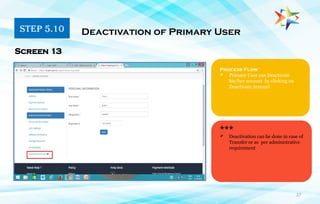
STEP 5.10 Deactivation of Primary User
***
Screen 13
Process Flow
 Primary User can Deactivate
his/her account by clicking on
Deactivate Account
 Deactivation can be done in case of
Transfer or as per administrative
requirement
28
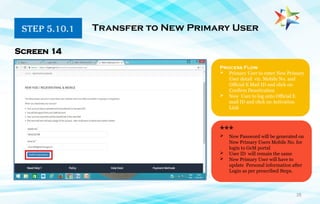
STEP 5.10.1 Transfer to New Primary User
***
Screen 14
Process Flow
 Primary User to enter New Primary
User detail viz. Mobile No. and
Official E Mail ID and click on
Confirm Deactivation
 New User to log onto Official E
mail ID and click on Activation
Link
 New Password will be generated on
New Primary Users Mobile No. for
login to GeM portal
 User ID will remain the same
 New Primary User will have to
update Personal information after
Login as per prescribed Steps.
29
Welcome Onboard
The Buyer and other Secondary Users can now Login with User Id created by Primary User and make
Hassle Free Procurements on GeM
***
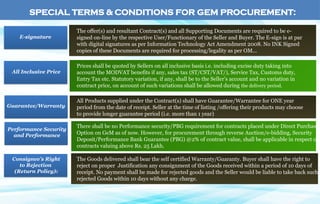
SPECIAL TERMS & CONDITIONS FOR GEM PROCUREMENT:
E-signature
All Inclusive Price
Guarantee/Warranty
Performance Security
and Performance
The offer(s) and resultant Contract(s) and all Supporting Documents are required to be e-
signed on-line by the respective User/Functionary of the Seller and Buyer. The E-sign is at par
with digital signatures as per Information Technology Act Amendment 2008. No INK Signed
copies of these Documents are required for processing/legality as per OM...
Prices shall be quoted by Sellers on all inclusive basis i.e. including excise duty taking into
account the MODVAT benefits if any, sales tax (ST/CST/VAT/), Service Tax, Customs duty,
Entry Tax etc. Statutory variation, if any, shall be to the Seller’s account and no variation in
contract price, on account of such variations shall be allowed during the delivery period.
All Products supplied under the Contract(s) shall have Guarantee/Warrantee for ONE year
period from the date of receipt. Seller at the time of listing /offering their products may choose
to provide longer guarantee period (i.e. more than 1 year)
There shall be no Performance security/PBG requirement for contracts placed under Direct Purchase
Option on GeM as of now. However, for procurement through reverse Auction/e-bidding, Security
Deposit/Performance Bank Guarantee (PBG) @2% of contract value, shall be applicable in respect of
contracts valuing above Rs. 25 Lakh.
The Goods delivered shall bear the self certified Warranty/Guaranty. Buyer shall have the right to
reject on proper Justification any consignment of the Goods received within a period of 10 days of
receipt. No payment shall be made for rejected goods and the Seller would be liable to take back such
rejected Goods within 10 days without any charge.
Consignee’s Right
to Rejection
(Return Policy):
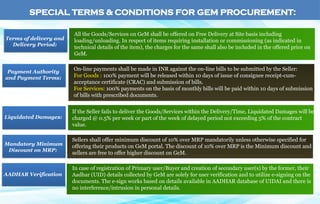
All the Goods/Services on GeM shall be offered on Free Delivery at Site basis including
loading/unloading. In respect of items requiring installation or commissioning (as indicated in
technical details of the item), the charges for the same shall also be included in the offered price on
GeM.
Terms of delivery and
Delivery Period:
On-line payments shall be made in INR against the on-line bills to be submitted by the Seller:
For Goods : 100% payment will be released within 10 days of issue of consignee receipt-cum-
acceptance certificate (CRAC) and submission of bills.
For Services: 100% payments on the basis of monthly bills will be paid within 10 days of submission
of bills with prescribed documents.
Payment Authority
and Payment Terms:
If the Seller fails to deliver the Goods/Services within the Delivery/Time, Liquidated Damages will be
charged @ 0.5% per week or part of the week of delayed period not exceeding 5% of the contract
value.
Liquidated Damages:
Sellers shall offer minimum discount of 10% over MRP mandatorily unless otherwise specified for
offering their products on GeM portal. The discount of 10% over MRP is the Minimum discount and
sellers are free to offer higher discount on GeM.
In case of registration of Primary user/Buyer and creation of secondary user(s) by the former, their
Aadhar (UID) details collected by GeM are solely for user verification and to utilize e-signing on the
documents. The e-sign works based on details available in AADHAR database of UIDAI and there is
no interference/intrusion in personal details.
AADHAR Verification
Mandatory Minimum
Discount on MRP:
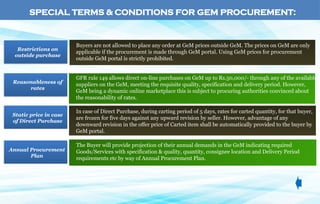
SPECIAL TERMS & CONDITIONS FOR GEM PROCUREMENT:
Buyers are not allowed to place any order at GeM prices outside GeM. The prices on GeM are only
applicable if the procurement is made through GeM portal. Using GeM prices for procurement
outside GeM portal is strictly prohibited.
Restrictions on
outside purchase
GFR rule 149 allows direct on-line purchases on GeM up to Rs.50,000/- through any of the available
suppliers on the GeM, meeting the requisite quality, specification and delivery period. However,
GeM being a dynamic online marketplace this is subject to procuring authorities convinced about
the reasonability of rates.
Reasonableness of
rates
In case of Direct Purchase, during carting period of 5 days, rates for carted quantity, for that buyer,
are frozen for five days against any upward revision by seller. However, advantage of any
downward revision in the offer price of Carted item shall be automatically provided to the buyer by
GeM portal.
Static price in case
of Direct Purchase
The Buyer will provide projection of their annual demands in the GeM indicating required
Goods/Services with specification & quality, quantity, consignee location and Delivery Period
requirements etc by way of Annual Procurement Plan.
Annual Procurement
Plan
SPECIAL TERMS & CONDITIONS FOR GEM PROCUREMENT:
Rule 149.
Government e-Market place (GeM). DGS&D or any other agency authorized by the
Government will host an online Government e-Marketplace (GeM) for common use
Goods and Services. DGS&D will ensure adequate publicity including periodic
advertisement of the items to be procured through GeM for the prospective suppliers.
The Procurement of Goods and Services by Ministries or Departments will be mandatory
for Goods or Services available on GeM. The credentials of suppliers on GeM shall be
certified by DGS&D. The procuring authorities will certify the reasonability of rates. The
GeM portal shall be utilized by the Government buyers for direct on-line purchases as
under :-
(i) Up to Rs.50,000/- through any of the available suppliers on the GeM, meeting the
requisite quality, specification and delivery period.
(ii) Above Rs.50,000/- and up to Rs.30,00,000/- through the GeM Seller having lowest
price amongst the available sellers, of at least three different manufacturers, on
GeM, meeting the requisite quality, specification and delivery period. The tools for
online bidding and online reverse auction available on GeM can be used by the
Buyer if decided by the competent authority.
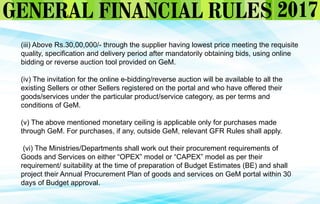
(iii) Above Rs.30,00,000/- through the supplier having lowest price meeting the requisite
quality, specification and delivery period after mandatorily obtaining bids, using online
bidding or reverse auction tool provided on GeM.
(iv) The invitation for the online e-bidding/reverse auction will be available to all the
existing Sellers or other Sellers registered on the portal and who have offered their
goods/services under the particular product/service category, as per terms and
conditions of GeM.
(v) The above mentioned monetary ceiling is applicable only for purchases made
through GeM. For purchases, if any, outside GeM, relevant GFR Rules shall apply.
(vi) The Ministries/Departments shall work out their procurement requirements of
Goods and Services on either “OPEX” model or “CAPEX” model as per their
requirement/ suitability at the time of preparation of Budget Estimates (BE) and shall
project their Annual Procurement Plan of goods and services on GeM portal within 30
days of Budget approval.
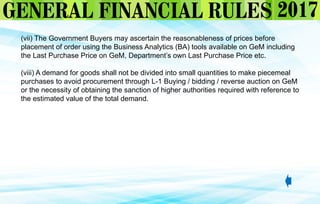
(vii) The Government Buyers may ascertain the reasonableness of prices before
placement of order using the Business Analytics (BA) tools available on GeM including
the Last Purchase Price on GeM, Department’s own Last Purchase Price etc.
(viii) A demand for goods shall not be divided into small quantities to make piecemeal
purchases to avoid procurement through L-1 Buying / bidding / reverse auction on GeM
or the necessity of obtaining the sanction of higher authorities required with reference to
the estimated value of the total demand.
Gem portal Registration online process.ppt

  • 1.
    Registration Guide -5 Simple Steps Note: Verifying Officer has no role to play in Registration process except Disable Primary User, only if required. PRIMARY USER IS REQUIRED TO FILL UP THE ORGANIZATION AND OTHER DETAILS ON GEM PORTAL https://gem.gov.in/register/buyer/signup THE PRIMARY USER IS RECOMMENDED TO FAMILIARIZE WITH:  Workflow / Timelines of GeM operation  Special Terms and Conditions of GeM  Primary User – User Manual PRIMARY USER IS REQUIRED TO OPEN INBOX MAIL FROM HIS/HER OFFICIAL E-MAIL ID AS FILLED IN STEP 2 AND CLICK ON VERIFY EMAIL LINK. PRIMARY USER IS REQUIRED TO LOGIN WITH USER ID AND PASSWORD https://gem.gov.in/login CREATED IN STEP 2 (Not Personal name or Personal Email ID) PRIMARY USER IS REQUIRED TO FILL UP OTHER ORGANIZATION DETAILS AND DETAILS OF VERIFYING OFFICER AND CREATE SECONDARY USERS AS NOMINATED i.e. BUYER, CONSIGNEE, DDO, AND PAO AS THE CASE MAY BE. The Organization is now functionally REGISTERED with  GFR rule 149: 2017 Edition Step 1 Step 2 Step 3 Step 4 Step 5 Step 3 Step 4 Step 5 Step 2 COMPETENT AUTHORITY TO NOMINATE RESPONSIBLE OFFICIALS AS PRIMARY AND SECONDARY USERS VIDE AN INTERNAL OFFICE NOTE. DRAFT FORMAT -https:// img1.digitallocker.gov.in/gem/resources/pdf/creation-of-parimary-user-and-secondary.pdf
  • 2.
    Competent Authority Workflow andtimelines Primary User Secondary User Organization Registration Secondary User Registration Fill the required fields to register the organization with GeM. • Buyer • Consignee • DDO • PAO • Select Product • Select mode of Procurement (DP/L1/Bidding/RA) • Upload scanned Financial Approval – E-sign • Sanction Order – E-sign • Generate Contract order – E sign CRAC Generation Go Back to Buyer Seller Confirmation and Delivery of Goods Default Delivery Period Within 15 days Within 10 Days • Process Draft Invoice • Claim LD (If any) • Invoice Payment • DDO – Through PFMS • PAO – Through SBI MOPS/ Through Offline mode Seller Confirms and Order Closed. • Receipt of Goods • PRC Generation • Inspection of Goods • Right to Reject Order WITHIN 10 Days CONSIGNEE BUYER PAYMENT AUTHORITY Note : Seller to take away Goods within 10 days If Consignee exercises Right to reject. Price Holding – 5 days for DP Within 48 Hrs
  • 3.
    PRIMARY USER MANUAL SearchingCarting Order Placement Recipient of the Product Can Process bill to PFMS Paying Authority for online and offline Payments  Representative of Buyer organization  Filling up Organization details  Creation of Secondary Users – Editing Roles and Deactivation  Monitoring of Orders placed  Administration of GeM procurements Role & Responsibility 3  Buyer and Consignee can be the same entity  Primary User can create new Primary User upon transfer etc.  Primary User cannot order products/make payments on GeM  Primary User can create any no. of Secondary Users PRIMARY USER *** Deputy Secretary/Equivalent officer OR Head of the Office at Sub Centre /Unit/Branch of Govt.Organization /PSU/ Autonomous Bodies/Local Bodies/Constitution Bodies/Statutory Bodies.
  • 4.
    4 Process Flow  PrimaryUser (Duly nominated by Competent Authority to Log on to www.gem.gov.in  Click on SIGN UP button Home Page of GeM Portal Screen 1 ***  Please surf the Website content on Home Page for better appreciation before Sign Up STEP 1
  • 5.
    Process Flow  Selectappropriate Organization Type, Ministry/Department  Type Organization Name etc.  Click on CREATE ACCOUNT - the Screen will expand Registration of Organization Screen 2  All Fields are Mandatory to fill  Please read THE DOCUMENT before Sign Up  Please Spell-check Organization Name STEP 2 5 ***
  • 6.
    6 Process Flow  CreateUser ID , Password  Provide E-Mail ID  Provide Mobile No.  E-sign by entering OTP received Registration of Organization Screen 2.1 ***  User ID created to be official in nature for subsequent use  Password should be of minimum eight characters with one upper case, one special character & one numeric character  E-mail ID created should be official - .gov or .nic preferably  For other official ID take approval by mailing to DGS&D.  Mobile Number provided should be Aadhar linked STEP 2.1
  • 7.
    7 Process Flow  CongratulatoryMessage  Visit your official Email id (provided in Step 2.1) to Verify and confirm Successful Creation of User ID Screen 3 *** STEP 2.3  Preliminary Registration complete
  • 8.
    8 Process Flow  PrimaryUser to Log onto Official E Mail ID  Primary user to click on VERIFY EMAIL link and Confirm Verification of USER - E Mail ID External Screen *** STEP 3  Congratulations –You are onboard GeM
  • 9.
    9 9 Process Flow  PrimaryUser to login with User ID and password created Primary User Login Screen 4 ***  Login should be with User ID created and not Official Email ID STEP 4
  • 10.
    10 STEP 5 Fillingup Organizational Details Screen 5 Process Flow  Default Screen  Primary User to diligently fill up all Organization Details  Must Fill all mandatory fields  Click on SAVE button to confirm ***  One time effort  Creation of Database  Click on SAVE button in order that process once completed is not duplicated.
  • 11.
    11 Process Flow  PrimaryUser to enter all Organization Details  Click on SAVE button to confirm Organizational Details: UPDATE Address Screen 5 ***  Click on SAVE button in order that process once completed is not duplicated.  The Address can be updated as and when required STEP 5.1
  • 12.
    12 STEP 5.2 OrganizationalDetails: Payment Method Process Flow  Primary User to choose PAYMENT METHOD being used in the Organization  Click on SAVE button to confirm  Payment Methods :  PFMS – linked with DDO  SBI – MOPS  Others – offline Mode of Payment Screen 6
  • 13.
    13 Process Flow  Inthis case – Primary user department is using PFMS method of payment  Click on SAVE button to confirm Organizational Details: Payment Method Screen 6 *** STEP 5.2.1  On clicking SAVE a new Screen will appear
  • 14.
    14 Process Flow  PrimaryUser to enter Budget Head and amount of budget allocated to organization  Click on SAVE button to confirm PFMS: Budget Details Screen 6.1 ***  It is required when PFMS is being used STEP 5.2.1
  • 15.
    15 Process Flow  Inthis case – Primary user department is using SBI MOPS method of payment  Click on SAVE button to confirm SBI MOPS method chosen for Payments Screen 6 ***  On clicking SAVE a new Screen will appear asking for Bank Account Details STEP 5.2.2
  • 16.
    16 Process Flow  Inthis case – Primary user department is using OTHER mode of payment  Click on SAVE button to confirm Other Mode chosen for Payment Screen 6 ***  On clicking SAVE a new Screen will appear asking for Bank Account Details STEP 5.2.3
  • 17.
    17 Process Flow  PrimaryUser to fill up Bank Account Detail  Click on SAVE button to confirm Organizational Details: Bank Account Detail Screen 7 *** STEP 5.3  Screen will not appear if PFMS mode is chosen
  • 18.
    18 Process Flow  PrimaryUser to fill up Personal Information  Click on SAVE button to confirm Screen 8 *** STEP 5.4 USER Account Details: Personal Information  Populates Automatically  Best utilized when change is to be incorporated
  • 19.
    19 Process Flow  PrimaryUser to provide Aadhar Number  Enter OTP generated on Aadhar linked Mobile No.  Click on SAVE button to confirm USER Account Details: Link Aadhar Screen 9 ***  This process is required to enter and confirm the Aadhar No. STEP 5.5
  • 20.
    20 Process Flow  PrimaryUser to provide particulars of Verification Authority as approved by Competent Authority Screen 10 ***  Verification authority can be Under Secretary or Equivalent  Verifying Officer has no role to play in Registration process except Disable Primary User, only if required STEP 5.6 USER Account Details: Referral Verification
  • 21.
    21 1. Primary usermust have a phone number Linked with Aadhar Card Process Flow  Password can be changed as and when required  Change of password is advised Screen 11 ***  It is recommended to change password at frequent intervals and keep it safe STEP 5.7 USER Account Details: Change Password
  • 22.
    22 1. Primary usermust have a phone number Linked with Aadhar Card Process Flow  Primary User to confirm E Mail Id and Mobile No. Screen 12 ***  Populates Automatically  This process is required to reconfirm the E Mail Id and Mobile No. especially in case of any change STEP 5.8 USER Account Details: Email/Mobile
  • 23.
    23 Process Flow  PrimaryUser to create Secondary Users for Operation of GeM procurements  Primary User to click on USERS  Click on Add User and a new screen will appear Screen 12 *** STEP 5.9 Creation of Secondary Users  Secondary Users – Buyer, Consignee, DDO/PAO to be created with Divisions
  • 24.
    24 Process Flow  PrimaryUser to Add Division related to Organization and other associated information Creation of Secondary Users: Add Division Screen 12.1 ***  Division – There can be many Divisions especially in Large Organizations.  The Primary User can create multiple Secondary Users for each Division STEP 5.9.1
  • 25.
    25 Process Flow  PrimaryUser to Add Secondary Users and Assign roles - Buyer, Consignee, DDO/PAO as per created Divisions  Primary User to create User ID for each secondary User Screen 12.2 ***  Buyer and Consignee can be same  Aashar linked mobile no. and Email ID of secondary Users is to be kept handy for filling particulars  PROCESS COMPLETE - The Organization is now functionally registered with GeM STEP 5.9.2 Creation of Secondary Users: Add User
  • 26.
    26 STEP 5.9.3 Creationof Secondary Users: Users List ***  The Primary User can explore the Market , Products, Dashboard from here Screen 12 Process Flow  User list is populated by the System after adding Division and Users  Primary User can edit User Details as required  Primary User can also Deactivate Users as required
  • 27.
    27 STEP 5.10 Deactivationof Primary User *** Screen 13 Process Flow  Primary User can Deactivate his/her account by clicking on Deactivate Account  Deactivation can be done in case of Transfer or as per administrative requirement
  • 28.
    28 STEP 5.10.1 Transferto New Primary User *** Screen 14 Process Flow  Primary User to enter New Primary User detail viz. Mobile No. and Official E Mail ID and click on Confirm Deactivation  New User to log onto Official E mail ID and click on Activation Link  New Password will be generated on New Primary Users Mobile No. for login to GeM portal  User ID will remain the same  New Primary User will have to update Personal information after Login as per prescribed Steps.
  • 29.
    29 Welcome Onboard The Buyerand other Secondary Users can now Login with User Id created by Primary User and make Hassle Free Procurements on GeM ***
  • 30.
    SPECIAL TERMS &CONDITIONS FOR GEM PROCUREMENT: E-signature All Inclusive Price Guarantee/Warranty Performance Security and Performance The offer(s) and resultant Contract(s) and all Supporting Documents are required to be e- signed on-line by the respective User/Functionary of the Seller and Buyer. The E-sign is at par with digital signatures as per Information Technology Act Amendment 2008. No INK Signed copies of these Documents are required for processing/legality as per OM... Prices shall be quoted by Sellers on all inclusive basis i.e. including excise duty taking into account the MODVAT benefits if any, sales tax (ST/CST/VAT/), Service Tax, Customs duty, Entry Tax etc. Statutory variation, if any, shall be to the Seller’s account and no variation in contract price, on account of such variations shall be allowed during the delivery period. All Products supplied under the Contract(s) shall have Guarantee/Warrantee for ONE year period from the date of receipt. Seller at the time of listing /offering their products may choose to provide longer guarantee period (i.e. more than 1 year) There shall be no Performance security/PBG requirement for contracts placed under Direct Purchase Option on GeM as of now. However, for procurement through reverse Auction/e-bidding, Security Deposit/Performance Bank Guarantee (PBG) @2% of contract value, shall be applicable in respect of contracts valuing above Rs. 25 Lakh. The Goods delivered shall bear the self certified Warranty/Guaranty. Buyer shall have the right to reject on proper Justification any consignment of the Goods received within a period of 10 days of receipt. No payment shall be made for rejected goods and the Seller would be liable to take back such rejected Goods within 10 days without any charge. Consignee’s Right to Rejection (Return Policy):
  • 31.
    All the Goods/Serviceson GeM shall be offered on Free Delivery at Site basis including loading/unloading. In respect of items requiring installation or commissioning (as indicated in technical details of the item), the charges for the same shall also be included in the offered price on GeM. Terms of delivery and Delivery Period: On-line payments shall be made in INR against the on-line bills to be submitted by the Seller: For Goods : 100% payment will be released within 10 days of issue of consignee receipt-cum- acceptance certificate (CRAC) and submission of bills. For Services: 100% payments on the basis of monthly bills will be paid within 10 days of submission of bills with prescribed documents. Payment Authority and Payment Terms: If the Seller fails to deliver the Goods/Services within the Delivery/Time, Liquidated Damages will be charged @ 0.5% per week or part of the week of delayed period not exceeding 5% of the contract value. Liquidated Damages: Sellers shall offer minimum discount of 10% over MRP mandatorily unless otherwise specified for offering their products on GeM portal. The discount of 10% over MRP is the Minimum discount and sellers are free to offer higher discount on GeM. In case of registration of Primary user/Buyer and creation of secondary user(s) by the former, their Aadhar (UID) details collected by GeM are solely for user verification and to utilize e-signing on the documents. The e-sign works based on details available in AADHAR database of UIDAI and there is no interference/intrusion in personal details. AADHAR Verification Mandatory Minimum Discount on MRP: SPECIAL TERMS & CONDITIONS FOR GEM PROCUREMENT:
  • 32.
    Buyers are notallowed to place any order at GeM prices outside GeM. The prices on GeM are only applicable if the procurement is made through GeM portal. Using GeM prices for procurement outside GeM portal is strictly prohibited. Restrictions on outside purchase GFR rule 149 allows direct on-line purchases on GeM up to Rs.50,000/- through any of the available suppliers on the GeM, meeting the requisite quality, specification and delivery period. However, GeM being a dynamic online marketplace this is subject to procuring authorities convinced about the reasonability of rates. Reasonableness of rates In case of Direct Purchase, during carting period of 5 days, rates for carted quantity, for that buyer, are frozen for five days against any upward revision by seller. However, advantage of any downward revision in the offer price of Carted item shall be automatically provided to the buyer by GeM portal. Static price in case of Direct Purchase The Buyer will provide projection of their annual demands in the GeM indicating required Goods/Services with specification & quality, quantity, consignee location and Delivery Period requirements etc by way of Annual Procurement Plan. Annual Procurement Plan SPECIAL TERMS & CONDITIONS FOR GEM PROCUREMENT:
  • 33.
    Rule 149. Government e-Marketplace (GeM). DGS&D or any other agency authorized by the Government will host an online Government e-Marketplace (GeM) for common use Goods and Services. DGS&D will ensure adequate publicity including periodic advertisement of the items to be procured through GeM for the prospective suppliers. The Procurement of Goods and Services by Ministries or Departments will be mandatory for Goods or Services available on GeM. The credentials of suppliers on GeM shall be certified by DGS&D. The procuring authorities will certify the reasonability of rates. The GeM portal shall be utilized by the Government buyers for direct on-line purchases as under :- (i) Up to Rs.50,000/- through any of the available suppliers on the GeM, meeting the requisite quality, specification and delivery period. (ii) Above Rs.50,000/- and up to Rs.30,00,000/- through the GeM Seller having lowest price amongst the available sellers, of at least three different manufacturers, on GeM, meeting the requisite quality, specification and delivery period. The tools for online bidding and online reverse auction available on GeM can be used by the Buyer if decided by the competent authority.
  • 34.
    (iii) Above Rs.30,00,000/-through the supplier having lowest price meeting the requisite quality, specification and delivery period after mandatorily obtaining bids, using online bidding or reverse auction tool provided on GeM. (iv) The invitation for the online e-bidding/reverse auction will be available to all the existing Sellers or other Sellers registered on the portal and who have offered their goods/services under the particular product/service category, as per terms and conditions of GeM. (v) The above mentioned monetary ceiling is applicable only for purchases made through GeM. For purchases, if any, outside GeM, relevant GFR Rules shall apply. (vi) The Ministries/Departments shall work out their procurement requirements of Goods and Services on either “OPEX” model or “CAPEX” model as per their requirement/ suitability at the time of preparation of Budget Estimates (BE) and shall project their Annual Procurement Plan of goods and services on GeM portal within 30 days of Budget approval.
  • 35.
    (vii) The GovernmentBuyers may ascertain the reasonableness of prices before placement of order using the Business Analytics (BA) tools available on GeM including the Last Purchase Price on GeM, Department’s own Last Purchase Price etc. (viii) A demand for goods shall not be divided into small quantities to make piecemeal purchases to avoid procurement through L-1 Buying / bidding / reverse auction on GeM or the necessity of obtaining the sanction of higher authorities required with reference to the estimated value of the total demand.